Chrome Zero-Day CVE-2026–125350: Update and Check
A use-after-free vulnerability in Chrome's XML component could allow a remote attacker to execute code inside the browser sandbox by tricking a user into visiting a crafted web page. Google has confirmed that an exploit exists in the wild.

medium.com
Published on medium.com
Security
The full write-up lives on its author's site
It belongs to its author, so we link to it rather than copy it. The other two tabs are our own rewrites, checked against it.
Context
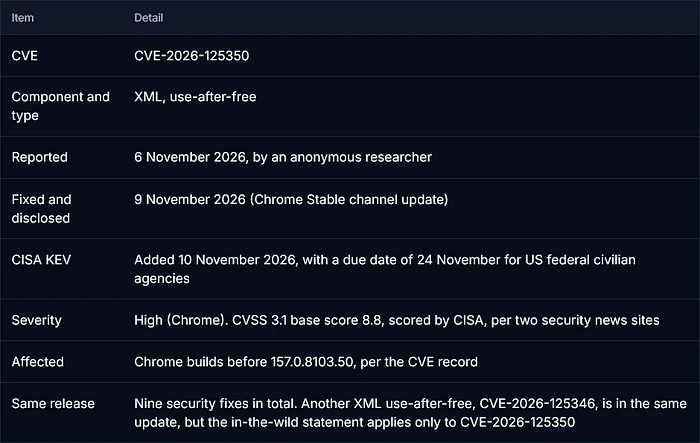
On 9 November 2026 Google shipped a fix for a Chrome vulnerability that was already being exploited in the wild, tracked as CVE-2026-125350. It is a use-after-free (CWE-416) in Chrome's XML component, rated High by Chrome. The practical consequence is blunt: if your browser is older than the fixed build, a web page can be enough to trigger it.
The headline framing, "execute malicious code remotely", is accurate but easy to over-read. What follows separates what has been confirmed from what has not, lists the fixed builds, and shows how to check every Chromium-based browser in a team's estate, including the ones that do not look like browsers.
Setup
No account, credentials or prior access is needed on the attacker side: the trigger is a crafted web page reached through a link, an ad, a compromised site or an embedded frame. On the defender side the relevant facts are the fixed builds:
| Channel | Fixed build |
|---|---|
| Stable, Linux | 157.0.8103.50 |
| Stable, Windows and macOS | 157.0.8103.50 / 157.0.8103.51 |
| Extended Stable | 156.0.8078.96 |
Google states it is aware that an exploit for this CVE exists in the wild. It has not disclosed who is using it or how widely.
Finding it
The starting point is the gap between the advisory language and the headlines. The CISA catalogue entry, as quoted by one write-up, describes a remote attacker running code inside the sandbox through a crafted web page. Chrome's sandbox is a separate layer that limits what a compromised renderer can do to the rest of the machine. A sandbox escape or full device compromise has not been publicly confirmed for this bug.
That distinction matters because real browser attacks are usually chains: one bug to get code running in the renderer, a second to break out. A bug exploited in the wild is often the first link of such a chain, and nobody has published what the second link was here. The missing information should be treated as unknown, not as a reason to wait.
A use-after-free happens when code keeps using memory after it has been released. If an attacker can control what gets placed in that freed memory, the program may end up reading or running attacker-chosen data. Browsers parse untrusted input constantly, in C++ where this class of mistake is possible, so they see a steady supply of such bugs. That is why Chrome security updates arrive so often, and why running an old build is the real risk, not any single CVE.
BleepingComputer's headline calls this the eighth Chrome zero-day exploited in attacks this year; that is quoted as reported, from the headline only.
Exploitation
Step 1: read the version from the browser
The fastest check is the browser itself: open chrome://version, or go to Help, then About Google Chrome, which also triggers the update download. Look for 157.0.8103.50 or newer.
Step 2: read the version from a terminal
google-chrome --version
"/Applications/Google Chrome.app/Contents/MacOS/Google Chrome" --version
# Windows (default install path)
(Get-Item "C:\Program Files\Google\Chrome\Application\chrome.exe").VersionInfo.ProductVersion
Step 3: compare against the fixed build in a script
For a fleet audit or a CI image check, a small helper accepts either the whole version string or just the number:
#!/usr/bin/env bash
CUR="$(echo "$1" | grep -oE '[0-9]+(\.[0-9]+){3}' | head -1)"
[ -z "$CUR" ] && { echo "no version found in: $1"; exit 2; }
ge() { [ "$(printf '%s\n%s\n' "$2" "$1" | sort -V | head -1)" = "$2" ]; }
MAJOR="${CUR%%.*}"
if [ "$MAJOR" -ge 157 ] && ge "$CUR" 157.0.8103.50; then echo "$CUR: has the fix"
elif [ "$MAJOR" -eq 156 ] && ge "$CUR" 156.0.8078.96; then echo "$CUR: has the fix (Extended Stable line)"
elif [ "$MAJOR" -gt 157 ]; then echo "$CUR: newer major, assume fixed"
else echo "$CUR: older than the fixed builds, update"; fi
An input with no version exits with status 2. The ge function compares two dotted versions using sort -V, which orders dotted numbers correctly, so 157.0.8103.9 is treated as older than 157.0.8103.50; a plain string comparison would get that wrong.
Running it:
$ ./chk.sh "Google Chrome 156.0.8078.96"
156.0.8078.96: has the fix (Extended Stable line)
$ ./chk.sh "157.0.8103.9"
157.0.8103.9: older than the fixed builds, update
$ ./chk.sh "153.0.8010.12"
153.0.8010.12: older than the fixed builds, update
The script was tested against those cases, including a version-less input.
Step 4: update and relaunch per platform
- Desktop Chrome (Windows, macOS): Help, About Google Chrome, then Relaunch. Chrome downloads updates in the background, but the fix takes effect only after a restart. A browser that has run for weeks with a pending update is still vulnerable.
- Linux: use the package manager. For Google's apt repository:
sudo apt update && sudo apt install --only-upgrade google-chrome-stable
Then restart the browser. Use the equivalent command for your distribution if you installed Chromium from a distro package, and check that its maintainers have shipped the fix. 3. Android: update through Google Play. One report lists the Android build as 157.0.8103.50, but the Android advisory does not list this CVE individually, so confirm the version on your own device. 4. Managed fleets: use your endpoint management tool to read installed versions, and consider Chrome's enterprise relaunch notification policies so users are not left on a pending update indefinitely. Check the current policy documentation for exact names and behaviour; those policies were not tested.
Step 5: cover the other Chromium consumers
The vulnerable code lives in Chromium, the open-source engine, so Edge, Brave, Opera, Vivaldi and others may be affected until they ship a build based on the fix. Each vendor patches on its own schedule. Two data points from the sources read:
- Microsoft's Edge release notes of 9 November said it was aware of exploits in the wild and was working on a fix, without naming the CVE, according to a secondary write-up. Check the Edge security notes for the current fixed build.
- No confirmed fixed version for Opera, Vivaldi or Brave was found in what was read. Look up each vendor's own advisory rather than assuming.
Chromium also runs where it does not look like a browser:
- Playwright, Puppeteer and Selenium test browsers. They download pinned Chromium builds. In the test environment, Playwright's bundled Chromium reported
153.0.8010.12, older than the fixed build, so by the CVE's affected range it does not contain this fix. Whether the exploit works against it was not tested. If CI browses untrusted pages (scraping, link checking, screenshot services), update the browser package and the cached browser downloads. - Electron apps. Each app bundles its own Chromium. Exposure depends on the Electron version and on whether the app loads untrusted content. Look at the vendor's release notes rather than your installed Chrome.
- Headless Chrome in containers. A Docker image built months ago keeps the browser version it was built with. Rebuild images that include Chrome or Chromium.
Step 6: reduce exposure while patching
Patching is the fix. Everything below only reduces exposure and none of it replaces updating:
- Close long-running browser sessions and restart the browser, so a downloaded update is actually applied.
- Avoid opening untrusted links from email and chat on unpatched machines.
- Keep browser isolation features and the sandbox enabled. Do not launch Chrome with
--no-sandboxoutside a throwaway container, and if CI needs it, keep that CI away from untrusted pages. - Restrict unapproved extensions, and use DNS or web-gateway filtering if the organisation has them.
- Watch endpoint telemetry for unusual browser child processes, repeated browser crashes and odd outbound connections.
Root cause
A use-after-free in Chrome's XML component: code continues to use memory after it has been released, and if an attacker can control what lands in that freed memory, the program may read or execute attacker-chosen data. The reason the bug is reachable at all is that browsers parse untrusted input continuously in C++, where this class of mistake is possible; the sandbox is the layer that limits what a compromised renderer can then do, and no sandbox escape has been publicly confirmed for this bug.
Impact
An attacker who gets a victim to visit a crafted page can run code inside the renderer sandbox. No account, credentials or prior access are required: a link, an ad, a compromised site or an embedded frame is enough. A sandbox escape or full device compromise has not been publicly confirmed, and the second link of any real-world chain has not been published. Google and CISA have not said who is using the exploit or against whom, so low profile is not a reason to assume you are not a target.
Fix
Google patched the bug; the fix shipped on 9 November 2026 in Stable 157.0.8103.50 (Linux) and 157.0.8103.50/.51 (Windows, macOS), and in Extended Stable 156.0.8078.96. The fix does not apply until the browser is restarted. For Chromium derivatives, each vendor must ship its own build based on the fix; check each vendor's advisory. The CISA deadline of 24 November applies to US federal civilian agencies; for everyone else it is a useful priority signal, not a mandate.
Common mistakes worth naming:
- Updating without relaunching.
- Checking only Chrome and forgetting Edge, Brave, Electron apps and CI browsers.
- Assuming a sandboxed bug is harmless, or assuming it means total compromise. Neither is established.
- Waiting for details of the exploit before patching.
- Reading the CISA deadline as applying to everyone.
Variants to test
- Other Chromium derivatives. Run the version check against Edge, Brave, Opera and Vivaldi builds. A positive result is a build at or above the vendor's fixed version, confirmed in that vendor's own advisory rather than inferred from the Chrome number.
- CI browser caches. Enumerate the Chromium binaries downloaded by Playwright, Puppeteer and Selenium in your pipelines. A positive result is every cached build reporting at least
157.0.8103.50(or156.0.8078.96on the Extended Stable line), or a documented decision that the pipeline never touches untrusted pages. - Container images. Inspect images that bundle Chrome or Chromium. A positive result is a rebuilt image whose browser passes the same comparison.
- Electron applications. Check the bundled Chromium version against the vendor's release notes. A positive result is a version the vendor lists as containing the fix, or an app that demonstrably never loads untrusted content.
- Relaunch state on managed endpoints. Read installed versions through endpoint management and check whether pending updates have actually been applied. A positive result is installed versions at or above the fixed builds on machines that have been restarted since the update landed.
There are no public indicators of compromise that could be found, and Google has not published attacker details. The practical response is to patch and review endpoint telemetry for unusual browser behaviour.
What happened, in plain words
On 9 November 2026, Google released a fix for a security hole in its Chrome browser. The hole is tracked as CVE-2026-125350. A CVE is a public catalogue number: when a security flaw is found, it gets an ID so that everyone, everywhere, can talk about the same thing without confusion. Think of it like a case number at a police station.
Google says it is aware that someone has already built a working attack for this flaw and is using it in the real world. That is what "exploited in the wild" means: not a researcher in a lab, but actual attackers against actual people.
The flaw is a use-after-free in Chrome's XML component. Both of those terms are explained below, but the short version is: a part of the browser that reads a certain kind of data can be tricked into using memory it has already given back, and an attacker who arranges things carefully can make the browser run code of their choosing.
Chrome rates the severity as High. If your browser is older than the fixed version, simply opening a web page can be enough to trigger the attack. You do not need to install anything, log in anywhere, or click a button on a pop-up. A link, an advertisement, a hacked website or a frame embedded in another page is enough.
The headline you may have seen says "execute malicious code remotely". That is accurate, but it is easy to read more into it than has actually been confirmed. This article separates what is known from what is not, lists the versions that contain the fix, and shows how to check every browser built on Chromium that you or your team use, including the ones that do not look like browsers at all.
The short version
- The bug: CVE-2026-125350, a use-after-free (CWE-416) in Chrome's XML component, rated High by Chrome.
- Exploited: Google says it is aware that an exploit for this CVE exists in the wild.
- Fixed in: Stable 157.0.8103.50 (Linux) and 157.0.8103.50/.51 (Windows, macOS); Extended Stable 156.0.8078.96.
- What you should do: update, then relaunch the browser. The fix does not apply until the restart.
A few of those words need unpacking before they mean anything.
CWE-416 is a classification number. CWE is a dictionary of types of software weakness, the way a medical dictionary lists types of injury. CWE-416 is the entry for "use after free". It tells you the family the bug belongs to, not the specific line of code.
Stable and Extended Stable are two release tracks of Chrome. Stable is the normal browser that most people run, updated frequently. Extended Stable is a slower track, aimed at organisations that prefer fewer, larger updates; it gets security fixes but on a different version numbering. That is why the fixed version number for Extended Stable (156.0.8078.96) starts with 156 while Stable starts with 157.
A version number like 157.0.8103.50 is just four numbers separated by dots. The first number is the major version. When you compare two versions, you compare them number by number from the left, not as text. This matters later, and it is a common source of mistakes.
Relaunch means fully closing the browser and starting it again. This is not the same as closing a tab. Chrome downloads updates quietly in the background while you work, but the new code only takes over when the browser process restarts. A browser that has been open for weeks with an update waiting is still running the old, vulnerable code.
What is confirmed
What "remote code execution" means here
This is where the headlines get ahead of the evidence.
The CISA catalogue entry, as quoted by one write-up, describes a remote attacker running code inside the sandbox through a crafted web page. CISA is the US Cybersecurity and Infrastructure Security Agency; its catalogue is a list of flaws that US federal agencies are required to fix within a deadline. "Remote" here means the attacker does not need to be sitting at your computer: they reach you over the network, through a web page.
The sandbox is one of the most important ideas in browser security, so it is worth a moment. Modern browsers do not run a web page's code with full access to your computer. Instead, the part of the browser that handles the page, called the renderer, runs inside a sealed box. The renderer can draw the page and run its scripts, but it cannot freely read your files, install programs or change system settings. If the renderer is compromised, the attacker is stuck inside that box.
A useful comparison is a ship with watertight compartments. If one compartment floods, the ship does not sink, because the water cannot spread. The sandbox is that compartment wall. A sandbox escape is the attacker finding a way through the wall.
For this bug, code execution inside the sandbox is the confirmed description. A sandbox escape, or full compromise of the device, has not been publicly confirmed.
That distinction matters because real attacks on browsers are usually chains: one bug to get code running inside the renderer, and a second, separate bug to break out of the sandbox. A flaw that is being exploited in the wild is often the first link of such a chain. Nobody has published what the second link was here. Treat the missing information as unknown, not as a reason to wait.
It also needs a person to visit a page. No account, no password, no prior access to your machine: just a link, an ad, a compromised site or an embedded frame. Google and CISA have not said who is using the exploit or against whom, so do not assume you are not a target just because you are not a famous or important person.
Why a use-after-free bug is dangerous
A use-after-free happens when a program keeps using a piece of memory after it has handed that memory back.
Programs borrow memory from the operating system while they run, and give it back when they are done with it. The comparison is a hotel: you check out of your room, the room becomes available, and the next guest gets it. If the hotel's records are wrong and staff still let the previous guest into the room after checkout, that guest can read the new occupant's belongings or leave things behind for them. A use-after-free is that bookkeeping mistake in software.
If an attacker can control what gets placed in that freed memory, the program may end up reading or running data the attacker chose. That is how a memory-management slip becomes a security hole.
Browsers parse untrusted input constantly. Every page you open is data written by someone else, and the browser has to make sense of it. Chrome is written in C++, a programming language that gives the programmer direct control over memory, and in which this class of mistake is possible. That is why Chrome security updates arrive so often, and why running an old build is the real risk, not any single CVE.
BleepingComputer's headline calls this the eighth Chrome zero-day exploited in attacks this year. That figure is quoted as reported, from the headline only.
Check your version in one minute
The fastest check is the browser itself. Open chrome://version, or go to Help, then About Google Chrome. The About page also triggers the update download, so visiting it does two jobs at once. Look for 157.0.8103.50 or newer.
chrome://version is an internal page built into Chrome. It is not a website on the internet; the browser produces it itself. Typing it in the address bar is like opening the settings panel on a device: it shows you information about the thing you are using.
Get Dev Talk's stories in your inbox
Join Medium for free to get updates from this writer.
Remember me for faster sign in
From a terminal
A terminal (also called a command line or console) is a text window where you type commands instead of clicking. It is useful here because it gives you the exact version string without any clicking around.
google-chrome --version
This line runs the Chrome program with a special option, --version, which tells it to print its version number and exit instead of opening a window. The -- prefix is how command-line options are written. On Linux, google-chrome is the name under which the browser is installed.
"/Applications/Google Chrome.app/Contents/MacOS/Google Chrome" --version
On macOS, programs are stored inside application bundles, which are folders that look like single files. The actual executable lives deep inside the bundle. The quotes are needed because the path contains spaces, and without quotes the terminal would treat each space as the end of one word and the start of another. This line runs that inner executable with the same --version option.
# Windows (default install path)
(Get-Item "C:\Program Files\Google\Chrome\Application\chrome.exe").VersionInfo.ProductVersion
It is there for the human reader.
Compare against the fixed build in a script
If you look after several machines, or build software automatically, checking by hand does not scale. A small script, which is a text file of commands the computer runs in order, can do the comparison for you. This one accepts either the whole version string or just the number.
#!/usr/bin/env bash
CUR="$(echo "$1" | grep -oE '[0-9]+(\.[0-9]+){3}' | head -1)"
[ -z "$CUR" ] && { echo "no version found in: $1"; exit 2; }
ge() { [ "$(printf '%s\n%s\n' "$2" "$1" | sort -V | head -1)" = "$2" ]; }
MAJOR="${CUR%%.*}"
if [ "$MAJOR" -ge 157 ] && ge "$CUR" 157.0.8103.50; then echo "$CUR: has the fix"
elif [ "$MAJOR" -eq 156 ] && ge "$CUR" 156.0.8078.96; then echo "$CUR: has the fix (Extended Stable line)"
elif [ "$MAJOR" -gt 157 ]; then echo "$CUR: newer major, assume fixed"
else echo "$CUR: older than the fixed builds, update"; fi
- In other words, a four-part dotted number such as
157.0.8103.50. The result is stored in the variableCUR(short for current). - If it is, the script prints a message and exits with status 2.
- This is the crucial trick: a plain text comparison would say that
157.0.8103.9is newer than157.0.8103.50, because the character9comes after5in text order. Version-aware sorting gets it right. - Otherwise, if the major version is exactly 156 and the version is at least
156.0.8078.96, it reports the Extended Stable line as fixed. Otherwise, if the major version is above 157, it assumes a newer release is fixed. In every other case it says the build is older than the fixed ones and should be updated.
Running it:
$ ./chk.sh "Google Chrome 156.0.8078.96"
156.0.8078.96: has the fix (Extended Stable line)
$ ./chk.sh "157.0.8103.9"
157.0.8103.9: older than the fixed builds, update
$ ./chk.sh "153.0.8010.12"
153.0.8010.12: older than the fixed builds, update
The script was tested against those cases, including a version-less input, which exits with an error.
Update and relaunch per platform
- Desktop Chrome (Windows, macOS): open Help, then About Google Chrome, then click Relaunch. Chrome downloads updates in the background, but the fix takes effect only after a restart. A browser that has run for weeks with a pending update is still vulnerable.
- Linux: use the package manager. A package manager is the tool that installs and updates software on a Linux system, keeping track of versions for you. For Google's apt repository, the command is:
sudo apt update && sudo apt install --only-upgrade google-chrome-stable
Then restart the browser. Use the equivalent command for your distribution if you installed Chromium from a distro package, and check that its maintainers have shipped the fix.
- Android: update through Google Play. One report lists the Android build as 157.0.8103.50, but the Android advisory does not list this CVE individually, so confirm the version on your own device.
- Managed fleets: a fleet is a set of computers an organisation looks after centrally. Use your endpoint management tool, the software that reads and controls those machines, to read installed versions. Consider Chrome's enterprise relaunch notification policies, which are settings that nudge users to restart, so people are not left on a pending update indefinitely. Check the current policy documentation for exact names and behaviour; those policies were not tested.
Cover the other Chromium consumers
The vulnerable code lives in Chromium, the open-source engine underneath Chrome. Think of Chromium as the engine and Chrome as one car built around it; other companies build their own cars around the same engine. Edge, Brave, Opera, Vivaldi and others may therefore be affected until they ship a build based on the fix. Each vendor patches on its own schedule. Two data points from the sources read:
- Microsoft's Edge release notes of 9 November said it was aware of exploits in the wild and was working on a fix, without naming the CVE, according to a secondary write-up. Check the Edge security notes for the current fixed build.
- No confirmed fixed version for Opera, Vivaldi or Brave was found in what was read. Look up each vendor's own advisory rather than assuming.
Chromium also runs where it does not look like a browser:
- Playwright, Puppeteer and Selenium test browsers. These are tools developers use to drive a browser automatically, for example to test a website or take screenshots. They download their own pinned Chromium builds, meaning a fixed version chosen when the tool was set up. In the test environment, Playwright's bundled Chromium reported
153.0.8010.12, older than the fixed build, so by the CVE's affected range it does not contain this fix. Whether the exploit works against it was not tested. If your CI (continuous integration, the automated system that builds and tests software on every change) browses untrusted pages, such as scraping, link checking or screenshot services, update the browser package and the cached browser downloads. - Electron apps. Electron is a framework for building desktop applications with web technology; each app bundles its own copy of Chromium. Exposure depends on the Electron version and on whether the app loads untrusted content. Look at the vendor's release notes rather than your installed Chrome.
- Headless Chrome in containers. Headless means a browser with no visible window, run by software rather than a person. A container is a packaged, self-contained environment, often built from a Docker image, a template that fixes the software versions inside it. A Docker image built months ago keeps the browser version it was built with. Rebuild images that include Chrome or Chromium.
Reduce exposure while patching
Patching is the fix. Everything below only reduces exposure and none of it replaces updating:
- Close long-running browser sessions and restart the browser, so a downloaded update is actually applied.
- Avoid opening untrusted links from email and chat on unpatched machines.
- Keep browser isolation features and the sandbox enabled. Do not launch Chrome with
--no-sandboxoutside a throwaway container. If CI needs it, keep that CI away from untrusted pages. - Restrict unapproved extensions. Use DNS or web-gateway filtering if the organisation has them.
- Watch endpoint telemetry for unusual browser child processes, repeated browser crashes and odd outbound connections.
Root cause
A use-after-free in Chrome's XML component: code continues to use memory after it has been released, and if an attacker can control what lands in that freed memory, the program may read or execute attacker-chosen data. The reason the bug is reachable at all is that browsers parse untrusted input continuously in C++, where this class of mistake is possible; the sandbox is the layer that limits what a compromised renderer can then do, and no sandbox escape has been publicly confirmed for this bug.
Impact
An attacker who gets a victim to visit a crafted page can run code inside the renderer sandbox. No account, credentials or prior access are required: a link, an ad, a compromised site or an embedded frame is enough. A sandbox escape or full device compromise has not been publicly confirmed, and the second link of any real-world chain has not been published. Google and CISA have not said who is using the exploit or against whom, so low profile is not a reason to assume you are not a target.
Fix
Google patched the bug; the fix shipped on 9 November 2026 in Stable 157.0.8103.50 (Linux) and 157.0.8103.50/.51 (Windows, macOS), and in Extended Stable 156.0.8078.96. The fix does not apply until the browser is restarted. For Chromium derivatives, each vendor must ship its own build based on the fix; check each vendor's advisory. The CISA deadline of 24 November applies to US federal civilian agencies; for everyone else it is a useful priority signal, not a mandate.
Common mistakes worth naming:
- Updating without relaunching.
- Checking only Chrome and forgetting Edge, Brave, Electron apps and CI browsers.
- Assuming a sandboxed bug is harmless, or assuming it means total compromise. Neither is established.
- Waiting for details of the exploit before patching.
- Reading the CISA deadline as applying to everyone.
Variants to test
- Other Chromium derivatives. Run the version check against Edge, Brave, Opera and Vivaldi builds. A positive result is a build at or above the vendor's fixed version, confirmed in that vendor's own advisory rather than inferred from the Chrome number.
- CI browser caches. Enumerate the Chromium binaries downloaded by Playwright, Puppeteer and Selenium in your pipelines. A positive result is every cached build reporting at least
157.0.8103.50(or156.0.8078.96on the Extended Stable line), or a documented decision that the pipeline never touches untrusted pages. - Container images. Inspect images that bundle Chrome or Chromium. A positive result is a rebuilt image whose browser passes the same comparison.
- Electron applications. Check the bundled Chromium version against the vendor's release notes. A positive result is a version the vendor lists as containing the fix, or an app that demonstrably never loads untrusted content.
- Relaunch state on managed endpoints. Read installed versions through endpoint management and check whether pending updates have actually been applied. A positive result is installed versions at or above the fixed builds on machines that have been restarted since the update landed.
There are no public indicators of compromise that could be found, and Google has not published attacker details. The practical response is to patch and review endpoint telemetry for unusual browser behaviour.
Frequently asked questions
Is CVE-2026-125350 being exploited right now?
Google says it is aware that an exploit exists in the wild. It has not disclosed who is using it or how widely.
I updated. Do I still need to do anything?
Yes: relaunch. Check chrome://version afterwards and confirm the number is at least 157.0.8103.50 (or 156.0.8078.96 on Extended Stable).
Does it affect Firefox or Safari?
The sources read describe a Chrome and Chromium bug. Nothing was found saying Firefox or Safari are affected, but they were not tested.
Did the attackers escape the sandbox?
Not publicly confirmed. Code execution in the sandbox is the confirmed description.
How do I know if I was attacked?
There are no public indicators of compromise that could be found. Google has not published any attacker details.
Glossary
- CVE: a public catalogue number for a specific security flaw, so everyone can refer to the same issue.
- CWE-416: the dictionary entry for the "use after free" class of software weakness.
- Use-after-free: a bug where a program keeps using memory after it has been released, letting an attacker influence what the program reads or runs.
- XML component: the part of the browser that reads XML, a text format for structured data.
- Zero-day: a flaw attackers exploit before a fix is available or widely applied.
- Exploited in the wild: attackers are using the flaw against real people, not just in a lab.
- Remote code execution: running an attacker's code over a network, without physical access to the machine.
- Sandbox: a sealed environment that limits what a compromised part of a program can do to the rest of the computer.
- Renderer: the part of the browser that processes and draws a web page.
- Sandbox escape: a second bug that breaks out of the sandbox, turning limited code execution into full compromise.
- Chain: a sequence of separate bugs used together, each enabling the next.
- C++: a programming language that gives direct control over memory, in which use-after-free mistakes are possible.
- Severity rating (High): the vendor's own label for how serious a flaw is.
- Stable / Extended Stable: Chrome's normal fast update track and a slower track for organisations.
- Version number: four dotted numbers identifying a build; compared number by number, not as text.
- Relaunch: fully closing and restarting the browser so a downloaded update takes effect.
- Terminal: a text window where you type commands instead of clicking.
- Script: a text file of commands the computer runs in order.
- Shebang: the first line of a script that names the program which should interpret it.
- grep: a command that searches text for a pattern.
- sort -V: a sort that compares version numbers correctly rather than as plain text.
- Exit status: a number a program returns to say whether it succeeded.
- Package manager: the tool that installs and updates software on Linux.
- sudo: runs a command with administrator rights.
- Chromium: the open-source browser engine underneath Chrome and many other browsers.
- CI (continuous integration): the automated system that builds and tests software on every change.
- Playwright / Puppeteer / Selenium: tools that drive a browser automatically for testing and automation.
- Electron: a framework for building desktop apps with web technology, each bundling its own Chromium.
- Headless: a browser running with no visible window.
- Container / Docker image: a packaged, self-contained environment and the template it is built from.
- Extension: an add-on that runs inside the browser with extra powers.
- DNS: the system that turns website names into network addresses.
- Endpoint telemetry: logging and monitoring data collected from computers, used to spot suspicious activity.
- Indicators of compromise: traces an attack leaves behind that let you check whether you were hit.
- CISA: the US Cybersecurity and Infrastructure Security Agency, which publishes a catalogue with fix deadlines for US federal agencies.

