Crossing the Boundary: How a Simple IDOR Allowed Me to Upload Files to Any Organization
The file upload endpoint trusted a client-supplied standard identifier without checking that the caller belonged to the organisation owning that standard. An attacker could therefore upload files into any other organisation's private workspace.

Idor Vulnerability
The full write-up lives on its author's site
It belongs to its author, so we link to it rather than copy it. The other two tabs are our own rewrites, checked against it.
Context
During a bug bounty hunt on a popular B2B management platform, the researcher was testing a feature that lets organizations create and manage internal "standards." The workflow is simple: a user creates a new standard for their organization and then attaches relevant files or documents to it. The report does not name the platform or the program.
The flaw found in that file upload flow is a textbook Insecure Direct Object Reference (IDOR), a type of Broken Access Control. It let an attacker cross tenant boundaries and upload files into the private workspace of any other organization on the platform.
Setup
The researcher worked as a regular user of the application and explored the "Standards" module. Two accounts were involved:
- An attacker account, used to create a valid standard in its own workspace and to send the upload request.
- A separate account, used to simulate the victim organization by creating a standard there and copying its ID from the URL.
Burp Suite was used to monitor HTTP traffic and to intercept and modify the upload request. The report gives no versions, no specific endpoints beyond the URL pattern below, and no other tooling.
The only precondition for the attack is knowledge of the target organization's standard ID. The researcher notes that such IDs can sometimes be leaked via web archives (such as the Wayback Machine), OSINT, or even basic enumeration, so finding one is highly plausible.
Finding it
While monitoring traffic in Burp Suite, the researcher noticed that creating a standard assigned it a unique identifier in the URL, for example:
Later, when a file was uploaded to that standard, the application sent an API request that included this exact standard_id inside the request body.
That was the signal: the application was asking the browser where the file should go. The question that followed is the standard one for access control testing: what happens if the client tells the server to upload the file to an ID that belongs to a completely different company?
Exploitation
Step 1: Target acquisition
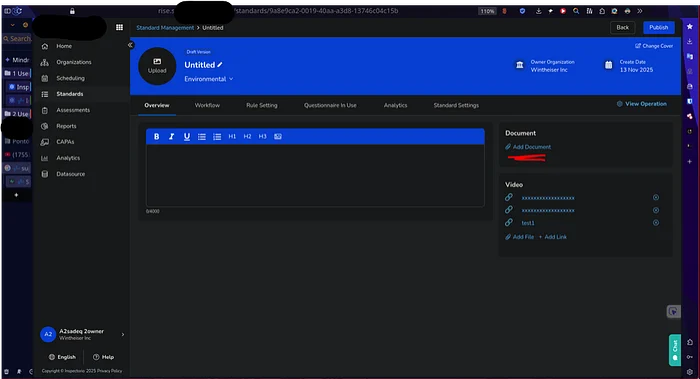
The researcher simulated the victim organization by creating a standard in a separate account and copying its ID from the URL. In a real attack, the hacker grabs this ID from external sources.
Step 2: The setup
The researcher logged into the attacker account and created a valid standard in their own workspace.
Step 3: Intercept the upload
A file upload was initiated to the researcher's own standard. Before the request could leave the browser, it was intercepted using Burp Suite.
Step 4: The swap
In the intercepted POST request body, the researcher located the standard_id parameter, deleted their own ID and pasted in the victim organization's ID.
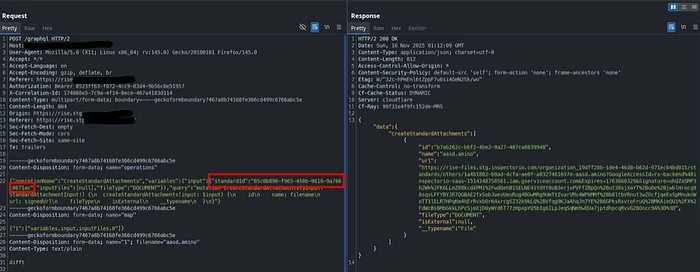
The report does not reproduce the full request, only the body parameter that was changed.
Step 5: The execution
The modified request was forwarded to the server.
Step 6: The result
The server returned a 200 OK success message. When the researcher checked the victim organization's account, the uploaded file was sitting inside their private standard overview.
Root cause
In a secure system, when a user tries to modify a record such as uploading a file to a standard, the server should first ask whether the user making the request actually belongs to the organization that owns that standard. Here the server skipped that check. It blindly trusted the standard_id supplied in the request body and assumed that because the user was logged in, they were allowed to interact with whichever standard ID they sent.
The report describes the ownership check as skipped: the server trusted the client-supplied identifier.
Impact
The impact is severe. By exploiting this IDOR, a malicious actor could upload infected files, such as malware, ransomware, or malicious macros embedded in PDFs and Office documents, directly into the trusted internal environment of another company. Employees of the victim organization, opening these "standard" documents in the expectation that they are legitimate company policies, would be compromised. An attacker could also overwrite legitimate documents with false information, severely disrupting the target organization's business operations.
All of this depends on the attacker knowing a valid standard ID belonging to the target organization.
Fix
The report does not say what the platform changed. The check it describes as missing is the one to add: on every upload, the server should verify that the authenticated user belongs to the organization that owns the standard_id in the request body, and reject the request otherwise, rather than trusting the client-supplied identifier.
Variants to test
What happened, in plain words
A security researcher was taking part in a bug bounty programme. A bug bounty is an arrangement where a company invites independent testers to look for security holes in its systems and pays them for reporting what they find, instead of those holes being found by criminals. The researcher was testing a B2B management platform. B2B means business to business: the platform is sold to companies, and each company gets its own private space on it, called a tenant or workspace, where its staff manage their own material. The report does not name the platform or the programme.
The feature under test lets an organization create internal "standards". A standard is simply a record inside the platform, for example a company policy, and the organization can attach files or documents to it. The normal flow is: create a standard, then upload a file to it.
While watching the network traffic, the researcher noticed something important. When a standard is created, the platform gives it a unique identifier, an ID, and that ID appears in the web address. When a file is uploaded to a standard, the browser sends a request to the server that includes that same standard_id in the body of the request. In other words, the browser tells the server which standard the file belongs to.
That raised the obvious question for anyone testing access control: what if the browser says the file belongs to a standard owned by a completely different company? The researcher tried it. The server accepted the upload and answered with a success message, and the file ended up inside the other organization's private space.
This kind of flaw is called an Insecure Direct Object Reference, or IDOR. It belongs to a wider family called Broken Access Control, which simply means the system does not properly check whether the person making a request is allowed to do what they are asking. The rest of this article walks through the same steps the researcher took, explaining each concept from scratch.
The platform and the feature
To follow the story you only need to understand three ideas.
A web application. You use it through a browser, like any website. Behind the scenes, the page you see is only the front end. The real work, storing records and files, is done by a server, a computer somewhere else that answers requests.
An API. An API is the way the front end talks to the server. Think of a restaurant: you do not walk into the kitchen, you tell the waiter what you want, and the waiter carries the order to the kitchen and brings back the result. The API is the waiter. When you click "upload", your browser does not write anything to a database itself; it sends a structured message to the server, and the server does the work and replies. These messages are HTTP requests, and they carry data in a body, much like an envelope with a form inside.
A tenant. A tenant is one customer organization's isolated area on a shared platform. The whole point of a B2B platform is that company A must never see or touch company B's material. The boundary between tenants is the line the researcher crossed.
The reconnaissance: watching the traffic
Reconnaissance means looking around before attacking: understanding how the application behaves, what it sends and what it receives. The researcher explored the "Standards" module as an ordinary logged-in user and used a tool called Burp Suite. Burp Suite is a program that sits between your browser and the internet and lets you read, pause and edit the requests your browser sends. It is the standard tool for this kind of work.
Two observations came out of that watching.
First, when a standard was created, it received a unique ID, and that ID appeared in the URL, for example:
Line by line: https:// is the secure web protocol, the padlock kind. [REDACTED].com stands for the platform's domain, which the report hides. /standards/ is the path, the part of the address that says which kind of thing you are looking at. <STANDARD_ID> is a placeholder for the actual identifier, a string of characters that uniquely names one standard among all the standards on the platform. The important point is that the ID is visible in the address bar, so anyone who can see the address can read it.
Second, when a file was uploaded to a standard, the browser sent an API request that contained that same standard_id inside the request body. The body is the part of the request that carries the data being submitted, as opposed to the address line. So the browser was effectively telling the server: "put this file into standard number X".
The researcher's reaction was the right one: the application was asking the browser where the file should go. Whenever a security decision is made based on something the user's browser supplies, you have to ask what happens if the user supplies something else. The specific question here was: what if I tell the server to upload my file to an ID that belongs to a completely different company?
The vulnerability
This is a textbook IDOR. The name describes it precisely: the application uses a direct reference to an object (here, the standard ID) and fails to check that the person using that reference is allowed to. It is a form of Broken Access Control, the general category for systems that do not enforce who may do what.
In a secure system, when a user tries to modify a record, such as uploading a file to a standard, the server should first ask: does the user making this request actually belong to the organization that owns this standard? That check has to happen on the server, because only the server can be trusted. Anything the browser sends can be changed by the user, so the server must verify it against its own records.
Here the server skipped that check. It blindly trusted the standard_id in the request body. It assumed that because the user was logged in, they were allowed to interact with whichever standard ID they sent. Being logged in proves who you are; it does not prove what you may touch. Confusing the two is the root cause.
The exploitation, step by step
To exploit the flaw, the researcher needed one piece of information: the target organization's standard ID. The report notes that such IDs can sometimes leak through web archives such as the Wayback Machine (a service that keeps old copies of web pages), through OSINT (open-source intelligence, meaning information gathered from public sources), or even through basic enumeration (trying IDs one after another to see which ones exist). So obtaining one is realistic.
Here is exactly how the attack was carried out.
Step 1: Target acquisition
The researcher simulated the victim organization by creating a standard in a separate account and copying its ID from the URL. In a real attack, the hacker grabs this ID from external sources.
Why this step: to test whether cross-tenant upload works, you need a real standard ID that belongs to someone else. Rather than hunting for a real victim, the researcher created a second account, made a standard there, and noted its ID. That gives a safe, controlled stand-in for another company's standard. The image shows this stage: the standard created in the separate account, with its identifier visible in the URL.
Step 2: The setup
The researcher logged into the attacker account and created a valid standard in their own workspace.
Why this step: the upload feature is designed to work on your own standard, so starting from a legitimate upload gives you a normal, working request to modify. You are not inventing a request from nothing; you are taking one the application itself produced and changing one value in it. That is the cleanest way to test access control.
Step 3: Intercept the upload
A file upload was initiated to the researcher's own standard. Before the request could leave the browser, it was intercepted using Burp Suite.
Why this step: once the request has left, it is gone. Burp Suite lets you pause it mid-flight, look at exactly what the browser was about to send, and change it before it reaches the server. This is the moment where the browser's claim about which standard to use can be rewritten.
Step 4: The swap
In the intercepted POST request body, the researcher located the standard_id parameter, deleted their own ID and pasted in the victim organization's ID.
A POST request is simply one type of HTTP request, the type normally used to submit data that changes something on the server, such as an upload. A parameter is a named value inside the request, here the pair of a name, standard_id, and a value, the ID itself. The researcher changed only the value: out with their own ID, in with the other organization's ID. Everything else, including the fact that the request came from a logged-in user, stayed the same. The report does not reproduce the full request, only the body parameter that was changed. The image shows the intercepted request with the standard_id value replaced.
Step 5: The execution
The modified request was forwarded to the server.
Why this step: forwarding sends the edited request on its way, so the server receives exactly what the researcher wants it to receive. From the server's point of view, this looks like an ordinary upload from a logged-in user.
Step 6: The result
The server returned a 200 OK success message. When the researcher checked the victim organization's account, the uploaded file was sitting inside their private standard overview.
200 OK is the standard HTTP status code meaning the request succeeded. The real proof, though, is the second half: the file appeared in the other organization's private space. That is the cross-tenant write, and it confirms the server never checked ownership.
Why it worked
The server trusted the client. The standard_id arrived in the request body, the server read it, and it used it to decide where the file goes, without asking whether the logged-in user belonged to the organization that owns that standard. The report describes the ownership check as skipped: the server trusted the client-supplied identifier.
A useful comparison: a hotel receptionist who gives out a room key to anyone who states a room number, without checking that the person is the guest registered to that room. The room number is a direct reference to an object. The missing check is the flaw.
The impact
The impact is severe. By exploiting this IDOR, a malicious actor could upload infected files, such as malware, ransomware, or malicious macros embedded in PDFs and Office documents, directly into the trusted internal environment of another company. Employees of the victim organization, opening these "standard" documents in the expectation that they are legitimate company policies, would be compromised. An attacker could also overwrite legitimate documents with false information, severely disrupting the target organization's business operations.
In plain terms: the platform's whole value is that each company's workspace is private and trustworthy. If an outsider can place files there, the trust is broken. Staff are trained to open internal policy documents without suspicion, which makes such a file a very effective delivery method for malware. And because the file sits in the victim's own workspace, it looks entirely legitimate.
All of this depends on the attacker knowing a valid standard ID belonging to the target organization.
The fix
The report does not say what the platform changed. The check it describes as missing is the one to add: on every upload, the server should verify that the authenticated user belongs to the organization that owns the standard_id in the request body, and reject the request otherwise, rather than trusting the client-supplied identifier. In hotel terms: the receptionist checks the guest list before handing over a key.
Variants to test
A session, mentioned in the first variant, is how the server remembers that you are logged in between requests. It is usually carried by a cookie, a small piece of data your browser stores and sends back with each request, or by a token, a similar value used to prove identity. Keeping your own session while changing the object ID is what isolates the test: you are not pretending to be someone else, you are simply asking for someone else's object as yourself.
Glossary
- API: the interface through which one program asks another to do something, here the way the browser asks the server to store a file.
- Access control: the rules that decide who is allowed to do what in a system.
- Broken Access Control: a flaw where those rules are missing or not enforced, so someone can do more than they should.
- Bug bounty: a programme where a company rewards independent researchers for reporting security flaws.
- Burp Suite: a tool that sits between the browser and the internet and lets you read, pause and edit requests.
- B2B: business to business, a platform sold to companies rather than individuals.
- Cookie: a small piece of data stored by the browser and sent back with requests, often used to keep you logged in.
- Enumeration: trying identifiers one after another to discover which ones exist.
- HTTP request: the message a browser sends to a server asking it to do something.
- IDOR (Insecure Direct Object Reference): a flaw where the application uses an identifier supplied by the user to reach an object without checking that the user is allowed to reach it.
- Identifier (ID): a value that uniquely names one record among many.
- OSINT: open-source intelligence, information gathered from publicly available sources.
- Parameter: a named value inside a request, such as
standard_idand its value. - POST request: an HTTP request type normally used to submit data that changes something on the server.
- Reconnaissance: the exploratory phase of testing, where you observe how an application behaves.
- Request body: the part of an HTTP request that carries the submitted data.
- Session: the server's record of your logged-in state across multiple requests.
- Standard: the platform's record type used here, an internal document or policy to which files can be attached.
- Status code (200 OK): a number in the server's reply indicating the outcome; 200 means success.
- Tenant: one customer organization's isolated area on a shared platform.
- Token: a value used to prove identity or authorise a request.
- URL: the address of a resource on the web, as shown in the browser's address bar.
- Wayback Machine: a service that keeps archived copies of web pages.
- Workspace: see tenant; the private area belonging to one organization.