CVE-2026–111437 Writeup
The IntegerWidget.clean() method in django-import-export converts user-supplied numeric strings to Decimal and then int without length or exponent limits. An authenticated user with import permissions can supply a crafted scientific-notation value that causes the worker process to consume 100% CPU for an extended period, denying service to other requests.

medium.com
Published on medium.com
Cybersecurity
The full write-up lives on its author's site
It belongs to its author, so we link to it rather than copy it. The other two tabs are our own rewrites, checked against it.
Context
django-import-export is a widely used open-source extension that adds data import and export to Django applications. When a spreadsheet or CSV column is mapped to an integer model field, the library passes each cell value through IntegerWidget, which cleans and sanitises the input before it reaches the database. The researcher found the issue during a security code audit of popular open-source Python packages.
The result is CVE-2026-111437: an authenticated user who holds import permissions can exhaust CPU on the server by supplying a specially crafted numeric string, producing a denial of service.
Setup
The proof of concept runs against the project's own example application, so no special tooling is needed beyond Python and a local checkout. The setup steps are:
- A local clone of the
django-import-exportrepository. - A Python virtual environment with the project installed in editable mode.
- The example project under
/tests, migrated, with a superuser created. - An account with import permissions (staff or admin) to drive the import through the Django admin panel or the import utility.
The affected versions are >= v2.7.0 up to <= v4.4.2. The affected component is IntegerWidget.clean() in import_export/widgets.py.
Finding it
The researcher describes the problem as unbounded decimal conversion. IntegerWidget.clean() takes the raw cell value, runs it through sanitize_separators(), converts the result to a Python Decimal, and then casts it to int. Nothing in that path checks the length of the input string or bounds the exponent before the conversion happens.
That matters because converting a decimal with a very large exponent, such as 1e1000000, to an int forces Python to compute the exact integer value, digit by digit. With no length check and no exponent limit, the worker spends an extended period at 100% of a CPU core doing that computation.
Exploitation
Step 1: Set up the project
Clone the repository and enter it:
git clone https://github.com/django-import-export/django-import-export.git
cd django-import-export
Create and activate a virtual environment:
python3 -m venv .venv
source .venv/bin/activate
Install the project:
python -m pip install -e .
Set up the example project inside /tests and create an admin account:
cd tests
python manage.py check
python manage.py migrate
python manage.py createsuperuser
Start the application:
python manage.py runserver
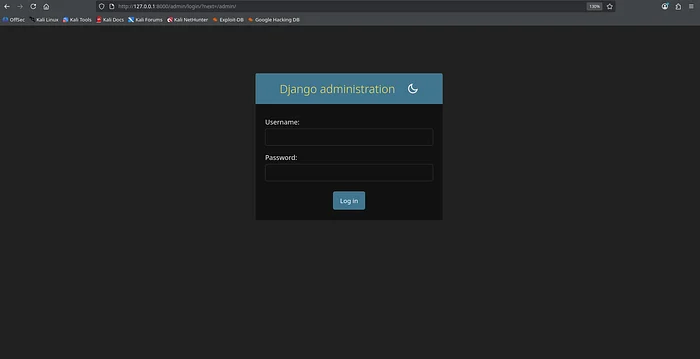
By default the development server listens on http://[redacted]:8000.
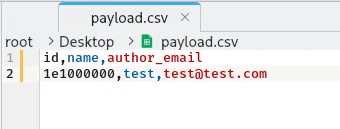
Step 2: Prepare the CSV payload
Create a minimalist CSV file in which an integer column contains a crafted scientific notation payload.
Step 3: Trigger the import
Initiate an import through the Django admin panel or the import utility.
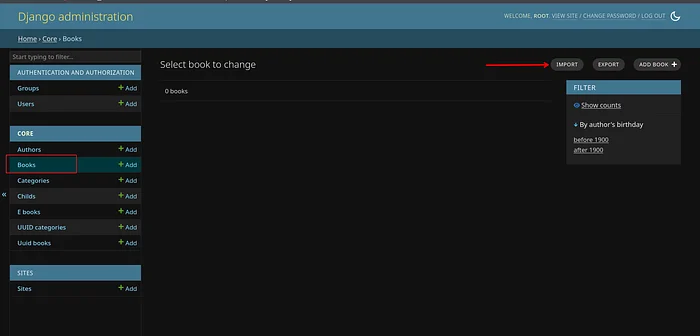
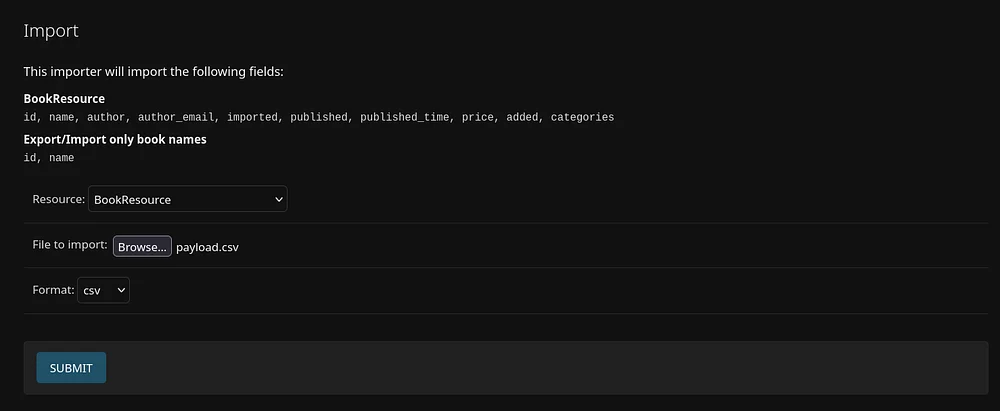
As the row is submitted and parsed, the server worker process locks up, pegging the CPU at 100% and halting response handling for other concurrent requests. The effect is a targeted denial of service.
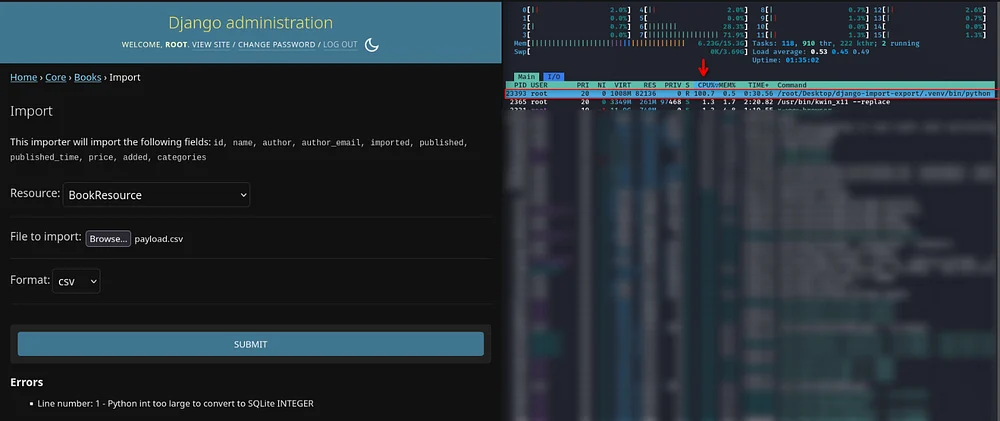
The researcher notes that this can be done by anyone with import permissions, whether staff or admin.
Root cause
The vulnerable code in import_export/widgets.py is:
def clean(self, value, row=None, *args, **kwargs): if value is None: return None return int(Decimal(sanitize_separators(value)))
Decimal accepts scientific notation, so a value like 1e1000000 parses without complaint. The subsequent int() cast then has to materialise the full integer. Because there are no length checks or exponent boundaries enforced before the conversion, Python consumes 100% of a worker CPU core for an extended period trying to compute the digits.
The weakness is classified as CWE-405 (Asymmetric Resource Consumption / Amplification) and CWE-400. The CVSS 3.1 score is 6.5 (Medium), with the vector AV:N/AC:L/PR:L/UI:N/S:U/C:N/I:N/A:H.
Impact
The attack requires authenticated access with import permissions, which is why the vector carries PR:L. It does not allow remote code execution, data theft or database corruption (C:N, I:N). The availability impact is rated High (A:H) because a single malicious import file can exhaust worker threads and crash application servers under heavy concurrency. The overall score is 6.5 (Medium).
Fix
The researcher reports that after a considerable time the maintainers responded and started work on a fix. The write-up does not describe the patch that was ultimately applied. It does recommend, for maintainers or for developers patching downstream forks, strict validation of input length and decimal exponents before type coercion:
MAX_INPUT_LENGTH = 20def clean(self, value, row=None, *args, **kwargs): if value is None: return None val_str = str(value).strip() if len(val_str) > MAX_INPUT_LENGTH: raise ValueError("Numeric input exceeds allowed length constraints.") return int(Decimal(sanitize_separators(val_str)))
This would reject any cell value longer than 20 characters before the Decimal and int conversions run, keeping an oversized exponent away from the expensive computation.
- Other widgets that coerce strings into numbers, such as float or decimal widgets in the same library, or equivalent import widgets in other frameworks. A positive result is a worker pinned at 100% CPU while parsing a single cell.
- Other numeric parsers that accept scientific notation and then expand it, for example JSON or YAML deserialisers that convert to arbitrary-precision integers. A positive result is a parse that takes seconds or longer for a short input string.
- Import paths that bypass the admin panel, such as management commands or background workers. A positive result is the same CPU exhaustion without an HTTP request in the loop.
- Length limits set too high to matter, for example a cap that still permits a large exponent. A positive result is a payload under the cap that still stalls the worker.
- Concurrency testing against a multi-worker deployment. A positive result is that a small number of malicious imports exhausts all workers and takes the application offline for other users.
What happened, in plain words
A security researcher was reading through the source code of a popular free add-on for the Python web framework Django, called django-import-export. This add-on lets a Django website accept spreadsheets or CSV files and turn their rows into database records, and export records back out again. While reading the code, the researcher found a way to make a server work extremely hard with a very small piece of input. The problem was given the identifier CVE-2026-111437.
In plain terms: a person who is allowed to import data into such a website can upload a file containing one specially written number. When the server tries to read that number, it gets stuck doing arithmetic for a very long time, using all of one processor core. While it is stuck, it cannot answer other visitors. That is a denial of service: the site is not broken into and no data is stolen, but it stops being available.
This article walks through the same ground as the technical write-up, but assumes you have never done security work before. Every term is explained the first time it appears, and every command and code snippet is followed by a line-by-line explanation.
Background: what the product does
django-import-export is an open-source extension for Django. Django is a toolkit for building websites with the Python programming language; an extension (often called a library or package) is a bundle of ready-made code that adds features to it. This particular extension adds two features to a Django site:
- Import: an administrator uploads a spreadsheet or CSV file, and the site reads each row and saves it as a record in its database.
- Export: the site produces a spreadsheet or CSV file from the records it already holds.
A CSV file is a plain text file where each line is a row and commas separate the columns, like a very simple spreadsheet. A database is the organised storage where a website keeps its data, for example a list of products or members.
When a column in the uploaded file is meant to hold a whole number (an integer, such as 5 or 1000), the library passes each cell through a small piece of code called IntegerWidget. A widget here is just a helper class that knows how to clean up and convert one kind of value. IntegerWidget takes the raw text from the cell, tidies it, and converts it into a number the database can store.
The researcher found the issue during a security code audit of popular open-source Python packages. A code audit means reading source code carefully, looking for mistakes that could be abused, rather than attacking a running site.
The result is CVE-2026-111437. A CVE (Common Vulnerabilities and Exposures) is a public catalogue number given to a known security flaw so that everyone can refer to the same issue by the same name. The flaw: an authenticated user who holds import permissions can exhaust CPU on the server by supplying a specially crafted numeric string, producing a denial of service.
Two more terms from that sentence:
- Authenticated user: someone who has logged in with a username and password, so the site knows who they are.
- CPU: the part of the computer that performs calculations. If one program keeps the CPU busy, other work has to wait.
Setting up a test copy
The proof of concept runs against the project's own example application, so no special tooling is needed beyond Python and a local checkout. A proof of concept (PoC) is a small, repeatable demonstration that a flaw really exists. A local checkout means a copy of the project's code downloaded onto your own computer.
The researcher's preconditions are:
- A local clone of the
django-import-exportrepository. A repository (repo) is the online store of a project's code and its history, usually on a site such as GitHub. To clone it is to download a full copy. - A Python virtual environment with the project installed in editable mode. A virtual environment is a private, isolated folder of Python packages for one project, so installing things for this project does not disturb the rest of your computer. Editable mode means the installed package points at your downloaded copy, so changes to that copy take effect immediately.
- The example project under
/tests, migrated, with a superuser created. A migration is a script that creates or updates the database tables a project needs. A superuser is the all-powerful built-in administrator account. - An account with import permissions (staff or admin) to drive the import through the Django admin panel or the import utility. The Django admin panel is a ready-made web page for managing a Django site's data. Permissions are the rights a given account has; staff and admin are the usual levels that include the right to import.
The affected versions are >= v2.7.0 up to <= v4.4.2. In version notation, >= means "this version and everything newer", and <= means "this version and everything older", so the flaw exists in every release from 2.7.0 through 4.4.2 inclusive. The affected component is IntegerWidget.clean() in import_export/widgets.py. A component is the specific part of the code at fault; clean() is the name of the function (a named block of code) inside the file widgets.py.
Finding it
The researcher describes the problem as unbounded decimal conversion. Let us unpack that phrase.
- A decimal here means a number written in decimal notation, possibly with an exponent, such as
1e1000000. Theemeans "times ten to the power of", so1e1000000is a 1 followed by one million zeros. Writing it that way is called scientific notation, and it is a compact way to write enormous numbers. - Conversion means changing a value from one type to another, for example from text into a number.
- Unbounded means there is no limit placed on it. The code never checks how long the input is or how large the exponent is before doing the conversion.
IntegerWidget.clean() takes the raw cell value, runs it through sanitize_separators(), converts the result to a Python Decimal, and then casts it to int. In order:
sanitize_separators()is a helper that removes or normalises formatting characters such as thousands separators, so that1,000becomes something the number parser understands.Decimalis Python's type for exact decimal numbers. It accepts scientific notation happily.intis Python's type for whole numbers. Casting (converting) aDecimalto anintforces Python to work out every single digit of the exact whole number.
Nothing in that path checks the length of the input string or bounds the exponent before the conversion happens. That matters because converting a decimal with a very large exponent, such as 1e1000000, to an int forces Python to compute the exact integer value, digit by digit. With no length check and no exponent limit, the worker spends an extended period at 100% of a CPU core doing that computation.
A worker is the process on the server that handles incoming requests. A core is one independent processing unit inside a CPU; a modern CPU has several, and each can run one thing at a time. If one worker is pinned at 100% of a core, it is not answering anyone else.
An everyday comparison: imagine a clerk who is asked to write out the full value of "one followed by a million zeros" on paper, digit by digit, before doing anything else. The request is tiny to state, but the work it demands is enormous. That mismatch between how little the attacker sends and how much work the server does is the heart of this bug.
Exploitation
Step 1: Set up the project
Clone the repository and enter it:
git clone https://github.com/django-import-export/django-import-export.git
cd django-import-export
git clone <url>downloads a full copy of the project stored at that address onto your computer, into a new folder named after the project. Git is the version-control tool that tracks changes to code.cd django-import-exportchanges your current directory (the folder your terminal is working in) into the newly downloaded folder, so the next commands run inside it.
Create and activate a virtual environment:
python3 -m venv .venv
source .venv/bin/activate
python3 -m venv .venvasks Python to create a new virtual environment in a folder called.venv. The leading dot makes it a hidden folder on Unix-like systems.source .venv/bin/activateswitches your terminal over to that environment, so any Python command you run now uses the isolated set of packages inside.venvrather than your system-wide ones.
Install the project:
python -m pip install -e .
pipis Python's package installer.install -e .installs the project found in the current directory (.) in editable mode, meaning it is linked to your downloaded copy rather than copied elsewhere.
Set up the example project inside /tests and create an admin account:
cd tests
python manage.py check
python manage.py migrate
python manage.py createsuperuser
cd testsmoves into thetestsfolder, which holds the example application used for demonstrations.python manage.py checkruns Django's built-in sanity check, reporting configuration problems before you start.python manage.py migratecreates the database tables the project needs.python manage.py createsuperuserprompts you to choose a username and password for the all-powerful administrator account. This account is what you will log in with to reach the admin panel.
Start the application:
python manage.py runserver
python manage.py runserverstarts Django's built-in development web server, so the site is now reachable in a browser on your own machine.
By default the development server listens on http://[redacted]:8000. [redacted] is the special address that always means "this computer", and 8000 is the port, a numbered doorway on which the server accepts connections. So typing that address into your browser opens the local copy of the site.
Why this step matters: you need a running copy of the vulnerable software, with an account that has import rights, before you can show the flaw. Doing it locally means nothing outside your own machine is affected.
Step 2: Prepare the CSV payload
Create a minimalist CSV file in which an integer column contains a crafted scientific notation payload.
A payload is the deliberately crafted input that triggers the flaw. Here the payload is a number written in scientific notation, placed in a column that the site expects to hold a whole number. The file is deliberately minimal, because the goal is to make a single cell do the damage.
Why this step matters: the attack does not need a large file or many rows. The whole cost to the attacker is a few characters in one cell.
Step 3: Trigger the import
Initiate an import through the Django admin panel or the import utility.
The import utility is the same feature reached through code rather than the web page.
As the row is submitted and parsed, the server worker process locks up, pegging the CPU at 100% and halting response handling for other concurrent requests. The effect is a targeted denial of service. Parsing means reading raw text and working out its structure and values. Concurrent requests are requests from other visitors arriving at the same time; while the worker is busy, those visitors get no answer.
The researcher notes that this can be done by anyone with import permissions, whether staff or admin. In other words, the attacker does not need to be the site owner; any account trusted to import data is enough.
Root cause
The vulnerable code in import_export/widgets.py is:
def clean(self, value, row=None, *args, **kwargs): if value is None: return None return int(Decimal(sanitize_separators(value)))
Line by line, in plain words:
def clean(self, value, row=None, *args, **kwargs):declares a function namedclean. It receives the cell's rawvalue, plus optional extras (row,*args,**kwargs) that the library may pass in.selfrefers to the widget object itself.if value is None:checks whether the cell is empty.return Nonemeans an empty cell is simply treated as "no value" and the function stops there.return int(Decimal(sanitize_separators(value)))is the important line. Reading it from the inside out:sanitize_separators(value)tidies the text;Decimal(...)turns that text into an exact decimal number;int(...)converts that decimal into a whole number; andreturnhands the result back to the caller.
Decimal accepts scientific notation, so a value like 1e1000000 parses without complaint. The subsequent int() cast then has to materialise the full integer, which is a million digits long in that example. Because there are no length checks or exponent boundaries enforced before the conversion, Python consumes 100% of a worker CPU core for an extended period trying to compute the digits.
The weakness is classified as CWE-405 (Asymmetric Resource Consumption / Amplification) and CWE-400. CWE is a catalogue of weakness types, the way CVE is a catalogue of individual flaws. Asymmetric resource consumption means the attacker spends very little while the target spends a great deal; amplification is the same idea, a small input producing a large effect. CWE-400 is the general category of uncontrolled resource consumption.
The CVSS 3.1 score is 6.5 (Medium), with the vector AV:N/AC:L/PR:L/UI:N/S:U/C:N/I:N/A:H. CVSS is a standard scoring system for how serious a flaw is; the vector is the compact string that records how the score was reached. Each part means:
| Part | Meaning |
|---|---|
AV:N |
Attack vector: network, reachable over the internet or a network |
AC:L |
Attack complexity: low, no special conditions needed |
PR:L |
Privileges required: low, a normal logged-in account with import rights |
UI:N |
User interaction: none, no victim has to click anything |
S:U |
Scope: unchanged, only the vulnerable component is affected |
C:N |
Confidentiality: none, no data is exposed |
I:N |
Integrity: none, no data is altered |
A:H |
Availability: high, the service can be taken down |
Impact
The attack requires authenticated access with import permissions, which is why the vector carries PR:L. It does not allow remote code execution, data theft or database corruption (C:N, I:N). Remote code execution would mean running the attacker's own programs on the server; data theft would mean reading records the attacker should not see; database corruption would mean damaging stored data. None of those happen here.
The availability impact is rated High (A:H) because a single malicious import file can exhaust worker threads and crash application servers under heavy concurrency. A thread is a unit of work inside a process; a server usually handles several requests at once with several threads. If each malicious import occupies one thread indefinitely, a handful of them can occupy them all, and ordinary visitors are left waiting. The overall score is 6.5 (Medium).
Fix
The researcher reports that after a considerable time the maintainers responded and started work on a fix. Maintainers are the people who look after an open-source project. The write-up does not describe the patch that was ultimately applied. It does recommend, for maintainers or for developers patching downstream forks, strict validation of input length and decimal exponents before type coercion. A downstream fork is a separate copy of a project, maintained by someone else, that started from the original code. Type coercion is the same idea as conversion: turning a value of one type into another.
MAX_INPUT_LENGTH = 20def clean(self, value, row=None, *args, **kwargs): if value is None: return None val_str = str(value).strip() if len(val_str) > MAX_INPUT_LENGTH: raise ValueError("Numeric input exceeds allowed length constraints.") return int(Decimal(sanitize_separators(val_str)))
Line by line:
MAX_INPUT_LENGTH = 20sets a named constant: the longest cell value this function will accept is 20 characters.def clean(self, value, row=None, *args, **kwargs):declares the same function as before, with the same arguments.if value is None:andreturn Nonekeep the original behaviour for empty cells.val_str = str(value).strip()turns the cell into text and removes leading and trailing spaces, so the length check measures the real content.if len(val_str) > MAX_INPUT_LENGTH:checks whether the text is longer than the allowed 20 characters.raise ValueError("Numeric input exceeds allowed length constraints.")stops the function with an error message if it is. Raising an error means deliberately aborting with a clear signal rather than carrying on.return int(Decimal(sanitize_separators(val_str)))is the original conversion, now reached only for short inputs.
This would reject any cell value longer than 20 characters before the Decimal and int conversions run, keeping an oversized exponent away from the expensive computation. The everyday comparison: the clerk now refuses any request longer than a short line before starting to write anything out.
Variants to test
- Other widgets that coerce strings into numbers, such as float or decimal widgets in the same library, or equivalent import widgets in other frameworks. A positive result is a worker pinned at 100% CPU while parsing a single cell.
- Other numeric parsers that accept scientific notation and then expand it, for example JSON or YAML deserialisers that convert to arbitrary-precision integers. JSON and YAML are common text formats for structured data; arbitrary-precision means the number type has no fixed size limit. A positive result is a parse that takes seconds or longer for a short input string.
- Import paths that bypass the admin panel, such as management commands or background workers. A management command is a task run from the terminal rather than through a web page. A positive result is the same CPU exhaustion without an HTTP request in the loop.
- Length limits set too high to matter, for example a cap that still permits a large exponent. A positive result is a payload under the cap that still stalls the worker.
- Concurrency testing against a multi-worker deployment. A positive result is that a small number of malicious imports exhausts all workers and takes the application offline for other users.
Glossary
- API: a defined way for one piece of software to talk to another; here, the import feature is the entry point an attacker uses.
- Authenticated user: someone who has logged in and is known to the site.
- Availability: whether a service is reachable and responsive when people need it.
- Cast / coercion: converting a value from one type to another, such as decimal to whole number.
- Clone: to download a full copy of a code repository.
- Component: the specific part of a codebase where a flaw lives.
- Concurrency: several requests being handled at the same time.
- Core: one independent processing unit inside a CPU.
- CPU: the part of a computer that performs calculations.
- CSV: a plain text file of rows and comma-separated columns, like a simple spreadsheet.
- CVE: a public catalogue number for a known security flaw.
- CVSS: a standard scoring system for the severity of a flaw, with a vector string recording the reasoning.
- CWE: a catalogue of weakness types, as opposed to individual flaws.
- Database: organised storage for a website's data.
- Decimal: Python's exact number type, which accepts scientific notation.
- Denial of service (DoS): making a service unavailable to its normal users.
- Django: a toolkit for building websites in Python.
- Editable mode: installing a package so it points at your local copy of the code.
- Exponent: the power-of-ten part of scientific notation, as in the
1000000of1e1000000. - Git: the tool that tracks changes to source code.
- Import permissions: the rights that allow an account to upload data into the site.
- Integer: a whole number.
- JSON / YAML: common text formats for structured data.
- Maintainer: a person who looks after an open-source project.
- Migration: a script that creates or updates database tables.
- Parsing: reading raw text and working out its structure and values.
- Payload: the deliberately crafted input that triggers a flaw.
- Permissions: the rights a given account has.
- pip: Python's package installer.
- Port: a numbered doorway on a computer through which a server accepts connections.
- Proof of concept (PoC): a small, repeatable demonstration that a flaw exists.
- Remote code execution: running the attacker's own programs on a server.
- Repository: the online store of a project's code and history.
- Scientific notation: writing a number as a small factor times a power of ten, such as
1e1000000. - Superuser: the all-powerful built-in administrator account in Django.
- Thread: a unit of work inside a process; servers use several to handle requests at once.
- Type coercion: see cast.
- Unbounded: with no limit enforced.
- Virtual environment: an isolated folder of Python packages for one project.
- Widget: a helper class that cleans and converts one kind of value.
- Worker: the server process that handles incoming requests.


