CVE-2026–11991 Case Study FlowForms <= 1.1.1
The FlowForms WordPress plugin's REST publish endpoint only checked that the caller had the generic edit_posts capability, not that they could edit the specific form ID in the URL. Any authenticated Contributor or higher could therefore publish another user's draft form to the live site, bypassing editorial review.

medium.com
Published on medium.com
Cve
The full write-up lives on its author's site
It belongs to its author, so we link to it rather than copy it. The other two tabs are our own rewrites, checked against it.
Context
FlowForms (by Priyanshu Chaudhary) is a self-hosted, open-source conversational form builder plugin for WordPress. Rather than presenting a traditional multi-field contact form, it delivers a Typeform-style step-by-step experience, one question at a time, aimed at improving completion rates and engagement. The plugin ships with a React-powered drag-and-drop builder supporting 8 field types (Short Text, Long Text, Multiple Choice, Checkboxes, Rating, Yes/No, Email and Number), full design customisation, pre-built templates, and embed options via Shortcode, Gutenberg Block or a direct full-page URL (/flowform/{id}).
From a security perspective, FlowForms exposes a REST API registered under the flowforms/v1 namespace, with endpoints for form lifecycle management, including:
POST /flowforms/v1/formsto create a new formPOST /flowforms/v1/forms/{id}/publishto publish a form to the live site
The /publish endpoint is the attack surface. It accepts a user-supplied form {id} in the URL path and is responsible for publishing the form. The endpoint performs an insufficient capability check, and because the form ID is entirely user-controlled, this leads to an authorization bypass.
The issue is tracked as CVE-2026-11991, an Unauthorized Form Publication vulnerability in FlowForms affecting all versions ≤ 1.1.1. It carries a CVSS score of 6.4 MEDIUM (AV:N/AC:L/PR:L/UI:N/S:U/C:N/I:H/A:N) and is rooted in Authorization Bypass Through User-Controlled Key (CWE-639).
Setup
The researcher worked in a testing lab. In that lab the administrator created a form as a draft, with form ID 62. In WordPress the Contributor role is intentionally restricted from publishing content; this is a core editorial workflow control. FlowForms' /publish endpoint bypasses this model entirely by only checking for the edit_posts capability, which Contributors possess. Any authenticated user at Contributor level or above can therefore publish any form directly to the live site, completely bypassing editorial review.
The vulnerable endpoint is:
POST /index.php?rest_route=/flowforms/v1/forms/{id}/publish
Finding it
The vulnerability originates in the file:
wp-content/plugins/flowforms/includes/class-rest-api.php
At the start there is a function that sets up the namespace for the REST API:
public function register_routes(){ $ns = 'flowforms/v1'; }
The route is then registered with WordPress' register_rest_route() function:
register_rest_route($ns, '/forms/(?P<id>\d+)/publish', [ 'methods' => 'POST', 'callback' => [$this, 'publish_form'], 'permission_callback' => fn() => current_user_can('edit_posts'), ]);
The problem sits in permission_callback: it checks only whether the user has the capability to edit posts, using current_user_can(). It does not check whether the user is authorised to modify or publish that particular post. That is the vulnerability. The callback used to publish the form is the publish_form function in the class.
The signature of current_user_can can check a capability on a specific post too:
current_user_can( string $capability, mixed $args ): bool
If the form ID is supplied as the second argument, the capability is checked against that form.
publish_form logic
public function publish_form($request) { $form_id = absint($request['id']); $json = $this->encode_slots($slots['content']['draft'], null, $slots['design'], $slots['settings']); $saved = $this->save_post_content($form_id, $json); if (! $saved) { return new WP_REST_Response(['message' => 'Failed to publish form.'], 500); } return new WP_REST_Response([ 'success' => true, 'form_id' => $form_id, 'message' => 'Form published successfully.', ], 200);
id is a user-controlled input parameter in the URL path. The function applies three checks to verify the availability of a valid drafted form, then encodes the form slots using the private function encode_slots, and saves the result using another private function, save_post_content, which updates the WordPress database using wpdb->update(). Finally it checks whether the save succeeded.
Exploitation
The goal is to find a form that is drafted and then attack that drafted form to publish it without authorisation.
Step 1: Enumerating drafted forms
The endpoint used to find a drafted form is:
http://<target>/flowform/<id>/
Finding forms manually is time consuming, so the researcher also created an exploit that finds and attacks the form automatically, demonstrated in the next section. In the testing lab the administrator created a form as a draft with form ID 62.
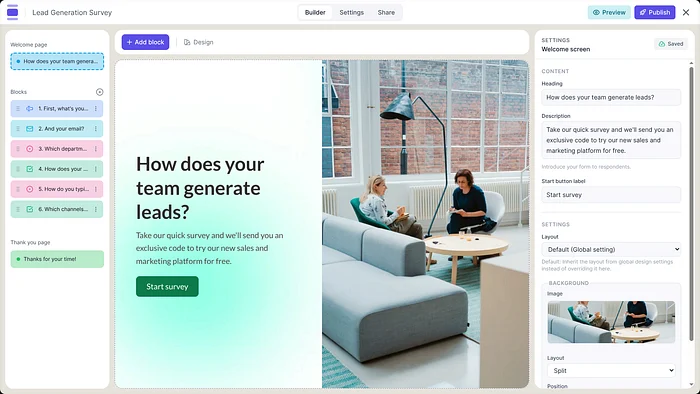
As a low-privileged user the form can be checked with the URL:
http://[redacted]/flowform/62/
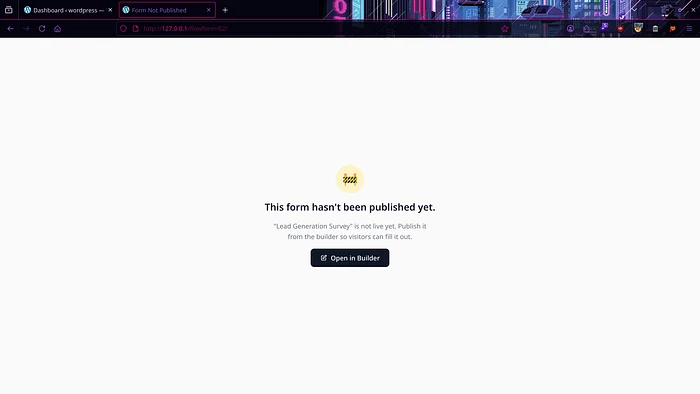
This confirms that the form is in draft.
Step 2: Publishing the drafted form
The vulnerable REST API endpoint to publish this form is:
/flowforms/v1/forms/62/publish
A simple POST request to this endpoint publishes the form.
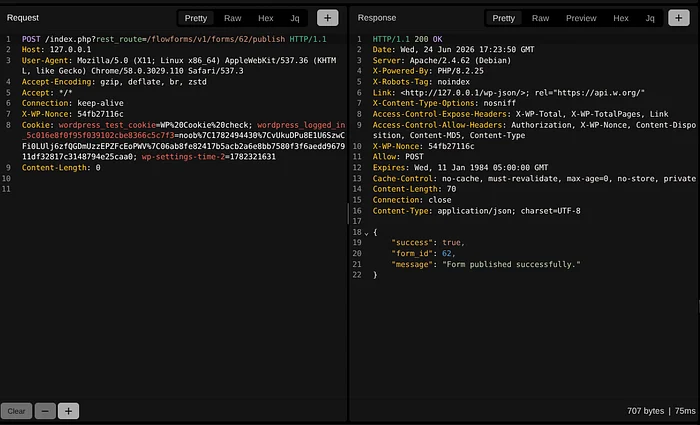
The form is published.
Step 3: Automated exploit
The researcher developed a complete exploit to enumerate drafted forms, published on GitHub as 0x00phantom-hat/CVE-2026-11991-Exploit. The exploit enumerates the drafted forms, displays them to the user and prompts the user to choose from the available drafted forms. The attacker can adjust the range used to find drafted forms and enable a proxy for debugging or for understanding the vulnerability.
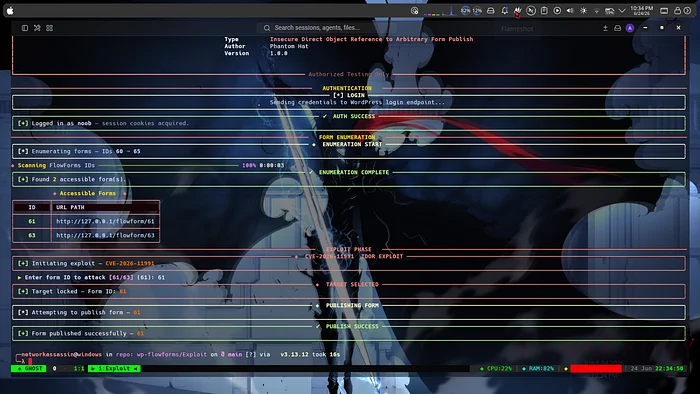
Once the form is published it can be checked by ID.
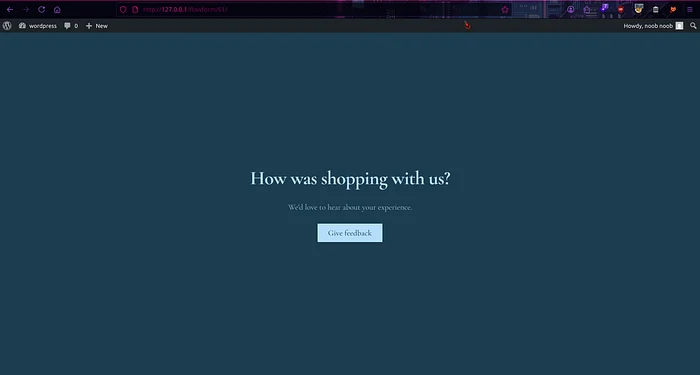
Root cause
The route registration uses a permission_callback that only evaluates current_user_can('edit_posts'). That capability is held by Contributors, who are by design not allowed to publish content. The callback never checks whether the current user is allowed to edit or publish the specific form identified by the {id} path parameter, which is fully user-controlled. The publish_form callback then takes that ID, encodes the draft slots and writes the result to the database through wpdb->update().
Impact
Any authenticated user with the Contributor role or above can publish any form directly to the live site, bypassing editorial review. The CVSS vector records the integrity impact as High (I:H), with no confidentiality or availability impact (C:N/A:N), and requires low privileges (PR:L) with no user interaction (UI:N).
Fix
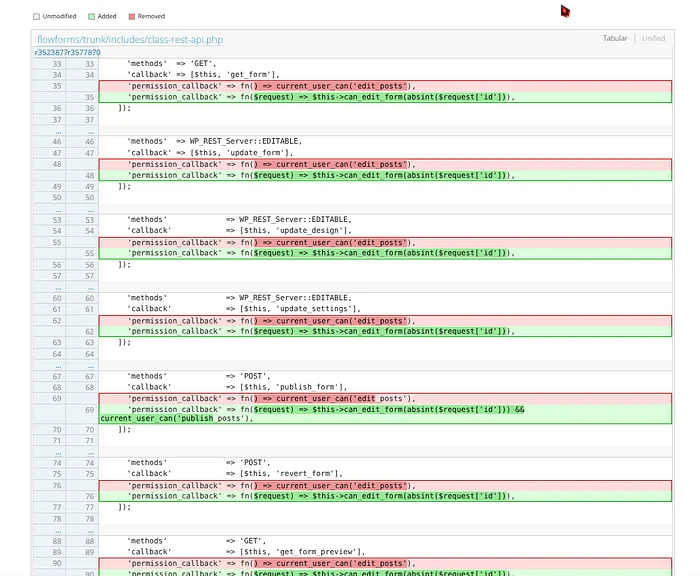
The developer implemented a patch. The permission_callback no longer uses current_user_can(). Instead a function was created to check the edit_post capability against the form ID from the request, and that function was applied to the REST API endpoints:
private function can_edit_form($form_id) { return current_user_can('edit_post', $form_id);}
This checks the edit_post capability on the specific form ID, making sure the user is authorised to edit that form.
Variants to test
- Other REST routes with object IDs in the path. Look for
register_rest_route()calls whosepermission_callbackuses a generic capability such asedit_postsorreadwithout passing the object ID. A positive result is a low-privileged user successfully acting on an object they do not own. - Publish, unpublish, delete and duplicate actions. Any lifecycle endpoint that takes
{id}and writes to the database is worth testing with a Contributor account against an administrator-owned draft. A positive result is a state change on the target object. current_user_can()with a second argument. Where the code does pass an argument, confirm it is the object ID from the request and not a constant or a value the caller controls in a different way.- Front-end draft exposure. Request
/flowform/<id>/as a low-privileged user for IDs that are not published, as done here with ID62. - ID enumeration ranges. Use the automated approach of sweeping ID ranges to find drafted forms before attempting the publish request, adjusting the range as needed.
What happened, in plain words
A WordPress plugin called FlowForms lets people build forms (the kind you fill in on a website: name, email, a rating, a yes/no question). The plugin has a feature that publishes a form, meaning it makes the form visible to the public. The researcher found that this publish feature only asked one question about the person pressing the button: "are you allowed to write posts on this site?" It never asked the more important question: "are you allowed to publish this particular form?"
Because of that, a low-privileged user, someone whose account is only meant to write drafts, could publish any form on the site, including forms created by the administrator that were still drafts. The researcher demonstrated this in a test lab with a draft form numbered 62, and then wrote a small tool that finds draft forms automatically.
The problem is tracked as CVE-2026-11991, an Unauthorized Form Publication vulnerability in FlowForms affecting all versions ≤ 1.1.1. It has a CVSS score of 6.4 MEDIUM (AV:N/AC:L/PR:L/UI:N/S:U/C:N/I:H/A:N) and is classified as Authorization Bypass Through User-Controlled Key (CWE-639).
A few words you will meet constantly below:
- WordPress: a popular system for building websites. People extend it with add-ons called plugins.
- Plugin: an add-on that adds a feature to WordPress, in this case form building.
- Draft: content that exists but is not visible to the public yet.
- Publish: the act of making content visible to the public.
- Authenticated: logged in with a username and password.
- Privilege: how much a logged-in account is allowed to do. A site usually has roles, and each role has a set of permissions called capabilities.
- Contributor: a WordPress role that can write posts but, by design, cannot publish them. An editor has to approve the work first.
- API: a way for one piece of software to talk to another. Think of a restaurant: the menu is the list of things you can ask for, and the waiter carries your order to the kitchen. An API is the waiter, and each thing you can ask for is an endpoint.
- REST API: a common style of API where each endpoint is a URL and you use standard web requests (GET to read, POST to send something) to use it.
- Endpoint: one specific address in an API that does one specific job, for example "publish a form".
- ID: a number that identifies one particular item, like a form. Form
62is a different form from form63. - Authorization: checking whether a logged-in person is allowed to do the thing they are trying to do. This is different from authentication, which only checks who they are.
- Authorization bypass: getting past that check, so you can do something you should not be allowed to do.
- IDOR (Insecure Direct Object Reference): a bug where the software takes an ID from the user and acts on it without checking that the user is allowed to touch that object. The name in the CVE database for this family is CWE-639, Authorization Bypass Through User-Controlled Key.
- CVE: a public catalogue number for a known security flaw, so everyone can refer to the same bug.
- CVSS: a scoring system for how serious a flaw is. The letters in brackets are the individual measurements that make up the score.
The product and the feature
FlowForms (by Priyanshu Chaudhary) is a self-hosted, open-source conversational form builder plugin for WordPress. Instead of showing a long form with many fields at once, it shows one question at a time, in the style of the Typeform service, which is meant to make people more likely to finish filling it in.
The plugin includes a drag-and-drop builder (built with a JavaScript library called React) with 8 field types: Short Text, Long Text, Multiple Choice, Checkboxes, Rating, Yes/No, Email and Number. It also offers design customisation, pre-built templates, and ways to place a form on a page: a Shortcode, a Gutenberg Block, or a direct full-page URL of the shape /flowform/{id}.
For our purposes, the important part is that FlowForms offers a REST API under the namespace flowforms/v1. A namespace is just a prefix that groups related endpoints together, like a folder name. The endpoints for managing a form's life include:
POST /flowforms/v1/formsto create a new formPOST /flowforms/v1/forms/{id}/publishto publish a form to the live site
The second one is the attack surface, meaning the part of the software an attacker will poke at. It takes a form {id} supplied by the user in the URL and publishes that form. The endpoint performs an insufficient capability check, and because the form ID is entirely user-controlled, this leads to an authorization bypass.
The setup in the test lab
The researcher worked in a testing lab, a copy of a website used only for experiments. In that lab the administrator created a form as a draft, with form ID 62.
In WordPress the Contributor role is intentionally restricted from publishing content. This is a core editorial workflow control: a writer drafts, an editor approves. FlowForms' /publish endpoint bypasses this model entirely by only checking for the edit_posts capability, which Contributors possess. Any authenticated user at Contributor level or above can therefore publish any form directly to the live site, completely bypassing editorial review.
The vulnerable endpoint is:
POST /index.php?rest_route=/flowforms/v1/forms/{id}/publish
Line by line:
POSTis the type of request. A web request has a method, andPOSTmeans "I am sending data and asking you to change something". Reading a page normally usesGET./index.phpis the main entry file of a WordPress site. Almost every request to WordPress passes through it.?rest_route=starts the part of the URL after the question mark, called the query string, which carries extra parameters. Here it tells WordPress which API route is being called./flowforms/v1/forms/{id}/publishis the route itself: the FlowForms API, version 1, the forms collection, one form identified by{id}, and the actionpublish.{id}is a placeholder. In a real request it is replaced by a number, for example62.
Finding it in the code
The vulnerability originates in the file:
wp-content/plugins/flowforms/includes/class-rest-api.php
This is a path inside a WordPress installation: wp-content holds site content, plugins holds add-ons, flowforms is this plugin, and includes/class-rest-api.php is the file that defines the API.
At the start there is a function that sets up the namespace for the REST API:
public function register_routes(){ $ns = 'flowforms/v1'; }
Line by line:
public function register_routes()declares a function namedregister_routes. A function is a named block of instructions.publicmeans other code is allowed to call it.{opens the block of instructions.$ns = 'flowforms/v1';creates a variable called$ns(short for namespace) and stores the textflowforms/v1in it. A variable is a labelled box that holds a value.}closes the block.
The route is then registered with WordPress' register_rest_route() function:
register_rest_route($ns, '/forms/(?P<id>\d+)/publish', [ 'methods' => 'POST', 'callback' => [$this, 'publish_form'], 'permission_callback' => fn() => current_user_can('edit_posts'), ]);
Line by line:
register_rest_route(calls the WordPress function that teaches WordPress a new API address. It takes the namespace, the route pattern, and a list of settings.$nsis the namespace variable from above, so the route will live underflowforms/v1.'/forms/(?P<id>\d+)/publish'is the route pattern.(?P<id>\d+)is a pattern that matches one or more digits and gives them the nameid, so the number in the URL becomes available to the code asid.[starts an array, which is a list of settings written asname => valuepairs.'methods' => 'POST'says this route only answersPOSTrequests.'callback' => [$this, 'publish_form']names the function that does the actual work when the route is called: thepublish_formmethod of the current class.$thismeans "this object", the class the code lives in.'permission_callback' => fn() => current_user_can('edit_posts')is the gatekeeper. WordPress calls this before running the callback, and if it returns false the request is refused.fn() => ...is a short way of writing a small function that returns the result of the expression after the arrow.current_user_can('edit_posts')asks WordPress: does the logged-in user have theedit_postscapability?]);closes the array and the function call.
The problem sits in permission_callback: it checks only whether the user has the capability to edit posts, using current_user_can(). It does not check whether the user is authorised to modify or publish that particular post. That is the vulnerability. The callback used to publish the form is the publish_form function in the class.
The signature of current_user_can can check a capability on a specific post too:
current_user_can( string $capability, mixed $args ): bool
Line by line:
current_user_can(is the name of the WordPress function.string $capabilityis the first argument: the name of a capability, written as text, for exampleedit_postsoredit_post.mixed $argsis an optional second argument.mixedmeans it can be of various types; here it is used to pass the ID of a specific object.): boolsays the function returns a boolean, that is,trueorfalse.
If the form ID is supplied as the second argument, the capability is checked against that form. The vulnerable code never supplies it, so the check is generic: "can this user edit posts at all?" rather than "can this user edit this form?".
What the publish function does
public function publish_form($request) { $form_id = absint($request['id']); $json = $this->encode_slots($slots['content']['draft'], null, $slots['design'], $slots['settings']); $saved = $this->save_post_content($form_id, $json); if (! $saved) { return new WP_REST_Response(['message' => 'Failed to publish form.'], 500); } return new WP_REST_Response([ 'success' => true, 'form_id' => $form_id, 'message' => 'Form published successfully.', ], 200);
Line by line:
public function publish_form($request)declares the function that runs when the route is called.$requestis an object holding everything about the incoming request, including theidtaken from the URL.$form_id = absint($request['id']);readsidfrom the request and passes it throughabsint, a WordPress helper that turns a value into a non-negative whole number. The result is stored in$form_id.$json = $this->encode_slots(...)builds the data to be saved.encode_slotsis a private function of the same class (private means only code inside the class can call it). It takes the draft content, anullvalue, the design and the settings, and turns them into a JSON string. JSON is a plain-text format for structured data, like a very strict shopping list.$saved = $this->save_post_content($form_id, $json);calls another private function, passing the form ID and the JSON, and stores the result in$saved.if (! $saved) {checks whether the save failed.!means "not".return new WP_REST_Response(['message' => 'Failed to publish form.'], 500);if it failed, sends back a response with a message and HTTP status500, which means "server error".}closes the failure branch.return new WP_REST_Response([starts building the success response.'success' => true,says the operation succeeded.'form_id' => $form_id,echoes back which form was published.'message' => 'Form published successfully.',is a human-readable message.], 200);closes the response and gives it HTTP status200, which means "OK".
id is a user-controlled input parameter in the URL path. The function applies three checks to verify the availability of a valid drafted form, then encodes the form slots using the private function encode_slots, and saves the result using another private function, save_post_content, which updates the WordPress database using wpdb->update(). wpdb is WordPress' database helper, and update() changes an existing row in a database table. Finally it checks whether the save succeeded.
Exploitation
The goal is to find a form that is drafted and then attack that drafted form to publish it without authorisation.
Step 1: Finding drafted forms
The endpoint used to find a drafted form is:
http://<target>/flowform/<id>/
Line by line:
http://is the protocol, the language browsers use to fetch web pages.<target>is a placeholder for the site's address. The angle brackets mean "put the real value here"./flowform/<id>/is the public page for one form, where<id>is the form's number.
Finding forms manually is time consuming, so the researcher also created an exploit that finds and attacks the form automatically, demonstrated in the next section. In the testing lab the administrator created a form as a draft with form ID 62.
As a low-privileged user the form can be checked with the URL:
http://[redacted]/flowform/62/
Line by line:
http://[redacted]/is the local address of the machine itself.[redacted]always means "this computer", so this request goes to the lab server running on the same machine./flowform/62/asks for the public page of form number 62.
Step 2: Publishing the drafted form
The vulnerable REST API endpoint to publish this form is:
/flowforms/v1/forms/62/publish
Line by line:
/flowforms/v1/is the API namespace.forms/62/points at the single form with ID 62.publishis the action being requested.
A simple POST request to this endpoint publishes the form.
The form is published.
Step 3: The automated exploit
The researcher developed a complete exploit to enumerate drafted forms, published on GitHub as 0x00phantom-hat/CVE-2026-11991-Exploit. To enumerate means to list items one by one, here by trying form IDs in turn. The exploit enumerates the drafted forms, displays them to the user and prompts the user to choose from the available drafted forms. The attacker can adjust the range used to find drafted forms and enable a proxy for debugging or for understanding the vulnerability. A proxy is a program that sits between the browser and the server and lets you watch the traffic going back and forth.
Once the form is published it can be checked by ID.
Why it works
The route registration uses a permission_callback that only evaluates current_user_can('edit_posts'). That capability is held by Contributors, who are by design not allowed to publish content. The callback never checks whether the current user is allowed to edit or publish the specific form identified by the {id} path parameter, which is fully user-controlled. The publish_form callback then takes that ID, encodes the draft slots and writes the result to the database through wpdb->update().
A useful comparison: a hotel receptionist who only checks that you are a guest of the hotel, and not which room key you are holding, will let you into any room. The check exists, but it is the wrong check.
What it means in practice
Any authenticated user with the Contributor role or above can publish any form directly to the live site, bypassing editorial review. The CVSS vector records the integrity impact as High (I:H), with no confidentiality or availability impact (C:N/A:N), and requires low privileges (PR:L) with no user interaction (UI:N). In plain terms: the attacker needs a normal account, does not need to trick anyone into clicking anything, cannot read secrets and cannot take the site down, but can change what the public sees.
The fix
The developer implemented a patch. The permission_callback no longer uses current_user_can(). Instead a function was created to check the edit_post capability against the form ID from the request, and that function was applied to the REST API endpoints:
private function can_edit_form($form_id) { return current_user_can('edit_post', $form_id);}
Line by line:
private function can_edit_form($form_id)declares a function that only code inside the class can call, and that receives a form ID.return current_user_can('edit_post', $form_id);asks WordPress whether the current user has theedit_postcapability on that specific form. Note the singularedit_postwith the ID as the second argument, which is the per-object check that was missing.}closes the function.
This checks the edit_post capability on the specific form ID, making sure the user is authorised to edit that form.
Other places to look for the same mistake
- Other REST routes with object IDs in the path. Look for
register_rest_route()calls whosepermission_callbackuses a generic capability such asedit_postsorreadwithout passing the object ID. A positive result is a low-privileged user successfully acting on an object they do not own. - Publish, unpublish, delete and duplicate actions. Any lifecycle endpoint that takes
{id}and writes to the database is worth testing with a Contributor account against an administrator-owned draft. A positive result is a state change on the target object. current_user_can()with a second argument. Where the code does pass an argument, confirm it is the object ID from the request and not a constant or a value the caller controls in a different way.- Front-end draft exposure. Request
/flowform/<id>/as a low-privileged user for IDs that are not published, as done here with ID62. - ID enumeration ranges. Use the automated approach of sweeping ID ranges to find drafted forms before attempting the publish request, adjusting the range as needed.
Glossary
- API: a defined way for one piece of software to ask another to do something, like a menu plus a waiter in a restaurant.
- Attack surface: the parts of a system an attacker can reach and try to abuse.
- Authenticated: logged in with a valid account.
- Authentication: checking who someone is.
- Authorization: checking whether someone is allowed to do a particular thing.
- Authorization bypass: getting past an authorization check and doing something you should not be allowed to do.
- Boolean: a value that is either
trueorfalse. - Callback: a function that is run when something happens, here when an API route is called.
- Capability: a named permission in WordPress, such as
edit_posts(edit posts in general) oredit_post(edit one specific post). - Contributor: a WordPress role that can write posts but cannot publish them.
- CVE: a public catalogue number for a known security flaw.
- CVSS: a scoring system for the severity of a security flaw, made of several measurements.
- CWE-639: the catalogue entry for Authorization Bypass Through User-Controlled Key, the family this bug belongs to.
- Draft: content that exists but is not visible to the public.
- Endpoint: one specific address in an API that performs one specific job.
- Enumerate: to list items one by one, here by trying form IDs in turn.
- Function: a named block of instructions that can be called by name.
- GET: the request method normally used to read something from a server.
- HTTP status code: a number in a response saying how it went, for example
200for OK and500for server error. - ID: a number identifying one particular item, such as a form.
- IDOR: Insecure Direct Object Reference, a bug where an ID supplied by the user is acted on without checking the user's rights over that object.
- JSON: a plain-text format for structured data.
- Namespace: a prefix that groups related API endpoints together, like a folder name.
- Permission callback: the gatekeeper function WordPress runs before an API route's main function, to decide whether the request is allowed.
- Plugin: an add-on that adds a feature to WordPress.
- POST: the request method used to send data and ask the server to change something.
- Proxy: a program that sits between browser and server and lets you watch the traffic.
- Publish: to make content visible to the public.
- Query string: the part of a URL after the question mark, carrying extra parameters.
- React: a JavaScript library for building user interfaces.
- REST API: an API style where each endpoint is a URL and standard web requests are used to call it.
- Role: a named set of permissions in WordPress, such as Contributor or Administrator.
- Route: one address in an API, defined by a pattern such as
/forms/(?P<id>\d+)/publish. - Variable: a labelled box in code that holds a value.
- WordPress: a popular system for building websites, extended with plugins.
wpdb: WordPress' helper for talking to its database;update()changes an existing row.



