️♂️ Dari Sekadar Ganti Angka, Jadi Celah Besar: Cerita I
The job portal's application endpoint did not check that the logged-in company owned the application, so changing the numeric ID let a company view other companies' applications. The same missing check also allowed accepting, rejecting and reviewing candidates belonging to other companies.

Awalnya, saya tidak berekspektasi tinggi. Sekadar ingin mencoba, memahami alur aplikasi, dan melihat apakah saya bisa menemukan sesuatu yang “menarik”.
The full write-up lives on its author's site
It belongs to its author, so we link to it rather than copy it. The other two tabs are our own rewrites, checked against it.
Context
The target was a job portal. Its features were standard for the genre: companies could post vacancies, candidates could apply, and companies could review, accept or reject candidates. Everything appeared to work as intended.
What drew the researcher's attention was a single endpoint used to view the data of an application:
/applications/{id}
At first glance it looked like an ordinary endpoint for reading one application. Nothing about it seemed suspicious until the researcher started wondering what would happen if the number in the path were changed.
Setup
The only precondition described is an authenticated account with the perusahaan (company) role. The researcher logged in as that user and opened one of the applications. No tools, versions or other accounts are mentioned.
Finding it
Logged in as the company user, the researcher opened an application by its numeric ID:
/applications/3
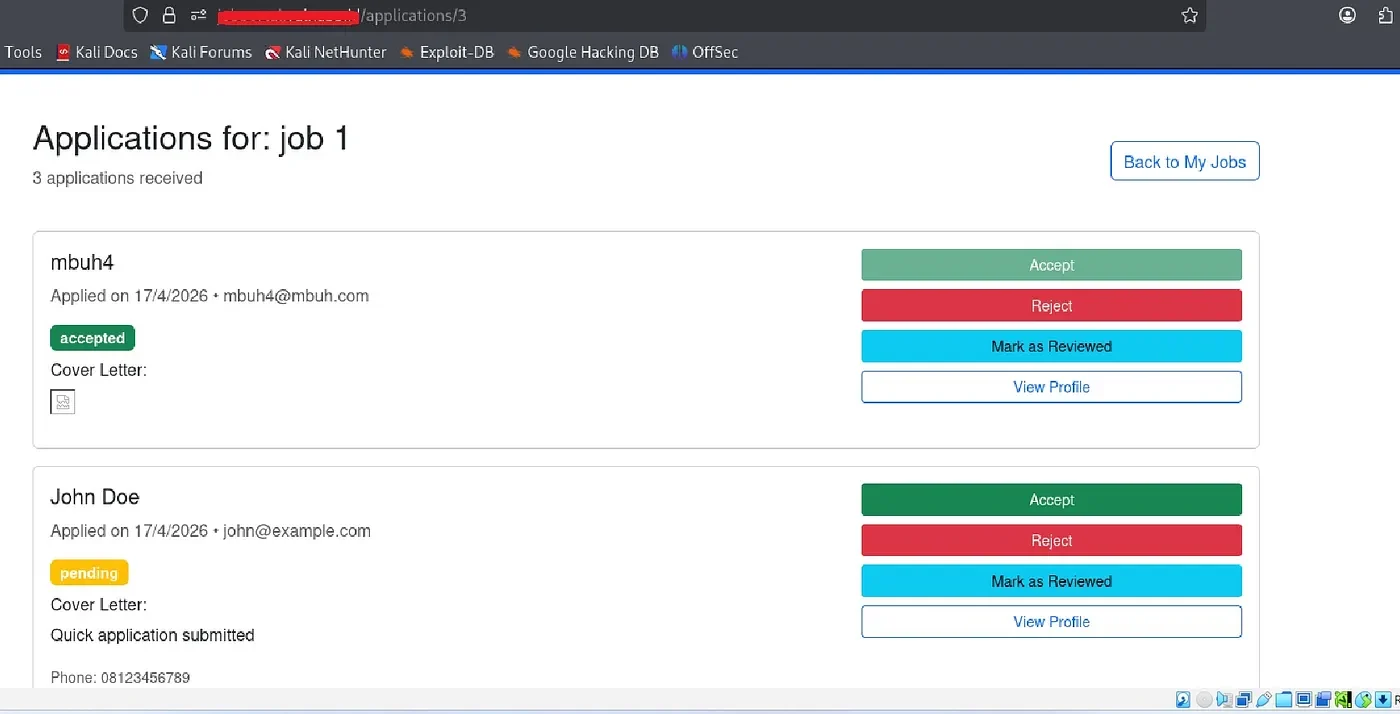
The data appeared normally. The researcher then did the most classic thing in security testing: changed the number 3 to 6.
/applications/6
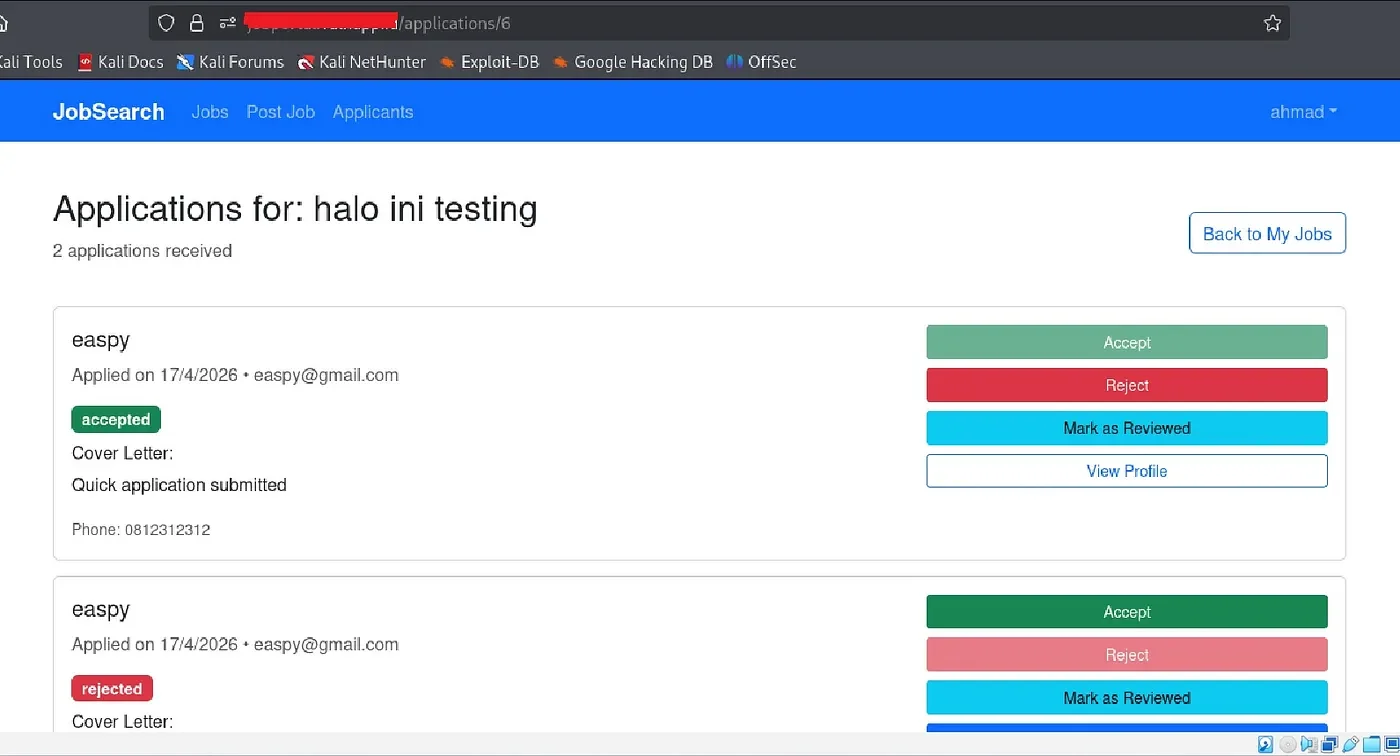
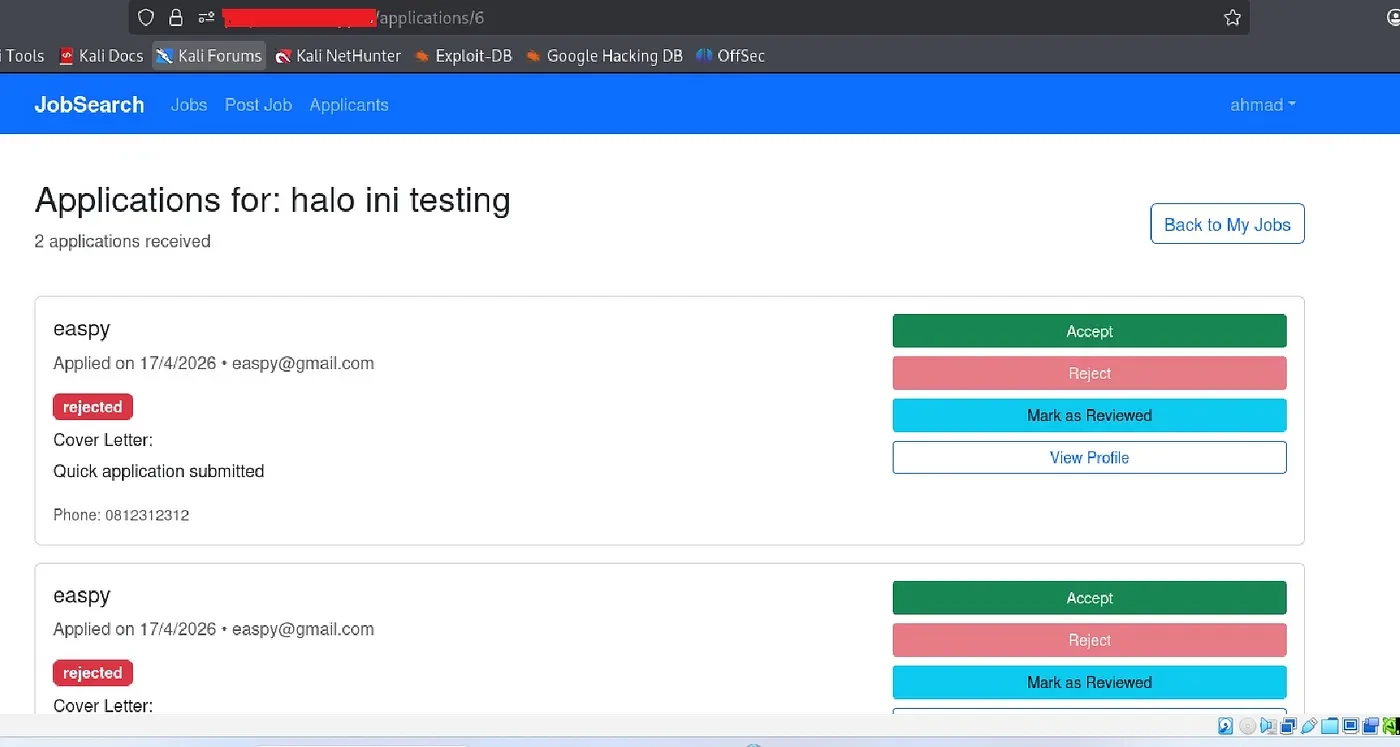
The application was still accessible. That raised the key question: is this data mine, or does it belong to someone else?
Exploitation
Step 1: Change the ID in the path
Starting from a legitimate request for /applications/3, the researcher substituted other numeric IDs directly in the URL:
/applications/6
The response still returned application data, with no error and no warning. The important part is that the server accepted an object identifier supplied by the client and returned the corresponding record without checking who owned it.
Step 2: Enumerate further IDs
To confirm this was not a one-off, the researcher tried several more IDs:
/applications/2/applications/4/applications/5
All of them were accessible. More importantly, the data did not belong to the researcher's company. At that point the conclusion was that this was not a small bug but an IDOR (Insecure Direct Object Reference), one of the forms of Broken Access Control discussed in the OWASP Top 10 2021.
Step 3: Go beyond reading
Usually an IDOR only allows reading data. Here the impact went further. The researcher tried the features available on an application:
- Accept candidate
- Reject candidate
- Give a review
All of them succeeded, with no error, no validation and no warning. In other words, the researcher could process applications belonging to other companies, influence their recruitment outcomes, and damage the integrity of the system without any obstacle.
Root cause
The researcher identifies three problems.
- No ownership check. The system never verified whether the application belonged to the company that was logged in.
- No authorisation validation on the server. The server processed the request directly, as if every user were entitled to access every record.
- Predictable IDs. Incremental identifiers (
1, 2, 3, ...) made exploitation very easy.
In practice the endpoint trusted the client-supplied identifier and acted on it without tying it to the authenticated company. The same gap applied to the state-changing actions (accept, reject, review), which is why they worked as well as the read.
Impact
If exploited by a malicious party, the researcher lists these consequences:
- Leakage of applicant data (a privacy issue)
- Manipulation of recruitment results
- Damage to the company's reputation
- Potential fraud in the hiring process
In other words, it is not only a technical problem but also a business one. The researcher rates the vulnerability CVSS 8.8 (High), with high impact on confidentiality, integrity and availability, and references MITRE CWE-639 and PortSwigger's technical discussion for classification.
Fix
The researcher lists what should be done.
- Validate ownership. Every request must confirm that the record belongs to the user, for example:
SELECT * FROM applications WHERE id = ? AND company_id = current_user.company_id;
- Use RBAC. Role-Based Access Control makes clear who is allowed to do what.
- Do not trust the frontend. All validation must happen on the server, not only in the UI.
- Use safer identifiers. Replacing incremental IDs with UUIDs reduces the chance of exploitation:
/applications/550e8400-e29b-41d4-a716-446655440000
Variants to test
- Read by ID on any object endpoint. Take a legitimate request such as
/applications/3, substitute another numeric ID, and look for a successful response containing data that does not belong to your account. A positive result is another company's record being returned rather than an error. - State-changing actions on foreign objects. Repeat the same substitution on accept, reject and review requests. A positive result is the action succeeding on an application that belongs to another company, with no error and no warning.
- Sequential enumeration. Walk through consecutive IDs (
2,4,5, ...) and check whether each returns data. A positive result is a run of accessible records that are not yours. - UUID endpoints. Where identifiers are UUIDs, test whether the server still enforces ownership; a UUID makes guessing harder but does not replace an authorisation check.
Hunting notes
This kind of bug tends to hide in plain object-lookup endpoints of multi-tenant applications, where a company or user role is expected to see only its own records. The signal during recon is a numeric identifier in the path of a request that returns a single record, especially when the application exposes several roles.
The researcher demonstrated impact by going past read access: after confirming that other companies' applications were readable, the accept, reject and review actions were shown to work on them too. That turned a data exposure into a manipulation of another company's recruitment process, which is the kind of consequence that makes the severity clear.
Closing reflection
The researcher's own lesson from the exercise is that a vulnerability does not always come from a complex technique but from something simple that was overlooked. Changing a number in a URL looks trivial, but without correct access control the effect can be very large. Security is not only about logging in; it is about making sure every user can access only what is genuinely theirs.
What happened, in plain words
A security researcher joined a vulnerability challenge and tested a job portal, a website where companies post job vacancies and candidates apply for them. The researcher had a normal account for a company, logged in, and noticed that each application had its own web address ending in a number, like /applications/3. Out of curiosity, the researcher changed that number to another one, and the page still loaded, but it showed an application that belonged to a different company. The researcher could also accept, reject and review those foreign applications. That is a serious access-control mistake: the website let one company see and change another company's recruitment data simply by editing a number in the address bar. This article walks through the same steps in beginner terms, explaining every concept along the way.
The target: a job portal that looked normal
The application under test was a job portal. Its features were the usual ones for this kind of site:
- Companies could post vacancies.
- Candidates could apply for those vacancies.
- Companies could review, accept or reject candidates.
Everything appeared to work as intended. Nothing looked broken from the outside.
What caught the researcher's attention was a single endpoint used to view the data of one application:
/applications/{id}
An endpoint is simply a specific address on a website that the browser (or an app) can ask for. Think of a large office building: the building is the website, and each endpoint is a particular desk or room you can walk up to and ask a question. Here the endpoint is the "desk" that hands out the details of one job application.
The {id} part is a placeholder. It stands for an identifier, a number or code that tells the server which specific application you want. If you have ever seen a web address like shop.example.com/order/1234, the 1234 is that kind of identifier: it points at one particular order out of many.
At first glance this looked like an ordinary endpoint for reading one application. Nothing about it seemed suspicious until the researcher started wondering what would happen if the number in the path were changed.
Setup: logging in as a company
The only precondition described is an authenticated account with the perusahaan (company) role. "Authenticated" means the website knows who you are because you logged in with a username and password. A role is a label the website attaches to your account that says what kind of user you are, for example a company or a candidate. The website uses that label to decide which features to show you.
The researcher logged in as that company user and opened one of the applications. No tools, versions or other accounts are mentioned.
Finding it: changing the number
Logged in as the company user, the researcher opened an application by its numeric ID:
/applications/3
The data appeared normally, which is exactly what you would expect: the company asked for one of its own applications and got it.
The researcher then did the most classic thing in security testing: changed the number 3 to 6.
/applications/6
The application was still accessible. That raised the key question: is this data mine, or does it belong to someone else?
This is the heart of the whole story. A website that shows you your own data is working correctly. A website that shows you someone else's data because you typed a different number is not checking who is allowed to see what. The researcher had not used any special tool, cracked any password or written any code. The browser's address bar was enough.
Exploitation
Step 1: Change the ID in the path
Starting from a legitimate request for /applications/3, the researcher substituted other numeric IDs directly in the URL:
/applications/6
The response still returned application data, with no error and no warning. The important part is that the server accepted an object identifier supplied by the client and returned the corresponding record without checking who owned it.
A few words here, because they matter for everything that follows. The client is your browser, the program on your computer that sends requests. The server is the computer far away that stores the data and answers those requests. When you type an address or click a link, your browser sends a request to the server, and the server sends back a response, usually a web page or some data. An object is just one stored item in the server's database, in this case one job application. The identifier is the number that names that object.
Normally the server should ask two questions before handing over an object: "Does this object exist?" and "Is the person asking allowed to see it?" Here it only answered the first. It took the number from the browser at face value, as if a visitor at a reception desk were allowed to walk into any office just by reading the room number off a door.
Step 2: Enumerate further IDs
To confirm this was not a one-off, the researcher tried several more IDs:
/applications/2/applications/4/applications/5
This block is three addresses written one after another: /applications/2, /applications/4 and /applications/5. Each one asks the server for a different application record. Trying a series of numbers like this is called enumeration: walking through possible values one by one to see what comes back.
All of them were accessible. More importantly, the data did not belong to the researcher's company. At that point the conclusion was that this was not a small bug but an IDOR (Insecure Direct Object Reference), one of the forms of Broken Access Control discussed in the OWASP Top 10 2021.
Let us unpack those terms. An IDOR happens when a website uses a direct reference to an object, such as a number in the address, and does not check that the person making the request is allowed to use that reference. The reference is "direct" because it points straight at the stored object, and it is "insecure" because anyone who changes it can reach objects that are not theirs. A simple comparison: a hotel where every room key is just the room number written on a card, and the door opens for anyone who writes a different number on their own card.
Broken Access Control is the broader category: any situation where the website fails to enforce who may do what. OWASP is a non-profit organisation that publishes widely used guidance on web security, and its Top 10 is a list of the most common categories of web security problems. The 2021 edition is the version referenced here, and Broken Access Control sits at the top of that list.
Step 3: Go beyond reading
Usually an IDOR only allows reading data. Here the impact went further. The researcher tried the features available on an application:
- Accept candidate
- Reject candidate
- Give a review
All of them succeeded, with no error, no validation and no warning. In other words, the researcher could process applications belonging to other companies, influence their recruitment outcomes, and damage the integrity of the system without any obstacle.
This is the part that turns a privacy problem into a business problem. Reading someone else's application is bad enough. Being able to press "accept" or "reject" on it means the researcher could change the outcome of another company's hiring process. Validation here means the checks the server should perform before acting on a request, such as confirming that the application belongs to the company making the request. None of those checks were in place.
Root cause
The researcher identifies three problems.
- No ownership check. The system never verified whether the application belonged to the company that was logged in. Ownership means which account an object belongs to. The server knew who was logged in, but it never compared that with the owner of the application.
- No authorisation validation on the server. The server processed the request directly, as if every user were entitled to access every record. Authorisation is the decision about what a logged-in user is allowed to do, as opposed to authentication, which is only about proving who they are. Logging in successfully does not mean you may see everything.
- Predictable IDs. Incremental identifiers (
1, 2, 3, ...) made exploitation very easy. An incremental identifier simply counts up by one for each new record, so if you can see number 3, you can guess that 2, 4 and 5 exist. It is like house numbers on a street: once you know one, the neighbours are obvious.
In practice the endpoint trusted the client-supplied identifier and acted on it without tying it to the authenticated company. The same gap applied to the state-changing actions (accept, reject, review), which is why they worked as well as the read. A state-changing action is any request that modifies data on the server rather than just reading it, such as accepting a candidate or saving a review.
Impact
If exploited by a malicious party, the researcher lists these consequences:
- Leakage of applicant data (a privacy issue)
- Manipulation of recruitment results
- Damage to the company's reputation
- Potential fraud in the hiring process
In other words, it is not only a technical problem but also a business one. The researcher rates the vulnerability CVSS 8.8 (High), with high impact on confidentiality, integrity and availability, and references MITRE CWE-639 and PortSwigger's technical discussion for classification.
A few of those terms deserve a plain explanation. CVSS is a standard scoring system for the severity of a security flaw; scores run from 0 to 10, and 8.8 falls in the High band. The three words confidentiality, integrity and availability describe the three things security tries to protect: confidentiality means data stays private, integrity means data stays correct and unaltered, and availability means the service keeps working. MITRE is the organisation that maintains CWE, a catalogue of common weakness types, and CWE-639 is the entry for authorisation bypass through a user-controlled key, which is exactly this pattern. PortSwigger is a well-known security training and research company whose material is often used as a reference for this class of bug.
Fix
The researcher lists what should be done.
- Validate ownership. Every request must confirm that the record belongs to the user, for example:
SELECT * FROM applications WHERE id = ? AND company_id = current_user.company_id;
This line is a database query written in SQL, the language used to ask a database for information. Read it piece by piece. SELECT * means "give me all columns of the matching rows". FROM applications means the data comes from the table that stores applications, a table being like a spreadsheet where each row is one record. WHERE id = ? restricts the result to the row whose identifier matches the one requested; the ? is a placeholder for that value, filled in safely by the program rather than pasted in as text. AND company_id = current_user.company_id adds the crucial second condition: the row's company must be the same as the company of the user who is currently logged in. With that condition, asking for someone else's application returns nothing, because the two company values do not match. The comparison is a bouncer at the door checking that the name on the invitation matches the name on your ID.
- Use RBAC. Role-Based Access Control makes clear who is allowed to do what. In plain terms, you write down rules per role, for example "a company may read, accept, reject and review only applications addressed to it", and the server enforces those rules on every request.
- Do not trust the frontend. All validation must happen on the server, not only in the UI. The frontend is what runs in your browser: the pages, buttons and menus you see. The UI, or user interface, is that visible part. Anything enforced only in the browser can be bypassed, because the browser belongs to the visitor. Hiding a button does not stop anyone from sending the request by hand. The server is the only place where a check cannot be skipped.
- Use safer identifiers. Replacing incremental IDs with UUIDs reduces the chance of exploitation:
/applications/550e8400-e29b-41d4-a716-446655440000
A UUID is a long, random-looking identifier, here shown in its usual form of groups of hexadecimal characters separated by hyphens. Because it is not a small counting number, you cannot guess the next one by adding one. That makes casual enumeration much harder. It is not a substitute for the ownership check, though: a hard-to-guess identifier only makes the door harder to find, it does not lock it.
Variants to test
These are the patterns worth trying on other sites, in the same spirit as the original test.
- Read by ID on any object endpoint. Take a legitimate request such as
/applications/3, substitute another numeric ID, and look for a successful response containing data that does not belong to your account. A positive result is another company's record being returned rather than an error. A 200 is the standard HTTP status code meaning "OK, here is your content"; an error would normally come back as a 4xx code such as 403 (forbidden) or 404 (not found). A tenant is one customer organisation sharing a multi-tenant application, here one company among many. - State-changing actions on foreign objects. Repeat the same substitution on accept, reject and review requests. A positive result is the action succeeding on an application that belongs to another company, with no error and no warning.
- Sequential enumeration. Walk through consecutive IDs (
2,4,5, ...) and check whether each returns data. A positive result is a run of accessible records that are not yours. - UUID endpoints. Where identifiers are UUIDs, test whether the server still enforces ownership; a UUID makes guessing harder but does not replace an authorisation check.
Hunting notes
This kind of bug tends to hide in plain object-lookup endpoints of multi-tenant applications, where a company or user role is expected to see only its own records. The signal during recon is a numeric identifier in the path of a request that returns a single record, especially when the application exposes several roles. Recon, short for reconnaissance, is the early phase of testing where you simply look around and note how the application is built before trying anything.
The researcher demonstrated impact by going past read access: after confirming that other companies' applications were readable, the accept, reject and review actions were shown to work on them too. That turned a data exposure into a manipulation of another company's recruitment process, which is the kind of consequence that makes the severity clear.
Closing reflection
The researcher's own lesson from the exercise is that a vulnerability does not always come from a complex technique but from something simple that was overlooked. Changing a number in a URL looks trivial, but without correct access control the effect can be very large. Security is not only about logging in; it is about making sure every user can access only what is genuinely theirs.
Glossary
- API: the set of addresses and rules a website offers so that programs, including your browser, can ask it for data or actions.
- Authentication: proving who you are, usually by logging in with a username and password.
- Authorisation: deciding what a logged-in user is allowed to do or see.
- Availability: keeping a service working and reachable for its users.
- Broken Access Control: a class of flaw where a website fails to enforce who may do what.
- Client: the program on your side, normally your browser, that sends requests to a server.
- Confidentiality: keeping data private to those allowed to see it.
- CVSS: a standard 0 to 10 scoring system for the severity of a security flaw.
- CWE: a catalogue of common weakness types maintained by MITRE; CWE-639 covers authorisation bypass through a user-controlled key.
- Endpoint: a specific address on a website that answers a particular kind of request.
- Enumeration: trying a series of possible values, such as consecutive numbers, to see which ones return data.
- Frontend: the part of a website that runs in your browser, including pages, buttons and menus.
- HTTP status code: a number in the server's reply that says how the request went, such as 200 for OK or 403 for forbidden.
- IDOR (Insecure Direct Object Reference): a flaw where a website uses a direct reference such as a number in the address without checking that the requester may use it.
- Identifier (ID): the number or code that names one particular stored object.
- Incremental ID: an identifier that counts up by one for each new record, making the next values easy to guess.
- Integrity: keeping data correct and unaltered by anyone not allowed to change it.
- MITRE: the organisation that maintains the CWE catalogue.
- Multi-tenant: an application shared by several separate customer organisations, each expected to see only its own data.
- Object: one stored item in a server's database, such as a single job application.
- OWASP: a non-profit organisation that publishes widely used web security guidance, including the Top 10 list of common flaw categories.
- Ownership: which account a stored object belongs to.
- PortSwigger: a security training and research company whose material is often used as a reference for web vulnerabilities.
- RBAC (Role-Based Access Control): granting permissions according to a user's role, such as company or candidate.
- Recon: the early phase of testing where you look around and note how an application is built.
- Role: a label on an account, such as company or candidate, that determines which features it gets.
- Server: the remote computer that stores data and answers requests from clients.
- SQL: the language used to ask a database for information or to change it.
- State-changing action: a request that modifies data on the server rather than only reading it, such as accepting a candidate.
- Tenant: one customer organisation within a multi-tenant application.
- UI (user interface): the visible part of a website that a person interacts with.
- UUID: a long, random-looking identifier that is impractical to guess by counting.
- Validation: the checks a server performs before acting on a request.
- Vulnerability: a weakness in a system that someone could abuse to do something they should not be able to do.



