Design Flaw : A Tale of Permanent DOS (Informative > Triaged)
The application locked a user account after a number of failed login attempts, and this lockout also destroyed the victim's active session. An attacker could repeatedly submit wrong passwords for a victim's account to trigger the lockout and log the victim out, causing a denial of service.
 Published on akashhamal0x01.medium.com
This is my first writeup here on medium. Hope you enjoy it :).
The full write-up lives on its author's site
It belongs to its author, so we link to it rather than copy it. The other two tabs are our own rewrites, checked against it.
Context
While testing a web application, the researcher found a design flaw in how the login rate limit and account lockout were implemented. The feature in question is the standard login form with a lockout after a number of unsuccessful attempts. Normally, a lockout is meant to slow down password guessing against a given account. In this application, the lockout had a side effect: it also destroyed the victim's existing logged-in session.
The write-up describes the issue as an application-level denial of service caused by a design flaw, and says it could lead to permanent DoS of a single user account, or mass DoS once the process is automated.
Setup
- A test account on the target web application.
- A second session on an Android device, connected through a different network, to check whether the lockout was IP based or account based.
- Manual testing of the login functionality, including repeated wrong-password attempts.
No specific tooling, versions or endpoints are given in the report.
Finding it
The researcher started by testing every functionality, and checked the rate limit on the login request. A rate limit was in place: after some unsuccessful attempts the account was locked out. When the researcher then refreshed the account in the browser, the session was logged out.
That raised the question of how the behaviour could be abused, but first the lockout had to be characterised: was it IP based or account based?
Exploitation
Step 1: Confirm the lockout is account based
The researcher logged into the account on Android, brute forced the account password, and was logged out on Android, meaning the logged-in session was destroyed. This showed the lockout was account based, not IP based.
Step 2: Recognise the consequence
Once the login attempt limit is exceeded, the victim is logged out. In other words, any attacker can brute force the victim's account with wrong passwords, trigger the account lockout, and thereby log the victim out of the website.
The researcher argues this should not happen, for two reasons:
- The attacker has not gained access to the account, because the lockout prevented that.
- The victim will never brute force their own password, since the victim has the option to reset the password.
Step 3: Report and triage
The researcher notes having received good bounties from this method, but that reporting it was not as easy as it looks: the report must be clear and concise to save time on both sides. In one case the report was understandable, but the developers did not seem to understand the risk. The timeline for that report was:
Report Sent: Apr 1, 2021
Got Reply : Apr 9 2021, status => informative with below reasoning :
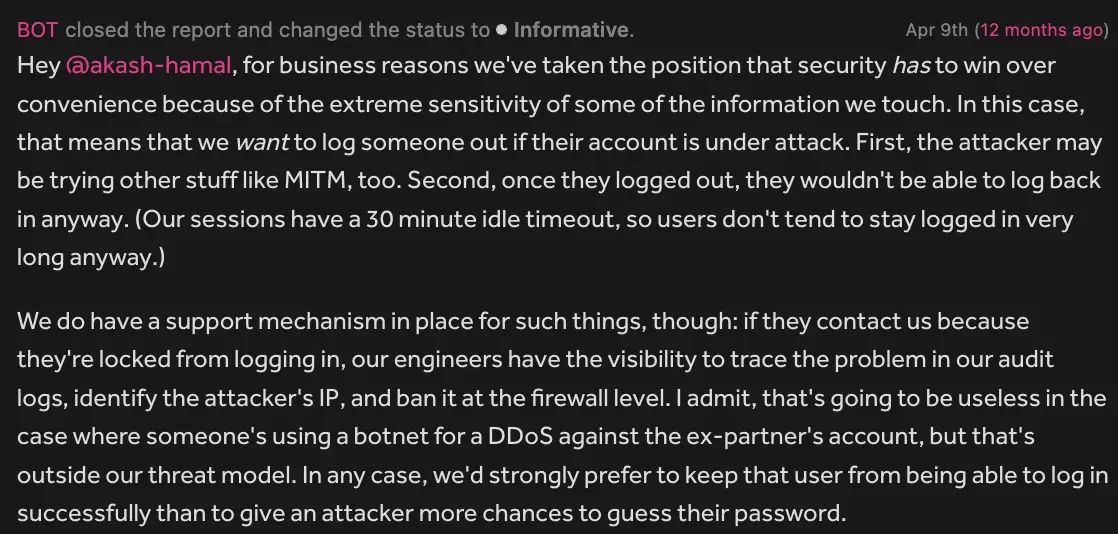
The internal team's reasoning treated the issue as involving a man-in-the-middle attack, which the researcher says is not true. The researcher also notes that it takes time for a team to digest a new attack vector, and that the program was very old; knowing this was the first time such a scene had been discovered, the researcher was ready with a reply giving a briefer explanation:
Reply sent : Apr 9, 2021
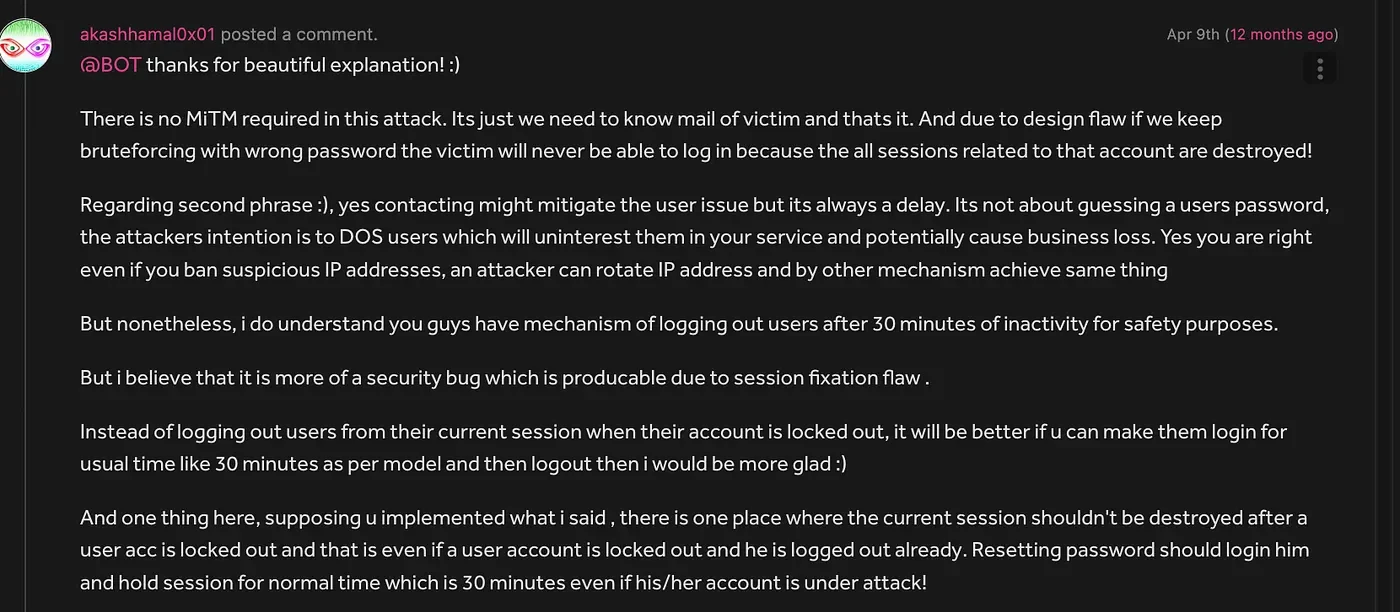
After that reply there was silence from the program team for nearly three months:
Got Reply: July 29, 2021
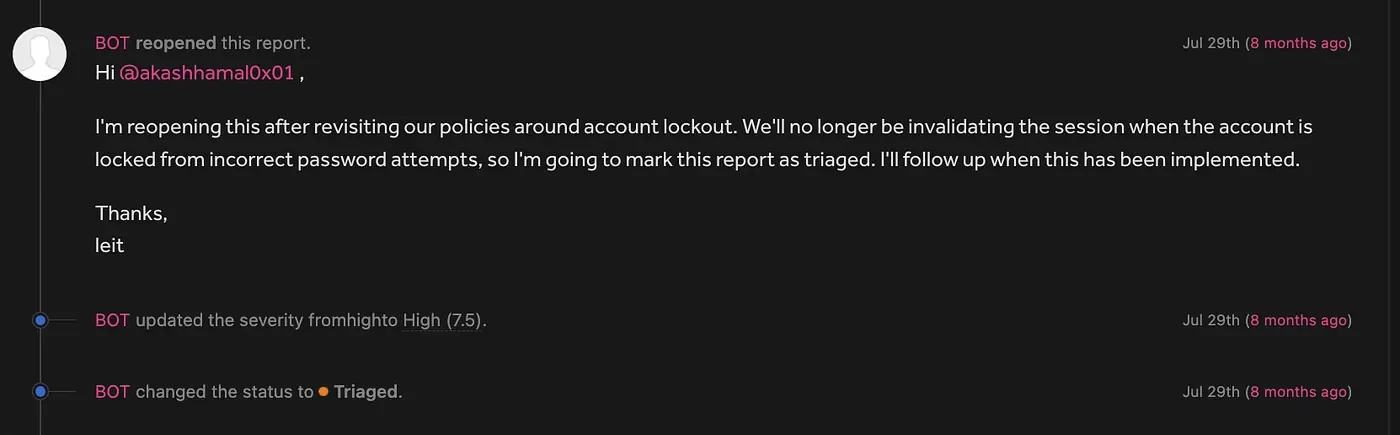
The severity was then set to HIGH, because the issue can lead to permanent DoS of a single user account, or of mass accounts once the process is automated.
The researcher got a few more bounties from this method and shared it on Twitter on October 10, 2021:
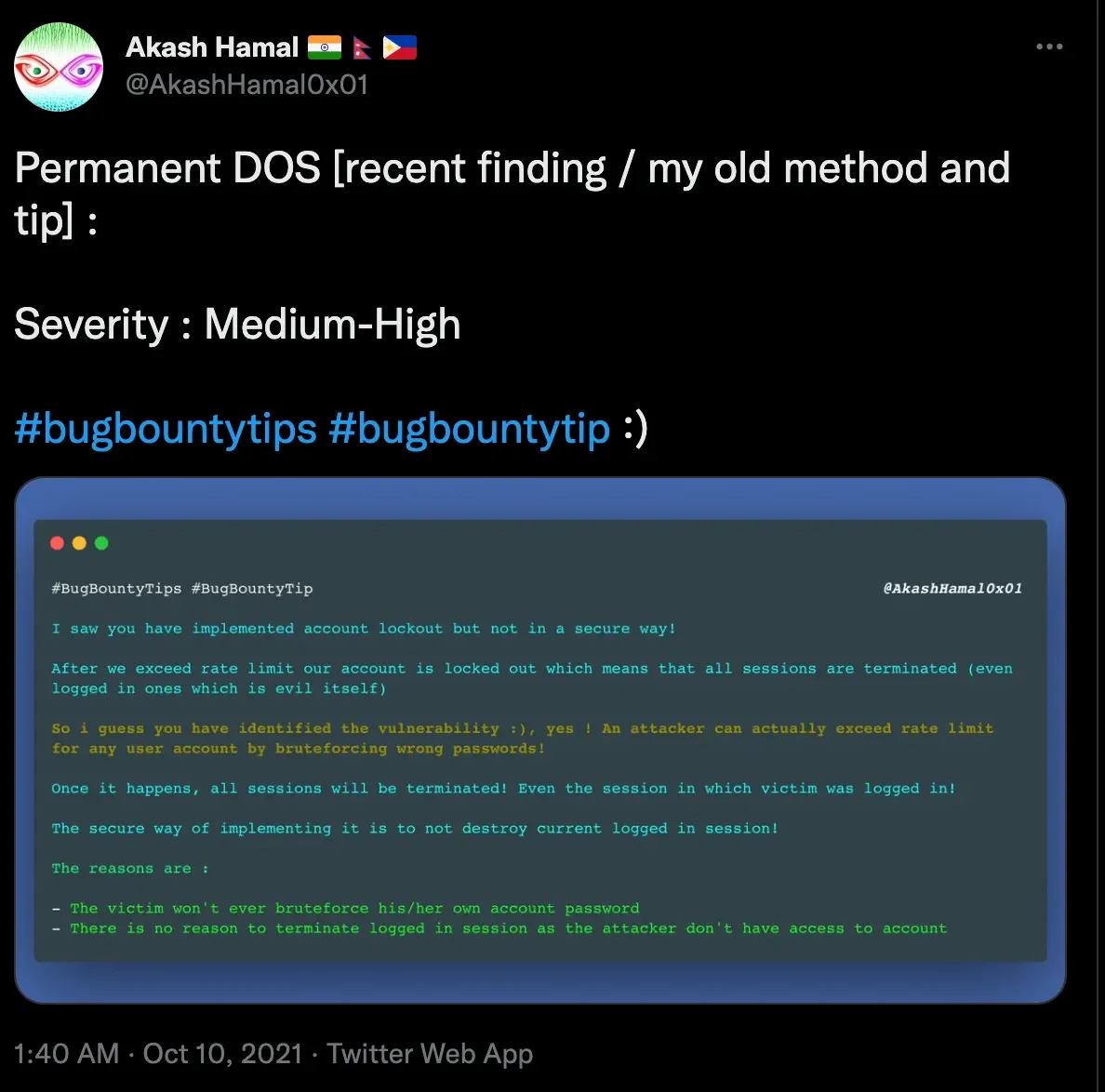
Tweet link: https://twitter.com/AkashHamal0x01/status/1446927311161331712
Root cause
The mistake is in the design of the lockout: locking the account also invalidates the victim's active session. The lockout itself works as intended against password guessing, but the session destruction is an unnecessary side effect that the attacker can trigger at will by submitting wrong passwords. Because the lockout is keyed to the account rather than the source IP, an attacker on any network can trigger it for any known username.
The report does not describe the server-side implementation, so the exact code path that destroys the session is not shown.
Impact
An attacker who knows a victim's username can repeatedly submit wrong passwords until the account is locked, which logs the victim out of the website. Repeated or automated attempts turn this into a permanent denial of service against a single account, and the same process can be scaled to many accounts at once. The attacker does not gain access to the account; the impact is availability, not confidentiality or integrity.
The researcher suggests reporting this as a MEDIUM-HIGH severity issue when found, and describes it as mostly acceptable because it is an application-level DoS caused by a design flaw. In the case described above, the program eventually rated it HIGH.
Fix
The report does not state what change, if any, the program made. Based on the described behaviour, the lockout should not destroy existing sessions: locking out further login attempts is enough to stop password guessing, and the victim's current session should remain valid.
Variants to test
- Account lockout on login: submit wrong passwords for a known username from a different network while a valid session is open elsewhere. A positive result is that the existing session is terminated when the lockout triggers.
- Lockout scope check: repeat the attempts from a different network. If the lockout still applies to the account, it is account based and can be triggered remotely by anyone.
- Automation: the report notes that automating the wrong-password submissions could lead to mass DoS of accounts.
Closing notes
The researcher lists two lessons: how implementation choices in a design can lead to high severity flaws, and the importance of patience, plus explaining the finding more briefly and in detail from the attacker's point of view, including ease of exploitation, when a triager does not understand it.
Update as of Apr 11: a friend of the researcher was rewarded because of this write-up:
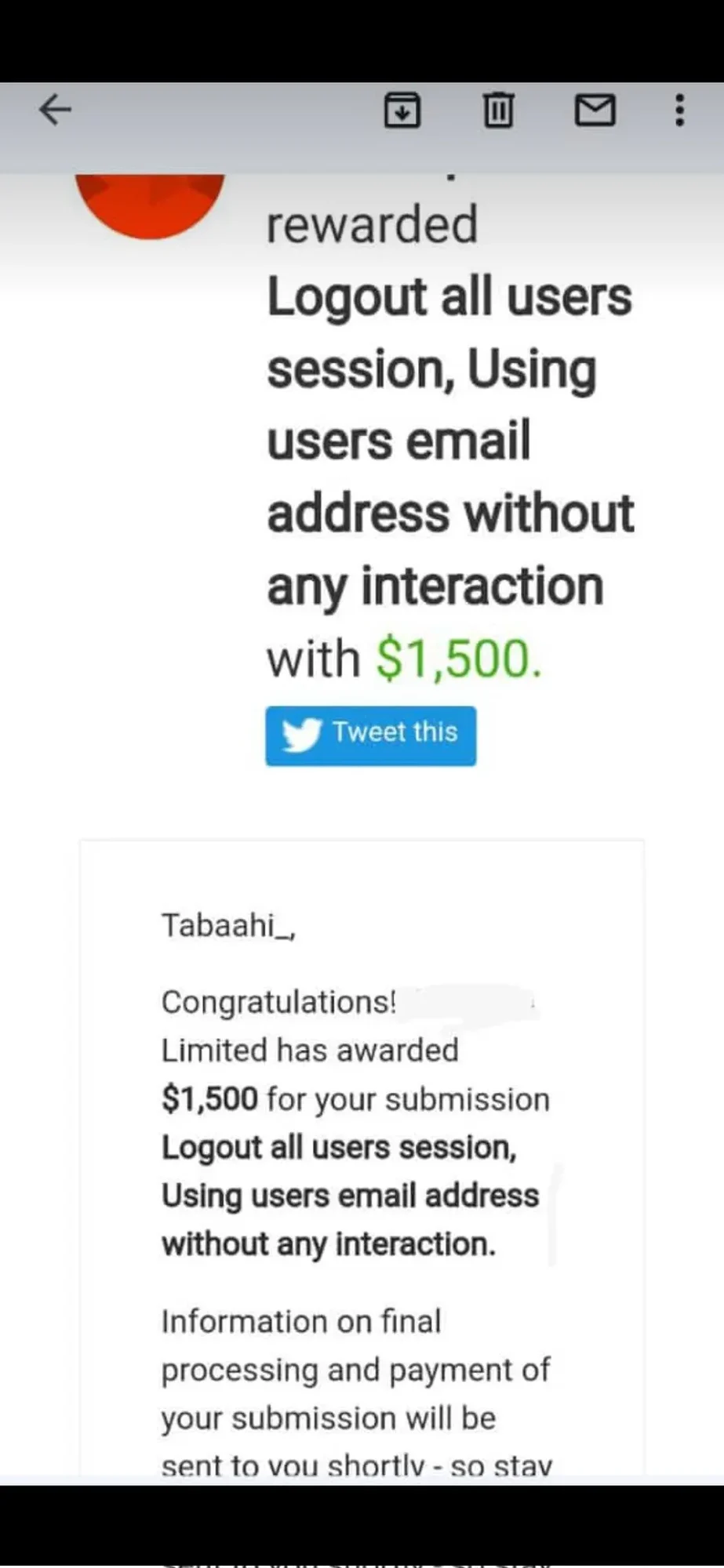
tweet link: https://twitter.com/tabaahi_/status/1513450589765570567
What happened, in plain words
A security researcher was testing a website's login page. Like many websites, this one tries to stop people from guessing passwords: after a certain number of wrong attempts, it locks the account. That part is normal and sensible.
The problem was a side effect. When the account got locked, the website also threw out whoever was already logged in to that account. So an attacker who knows your username can type wrong passwords on purpose, get your account locked, and in doing so kick you out of the website. They never learn your password and never get into your account. They just make sure you cannot stay logged in.
If the attacker does this over and over, or writes a small program to do it for many usernames at once, the victim (or many victims) can be kept out of the site permanently. This kind of attack, where the goal is to stop a service from being usable rather than to steal data, is called a denial of service, or DoS.
The researcher calls this a design flaw: the lockout feature itself works, but the way it was put together with the login session creates a weakness. The report walks through how the researcher found it, how they confirmed it, how the first report was misunderstood, and how it was eventually accepted as a high severity issue.
Background you need first
A few ideas come up again and again, so here they are from zero.
Logging in and sessions. When you type your username and password into a website and it accepts them, the website needs a way to remember, on the next page you open, that you are the same person. It does this by giving your browser a small piece of data, usually called a session cookie or a session token. Your browser sends it back with every request, like a wristband at an event: you show it at the door and you are let in without showing your ID again. If the website decides the wristband is no longer valid, you are logged out, even if you never clicked "log out".
Rate limiting. A rate limit is a cap on how often something can be done. A login form might allow, say, a handful of attempts and then refuse more for a while. It exists because attackers often try many passwords quickly, a technique called brute forcing: guessing password after password until one works.
Account lockout. A stronger version of a rate limit. After too many wrong passwords, the account itself is locked, so nobody can log in to it until it is unlocked (often by waiting, or by resetting the password).
IP address versus account. Every device on the internet has an address, its IP address, a bit like a postal address for your connection. A website can decide to block based on the IP address (the place the attempts come from) or based on the account (the username being targeted). The difference matters a lot, and the researcher spends time checking which one this site used.
Denial of service (DoS). Normally when we talk about a security bug we mean someone stealing data or breaking in. DoS is different: the attacker's goal is to make something unavailable to its rightful user. Think of someone repeatedly pressing the "call" button on a lift so it never reaches your floor. Nothing is stolen, but you cannot use the lift.
Man-in-the-middle (MiTM). An attack where someone sits between you and the website and eavesdrops or alters the traffic. It is a real class of attack, but it is not what this report is about, and that misunderstanding is part of the story.
Triager. Many bug bounty programmes (places where companies pay people for finding bugs) have a triager: a person who reads incoming reports and decides whether they are valid, how serious they are, and whether a reward is due.
Severity. A rough rating of how bad a bug is, often low, medium, high or critical. It helps a company decide what to fix first.
Setting up the test
To investigate, the researcher needed:
- A test account on the target web application.
- A second session on an Android device, connected through a different network, to check whether the lockout was IP based or account based.
- Manual testing of the login functionality, including repeated wrong-password attempts.
The second device on a different network is the key trick. If the lockout were tied to the IP address, then attempts from a different network should not affect the account elsewhere. If it is tied to the account, they will. The report does not name any specific tools, versions or endpoints.
Finding it
The researcher started by testing every functionality, and checked the rate limit on the login request. A rate limit was in place: after some unsuccessful attempts the account was locked out. When the researcher then refreshed the account in the browser, the session was logged out.
That raised the question of how the behaviour could be abused, but first the lockout had to be characterised: was it IP based or account based?
In plain terms: the researcher poked at the login form, saw that wrong passwords eventually lock the account, and then noticed something odd. Refreshing the page logged them out. That is not what a lockout is supposed to do. A lockout should stop new logins; it should not end a session that is already open. The next question was whether this could be triggered by someone else, from somewhere else.
Exploitation
Step 1: Confirm the lockout is account based
The researcher logged into the account on Android, brute forced the account password, and was logged out on Android, meaning the logged-in session was destroyed. This showed the lockout was account based, not IP based.
Why this step matters: if the lockout were IP based, an attacker could only lock out people sharing their network, which is a much smaller problem. Because it is account based, anyone anywhere who knows a username can trigger it. The Android device on a different network was the control in the experiment: it proved the lockout follows the account, not the connection.
Step 2: Recognise the consequence
Once the login attempt limit is exceeded, the victim is logged out. In other words, any attacker can brute force the victim's account with wrong passwords, trigger the account lockout, and thereby log the victim out of the website.
The researcher argues this should not happen, for two reasons:
- The attacker has not gained access to the account, because the lockout prevented that.
- The victim will never brute force their own password, since the victim has the option to reset the password.
Put simply: the lockout is doing its job of keeping the attacker out, but it is also punishing the victim for something the victim did not do. The victim would never sit there typing wrong passwords; if they forgot their password they would use the reset option. So the only person who can trigger the lockout is someone who is not the account owner. Locking the owner out of their own session therefore protects nobody and only helps the attacker.
Step 3: Report and triage
The researcher notes having received good bounties from this method, but that reporting it was not as easy as it looks: the report must be clear and concise to save time on both sides. In one case the report was understandable, but the developers did not seem to understand the risk. The timeline for that report was:
Report Sent: Apr 1, 2021
Got Reply : Apr 9 2021, status => informative with below reasoning :
The image shows the reply from the programme team, which marked the report as informative and gave its reasoning.
The internal team's reasoning treated the issue as involving a man-in-the-middle attack, which the researcher says is not true. The researcher also notes that it takes time for a team to digest a new attack vector, and that the program was very old; knowing this was the first time such a scene had been discovered, the researcher was ready with a reply giving a briefer explanation:
Reply sent : Apr 9, 2021
The image shows the researcher's follow-up reply, written to explain the issue more briefly.
A man-in-the-middle attack would mean someone intercepting traffic between the victim and the website. Here nothing is intercepted: the attacker simply sends wrong passwords to the login form like any ordinary visitor. That is why the researcher says the team's reasoning was off, and why the follow-up reply was needed.
After that reply there was silence from the program team for nearly three months:
Got Reply: July 29, 2021
The image shows the reply that arrived after the long wait.
The severity was then set to HIGH, because the issue can lead to permanent DoS of a single user account, or of mass accounts once the process is automated.
The researcher got a few more bounties from this method and shared it on Twitter on October 10, 2021:
The image shows the tweet in which the method was shared.
Tweet link: https://twitter.com/AkashHamal0x01/status/1446927311161331712
Root cause
The mistake is in the design of the lockout: locking the account also invalidates the victim's active session. The lockout itself works as intended against password guessing, but the session destruction is an unnecessary side effect that the attacker can trigger at will by submitting wrong passwords. Because the lockout is keyed to the account rather than the source IP, an attacker on any network can trigger it for any known username.
The report does not describe the server-side implementation, so the exact code path that destroys the session is not shown.
In everyday terms: the lockout and the session are two separate things that should not be wired together. Locking the door to stop strangers getting in is fine. But the same lock should not also throw the owner out of the house. Here, one action (too many wrong passwords) does both, and the attacker controls that action.
Impact
An attacker who knows a victim's username can repeatedly submit wrong passwords until the account is locked, which logs the victim out of the website. Repeated or automated attempts turn this into a permanent denial of service against a single account, and the same process can be scaled to many accounts at once. The attacker does not gain access to the account; the impact is availability, not confidentiality or integrity.
Those last three words are worth unpacking. Confidentiality means keeping data secret; integrity means keeping data correct and unaltered; availability means keeping the service usable when people need it. This bug only touches availability. Nothing is stolen and nothing is changed, but the victim cannot use their account.
The researcher suggests reporting this as a MEDIUM-HIGH severity issue when found, and describes it as mostly acceptable because it is an application-level DoS caused by a design flaw. In the case described above, the program eventually rated it HIGH.
Fix
Based on the described behaviour, the lockout should not destroy existing sessions: locking out further login attempts is enough to stop password guessing, and the victim's current session should remain valid.
In plain words: keep the lockout, remove the side effect. If someone is already logged in, a stranger's failed attempts should not end that session.
Variants to test
If you want to look for this kind of bug yourself, here are some variations to try.
- Account lockout on login: submit wrong passwords for a known username from a different network while a valid session is open elsewhere. A positive result is that the existing session is terminated when the lockout triggers.
- Lockout scope check: repeat the attempts from a different network. If the lockout still applies to the account, it is account based and can be triggered remotely by anyone.
- Automation: the report notes that automating the wrong-password submissions could lead to mass DoS of accounts.
OTP means one-time password, the short code some sites send you by text or app to confirm it is really you. Two-factor verification means asking for two different proofs of identity, such as a password plus a code. These flows can have the same design mistake: a lock after failed attempts that also ends an existing session.
Closing notes
The researcher lists two lessons: how implementation choices in a design can lead to high severity flaws, and the importance of patience, plus explaining the finding more briefly and in detail from the attacker's point of view, including ease of exploitation, when a triager does not understand it.
Update as of Apr 11: a friend of the researcher was rewarded because of this write-up:
The image relates to the friend who was rewarded because of this write-up.
tweet link: https://twitter.com/tabaahi_/status/1513450589765570567
Glossary
- Account lockout: a defence that blocks all logins to an account after too many wrong password attempts.
- Application-level DoS: a denial of service caused by how the application itself behaves, rather than by flooding the network.
- Availability: the property of a service being usable when its owner needs it; one of the three classic security goals alongside confidentiality and integrity.
- Brute force: trying many passwords in sequence until one works.
- Bug bounty programme: a scheme where a company pays researchers for reporting security bugs.
- Confidentiality: keeping data secret from people who should not see it.
- Cookie / session token: a small piece of data a website gives your browser so it can recognise you on later requests.
- Denial of service (DoS): an attack whose goal is to make a service unavailable to its rightful user, rather than to steal or change data.
- Design flaw: a weakness in how a feature was planned and put together, rather than a mistake in a single line of code.
- Endpoint: a specific address on a website or API that performs a particular action, such as the login form's submit address.
- Informative: a triage status meaning the report was read but judged not to be a valid or actionable security issue.
- Integrity: keeping data correct and unaltered.
- IP address: the numeric address of a device or network connection on the internet.
- IP based lockout: a lockout that triggers based on where the attempts come from.
- Account based lockout: a lockout that triggers based on which account is being targeted, regardless of where the attempts come from.
- Man-in-the-middle (MiTM): an attack where someone sits between the victim and the website and intercepts or alters traffic.
- OTP (one-time password): a short code valid for a single use, often sent by text or app.
- Rate limit: a cap on how often an action can be performed in a period of time.
- Session: the state of being logged in, kept alive by a cookie or token the browser sends with each request.
- Severity: a rating of how serious a bug is, commonly low, medium, high or critical.
- Triager: the person at a bug bounty programme who reviews reports and decides their validity and severity.
- Two-factor verification: asking for two different proofs of identity, such as a password plus a code.
- Username: the name that identifies an account on a site, often known or guessable by others.


