DOS & Stored HTML Injection Bug Bounty Writeup
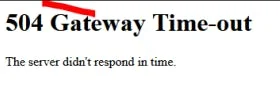
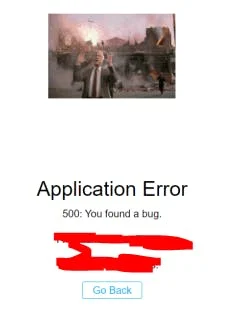
The chat reply feature stored user-supplied HTML without proper sanitisation, so an attacker could inject a working hyperlink into messages. Sending a very long message body also caused the site to lag and eventually return 500 and 504 errors for all users, taking the whole site down.
 Published on blog.riotsecurityteam.com
·May 19, 2021·
The full write-up lives on its author's site
It belongs to its author, so we link to it rather than copy it. The other two tabs are our own rewrites, checked against it.
Context
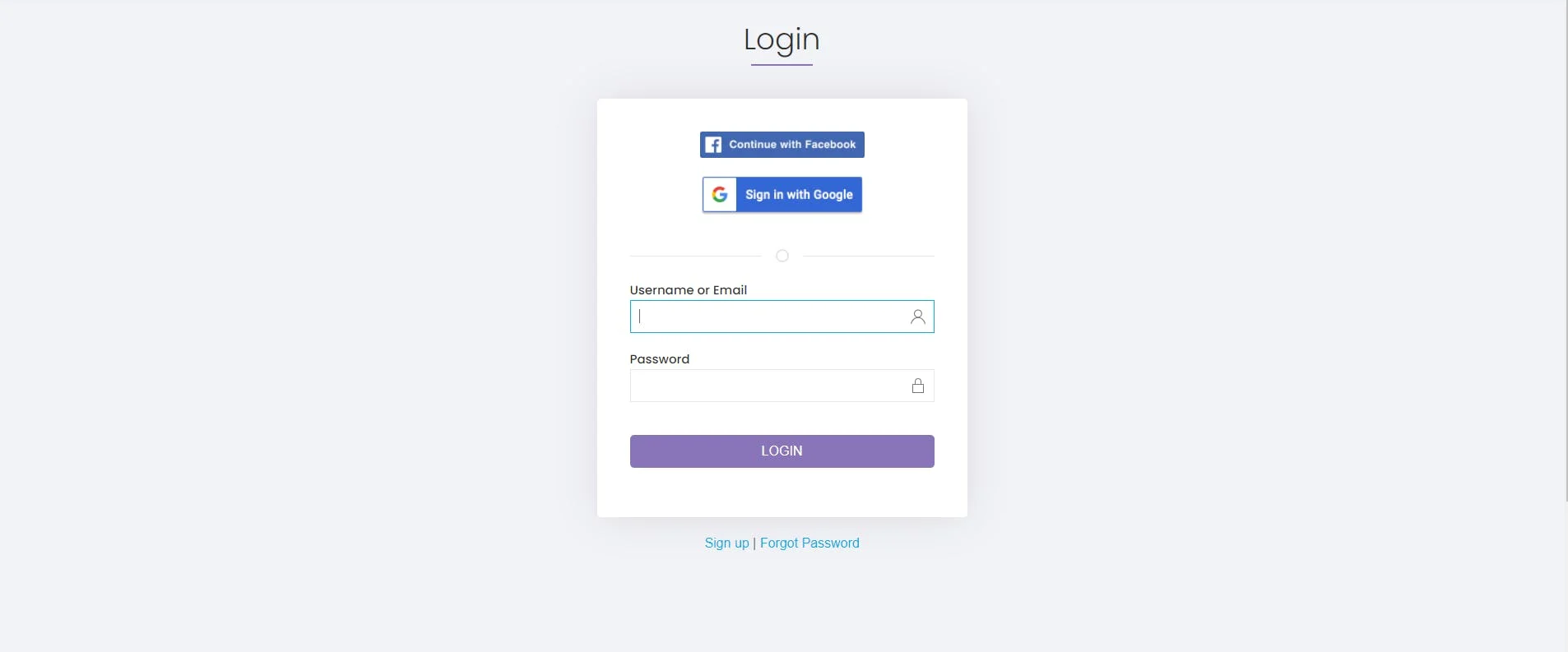
The target was a job search platform with more than 500,000 active users and over 2 million applications made through it. The researcher describes the login page as a clean, basic UI. The feature that mattered here was the chat: users could message a friend or anyone else with a username, a title and a body, all stored on the account. For a site whose main purpose is searching for jobs and applying to them, a messaging feature seemed odd, and that is exactly why it drew attention as a place to test.
Two issues came out of that feature: stored HTML injection in the chat message body, and a denial of service triggered by sending an oversized message body through the same endpoint.
Setup
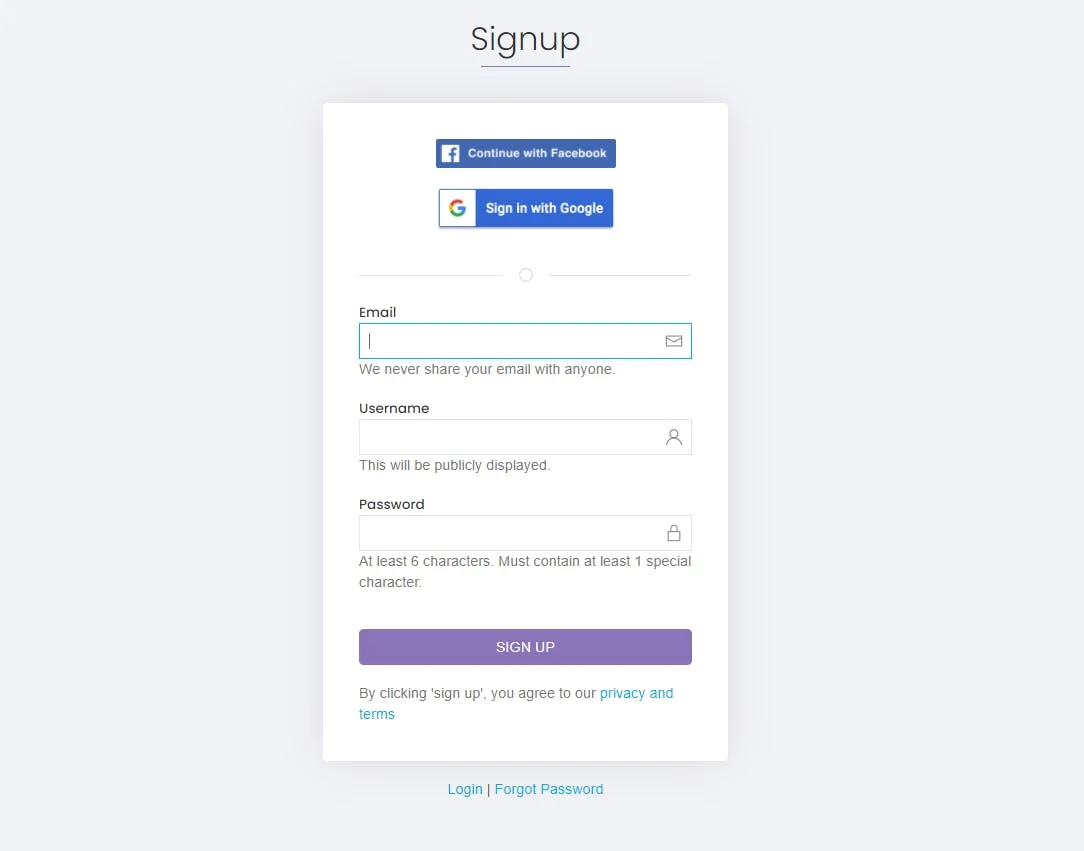
- Register a normal user account. The researcher notes this took a while, because registration required choosing talents, filling in addresses and stating which jobs were being looked for.
- Use Burp to capture and replay the chat reply request.
- Have a second account, in this case a friend's, to observe how messages render on the receiving side and to confirm whether the site is reachable.
Before going deeper into the chat, the researcher checked for CSRF. The application did use CSRF tokens and a CFUID, so that avenue was closed and attention moved to the chat functionality.
Finding it
The chat reply endpoint accepts a form-encoded body parameter. The first probe was a straightforward XSS attempt, then an HTML injection attempt to see what markup survived, and finally a very large body to see how the server coped with it. The chat stored the message body and rendered some markup from it, which is what made both the injection and the oversized message interesting.
Exploitation
Step 1: XSS attempt in the chat reply
The request was captured in Burp and an image-based XSS payload was placed in the message body:
POST /api/v1/chat_rooms/38589/reply HTTP/1.1
Host: thewebsite.com
Content-Length: 64
Accept: application/json, text/javascript, */*; q=0.01
X-CSRF-Token:X-CSRF Token value
X-Requested-With: XMLHttpRequest
Content-Type: application/x-www-form-urlencoded; charset=UTF-8
Origin: https://www.thewebsite.com
Referer: https://www.thewebsite.com
Accept-Encoding: gzip, deflate
Accept-Language: en-US,en;q=0.9
Cookie:Cookies
Connection: close

chat_message%5Bbody%5D=%22%3E%3Cimg+src+onerror%3Dalert(1)%3E%0A
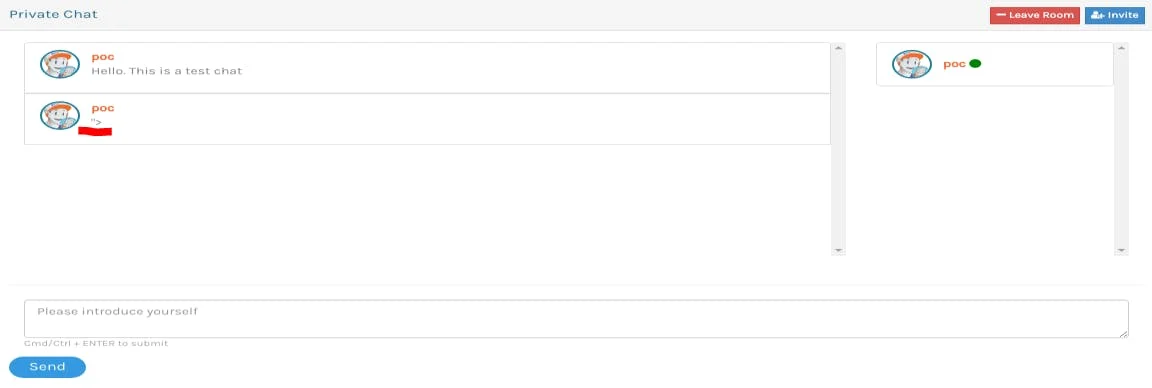
URL-decoded, the body value is an img tag with an empty src and an onerror handler containing alert(1). The idea is that the missing or invalid src fires the error event, which runs the handler. The response rendered a stripped version of the payload, which the researcher took as client-side sanitisation blocking the payload. The security measures on the chat were in place for this attempt.
Step 2: HTML injection with an anchor tag
Next the researcher tried to create hyperlinks instead of script:
POST /api/v1/chat_rooms/38589/reply HTTP/1.1
Host: thewebsite.com
Content-Length: 85
Accept: application/json, text/javascript, */*; q=0.01
X-CSRF-Token: X-CSRF-Token
X-Requested-With: XMLHttpRequest
Content-Type: application/x-www-form-urlencoded; charset=UTF-8
Origin: https://www.thewebsite.com
Referer: https://www.thewebsite.com
Accept-Encoding: gzip, deflate
Accept-Language: en-US,en;q=0.9
Cookie: Cookies

chat_message%5Bbody%5D=%3Ca+href%3Dhttps%3A%2F%2Fwww.google.com%3EHyperlink%3C%2Fa%3E
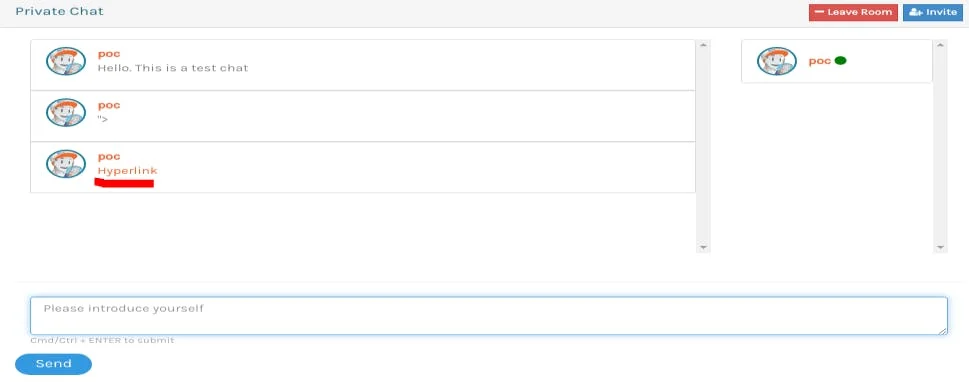
Decoded, this is an anchor tag with an href pointing at https://www.google.com and the visible text Hyperlink, closed with </a>. The link was created successfully, which the researcher describes as a surprise: the chat was vulnerable to stored HTML injection.
Step 3: Trying to escalate the injection to XSS
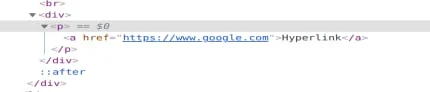
The researcher then tried to leverage the stored injection with the javascript:alert(1) method. The hyperlink was created but the script did not execute. The researcher assumes this was down to sanitisation. The link itself still rendered, which confirmed the HTML injection.
Other methods to reach XSS were tried with a friend, but without success, so the work moved on to a denial of service.
Step 4: Oversized message body
The researcher sent a message with around 10,000 a characters in the body:
POST /api/v1/chat_rooms/38589/reply HTTP/1.1
Host: thewebsite.com
Content-Length: 85
Accept: application/json, text/javascript, */*; q=0.01
X-CSRF-Token: X-CSRF-Token
X-Requested-With: XMLHttpRequest
Content-Type: application/x-www-form-urlencoded; charset=UTF-8
Origin: https://www.thewebsite.com
Referer: https://www.thewebsite.com
Accept-Encoding: gzip, deflate
Accept-Language: en-US,en;q=0.9
Cookie: Cookies

chat_message%5Bbody%5D=the query string here
The body value in the captured request is shown as the query string here; the long string of a characters is what the researcher describes sending in that field. Sending it lagged the researcher's own browser. The message appeared to send, but neither the researcher nor the friend saw it arrive, so it was sent again with the same result.
About 15 minutes later the message appeared. Opening the chat did not crash the researcher's browser, but after another five minutes of moving around the site a 504 came back, indicating the server was struggling to cope. The friend saw the same. The effect then spread beyond the chat: the whole website went down, and other friends loading it got 500 application errors and 504 gateway timeouts. The denial of service affected everyone, not just the two accounts involved.
Root cause
The chat reply endpoint accepted a message body of around 10,000 characters, and after the message was sent the site returned 504 and 500 responses to all users. The report does not identify the specific cause. The researcher is explicit that the exact reason the whole web server crashed for everyone is unknown, and suggests there are likely multiple reasons. The report does not identify the specific component that failed.
On the injection side, the chat rendered stored markup from the message body. The XSS payload was stripped, and javascript: in an href did not execute, so some sanitisation was present, but it did not prevent an anchor tag with an href from being stored and rendered. Whether that sanitisation ran on the client, the server, or both is not stated; the researcher describes the stripping as client-side.
Impact
Stored HTML injection in the chat let the researcher store an anchor tag with an href in a message body. The researcher could not turn it into script execution.
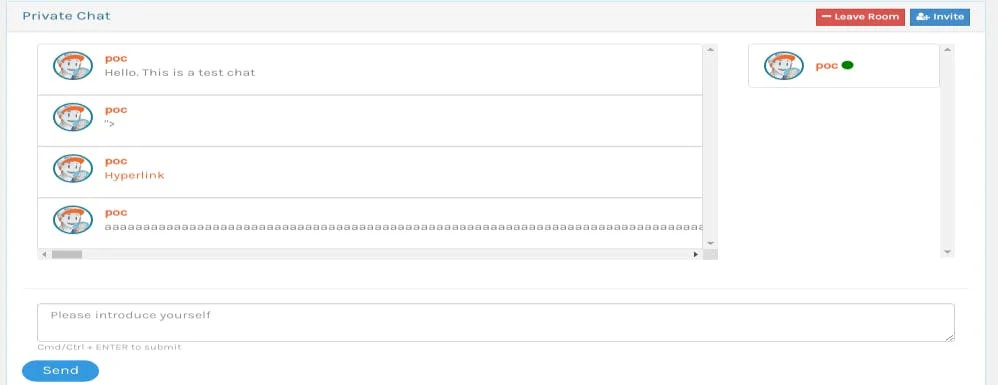
The denial of service took the entire website down for all users, not only the accounts in the conversation. The researcher reported it immediately to the bug bounty programme and the teams involved. The site was back up within five hours. The DOS has since been fixed, and the researcher has not been able to recreate the attack. The screenshots below show the fixed attempt having no effect.
Fix
The report states that the DOS has been fixed and that the attack could no longer be reproduced afterwards. It does not describe the change that was made. For the injection, the report does not say whether anything was changed; the anchor tag was rendering at the time of testing.
Variants to test
- Send a message body just under any documented or observed length limit, then step past it, and watch for slow responses,
504or500on the chat and elsewhere on the site. A positive result is the application becoming slow or unavailable for other users, not just the sender. - Repeat the oversized body across several messages or several chat rooms to see whether the effect compounds. A positive result is the site degrading faster than with a single message.
- Submit anchor tags with different
hrefschemes (https,javascript:,data:) and observe which are stored and which execute. A positive result is a stored link that runs script when another user clicks it. - Try other HTML elements that render without script, such as images, forms and meta refresh, and check what survives sanitisation. A positive result is any stored element that changes how the page behaves for the recipient.
- Test the same body parameter with encoded and double-encoded markup to see whether sanitisation can be bypassed. A positive result is a payload that renders as markup after decoding where the plain version was stripped.
What happened, in plain words
A security researcher signed up to a job search website, found the chat feature, and discovered two problems in it. The first was that the chat would happily store and display HTML, the code that tells a browser how to lay out a page, so a message could contain a working hyperlink pointing anywhere the sender chose. The second, and much more serious, was that sending one enormous chat message made the whole website fall over for everybody, not just the people in that conversation. The researcher reported both straight away, the site came back within five hours, and the denial of service was fixed.
This article walks through the same steps the researcher took, in the same order, and explains every term along the way. You only need to know how to use a browser to follow it.
The target
The website was a job search platform. According to the researcher it had more than 500,000 active users and had handled over 2 million job applications. The login page is described as a clean, basic interface.

The feature that turned out to matter was the chat. Users could send a message to a friend or to anyone else, and each message had a username, a title and a body, all of which were stored on the account. For a site whose main job is helping people find work and apply for it, a messaging feature seemed odd, and that is exactly why the researcher decided to look at it closely.
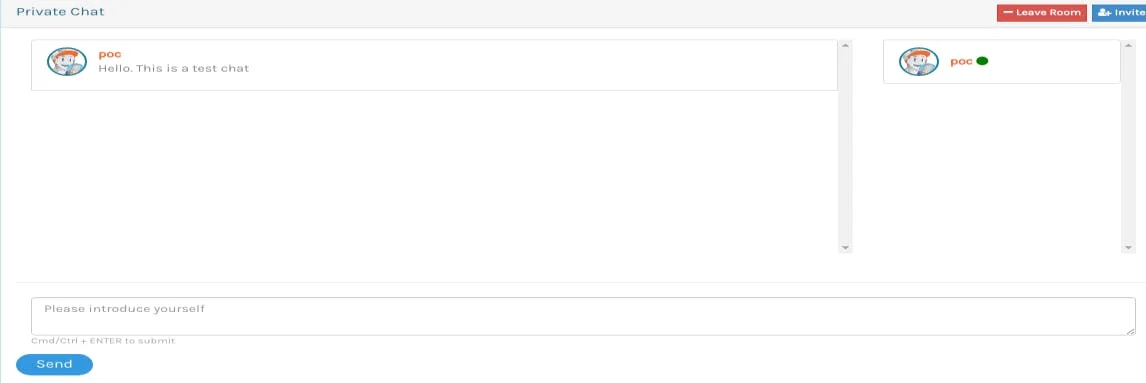
Getting set up
Before testing anything, the researcher needed a few things in place:
- A normal account. Registering took a while, because the sign-up process asked for talents, addresses and the kinds of jobs being looked for.
- A tool to capture and replay requests. The researcher used Burp, short for Burp Suite, a program that sits between your browser and a website and lets you see and edit every request before it is sent. Think of it as being able to open an envelope, read the letter, rewrite it and seal it again before it reaches the recipient.
- A second account. In this case a friend's account, so the researcher could see how a message looked on the receiving end and could check whether the site was still reachable.
Before going deeper into the chat, the researcher checked for CSRF. CSRF stands for Cross-Site Request Forgery: an attack where a malicious page tricks your browser into sending a request to another site while you are logged in there, using the login you already have. A common defence is a CSRF token, a secret value that the site puts into each form and checks when the form comes back, so a request forged elsewhere will not carry the right value. CFUID is a cookie set by Cloudflare, the content delivery network in front of many sites, and it serves a similar purpose of tying a request to a real browser session. The application had both, so that avenue was closed and the researcher moved on to the chat itself.
Finding the problems
The chat reply endpoint accepts a form-encoded body parameter. An endpoint is simply a specific address on a server that does a specific job, like a particular counter in a large building: the building's address gets you inside, but the counter is where your request is actually handled. Form-encoded means the data is packaged the way a web form sends it, as pairs of names and values joined with & and separated with =, with special characters written in percent-encoded form (for example %3C for <).
The researcher made three probes in turn: a straightforward XSS attempt, then an HTML injection attempt to see what markup survived, and finally a very large body to see how the server coped. The chat stored the message body and displayed some markup from it, which is what made both the injection and the oversized message interesting.
XSS stands for Cross-Site Scripting. It means getting your own JavaScript, the programming language browsers run, into a page that other people view, so that the code runs in their browser as if the site had written it. HTML injection is the milder cousin: instead of running code, you get your own HTML markup, such as a link or an image, stored in the page. HTML is the language that describes what appears on a page; a browser reads it and draws the result.
Step 1: Trying XSS in the chat reply
The researcher captured the chat reply request in Burp and put an image-based XSS payload into the message body:
POST /api/v1/chat_rooms/38589/reply HTTP/1.1
Host: thewebsite.com
Content-Length: 64
Accept: application/json, text/javascript, */*; q=0.01
X-CSRF-Token:X-CSRF Token value
X-Requested-With: XMLHttpRequest
Content-Type: application/x-www-form-urlencoded; charset=UTF-8
Origin: https://www.thewebsite.com
Referer: https://www.thewebsite.com
Accept-Encoding: gzip, deflate
Accept-Language: en-US,en;q=0.9
Cookie:Cookies
Connection: close

chat_message%5Bbody%5D=%22%3E%3Cimg+src+onerror%3Dalert(1)%3E%0A
Line by line, in plain words:
POST /api/v1/chat_rooms/38589/reply HTTP/1.1is the request line. POST is the method used when you are sending data to the server, as opposed to GET, which asks for a page. The path points at the reply action for one particular chat room, number 38589. HTTP/1.1 is the version of the language browsers and servers use to talk. An API is the set of addresses a site exposes for programs to talk to, rather than for people clicking links; here/api/v1/...is the API's version 1.Host: thewebsite.comnames the site being contacted.Content-Length: 64says how many bytes of data follow the blank line.Accepttells the server what kind of answer the browser is willing to receive.X-CSRF-Tokencarries the secret value described above. The report shows a placeholder rather than the real value.X-Requested-With: XMLHttpRequestis a header that marks the request as coming from JavaScript on the page rather than from typing a URL into the address bar. A header is a labelled line of extra information attached to a request or response.Content-Type: application/x-www-form-urlencoded; charset=UTF-8says the body is packaged like a web form and uses UTF-8 character encoding.OriginandReferertell the server which page the request came from.Accept-Encoding,Accept-LanguageandConnectiondescribe compression, language preference and whether to keep the connection open.Cookie:Cookiesis where the browser's stored cookies would go. A cookie is a small piece of data a site asks your browser to keep and send back with every later request, which is how a site remembers that you are logged in. The report shows a placeholder here too.- The blank line separates the headers from the body.
chat_message%5Bbody%5D=%22%3E%3Cimg+src+onerror%3Dalert(1)%3E%0Ais the body.%5Band%5Dare the encoded forms of[and], so the field name ischat_message[body], meaning the body field of a chat message. The value is the payload, percent-encoded.
Decoded, the value is an img tag with an empty src and an onerror handler containing alert(1). The src attribute is where an image's address goes; leaving it blank or invalid means the browser cannot load the image, which fires the error event, and the onerror handler is the code that runs when that happens. alert(1) is the simplest possible JavaScript: it pops up a box. If that box appeared on someone else's screen, the researcher would have proven script execution.
The response showed a stripped version of the payload, which the researcher took as client-side sanitisation blocking it. Sanitisation is the process of cleaning input by removing or neutralising dangerous parts. Client-side means it happens in the browser, as opposed to server-side, where it happens on the server before anything is stored. In this case the security measures on the chat were in place for this attempt.
Step 2: HTML injection with a link
Next the researcher tried to create a hyperlink instead of script:
POST /api/v1/chat_rooms/38589/reply HTTP/1.1
Host: thewebsite.com
Content-Length: 85
Accept: application/json, text/javascript, */*; q=0.01
X-CSRF-Token: X-CSRF-Token
X-Requested-With: XMLHttpRequest
Content-Type: application/x-www-form-urlencoded; charset=UTF-8
Origin: https://www.thewebsite.com
Referer: https://www.thewebsite.com
Accept-Encoding: gzip, deflate
Accept-Language: en-US,en;q=0.9
Cookie: Cookies

chat_message%5Bbody%5D=%3Ca+href%3Dhttps%3A%2F%2Fwww.google.com%3EHyperlink%3C%2Fa%3E
The request line and headers do the same jobs as before; only the body differs. Decoded, the body value is an anchor tag, <a>, with an href attribute pointing at https://www.google.com and the visible text Hyperlink, closed with </a>. An anchor tag is the HTML element that makes a clickable link, and href is the attribute that says where the link goes. The researcher's reasoning was simple: if the chat lets a link through, it is storing markup, and that is HTML injection.
The link was created successfully, which the researcher describes as a surprise. The chat was vulnerable to stored HTML injection. Stored means the payload is saved on the server and shown to everyone who later views that message, rather than being reflected back only to the person who sent it.
Step 3: Trying to turn the link into script
With a working link in place, the researcher tried to leverage it into XSS using the javascript:alert(1) method. The idea is that javascript: in an href tells the browser to run the code after the colon when the link is clicked, instead of navigating to a page.
The hyperlink was created but the script did not execute. The researcher assumes this was down to sanitisation. The link itself still rendered, which confirmed the HTML injection.
Other methods to reach XSS were tried with a friend, but without success, so the work moved on to a denial of service.
Step 4: An oversized message
A denial of service, or DOS, is an attack that aims to make a service unavailable to the people who need it. The everyday comparison is a shop counter: if one customer keeps the assistant busy with an impossible request, the queue behind them never gets served. The researcher's own definition in the write-up is an attack meant to take down a target's website or network by sending high amounts of traffic or information, for example sending a query 5000 times in one request, which may cause a crash because of the sheer amount of data arriving at once.
The researcher sent a message with around 10,000 a characters in the body:
POST /api/v1/chat_rooms/38589/reply HTTP/1.1
Host: thewebsite.com
Content-Length: 85
Accept: application/json, text/javascript, */*; q=0.01
X-CSRF-Token: X-CSRF-Token
X-Requested-With: XMLHttpRequest
Content-Type: application/x-www-form-urlencoded; charset=UTF-8
Origin: https://www.thewebsite.com
Referer: https://www.thewebsite.com
Accept-Encoding: gzip, deflate
Accept-Language: en-US,en;q=0.9
Cookie: Cookies

chat_message%5Bbody%5D=the query string here
Again the request line and headers are the same machinery as before. The body value in the captured request is shown as the query string here; the long string of a characters is what the researcher describes sending in that field.
Sending it lagged the researcher's own browser. The message appeared to send, but neither the researcher nor the friend saw it arrive, so it was sent again with the same result.
About 15 minutes later the message appeared. Opening the chat did not crash the researcher's browser, but after another five minutes of moving around the site a 504 came back. A 504 is the status code a server or gateway returns when it waited too long for an answer from something behind it, in other words when it is struggling to cope. The friend saw the same.
The effect then spread beyond the chat: the whole website went down, and other friends loading it got 500 application errors and 504 gateway timeouts. A 500 is the general status code for a server error, meaning something on the server side broke while handling the request. The denial of service affected everyone, not just the two accounts involved.
Why it worked
The chat reply endpoint accepted a message body of around 10,000 characters, and after the message was sent the site returned 504 and 500 responses to all users. The report does not identify the specific cause. The researcher is explicit that the exact reason the whole web server crashed for everyone is unknown, and suggests there are likely multiple reasons. The report does not identify the specific component that failed.
On the injection side, the chat rendered stored markup from the message body. The XSS payload was stripped, and javascript: in an href did not execute, so some sanitisation was present, but it did not prevent an anchor tag with an href from being stored and rendered. Whether that sanitisation ran on the client, the server, or both is not stated; the researcher describes the stripping as client-side.
What it meant
Stored HTML injection in the chat let the researcher store an anchor tag with an href in a message body. The researcher could not turn it into script execution.
The denial of service took the entire website down for all users, not only the accounts in the conversation. The researcher reported it immediately to the bug bounty programme and the teams involved. A bug bounty programme is a scheme where an organisation invites outside researchers to report security problems, often with a reward, instead of taking legal action against them. The site was back up within five hours. The DOS has since been fixed, and the researcher has not been able to recreate the attack. The screenshots below show the fixed attempt having no effect.
The fix
The report states that the DOS has been fixed and that the attack could no longer be reproduced afterwards. It does not describe the change that was made. For the injection, the report does not say whether anything was changed; the anchor tag was rendering at the time of testing.
Things worth trying next
- Send a message body just under any documented or observed length limit, then step past it, and watch for slow responses,
504or500on the chat and elsewhere on the site. A positive result is the application becoming slow or unavailable for other users, not just the sender. - Repeat the oversized body across several messages or several chat rooms to see whether the effect compounds. A positive result is the site degrading faster than with a single message.
- Submit anchor tags with different
hrefschemes (https,javascript:,data:) and observe which are stored and which execute. A positive result is a stored link that runs script when another user clicks it. - Try other HTML elements that render without script, such as images, forms and meta refresh, and check what survives sanitisation. A positive result is any stored element that changes how the page behaves for the recipient.
- Test the same body parameter with encoded and double-encoded markup to see whether sanitisation can be bypassed. A positive result is a payload that renders as markup after decoding where the plain version was stripped.
Glossary
- API: the set of addresses a website exposes so that programs, rather than people clicking links, can talk to it.
- Anchor tag: the HTML element, written
<a>, that creates a clickable link; itshrefattribute says where the link goes. - Attribute: a named setting inside an HTML tag, such as
srcorhref, that tells the browser more about the element. - Body: the part of a request that carries the actual data being sent, after the headers.
- Bug bounty programme: a scheme where an organisation invites outside researchers to report security problems, often with a reward.
- Burp (Burp Suite): a tool that sits between your browser and a website so you can see and edit every request before it is sent.
- CFUID: a cookie set by Cloudflare, the content delivery network in front of many sites, used to tie a request to a real browser session.
- Client-side: happening in the browser, on the user's own computer, rather than on the server.
- Content-Type: a header that says how the body of a request or response is packaged, for example as form data or JSON.
- Cookie: a small piece of data a site asks your browser to keep and send back with later requests, which is how a site remembers that you are logged in.
- CSRF (Cross-Site Request Forgery): an attack where a malicious page tricks your browser into sending a request to another site while you are logged in there.
- CSRF token: a secret value the site puts into each form and checks when the form comes back, so a request forged elsewhere will not carry the right value.
- Denial of service (DOS): an attack that aims to make a service unavailable to the people who need it, for example by sending far more data than it can handle.
- Endpoint: a specific address on a server that does a specific job.
- Form-encoded: packaged the way a web form sends data, as name and value pairs joined with
&, with special characters percent-encoded. - Header: a labelled line of extra information attached to a request or response, such as
HostorContent-Type. - HTML: the language that describes what appears on a web page; a browser reads it and draws the result.
- HTML injection: getting your own HTML markup, such as a link or an image, stored in a page that other people view.
- HTTP: the language browsers and servers use to talk to each other.
- JavaScript: the programming language browsers run to make pages interactive.
javascript:: a prefix in a link'shrefthat tells the browser to run the code after the colon when the link is clicked, instead of navigating to a page.- Percent-encoding (URL encoding): writing special characters in a form that can travel safely in a URL or form body, for example
%3Cfor<. - POST: the HTTP method used when you are sending data to the server, as opposed to GET, which asks for a page.
- Sanitisation: cleaning input by removing or neutralising dangerous parts.
- Server-side: happening on the server, before anything is stored or shown.
- Status code: a number a server returns to say how a request went, such as
500for a server error or504for a gateway timeout. - Stored: saved on the server and shown to everyone who later views the content, rather than reflected back only to the person who sent it.
- XSS (Cross-Site Scripting): getting your own JavaScript into a page that other people view, so that it runs in their browser as if the site had written it.


