Exploiting CORS to perform an IDOR Attack leading to PII Information Disclosure
The checkout endpoint did not verify that the requesting user was authorised to access the cart data, and a related JSON endpoint exposed user details when given a checkout hash. A permissive CORS policy allowed any domain to read responses, so an attacker could fetch a victim's hash and then retrieve their personal and payment information.
 Published on notmarshmllow.medium.com
Every Bug Hunter loves PII Information Disclosure, right? So do I, and recently I came across a very similar vulnerability while hunting on a target.
The full write-up lives on its author's site
It belongs to its author, so we link to it rather than copy it. The other two tabs are our own rewrites, checked against it.
Context
The target was an E-Commerce Platform. The feature at the centre of the report is the checkout flow: the application asks for the user's delivery address and credit card details, and the checkout page is addressed by a long random hash in the URL. A second endpoint, under /wallets/checkouts/, returns the account data associated with that same hash. The report describes the bug as a CORS misconfiguration that made an IDOR-style data disclosure practical, because the hash needed to reach the vulnerable endpoint could be fetched cross-origin.
Setup
The researcher was hunting business logic vulnerabilities in the application, using Burp Suite and its History and Search functions. No accounts, roles or versions are described beyond the attacker and victim distinction implied by swapping one user's hash for another's. The precondition for the attack is that a victim's checkout hash is exposed through the permissive CORS configuration.
Finding it
The first hours were spent understanding the application's workflow, manipulating data, sending requests to Repeater and looking for other vulnerabilities such as XSS. The application was described as pretty secure, so the researcher took a break and, on returning, started testing the CHECKOUT functionality.
On checkout, the application asked for the user's delivery address and credit card details as expected. The URL of the checkout page looked like this:
https://redcorp.com/20183638/checkout/700dd776teu8890abcdpo12ha0
Swapping that hash for another user's hash changed the items shown in the cart on the checkout page. That indicated a lack of authorization, but the application neither swapped accounts nor changed the items in the cart except at the time of checkout, so the researcher judged it to have insufficient impact to report. In simple terms, it loaded another user's cart items.
Later, going through Burp Suite's History, the researcher found a different endpoint containing the same hash:
/wallets/checkouts/700dd776teu8890abcdpo12ha0.json
This hash stored the data of the user's account. The /wallets/checkouts/ endpoint did not check whether the user was authorized to access the data. Swapping the attacker's hash for the victim's hash loaded the victim's account data in the response. That was worth reporting: by replacing another user's hash on the /wallet/checkout/*random_hash*.json endpoint, all details of other users could be stolen.
The remaining obstacle was that random hashes are difficult to guess and brute-forcing them is a waste of time. If the researcher could steal another user's hash, they could view that user's name, home address, credit card details and much more. The question was how.
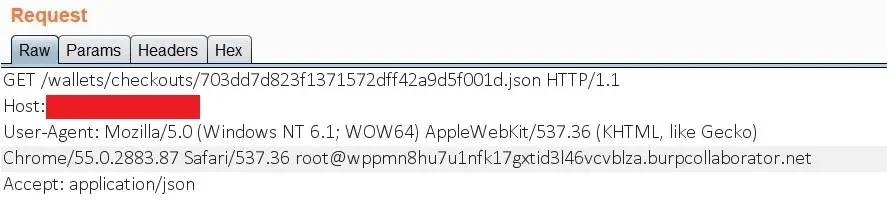
Exploitation
Step 1: Find where the hash leaks
The researcher searched for the hash in Burp Suite using the Search function to check whether it was leaking anywhere. It was. Third party applications integrated into the target application for transactions and for validating credit card numbers were able to access this hash, and CORS allowed them to access data from the request. Sharing data with third party applications was necessary for the application to validate it, but the same mechanism also let the researcher access the data. CORS was configured to allow any domain to fetch data from the request, so the hash could be fetched cross-origin as well.
Step 2: Fetch the hash and swap it
An attacker first exploits CORS to fetch the random hash of the user, then replaces the hash to access the victim's data. The data returned included name, address, credit card information, payment information and everything related to a user's account.


Root cause
The /wallets/checkouts/ endpoint did not verify that the requesting user was authorized to access the data behind a given hash, so possession of the hash was effectively the only access control. The hash itself was exposed because CORS was configured to allow any domain to fetch data from the request, which was needed for the third party integrations that validate transactions and credit card numbers. The combination meant an attacker could obtain a victim's hash cross-origin and then read the victim's account data from the endpoint.
Impact
An attacker who obtains another user's checkout hash can read that user's name, home address, credit card details, payment information and everything else related to the account. The attack depends on the hash being obtainable, which in this case came from the permissive CORS configuration exposing it to third party integrations. The report does not describe any authentication requirement on the endpoint.
Fix
Since CORS cannot be blocked, the company fixed the issue by validating and blocking unauthorized access to the endpoint.
Variants to test
- Look for long random identifiers in checkout, cart or wallet URLs and try swapping them between accounts. A positive result is another user's cart contents or account data being returned.
- Search Burp Suite History or proxy logs for the same identifier appearing in requests to other endpoints, especially JSON endpoints. A positive result is an endpoint that returns account data for a hash you do not own.
- Check whether third party integrations receive the identifier and whether CORS on the application allows arbitrary origins to read responses containing it. A positive result is a response readable from an arbitrary origin that includes the hash or account data.
- Test whether the data endpoint enforces authorization independently of the hash. A positive result is a response containing another user's PII when only the hash is changed.
What happened, in plain words
A security researcher found a way to read other people's private account information on an online shop. The shop's checkout page used a long random code in its web address that identified the shopper's account data. A second part of the site, which returned the account details behind that code, never checked whether the person asking was allowed to see them. Anyone who knew someone else's code could read that person's name, home address and card details.
The hard part was getting the code. It was long and random, so guessing it was hopeless. The researcher discovered that outside companies the shop used to process payments and check card numbers could access that code, and that the shop's configuration let any website read those responses. That meant a malicious page could quietly fetch a shopper's code and then use it to pull the shopper's data.
This is a beginner's walkthrough of how the researcher got there, in the same order as the original write-up, with the same addresses and the same reasoning at each step.
The pieces you need to know first
Before the story, a few everyday ideas. None of them require any technical background.
- An e-commerce platform is an online shop. You browse products, put them in a basket (the cart), and pay at the checkout.
- The checkout flow is the sequence of pages where the shop asks for your delivery address and your credit card details, then confirms the order.
- A URL is the address of a page, the thing in your browser's address bar, like
https://redcorp.com/.... - A hash in this report means a long random string of letters and digits that the shop puts in a URL to identify one particular order or account. Think of it like the coat-check ticket you get at a cloakroom: the number on the ticket is meaningless on its own, but if you hand it in, you get the coat that belongs to it. Nobody can guess your ticket number, but if someone reads it over your shoulder, they can collect your coat.
- An endpoint is a specific address on a server that does one job. If the shop's website is a building, endpoints are the individual service windows: one for the checkout page, one for account data, and so on. Some endpoints return web pages for your browser to display; others return raw data, often in a format called JSON, which is just structured text that programs read easily.
- An API is the set of these data endpoints that a program (rather than a person clicking) talks to. It is like a restaurant's service counter: you do not walk into the kitchen, you ask at the counter and get a tray back.
- Authorization means checking whether the person making a request is allowed to do it. Authentication is the earlier question of who they are. A shop can know perfectly well that you are Alice and still fail to check that the order you are opening belongs to Alice rather than Bob.
- An IDOR (Insecure Direct Object Reference) is the name for that failure: the site lets you refer to something by its identifier (here, the hash) without checking that the thing is yours. It is like a hotel that hands out room keys by room number without asking whether you booked that room.
- PII (Personally Identifiable Information) is data that identifies a real person: name, home address, card details, and so on.
- CORS (Cross-Origin Resource Sharing) is a rule that browsers follow about which websites may read responses from which other websites. By default, a page on one site is not allowed to read data from a different site, because otherwise any page you visit could quietly read your bank's pages in the background. CORS is the mechanism by which a site says, "these other sites are allowed to read my responses." If a site says "any site is allowed", then any page you visit can read its data.
- Burp Suite is a tool that sits between your browser and a website and records every request and response. Its History is the log of everything captured, its Repeater lets you take one captured request and resend it over and over with small changes, and its Search function finds a piece of text across everything in the log.
- Brute-forcing means trying every possible value until one works. It only succeeds when the value is short or predictable.
The hunt begins
The researcher's name is Harsh, also known as notmarshmllow. The target was an e-commerce platform, and the first goal was business logic vulnerabilities: flaws in how the shop's rules work, rather than in its code. An example of a business-logic flaw is a shop that lets you apply the same discount code twice, or that trusts a price your browser sends it.
The first few hours went into understanding how the application worked, changing data as it travelled, resending requests in Burp Suite's Repeater, and looking for other well-known bugs such as XSS (cross-site scripting, where a site displays text supplied by an attacker as if it were its own code). The application turned out to be pretty secure, so the researcher took a break and went out for some fresh air.
The checkout page and the swap
On returning, the researcher started testing the CHECKOUT functionality. As expected, the shop asked for the shopper's delivery address and credit card details. The interesting part was the address of the checkout page itself:
https://redcorp.com/20183638/checkout/700dd776teu8890abcdpo12ha0
Line by line, in plain words:
https://is the secure version of the web protocol; the padlock in your browser means traffic is encrypted.redcorp.comis the shop's domain, the name of the site./20183638/is a number in the path. The report does not say what it represents./checkout/says this is the checkout area of the site.700dd776teu8890abcdpo12ha0is the hash: the long random string that identifies this particular checkout.
The researcher tried swapping that hash for another user's hash. The items shown in the cart on the checkout page changed to the other user's items. That is a sign of missing authorization: the page accepted an identifier that did not belong to the person using it and showed the data behind it.
Why was that not reported? Because the impact was small. The application did not swap accounts and did not change the items in the cart, except at the moment of checkout. In simple words, it loaded another user's cart items and nothing more. A bug report needs to show real harm, and seeing someone else's shopping basket is not enough on its own.
A second endpoint with the same hash
Later, the researcher went through Burp Suite's History and found a different endpoint that contained the same hash:
/wallets/checkouts/700dd776teu8890abcdpo12ha0.json
Line by line:
/wallets/is the first part of the path. The report does not explain what a "wallet" is in this application beyond the fact that the endpoint lives under it./checkouts/groups the checkout-related data.700dd776teu8890abcdpo12ha0is the same hash as on the checkout page, so this endpoint is about the same checkout..jsonis the file extension for JSON, the structured text format mentioned earlier. It is a strong hint that this endpoint returns raw data for a program rather than a page for a person.
This hash stored the data of the user's account. The /wallets/checkouts/ endpoint did not check whether the user was authorized to access that data. Swapping the attacker's hash for the victim's hash loaded the victim's account data in the response.
Now there was something worth reporting. By replacing another user's hash on the /wallet/checkout/*random_hash*.json endpoint, all details of other users could be stolen. The *random_hash* in that path is a placeholder meaning "whatever the hash happens to be".
The obstacle: guessing is hopeless
The remaining problem was practical. Random hashes are difficult to guess, and brute-forcing them is a waste of time. If the researcher could steal another user's hash, they could view that user's name, home address, credit card details and much more. But how?
Step 1: find where the hash leaks
The researcher searched for the hash in Burp Suite using the Search function, to check whether it was leaking anywhere else. It was.
Third-party applications integrated into the target application for transactions and for validating credit card numbers were able to access this hash, and CORS allowed them to access data from the request. Sharing data with those third parties was necessary: the shop has to hand the order details to the payment services so they can process the payment and check the card. But the same mechanism also let the researcher access the data.
CORS was configured to allow any domain to fetch data from the request. In other words, the shop told every browser in the world: "any website may read my responses." That is the misconfiguration. This one allowed any domain to fetch data from the request.
Why does that matter? Because of how browsers work. Normally, if you are logged in to a shop and you visit some other page, that other page cannot read the shop's responses, even though your browser will happily send your session along with the request. CORS is the exception that lets a page read the response. When the exception is granted to every domain, any page you visit can read the shop's data as if it were the shop itself.
Step 2: fetch the hash and swap it
An attacker first exploits CORS to fetch the random hash of the user, then replaces the hash to access the victim's data. The data returned included name, address, credit card information, payment information and everything related to a user's account.
Put the two halves together and the attack is a chain:
- A victim visits a malicious page while logged in to the shop.
- That page uses the permissive CORS setting to read a response from the shop that contains the victim's checkout hash.
- The attacker takes that hash and requests the
/wallets/checkouts/endpoint with it. - The endpoint returns the victim's account data, because it never checks who is asking.
Neither half is enough alone. The endpoint without the CORS leak leaves the attacker unable to guess the hash; the CORS leak without the endpoint gives away a code that opens nothing.
Root cause
The /wallets/checkouts/ endpoint did not verify that the requesting user was authorized to access the data behind a given hash, so possession of the hash was effectively the only access control. The hash itself was exposed because CORS was configured to allow any domain to fetch data from the request, which was needed for the third-party integrations that validate transactions and credit card numbers. The combination meant an attacker could obtain a victim's hash cross-origin and then read the victim's account data from the endpoint.
Impact
An attacker who obtains another user's checkout hash can read that user's name, home address, credit card details, payment information and everything else related to the account. The attack depends on the hash being obtainable, which in this case came from the permissive CORS configuration exposing it to third-party integrations.
Fix
Since CORS cannot be blocked, the company fixed the issue by validating and blocking unauthorized access to the endpoint.
The shop needed to share data with third party applications to validate it, so the fix was made on the endpoint instead. The durable fix is on the endpoint: check that the person asking for a hash's data is entitled to it, so that even someone holding a stolen hash gets nothing.
Variants to test
If you want to look for something similar yourself, these are the checks the write-up suggests, in plain terms:
- Look for long random identifiers in checkout, cart or wallet URLs and try swapping them between accounts. A positive result is another user's cart contents or account data being returned.
- Search Burp Suite History or proxy logs for the same identifier appearing in requests to other endpoints, especially JSON endpoints. A positive result is an endpoint that returns account data for a hash you do not own.
- Check whether third-party integrations receive the identifier and whether CORS on the application allows arbitrary origins to read responses containing it. A positive result is a response readable from an arbitrary origin that includes the hash or account data.
- Test whether the data endpoint enforces authorization independently of the hash. A positive result is a response containing another user's PII when only the hash is changed.
Glossary
- API: the set of addresses a program uses to ask a server for data or actions, as opposed to pages meant for a person to click.
- Authentication: the process of establishing who you are.
- Authorization: the process of deciding whether you are allowed to do or see something.
- Brute-forcing: trying every possible value until one works.
- Burp Suite: a tool that records and lets you replay the requests and responses between your browser and a website.
- Business logic vulnerability: a flaw in the rules of an application rather than in its code, such as trusting a value the browser sends.
- Cart: the basket of items a shopper has selected before paying.
- Checkout: the part of a shop where delivery and payment details are entered and the order is confirmed.
- CORS (Cross-Origin Resource Sharing): the browser rule and server setting that decide which other websites may read a site's responses.
- Cross-origin: coming from a different domain than the one being requested.
- Endpoint: a specific address on a server that performs one job and returns a response.
- Hash (in this report): a long random string in a URL that identifies a particular checkout or account.
- History (Burp Suite): the log of every request and response captured.
- IDOR (Insecure Direct Object Reference): a flaw where a site lets you name an object by its identifier without checking that it belongs to you.
- JSON: a structured text format that programs use to exchange data.
- PII (Personally Identifiable Information): data that identifies a real person, such as name, address or card details.
- Repeater (Burp Suite): a Burp Suite tool for resending a captured request repeatedly with changes.
- Search (Burp Suite): a Burp Suite function that finds a piece of text across the captured traffic.
- Third-party application: an outside service the shop relies on, here for transactions and card validation.
- URL: the address of a page or resource on the web.



