Exploiting PHP 8.4: From Out-of-Memory Conditions to Remote Code Execution (PHP2Shell)— — CWL
A PHP 8.4 application was vulnerable to memory corruption during multipart request parsing and session cleanup under out-of-memory conditions, allowing a use-after-free and out-of-bounds read that leaked memory addresses. This leak enabled an ASLR bypass and, with further memory corruption, remote code execution as the web-server user.

Cybersecurity
The full write-up lives on its author's site
It belongs to its author, so we link to it rather than copy it. The other two tabs are our own rewrites, checked against it.
Context
This write-up covers a lab challenge provided by SecureCorps that centres on a PHP 8.4 application. The application processes multipart HTTP requests, and the challenge is built around what happens to PHP's memory handling when such a request drives the process into an Out-of-Memory (OOM) condition. The stated goal was to turn that memory-management weakness into remote code execution (RCE) as the web-server user and then read a protected flag.
The author frames the exercise around a chain rather than a single bug: OOM during multipart parsing, stale references left behind by incomplete cleanup, an out-of-bounds read that discloses memory, an ASLR bypass built on the disclosed addresses, memory corruption, and finally command execution in the context of the Apache/PHP worker.
Setup
The environment, as identified from the author's terminal output, was:
| Component | Version / Details |
|---|---|
| Operating System | Debian Linux |
| Web Server | Apache 2.4.69 |
| PHP Runtime | PHP 8.4.26 |
| Application | index.php |
| Initial User | student |
| Web Server User | www-data |
The author notes that the actual Apache version in the environment was 2.4.69. Access to the target began with SSH using credentials supplied by the lab. A pre-built exploit script, exploit.py, was provided in a directory in the home folder, and the flag to retrieve was /flag.txt.
Finding it
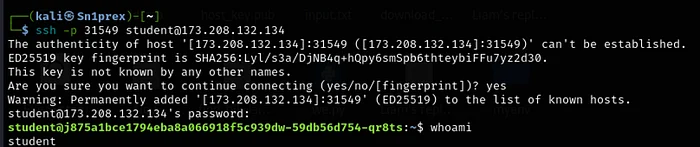
The first thing the author established was the permission boundary. After logging in over SSH, the current user was confirmed:
whoami
Reading the flag directly was attempted next:
cat /flag.txt
The server returned:
Permission denied
Checking the file permissions showed the file was owned by:
root:www-data
With 640 permissions, only the owner and members of the assigned group could read it. That set up the core of the challenge: the initial SSH user could not read the flag, but the web-server account carried the group permissions needed to do so.

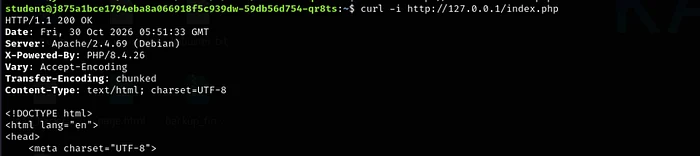
The web application itself was then checked locally:
curl -i http://[redacted]/index.php
The response confirmed the application was reachable, which led to the environment table above.
Exploitation
Step 1: Understand the vulnerability classes in play
Before running anything, the author walks through the memory-management concepts the chain depends on.
Out-of-Memory (OOM). OOM occurs when an application needs more memory than the system or its configured memory limit allows. The analogy used is opening too many applications until RAM is full and the next allocation struggles. In PHP terms, processing a large HTTP request can exhaust the allocated memory. In this lab, the exploit triggered an OOM condition during multipart request processing, exposing weaknesses in PHP's memory cleanup behaviour.
Dangling pointer / use-after-free (UAF). A dangling pointer is a reference to memory that has already been released; using it can cause unexpected behaviour. The locker analogy: you rent locker 25, return it, management marks it available, someone else rents it, and your old key still opens it. In this lab, improper cleanup during the OOM condition could leave stale references in PHP's internal structures, and accessing them could lead to memory corruption.
Out-of-bounds (OOB) read. An OOB read happens when a program reads beyond the valid boundaries of an allocated region, like reading page 105 of a 100-page book. In this lab, the exploit used a stale reference to reach unintended memory and obtain information about internal memory addresses.
Memory disclosure / memory leak. This is the unintentional exposure of information stored in memory, not merely RAM consumption. In this lab, the exploit obtained memory information, including an address associated with PHP's internal library, which fed the next stage.
ASLR bypass. ASLR randomises important memory locations at program start so attackers cannot predict where functions and regions live, like offices in a mall that move every day. If a vulnerability exposes real addresses, the uncertainty is reduced. Here, the disclosed addresses were used to calculate relevant PHP library and memory locations, overcoming ASLR.
Step 2: Inspect the provided exploit
The exploit directory was located and listed:
cd ~/exploitls -la
The directory contained:
exploit.py
The available arguments were inspected with:
python3 exploit.py --help
The important parameters were:
| Parameter | Purpose |
|---|---|
--port |
Specifies the application HTTP port |
--workers |
Configures Apache prefork worker handling |
--cmd |
Specifies the command used in the execution test |
--proof |
Specifies the proof-file location |
--timeout |
Controls the operation timeout |
--retries |
Configures the number of attempts |
--outdir |
Specifies the output directory |
--restart |
Allows restarting a specified Docker container |
The script implemented a multi-stage chain: crafted HTTP requests, memory disclosure, address calculations and memory corruption.
Step 3: Run the chain and verify RCE
The proof of execution was the lab's benign identity-check command. The first attempts did not consistently complete the whole chain: some failed because the expected memory disclosure was unavailable, and another obtained memory information but failed to produce the expected proof. A later attempt completed successfully, returning:
[4/4] RCE OK; proof /tmp/id9.txt:
uid=33(www-data) gid=33(www-data) groups=33(www-data)
The output shows the command ran as www-data: uid=33(www-data) is the user, gid=33(www-data) the primary group, and groups=33(www-data) the group membership. The SSH session itself stayed under the student account; the command executed through the vulnerable PHP application inherited the privileges of the web-server process, so no manual login as www-data was needed.

Step 4: Retrieve the flag
With RCE confirmed as www-data, the final objective was reading /flag.txt. The point of the exercise was the difference between the SSH user's permissions and those of the web-server process: the SSH login and exploit.py ran as student, the vulnerable PHP request was handled by the Apache/PHP process, the exploited command ran as www-data, and the flag access succeeded under www-data's permissions. The flag was retrieved.

Root cause
The chain rests on PHP's handling of multipart request parsing and memory cleanup during OOM conditions. When the process runs out of memory mid-request, cleanup is incomplete, leaving stale references in PHP's internal structures. Those references can then be used for an out-of-bounds read that discloses memory, including an address associated with PHP's internal library. The disclosed address reduces ASLR's uncertainty, and the later stage manipulates PHP internal structures to redirect execution to an unintended command path.
The disclosed address reduced ASLR's uncertainty, and the web-server process, not the SSH user, held the group permissions on the flag.
Impact
Under the conditions of the lab, an attacker who can drive the vulnerable PHP application into the OOM condition can obtain memory disclosure, bypass ASLR, corrupt memory and execute commands as the web-server user (www-data). That was enough to read /flag.txt, which the initial SSH user could not read. The author is explicit that a memory leak alone does not guarantee code execution: it only provides information, and additional vulnerabilities plus precise exploitation conditions are required for RCE. The exploit also did not succeed consistently in testing.
Fix
The takeaways include that web-server accounts should have restricted privileges, and that memory-management weaknesses can potentially compromise the boundary between the application and the operating system.
Variants to test
- Multipart parsing under memory pressure. Send large multipart requests to a PHP 8.4 endpoint with a low
memory_limitand watch for incomplete cleanup. A positive result is a response or crash pattern that differs from a clean OOM, suggesting stale state survives the request. - Memory disclosure via stale references. After forcing OOM, probe for responses that contain pointer-like values or library addresses. A positive result is a leak that includes an address tied to a PHP internal library.
- ASLR check across restarts. Repeat the disclosure across process restarts and compare addresses. A positive result is a stable enough base to calculate library and memory locations.
- Worker affinity. Vary
--workersand request timing so requests land on the same Apache prefork worker. A positive result is a higher success rate for the full chain. - Privilege context check. Use a benign identity command as proof and confirm the output shows the web-server user rather than the login user. A positive result is
uid/gidmatching the web-server account. - File permission boundary. From the web-server context, attempt to read a file owned by another account with group permissions for the web-server group. A positive result is access where the original login user was denied.
What happened, in plain words
A security researcher worked through a practice exercise (a "lab") built around a small web application written in PHP, a programming language used to build many websites. The lab was supplied by a company called SecureCorps. The application had a flaw in the way it handles memory when it receives a particular kind of web request. By sending carefully crafted requests, the researcher was able to make the application run a command of their choosing on the server, as the user account that the web server runs under. That account could read a protected file, /flag.txt, which the researcher's own login account was not allowed to read.
The exercise is interesting because it is not one bug but a chain of several. Each link in the chain makes the next one possible. The researcher starts with a normal login to the machine, discovers they cannot read the protected file, checks what the web application is, learns the memory concepts involved, inspects a ready-made exploit script, runs it (several times, because it does not always work), confirms that a command ran as the web-server user, and finally reads the flag.
This article walks through the same steps in the same order, explaining every term from scratch. If you can use a browser and a computer, you can follow it.
Introduction
The researcher describes a vulnerability in a PHP 8.4 application. PHP 8.4 is a version of PHP, the language that powers a large share of the web. The flaw shows how bad handling of memory can, under the right conditions, lead to Remote Code Execution, usually shortened to RCE. RCE means exactly what it sounds like: someone who is not supposed to can make the server run commands, as if they were sitting at its keyboard.
The challenge involved two areas of the application: how it parses multipart HTTP requests, and how it cleans up memory when it runs out of memory.
Two terms to unpack straight away:
- HTTP request: the message your browser sends to a web server when you visit a page or submit a form. It has a method (such as GET to fetch something or POST to send something), a URL, some headers (extra information such as what browser you use), and sometimes a body (the data you are sending).
- Multipart request: a request whose body is split into several parts, each with its own little header. This is the format browsers use when you upload a file through a form, because one part can carry the file and another can carry a text field. The server has to take the body apart, piece by piece, which is called parsing.
The objectives the researcher set out were:
- Investigate the PHP application running on the target.
- Understand the OOM-related memory corruption.
- Obtain memory addresses to bypass ASLR.
- Achieve command execution as the web-server user.
- Retrieve a protected flag from the server.
A few of those words need explaining before we go further:
- Target: the machine being tested. In a lab it is a machine you are authorised to attack; in the wild it would be someone else's system, and doing this without permission is a crime.
- OOM: Out Of Memory. The application asked for more memory than it is allowed to use, and the request failed.
- Memory corruption: the application's internal bookkeeping about memory gets into a state it should never be in, so that later operations read or write the wrong place.
- ASLR: Address Space Layout Randomization, a defence that shuffles where things sit in memory each time a program starts, so an attacker cannot hard-code an address. We will come back to it.
- Flag: a secret string placed on the machine by the lab authors. If you can read it, you have proved you reached the place you were not supposed to reach. It is the lab's stand-in for sensitive data.
The researcher's summary is that the lab shows how a memory-management issue can grow into a serious compromise of the application.
1. Initial Access and Environment Discovery
The first step was to log in to the target machine over SSH, using credentials the lab provided.
SSH stands for Secure Shell. It is a way to open a text-only session on a remote computer: you type commands on your own keyboard and they run on the other machine. Think of it as a remote control for a computer's command line. The command line (or terminal) is the text interface where you type instructions instead of clicking icons.
Once connected, the researcher checked which user account they were logged in as:
whoami
Line by line: whoami is a single command with no arguments. It asks the operating system "which user am I?" and prints the answer. It is the simplest way to confirm that the login worked and to learn the name of your account, which matters later because permissions are tied to accounts.
This confirmed that the researcher had successfully accessed the target.
Attempting to access the flag
The researcher then tried to read the flag directly:
cat /flag.txt
Line by line: cat is a command that prints the contents of a file to the screen. /flag.txt is the path of the file. The leading slash means "start from the very top of the filesystem", so this is a file called flag.txt sitting at the root of the disk, not inside anyone's home folder.
However, the server returned:
Permission denied
That message means the operating system refused the read. Every file on a Linux system has an owner and a set of permissions saying who may read it, write to it, or execute it. The refusal is not a bug; it is the system doing its job.
The researcher then checked the file permissions. This showed that the file was owned by:
root:www-data
Line by line: this is the owner and group of the file, written as owner:group. root is the all-powerful administrator account on Linux. www-data is the conventional account that web servers run under on Debian-based systems. So the file belongs to the administrator, and its group is the web-server group.
With 640 permissions, only the owner and members of the assigned group could read it.
File permissions are usually shown as three digits, each describing one audience: the owner, the group, and everyone else. Each digit is a sum: 4 means read, 2 means write, 1 means execute. So 640 means the owner gets 6 (read plus write), the group gets 4 (read only), and everyone else gets 0 (nothing). In plain words: root can read and change the file, members of the www-data group can read it, and nobody else can do anything with it.
This established an important part of the challenge: the initial SSH user did not have enough permission to read the flag, but the web-server account did, through its group membership. The whole exercise, then, is about getting from the first account to the second.
2. Identifying the Web Server
Next, the researcher checked the web application running locally on the machine:
curl -i http://[redacted]/index.php
Line by line:
curlis a command-line tool for making HTTP requests, the same kind your browser makes, but from the terminal and with the response printed as text.-itells curl to include the response headers in the output, not just the page body. Headers are the metadata of a response: status code, server software, content type and so on. Seeing them is how you learn what software is answering.http://[redacted]/index.phpis the address.[redacted]is the special address that always means "this same machine", also called localhost. So the researcher is asking the target machine to fetch a page from itself.index.phpis the default page of the application.
The response confirmed that the application was accessible.
The environment identified from the terminal output was:
| Component | Version / Details |
|---|---|
| Operating System | Debian Linux |
| Web Server | Apache 2.4.69 |
| PHP Runtime | PHP 8.4.26 |
| Application | index.php |
| Initial User | student |
| Web Server User | www-data |
A short explanation of each row:
- Operating System: Debian Linux, a popular free operating system. Linux is the usual choice for servers.
- Web Server: Apache, the program that listens for HTTP requests and hands them to the application. Version 2.4.69.
- PHP Runtime: the PHP interpreter, version 8.4.26. The runtime is the program that actually executes PHP code.
- Application:
index.php, the single page that makes up the app. - Initial User:
student, the account the researcher logged in with over SSH. - Web Server User:
www-data, the account Apache and PHP run under. This is the account whose permissions we need.
One important observation: the actual Apache version in the environment was 2.4.69.
3. Understanding the Vulnerability
The central issue in this challenge involved PHP multipart request parsing and memory cleanup during Out-of-Memory conditions. Before running anything, it helps to understand each concept the chain depends on. The researcher explains them one at a time, and so do we.
3.1 Out-of-Memory (OOM)
What is it? OOM happens when an application needs more memory than the system or its configured memory limit allows.
Example: imagine opening too many applications on your computer. Your RAM becomes full, and when you open another application, the system struggles to allocate additional memory.
RAM is a computer's short-term working memory. Programs keep the data they are actively using there. It is finite, and on a server it is often deliberately capped per program: PHP has a setting called memory_limit that says how much a single request may use. When a request tries to go past that cap, PHP stops it with an out-of-memory error.
In this lab: the exploit triggered an OOM condition during multipart request processing, exposing weaknesses in PHP's memory cleanup behaviour. In other words, the failure itself was the point. When PHP gives up on a request because it ran out of memory, it has to tidy up after itself: free the memory it had reserved, discard the half-parsed request, and so on. The report points to weaknesses in that tidying-up.
3.2 Dangling Pointer / Use-After-Free (UAF)
What is it? A dangling pointer is a reference to memory that has already been released. If a program continues using that reference, it can cause unexpected behaviour.
A pointer is a variable that holds the address of some data in memory, rather like a note saying "the thing you want is in locker 25". A dangling pointer is a note pointing at a locker that has since been emptied and possibly given to someone else.
Example: imagine renting a locker:
- You rent locker number 25.
- You return the locker, and the management marks it as available.
- Another person rents the same locker.
- You still have an old key and try to access locker 25.
The key represents an outdated reference. The locker may now belong to someone else. If you open it, you are reading or changing someone else's belongings. In a program, that is memory corruption.
In this lab: improper cleanup during the OOM condition could leave stale references in PHP's internal structures. Accessing those references could lead to memory corruption. "Stale" here means the same as dangling: the reference outlived the data it pointed to.
3.3 Out-of-Bounds (OOB) Read
What is it? An OOB read happens when a program reads data beyond the valid boundaries of an allocated memory region.
Example: imagine a book has 100 pages, but someone tries to read page 105. Page 105 is outside the book's valid range. In a computer program, an out-of-bounds read can expose data that the application was never supposed to access.
In this lab: the exploit used a stale reference to access unintended memory and obtain information about internal memory addresses. That is the bridge from a crash-type bug to something useful to an attacker: instead of just breaking, the program hands back a piece of its own memory.
3.4 Memory Disclosure / Memory Leak
What is it? Memory disclosure occurs when an application unintentionally exposes information stored in its memory.
Here, memory disclosure means revealing internal memory contents, not simply consuming RAM. The word "leak" is confusing because it is also used for a program slowly using more and more memory. In security, a leak usually means information escaping.
Example: imagine a company accidentally exposing an internal document containing employee information, server details, or confidential records. Similarly, a vulnerable application might unintentionally reveal internal memory addresses.
In this lab: the exploit obtained memory information, including an address associated with PHP's internal library. This information helped with the next stage of the exploitation chain. An address is a number, but a very useful number: it tells you where something lives.
3.5 ASLR (Address Space Layout Randomization) Bypass
What is ASLR? ASLR is a security mechanism that randomly arranges important memory locations when a program starts. Its purpose is to make it difficult for attackers to predict where specific functions or memory regions are located.
Example: imagine a shopping mall where the locations of important offices change every day. Someone trying to reach a particular office cannot simply memorise its previous location. ASLR works similarly by making memory locations less predictable.
How can it be bypassed? If a vulnerability exposes actual memory addresses, an attacker may use that information to reduce the uncertainty introduced by ASLR. The defence assumes the attacker does not know where anything is. A leak breaks that assumption.
In this lab: the memory disclosure stage provided addresses that the exploit used to calculate relevant PHP library and memory locations. This helped overcome the protection offered by ASLR.
4. Locating and Understanding the Exploit
After identifying the application, the researcher navigated to the provided exploit directory:
cd ~/exploitls -la
Line by line:
cd ~/exploitchanges the current directory toexploitinside your home folder.cdmeans change directory, and~is shorthand for your home folder. The terminal always has a "current directory", the folder commands act in, like the folder a file manager has open.ls -lalists the contents of the current directory.lsmeans list,-lasks for the long format (permissions, owner, size, date), and-aasks to include hidden files, which on Linux are files whose names start with a dot.
The directory contained:
exploit.py
That is a Python script. Python is a programming language often used for tooling; a .py file is a program written in it. This one was written in advance by the lab authors to carry out the attack.
The researcher inspected its available arguments using:
python3 exploit.py --help
Line by line: python3 runs the Python interpreter, version 3. exploit.py is the script to run. --help is a conventional flag that most command-line tools understand; it asks the tool to print a description of its options instead of doing its normal job. This is the safe way to learn what a script does before running it for real.
Some important parameters included:
| Parameter | Purpose |
|---|---|
--port |
Specifies the application HTTP port |
--workers |
Configures Apache prefork worker handling |
--cmd |
Specifies the command used in the execution test |
--proof |
Specifies the proof-file location |
--timeout |
Controls the operation timeout |
--retries |
Configures the number of attempts |
--outdir |
Specifies the output directory |
--restart |
Allows restarting a specified Docker container |
A parameter (or argument, or flag) is an option you pass to a program to change its behaviour, like choosing which folder to save a document in. A few of these deserve a word:
- Port: a numbered channel on a machine. One server can run many services, and each listens on its own port. Web traffic conventionally uses port 80 for plain HTTP and 443 for HTTPS.
- Apache prefork worker: Apache can be configured to handle requests with a pool of separate processes, called workers, each dealing with one request at a time. "Prefork" is the name of that model. Which worker handles your request matters here, because the exploit needs its requests to land on the same worker.
- Timeout: how long the tool waits before giving up on an operation.
- Retries: how many times it tries again.
- Docker container: Docker is a tool for packaging an application and everything it needs into an isolated box called a container. Restarting the container is a way to reset the application to a clean state.
The script implemented a multi-stage exploitation chain involving crafted HTTP requests, memory disclosure, address calculations, and memory corruption. "Crafted" simply means deliberately built to have a particular shape, rather than generated by a normal browser.
5. Exploitation and RCE Verification
The next objective was to verify whether the exploitation chain could achieve command execution.
The researcher used the lab's benign identity-check command as the proof of execution. "Benign" means harmless: the command only reports who is running it, so it proves access without changing anything.
During the first attempts, the exploit did not consistently complete the entire chain. Some attempts failed because the expected memory disclosure was unavailable, while another attempt successfully obtained memory information but failed to produce the expected proof. This demonstrated that obtaining a memory leak alone does not guarantee successful RCE.
Eventually, a subsequent attempt completed successfully.
Successful RCE verification
The terminal returned:
[4/4] RCE OK; proof /tmp/id9.txt:
Line by line: this is the script's own progress message. [4/4] means stage four of four has finished. RCE OK means the script believes command execution worked. proof /tmp/id9.txt says the output of the command was saved to a file at /tmp/id9.txt; /tmp is a scratch directory for temporary files. The colon at the end introduces what follows.
uid=33(www-data) gid=33(www-data) groups=33(www-data)
Line by line: this is the output of the identity command, the same kind of information whoami gives but in more detail.
uid=33(www-data): the user ID is 33 and the user iswww-data. The UID is the number the operating system uses internally to identify a user; the name is just a label for humans.gid=33(www-data): the primary group ID is 33 and the group iswww-data. A group is a collection of users that can be given permissions together.groups=33(www-data): the process belongs to thewww-datagroup.
This was the most important evidence from the lab. It shows the command did not run as student; it ran as the web-server account.
An important distinction is that the SSH session remained under the same user account. The command executed through the vulnerable PHP application inherited the privileges of the web-server process. Therefore, the researcher did not need to manually log in as www-data. This is worth pausing on: there were two separate sessions on the same machine. The researcher's own shell was still student. The command ran inside a process started by Apache, and that process was www-data. The exploit did not change the researcher's account; it borrowed the web server's.
After successfully verifying RCE as www-data, the researcher completed the final objective of the challenge: retrieving the protected flag from /flag.txt.
The important concept here was the difference between the permissions of the original SSH user and the web-server process:
| Stage | Account |
|---|---|
| SSH login | student |
| Running exploit.py | student |
| Vulnerable PHP request | Apache/PHP process |
| Exploited command | www-data |
| Protected flag access | www-data permissions |
The flag was successfully retrieved.
6. Understanding the Exploitation Chain
The lab demonstrated the following conceptual sequence:
- OOM Trigger: crafted multipart requests exercise the application's OOM-related cleanup behaviour.
- Memory Disclosure: a stale-pointer read exposes memory information.
- ASLR Bypass: disclosed addresses help identify relevant memory locations.
- Memory Corruption: the subsequent exploitation stage manipulates PHP internal structures.
- RCE: execution is redirected to an unintended system command execution path.
- Privilege Context: the command executes with the privileges of the Apache/PHP worker, which is
www-data.
Read as a story: first you make the application fail in a controlled way (step 1). The failure leaves a mess behind, and you use that mess to read a little of the application's memory (step 2). What you read tells you where things are, which defeats the randomisation defence (step 3). With that knowledge you can make the application do something it should not (step 4), and the end result is that a command of your choosing runs (step 5). Because the command runs inside the web server, it carries the web server's permissions (step 6), and those permissions are enough to read the flag.
The most interesting part was understanding how multiple memory-management weaknesses can combine into a much more serious security impact.
7. Why Did the Exploit Sometimes Fail?
One of the most interesting observations was that the exploit did not succeed consistently. This behaviour can be understood through several factors:
- ASLR: memory addresses vary between processes.
- Heap Layout: memory allocation and deallocation can change the arrangement of objects. The heap is the area of memory a program uses for data it creates while running. Where things end up in it depends on the order in which they were created and freed, so it shifts from run to run.
- Apache Worker Affinity: requests need to reach the appropriate worker processes. Requests need to reach the appropriate worker processes.
- Request Timing: the exploitation sequence depends on carefully coordinated HTTP requests. The exploitation sequence depends on carefully coordinated HTTP requests.
- OOM Cleanup: memory allocation and cleanup behaviour can vary between attempts.
In testing, the first attempts did not produce a successful proof. A later attempt completed the chain and confirmed RCE.
The lesson the researcher draws is that a successful memory leak does not automatically lead to code execution; it only provides useful information, while additional vulnerabilities and precise exploitation conditions are required to achieve RCE.
8. Key Takeaways
The lab helped the researcher understand the relationship between application-level vulnerabilities and operating-system privileges. The most important concepts learned were:
- How OOM conditions can affect memory cleanup.
- Why dangling pointers and use-after-free conditions are dangerous.
- How memory disclosure can weaken ASLR.
- Why exploitation chains depend on memory layout and request timing.
- How PHP application vulnerabilities can lead to RCE.
- Why web-server accounts should have restricted privileges.
- How Linux file permissions affect access to sensitive files.
The biggest takeaway was that a vulnerability in application memory management can have consequences far beyond application availability. Under the right conditions, it can potentially compromise the security boundary between an application and the underlying operating system.
Root cause
The chain rests on PHP's handling of multipart request parsing and memory cleanup during OOM conditions. When the process runs out of memory mid-request, cleanup is incomplete, leaving stale references in PHP's internal structures. Those references can then be used for an out-of-bounds read that discloses memory, including an address associated with PHP's internal library. The disclosed address reduces ASLR's uncertainty, and the later stage manipulates PHP internal structures to redirect execution to an unintended command path.
The existing defences did not stop the chain: ASLR was defeated by the disclosure, and the privilege boundary was crossed because the web-server process, not the SSH user, held the group permissions on the flag. The report describes the mechanism at this level; the specific faulty code path is not shown.
Impact
Under the conditions of the lab, an attacker who can drive the vulnerable PHP application into the OOM condition can obtain memory disclosure, bypass ASLR, corrupt memory and execute commands as the web-server user (www-data). That is enough to read files the web-server account can access, such as /flag.txt here, which the initial SSH user could not read. The researcher is explicit that a memory leak alone does not guarantee code execution: it only provides information, and additional vulnerabilities plus precise exploitation conditions are required for RCE. The exploit also did not succeed consistently in testing.
Fix
The report does not describe a patch or configuration change. The takeaways point to the defensive direction: web-server accounts should have restricted privileges, and memory-management weaknesses in application code should be treated as potentially affecting the boundary between the application and the operating system, not just availability.
Variants to test
- Multipart parsing under memory pressure. Send large multipart requests to a PHP 8.4 endpoint with a low
memory_limitand watch for incomplete cleanup. A positive result is a response or crash pattern that differs from a clean OOM, suggesting stale state survives the request. - Memory disclosure via stale references. After forcing OOM, probe for responses that contain pointer-like values or library addresses. A positive result is a leak that includes an address tied to a PHP internal library.
- ASLR check across restarts. Repeat the disclosure across process restarts and compare addresses. A positive result is a stable enough base to calculate library and memory locations.
- Worker affinity. Vary
--workersand request timing so requests land on the same Apache prefork worker. A positive result is a higher success rate for the full chain. - Privilege context check. Use a benign identity command as proof and confirm the output shows the web-server user rather than the login user. A positive result is
uid/gidmatching the web-server account. - File permission boundary. From the web-server context, attempt to read a file owned by another account with group permissions for the web-server group. A positive result is access where the original login user was denied.
Glossary
- Address: the number that says where a piece of data sits in memory.
- Apache: the web-server program that receives HTTP requests and passes them to the application.
- ASLR (Address Space Layout Randomization): a defence that randomises where things sit in memory each time a program starts, so attackers cannot predict addresses.
- Command line (terminal): the text interface where you type commands instead of clicking.
- Container: an isolated package containing an application and everything it needs to run, managed by a tool such as Docker.
- Crafted request: an HTTP request deliberately built to have a particular shape, rather than one a normal browser would send.
- curl: a command-line tool for making HTTP requests and printing the response.
- Dangling pointer: a reference to memory that has already been freed.
- Debian Linux: a popular free operating system, common on servers.
- Docker: a tool for packaging and running applications in containers.
- Exploit: a technique or program that turns a vulnerability into an actual effect, such as running a command.
- Flag: a secret string placed on a lab machine to prove you reached a protected place.
- Group: a collection of user accounts that can be given permissions together.
- Heap: the area of memory a program uses for data it creates while running.
- HTTP request: the message a browser or tool sends to a web server, with a method, URL, headers and sometimes a body.
- Localhost ([redacted]): the special address that always means the same machine.
- Memory corruption: a state where a program's bookkeeping about memory is wrong, so it reads or writes the wrong place.
- Memory disclosure (memory leak): the unintentional exposure of information stored in a program's memory.
- memory_limit: the PHP setting that caps how much memory one request may use.
- Multipart request: an HTTP request whose body is split into several parts, each with its own headers, used for file uploads and forms.
- OOB (out-of-bounds) read: reading data beyond the valid boundary of an allocated memory region.
- OOM (Out Of Memory): the condition where an application needs more memory than it is allowed.
- Parameter (argument, flag): an option passed to a program to change its behaviour.
- Parsing: taking apart a structured message, such as a multipart body, into its pieces.
- Permission: the rule saying who may read, write or execute a file; shown as digits such as
640. - PHP: a programming language widely used to build websites.
- Pointer: a variable holding the address of some data in memory.
- Port: a numbered channel on a machine that a service listens on; web traffic conventionally uses 80 and 443.
- Prefork worker: one of a pool of separate Apache processes, each handling one request at a time.
- Privilege: the level of access an account or process has.
- Proof: in this lab, the output of a harmless command showing which account it ran as.
- RAM: a computer's short-term working memory, where active data is kept.
- RCE (Remote Code Execution): making a remote server run commands of your choosing.
- root: the all-powerful administrator account on Linux.
- Runtime: the program that actually executes code written in a language, such as the PHP interpreter.
- SSH (Secure Shell): a way to open a text-only session on a remote computer.
- Stale reference: a reference that outlived the data it pointed to; the same idea as a dangling pointer.
- Timeout: how long a tool waits before giving up.
- UID / GID: the numbers the operating system uses to identify a user and a group.
- UAF (use-after-free): using memory after it has been freed.
- Vulnerability: a weakness in software that can be abused to cause harm.
- www-data: the conventional account that web servers run under on Debian-based systems.

