From a 500 error to Django admin takeover
An API endpoint that returned user records did not check who was asking, so any signed-in user could read other users' personal details by changing the numeric id. The same endpoint also accepted extra fields on an update request, letting the author give their own account administrator rights and reach the Django admin panel.

This bug is about a private target I was hunting. I passed all the subdomains to FFUF, a great tool written in GoLang to brute force directories.
The full write-up lives on its author's site
It belongs to its author, so we link to it rather than copy it. The other two tabs are our own rewrites, checked against it.
Context
The target was a private bug bounty program, and the application had a role field called lms_role, which the researcher found relates to a learning management system and had something to do with Django. The researcher refers to the host as sub.vulnerable.com and the asset is recorded as blog.shashank.co, the researcher's own blog where the write-up was published. The feature at the centre of the report is the application's REST API, documented through a Swagger UI served at /api-docs/, and the Django administration interface served at /admin. Two endpoints under /api/panel/v1/users/ were interesting: a detail endpoint keyed by an integer id and a list endpoint with pagination and search.
Setup
The only tool named in the report is FFUF, described as a GoLang tool for brute forcing directories, which the researcher used to enumerate subdomains. No versions are given. The researcher created a normal account on the main application by signing up. No special role, invitation or approval is mentioned as a precondition for registration. The report does not state how many subdomains were tested or what wordlist was used.
Finding it
The researcher passed all the subdomains to FFUF. Because no interesting 200 responses came back against the wordlist, they started looking at other status codes such as 302 and 403. One subdomain, referred to as sub.vulnerable.com, returned a 500 error for the endpoint:
/api-docs/
This stood out because a request to /anything on the same host returned 404. The difference between 404 and 500 suggested that /api-docs existed but required more privileges, or something else was failing on the server side. The researcher tried many HTTP methods against it without success, and then went back to testing the main application.
Exploitation
Step 1: Register and reload the API docs
After signing up on the main application, the researcher refreshed the page in the next tab, which was pointing at /api-docs/. The documentation appeared, rendered as a Swagger UI.

The screenshot shows the Swagger UI that became reachable after registration. The report does not explain the mechanism behind this, only that the documentation was visible once an account existed.
Step 2: Review the documented endpoints
Seeing the admin API in the documentation, the researcher expected a goldmine, but none of the admin API endpoints worked. Attention moved to the normal API endpoints, and two stood out.
The first was the user detail endpoint:
/api/panel/v1/users/{id}/
Here {id} is an integral value. The researcher automated requests for the values 1 to 100 and filtered the 200 responses. Those responses contained other users' email addresses, dates of birth, names and similar fields.
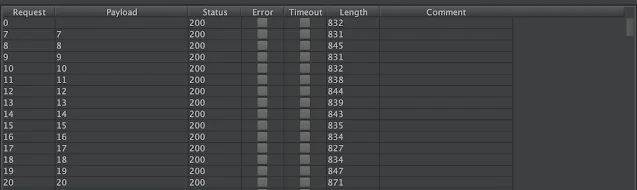
The screenshot shows the harvested responses, with the personal data of other users returned for sequential ids.
The second was a similar endpoint with the same kind of leak through search functionality:
/api/panel/v1/users/?page=1&page_size=1&search=cyberboy
Both endpoints returned other users' records to the researcher's account.
Step 3: Report, then escalate
The researcher reported the bug, and the team asked whether the severity could be raised. The researcher went back to /api/panel/v1/users/{id}/ and noticed a JSON value in the response:
"is_staff": false
From this it was easy to infer that the site has different roles. To learn what the higher roles look like, the researcher looked for the privileges of an admin account, reasoning that these would belong to developers of the company. Developer names were easy to find in public places, so the plan was to pass a name to the search API and fetch the matching record if it existed.
One of the names worked, and the search returned an admin account's information:
/api/panel/v1/users/?page=1&page_size=1&search=NAME_OF_A_DEV_I_KNEW
The record revealed more interesting role fields:
"is_superuser": true
"is_staff": true
"lms_role": "super_admin"
Step 4: Try to write the privileged fields
Having the shape of an admin record, the researcher tried to give those privileges to their own account. The first attempt was a POST request to their own id with the privileged JSON values:
POST /api/panel/v1/users/{id}/ HTTP/1.1

{
  "is_superuser": true
  "is_staff": true
  "lms_role": "super_admin"
}
This returned a 500 error.
The next attempt used PATCH against the same endpoint:
PATCH /api/panel/v1/users/{id}/ HTTP/1.1

{
  "is_superuser": true
  "is_staff": true
  "lms_role": "super_admin"
}
This returned 200. The researcher logged into their account and was now a staff member and a superuser, able to edit and modify content.
Step 5: Reach the Django admin
Curiosity did not stop there. Searching for lms_role showed that it belongs to a learning management system and had something to do with Django. The researcher opened /admin and was greeted with a welcome message addressing them as "Cyberboy".

The screenshot shows the Django admin interface after the privilege change, with the researcher logged in as an administrator.
At that point the researcher told the team they would like to stop, and the team agreed. The bounty was 3000 USD.
Root cause
The user detail endpoint and the user list endpoint returned full user objects, including role fields, to any authenticated user, and the detail endpoint accepted PATCH requests that wrote those same role fields. In other words, the role attributes (is_staff, is_superuser, lms_role) were mass-assignable through the ordinary user update path, with no server-side check that the caller was allowed to change them. The POST attempt returned a 500 error, while the PATCH attempt returned 200.
Impact
Any registered user could enumerate user records by id or by search and read other users' email addresses, dates of birth and names. The same user could then PATCH their own record to become staff and superuser, which gave the ability to edit and modify content and, through /admin, full administrative access to the Django application. The role field names and values were learned from an admin account's record returned by the search endpoint.
Fix
Based on the behaviour shown, the role fields should be read-only in the user serialiser, so that PATCH requests cannot set is_staff, is_superuser or lms_role, and the detail and list endpoints should restrict which fields and which records are returned to the caller. Whether the team implemented this is not stated.
Variants to test
- Enumerate integer ids on any
/api/.../users/{id}/style endpoint and filter for 200 responses. A positive result is another user's record returned to your account. - Try the list endpoint with
search=andpage_size=parameters, using names found in public sources. A positive result is a record for a privileged account, including its role fields. - Take the role fields seen in responses (
is_staff,is_superuser, and any application-specific role such aslms_role) and send them back with PATCH to your own id. A 200 followed by new privileges in the UI is the escalation. - Repeat the same fields with POST and PUT to see which methods the write path accepts. A 500 on one method and 200 on another tells you which path is wired to the model.
- Check whether API documentation paths such as
/api-docs/change status code before and after registration. A move from 500 or 403 to 200 exposes the full endpoint inventory. - After any privilege change, open
/adminand other framework administration paths. A positive result is an authenticated administrative session.
What happened, in plain words
A security researcher was testing a website that belonged to a private bug bounty program. A bug bounty program is an arrangement where a company invites outside people to look for security weaknesses in its systems and pays them for reporting what they find, instead of the company being attacked by criminals first. The website had a role field called lms_role, which the researcher found relates to a learning management system, software schools and companies use to run courses, lessons and student records, and had something to do with Django, a popular toolkit for building websites in the Python programming language.
The researcher found that the website's API was leaking personal information about its users, and then found a way to give their own ordinary account the highest possible privileges, ending up inside the site's administration area. The company paid a bounty of 3000 USD.
An API (Application Programming Interface) is the part of a website that programs talk to, rather than people. When you use a normal website, your browser asks for a page and gets back something to look at. When a program uses an API, it asks for data and gets back data, usually in a structured text format called JSON. Think of a restaurant: the dining room is the website you see, and the kitchen door where waiters pick up orders is the API. The menu of everything the kitchen can make is the API documentation.
This write-up walks through the whole chain: how the researcher found a hidden part of the site, how they read other people's data, and how a single request turned their account into an administrator account.
The setup
The only tool the report names is FFUF, described as a tool written in GoLang for brute forcing directories. GoLang (usually just Go) is a programming language. Brute forcing directories means trying a long list of common names against a web server to see which ones exist, the way you might try every key on a big keyring to find the one that opens a door. The researcher used FFUF to go through the site's subdomains. A subdomain is a section of a domain name: if the main site is example.com, then shop.example.com and blog.example.com are subdomains of it.
The researcher also created a normal account on the main application by signing up. Nothing special was needed for this: no invitation, no approval, no special role. The report does not say how many subdomains were tested or which wordlist was used.
Finding the hidden door
The researcher passed all the subdomains to FFUF. When you scan a web server this way, the server answers each guess with a status code, a three-digit number that says how the request went. The common ones are:
- 200: here it is, the page exists.
- 302: the page exists but sends you somewhere else.
- 403: the page exists but you are not allowed to see it.
- 404: there is nothing here.
- 500: something went wrong on the server while handling your request.
At first no interesting 200 responses came back against the wordlist, so the researcher started looking at the other codes, such as 302 and 403. One subdomain, which the report calls sub.vulnerable.com, returned a 500 error for this endpoint:
/api-docs/
An endpoint is a specific address inside a website that does one job, like a particular counter in a large office. /api-docs/ is the address where the API documentation lives.
This stood out because a request to /anything on the same host returned 404. In other words, a made-up address got the polite "nothing here" answer, but the documentation address got a server error. That difference suggested that /api-docs really existed but needed more privileges, or that something else was failing on the server side. A 500 is like a shop assistant saying "I can't serve you" rather than "we don't sell that": it hints that the thing you asked for is behind the counter.
The researcher tried many HTTP methods against it without success. An HTTP method is the verb of a web request: GET means "give me this", POST means "create this", PATCH means "change part of this", and so on. None of them worked, so the researcher went back to testing the main application.
Step 1: Register, then reload the API docs
After signing up on the main application, the researcher refreshed the page in the next tab, which was pointing at /api-docs/. The documentation appeared, rendered as a Swagger UI. Swagger UI is a standard, interactive page that lists every endpoint an API offers and lets you try requests from the browser.
The screenshot shows the Swagger UI that became reachable after registration. The report does not explain the mechanism behind this, only that the documentation was visible once an account existed. The practical lesson is that a page which refuses you when you are a stranger may open up once you are logged in, so it is worth checking the same address before and after creating an account.
Step 2: Read the menu of endpoints
Seeing the admin API in the documentation, the researcher expected a goldmine, but none of the admin API endpoints worked. Attention moved to the normal API endpoints, and two stood out.
The first was the user detail endpoint:
/api/panel/v1/users/{id}/
Here {id} is an integral value, meaning a whole number. Each user in the system has a number, and this address returns the record for that number. The researcher automated requests for the values 1 to 100 and filtered the 200 responses. Automating means writing a small script or loop so the computer sends the requests instead of a person clicking a hundred times. Filtering means keeping only the answers that came back as 200, because those are the ones that actually returned data.
Those responses contained other users' email addresses, dates of birth, names and similar fields. The endpoint returned other users' records to the researcher's account. It is like a hotel where any guest can open any room door with their own key, as long as they know the room number.
The screenshot shows the harvested responses, with the personal data of other users returned for sequential ids.
The second was a similar endpoint with the same kind of leak through search functionality:
/api/panel/v1/users/?page=1&page_size=1&search=cyberboy
This address asks for a list of users. page=1 and page_size=1 control pagination, which is how APIs hand back long lists in small chunks: page 1, one result per page. search=cyberboy asks the server to filter the list to records matching that word. The leak here is the same: the search returns user records without any check that the requester is entitled to see them.
Both endpoints returned user records without any check that the requester was entitled to see them.
Step 3: Report, then escalate
The researcher reported the bug, and the team asked whether the severity could be raised. Severity is how much damage a bug could do, and it affects the size of the bounty. So the researcher went back to /api/panel/v1/users/{id}/ and noticed a JSON value in the response:
"is_staff": false
JSON is the text format APIs use to send data: it is a list of field names and values, like a very tidy form. This line says the field is_staff is false for that user. is_staff is a Django convention meaning "this account may use the administration area". Seeing it set to false made it easy to infer that the site has different roles, and that some accounts have it set to true.
To learn what the higher roles look like, the researcher looked for the privileges of an admin account, reasoning that these would belong to developers of the company. Developer names were easy to find in public places, so the plan was to pass a name to the search API and fetch the matching record if it existed.
One of the names worked, and the search returned an admin account's information:
/api/panel/v1/users/?page=1&page_size=1&search=NAME_OF_A_DEV_I_KNEW
The record revealed more interesting role fields:
"is_superuser": true
"is_staff": true
"lms_role": "super_admin"
The record showed is_superuser true, is_staff true and lms_role set to super_admin. Now the researcher knew the exact names and values that a powerful account carries.
Step 4: Try to write the privileged fields
Having the shape of an admin record, the researcher tried to give those privileges to their own account. The first attempt was a POST request to their own id with the privileged JSON values:
POST /api/panel/v1/users/{id}/ HTTP/1.1

{
  "is_superuser": true
  "is_staff": true
  "lms_role": "super_admin"
}
Line by line: the first line says "create something at this user address, using version 1.1 of the HTTP protocol". The block below is the JSON body, the data being sent. The intent was to create or overwrite the record with these values. This returned a 500 error, meaning the server failed while handling it. That is a hint that this address was not designed for creation, so the write path did not fit.
The next attempt used PATCH against the same endpoint:
PATCH /api/panel/v1/users/{id}/ HTTP/1.1

{
  "is_superuser": true
  "is_staff": true
  "lms_role": "super_admin"
}
PATCH means "change these fields on the existing thing". This returned 200, meaning it worked. The researcher logged into their account and was now a staff member and a superuser, able to edit and modify content.
The PATCH request returned 200, and the researcher's account then had staff and superuser privileges. It is like a form at a hotel reception where you can write your own room number, your own floor, and your own job title, and the clerk copies all of it into the register without looking.
Step 5: Reach the Django admin
Curiosity did not stop there. Searching for lms_role showed that it belongs to a learning management system and had something to do with Django. The researcher opened /admin and was greeted with a welcome message addressing them as "Cyberboy".
The screenshot shows the Django admin interface after the privilege change, with the researcher logged in as an administrator. Django ships with a built-in administration area at /admin, and the researcher reached it after the privilege change.
At that point the researcher told the team they would like to stop, and the team agreed. The bounty was 3000 USD.
Why it worked
The user detail endpoint and the user list endpoint returned full user objects, including role fields, to any authenticated user, and the detail endpoint accepted PATCH requests that wrote those same role fields. In other words, the role attributes (is_staff, is_superuser, lms_role) were mass-assignable through the ordinary user update path, with no server-side check that the caller was allowed to change them. The POST attempt returned a 500 error, while the PATCH attempt returned 200.
What the impact was
Any registered user could enumerate user records by id or by search and read other users' email addresses, dates of birth and names. Enumerating means walking through the numbers one by one to collect every record. The same user could then PATCH their own record to become staff and superuser, which gave the ability to edit and modify content and, through /admin, full administrative access to the Django application. The role field names and values were learned from an admin account's record returned by the search endpoint.
How it should be fixed
Based on the behaviour shown, the role fields should be read-only in the user serialiser, so that PATCH requests cannot set is_staff, is_superuser or lms_role, and the detail and list endpoints should restrict which fields and which records are returned to the caller. Whether the team implemented this is not stated.
Things to try on your own targets
- Enumerate integer ids on any
/api/.../users/{id}/style endpoint and filter for 200 responses. A positive result is another user's record returned to your account. - Try the list endpoint with
search=andpage_size=parameters, using names found in public sources. A positive result is a record for a privileged account, including its role fields. - Take the role fields seen in responses (
is_staff,is_superuser, and any application-specific role such aslms_role) and send them back with PATCH to your own id. A 200 followed by new privileges in the UI is the escalation. - Repeat the same fields with POST and PUT to see which methods the write path accepts. A 500 on one method and 200 on another tells you which path is wired to the model.
- Check whether API documentation paths such as
/api-docs/change status code before and after registration. A move from 500 or 403 to 200 exposes the full endpoint inventory. - After any privilege change, open
/adminand other framework administration paths. A positive result is an authenticated administrative session.
Glossary
- API: the part of a website that programs talk to, returning data rather than pages.
- API documentation: a page listing every endpoint an API offers and what each one expects.
- Authentication: proving who you are, usually by logging in.
- Authorisation: what a logged-in user is allowed to do once they are known.
- Broken access control: a flaw where the server checks who you are but not what you may see or change.
- Brute forcing directories: trying a long list of common names against a server to discover which exist.
- Bug bounty program: a scheme where a company pays outsiders for reporting security weaknesses.
- Django: a toolkit for building websites in Python, which includes a built-in admin area.
- Endpoint: a specific address inside a website that performs one job.
- Enumeration: walking through predictable values, such as user ids, to collect records.
- FFUF: a tool written in Go for brute forcing directories and subdomains.
- GoLang: a programming language, often called Go.
- HTTP method: the verb of a request, such as GET, POST, PATCH or PUT.
- JSON: a text format of field names and values used by APIs to send data.
- Learning management system: software for running courses, lessons and student records.
- Mass assignment: a flaw where a server writes whatever fields a client sends onto a record without checking which are allowed.
- Pagination: splitting a long list into numbered pages of a fixed size.
- PATCH: an HTTP method meaning "change these fields on the existing thing".
- POST: an HTTP method meaning "create this".
- Privilege escalation: gaining more permissions than you were meant to have.
- Role: a label such as staff or superuser that decides what an account may do.
- Serialiser: the part of a Django API that converts records to and from JSON.
- Severity: how much damage a bug could do, which affects the bounty.
- Status code: a three-digit number saying how a request went, such as 200, 404 or 500.
- Subdomain: a section of a domain name, such as
shop.example.com. - Swagger UI: an interactive page that lists and lets you try an API's endpoints.
- Wordlist: a file of common names used when brute forcing.