From a Cache Header to a $400 Bug Bounty: My API Security Research
The author found that API endpoints on a development hostname were reachable without passing through the Cloudflare Access login flow, and that responses were not served from cache. Under concurrent unauthenticated requests the backend response time rose, suggesting missing throttling and possible resource exhaustion.
 Published on medium.com
Bug Bounty
The full write-up lives on its author's site
It belongs to its author, so we link to it rather than copy it. The other two tabs are our own rewrites, checked against it.
Context
This is a write-up about a development environment of a web application, referred to throughout as dev.xxx.com. The main application sits behind Cloudflare Access: an unauthenticated visitor to the site root is redirected into the Cloudflare Access authentication flow at xxx.cloudflare.com and shown a login page. From the outside, that looks like a solid authentication boundary in front of everything.
The researcher's interest was in the API surface behind that boundary, specifically whether requests to API paths were subject to the same protection as the main entry point, whether their responses were served from cache, and whether anything throttled repeated unauthenticated requests. The finding was paid a $400 bounty.
Setup
The testing was done against a development environment. The tools used were:
- plow, used to send requests concurrently.
- A shell loop with
curlandtimeto measure response latency from a second terminal. - Kali Linux, where the researcher opened a terminal to script the test.
No accounts, credentials or special roles were needed: the whole point was that the requests were unauthenticated.
Finding it
The starting point was a simple question: what happens if you do not use the main application entry point? Instead of following the normal login flow, the researcher went looking at the application's API surface.

The normal behaviour, for reference, was:
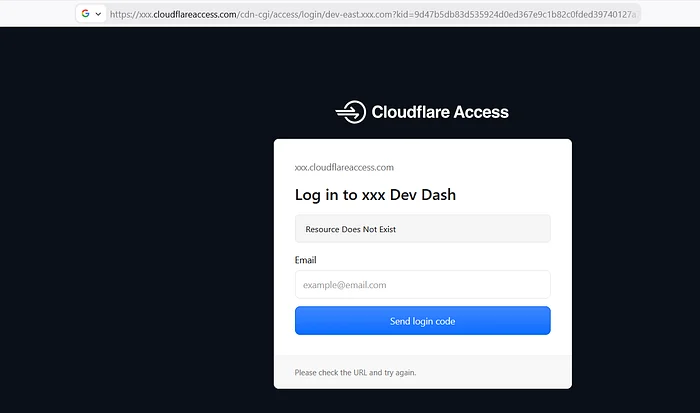
So externally the application appeared to have an authentication boundary in front of it. The first deviation came from requesting an API endpoint directly:
GET /api/auth/login HTTP/2
Host: dev.xxx.com
Accept: application/json
Instead of being redirected to the Cloudflare login page, the request reached the application and returned an application-generated response: 419 Page Expired. That was the first clue, and at that stage it was only a clue. The researcher explicitly was not claiming the API was vulnerable yet; the question was where the request was actually going.

A 419 or a 404 on its own is not interesting, so the next step was to look at the response headers. One response looked like this:
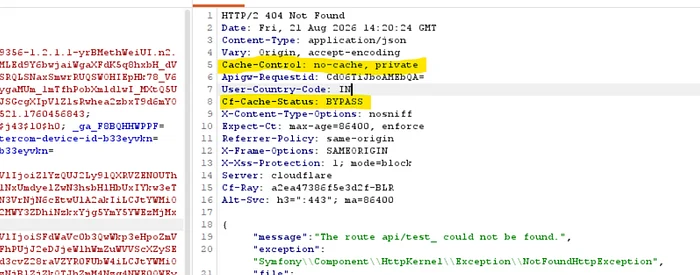
Two headers stood out:
Cache-Control: no-cache, private
Cf-Cache-Status: BYPASS
The interpretation matters here. Cf-Cache-Status: BYPASS does not mean Cloudflare was bypassed. Traffic was still going through Cloudflare. What it means is that the tested API response was not being served from an existing Cloudflare cache entry, so the request was reaching the request-processing path. That distinction is what makes the finding worth pursuing: if responses are not satisfied from cache, repeated requests can continuously reach the backend.
The next question was whether anything throttled those requests. The researcher notes a common but incorrect line of reasoning: "there are no rate limits because there are no rate-limit headers in the response". Missing headers do not mean a lack of rate limiting, and reporting it that way risks being closed as informational. So the missing headers were treated only as an observation, and the focus moved to actual behaviour.

With controlled requests, the responses kept coming back without an observable 429 Too Many Requests or equivalent client-side throttling. That was interesting, but not yet proof of anything.
At this point there were three observations:
- Main application → Cloudflare Access authentication.
/api/*→ directly reachable through the public hostname.- Tested API responses → not served from cache.
Which led to the question that shaped the rest of the investigation: are these requests actually creating measurable backend pressure? Rather than assume the answer, the researcher scripted a test.
Exploitation
Step 1: send concurrent requests with plow
In the first terminal, plow was used to send requests without limit:
This drives concurrent requests at the API path for a fixed duration, with the JSON Accept header matching the earlier manual request.
Step 2: measure response time from a second terminal
In the second terminal, a loop measured how long each request took:
for i in {1..100}; do
time curl -X GET "https://dev.xxx.com/api/test$i" \
 -H "Accept: application/json" \
 -s -o /dev/null -w "Request $i: %{time_total}s\n"
done
This issues sequential requests to the API path and prints the total time for each one, giving a baseline that can be compared against the same measurement taken while plow is running.
Step 3: compare the two
With both running at the same time, the responses in the second terminal showed increasing delay as plow sent requests concurrently. The researcher reports using 1000 requests in plow. The starting latency was approximately 0.4-0.5 seconds.
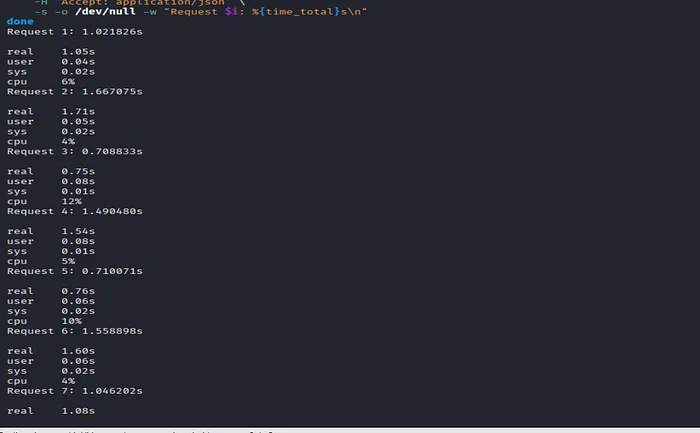
And the response time increased from there.
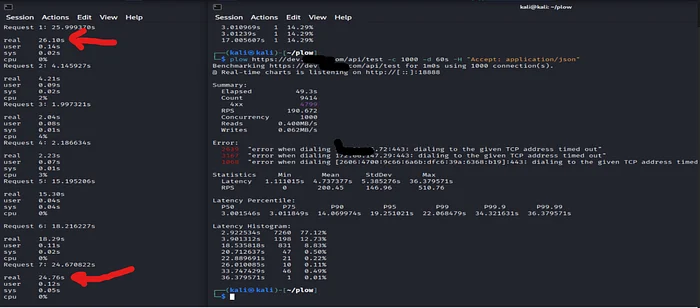
The conclusion was that all requests sent reached the origin backend and hit it: no cache configuration in front of them, and no rate-limit throttling or blocking.

A detailed report was sent to the triage team and paid a $400 bounty.

Root cause
The observations point to a mismatch between where the authentication boundary sits and where the API lives. Cloudflare Access was protecting the main application entry point, but the API paths were reachable directly through the public hostname and returned application-generated responses rather than an authentication redirect. In other words, the edge control covered the front door but not the API surface behind it.
On top of that, the tested API responses carried Cache-Control: no-cache, private and Cf-Cache-Status: BYPASS, so they were not satisfied from cache, and no throttling was observed on repeated unauthenticated requests. Each request therefore consumed backend processing.
Impact
Under the conditions tested, an unauthenticated client could send repeated requests to the API path and have each one processed by the backend, with response times degrading as concurrency increased. The researcher frames the risk as resource exhaustion: sustained unauthenticated traffic could increase backend compute consumption. If the application is backed by AWS Lambda, that could translate into increased Lambda execution and infrastructure costs, depending on request volume and execution duration.
The report is careful about the limits of the claim. The missing rate-limit headers were not treated as evidence of anything, and the finding rests on measured behaviour: no cache absorption, no observed 429 or equivalent throttling, and rising latency under concurrent load. The billing impact is presented as potential, conditional on the backend architecture.
Fix
Variants to test
- Other API paths on the same host. Request paths under
/api/directly withAccept: application/jsonand compare against the site root. A positive result is an application-generated response (any status produced by the app, such as the419seen here) instead of a redirect to the access login page. - Cache status on other endpoints. Inspect
Cf-Cache-StatusandCache-Controlon responses from API paths.BYPASSorno-cache, privateon responses that trigger backend work is the pattern to look for. - Throttling behaviour. Send controlled repeated requests and watch for
429or equivalent. A positive result is a sustained absence of throttling combined with responses that are clearly generated by the application. - Latency under concurrency. Run a concurrent load tool against one endpoint while measuring sequential request times from a second terminal, as done here. A positive result is a measurable increase in latency during the concurrent run compared with the baseline.
- **
What happened, in plain words
A security researcher was looking at a development copy of a website, the kind of test version a company keeps separate from its real public site. The main page of that site was locked behind a login screen provided by a service called Cloudflare Access. If you typed the site address into a browser without being logged in, you were sent to a Cloudflare login page and could go no further. From the outside it looked like the whole site was sealed off.
The researcher asked a simple question: what if I do not go in through the front door? Instead of loading the main page, they sent a request straight to one of the site's API addresses. An API is the part of a website that programs talk to, rather than people clicking buttons. That request did not get bounced to the Cloudflare login page. It reached the actual application, which answered with its own error message, 419 Page Expired.
That alone was only a hint. The researcher then looked at the extra information the server sends back with every answer, called response headers, and noticed that the answer was not being stored and reused by Cloudflare's cache. A cache is a copy kept close to the visitor so the same answer can be handed out again quickly without bothering the real server. No cache meant every request was travelling all the way to the application behind Cloudflare.
Next question: does anything slow down repeated requests? The researcher deliberately avoided the common beginner mistake of claiming "no rate limiting" just because certain headers were missing. Instead they tested the actual behaviour. They used a tool called plow to fire many requests at once, and a small script in a second terminal window to time how long single requests took. As the flood went on, the single requests got slower and slower, starting at roughly 0.4 to 0.5 seconds. That showed the requests really were reaching the backend and putting load on it.
The researcher wrote it up, sent it to the company's triage team (the people who read incoming bug reports and decide what to do with them), and was paid a $400 bounty. A bounty is a reward a company pays someone for responsibly reporting a security problem.
The setting: a test site behind a login wall
The target was a development environment, written throughout as dev.xxx.com. A development environment is a copy of a website used for building and testing, usually reachable on its own address. It often contains the same code as the live site but is not meant for the public.
The main application was protected by Cloudflare Access. Cloudflare is a large service that sits between visitors and a website, like a reception desk in front of an office. Access is one of its products: before anyone reaches the site, Cloudflare checks whether they are allowed in, and if not, sends them to a login page at xxx.cloudflare.com. Only after logging in does the visitor reach the real application.
From the outside, that looks like a solid wall in front of everything. The researcher's interest was in what sits behind that wall: the API surface. "API surface" simply means all the addresses under a site that programs can call. The questions were:
- Are requests to API addresses protected the same way as the main page?
- Are the answers to those requests stored in a cache, or does each one reach the real server?
- Does anything slow down or block someone who sends the same request over and over without logging in?
The answer to those questions earned a $400 bounty.
What you need to follow along
The testing was done against a development environment. The tools were:
- An HTTP client is any program that sends web requests; a browser is one, and there are simpler text-based ones too.
- plow, a tool that sends many requests at the same time. Think of it as many people knocking on the same door simultaneously instead of one person knocking repeatedly.
- A shell loop using
curlandtimeto measure how long each request takes, run from a second terminal window. A terminal is a text window where you type commands.curlis a command-line tool for sending web requests, andtimeis a command that reports how long something took. - Kali Linux, where the researcher opened a terminal to script the test.
No accounts, passwords or special permissions were needed. That is the whole point: every request was made as an anonymous visitor, someone who has not logged in. "Edge" here means the outer layer of the network, the part closest to the visitor, before traffic reaches the company's own servers.
Finding it
The starting point was one question: what happens if you do not use the main application entry point? Instead of following the normal login flow, the researcher went looking at the application's API surface.
For comparison, the normal behaviour was:
Line by line, this says: an unauthenticated user (someone not logged in) goes to the site root, https://dev.xxx.com/. Cloudflare Access intercepts them, and they are shown a page saying authentication is required, which is the login page. In everyday terms: you walk up to the building, the receptionist stops you and asks for ID before you can go any further.
So from the outside, the application appeared to have an authentication boundary in front of it. An authentication boundary is simply the point where a system checks who you are before letting you through.
The first deviation came from requesting an API endpoint directly. An endpoint is one specific address that a program can call, like a particular service window in a building rather than the main entrance.
GET /api/auth/login HTTP/2
Host: dev.xxx.com
Accept: application/json
Line by line:
GET /api/auth/login HTTP/2is the request itself.GETis the method, meaning "give me this thing"./api/auth/loginis the path being asked for, an address under the site's API area.HTTP/2is the version of the web protocol being used, the language the browser and server speak.Host: dev.xxx.comtells the server which site name the request is for. One server can host many sites, so this line says which one is meant.Accept: application/jsontells the server what kind of answer the client would like. JSON is a common text format that programs use to exchange data. Saying you accept JSON is a way of saying "I am a program, not a browser loading a page".
Instead of being redirected to the Cloudflare login page, the request reached the application and returned an application-generated response: 419 Page Expired. A 419 is an HTTP status code, a number a server sends to describe the outcome of a request. You have probably seen 404, meaning "not found". 419 is used by some frameworks to mean a page or session has expired.
That was the first clue, and at that stage it was only a clue. The researcher explicitly was not claiming the API was vulnerable yet. The question was where the request was actually going. This is an important habit: noticing something odd is not the same as proving a problem.
A 419 or a 404 on its own is not interesting. Plenty of servers return errors for all sorts of harmless reasons. So the next step was to look at the response headers. Headers are the extra lines of information a server attaches to its answer, separate from the content itself, a bit like the label on a parcel telling you how it was shipped.
One response looked like this:
Two headers stood out:
Cache-Control: no-cache, private
Cf-Cache-Status: BYPASS
Line by line:
Cache-Control: no-cache, privateis the application telling caches how to treat this answer.no-cachemeans it should not be reused without checking with the server first, andprivatemeans it is meant for one user only and must not be stored in a shared cache.Cf-Cache-Status: BYPASSis a header added by Cloudflare.Cfstands for Cloudflare.BYPASSmeans Cloudflare did not serve this answer from its cache; the request went past the cache to the real server.
The interpretation matters here. Cf-Cache-Status: BYPASS does not mean Cloudflare was bypassed. Traffic was still going through Cloudflare. What it means is that the tested API response was not being served from an existing Cloudflare cache entry, so the request was reaching the request-processing path. That distinction is what makes the finding worth pursuing: if responses are not satisfied from cache, repeated requests can continuously reach the backend. The backend is the company's own server or service that does the actual work.
A useful comparison: a cache is like a coffee shop keeping a few cups already poured on the counter. If a drink is not on the counter, every order has to be made fresh by the barista. BYPASS says the drink was made fresh, not taken from the counter.
The next question was whether anything throttled those requests. Throttling, also called rate limiting, means deliberately slowing down or refusing a client that sends too many requests in a short time. It is the bouncer who tells a crowd to enter one at a time.
The researcher notes a common but incorrect line of reasoning: "there are no rate limits because there are no rate-limit headers in the response". Missing headers do not mean a lack of rate limiting, and reporting it that way risks being closed as informational. "Informational" is the lowest severity a bug report can get, meaning it is noted but not treated as a real security problem. So the missing headers were treated only as an observation, and the focus moved to actual behaviour.
With controlled requests, the responses kept coming back without an observable 429 Too Many Requests or equivalent client-side throttling. A 429 is the standard status code for "you are sending too many requests, slow down". Client-side throttling here means any mechanism on the receiving side that visibly limits the client. That was interesting, but not yet proof of anything. Absence of a 429 could simply mean the limit is set very high, or that the limit is applied somewhere the researcher could not see.
At this point there were three observations:
- Main application → Cloudflare Access authentication.
/api/*→ directly reachable through the public hostname. The*is a wildcard meaning "anything under this path".- Tested API responses → not served from cache.
Which led to the question that shaped the rest of the investigation: are these requests actually creating measurable backend pressure? In other words, is the backend visibly working harder because of them? Rather than assume the answer, the researcher scripted a test. This is the difference between guessing and measuring.
Exploitation
Step 1: send concurrent requests with plow
In the first terminal, plow was used to send requests without limit:
Line by line:
plowis the name of the tool being run.https://dev.xxx.com/api/testis the address being hit, an API path on the development host.-c 50sets concurrency to 50, meaning 50 requests are in flight at the same time. Think of 50 people knocking at once rather than one person knocking 50 times.-d 60ssets the duration to 60 seconds, so the tool keeps going for one minute.-H "Accept: application/json"adds a header to every request, the sameAcceptheader used in the earlier manual request, so the traffic looks like the earlier test.
This drives concurrent requests at the API path for a fixed duration, with the JSON Accept header matching the earlier manual request. The reason for doing this is to create load while measuring from somewhere else.
Step 2: measure response time from a second terminal
In the second terminal, a loop measured how long each request took:
for i in {1..100}; do
time curl -X GET "https://dev.xxx.com/api/test$i" \
 -H "Accept: application/json" \
 -s -o /dev/null -w "Request $i: %{time_total}s\n"
done
Line by line:
for i in {1..100}; dostarts a loop that repeats 100 times, with the variableicounting from 1 to 100.timeis a command that reports how long the following command took.curlis the tool sending the request.-X GETsays to use the GET method, the same method as before."https://dev.xxx.com/api/test$i"is the address, with$ireplaced by the current loop number, so each request goes to a slightly different path such as/api/test1,/api/test2and so on.-H "Accept: application/json"again adds the JSON accept header.-smakes curl quiet, hiding its progress output.-o /dev/nullthrows away the response body, since only the timing matters.-w "Request $i: %{time_total}s\n"prints a custom line after each request showing the request number and the total time in seconds.donecloses the loop.
This issues sequential requests to the API path and prints the total time for each one, giving a baseline that can be compared against the same measurement taken while plow is running. A baseline is the normal measurement taken when nothing unusual is happening, so you have something to compare against later.
Step 3: compare the two
With both running at the same time, the responses in the second terminal showed increasing delay as plow sent requests concurrently. The researcher reports using 1000 requests in plow. The starting latency was approximately 0.4-0.5 seconds. Latency is the time between sending a request and getting the answer back.
And the response time increased from there.
The conclusion was that all requests sent reached the origin backend and hit it: no cache configuration in front of them, and no rate-limit throttling or blocking. The origin is the company's own server, the place where the real work happens, as opposed to the edge layer in front of it.
A detailed report was sent to the triage team and paid a $400 bounty.
Why it works: the root cause
The observations point to a mismatch between where the authentication boundary sits and where the API lives. Cloudflare Access was protecting the main application entry point, but the API paths were reachable directly through the public hostname and returned application-generated responses rather than an authentication redirect. In other words, the edge control covered the front door but not the API surface behind it.
A comparison: a building where the receptionist checks everyone who comes through the main lobby, but there is a side door marked "deliveries" that nobody watches. The side door is not a secret; it is just not covered by the same check.
On top of that, the tested API responses carried Cache-Control: no-cache, private and Cf-Cache-Status: BYPASS, so they were not satisfied from cache, and no throttling was observed on repeated unauthenticated requests. Each request therefore consumed backend processing.
What the impact is
Under the conditions tested, an unauthenticated client could send repeated requests to the API path and have each one processed by the backend, with response times degrading as concurrency increased. Degrading means getting worse, in this case slower.
The researcher frames the risk as resource exhaustion. That is a class of problem where an attacker uses up a system's limited resources, such as processing time or memory, so that it cannot serve normal users well. A simple comparison is a shop with one cashier: if a crowd keeps asking questions without buying anything, real customers wait longer.
Sustained unauthenticated traffic could increase backend compute consumption. If the application is backed by AWS Lambda, that could translate into increased Lambda execution and infrastructure costs, depending on request volume and execution duration. AWS Lambda is a cloud service that runs code on demand and charges for the time that code runs, so more requests mean a bigger bill.
The report is careful about the limits of the claim. The missing rate-limit headers were not treated as evidence of anything, and the finding rests on measured behaviour: no cache absorption, no observed 429 or equivalent throttling, and rising latency under concurrent load. The billing impact is presented as potential, conditional on the backend architecture. In plain terms: the researcher says "this could cost money if the backend is built this way", not "this definitely cost money".
How to fix it
In the building comparison: put the same receptionist on the deliveries door, and add a limit on how many people can queue at once.
Other things to try
If you want to look for the same pattern on a site you are allowed to test, these are the variations worth trying:
- Other API paths on the same host. Request paths under
/api/directly withAccept: application/jsonand compare against the site root. A positive result is an application-generated response (any status produced by the app, such as the419seen here) instead of a redirect to the access login page. - Cache status on other endpoints. Inspect
Cf-Cache-StatusandCache-Controlon responses from API paths.BYPASSorno-cache, privateon responses that trigger backend work is the pattern to look for. - Throttling behaviour. Send controlled repeated requests and watch for
429or equivalent. A positive result is a sustained absence of throttling combined with responses that are clearly generated by the application. - Latency under concurrency. Run a concurrent load tool against one endpoint while measuring sequential request times from a second terminal, as done here. A positive result is a measurable increase in latency during the concurrent run compared with the baseline.
- ** Staging is another test copy of a site, usually closer to the live version than development.
Glossary
- API: the part of a website that programs talk to, rather than people clicking pages.
- API surface: all the addresses under a site that programs can call.
- Endpoint: one specific address a program can call.
- HTTP: the protocol browsers and servers use to exchange requests and answers.
- HTTP/2: a version of HTTP.
- GET: an HTTP method meaning "give me this thing".
- Host header: the line in a request that says which site name it is for.
- Accept header: the line in a request that says what kind of answer the client would like.
- JSON: a common text format programs use to exchange data.
- Status code: a number a server sends to describe the outcome of a request, such as 404 for not found.
- 419 Page Expired: a status code some frameworks use to mean a page or session has expired.
- 429 Too Many Requests: the standard status code for "you are sending too many requests".
- Response headers: extra lines of information a server attaches to its answer, separate from the content.
- Cache: a copy of an answer kept close to the visitor so it can be reused without bothering the real server.
- Cache-Control: a header telling caches how to treat an answer;
no-cache, privatemeans do not reuse without checking, and keep it for one user only. - Cf-Cache-Status: a header added by Cloudflare saying whether the answer came from its cache;
BYPASSmeans it did not. - Cloudflare: a service that sits between visitors and a website.
- Cloudflare Access: a Cloudflare product that checks whether a visitor is allowed in before they reach the site, sending them to a login page if not.
- Edge: the outer layer of the network, closest to the visitor, before traffic reaches the company's own servers.
- Origin / backend: the company's own server or service that does the actual work.
- Authentication boundary: the point where a system checks who you are before letting you through.
- Unauthenticated: not logged in, an anonymous visitor.
- Rate limiting / throttling: deliberately slowing down or refusing a client that sends too many requests in a short time.
- Resource exhaustion: using up a system's limited resources so it cannot serve normal users well.
- Latency: the time between sending a request and getting the answer back.
- Baseline: a normal measurement taken when nothing unusual is happening, used for comparison.
- Concurrency: several requests in flight at the same time.
- curl: a command-line tool for sending web requests.
- time: a command that reports how long something took.
- Terminal / shell: a text window where you type commands; the shell is the program that runs them.
- Kali Linux: a Linux distribution that ships with security testing tools preinstalled.
- Development environment: a copy of a website used for building and testing, usually on its own address.
- Staging: another test copy of a site, usually closer to the live version than development.
- AWS Lambda: a cloud service that runs code on demand and charges for the time that code runs.
- Bounty: a reward a company pays someone for responsibly reporting a security problem.
- Triage team: the people who read incoming bug reports and decide what to do with them.
- Informational: the lowest severity a bug report can get, noted but not treated as a real security problem.
- Wildcard (
*): a symbol meaning "anything under this path". - PoC: a proof of concept, a small demonstration that shows a problem is real.


