From Directory Listing to Full Takeover
A web server had directory listing enabled, which exposed the application's source code including hard-coded MySQL credentials and a reversible password encryption routine. The attacker used these to dump the database, recover the admin password, log into the admin panel and also authenticate to an associated Firebase project.

medium.com
Published on medium.com
Cybersecurity
The full write-up lives on its author's site
It belongs to its author, so we link to it rather than copy it. The other two tabs are our own rewrites, checked against it.
Context
This write-up describes a chain of findings on a web application that began with a directory listing and ended with access to an admin panel and a Firebase project. The report does not name the target, the program or the application's purpose. What it does describe is a web application whose server exposed its directory contents, and whose source code, database credentials and encryption helper were all reachable from that exposure.
The feature at the centre of it is directory listing: the web server's automatic index of a directory when no index file is present. Normally it is either disabled or restricted to directories that contain nothing sensitive. Here it was enabled on a directory that held the application's source code.
Setup
The researcher does not describe any accounts, roles or tool versions. The only tools named in the report are:
- a browser, used to open the server IP over HTTP;
- XAMPP and phpMyAdmin, used to import a database dump for inspection;
- Google Dorks and other search queries, used in an unsuccessful attempt to locate the admin panel.
The chain began with a directory listing that exposed the application's source code.
Finding it
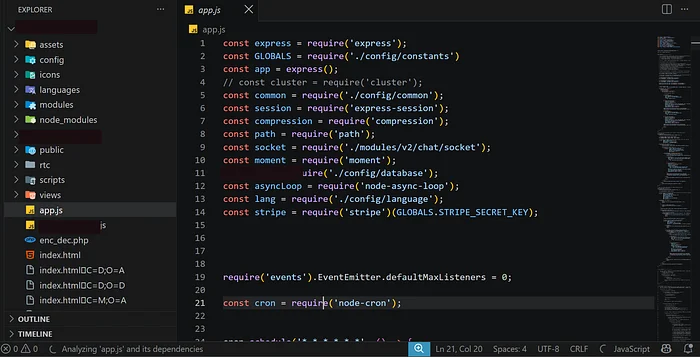
The researcher started with a simple check and noticed that the web application had Directory Listing enabled. Looking through the listed files showed that this was not a handful of ordinary files: the application's Source Code was exposed as well.
Exploitation
Step 1: Download the source code
The first action was to download the entire available source code, then go through the files one by one looking for anything that should not have been exposed.
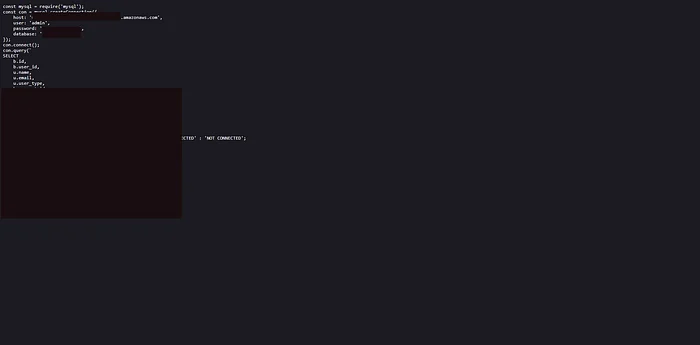
Step 2: Read the database credentials from the source
One file stood out. Inside it, the application was connecting to a remote MySQL database, and the database connection credentials were included in the source code.
Step 3: Connect to the database
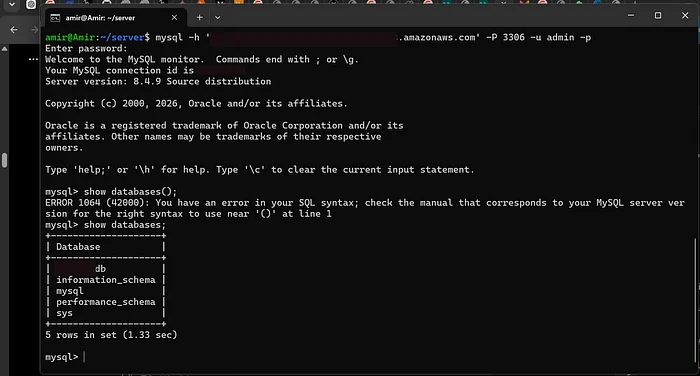
The database was hosted on AWS. Using the credentials found in the source code, the researcher connected to the MySQL database successfully.
Step 4: Dump the database
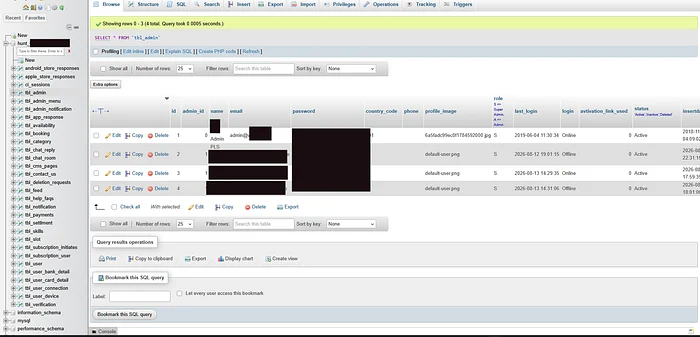
With the connection confirmed, the next step was a database dump. The researcher took a backup of the database and imported the dump into XAMPP and phpMyAdmin so the data could be inspected more easily, then went through the tables looking for anything interesting.
Step 5: Find the admin account
After some digging, the researcher found information related to the Admin account, and at that point had the admin credentials. There was a problem, though: the password was not stored as a typical hash and looked different from what was expected.
Step 6: Recover the password with enc_dec.php
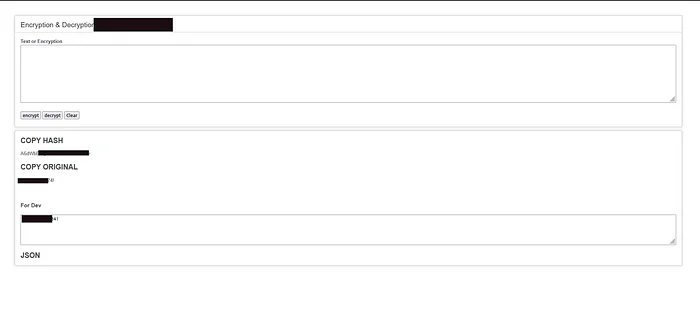
Going back to the source code, the researcher found a file called enc_dec.php. Reading the code made it clear that the value stored in the database could be converted back to its original value. This was not a one-way password hash: the application had its own encryption and decryption mechanism. Using enc_dec.php, the researcher recovered the password and could use it for authentication.
Step 7: Locate the admin panel
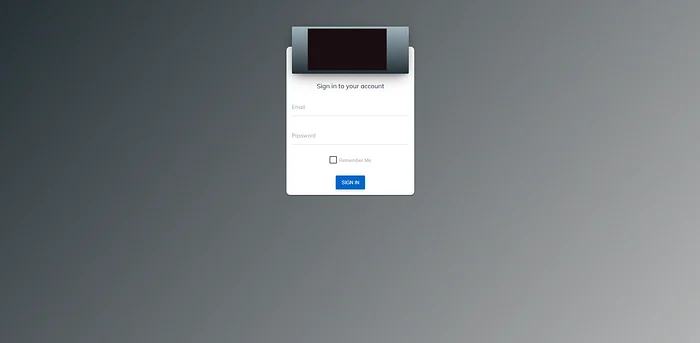
The only thing left was to find where the admin panel was. Google Dorks and various search queries did not find it. The researcher then opened the server IP directly over HTTP, and the server redirected straight to the Admin Panel.
Step 8: Log in
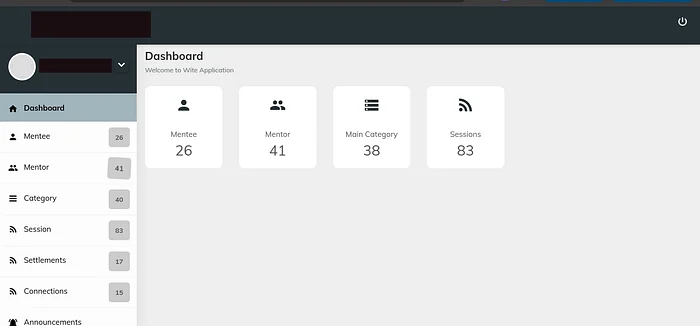
Entering the recovered credentials worked, and the researcher was in.
At this point the chain was:
Directory Listing → Source Code → MySQL → Database Dump → Password Recovery → Admin Panel
Step 9: Firebase credentials
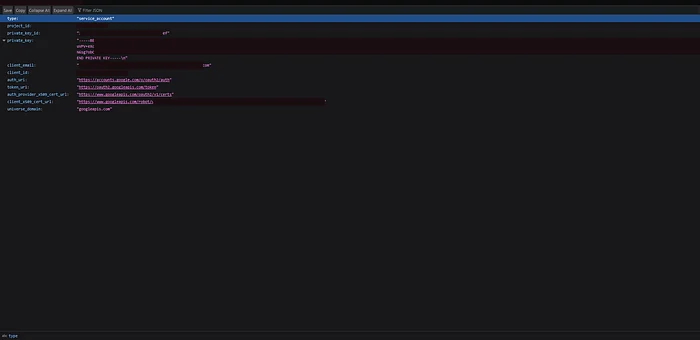
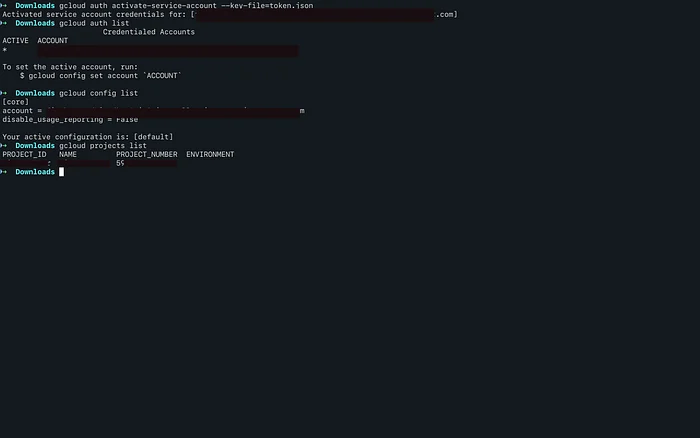
Reviewing the source code again, the researcher found another file containing Firebase credentials. Checking them showed that they could be used to authenticate to the associated project.
Root cause
The initial mistake was that directory listing was enabled on a directory that held the application's source code. That single exposure turned every secret in the code base into a reachable secret: the remote MySQL credentials, the enc_dec.php helper and the Firebase credentials.
The second mistake was storing recoverable secrets in the source tree. The database password was in a file the web server could serve, and the application's own encryption and decryption routine was also in the exposed source, so the stored admin password could be reversed rather than only compared.
The third weakness was that the admin password was stored reversibly rather than as a one-way hash. Even with the database dump alone, that made the credential recoverable once the helper was available.
Google Dorks and other search queries did not find the admin panel, but opening the server IP over HTTP redirected to it.
Impact
Under the conditions described, an attacker who reached the directory listing could obtain the application's source code, connect to the remote MySQL database, dump it, recover the admin password and authenticate to the admin panel. The same source review also yielded Firebase credentials that authenticated to the associated project.
It also does not say whether the findings were reported to the owner or remediated.
Fix
Based on the chain, the changes that would break it are:
- Disable directory listing on the web server, or restrict it to directories that contain nothing sensitive.
- Keep source code, configuration files and helper scripts such as
enc_dec.phpoutside the web root, so the server cannot serve them. - Move database and Firebase credentials out of the source tree into a secrets store or environment configuration that is not web-accessible, and rotate any credentials that were exposed.
- Store admin passwords as one-way hashes with a suitable password hashing function instead of a reversible value, and remove the decryption path from the application.
- Restrict the admin panel so that it is not reachable simply by opening the server IP, and require authentication before any redirect to it.
Variants to test
- Directory listing on other paths. Request directories that commonly hold code or configuration, such as backup, include or admin directories. A positive result is an index page listing files that should not be public.
- Secrets in served source files. Look for configuration and helper files in any exposed directory and check whether they contain database, cloud or third-party credentials. A positive result is a credential that authenticates to a live service.
- Reversible password storage. When a database dump is available, check whether stored password values can be decoded with a helper found in the source. A positive result is a plaintext password that works for authentication.
- Admin panel discovery by IP. Open the server IP directly over HTTP and observe redirects. A positive result is a redirect to an administrative interface.
- Cloud credentials in source. Search the source for Firebase or similar cloud configuration and test whether it authenticates to the associated project. A positive result is a successful authentication to that project.
What happened, in plain words
This is the story of a website that gave away far more than it meant to. It started with one small setting left switched on, and that setting led, step by step, to the application's source code, its database, its admin account and finally a cloud service the application used.
No clever attack was needed at the start. The researcher simply opened a folder on the website and found that the server was happy to show a list of every file inside it. From there, each discovery pointed to the next one, like a trail of clues. The report does not name the website, the company or the bug bounty programme, and it does not say what the application was for.
By the end, the researcher could log in to the admin panel and could authenticate to the associated Firebase project. The report does not say whether the owner was told or whether anything was fixed.
The one setting that started it all
What a directory listing is
Websites are made of files stored in folders on a server, much like the folders on your own computer. When you visit a web address that points to a folder rather than to a specific page, the server has to decide what to send back. Usually it sends a default page, such as index.html, or it refuses and shows an error.
Some servers are configured to do something else instead: if there is no default page, they build a plain list of every file in that folder and show it to whoever asked. That is called directory listing (or directory indexing). It is convenient for a developer who wants to browse files quickly, and dangerous for everyone else, because it turns a private folder into a public catalogue.
A simple comparison: imagine a filing cabinet in a reception area. Normally the drawer is locked. Directory listing is like leaving the drawer open with an inventory taped to the front, so any visitor can read exactly what is inside and help themselves.
What the researcher saw
The researcher began with a simple check and immediately noticed that the web application had Directory Listing enabled. Looking through the listed files showed that this was not a handful of ordinary files: the application's Source Code was exposed as well.
Source code is the set of instructions that programmers write to build the application. It is the recipe, not the cake. Visitors are supposed to see only the finished cake, the pages the application produces. If the recipe is public, anyone can read how the application works, what it connects to, and sometimes what passwords it uses.
Following the trail, step by step
Step 1: Download the source code
The first action was to download the entire available source code, then go through the files one by one looking for anything that should not have been exposed.
Why do this? Because source code is where developers keep the details that make the application run: addresses of other computers it talks to, names of databases, and often the keys to reach them. Reading it is like finding the builder's plans for a building, including where the spare keys are hidden.
Step 2: Read the database credentials from the source
One file stood out. Inside it, the application was connecting to a remote MySQL database, and the database connection credentials were included in the source code.
Two ideas need unpacking here.
MySQL is a type of database: a program that stores information in tables, with rows and columns, much like a very large and well organised spreadsheet. Websites use databases to hold user accounts, articles, orders and so on.
Remote means the database was not on the same machine as the website. It lived on another computer, reachable over the internet, and the application connected to it across the network.
Credentials are the username and password used to log in to that database. Developers often put them in a configuration file so the application can connect automatically. That is normal. What is not normal is that the file was sitting in a folder the web server would happily hand to any visitor.
Step 3: Connect to the database
The database was hosted on AWS. Using the credentials found in the source code, the researcher connected to the MySQL database successfully.
AWS (Amazon Web Services) is a large cloud provider: a company that rents out computers and services over the internet. Many organisations run their databases there instead of owning physical servers.
Why connect at all? Because the credentials in the file were not a hint or a placeholder. They were real, and they worked. The credentials in the file were real and worked, so the database was reachable with them.
Step 4: Dump the database
With the connection confirmed, the next step was a database dump. The researcher took a backup of the database and imported the dump into XAMPP and phpMyAdmin so the data could be inspected more easily, then went through the tables looking for anything interesting.
A database dump is a complete copy of a database, exported into a file. It is the same idea as making a backup of your photos before changing phones: everything is copied out so it can be moved or examined elsewhere.
XAMPP is a free package that lets you run a web server and a database on your own computer. phpMyAdmin is a web page for browsing and editing MySQL databases. Together they gave the researcher a comfortable, local copy to click through, instead of working directly against the live server.
Why bother copying it locally? Because it is faster and safer to explore a copy. You can open every table, sort columns and search without worrying about disturbing the real system.
Step 5: Find the admin account
After some digging, the researcher found information related to the Admin account, and at that point had the admin credentials. There was a problem, though: the password was not stored as a typical hash and looked different from what was expected.
An admin account is the account with the most power in an application: it can usually see and change everything. Getting it is the goal of most attacks on a website.
A hash is a one-way transformation of a password. You put a password in, you get a fixed-length string of characters out, and there is no practical way to turn that string back into the password. When you log in, the application hashes what you typed and compares it with the stored hash. If the two match, you are in. The point is that even someone who steals the database cannot read the passwords.
Here, the stored value did not look like a hash. It looked like something that could be turned back. That is the problem the researcher noticed, and it is what sent them back to the source code.
Step 6: Recover the password with enc_dec.php
Going back to the source code, the researcher found a file called enc_dec.php. Reading the code made it clear that the value stored in the database could be converted back to its original value. This was not a one-way password hash: the application had its own encryption and decryption mechanism. Using enc_dec.php, the researcher recovered the password and could use it for authentication.
Encryption is different from hashing. Encryption is a two-way process: you scramble a value with a key, and with the same key you can unscramble it back to the original. Hashing is a one-way street; encryption is a road that goes both ways.
The file name enc_dec.php is short for encrypt and decrypt. It was the application's own helper for scrambling and unscrambling values, and it was part of the exposed source code. So the researcher had both the scrambled password, from the database, and the tool to unscramble it, from the source code. That is why the password could be recovered rather than merely guessed.
Authentication simply means proving who you are when you log in, usually with a username and password.
Step 7: Locate the admin panel
The only thing left was to find where the admin panel was. Google Dorks and various search queries did not find it. The researcher then opened the server IP directly over HTTP, and the server redirected straight to the Admin Panel.
An admin panel is the private control room of the application: the pages where an administrator manages users, content and settings. It is usually kept at an address that is not linked from the public site, on the theory that if nobody knows where it is, nobody can attack it.
Google Dorks are specially crafted search queries that use search engine operators to find pages that were not meant to be indexed, such as login pages or open directories. They are a way of asking a search engine to reveal what it has already crawled.
An IP address is the numeric address of a computer on the internet, like a street address for a building. A domain name such as example.com is just a friendlier label that points to an IP address. Opening the IP directly means typing the numeric address into the browser instead of the name.
HTTP is the language browsers and web servers use to exchange pages. Opening an address over HTTP means asking the server for a page in the ordinary, unencrypted way.
A redirect is the server's way of saying "not here, go there instead". You type one address, and the browser is automatically sent to another. In this case, the bare server address sent the researcher straight to the admin panel.
Step 8: Log in
Entering the recovered credentials worked, and the researcher was in.
At this point the chain was:
Directory Listing → Source Code → MySQL → Database Dump → Password Recovery → Admin Panel
Read that chain as a sentence: an open folder led to the source code, which held database credentials, which allowed a full copy of the database, which held a reversibly stored admin password, which the application's own helper could decode, which opened the admin panel. Each arrow is a step that only worked because the previous one did.
Step 9: Firebase credentials
Reviewing the source code again, the researcher found another file containing Firebase credentials. Checking them showed that they could be used to authenticate to the associated project.
Firebase is a cloud platform, run by Google, that provides ready-made services for applications: databases, file storage, login systems and more. An application that uses Firebase connects to a project, which is a container holding that application's cloud resources.
Credentials here means the keys or configuration values that let a program talk to that Firebase project. If they are valid, whoever holds them can act as the application towards that project. The researcher checked them and found they worked, which meant the exposure reached beyond the website and its database into the cloud service as well.
Why it all worked
The initial mistake was that directory listing was enabled on a directory that held the application's source code. That single exposure turned every secret in the code base into a reachable secret: the remote MySQL credentials, the enc_dec.php helper and the Firebase credentials.
The second mistake was storing recoverable secrets in the source tree. The database password was in a file the web server could serve, and the application's own encryption and decryption routine was also in the exposed source, so the stored admin password could be reversed rather than only compared.
The third weakness was that the admin password was stored reversibly rather than as a one-way hash. Even with the database dump alone, that made the credential recoverable once the helper was available.
Google Dorks and other search queries did not find the admin panel, but opening the server IP over HTTP redirected to it.
What an attacker could do with this
Under the conditions described, an attacker who reached the directory listing could obtain the application's source code, connect to the remote MySQL database, dump it, recover the admin password and authenticate to the admin panel. The same source review also yielded Firebase credentials that authenticated to the associated project.
It also does not say whether the findings were reported to the owner or remediated.
How to break the chain
Based on the chain, the changes that would break it are:
- Disable directory listing on the web server, or restrict it to directories that contain nothing sensitive.
- Keep source code, configuration files and helper scripts such as
enc_dec.phpoutside the web root, so the server cannot serve them. - Move database and Firebase credentials out of the source tree into a secrets store or environment configuration that is not web-accessible, and rotate any credentials that were exposed.
- Store admin passwords as one-way hashes with a suitable password hashing function instead of a reversible value, and remove the decryption path from the application.
- Restrict the admin panel so that it is not reachable simply by opening the server IP, and require authentication before any redirect to it.
Things worth checking elsewhere
- Directory listing on other paths. Request directories that commonly hold code or configuration, such as backup, include or admin directories. A positive result is an index page listing files that should not be public.
- Secrets in served source files. Look for configuration and helper files in any exposed directory and check whether they contain database, cloud or third-party credentials. A positive result is a credential that authenticates to a live service.
- Reversible password storage. When a database dump is available, check whether stored password values can be decoded with a helper found in the source. A positive result is a plaintext password that works for authentication.
- Admin panel discovery by IP. Open the server IP directly over HTTP and observe redirects. A positive result is a redirect to an administrative interface.
- Cloud credentials in source. Search the source for Firebase or similar cloud configuration and test whether it authenticates to the associated project. A positive result is a successful authentication to that project.
Glossary
- Admin account: the account with the highest level of permission in an application, able to see and change everything.
- Admin panel: the private set of pages where an administrator manages the application.
- Authentication: the process of proving who you are when logging in, usually with a username and password.
- AWS: Amazon Web Services, a cloud provider that rents out computers and services over the internet.
- Credentials: the username and password, or keys, used to log in to a system or service.
- Database: a program that stores information in tables of rows and columns, used by applications to hold their data.
- Database dump: a complete export of a database into a file, used as a backup or for inspection elsewhere.
- Directory listing: a web server feature that shows a list of every file in a folder when no default page is present.
- Encryption: a two-way scrambling of data with a key, so that it can later be unscrambled back to the original.
- Firebase: a cloud platform from Google offering databases, storage, login and other services to applications.
- Google Dorks: specially crafted search engine queries that use operators to find pages not meant to be indexed.
- Hash: a one-way transformation of a password into a fixed-length string that cannot practically be turned back into the password.
- HTTP: the language browsers and web servers use to exchange pages.
- IP address: the numeric address of a computer on the internet.
- MySQL: a type of database program that stores data in tables.
- phpMyAdmin: a web interface for browsing and editing MySQL databases.
- Project (Firebase): a container in Firebase holding one application's cloud resources.
- Redirect: a server response that automatically sends the browser to a different address.
- Remote: located on another computer, reached across a network rather than locally.
- Source code: the instructions programmers write to build an application.
- Web root: the folder on a server whose contents the web server is allowed to serve to visitors.
- XAMPP: a free package for running a web server and database on your own computer.



