**From File Preview to Server-Side File Read: Testing DuckDB SQL Execution**
An authenticated user could execute arbitrary SQL queries in a workspace, and the backend ran them through DuckDB without restricting file access. This allowed reading server files such as /etc/passwd and accessing another tenant's uploaded data via file paths.
 Published on medium.com
Local File Inclusion
The full write-up lives on its author's site
It belongs to its author, so we link to it rather than copy it. The other two tabs are our own rewrites, checked against it.
Context
The target was an ETL (extract, transform, load) platform that offered an authenticated Workspace in which a user could select a table and run SQL queries against their own ETL data. The application used DuckDB as part of its SQL and data-processing workflow. DuckDB is an embedded analytical database library, so it runs inside the application process rather than as a separate server, which removes server management and network latency.

The intended workflow was:
User ↓Workspace ↓Select Table ↓Execute SQL ↓Query Authorized ETL Data ↓Display Results
That is a legitimate and useful feature. The security question the researcher asked was whether the SQL execution environment was restricted to the user's authorised ETL data, or whether SQL could reach resources belonging to the underlying server.
Setup
The researcher used two controlled tenant accounts for the multi-tenant part of the testing. No specific tooling, versions or configuration details are given beyond that. The precondition for everything below is simply the ability to submit SQL through the Workspace as a logged-in user.
Finding it
DuckDB exposes functions that read external data sources directly from SQL. One of them is:
read_csv()

A normal use looks like this:
SELECT *
FROM read_csv('/path/to/authorized/data.csv');
The concern appears when a user can control that path. If the backend simply executes the supplied SQL, the SQL engine may become capable of reading files that were never meant to be reachable through the Workspace. The query itself is not necessarily the vulnerability; the problem is the combination of user-controlled SQL, powerful DuckDB functions, server-side file access and insufficient authorisation or isolation.
Exploitation
Step 1: Server-side file access
The researcher started with a controlled test against a system file commonly present on Linux systems:
SELECT * FROM read_csv('/etc/passwd');
If the SQL engine were properly restricted, the request should have been rejected. Instead, the Workspace returned content from the underlying server filesystem.
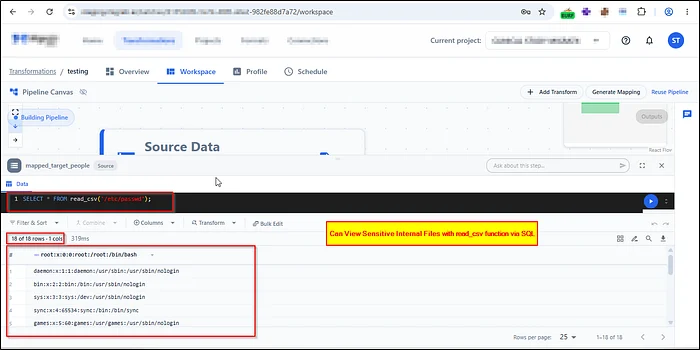
That confirmed that the authenticated user could make the server-side DuckDB process read a file outside the intended ETL data scope.

The important point is that the query is executed by the backend, not by the researcher's local machine. The request flow is:
My Browser ↓Workspace API ↓Backend ↓DuckDB ↓Server filesystem ↓/etc/passwd
Step 2: Testing the tenant boundary
The next question was the more important one for a multi-tenant application: could the same SQL functionality access another tenant's data?
The intended model was:
Tenant A └── Tenant A data
Tenant B └── Tenant B data
A Tenant B user should never be able to query Tenant A's uploaded dataset. During testing, the researcher identified the server-side path associated with a controlled uploaded CSV file, then tested whether that file could be referenced directly through DuckDB. The sanitised example was:
SELECT *
FROM read_csv(
    '/app/data/uploads/<tenant-specific-path>/controlled-test.csv');
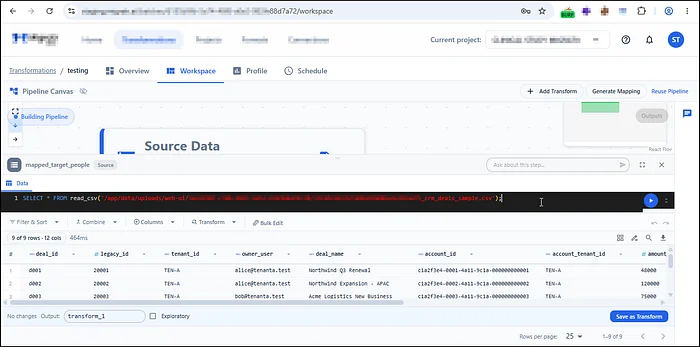
The exact production path and identifiers are intentionally omitted from the write-up.
Root cause
The SQL query itself was not necessarily the vulnerability. The issue was the combination of user-controlled SQL, powerful DuckDB functions, server-side file access and insufficient authorisation or isolation. Individually each component may look legitimate; together they crossed a security boundary.
The expected model was:
User ↓Workspace ↓Authorized ETL Data
But the tested behaviour allowed:
User ↓Workspace SQL ↓DuckDB read_csv() ├── Server filesystem └── Other tenant's data
In other words, the tested behaviour showed that the SQL could reach files outside the intended ETL data scope and another tenant's data. The write-up does not describe the specific code or configuration that allowed this, so the exact defensive control that failed is not stated.
Impact
The demonstrated impact included:
- Unauthorised server-side file read
- Cross-tenant data exposure
- Disclosure of internal filesystem paths
- Potential access to other application-managed files
- Potential exposure of confidential ETL datasets
The actual impact depends on what files are accessible to the DuckDB/ETL process. The researcher also noted that while testing other DuckDB file-access functionality, read_parquet() led to a separate behaviour involving server-side outbound requests (SSRF). That behaviour and its testing approach are covered in a separate article; the two are related because both originate from the same SQL execution capability but represent different security impacts.
Fix
The write-up sets out recommendations rather than describing a change that was made:
- Restrict file-reading functions. Functions such as
read_csv()andread_parquet()should only be able to access explicitly approved locations. - Don't allow arbitrary paths. The application should not let a user supply an arbitrary server filesystem path through SQL.
- Enforce tenant authorisation. Before a dataset is accessed, the backend should verify the authenticated user, the tenant, the dataset and whether access is authorised.
- Isolate processing environments. Each tenant or ETL job should have an appropriately isolated execution context where possible.
- Use least privilege. The DuckDB/ETL process should run with only the filesystem permissions it actually needs, and should not have unnecessary access to system files, application configuration, credentials, other tenant directories or unrelated application data.
- Prevent information disclosure. Internal filesystem paths and backend debugging information should not be returned to users.
Variants to test
When assessing a SQL or data-processing feature, the researcher's checklist suggests the following, each with the positive result to look for:
| Test | Positive result |
|---|---|
| Enumerate available SQL functions | File-reading or URL-fetching functions are exposed to the user |
| Try reading a local file through SQL | Content of a server file is returned |
| Try accessing an external URL through SQL | The backend makes an outbound request |
| Supply a filesystem path as a user | The path is accepted rather than rejected |
| Check whether paths are restricted to approved directories | A path outside the approved directory works |
| Reference another tenant's file | Data belonging to a different tenant is returned |
| Check whether table and dataset identifiers are authorisation-checked | An identifier for a dataset the user does not own is accepted |
| Look for internal filesystem paths in responses | Backend paths or debugging details leak |
| Assess whether the SQL execution environment is isolated | The process can reach resources beyond its job |
| Check the OS permissions of the processing service | The service can read files it does not need |
The key is to test the boundary, not just the SQL functionality. A feature designed to query data should only be able to query the data the user is authorised to access. If an application lets users execute code or queries on the server, always ask what the execution environment can actually reach.
What happened, in plain words
Imagine a shared office building where each company rents its own locked room. The building also has a shared kitchen, a shared post room, and a cupboard full of maintenance paperwork. Now imagine the building manager gives every tenant a key that opens not just their own room, but every room and every cupboard. Nothing looks broken. The key works exactly as designed. The problem is what the key can reach.
That is the shape of the issue described here. A web application let logged-in users type database queries into a box and see the results. The feature was meant to let each user look at their own uploaded data. Instead, the same box could be used to read files sitting on the server that runs the application, and to read data belonging to a different customer.
This article walks through the whole thing from zero. You only need to know how to use a browser. Every technical word is explained the first time it appears, and there is a glossary at the end.
The product and the feature
The target was an ETL platform. ETL stands for extract, transform, load. In everyday terms, it is software that takes data from one place, tidies it up or reshapes it, and puts it somewhere else. A company might use it to pull sales figures out of an online shop every night, clean them, and load them into a reporting system. Think of it as a very capable conveyor belt for data.
The platform offered a Workspace. A workspace here is simply a screen inside the application, available after you log in, where you can pick one of your tables and run queries against it.
A query is a question written in a special language that databases understand. The language is called SQL, short for Structured Query Language. You write something like "give me every row in this table where the country is France", and the database answers with those rows. It is the standard way to talk to a database, and it looks a bit like English.
A table is the basic unit of storage in a database: a grid of rows and columns, much like a spreadsheet. Each row is one record, each column is one field.
So the feature was: log in, choose a table, type a SQL question, get an answer back on screen. That is a completely normal and useful thing for a data product to offer.
What the application was built on
The application used DuckDB as part of its SQL and data-processing workflow.
A database is software that stores data and answers questions about it. Most databases you hear about, such as PostgreSQL or MySQL, run as a separate program on a separate machine, and your application talks to them over a network connection. DuckDB is different: it is an embedded database. Embedded means it runs inside the application itself, as part of the same program, rather than as a separate server.
The write-up describes DuckDB as a lightweight library that eliminates server management and network latency. In plain terms: there is no separate database server to install, patch and look after, and because the database lives in the same process as the application, there is no network round trip when it answers a question, so it is fast. A library is a bundle of ready-made code that a program can use, like a set of pre-built parts.
This detail matters later. Because DuckDB runs inside the application, it runs with the application's own permissions on the machine. Whatever files the application can read, DuckDB can probably read too.
The intended workflow
The write-up shows the normal, intended flow like this:
User ↓Workspace ↓Select Table ↓Execute SQL ↓Query Authorized ETL Data ↓Display Results
Line by line, in plain words:
Useris the person sitting at a browser, logged in.Workspaceis the screen in the application where they work.Select Tableis them choosing which of their own tables to look at.Execute SQLis them pressing the button that runs their query.Query Authorized ETL Datais the important line: the system is supposed to fetch only data this user is allowed to see.Display Resultsis the answer appearing on screen.
That is a legitimate and useful feature. Nothing about it is suspicious.
The security question the researcher asked was simple to state: is the SQL execution environment restricted to the user's authorised ETL data, or can SQL reach resources belonging to the underlying server?
Two terms there. The SQL execution environment is the place where the query actually runs. It is not your laptop. It is the application's own machine, often called the server: a computer in a data centre that holds the application and its data and answers requests from many users at once. "Environment" just means the surroundings the query runs in, including what files and network it can touch.
Authorised means permitted for this particular user. In a multi-user product, the system is supposed to know who you are and only hand you your own things.
Setup
The researcher used two controlled tenant accounts for the multi-tenant part of the testing.
Authenticated means logged in, proven to be a real account holder. Tenant is the word for one customer organisation in a shared product. Multi-tenant means one installation of the software serves many separate customers at once, and each customer's data is supposed to be walled off from the others. Think of an apartment block: one building, many flats, each with its own front door.
Controlled here means the researcher created the accounts and the data themselves, so they knew exactly what was in them. That is how you test safely: you do not go poking at a real customer's files, you make your own test files and see whether the system lets you reach them when it should not.
No specific tooling, versions or configuration details are given beyond that. The precondition for everything below is simply the ability to submit SQL through the Workspace as a logged-in user.
Looking at DuckDB
DuckDB provides functions for reading external data sources directly from SQL. One of those functions is:
read_csv()
A function is a named piece of built-in behaviour you can call by name. You give it something in brackets, called an argument, and it gives you something back. read_csv() is a function that reads a file in CSV format. CSV stands for comma-separated values: a plain text file where each line is a row and commas separate the fields. It is the simplest possible spreadsheet format, and it is how a lot of data gets moved around.
So read_csv() means: "open this file, treat it as a table of rows and columns, and hand it back to me." The brackets are empty in the snippet above because no file has been named yet.
A normal use looks like this:
SELECT *
FROM read_csv('/path/to/authorized/data.csv');
Line by line:
SELECT *means "give me every column". The asterisk is a wildcard for "all columns".FROM read_csv('/path/to/authorized/data.csv')means "take the data from the result of callingread_csvon this file path".- The text in quotes is a file path: the address of a file on a computer's disk, like a postal address but for files.
/path/to/authorized/data.csvis a placeholder showing where a real path would go. - The semicolon at the end simply marks the end of the statement.
The concern appears when a user can control that path. If the backend simply executes the supplied SQL, the SQL engine may become capable of reading files that were never meant to be reachable through the Workspace.
Backend means the part of the application that runs on the server, out of sight, doing the real work. The part you see in the browser is the frontend. When you press a button, your browser sends a request to the backend, and the backend does the job and sends back an answer.
The query itself is not necessarily the vulnerability; the problem is the combination of user-controlled SQL, powerful DuckDB functions, server-side file access and insufficient authorisation or isolation.
A vulnerability is a weakness in software that someone can use to make it do something it was not supposed to do. Isolation means keeping things apart so that one part cannot reach another. Insufficient means not enough of it.
Step 1: Testing server-side file access
The researcher started with a controlled test against a system file commonly present on Linux systems:
SELECT * FROM read_csv('/etc/passwd');
Line by line:
SELECT *asks for all columns.FROM read_csv('/etc/passwd')asks DuckDB to open the file at the path/etc/passwdand treat it as a CSV table./etc/passwdis a well-known file on Linux, a common operating system for servers. On Linux, files are arranged in a tree starting at/, and/etcis the folder for system configuration./etc/passwdis a standard file that lists user accounts on the machine. It is a classic test target because it exists on almost every Linux system and its contents are predictable, so it is easy to tell whether you really read it.
If the SQL engine were properly restricted, the request should have been rejected. Instead, the Workspace returned content from the underlying server filesystem.
That confirmed that the authenticated user could make the server-side DuckDB process read a file outside the intended ETL data scope.
Server-side means the action happened on the server, not on the researcher's own computer. Filesystem means the way files and folders are organised on a machine. Process means a running program; here, the DuckDB code running inside the application.
The important point is that the query is executed by the backend, not by the researcher's local machine. The request flow is:
My Browser ↓Workspace API ↓Backend ↓DuckDB ↓Server filesystem ↓/etc/passwd
Line by line:
My Browseris the researcher's own web browser on their own computer.Workspace APIis the doorway the browser uses to talk to the application. An API (Application Programming Interface) is a defined set of requests a program accepts. Think of a restaurant menu: you can order only what is on it, in the format the kitchen expects. The browser sends a request in that format.Backendis the application's own code on the server, which receives the request.DuckDBis the embedded database inside the backend, which runs the SQL.Server filesystemis the disk of the server machine./etc/passwdis the specific file that got read.
The arrow chain is the whole point: the file was read on the far end of the chain, on a machine the researcher does not own, because the application passed the query along without checking what it was allowed to touch.
Step 2: Testing the tenant boundary
The next question was the more important one for a multi-tenant application: could the same SQL functionality access another tenant's data?
A tenant boundary is the invisible wall between one customer's data and another's. In a multi-tenant product, that wall is one of the most important security controls there is. If it fails, one customer can see another customer's private information, which is often a serious incident.
The intended model was:
Tenant A └── Tenant A data
Tenant B └── Tenant B data
In plain words: Tenant A's data sits under Tenant A, and Tenant B's data sits under Tenant B, and the two branches never meet. A Tenant B user should never be able to query Tenant A's uploaded dataset.
A dataset is just a collection of data, here the files a customer has uploaded.
During testing, the researcher identified the server-side path associated with a controlled uploaded CSV file, then tested whether that file could be referenced directly through DuckDB. The sanitised example was:
SELECT *
FROM read_csv(
    '/app/data/uploads/<tenant-specific-path>/controlled-test.csv');
Line by line:
SELECT *asks for all columns again.FROM read_csv(starts the call to the file-reading function, and the opening bracket means the argument continues on the next line.'/app/data/uploads/<tenant-specific-path>/controlled-test.csv'is the file path./app/data/uploads/is the folder where the application keeps uploaded files.<tenant-specific-path>is a placeholder standing in for the part of the path that identifies which tenant the file belongs to.controlled-test.csvis the name of the test file the researcher uploaded.- The closing
);finishes the call and the statement.
Sanitised means cleaned up for publication: real names, real paths and real identifiers have been replaced with placeholders so that nothing sensitive is disclosed. The exact production path and identifiers are intentionally omitted from the write-up.
Why this step matters: the first test showed the server could be made to read a system file. This second test asked a sharper question. If the researcher, logged in as one tenant, could name the path of a file belonging to another tenant and reference it through DuckDB, then the wall between customers was not being enforced. That is a much more serious finding for a business, because it means one paying customer can read another's data.
Two security boundaries were crossed
The testing demonstrated two related issues through the same functionality.
1. Server-side file access
A user-controlled SQL query could make DuckDB read files from the underlying server filesystem.
SELECT * FROM read_csv('/etc/passwd');
This is the same query as before. The point being made here is that a user-controlled SQL query could make DuckDB read files from the server filesystem.
2. Cross-tenant data access
A user from one tenant could use a server-side file path to access a controlled dataset belonging to another tenant.
SELECT *
FROM read_csv('/app/data/uploads/<other-tenant-path>/file.csv');
Line by line:
SELECT *asks for all columns.FROM read_csv(...)reads the named file as a table.'/app/data/uploads/<other-tenant-path>/file.csv'is a path pointing into another tenant's upload folder.<other-tenant-path>is a placeholder for that tenant's folder name, andfile.csvis the file being read.
Cross-tenant means from one tenant to another. This is the second boundary crossed: not just "the server's own files", but "another customer's files".
So the actual security model looked like this. The expected model was:
User ↓Workspace ↓Authorized ETL Data
In plain words: the user goes through the Workspace, and the Workspace hands back only data that user is authorised to see. That is the promise.
But the tested behaviour allowed:
User ↓Workspace SQL ↓DuckDB read_csv() ├── Server filesystem └── Other tenant's data
In plain words: the user goes through the Workspace, their SQL reaches DuckDB, and DuckDB's read_csv() branches out in two directions. One branch reaches the server's own filesystem. The other reaches another tenant's data. The ├── and └── are just tree-drawing characters showing two branches from the same point.
Why read_csv() was the interesting attack surface
The SQL query itself was not necessarily the vulnerability. The problem was the combination of:
User-controlled SQL +Powerful DuckDB functions +Server-side file access +Insufficient authorization/isolation
Line by line:
User-controlled SQLmeans the user decides what the query says. That is the whole point of a query box, but it also means the user decides what file paths appear in it.Powerful DuckDB functionsmeans the database comes with built-in abilities, such as reading files, that go well beyond simple table lookups.Server-side file accessmeans those abilities run on the server, where the application's own files live.Insufficient authorization/isolationmeans the checks that should limit all of the above were not strong enough.
Attack surface means all the places where someone could try to interact with a system in an unintended way. A query box is a large attack surface because it accepts free-form text that the server then acts on.
Individually, each component may appear legitimate. Together, they created a security boundary violation. A security boundary is a line that should not be crossed: between one user and another, between a user and the server's own files, between the application and the operating system. A boundary violation is when something crosses that line.
A useful comparison: a kitchen knife is legitimate, a kitchen is legitimate, and a cook is legitimate. Put a knife in the hands of a visitor in a kitchen with no supervision, and the combination is the problem, not any one part.
What the researcher found next: DuckDB read_parquet()
While testing other DuckDB file-access functionality, the researcher also looked at read_parquet(). That led to another interesting behaviour involving server-side outbound requests (SSRF).
Parquet is another file format for storing tables of data, more compact and efficient than CSV, often used for large datasets. read_parquet() is the matching DuckDB function for reading those files.
SSRF stands for Server-Side Request Forgery. In plain words: you trick the server into making a request on your behalf, to somewhere you could not reach yourself. Imagine asking a colleague who has keys to every floor to go and fetch something from a locked room for you. The colleague is trusted; you are using their access.
The read_csv() behaviour and the read_parquet() behaviour are related because both originate from the same SQL execution capability, but they represent different security impacts. The write-up says the read_parquet() SSRF behaviour and the testing approach will be covered in a separate article, so it is not described further here.
Security impact
Impact means what harm could actually come of it. The demonstrated impact included:
- Unauthorised server-side file read
- Cross-tenant data exposure
- Disclosure of internal filesystem paths
- Potential access to other application-managed files
- Potential exposure of confidential ETL datasets
In plain words, one by one:
- Unauthorised server-side file read: a logged-in user could read files on the server they were never given access to.
- Cross-tenant data exposure: one customer could see another customer's data.
- Disclosure of internal filesystem paths: the answers revealed where files live on the server. That is useful to an attacker because it maps out the machine, a bit like learning the floor plan of a building.
- Potential access to other application-managed files: files the application itself uses might also be reachable. "Potential" because it depends on what is there.
- Potential exposure of confidential ETL datasets: the actual business data flowing through the platform might be readable.
The actual impact depends on what files are accessible to the DuckDB/ETL process. That is an honest caveat: the severity depends on what happens to be sitting on that machine.
How should this be fixed?
Fix means a change to the software that closes the weakness. The write-up sets out recommendations rather than describing a change that was made.
1. Restrict file-reading functions
Functions such as:
read_csv()
read_parquet()
should only be able to access explicitly approved locations. In plain words: give the function a short list of folders it is allowed to open, and refuse everything else. Like a library that will only fetch books from its own shelves, not from the staff room.
2. Don't allow arbitrary paths
The application should not let a user supply an arbitrary server filesystem path through SQL. Arbitrary means any path at all, chosen freely. If users can only refer to their own datasets by name, and the server works out the real path itself, there is nothing to abuse.
3. Enforce tenant authorisation
Before a dataset is accessed, the backend should verify:
Authenticated User ↓Tenant ↓Dataset ↓Authorized?
Line by line: first establish who the user is (authenticated), then which tenant they belong to, then which dataset is being asked for, and finally check whether that user, in that tenant, is allowed that dataset. Only if the last answer is yes should the data be returned. This is the wall between customers, checked on every request rather than assumed.
4. Isolate processing environments
Each tenant or ETL job should have an appropriately isolated execution context where possible. An execution context is the little world a job runs in: which files it can see, which network it can reach. If each job runs in its own sealed box, one job cannot wander into another's files. "Where possible" acknowledges that this is not always practical.
5. Use least privilege
Least privilege is a principle: give every program and every person the smallest set of permissions needed to do the job, and no more. The DuckDB/ETL process should run with only the filesystem permissions it actually needs. It should not have unnecessary access to:
System filesApplication configurationCredentialsOther tenant directoriesUnrelated application data
Line by line: system files are the operating system's own files; application configuration is the settings that tell the app how to run; credentials are passwords, keys and tokens that prove identity; other tenant directories are other customers' folders; unrelated application data is anything else the app happens to store. If the process cannot read these, then even a successful query cannot leak them.
6. Prevent information disclosure
Information disclosure means accidentally revealing details that help an attacker, such as internal paths or error messages. Internal filesystem paths and backend debugging information should not be returned to users. Show a friendly error, keep the technical detail in the server's own logs.
Practical testing checklist
When assessing a SQL or data-processing feature, the researcher recommends checking the following. Each item is a question to ask, and the table shows what a positive result looks like: a sign that something may be wrong.
| Test | Positive result |
|---|---|
| Enumerate available SQL functions | File-reading or URL-fetching functions are exposed to the user |
| Try reading a local file through SQL | Content of a server file is returned |
| Try accessing an external URL through SQL | The backend makes an outbound request |
| Supply a filesystem path as a user | The path is accepted rather than rejected |
| Check whether paths are restricted to approved directories | A path outside the approved directory works |
| Reference another tenant's file | Data belonging to a different tenant is returned |
| Check whether table and dataset identifiers are authorisation-checked | An identifier for a dataset the user does not own is accepted |
| Look for internal filesystem paths in responses | Backend paths or debugging details leak |
| Assess whether the SQL execution environment is isolated | The process can reach resources beyond its job |
| Check the OS permissions of the processing service | The service can read files it does not need |
A few of those terms in plain words. To enumerate means to list out everything available. A URL is a web address. An outbound request is the server reaching out to somewhere else on the internet. An identifier is a name or number that points at a specific thing, such as a dataset ID. OS permissions are the operating system's rules about which program may read or write which files.
The key is to test the boundary, not just the SQL functionality. A feature designed to query data should only be able to query the data the user is authorised to access.
Final takeaway
The interesting part of this vulnerability was not simply that DuckDB supports read_csv(). The real issue was that a user-controlled SQL interface exposed that capability without sufficiently restricting the resources available to the SQL execution environment.
A seemingly normal workflow:
Workspace → SQL Query → Results
became:
Workspace ↓User-controlled SQL ↓DuckDB ↓Server filesystem ↓Other tenant's data
In plain words: what looked like "type a question, get your answer" could also reach the server's own filesystem and another tenant's data.
That is why SQL execution features deserve the same level of authorisation testing as any other sensitive API. If the application lets users execute code or queries on the server, always ask what the execution environment can actually reach.
Glossary
- API: a defined set of requests a program accepts, like a menu you can order from.
- Argument: the value you give to a function inside its brackets.
- Attack surface: all the places where someone could try to interact with a system in an unintended way.
- Authenticated: proven to be a logged-in, real account holder.
- Authorised: permitted for this particular user.
- Backend: the part of an application that runs on the server, out of sight, doing the real work.
- Boundary violation: when something crosses a line that should not be crossed.
- Controlled: created by the tester themselves, so its contents are known and safe to test with.
- Credentials: passwords, keys or tokens that prove identity.
- Cross-tenant: from one customer organisation to another.
- CSV: comma-separated values, a plain text file where each line is a row and commas separate fields.
- Database: software that stores data and answers questions about it.
- Dataset: a collection of data, here the files a customer has uploaded.
- DuckDB: an embedded analytical database library that runs inside the application rather than as a separate server.
- Embedded: running inside another program rather than as a separate service.
- Enumerate: to list out everything available.
- ETL: extract, transform, load; software that moves data from one place, reshapes it, and puts it somewhere else.
- Execution context: the little world a job runs in, including which files and network it can reach.
- File path: the address of a file on a computer's disk.
- Filesystem: the way files and folders are organised on a machine.
- Fix: a change to software that closes a weakness.
- Frontend: the part of an application you see in the browser.
- Function: a named piece of built-in behaviour you can call, giving it an argument and getting something back.
- Identifier: a name or number that points at a specific thing, such as a dataset ID.
- Impact: what harm could actually come of a weakness.
- Information disclosure: accidentally revealing details that help an attacker, such as internal paths or error messages.
- Insufficient: not enough of something.
- Isolation: keeping things apart so one part cannot reach another.
- Least privilege: giving every program and person only the smallest permissions needed to do the job.
- Library: a bundle of ready-made code a program can use.
- Linux: a common operating system for servers.
- Multi-tenant: one installation of software serving many separate customers at once.
- OS permissions: the operating system's rules about which program may read or write which files.
- Outbound request: the server reaching out to somewhere else on the internet.
- Parquet: a compact file format for storing tables of data.
- Process: a running program.
- Query: a question written in a language a database understands.
- Sanitised: cleaned up for publication, with real names, paths and identifiers replaced by placeholders.
- Security boundary: a line that should not be crossed, between users, or between a user and the server's own files.
- Server: a computer in a data centre that holds an application and its data and answers requests from many users.
- Server-side: happening on the server, not on the user's own computer.
- SQL: Structured Query Language, the standard language for asking databases questions.
- SQL execution environment: the place where a query actually runs, including what files and network it can touch.
- SSRF: Server-Side Request Forgery; tricking the server into making a request on your behalf to somewhere you could not reach yourself.
- Table: a grid of rows and columns in a database, much like a spreadsheet.
- Tenant: one customer organisation in a shared product.
- Tenant boundary: the invisible wall between one customer's data and another's.
- URL: a web address.
- Vulnerability: a weakness in software that someone can use to make it do something it was not supposed to do.
- Workspace: a screen inside the application, available after logging in, where a user picks a table and runs queries.