From IDOR to Admin: How a Simple ID Parameter Led to Full Platform Takeover
The profile update endpoint accepted a user-supplied user_id without checking ownership, so an attacker could change any user's email address. By targeting the administrator account (ID 1), the attacker could reset the password and log in as admin, gaining full control of the platform.
 Published on medium.com
Bug Bounty
The full write-up lives on its author's site
It belongs to its author, so we link to it rather than copy it. The other two tabs are our own rewrites, checked against it.
Context
The target was a real estate listing web application, tested during a bug bounty engagement. The scope covered user profiles, authentication flows and the admin dashboard. The application defined three user roles: Standard User, Pro Member and Administrator.
The feature at the centre of the finding is the profile update functionality. Normally it lets an authenticated user change their own profile data, such as their email address. The researcher found that the request body carried a user_id parameter and that the server did not check whether the authenticated user owned that ID.
The write-up describes the result as a Critical severity finding: a single Insecure Direct Object Reference (IDOR) that allowed complete account takeover of any user, including the platform administrator.
Setup
The report does not describe how the test accounts were created or which roles the researcher held before the attack. What it does state is the tooling:
- Burp Suite Professional, for request interception and replay
- Firefox Developer Tools, for DOM inspection
- Custom Python scripts, for ID enumeration
The report does not describe the preconditions beyond the profile update endpoint being tested with an authenticated user. The researcher notes that the first user account in many applications is the administrator or superuser, which is what made user_id: 1 the obvious target.
Finding it
While testing the profile update functionality, the researcher noticed that the application accepted a user_id parameter in the request body and did not validate whether the authenticated user actually owned that ID.
The key observation was that the endpoint accepted any user_id value without server-side authorisation checks. That meant any user's profile could potentially be modified by changing the ID number in the request.
Exploitation
Step 1: The IDOR discovery
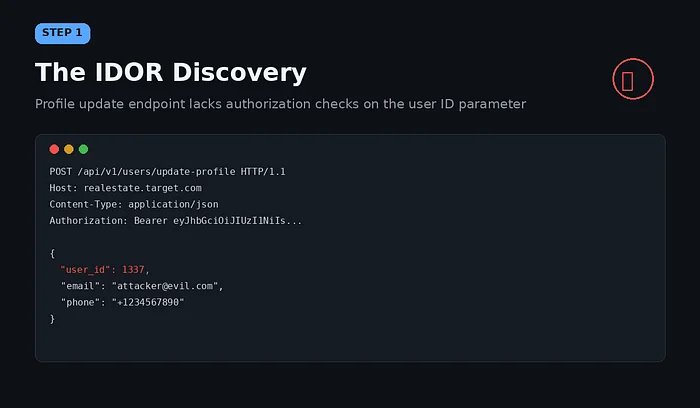
The profile update request carries a user_id field. Because the server trusted the client-supplied value, the researcher could point the update at another account. The report does not reproduce the raw request for this step; the observation is the user_id parameter itself and the absence of an ownership check.
Step 2: Targeting the admin account
The next logical step was to test with user_id: 1, on the assumption that the first account is the administrator. The researcher crafted a request to update user ID 1's email address to an attacker-controlled email.
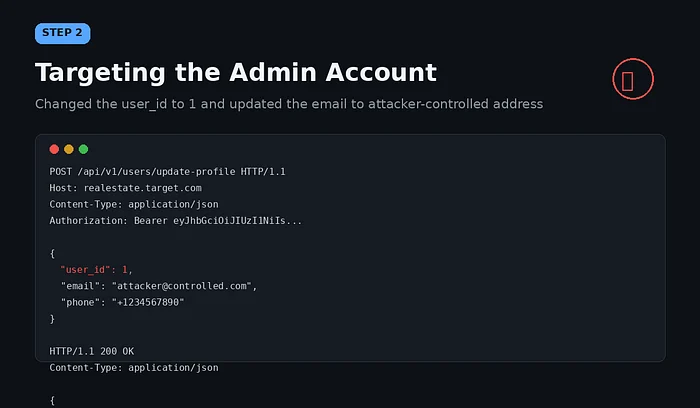
The server responded with 200 OK and revealed the target account's role as "administrator". The email address was updated without any authorisation challenge.
Step 3: Password reset chain
With control over the admin's email address, the researcher triggered the "Forgot Password" flow. The reset link was delivered to the attacker-controlled inbox.
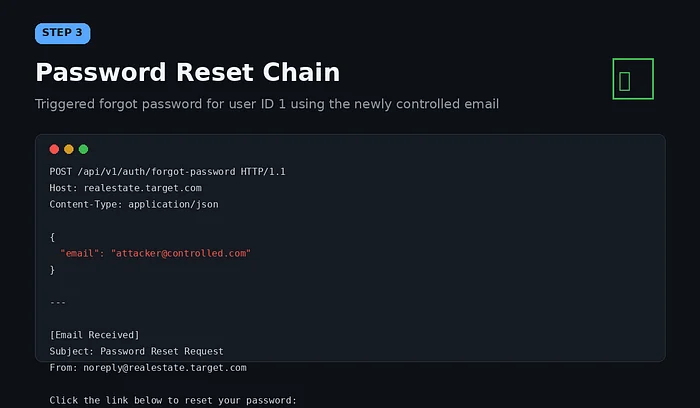
The link was used to set a new password, and the application accepted it without any additional verification. At that point the account was fully compromised.
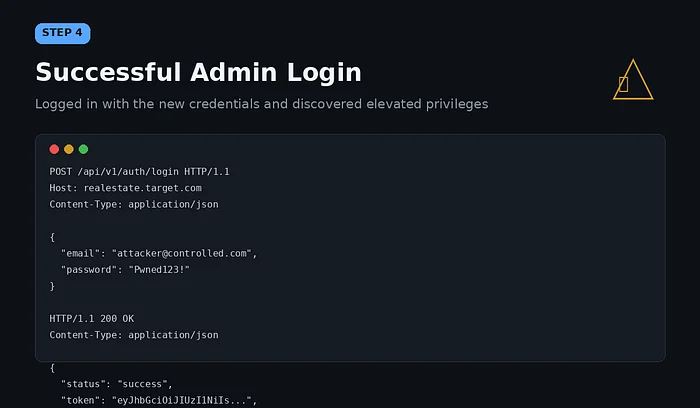
Step 4: Successful admin login
Logging in with the new credentials returned a JWT that confirmed the account's privileges:
id: 1role: administratormembership: propermissions: ["all"]
Step 5: The Pro Member surprise
After login, a "Pro Member" badge appeared in the top-left corner of the UI. Inspecting the page source showed hidden DOM elements that were conditionally rendered based on the admin role.
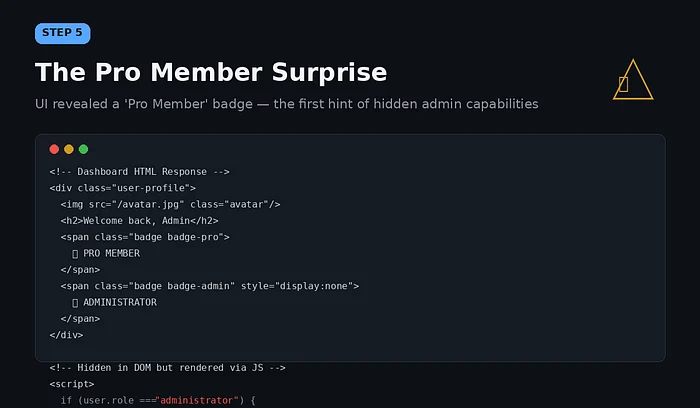
The JavaScript checked user.role === "administrator" and then revealed hidden admin-specific UI components. This was the first visual confirmation that more was reachable.
Step 6: The hidden control panel
A new option, "Control Panel", appeared in the left sidebar. It was not visible on standard user accounts, and clicking it triggered a redirect.
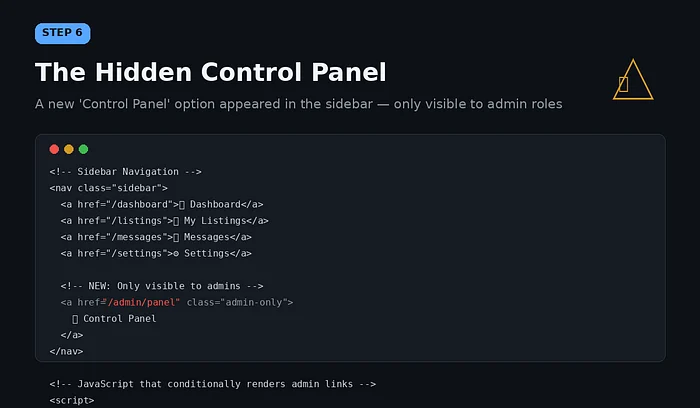
The navigation link pointed to /admin/panel, an endpoint that was not documented in the public API schema.
Step 7: Full platform takeover
The redirect landed on the admin dashboard with unrestricted access to the entire platform.
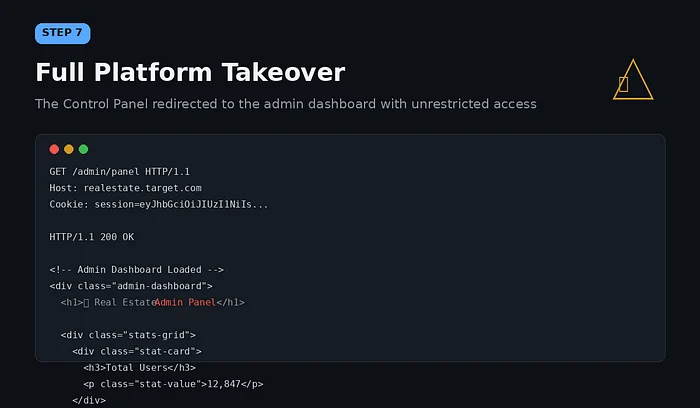
The admin capabilities the researcher found were:
- View and manage all 4,12,847 user accounts
- Moderate all 45,231 property listings
- Access transaction logs and $2.4M revenue data
- Modify system settings and user roles
- Delete or impersonate any account
The chain in summary
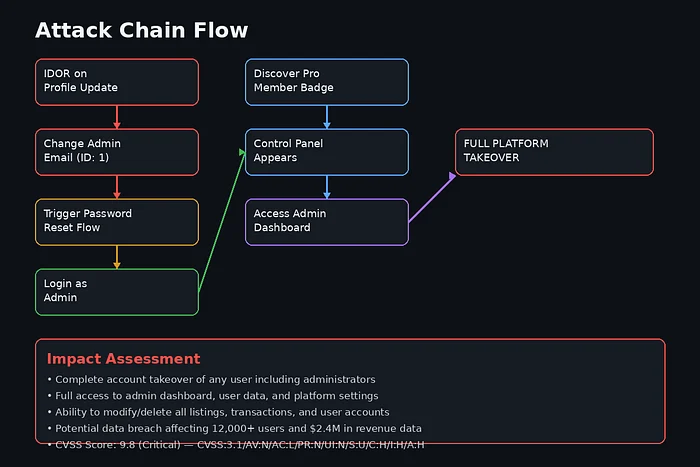
- IDOR on profile update, allowing modification of any user's data
- Email takeover of the admin account (ID: 1)
- Password reset abuse via the controlled email
- Authentication bypass, logging in as admin
- Privilege escalation into the admin dashboard
Severity
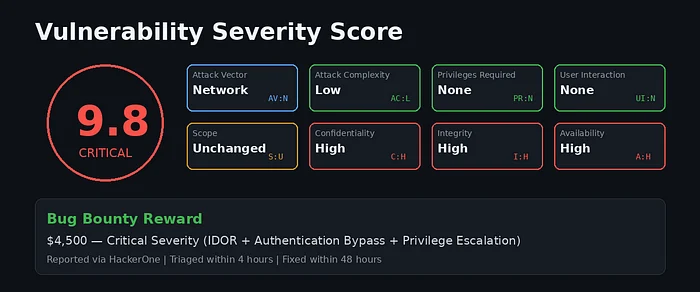
The researcher scored the finding as CVSS 3.1 9.8 (Critical), with the following vector components:
| Metric | Value |
|---|---|
| Attack Vector | Network |
| Attack Complexity | Low |
| Privileges Required | None |
| User Interaction | None |
| Confidentiality Impact | High |
| Integrity Impact | High |
| Availability Impact | High |
The report records a bug bounty reward of $4,500 for the Critical severity finding.
Root cause
The mistake is in the profile update endpoint: it accepts a client-supplied user_id and acts on it without deriving the identity from the authenticated session and without verifying ownership server-side. The report's own framing is that the endpoint accepted any user_id value without server-side authorisation checks.
Two further weaknesses turned a single-object data modification into full account takeover. First, the email address could be changed without verification through the new address, so controlling the email field was enough to drive the password reset flow. Second, the admin area relied on client-side hiding: the JavaScript checked user.role === "administrator" before revealing admin UI, but the report states that the /admin/panel endpoint itself lacked server-side role verification. Hiding the link in the DOM did not protect the endpoint.
Impact
Under the conditions described, an authenticated attacker could modify any user's profile, including the administrator's, take over the admin account through the email and password reset chain, and then reach the admin dashboard. From there the report lists access to all user accounts, all property listings, transaction logs and revenue data, system settings, user roles, and the ability to delete or impersonate any account. The researcher rates this as complete account takeover of any user and full platform takeover.
Fix
The report sets out four remediation measures:
- Server-side authorisation checks. Never trust client-provided IDs. Derive the user ID from the authenticated session (JWT or session token) and verify ownership server-side.
- Email verification for critical changes. Changing an email address should require verification via the new email before the change takes effect, which breaks email takeover chains.
- Role-based access control. Admin endpoints must independently verify the user's role on every request. Client-side rendering of admin UI is not security.
- Rate limiting and monitoring. Apply rate limiting to profile update endpoints and alert on suspicious patterns such as rapid ID enumeration.
Variants to test
- Low-numbered IDs on any object endpoint. Send
user_id: 1, then2,3and so on in profile, settings or account update requests. A positive result is a200 OKthat changes another account's data, or a response body that discloses the target's role, as happened here with"administrator". - Email change without verification. On any account settings form, change the email to one you control and see whether the change takes effect before you confirm the new address. A positive result is a login or password reset working through the unverified address.
- Password reset after email takeover. Once an email change is accepted, run the forgot-password flow and check whether the reset link arrives at the new address and is accepted without further checks.
- Hidden admin routes. When the UI conditionally renders admin elements based on a role claim, request the underlying paths directly, such as the
/admin/panelstyle link found here. A positive result is a page or API response served to a non-admin session. - JWT claim trust. Decode the token and compare its claims (
role,membership,permissions) with what the server actually enforces. A positive result is an endpoint that authorises on the token's claims alone while the account behind it has no such role, or a token whose claims can be influenced by profile updates. - ID enumeration at scale. Use a scripted sweep over the ID space on update endpoints and watch for rate limiting or alerting. A positive result is a large run of accepted updates with no throttling, which is the pattern the report recommends monitoring for.
What happened, in plain words
A security researcher was testing a website that lists houses and flats for sale or rent. During that test, he found a small mistake in the part of the site where you edit your own profile. The site let him change the email address of any account, not just his own, simply by changing a number in the request. He changed the email address of the site's main administrator, used the site's "forgot password" feature to send a password reset link to that email, set a new password, and logged in as the administrator. From there he could see and control the whole platform.
The researcher was taking part in a bug bounty programme. A bug bounty is an arrangement where a company invites independent testers to look for security problems in its systems and pays them for reporting what they find, instead of the company being attacked quietly by criminals. The report describes the result as a Critical severity finding.
The target
The application was a real estate listing web application. In plain terms, it is a website where estate agents and private owners post properties, and where visitors browse them. The report says the testing covered three areas:
- User profiles: the pages where a person edits their own details, such as name and email address.
- Authentication flows: everything to do with logging in, logging out and resetting a forgotten password. "Authentication" means proving who you are, like showing your passport at a border.
- The admin dashboard: the private control area used by the people who run the site.
The site had three kinds of user account, called roles:
- Standard User: an ordinary visitor or member with basic access.
- Pro Member: a member role with extra features.
- Administrator: someone who runs the platform.
The feature at the centre of the story is the profile update function. When you are logged in and you change your email address or other details, your browser sends that change to the server. The server is the computer that stores the data and decides what happens. The researcher found that this request included a field called user_id, a number that says which account should be updated. The server did not check that the authenticated user owned that account number.
That kind of mistake has a name: Insecure Direct Object Reference, usually shortened to IDOR. A useful comparison is a cloakroom. You hand in your coat and get a ticket with a number on it. If the attendant hands back whatever coat matches the number you ask for, without checking that the ticket is really yours, then anyone can ask for ticket number 1 and walk away with someone else's coat. In a web application, the "ticket number" is an ID in the request, and the "attendant" is the server. A secure server checks that the ID belongs to the logged-in person before acting on it.
The tools used
The report lists three tools:
- Burp Suite Professional, used for request interception and replay. When you use a website, your browser sends messages to the server and receives replies. Burp Suite sits in the middle so the tester can pause a message, read it, change it and send it again. Think of it as being able to open an envelope, rewrite the letter inside, and post it again.
- Firefox Developer Tools, used for DOM inspection. The DOM is the browser's live model of the page: every button, link and hidden element. Developer Tools let you look at that model, including things that are present in the page but not visible on screen.
- Custom Python scripts, used for ID enumeration. Enumeration means trying a series of values one after another, for example 1, 2, 3 and so on, to see which ones work. A script automates that repetition.
The report does not say how the test accounts were created or which roles the researcher held before the attack.
The researcher also notes a general habit among testers: in many applications, the very first account created is the administrator or superuser. That is why account number 1 was the obvious thing to try.
Finding it
While testing the profile update functionality, the researcher noticed that the application accepted a user_id parameter in the request body and did not validate whether the authenticated user actually owned that ID.
A few terms in that sentence deserve unpacking:
- Request body: when your browser sends data to the server, the message has parts. The body is the part that carries the actual content, such as the new email address you typed. The URL is the address you are sending to; the body is the contents of the parcel.
- Parameter: a named piece of data in that message.
user_idis the name, and the number next to it is the value. - Authenticated user: the person the server believes is logged in, usually identified by a session cookie or a token (explained below).
- Server-side check: a check performed on the server, where the data lives, rather than in the browser. Checks done only in the browser can be bypassed, because the browser belongs to the user.
The key observation was that the endpoint accepted any user_id value without server-side authorisation checks. An endpoint is a specific address on the server that does a specific job, like a service counter in a large office: one counter for updating profiles, another for logging in. Authorisation is different from authentication: authentication is who you are, authorisation is what you are allowed to do. The server knew who the researcher was, but never asked whether he was allowed to touch the account he named.
That meant any user's profile could potentially be modified by changing the ID number in the request. The report does not reproduce the raw request for this first step; the observation is the user_id parameter itself and the absence of an ownership check.
Exploitation
Step 1: The IDOR discovery
The profile update request carries a user_id field. Because the server trusted the value supplied by the client, the researcher could point the update at another account. "Client" here means the browser, or the tool acting as the browser. The rule of thumb in security is that anything coming from the client is under the attacker's control and must be treated with suspicion.
Step 2: Targeting the admin account
The next logical step was to test with user_id: 1, on the assumption that the first account is the administrator. The researcher crafted a request to update user ID 1's email address to an attacker-controlled email.
Why this step? Because if the guess is right, the account being modified is the most powerful one on the platform. The researcher only needed the number 1 to target the account.
The server responded with 200 OK and revealed the target account's role as "administrator". 200 OK is the standard HTTP status code meaning "the request succeeded". The response also revealed the role of the account that had just been changed. The email address was updated without any authorisation challenge, meaning the server never asked "are you sure this is your account?"
Step 3: Password reset chain
With control over the admin's email address, the researcher triggered the "Forgot Password" flow. The reset link was delivered to the attacker-controlled inbox.
This is the heart of the chain. Most websites let you recover a forgotten password by sending a special link to the email address on file. The link contains a secret code that proves you can read that mailbox. Normally that is a good design, because only the real owner can read the email. But if an attacker can change the email address on the account first, the recovery link goes to the attacker instead. The security of the whole account then rests on the security of an email address the attacker chose.
The link was used to set a new password, and the application accepted it without any additional verification. At that point the account was fully compromised.
Step 4: Successful admin login
Logging in with the new credentials returned a JWT that confirmed the account's privileges:
id: 1role: administratormembership: propermissions: ["all"]
A JWT, short for JSON Web Token, is a small piece of signed text that the server gives you after you log in. Your browser sends it back with each later request so the server knows who you are without asking for your password again. A useful comparison is a wristband at a festival: you show your ticket once at the gate, get the wristband, and after that the staff just look at the wristband. The four lines above are claims inside that wristband: the account number, the role, the membership level, and the permissions. permissions: ["all"] means the token says this account may do everything.
Step 5: The Pro Member surprise
After login, a "Pro Member" badge appeared in the top-left corner of the UI. UI means user interface, the visible part of the page. Inspecting the page source showed hidden DOM elements that were conditionally rendered based on the admin role.
"Conditionally rendered" means the page contains instructions like "show this part only if the user has a certain role". The JavaScript checked user.role === "administrator" and then revealed hidden admin-specific UI components. JavaScript is the programming language that runs inside your browser and makes pages interactive. This check was the first visual confirmation that more was reachable.
It is worth being clear about what this means. The script decided whether to display the hidden elements based on the admin role. Anyone who opens the page source can see them. Hiding something on screen is not the same as protecting it on the server.
Step 6: The hidden control panel
A new option, "Control Panel", appeared in the left sidebar. It was not visible on standard user accounts, and clicking it triggered a redirect.
The navigation link pointed to /admin/panel, an endpoint that was not documented in the public API schema. An API is the set of addresses and rules a website's front end uses to talk to its back end, the way a restaurant menu lists what you can order and how to ask for it. A schema is the published description of that menu. An endpoint that is missing from the schema is undocumented, but it still exists and still answers requests.
Step 7: Full platform takeover
The redirect landed on the admin dashboard with unrestricted access to the entire platform.
The admin capabilities the researcher found were:
- View and manage all 4,12,847 user accounts
- Moderate all 45,231 property listings
- Access transaction logs and $2.4M revenue data
- Modify system settings and user roles
- Delete or impersonate any account
"Impersonate" means to act as another person, in this case logging in or operating as any user without their password. "Moderate" means to approve, edit or remove listings. The numbers are as stated in the report.
The chain in summary
The whole attack was a chain of small steps, each one making the next possible:
- IDOR on profile update, allowing modification of any user's data
- Email takeover of the admin account (ID: 1)
- Password reset abuse via the controlled email
- Authentication bypass, logging in as admin
- Privilege escalation into the admin dashboard
"Privilege escalation" means moving from a lower level of access to a higher one. No single step here was exotic. The danger came from combining them.
Severity
The researcher scored the finding as CVSS 3.1 9.8 (Critical), with the following vector components:
| Metric | Value |
|---|---|
| Attack Vector | Network |
| Attack Complexity | Low |
| Privileges Required | None |
| User Interaction | None |
| Confidentiality Impact | High |
| Integrity Impact | High |
| Availability Impact | High |
CVSS is a standard way of scoring how serious a security flaw is, on a scale from 0 to 10. The table breaks the score into parts. Attack Vector Network means the attacker works over the internet rather than needing physical access. Attack Complexity Low means no special conditions are needed. Privileges Required None means the attacker needs no account at all. User Interaction None means no victim has to click anything. The three impact rows describe what the attacker can damage: confidentiality is secrecy of data, integrity is correctness of data, and availability is whether the service keeps working. All three are High.
The report records a bug bounty reward of $4,500 for the Critical severity finding.
Root cause
The mistake is in the profile update endpoint: it accepts a user_id supplied by the client and acts on it without deriving the identity from the authenticated session and without verifying ownership server-side. The report's own framing is that the endpoint accepted any user_id value without server-side authorisation checks.
Two further weaknesses turned a single-object data modification into full account takeover. First, the email address could be changed without verification through the new address, so controlling the email field was enough to drive the password reset flow. Second, the admin area relied on client-side hiding: the JavaScript checked user.role === "administrator" before revealing admin UI, but the report states that the /admin/panel endpoint itself lacked server-side role verification. Hiding the link in the DOM did not protect the endpoint.
Impact
Under the conditions described, an authenticated attacker could modify any user's profile, including the administrator's, take over the admin account through the email and password reset chain, and then reach the admin dashboard. From there the report lists access to all user accounts, all property listings, transaction logs and revenue data, system settings, user roles, and the ability to delete or impersonate any account. The researcher rates this as complete account takeover of any user and full platform takeover.
Fix
The report sets out four remediation measures:
- Server-side authorisation checks. Never trust client-provided IDs. Derive the user ID from the authenticated session (JWT or session token) and verify ownership server-side.
- Email verification for critical changes. Changing an email address should require verification via the new email before the change takes effect, which breaks email takeover chains.
- Role-based access control. Admin endpoints must independently verify the user's role on every request. Client-side rendering of admin UI is not security.
- Rate limiting and monitoring. Apply rate limiting to profile update endpoints and alert on suspicious patterns such as rapid ID enumeration.
"Rate limiting" means capping how many requests one person or one connection can make in a given time, so that a script cannot try thousands of IDs in a minute. "Monitoring" means watching for patterns that look automated or unusual. The report does not say which of these were actually implemented by the platform.
Variants to test
These are the same ideas applied to other places, for anyone learning to test:
- Low-numbered IDs on any object endpoint. Send
user_id: 1, then2,3and so on in profile, settings or account update requests. A positive result is a200 OKthat changes another account's data, or a response body that discloses the target's role, as happened here with"administrator". - Email change without verification. On any account settings form, change the email to one you control and see whether the change takes effect before you confirm the new address. A positive result is a login or password reset working through the unverified address.
- Password reset after email takeover. Once an email change is accepted, run the forgot-password flow and check whether the reset link arrives at the new address and is accepted without further checks.
- Hidden admin routes. When the UI conditionally renders admin elements based on a role claim, request the underlying paths directly, such as the
/admin/panelstyle link found here. A positive result is a page or API response served to a non-admin session. - JWT claim trust. Decode the token and compare its claims (
role,membership,permissions) with what the server actually enforces. A positive result is an endpoint that authorises on the token's claims alone while the account behind it has no such role, or a token whose claims can be influenced by profile updates. - ID enumeration at scale. Use a scripted sweep over the ID space on update endpoints and watch for rate limiting or alerting. A positive result is a large run of accepted updates with no throttling, which is the pattern the report recommends monitoring for.
Glossary
- API: the set of addresses and rules a website's front end uses to talk to its back end, like a menu of what can be requested.
- Authentication: proving who you are, for example by logging in with a password.
- Authorisation: deciding what a proven identity is allowed to do.
- Bug bounty: a programme where a company pays independent testers for reporting security problems instead of being attacked quietly.
- Burp Suite Professional: a tool that sits between browser and server so requests can be paused, read, changed and replayed.
- Client: the browser or tool making requests, as opposed to the server answering them.
- Client-side check: a check performed in the browser, which the user controls and can bypass.
- Cookie: a small piece of data a site stores in your browser so it can recognise you on later requests.
- Critical: the highest severity level in the usual scoring systems.
- CVSS: a standard 0 to 10 score for how serious a security flaw is, broken into components such as attack vector and impact.
- DOM: the browser's live model of a page, including elements that are present but not visible.
- Endpoint: a specific address on a server that performs a specific job.
- Enumeration: trying a series of values, such as 1, 2, 3, to see which ones work.
- IDOR (Insecure Direct Object Reference): a flaw where a request names an object by its ID and the server does not check that the requester owns it.
- Impersonate: to act as another person, here logging in or operating as any user without their password.
- JavaScript: the programming language that runs in the browser and makes pages interactive.
- JWT (JSON Web Token): a signed piece of text given after login and sent back with later requests to identify you, like a festival wristband.
- Parameter: a named piece of data in a request, such as
user_id. - Privilege escalation: moving from a lower level of access to a higher one.
- Rate limiting: capping how many requests can be made in a given time.
- Request body: the part of a message that carries the actual content, such as the new email address.
- Role: a category of account that determines what it may do, such as Standard User, Pro Member or Administrator.
- Server: the computer that stores data and decides what happens in response to requests.
- Server-side check: a check performed on the server, where the user cannot tamper with it.
- Session: the period during which a site remembers that you are logged in.
- Status code (200 OK): a number in the server's reply saying how the request went; 200 means it succeeded.
- Token: a piece of data, such as a JWT, used to prove identity on later requests.
- UI (user interface): the visible part of a page that a person interacts with.



