From Medium Integrity to SYSTEM on Windows 11
A researcher ran a lab test on Windows 11 in which a medium-integrity PowerShell session used the documented ComputerDefaults UAC bypass to gain high integrity, then opened winlogon.exe and injected a remote thread to obtain a SYSTEM shell. The text does not establish a new vulnerability: MSRC rejected the submission, and the author admits the proposed token race and registry-transaction explanations remain unconfirmed.

medium.com
Published on medium.com
Cybersecurity
The full write-up lives on its author's site
It belongs to its author, so we link to it rather than copy it. The other two tabs are our own rewrites, checked against it.
Context
This is a lab account of a Windows 11 privilege escalation test that began in a medium-integrity PowerShell session and ended with a session running as NT AUTHORITY\SYSTEM. The technique used to get around UAC is the documented ComputerDefaults method from the LOLBAS project, which the author credits to that project and to Eron Clarke. The research had been submitted to the Microsoft Security Response Center a few months before the run; MSRC determined that it did not meet its vulnerability criteria. The screenshots in the write-up come from the 26 October 2026 run.
The target was a Windows 11 virtual machine on 25H2, build 26200.9711. The account used already belonged to the local Administrators group, but the PowerShell session it started from carried a filtered token and was running at medium integrity.
Setup
The lab had two machines:
- A Windows 11 VM (25H2, build 26200.9711) with Process Explorer open, Sysmon and WinDefend running, and Defender in Normal mode with antivirus, real-time protection and tamper protection enabled.
- An Ubuntu VM at
[redacted], serving files from its Documents directory and waiting for a reverse connection on port 89.
Two files were hosted on the Ubuntu box:
gatpoc.txt, which contains C# wrapped in PowerShell.e.txt, the PowerShell reverse shell used for the lab connection.
A separate administrator PowerShell session handled monitoring. The Sysmon configuration was checked there, and the start of the test was marked at 3:55:41 PM. The original medium-integrity session was the one used to launch the test.
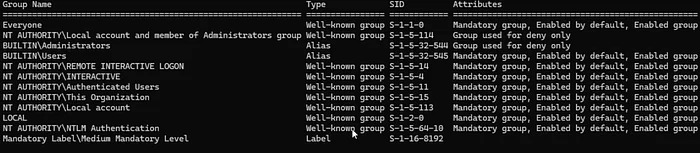
Before launching anything, the author checked the starting token. BUILTIN\Administrators was marked Group used for deny only, and the mandatory label was Medium Mandatory Level, SID S-1-16-8192.
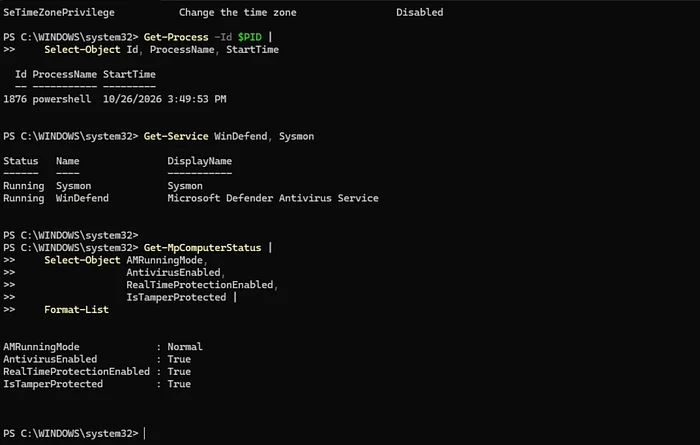
The starting PowerShell process was PID 1876, started at 3:49:53 PM. Sysmon and WinDefend were running, and Defender reported Normal mode with antivirus, real-time protection and tamper protection enabled.
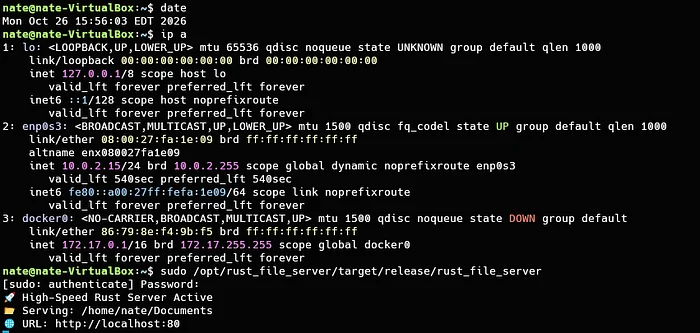
On the Ubuntu side, the first capture shows the file server serving Documents, with the date output reading 15:56:03 EDT.
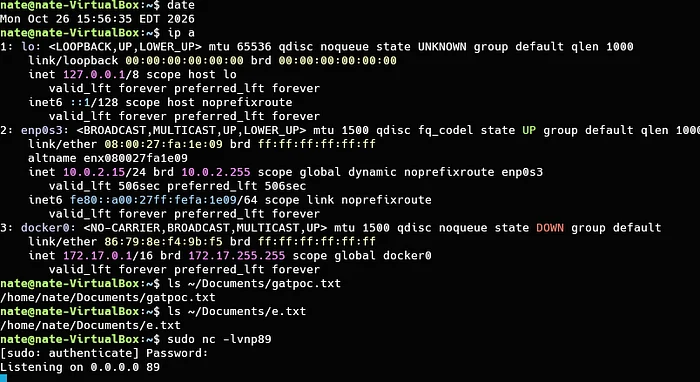
By 15:56:35 EDT both test files were in place and the listener was waiting on port 89.
Finding it
The starting point is the well-known gap between a filtered administrator token and a full one. The author did not discover the ComputerDefaults UAC bypass; the write-up is about what happened when it was combined with a second stage aimed at winlogon.exe, and about how much of the resulting SYSTEM session can actually be proven from the telemetry.
The interesting observation is the sequence in Process Explorer and Sysmon: ComputerDefaults instances spawning high-integrity PowerShell, then a burst of access to winlogon.exe, remote threads into it, and SYSTEM cmd.exe processes whose recorded parent is winlogon.exe.
Exploitation
Step 1: fetch and run the hosted payload
In the original medium-integrity PowerShell session, the hosted test file was fetched with Invoke-RestMethod and passed to Invoke-Expression. The first stage used ComputerDefaults together with the per-user ms-settings command handler:
HKCU\Software\Classes\ms-settings\Shell\Open\command
The loop opened a registry transaction, wrote the test command, committed the transaction, and launched ComputerDefaults. In the MSRC submission the author described a possible timing window around that sequence. The transaction-specific explanation is something the author still needs to distinguish from the documented UAC technique.
Step 2: Defender reacts
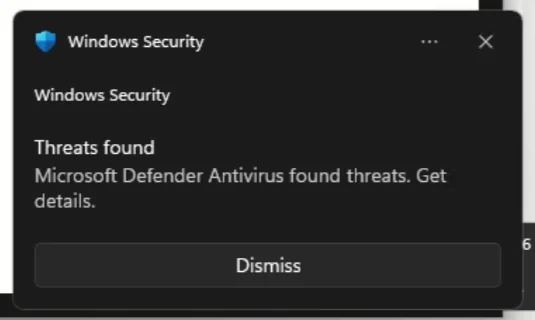
Defender started flagging the activity almost immediately. The first detection in the marked window is timestamped 3:58:21 PM and named Behavior:Win32/UACBypassExp.T!gen. Other detections reference ComputerDefaults. At 05:14 in the recording, the Windows Security notification is visible.
Step 3: the process storm
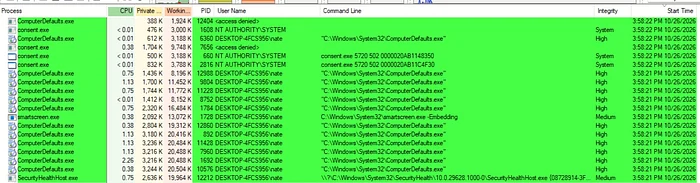
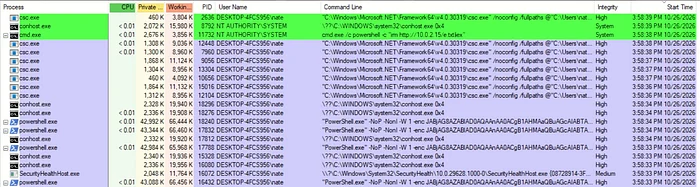
Process Explorer filled with ComputerDefaults instances, high-integrity PowerShell processes and compiler activity. CPU usage climbed, and SYSTEM command processes appeared in the list. The exported timeline for this one capture contains 180 ComputerDefaults process creations and 63 high-integrity PowerShell processes whose recorded parent was ComputerDefaults.
Step 4: the winlogon stage
The next part of the test involved repeated NtQuerySystemInformation and NtQueryInformationToken calls while other threads changed state concurrently. The report proposed a token-validation race affecting access to winlogon.exe. The event logs were used to check the resulting activity without relying on that explanation alone.
Sysmon captured 63 PowerShell-to-winlogon access events with GrantedAccess set to 0x1fffff. There were also 63 remote-thread events into winlogon, with KERNEL32.DLL!WinExec identified as the start function. The process timeline shows 63 cmd.exe processes running as NT AUTHORITY\SYSTEM, with winlogon.exe as their recorded parent.
Step 5: the SYSTEM session on Ubuntu
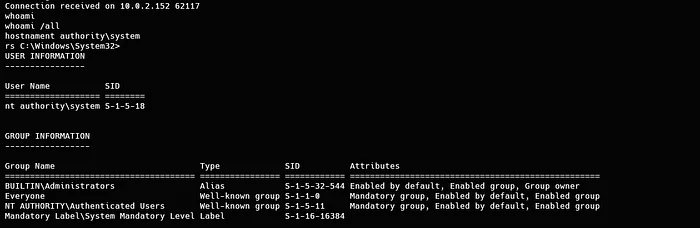
The Ubuntu listener received a connection. Checking the identity in that session returned nt authority\system. The full output includes SID S-1-5-18 and System Mandatory Level, SID S-1-16-16384.
Defender eventually killed the original PowerShell launcher. Sysmon records PID 1876 ending at 4:00:08 PM. For this run, multiple PowerShell sessions were needed in parallel so the timing-dependent attempts could finish while Defender was terminating sessions. That accounts for the number of PowerShell and ComputerDefaults processes in the capture.
In the connected session, the date and process ID were checked. Windows returned Monday, October 26, 2026, 4:00:49 PM, and echo $PID returned 552. That allowed the session to be matched to a specific process on the Windows machine.

Step 6: matching the session to a process
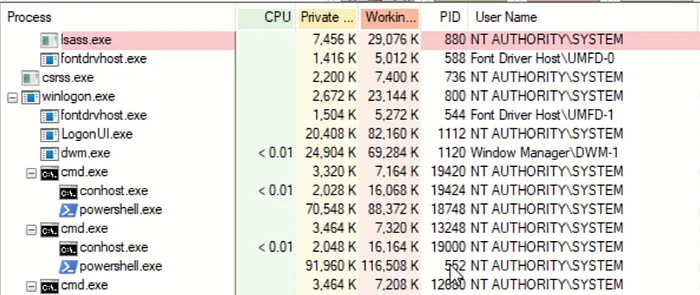
Process Explorer showed PID 552 beneath cmd.exe PID 13248, which was beneath winlogon.exe PID 800. The PowerShell process was a grandchild of winlogon, with cmd.exe in between:
winlogon.exe PID 800 cmd.exe PID 13248 powershell.exe PID 552
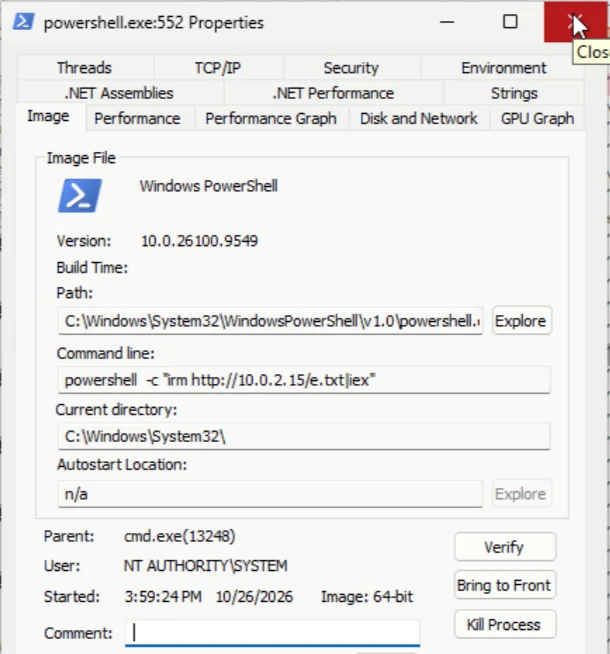
Opening the properties for PowerShell PID 552 confirmed the parent as cmd.exe (13248) and the user as NT AUTHORITY\SYSTEM. Its start time was 3:59:24 PM, matching the process being checked from the Ubuntu session.
Process GUIDs were checked as well as PIDs when matching the processes. Windows had already used PID 552 for a different process earlier in the run, so the start time and parent relationship mattered too. Defender detected activity and reported remediation during the same run.
Step 7: the follow-up trace (edit of 27 October 2026)
The author went back through the script and saved Sysmon records to follow the original PowerShell session through to the SYSTEM session. In this run, the first stage was a timing competition with Defender: the test repeatedly registered and triggered the command while Defender detected activity and terminated processes. Once it had elevated execution, the embedded C# attempted to open winlogon, allocated memory inside it, and wrote a command string into that memory. It then created a remote thread starting at WinExec to launch the command in winlogon's context. That led to the SYSTEM process chain shown in the screenshots.
Matching the process GUIDs gives the following sequence from the original medium-integrity PowerShell to the final SYSTEM PowerShell. The sideways arrow marks the remote-thread activity into an existing process:
PowerShell 1876 [Medium] └─ ComputerDefaults 15104 [High] └─ PowerShell 15196 [High] ── remote thread → winlogon 800 [SYSTEM] └─ cmd 13248 [SYSTEM] └─ PowerShell 552 [SYSTEM]
Sysmon records PowerShell 15196 accessing winlogon 800 with GrantedAccess 0x1fffff at 3:59:00.845 PM. At 3:59:10.858 PM it records that same PowerShell creating the remote thread. One millisecond later, winlogon creates SYSTEM cmd 13248, which starts SYSTEM PowerShell 552 at 3:59:24.758 PM. Those are local times on 26 October. The timing strongly connects the remote thread to the command shell, although Sysmon does not directly identify which winlogon thread created that child.
Root cause
The write-up is careful about what is and is not established. Two candidate causes are discussed, and neither is confirmed.
On the registry side, launching an elevated child after a transaction does not establish that ComputerDefaults read uncommitted registry data. The capture shows the execution sequence and the resulting identities, while the transaction-specific cause remains unconfirmed.
On the access side, there is still a question about what caused the access to be granted. A handle to a SYSTEM process does not change the caller's identity, and Microsoft's OpenProcess documentation explains how enabled SeDebugPrivilege affects access checks. Proving the proposed token-validation race would also mean accounting for the caller's existing privileges and ruling out other explanations.
The author also looked at CVE-2024-30088, a token-query race in NtQueryInformationToken that allows escalation to SYSTEM. The test uses NtQueryInformationToken too, but the author has not established that it uses the same vulnerability.
Defender did detect the activity, flagged it as Behavior:Win32/UACBypassExp.T!gen, and eventually killed the original launcher; the author ran multiple PowerShell sessions in parallel so timing-dependent attempts could finish while Defender was terminating sessions. Microsoft's Windows security servicing criteria place UAC in the defence-in-depth category and explain the trusted position of administrative processes; MSRC's response to the submission was that it did not meet the vulnerability criteria, and the author has not attributed a more specific reason to that decision.
Impact
In this lab, a medium-integrity PowerShell session belonging to a local administrator ended with a reverse shell running as NT AUTHORITY\SYSTEM, with SID S-1-5-18 and System Mandatory Level. The session was matched to PowerShell PID 552, a grandchild of winlogon.exe PID 800 via cmd.exe PID 13248.
The practical precondition is an account that is already a local administrator but running with a filtered, medium-integrity token. The write-up does not claim a path from a standard user. The author also does not claim a confirmed vulnerability: the proposed race and the transaction-specific registry explanation remain unproven, and MSRC did not accept the submission.
Fix
No fix is described. The report records MSRC's position that the submission did not meet the vulnerability criteria, and links Microsoft's Windows security servicing criteria, which categorise UAC as defence-in-depth. The author does not propose a code change.
Variants to test
- Other per-user
ms-settingshandler hijacks. The technique relies onHKCU\Software\Classes\ms-settings\Shell\Open\command. On another Windows build, write the same key and launch ComputerDefaults from a medium-integrity administrator shell. A positive result is a high-integrity child process whose parent is ComputerDefaults, visible in Process Explorer and in Sysmon process-creation events. - Registry transaction timing. Repeat the open, write, commit and launch sequence with varying delays between commit and the ComputerDefaults launch. A positive result would be an elevated child that appears only when the transaction is in flight, which would support the uncommitted-read explanation; the same result with no transaction would argue against it.
- Remote thread into a SYSTEM process. From a high-integrity process, attempt
OpenProcessagainstwinlogon.exewithGrantedAccess 0x1fffff, allocate memory, write a command, and create a remote thread atWinExec. A positive result is a Sysmon remote-thread event withKERNEL32.DLL!WinExecas the start function, followed by a SYSTEM child of winlogon. - Privilege accounting. Run the same winlogon access with
SeDebugPrivilegedisabled and then enabled. A positive result is that access succeeds only in one configuration, which would separate a privilege effect from a race. - Comparison with CVE-2024-30088. Exercise
NtQueryInformationTokenunder concurrent state changes on a patched and an unpatched build. A positive result is that the behaviour differs between the two, which would tie the test to that specific race rather than a generic one. - Defender race window. Run the first stage repeatedly in parallel sessions while Defender is active. A positive result is at least one elevated execution completing before termination, which is the condition the author needed in this run.
What happened, in plain words
A security researcher set up two computers in a lab: a Windows 11 machine and an Ubuntu (Linux) machine. On the Windows machine, they opened a PowerShell window. PowerShell is a text-based tool built into Windows where you type commands instead of clicking icons. The window they opened was running with less power than the account actually had.
From that ordinary-looking window, the researcher ran a known trick that gets around the User Account Control (UAC) prompt, the pop-up Windows shows when a program wants administrator rights. The trick uses a built-in Windows program called ComputerDefaults. After that, the researcher's code reached into a very important Windows process called winlogon.exe, which handles logins, and made it start a command shell. After that, the researcher's code reached into a very important Windows process called winlogon.exe, which handles logins, and a command shell and PowerShell inside it ended up running as NT AUTHORITY\SYSTEM, the highest account on a Windows machine, the one the operating system itself uses.
The Ubuntu machine was listening for a connection back from Windows. When it received one, the researcher typed commands into it and confirmed the identity was SYSTEM. They then matched that remote session to a specific process on the Windows machine, PowerShell with process ID 552, and followed its parents back to winlogon.exe.
The researcher had sent this work to Microsoft's Security Response Center (MSRC), the team that handles reports of security problems in Microsoft products. MSRC replied that it did not meet their vulnerability criteria, meaning they did not treat it as a security flaw they needed to fix. The researcher is honest that two explanations they proposed, a timing race and a registry transaction effect, are not proven. What the screenshots and logs support is the sequence of events and the final SYSTEM session.
This article walks through the same steps for someone who has never done security work. Every technical word is explained where it first appears, and there is a glossary at the end.
The background you need first
Accounts, administrators and tokens
Windows decides what you are allowed to do based on your account. A normal user account can run programs and change their own files. A member of the local Administrators group can do much more: install software, change system settings, and touch files that belong to the operating system.
When you log in, Windows does not hand your programs the full administrator power straight away. It creates a token, a small data structure that lists your identity and your privileges, and it gives your session a filtered copy. The filtered token says you are an administrator, but marks the administrator group as usable only for saying no, not for granting access.
A useful comparison: think of a membership card for a club. The filtered token is a card that says "member, but not allowed into the members' lounge today". The full token is the same card with lounge access switched on. UAC is the receptionist who checks your ID and switches the lounge access on when you ask.
Integrity levels
Windows also tags every process with an integrity level, a rough measure of how trusted it is. The levels you will see here are:
- Medium: what ordinary programs and unelevated administrator shells run at.
- High: what elevated (administrator) processes run at.
- System: the highest level, used by core operating system processes.
UAC and why bypassing it matters
User Account Control (UAC) is the feature that shows the consent prompt. It exists so that malware running as you cannot silently give itself administrator rights. A UAC bypass is a technique that gets an elevated process without the prompt appearing. Microsoft classes UAC as defence-in-depth, meaning an extra layer of protection rather than a hard security boundary. That classification matters later, because it shapes how Microsoft treats reports about it.
The ComputerDefaults technique
ComputerDefaults is a small Windows program that opens a settings page. Windows lets each user define, in their own part of the registry, which command should run when a particular kind of settings link is opened. The registry is Windows' central database of settings, organised in folders called keys. HKCU means "HKEY_CURRENT_USER", the section that belongs to the logged-in user and which that user can write to without administrator rights.
The documented trick, published by the LOLBAS project (a catalogue of legitimate Windows binaries that can be abused), is to point the per-user settings handler at your own command and then launch ComputerDefaults. The write-up credits this technique to the LOLBAS project and to Eron Clarke.
Sysmon, Defender and Process Explorer
Three tools appear throughout:
- Sysmon is a Microsoft tool that writes detailed logs about process creation, network connections and other activity to the Windows event log. It is the recorder.
- Microsoft Defender is the built-in antivirus. It watches for suspicious behaviour and can kill processes.
- Process Explorer is a free Microsoft tool that shows a live tree of every running process, its process ID, its parent and its account. It is the magnifying glass.
Process IDs, parents and GUIDs
Every running program gets a process ID (PID), a number Windows uses to refer to it. PIDs are reused: once a program exits, its number can be given to a new program. Each process also has a parent, the process that started it, so processes form a family tree. A GUID is a long unique identifier that does not get reused, which is why the researcher checked GUIDs as well as PIDs when matching processes.
The API calls mentioned
An API (Application Programming Interface) is a set of functions that programs use to ask the operating system to do things. The names in this report are Windows internal functions:
OpenProcess: asks Windows for a handle to another process. A handle is like a ticket that lets you operate on that process.NtQuerySystemInformation: asks Windows for information about the system, including running processes.NtQueryInformationToken: asks Windows for information about a token.WinExec: a function that starts a program.SeDebugPrivilege: a privilege that lets a process open other processes for debugging, which in practice means it can get powerful access to them.
Reverse shells and listeners
A shell is a program that accepts commands and runs them. A reverse shell is a shell that connects out from the victim machine to a machine the attacker controls, rather than waiting to be connected to. The controlling machine runs a listener, a program waiting on a network port (a numbered channel) for that incoming connection. Here the Ubuntu machine was the listener and the Windows machine connected back to it.
Race conditions
A race condition is a bug where the result depends on the exact timing of two things happening at once. Imagine two people editing the same shared document: if one saves while the other is still typing, the result depends on who was faster. In software, a token-validation race would mean a check on a token gives a different answer depending on what another thread is doing at that instant. A thread is a unit of execution inside a process; a process can have several running at once.
CVE numbers
A CVE is a public catalogue number for a known security vulnerability. CVE-2024-30088 is a previously published token-query race that allows escalation to SYSTEM. The researcher compares their test to it but does not claim it is the same bug.
The setup
The lab had two machines.
- A Windows 11 virtual machine (a full Windows install running inside another computer, isolated from the real one) on version 25H2, build 26200.9711. Process Explorer was open. Sysmon and WinDefend (the Defender service) were running. Defender was in Normal mode with antivirus, real-time protection and tamper protection all enabled. Tamper protection stops other programs from switching Defender off.
- An Ubuntu virtual machine at address
[redacted], serving files from its Documents directory and waiting for a reverse connection on port 89.
Two files were hosted on the Ubuntu machine:
gatpoc.txt, which contains C# code wrapped in PowerShell. C# is a programming language; wrapping it in PowerShell means PowerShell is used to compile and run it.e.txt, the PowerShell reverse shell used for the lab connection.
A separate administrator PowerShell session handled monitoring. The researcher checked the Sysmon configuration there and marked the start of the test at 3:55:41 PM. The original medium-integrity session was the one used to launch the test, so the monitoring session stayed out of the way.
Before launching anything, the researcher checked the starting token. BUILTIN\Administrators was marked Group used for deny only, and the mandatory label was Medium Mandatory Level, SID S-1-16-8192. A SID (Security Identifier) is the unique number Windows uses for an account or a level. S-1-16-8192 is the number for medium integrity. Seeing it confirmed the session really was filtered and not elevated.
Figure 1 shows that starting token: the Administrators group present but usable only to deny, and the medium mandatory level. This is the baseline the whole test starts from.
The starting PowerShell process was PID 1876, started at 3:49:53 PM. Sysmon and WinDefend were running, and Defender reported Normal mode with antivirus, real-time protection and tamper protection enabled.
Figure 2 shows PowerShell PID 1876 alongside the service and Defender status before the test, so the reader can see the starting conditions were as described.
On the Ubuntu side, the first capture shows the file server serving Documents, with the date output reading 15:56:03 EDT. EDT is a time zone (US Eastern Daylight Time); the Windows screenshots use local times that correspond to these.
Figure 3 shows the Ubuntu machine at [redacted] serving its Documents folder, with the clock reading 15:56:03.
By 15:56:35 EDT both test files were in place and the listener was waiting on port 89.
Figure 4 shows both files present and the listener waiting on port 89, so the researcher knew the receiving end was ready before starting the attack.
Finding it
The starting point is the well-known gap between a filtered administrator token and a full one. The researcher did not discover the ComputerDefaults UAC bypass; the write-up is about what happened when it was combined with a second stage aimed at winlogon.exe, and about how much of the resulting SYSTEM session can actually be proven from the logs.
The interesting observation is the sequence in Process Explorer and Sysmon: ComputerDefaults instances spawning high-integrity PowerShell, then a burst of access to winlogon.exe, remote threads into it, and SYSTEM cmd.exe processes whose recorded parent is winlogon.exe. A remote thread is a thread created inside another process, which is a way of making that process run your code. That pattern is what the researcher set out to reproduce and then to explain.
Exploitation
Step 1: fetch and run the hosted payload
In the original medium-integrity PowerShell session, the hosted test file was fetched with Invoke-RestMethod and passed to Invoke-Expression. Invoke-RestMethod downloads content from a web address; Invoke-Expression takes a piece of text and runs it as a command. Together they mean "download this script and execute it". The first stage used ComputerDefaults together with the per-user ms-settings command handler:
HKCU\Software\Classes\ms-settings\Shell\Open\command
This is a registry path, read from left to right:
HKCUis the current user's own section of the registry, which the user can write to without administrator rights.Software\Classesis where per-user file and protocol associations live.ms-settingsis the internal name for the Windows Settings app.Shell\Open\commandis the value that says which command to run when this kind of item is opened.
By writing a command of their own into that value, the researcher makes Windows run their command whenever something opens an ms-settings link. ComputerDefaults is the trusted program used to do the opening.
The loop opened a registry transaction, wrote the test command, committed the transaction, and launched ComputerDefaults. A registry transaction is a way of grouping registry changes so they take effect together, like a database transaction. In the MSRC submission the researcher described a possible timing window around that sequence: the idea that ComputerDefaults might read the value while the transaction was still in progress. The transaction-specific explanation is something the researcher still needs to distinguish from the documented UAC technique, meaning they are not yet sure the transaction added anything beyond the known trick.
Step 2: Defender reacts
Defender started flagging the activity almost immediately. The first detection in the marked window is timestamped 3:58:21 PM and named Behavior:Win32/UACBypassExp.T!gen. That name is Defender's label for behaviour it associates with UAC bypass exploits; the !gen suffix means it is a generic behavioural detection rather than a signature for one specific file. Other detections reference ComputerDefaults. At 05:14 in the recording, the Windows Security notification is visible.
Figure 5 shows the Windows Security notification reporting threats found, with the first exported detection at 15:58:21. This is the moment the antivirus noticed, which matters because the rest of the run is a race against it.
Step 3: the process storm
Process Explorer filled with ComputerDefaults instances, high-integrity PowerShell processes and compiler activity. Compiler activity means the C# code was being turned into a runnable program on the fly. CPU usage climbed, and SYSTEM command processes appeared in the list. The exported timeline for this one capture contains 180 ComputerDefaults process creations and 63 high-integrity PowerShell processes whose recorded parent was ComputerDefaults.
Figure 6 shows several ComputerDefaults instances with different PIDs, including 6360, 12988 and 9804, all at High integrity and starting within about a second of each other.
Figure 7 shows high-integrity PowerShell processes and a SYSTEM cmd.exe in Process Explorer, which is the next rung up the ladder.
Step 4: the winlogon stage
The next part of the test involved repeated NtQuerySystemInformation and NtQueryInformationToken calls while other threads changed state concurrently. In plain terms, the code kept asking Windows about processes and tokens while other parts of the program were changing things at the same time, hoping to catch a moment when a check gave the wrong answer. The report proposed a token-validation race affecting access to winlogon.exe. The event logs were used to check the resulting activity without relying on that explanation alone, which is good practice: the logs show what happened even if the proposed cause is wrong.
Sysmon captured 63 PowerShell-to-winlogon access events with GrantedAccess set to 0x1fffff. GrantedAccess records which permissions were requested or granted when opening a process; 0x1fffff is a hexadecimal number meaning essentially all of them. There were also 63 remote-thread events into winlogon, with KERNEL32.DLL!WinExec identified as the start function. KERNEL32.DLL is a core Windows library, and the ! notation means "the WinExec function inside that library". So the logs show code being started inside winlogon using the function that launches programs. The process timeline shows 63 cmd.exe processes running as NT AUTHORITY\SYSTEM, with winlogon.exe as their recorded parent.
Step 5: the SYSTEM session on Ubuntu
The Ubuntu listener received a connection. Checking the identity in that session returned nt authority\system. The full output includes SID S-1-5-18 and System Mandatory Level, SID S-1-16-16384. S-1-5-18 is the SID for the local SYSTEM account, and S-1-16-16384 is the number for system integrity. Together they confirm the connection was running as the operating system itself.
Figure 8 shows the Ubuntu side reporting NT AUTHORITY\SYSTEM with those SIDs, which is the payoff of the whole test.
Defender eventually killed the original PowerShell launcher. Sysmon records PID 1876 ending at 4:00:08 PM. For this run, multiple PowerShell sessions were needed in parallel so the timing-dependent attempts could finish while Defender was terminating sessions. That accounts for the number of PowerShell and ComputerDefaults processes in the capture: many attempts were running at once.
In the connected session, the date and process ID were checked. Windows returned Monday, October 26, 2026, 4:00:49 PM, and echo $PID returned 552. echo $PID prints the process ID of the PowerShell process handling the session, so it tells you which process on the Windows machine you are actually talking to. That allowed the session to be matched to a specific process on the Windows machine.
Figure 9 shows the connected session returning the Windows date and PID 552, which is the link between the remote shell and a local process.
Step 6: matching the session to a process
Process Explorer showed PID 552 beneath cmd.exe PID 13248, which was beneath winlogon.exe PID 800. The PowerShell process was a grandchild of winlogon, with cmd.exe in between:
winlogon.exe PID 800 cmd.exe PID 13248 powershell.exe PID 552
Read left to right, this line is a family tree: winlogon.exe (PID 800) started cmd.exe (PID 13248), which started powershell.exe (PID 552). The remote session was the last one in that chain.
Figure 10 shows that tree in Process Explorer, with the account column showing SYSTEM for the chain.
Opening the properties for PowerShell PID 552 confirmed the parent as cmd.exe (13248) and the user as NT AUTHORITY\SYSTEM. Its start time was 3:59:24 PM, matching the process being checked from the Ubuntu session.
Figure 11 shows the properties window for PID 552 with the parent and user, which is the final confirmation that the remote session and the local process are the same thing.
Process GUIDs were checked as well as PIDs when matching the processes. Windows had already used PID 552 for a different process earlier in the run, so the start time and parent relationship mattered too. This is why the researcher did not stop at "the PID matches": a reused number could point at the wrong process. Defender detected activity and reported remediation during the same run.
Step 7: the follow-up trace (edit of 27 October 2026)
The researcher went back through the script and saved Sysmon records to follow the original PowerShell session through to the SYSTEM session. In this run, the first stage was a timing competition with Defender: the test repeatedly registered and triggered the command while Defender detected activity and terminated processes. Once it had elevated execution, the embedded C# attempted to open winlogon, allocated memory inside it, and wrote a command string into that memory. It then created a remote thread starting at WinExec to launch the command in winlogon's context. That led to the SYSTEM process chain shown in the screenshots.
In everyday terms: the code tried to open winlogon, wrote a command into its memory, and then created a remote thread to run it. Because winlogon runs as SYSTEM, anything it starts also runs as SYSTEM.
Matching the process GUIDs gives the following sequence from the original medium-integrity PowerShell to the final SYSTEM PowerShell. The sideways arrow marks the remote-thread activity into an existing process:
PowerShell 1876 [Medium] └─ ComputerDefaults 15104 [High] └─ PowerShell 15196 [High] ── remote thread → winlogon 800 [SYSTEM] └─ cmd 13248 [SYSTEM] └─ PowerShell 552 [SYSTEM]
This diagram is the whole story in one picture. The original PowerShell 1876 at Medium starts ComputerDefaults 15104, which comes up at High. That starts PowerShell 15196, also High. From there, a remote thread goes sideways into winlogon 800, which is SYSTEM. Winlogon then starts cmd 13248 as SYSTEM, and that starts PowerShell 552 as SYSTEM, the session seen on Ubuntu.
Sysmon records PowerShell 15196 accessing winlogon 800 with GrantedAccess 0x1fffff at 3:59:00.845 PM. At 3:59:10.858 PM it records that same PowerShell creating the remote thread. One millisecond later, winlogon creates SYSTEM cmd 13248, which starts SYSTEM PowerShell 552 at 3:59:24.758 PM. Those are local times on 26 October. The timing strongly connects the remote thread to the command shell, although Sysmon does not directly identify which winlogon thread created that child. In other words, the order of events is compelling but not a formal proof of the exact thread involved.
Root cause
The write-up is careful about what is and is not established. Two candidate causes are discussed, and neither is confirmed.
On the registry side, launching an elevated child after a transaction does not establish that ComputerDefaults read uncommitted registry data. "Uncommitted" means written but not yet finalised. The capture shows the execution sequence and the resulting identities, while the transaction-specific cause remains unconfirmed.
On the access side, there is still a question about what caused the access to be granted. A handle to a SYSTEM process does not change the caller's identity: holding a ticket to someone else's process does not make you them. Microsoft's OpenProcess documentation explains how enabled SeDebugPrivilege affects access checks, which is one ordinary explanation for being allowed in. Proving the proposed token-validation race would also mean accounting for the caller's existing privileges and ruling out other explanations.
The researcher also looked at CVE-2024-30088, a token-query race in NtQueryInformationToken that allows escalation to SYSTEM. The test uses NtQueryInformationToken too, but the researcher has not established that it uses the same vulnerability.
As for why existing defences did not stop it: Defender did detect the activity, flagged it as Behavior:Win32/UACBypassExp.T!gen, and eventually killed the original launcher, but the timing-dependent attempts were run in parallel so some completed before termination. Microsoft's Windows security servicing criteria place UAC in the defence-in-depth category and explain the trusted position of administrative processes; MSRC's response to the submission was that it did not meet the vulnerability criteria, and the researcher has not attributed a more specific reason to that decision.
Impact
In this lab, a medium-integrity PowerShell session belonging to a local administrator ended with a reverse shell running as NT AUTHORITY\SYSTEM, with SID S-1-5-18 and System Mandatory Level. The session was matched to PowerShell PID 552, a grandchild of winlogon.exe PID 800 via cmd.exe PID 13248.
The practical precondition is an account that is already a local administrator but running with a filtered, medium-integrity token. The write-up does not claim a path from a standard user. The researcher also does not claim a confirmed vulnerability: the proposed race and the transaction-specific registry explanation remain unproven, and MSRC did not accept the submission.
Fix
No fix is described. The report records MSRC's position that the submission did not meet the vulnerability criteria, and links Microsoft's Windows security servicing criteria, which categorise UAC as defence-in-depth. The researcher does not propose a code change.
Variants to test
- Other per-user
ms-settingshandler hijacks. The technique relies onHKCU\Software\Classes\ms-settings\Shell\Open\command. On another Windows build, write the same key and launch ComputerDefaults from a medium-integrity administrator shell. A positive result is a high-integrity child process whose parent is ComputerDefaults, visible in Process Explorer and in Sysmon process-creation events. - Registry transaction timing. Repeat the open, write, commit and launch sequence with varying delays between commit and the ComputerDefaults launch. A positive result would be an elevated child that appears only when the transaction is in flight, which would support the uncommitted-read explanation; the same result with no transaction would argue against it.
- Remote thread into a SYSTEM process. From a high-integrity process, attempt
OpenProcessagainstwinlogon.exewithGrantedAccess 0x1fffff, allocate memory, write a command, and create a remote thread atWinExec. A positive result is a Sysmon remote-thread event withKERNEL32.DLL!WinExecas the start function, followed by a SYSTEM child of winlogon. - Privilege accounting. Run the same winlogon access with
SeDebugPrivilegedisabled and then enabled. A positive result is that access succeeds only in one configuration, which would separate a privilege effect from a race. - Comparison with CVE-2024-30088. Exercise
NtQueryInformationTokenunder concurrent state changes on a patched and an unpatched build. A positive result is that the behaviour differs between the two, which would tie the test to that specific race rather than a generic one. - Defender race window. Run the first stage repeatedly in parallel sessions while Defender is active. A positive result is at least one elevated execution completing before termination, which is the condition the researcher needed in this run.
Glossary
- Account: the identity you log in with on a computer, which determines what you are allowed to do.
- Administrators group: the built-in Windows group whose members can make system-wide changes.
- API (Application Programming Interface): a set of functions a program calls to ask the operating system or another program to do something.
- C#: a programming language used on Windows; here it is compiled and run on the fly.
- cmd.exe: the classic Windows command shell, a text window that runs commands.
- Compiler: a program that turns source code into something the computer can run.
- ComputerDefaults: a built-in Windows program that opens a settings page; abused here to launch a command at higher integrity.
- CVE: a public catalogue number for a known security vulnerability.
- Defender (Microsoft Defender): the antivirus built into Windows, which watches for suspicious behaviour and can kill processes.
- Defence-in-depth: an extra layer of protection that is useful but not treated as a hard security boundary.
- EDT: US Eastern Daylight Time, a time zone.
- Filtered token: a cut-down copy of a user's token that marks administrator rights as usable only to deny, not to grant.
- GUID: a long unique identifier that is not reused, unlike a process ID.
- Handle: a ticket Windows gives a program so it can operate on a specific object such as another process.
- HKCU: the part of the registry belonging to the currently logged-in user, writable without administrator rights.
- Integrity level: a trust tag on a process (Medium, High, System) that limits what it can touch.
- Invoke-Expression: a PowerShell command that runs a piece of text as a command.
- Invoke-RestMethod: a PowerShell command that downloads content from a web address.
- KERNEL32.DLL: a core Windows library containing many basic functions, including
WinExec. - Listener: a program waiting on a network port for an incoming connection.
- LOLBAS project: a public catalogue of legitimate Windows programs that can be abused by attackers.
- Medium integrity: the level ordinary programs and unelevated administrator shells run at.
- MSRC (Microsoft Security Response Center): the team that receives and assesses reports of security problems in Microsoft products.
- NtQueryInformationToken: a Windows function that returns information about a token.
- NtQuerySystemInformation: a Windows function that returns information about the system, including processes.
- OpenProcess: a Windows function that requests a handle to another process.
- Parent process: the process that started another process.
- PID (process ID): the number Windows uses to refer to a running program; numbers are reused after a program exits.
- Port: a numbered channel on a computer that network connections use.
- PowerShell: a text-based command tool built into Windows.
- Process Explorer: a Microsoft tool that shows a live tree of running processes, their parents and their accounts.
- Race condition: a bug where the result depends on the exact timing of two things happening at once.
- Registry: Windows' central database of settings, organised into keys.
- Registry transaction: a way of grouping registry changes so they take effect together.
- Remote thread: a thread created inside another process, a way of making that process run your code.
- Reverse shell: a shell that connects out from the victim machine to a machine the attacker controls.
- SeDebugPrivilege: a Windows privilege that allows powerful access to other processes for debugging.
- Shell: a program that accepts commands and runs them.
- SID (Security Identifier): the unique number Windows uses for an account or integrity level.
- Sysmon: a Microsoft tool that writes detailed logs of process, network and other activity to the Windows event log.
- SYSTEM / NT AUTHORITY\SYSTEM: the highest local account on Windows, used by the operating system itself; SID
S-1-5-18. - Tamper protection: a Defender feature that stops other programs from switching Defender off.
- Thread: a unit of execution inside a process; a process can run several at once.
- Token: a data structure listing a session's identity and privileges.
- UAC (User Account Control): the Windows feature that shows a consent prompt before granting administrator rights.
- UAC bypass: a technique that obtains elevated rights without the UAC prompt appearing.
- Virtual machine (VM): a full computer running inside another computer, isolated from it.
- WinDefend: the Windows service that runs Microsoft Defender.
- WinExec: a Windows function that starts a program.
- winlogon.exe: the core Windows process that handles logins; it runs as SYSTEM.


