From Open Redirect to Cookie Bombing: Chaining Two Web Security Issues
An authorization endpoint accepted an external redirectURL parameter, allowing redirection to an attacker-controlled domain. The author chained this with a cookie-bombing proof of concept on their own page, but could not confirm token leakage, account takeover, or that the cookie bombing actually disrupted the target.
 Published on medium.com
Cybersecurity
The full write-up lives on its author's site
It belongs to its author, so we link to it rather than copy it. The other two tabs are our own rewrites, checked against it.
Context
During a bug bounty assessment, the researcher found an Open Redirect in an authentication-related flow. While investigating its practical impact, he discovered that the redirect could be chained with browser cookie behaviour to demonstrate a cookie-bombing / header-bloat scenario. The target is kept anonymous and referred to as the target application. The report does not name the program, the product, or the technology stack.
The feature involved is an authorisation endpoint that accepts a redirectURL parameter and sends the browser to that URL as part of an authentication flow.
Setup
The report does not describe accounts, roles, tooling versions or other preconditions. The researcher used a domain he controlled as the redirect destination and to host the cookie-bombing proof of concept.
Finding it
The application had an authorisation endpoint that accepted a redirectURL parameter:
https://target.example/authorization?authPage=login-options&redirectURL=<external-url>
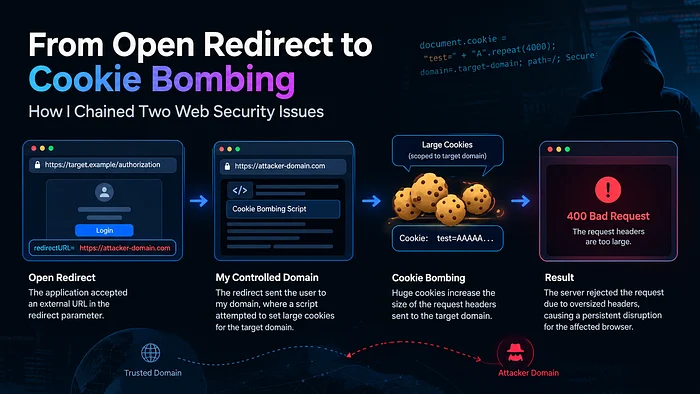
The researcher tested redirectURL with a domain he controlled, and the application successfully redirected the browser there. The flow was:
Victim ↓Target Application ↓Authorization Flow ↓redirectURL ↓My Controlled Domain
This is classified as CWE-601: URL Redirection to Untrusted Site. The concern is that the initial URL belongs to a legitimate and trusted domain, so a malicious link can appear more trustworthy before the victim is sent elsewhere.
Because the redirect happened during an authentication-related flow, the researcher checked whether anything sensitive was being sent to his controlled domain. He tested for:
- Session tokens
- Authentication codes
- OTP information
- User information
- Sensitive URL parameters
- Useful
Refererinformation
He could not confirm any token, session, or personal-information leakage, so he did not claim account takeover or credential theft. Instead he investigated whether the redirect could be combined with another browser-side behaviour.
Exploitation
Step 1: Confirm the redirect
The researcher supplied his own domain in the redirectURL parameter of the authorisation endpoint shown above and observed the browser being redirected there. This confirmed external redirection was possible and that the redirect could lead to his controlled domain.
Step 2: Look for leakage
Still within the authentication flow, he inspected what arrived at the controlled domain for the items listed above. Nothing sensitive was confirmed, so he did not claim the higher-impact impacts and instead investigated browser-side effects.
Step 3: Serve a cookie-bombing proof of concept
The redirect destination was under his control, so his controlled page contained a cookie-bombing proof of concept. The page could execute his test JavaScript, and cookie behaviour could be tested from it.
Cookie bombing stores a large amount of cookie data for a target domain, so that the browser sends a large Cookie header with subsequent requests:
Large Cookies ↓Large Cookie Header ↓Request Becomes Too Large ↓Server / Proxy Rejects Request ↓HTTP 400
The complete chain was:
Victim opens trusted URL ↓Open Redirect ↓My Controlled Domain ↓Cookie-Bombing PoC ↓Browser Cookie Storage ↓Large Cookie Header ↓Request Rejected
The important technical detail is that the browser still enforces cookie rules. The controlled domain did not simply gain access to the target's JavaScript origin. The cookie's domain, path, and browser behaviour determine whether it will actually be sent with requests to the target. The report does not include the JavaScript used in the proof of concept or the exact cookie attributes it set.
Step 4: Separate confirmed from assumed
Confirmed:
- External redirection was possible.
- The redirect could lead to the controlled domain.
- The controlled page could execute the test JavaScript.
- Cookie behaviour could be tested.
- Oversized request headers can result in request rejection.
Not confirmed:
- Account takeover
- OTP bypass
- Session-token theft
- Credential theft
- Private user-data exposure
Root cause
The Open Redirect is the entry point: the authorisation endpoint takes a user-supplied redirectURL and sent the browser to the researcher's controlled domain.
The second half of the chain relies on browser cookie semantics rather than a flaw in the target's JavaScript origin: cookies set from the controlled page are stored by the browser and, depending on their domain and path, sent with later requests to the target. If enough cookie data accumulates, the resulting Cookie header may exceed the target's request-header limits and the request may be rejected. Whether this happens depends on the browser, cookie scope, CDN/proxy configuration, and server header limits.
Impact
The main impact was the ability to use the trusted target domain as a redirector to an attacker-controlled website, which can make malicious links appear more trustworthy because the victim initially sees a legitimate domain before being redirected elsewhere:
Trusted Domain ↓Authentication Flow ↓Attacker-Controlled Page
This can potentially be abused for:
- Phishing
- Credential-harvesting campaigns
- Social engineering
- Redirecting users to malicious content
- Bypassing some basic URL-reputation or domain-trust checks
Token leakage, credential theft and account takeover were not demonstrated and should not be claimed as confirmed.
For the cookie-bombing portion, if the resulting cookie data is large enough to exceed the target's request-header limits, the affected browser may repeatedly receive errors when accessing the application. This can result in:
- Temporary loss of access to the website
- HTTP 400 responses
- Disruption of login or account pages
- Persistent browser-side disruption until the affected cookies/site data are removed
If cookies are scoped broadly enough, the effect may also extend to multiple applicable subdomains. The actual impact depends heavily on the browser, cookie scope, CDN/proxy configuration, and server header limits.
The cookie-bombing / DoS portion of the chain fell under the program's exclusion of DoS/DDoS-style impact. The researcher therefore treated it as a technical research observation rather than relying on it as the primary report impact. The lesson he draws is that a technically valid security impact is not automatically a valid bug bounty impact, and that programs differ: some may accept certain availability or resource-exhaustion issues under controlled conditions, while others explicitly exclude DoS, DDoS, resource exhaustion, stress testing, excessive automated requests and availability-impact testing.
Fix
The report gives remediation guidance rather than describing changes that were made:
- Fix the Open Redirect. Validate
redirectURLserver-side and allow only trusted internal paths or explicitly allowlisted domains. - Review cookie scope. Use the narrowest appropriate cookie domain and path. Avoid unnecessarily broad parent-domain cookie scopes.
- Protect against header bloat. CDNs, reverse proxies, and web servers should enforce sensible request-header limits and handle oversized requests safely.
Variants to test
- Other redirect parameters in authentication flows. Try parameters such as
redirectURLon login, logout, SSO and password-reset endpoints. A positive result is the browser landing on a domain you control after passing through the trusted domain. - Allowlist bypasses. Where a domain allowlist exists, test whether it can be bypassed (for example with lookalike hosts or path tricks). A positive result is redirection to a host you control despite the allowlist. The report does not list specific bypass payloads.
- Leakage checks on the redirect. Repeat the sensitive-information checks (session tokens, authentication codes, OTP information, user information, sensitive URL parameters,
Referer) at the controlled domain. A positive result is any of these arriving there. - Cookie scope from a redirected page. From a page reached via the redirect, test which cookies the browser will store and send to the target, varying domain and path. A positive result is cookies being sent to the target that you set from your own page.
- Header-limit behaviour. Measure how the target's CDN, proxy or server responds as the
Cookieheader grows. A positive result is request rejection (for example HTTP 400) once the header exceeds the configured limit, but check the program's policy on availability testing before doing this.
What happened, in plain words
A security researcher was taking part in a bug bounty programme. A bug bounty programme is a scheme run by a company that invites outside people to look for security weaknesses in its systems and report them, sometimes for a reward. During that work he found a weakness called an Open Redirect in a part of the site that handles logging in. An Open Redirect is a flaw where a website will send your browser to any address someone puts in a link, instead of only to its own pages.
While working out how serious that flaw was, he noticed it could be combined with the way browsers store small pieces of data called cookies. Cookies are little text files a website asks your browser to keep and to send back on later visits, for example to remember that you are logged in. By combining the redirect with a trick that fills a browser with far too much cookie data, he could demonstrate a scenario called cookie bombing, where the browser may end up sending an oversized request that the server refuses. He calls this header bloat.
The company did not want to be named, so throughout this article the site is simply called the target application. The report does not name the programme, the product or the technology the site is built on.
The feature at the centre of it is an authorisation endpoint. An endpoint is a specific address on a website that does one job when your browser asks for it. This one takes part in the login process and accepts a parameter called redirectURL, which tells it where to send the browser once that step is done. A parameter is a named value attached to a web address, the part after the ? sign.
1. Finding the Open Redirect
The application had an authorisation endpoint that accepted a redirectURL parameter:
https://target.example/authorization?authPage=login-options&redirectURL=<external-url>
Here is what each part of that address means:
https://is the secure version of the protocol browsers use to fetch web pages.target.exampleis the placeholder name for the target application's domain. A domain is the human-readable name of a site, the part you type in the address bar./authorizationis the path, the specific page or endpoint on that site.?marks the start of the parameters.authPage=login-optionsis one parameter, telling the endpoint which login-related page is involved.&separates one parameter from the next.redirectURL=<external-url>is the parameter of interest. Its value is where the browser should be sent afterwards, and<external-url>is a placeholder for any address on the internet.
What is an Open Redirect?
An Open Redirect happens when a website allows an attacker to control where the user's browser is redirected. A redirect is simply the server telling the browser "the page you want is over there, go to this other address instead". A everyday comparison: a receptionist who is asked for directions to a meeting room and always points to the room the visitor names, even if the visitor names a building across town.
Normally:
Target Website → Trusted Page
This means the site only ever forwards you to one of its own pages, for example from a login page to the account dashboard.
But with an open redirect:
Target Website → Attacker-Controlled Website
Here the site forwards you to whatever address was supplied, including one belonging to someone else. An attacker is anyone trying to misuse the site; attacker-controlled means a site that person owns and can put anything on.
This can be useful for phishing because the initial URL belongs to a legitimate and trusted domain. Phishing is tricking someone into handing over information or clicking something harmful by pretending to be a trustworthy party. The trick works better when the link a victim clicks starts with a name they recognise.
In this case, the researcher tested the redirectURL parameter with a domain that he controlled, and the application successfully redirected the browser there. In other words, he put his own web address into that parameter and watched the browser end up on his site.
The flow was:
Victim ↓Target Application ↓Authorization Flow ↓redirectURL ↓My Controlled Domain
Read from top to bottom: a victim, the person being tricked, opens a link. The browser goes to the target application. The application runs its authorisation flow, the sequence of steps in the login process. At the end of that flow it reads the redirectURL value. Finally the browser lands on the researcher's own domain. A domain is controlled by someone when they can decide what appears on it.
This is classified as CWE-601: URL Redirection to Untrusted Site. CWE is a public catalogue of common software weakness types, each with a number, so that everyone can refer to the same kind of mistake by the same name. CWE-601 is the entry for "the site redirects to an address it does not trust".
Impact of the Open Redirect
The main impact was the ability to use the trusted target domain as a redirector to an attacker-controlled website, which could potentially be abused. A redirector is something that sends people onwards; here the trusted site does the sending.
This can make malicious links appear more trustworthy because the victim initially sees a legitimate domain before being redirected elsewhere. Legitimate means genuine, the real site rather than an imitation.
For example:
Trusted Domain ↓Authentication Flow ↓Attacker-Controlled Page
Again read downwards: the victim starts on the trusted domain, passes through the authentication flow, and ends on a page the attacker controls.
This can potentially be abused for:
- Phishing
- Credential-harvesting campaigns
- Social engineering
- Redirecting users to malicious content
- Bypassing some basic URL-reputation or domain-trust checks
A credential-harvesting campaign is an organised attempt to collect usernames and passwords, usually with a fake login page. Social engineering is manipulating people rather than machines, for example by building trust so someone reveals something. URL-reputation checks are services and browser features that judge whether a web address is known to be bad; a link that starts on a trusted domain can slip past some of them.
However, in his testing, he could not demonstrate token leakage, credential theft, or account takeover. A token is a short piece of data that stands in for a logged-in user, a bit like a cloakroom ticket: whoever holds it is treated as that user. Account takeover means someone else gaining control of your account. Therefore, those impacts should not be claimed as confirmed. This is an important habit in security reporting: only claim what you actually saw happen.
2. Checking for Sensitive Information
Because the redirect happened during an authentication-related flow, he checked whether anything sensitive was being sent to his controlled domain. The reasoning is simple: if the browser is sent to his site in the middle of a login process, perhaps some of the login data travels with it. If it does, the flaw is far more serious than a redirect.
He tested for:
- Session tokens
- Authentication codes
- OTP information
- User information
- Sensitive URL parameters
- Useful
Refererinformation
A session token is the value that keeps you logged in between page loads. An authentication code is a one-time value a login system issues as proof that a step succeeded. OTP stands for one-time password, the short code often sent by text message or app to confirm it is really you. User information means personal details such as a name or email address. Sensitive URL parameters are values in the address itself that should not be shared. The Referer header is a small note the browser attaches to a request saying which page you came from; a header is extra information sent alongside a web request or response, separate from the page content itself.
He could not confirm any token, session, or personal-information leakage. So he did not claim account takeover or credential theft. Instead, he investigated whether the redirect could be combined with another browser-side behaviour. Browser-side means it happens inside the browser rather than on the server.
3. Redirecting to My Controlled Domain
The interesting part was that the redirect destination was under his control. Because he owned the destination page, he could put anything he liked on it, and that is what made the next step possible.
His controlled page contained a cookie-bombing proof of concept. A proof of concept is a small demonstration that shows a weakness is real. Before explaining the chain, it is important to understand what cookie bombing means.
4. What Is Cookie Bombing?
A cookie is small data that a website stores in a user's browser. A useful comparison is a coat-check ticket: the site hands it to your browser, your browser keeps it, and shows it again on the next visit so the site knows who you are or what you chose.
For example:
theme=darksession=abc123
This is two cookies written one after the other. The first, theme=dark, records a display preference: the site asked the browser to remember that the user picked a dark colour scheme. The second, [redacted] is a session cookie: a name, session, an equals sign, and a value, abc123`, which stands in for the logged-in user. In a real report the value would be a secret and would be redacted.
The browser automatically sends matching cookies back to the website with future requests. You do not do anything; the browser attaches them on its own.
Cookie bombing is a technique where a large amount of cookie data is stored for a target domain, causing the browser to send a large Cookie header with subsequent requests. The Cookie header is the part of a request where the browser lists all the cookies that belong to that site. Think of a form where every visit you must hand over every ticket you have ever been given; if someone gives you thousands of tickets, the pile becomes impossible to handle.
The basic idea is:
Large Cookies ↓Large Cookie Header ↓Request Becomes Too Large ↓Server / Proxy Rejects Request ↓HTTP 400
Line by line: first a lot of cookie data is stored. Then the browser puts all of it into the Cookie header of each request. The request as a whole may grow beyond what the receiving side will accept. The server, or a proxy sitting in front of it, may then refuse it. A proxy is an intermediary computer that passes requests on to the real server, often used to filter or balance traffic. The refusal comes back as HTTP 400, the standard status code meaning "bad request", that is, the server could not make sense of what it received.
Depending on the application's infrastructure, this can cause access disruption for the affected browser. Infrastructure here means the servers, proxies and content delivery networks that sit behind a website. Content delivery network, or CDN, is a network of servers around the world that serve a site's content close to the visitor.
Impact of Cookie Bombing
If the resulting cookie data is large enough to exceed the target's request-header limits, the affected browser may repeatedly receive errors when accessing the application. Request-header limits are the maximum size a server is configured to accept for the extra information sent with a request.
This can result in:
- Temporary loss of access to the website
- HTTP 400 responses
- Disruption of login or account pages
- Persistent browser-side disruption until the affected cookies/site data are removed
Persistent here means it keeps happening on every visit, because the oversized cookies stay in the browser until they are cleared. Site data is the browser's stored information for a site, including its cookies.
If cookies are scoped broadly enough, the effect may also extend to multiple applicable subdomains. Scope is the rule that says which addresses a cookie belongs to. A subdomain is a smaller name under a main domain, for example shop in shop.example.com under example.com. A cookie set for the main domain can be sent to its subdomains too, so a broad scope spreads the problem.
However, the actual impact depends heavily on the browser, cookie scope, CDN/proxy configuration, and server header limits. In other words, the same trick may work on one setup and do nothing on another.
5. The Chain
His controlled domain contained a cookie-bombing proof of concept.
Conceptually, the complete chain was:
Victim opens trusted URL ↓Open Redirect ↓My Controlled Domain ↓Cookie-Bombing PoC ↓Browser Cookie Storage ↓Large Cookie Header ↓Request Rejected
Read it as a sequence of events. The victim opens a link that starts on the trusted site. The open redirect sends the browser onwards. The browser arrives at the researcher's domain. That page runs the cookie-bombing proof of concept. The browser stores the resulting cookies. On later requests it sends a large Cookie header. The request is rejected.
The important technical detail is that the browser still enforces cookie rules. His controlled domain did not simply gain access to the target's JavaScript origin. An origin is the combination of scheme, host and port that a browser treats as one security boundary, roughly "which site this is". JavaScript is the programming language web pages run in your browser. Browsers deliberately stop a page from one origin from reading or writing another origin's data, and that protection still applied here.
The cookie's domain, path, and browser behaviour determine whether it will actually be sent with requests to the target. Domain says which site the cookie belongs to, path says which part of that site, and each browser has its own rules for storing and sending cookies. The report does not include the JavaScript used in the proof of concept or the exact cookie attributes it set.
6. What I Verified
He separated the confirmed behaviour from assumptions. This is a core discipline in security work: distinguish what you saw from what you think might be possible.
Confirmed
- External redirection was possible.
- The redirect could lead to his controlled domain.
- His controlled page could execute his test JavaScript.
- Cookie behaviour could be tested.
- Oversized request headers can result in request rejection.
Not Confirmed
- Account takeover
- OTP bypass
- Session-token theft
- Credential theft
- Private user-data exposure
An OTP bypass would mean getting past the one-time code check without the code. None of these were shown, so none were claimed.
7. The Important Bug Bounty Lesson
Unfortunately, the cookie-bombing / DoS portion of this chain was considered out of scope by this particular program. DoS stands for denial of service: making a service unavailable to its users. Out of scope means the programme's rules say that kind of finding is not eligible, so it will not be accepted or rewarded even if it is real.
And this is something researchers should always check before testing. Different bug bounty programmes have different policies. A policy is the written set of rules for what may be tested and what counts as a valid finding.
Some programmes may accept certain types of availability or resource-exhaustion issues under controlled conditions, while others explicitly exclude:
- DoS
- DDoS
- Resource exhaustion
- Stress testing
- Excessive automated requests
- Availability-impact testing
Availability means whether a service is up and usable. DDoS is a distributed denial of service, the same idea carried out from many machines at once. Resource exhaustion means using up a system's memory, processing power or bandwidth until it cannot serve normal users. Stress testing means deliberately pushing a system hard to see where it breaks. Automated requests are requests sent by a program rather than a person. Availability-impact testing is any test whose effect is to make the service harder to use.
So even when a technique is technically valid, it doesn't necessarily mean it is reportable under every programme's rules. Reportable means eligible to be submitted as a finding.
In this case, the programme specifically excluded DoS/DDoS-style impact, so he treated the cookie-bombing portion as a technical research observation rather than relying on it as the primary report impact. A research observation is something worth documenting and understanding, but not something submitted as the main finding.
8. Remediation
Remediation means the fixes that remove the weakness.
Fix the Open Redirect
Validate redirectURL server-side and allow only trusted internal paths or explicitly allowlisted domains. Validate means check the value against rules before acting on it. Server-side means the check happens on the server, where the user cannot tamper with it, rather than in the browser. An allowlist is a list of the only values that are permitted.
Review Cookie Scope
Use the narrowest appropriate cookie domain and path. Avoid unnecessarily broad parent-domain cookie scopes. Narrowest means giving a cookie the smallest reach that still lets it do its job, so a problem with one cookie cannot spread across a whole family of sites.
Protect Against Header Bloat
CDNs, reverse proxies, and web servers should enforce sensible request-header limits and handle oversized requests safely. A reverse proxy is the intermediary that sits in front of a web server and forwards requests to it. Enforce means actually apply the limit and reject what exceeds it.
Final Takeaway
What started as a simple Open Redirect turned into an interesting investigation into browser cookie behaviour.
The research chain was:
Open Redirect → Controlled Domain → Cookie Behaviour → Header Bloat → Request Rejection
But there is another important lesson beyond the technical side:
A technically valid security impact is not automatically a valid bug bounty impact.
Always read the programme's scope before testing. Scope is the description of what a programme allows you to test. Some programmes accept certain availability issues, while others explicitly exclude them.
For him, the valuable part was understanding the chain and learning where the boundary between technical impact and programme-accepted impact lies.
Find the behaviour. Understand the mechanism. Check the scope. Prove what is actually reportable.
Glossary
- Account takeover: someone else gaining control of your account.
- Allowlist: a list of the only values that are permitted.
- Attacker-controlled: a site or resource owned by the person trying to misuse the system.
- Authentication code: a one-time value a login system issues as proof that a step succeeded.
- Authorisation endpoint: a specific web address that takes part in the login process.
- Availability: whether a service is up and usable.
- Bug bounty programme: a scheme where a company invites outside people to find and report security weaknesses, sometimes for a reward.
- CDN (content delivery network): a network of servers around the world that serve a site's content close to the visitor.
- Cookie: small data a website asks your browser to store and send back on later visits.
- Cookie bombing: storing a large amount of cookie data for a target domain so the browser sends an oversized
Cookieheader. - Cookie header: the part of a request where the browser lists the cookies belonging to that site.
- Credential: a username, password or similar proof of identity.
- Credential harvesting: an organised attempt to collect usernames and passwords, usually with a fake login page.
- CWE: a public catalogue of common software weakness types, each with a number.
- CWE-601: the catalogue entry for URL redirection to an untrusted site.
- DDoS (distributed denial of service): a denial of service carried out from many machines at once.
- Domain: the human-readable name of a site, the part you type in the address bar.
- DoS (denial of service): making a service unavailable to its users.
- Endpoint: a specific address on a website that does one job when your browser asks for it.
- Header: extra information sent alongside a web request or response, separate from the page content.
- Header bloat: a request header growing so large that the receiving side refuses the request.
- HTTP 400: the standard status code meaning the server could not make sense of the request.
- Infrastructure: the servers, proxies and networks that sit behind a website.
- JavaScript: the programming language web pages run in your browser.
- Open Redirect: a flaw where a site sends your browser to any address supplied in a link instead of only its own pages.
- Origin: the combination of scheme, host and port that a browser treats as one security boundary.
- OTP (one-time password): a short code, often sent by text message or app, used to confirm it is really you.
- Out of scope: excluded by a programme's rules, so not eligible as a finding.
- Parameter: a named value attached to a web address, the part after the
?sign. - Path: the specific page or endpoint on a site, and for a cookie, the part of the site it belongs to.
- Phishing: tricking someone into handing over information or clicking something harmful by pretending to be trustworthy.
- Policy: the written set of rules for what may be tested and what counts as a valid finding.
- Proof of concept: a small demonstration that shows a weakness is real without causing harm.
- Proxy: an intermediary computer that passes requests on to the real server.
- Referer header: a note the browser attaches to a request saying which page you came from.
- Remediation: the fixes that remove a weakness.
- Reportable: eligible to be submitted as a finding.
- Request-header limit: the maximum size a server is configured to accept for the extra information sent with a request.
- Resource exhaustion: using up a system's memory, processing power or bandwidth until it cannot serve normal users.
- Reverse proxy: an intermediary that sits in front of a web server and forwards requests to it.
- Scope: the description of what a programme allows you to test, and for a cookie, which addresses it belongs to.
- Session token: the value that keeps you logged in between page loads.
- Social engineering: manipulating people rather than machines to get them to do something.
- Stress testing: deliberately pushing a system hard to see where it breaks.
- Subdomain: a smaller name under a main domain, such as
shopinshop.example.com. - Token: a short piece of data that stands in for a logged-in user.
- URL-reputation check: a service or browser feature that judges whether a web address is known to be bad.
- Validate: check a value against rules before acting on it.
- Victim: the person being tricked or affected.




