From Payment Metadata to Unauthorized Subscription Access
An unauthenticated subscription lookup endpoint accepted payment metadata (card BIN, last four digits, expiry, amount) and returned multiple subscription records including their IDs. Those IDs could then be submitted to a second unauthenticated endpoint to retrieve further subscription details, exposing information about subscriptions the requester did not own.

medium.com
Published on medium.com
Bug Bounty
The full write-up lives on its author's site
It belongs to its author, so we link to it rather than copy it. The other two tabs are our own rewrites, checked against it.
Context
This write-up describes a subscription management API that let a client look up subscriptions using a combination of payment-related parameters. The lookup was reachable without an authenticated session, and the subscription identifiers it returned could be reused against a second endpoint that also required no credentials. The report does not name the target, the product or the vendor; the captured request shows the host as target.example.
The feature itself is a normal lookup mechanism: a client supplies card and transaction details and receives subscription records back. The problem was that those details were treated as if they proved ownership of the subscription.
Setup
The report does not describe any accounts, roles, tools or versions. The only precondition that matters is that the first endpoint was reachable without authentication, and the researcher tested it that way.
Finding it
While testing the API, the researcher found an endpoint that accepted a combination of payment-related parameters. What stood out was that the functionality was available without an authenticated session.
At first glance the parameters look like a form of verification, but none of them represents an authenticated identity or proof of ownership. The request carried no Authorization header, no session cookie, no bearer token and no authenticated account.
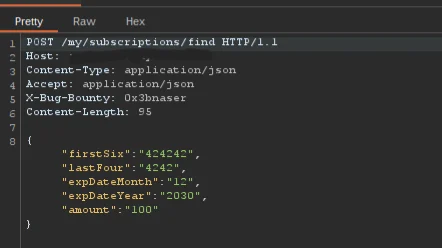
The response was the more interesting part: a single request returned multiple subscription objects rather than a single record.
Exploitation
Step 1: unauthenticated lookup with payment metadata
The endpoint accepted this body:
{
 "firstSix": "424242",
 "lastFour": "4242",
 "expDateMonth": 12,
 "expDateYear": 2030,
 "amount": 100
}
firstSix is the first six digits of the card number (the BIN), lastFour the last four digits, followed by the expiry month and year and the transaction amount. These are attributes of a payment transaction, not of a person, and the request carried nothing that tied it to an account.
The response contained subscription information such as:
{
 "Id": "sc_xxxxxxxxxxxxxxxxxxxxxxxxxxxxx",
 "Amount": 100,
 "Description": "Subscription",
 "Currency": "RUB",
 "Interval": "Month",
 "Status": "Active",
 "NextTransactionDateIso": "2026-09-25T09:42:45"
}
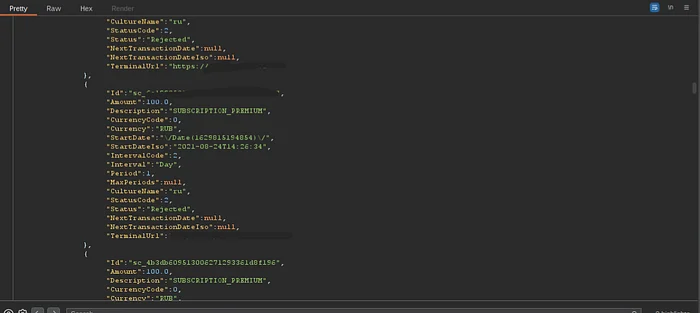
The response contained multiple records associated with different services and merchant contexts, and some of the returned subscriptions were active with future transaction dates.
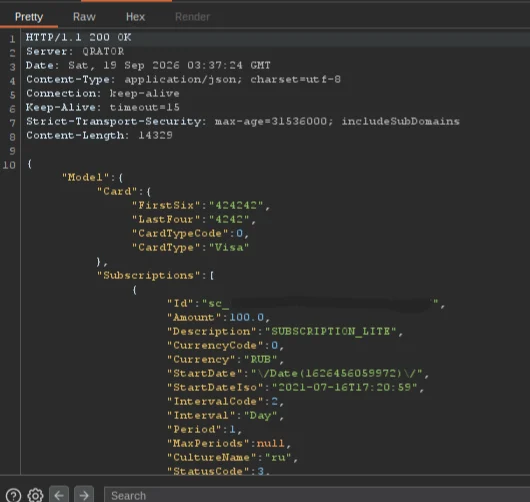
The application was not returning information about a single subscription. The lookup could expose a collection of subscription records without establishing that the requester owned them.
Step 2: follow the identifier to a second endpoint
One of the returned objects contained a subscription ID similar to:
sc_xxxxxxxxxxxxxxxxxxxxxxxxxxxxx
The researcher searched the available API functionality for places where a subscription ID was accepted and found another endpoint that took exactly this value. An ID returned by the first endpoint was submitted to the second:
POST /subscription/get HTTP/1.1
Host: target.example
Content-Type: application/json

{
 "id": "sc_xxxxxxxxxxxxxxxxxxxxxxxxxxxxx"
}
This request was made without adding any authentication credentials.
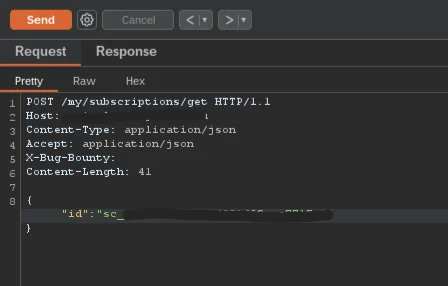
The server returned the corresponding subscription information successfully.
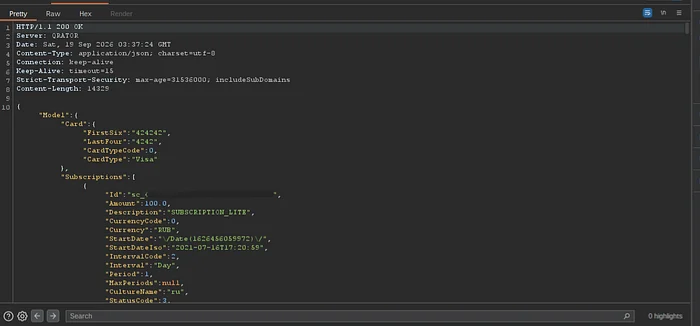
This confirmed that the identifier exposed by the first endpoint was not just an informational value. It could be reused as a reference to retrieve additional information about the subscription.
Root cause
The main problem was not that the API accepted payment-related parameters. It was treating those parameters as an authorization boundary. A BIN, the last four digits, an expiration date and a transaction amount can be associated with a payment transaction without proving that the requester owns the associated subscription. Knowing payment metadata is not the same thing as being authorized to access the subscription.
The report describes the underlying issue as a missing ownership/authorization check around subscription resources. A subscription ID should not become an authorization token simply because another endpoint returned it. The report describes the underlying issue as a missing ownership/authorization check around subscription resources; the exact server-side code is not shown, so the mechanism is inferred from behaviour.
Impact
The demonstrated impact was primarily unauthorized disclosure of subscription information. An unauthenticated requester could obtain:
- Subscription IDs
- Amounts
- Currency
- Descriptions
- Billing intervals
- Subscription status
- Start dates
- Future transaction dates
- Merchant/service context
- Limited card metadata through the secondary endpoint
The chain was:
- Unauthenticated lookup.
- Subscription ID disclosed.
- ID reused in another endpoint.
- Additional subscription information disclosed.
That is a clear access-control problem across the subscription API. The report does not claim any write access, payment manipulation or account takeover; the impact it demonstrates is disclosure.
Fix
The researcher deliberately does not recommend a specific fix. The stated position is that authorization should be enforced server-side rather than relying on the client to provide a supposedly unique combination of payment details.
Variants to test
- Lookup endpoints keyed on payment metadata. Try BIN, last four, expiry and amount combinations against subscription or order lookup endpoints with no credentials. A positive result is a response containing one or more subscription or order objects you do not own.
- Identifier reuse across endpoints. Take any ID returned by a lookup and submit it to every endpoint that accepts an ID of that shape (
/subscription/get, detail, invoice, history). A positive result is a successful response with no credentials attached. - Collection instead of single record. Send one lookup and count the returned objects. Multiple records across different merchants or services indicate the query is not scoped to a single owner.
- Active and future-dated records. Check
StatusandNextTransactionDateIsoin the response. CheckStatusandNextTransactionDateIsoin the response; the report notes some returned subscriptions were active with future transaction dates. - Secondary metadata. Compare what the second endpoint returns with the first. Extra fields such as limited card metadata widen the disclosure and are worth documenting separately.
This was the researcher's first bug bounty report, and it was ultimately marked as a duplicate.
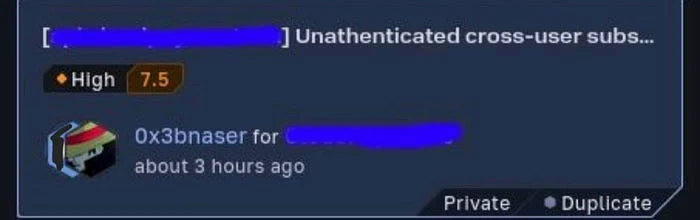
The closing tip: don't just test endpoints, follow the objects they return.
## What happened, in plain words

A website had a feature that let someone look up subscription records by typing in a few details about a payment card: the first six digits of the card number, the last four digits, the expiry month and year, and the amount that was charged. Normally you would expect a feature like that to sit behind a login, so that only the person who owns the subscription can see it. It did not. Anyone who could reach the feature could use it, with no account, no password and no login session of any kind.

Worse, one lookup did not return one subscription. It returned several, belonging to different services and different merchants. Each of those records contained a subscription ID, a short code that identifies that particular subscription inside the system. The researcher then took one of those IDs and pasted it into a second part of the same website, a part that fetches the details of a single subscription when you give it an ID. That second part also asked for no login, and it happily returned the full details of the subscription.

So the chain was: look up subscriptions using card details, get back subscription IDs you should never have seen, then use one of those IDs somewhere else to pull even more information. The researcher describes this as an access-control problem: the website was deciding who is allowed to see what based on the wrong thing. The report was the researcher's first bug bounty submission and was eventually marked as a duplicate, meaning someone else had already reported the same issue.

Before going further, a few words that come up constantly below.

- An **API** (Application Programming Interface) is the part of a website that a program talks to, rather than a person clicking buttons. When you use a mobile app or a website and it shows you your orders, the app is usually sending a small message to the API and the API sends data back. Think of it as the counter at a shop: you hand over a request, the person behind the counter hands back what you asked for. The API is that counter.
- A **request** is the message your browser or app sends to the server. It has a method (like `GET` to fetch something or `POST` to send something), a path (which part of the site you want), some headers (extra labels about the message) and sometimes a body (the actual data you are sending).
- A **response** is the message the server sends back, usually containing the data you asked for.
- **JSON** is a common way of writing data as text so that both sides can read it. It looks like a list of labels and values in curly braces, for example `"Amount": 100`. It is just a format, like a very strict way of filling in a form.
- A **cookie** is a small piece of text that a website asks your browser to store and send back with every later request. It is how a site remembers that you logged in. Think of it as a wristband you get at an event: you show it at the door and you are let in without showing your ticket again.
- A **token** (sometimes called a bearer token) is similar but usually sent in a header rather than stored by the browser. It is a string that proves who you are. "Bearer" means "whoever is holding this is allowed in", which is exactly why tokens must be kept secret.
- An **Authorization header** is a labelled line in a request where a token is normally placed, so the server can check it.
- **Authentication** means proving who you are (logging in). **Authorization** means deciding what you are allowed to do once you are known. These are different things, and this story is mostly about the second one.
- **Access control** is the set of rules that decides who can see or change what. When those rules are missing or wrong, you get an **access-control vulnerability**, which is the general name for the kind of bug in this report.
- A **subscription** here is a recurring payment arrangement: a customer is charged an amount every month (or another interval) for a service, and the system keeps a record of it with an ID, a status, an amount, a currency and the date of the next charge.
- **Payment metadata** means details about a payment that are not the card number itself: the first six digits, the last four digits, the expiry date, the amount. They describe a transaction, not a person.
- A **BIN** (Bank Identification Number) is the first six digits of a card number. They identify the bank that issued the card, not the cardholder.
- **Merchant** means the business that is being paid, for example the shop or service the subscription is for.
- A **bug bounty** is a programme where a company pays people (or at least thanks them) for reporting security problems privately instead of exploiting them. A report marked **duplicate** means the same issue had already been submitted by someone else.

## The feature that was being tested

The target is a subscription management API. The report does not name the company, the product or the vendor, and the host in the captured request is written as `target.example`. So we know what kind of system it was, not whose it was.

The feature is a lookup: a client sends card and transaction details, and the API sends back subscription records. On paper that sounds reasonable. A support agent, or a payment page, might want to find "which subscription does this payment belong to?" The problem was that the API treated those details as if they proved that the person asking owned the subscription. They do not. These details can be associated with a payment transaction without proving that the requester owns the subscription.

## Setting up

The report does not describe any accounts, roles, tools or software versions. There is only one precondition that matters: the first endpoint could be reached without logging in, and the researcher tested it exactly that way, with no credentials at all.

## Finding it

While testing the API, the researcher found an endpoint that accepted a combination of payment-related parameters. What stood out was that the functionality was available without an authenticated session. In plain terms: no login was needed to use it.

At first glance the parameters look like a form of verification, as if the site is checking that you know the card. But none of them represents an authenticated identity or proof of ownership. The request carried no `Authorization` header, no session cookie, no bearer token and no authenticated account.


{{media:0}}


The screenshot shows the request as captured, and the point it illustrates is the absence of any of those things: no authorization header, no session cookie, no bearer token, no logged-in account. The request is just a bare call to the API with payment details in it.

The response was the more interesting part: a single request returned multiple subscription objects rather than a single record. That is the first sign that something is wrong. A lookup that is properly tied to one owner should return that owner's record, or nothing. Returning a pile of records suggests the query is matching on the payment details alone, across everybody.

## Exploitation

### Step 1: unauthenticated lookup with payment metadata

The endpoint accepted this body:

```json
{
 "firstSix": "424242",
 "lastFour": "4242",
 "expDateMonth": 12,
 "expDateYear": 2030,
 "amount": 100
}
```

Line by line:

- The outer `{` and `}` mark the start and end of a JSON object, which is the body of the request. Everything inside is a set of label-and-value pairs.
- `"firstSix": "424242"` is the first six digits of a card number, the BIN. The value is written as text because it is a string of digits, not a number to do arithmetic with.
- `"lastFour": "4242"` is the last four digits of the card number, again as text. Together with the first six, these are the fragments of a card number that appear on receipts and in many systems.
- `"expDateMonth": 12` is the expiry month, a number from 1 to 12. Here it is December.
- `"expDateYear": 2030` is the expiry year.
- `"amount": 100` is the transaction amount.

Why these fields matter: they are attributes of a payment transaction, not of a person. A BIN belongs to a bank, the last four digits are printed on receipts, an expiry date is visible on the card itself, and an amount is something you know if you made the payment or saw a statement. None of them says "I am the account holder". The request carried nothing that tied it to an account: no cookie, no token, no header. That is the whole bug in one sentence: the site was using knowledge of payment details as a substitute for being logged in.

The response contained subscription information such as:

```json
{
 "Id": "sc_xxxxxxxxxxxxxxxxxxxxxxxxxxxxx",
 "Amount": 100,
 "Description": "Subscription",
 "Currency": "RUB",
 "Interval": "Month",
 "Status": "Active",
 "NextTransactionDateIso": "2026-09-25T09:42:45"
}
```

Line by line:

- `"Id": "sc_xxxxxxxxxxxxxxxxxxxxxxxxxxxxx"` is the subscription identifier. `"Id": "sc_xxxxxxxxxxxxxxxxxxxxxxxxxxxxx"` is the subscription identifier, the value that matters most for the second step. This is the value that matters most, because it is the key to the second step.
- `"Amount": 100` is the amount associated with the subscription, matching the amount that was sent in the lookup.
- `"Description": "Subscription"` is a human-readable label for what the record is.
- `"Currency": "RUB"` is the currency of the amount. `RUB` is the code for the Russian rouble.
- `"Interval": "Month"` says the subscription renews every month.
- `"Status": "Active"` says the subscription is currently live, not cancelled or expired.
- `"NextTransactionDateIso": "2026-09-25T09:42:45"` is the date and time of the next charge, written in ISO format: year, month, day, then `T`, then hours, minutes and seconds. This is future billing information, which makes the disclosure more serious than a list of old records.

The response contained multiple records associated with different services and merchant contexts, and some of the returned subscriptions were active with future transaction dates.


{{media:1}}


The screenshot shows the response with several records in it, belonging to different services and merchants, some of them active with future transaction dates. That is the moment the researcher describes as the point where the issue became more interesting: the application was not returning information about a single subscription. The lookup could expose a collection of subscription records without establishing that the requester owned them.

Think of it like a lost-and-found desk that, when you describe one umbrella, hands you every umbrella in the building, each with the owner's name and address attached.

### Step 2: follow the identifier to a second endpoint

One of the returned objects contained a subscription ID similar to:

```text
sc_xxxxxxxxxxxxxxxxxxxxxxxxxxxxx
```

This is the same identifier as in the response above, shown on its own. The researcher's habit, described in the report, is: whenever an API returns an identifier, check where else that identifier is used. The reasoning is simple. An ID is a reference. If one part of a system hands you a reference, another part of the same system may accept that reference and give you more. It is like finding a cloakroom ticket: the ticket itself is worthless, until you find the cloakroom that accepts it.

The researcher searched the available API functionality for places where a subscription ID was accepted and found another endpoint that took exactly this value. An ID returned by the first endpoint was submitted to the second:

```http
POST /subscription/get HTTP/1.1
Host: target.example
Content-Type: application/json

{
 "id": "sc_xxxxxxxxxxxxxxxxxxxxxxxxxxxxx"
}
```

Line by line:

- `POST /subscription/get HTTP/1.1` is the request line. `POST` is the method, used when you are sending data to the server rather than just asking for a page. `/subscription/get` is the path, the address of the feature on the server that fetches a subscription. `HTTP/1.1` is the version of the protocol being spoken.
- `Host: target.example` tells the server which site the request is for. `target.example` is the placeholder host name used in the report.
- `Content-Type: application/json` is a header that tells the server the body is JSON, so it knows how to read it.
- The blank line separates the headers from the body. This is a rule of the protocol: headers first, empty line, then the data.
- `{ "id": "sc_xxxxxxxxxxxxxxxxxxxxxxxxxxxxx" }` is the body: a JSON object with one field, `id`, whose value is the subscription ID taken from the first endpoint's response.

This request was made without adding any authentication credentials. That is the crucial detail. The researcher did not log in, did not attach a cookie, did not add a token. The request is exactly what a stranger could send.


{{media:2}}


The screenshot shows the request being sent with no authentication credentials attached, which is the condition that makes the result meaningful. If the researcher had been logged in as the owner, a successful response would prove nothing.

The server returned the corresponding subscription information successfully.


{{media:3}}


{{media:4}}


These screenshots show the successful response coming back from the second endpoint. The subscription details were returned even though the request carried no credentials, which confirms that the identifier exposed by the first endpoint was not just an informational value. It could be reused as a reference to retrieve additional information about the subscription.

In everyday terms: the first endpoint was a noticeboard that accidentally displayed cloakroom tickets, and the second endpoint was a cloakroom that handed over the coat to anyone holding a ticket, without asking who they were.

## Root cause

The main problem was not that the API accepted payment-related parameters. Plenty of systems accept card details; that is how payments work. The problem was treating those parameters as an authorization boundary, meaning the site used "you know these payment details" as the test for "you are allowed to see this subscription".

A BIN, the last four digits, an expiration date and a transaction amount can be associated with a payment transaction without proving that the requester owns the associated subscription. Knowing payment metadata is not the same thing as being authorized to access the subscription. A receipt in your pocket does not make you the account holder; it just means you have seen a receipt.

The report describes the underlying issue as a missing ownership/authorization check around subscription resources. A subscription ID should not become an authorization token simply because another endpoint returned it. An ID is a name, not a password. The exact server-side code is not shown, so the mechanism is inferred from behaviour: the API returns data it should have refused.

## Impact

The demonstrated impact was primarily unauthorized disclosure of subscription information. "Disclosure" means information was shown to someone who should not have seen it. The report does not claim any write access, payment manipulation or account takeover; nobody changed anything or took over an account. What was shown was data.

An unauthenticated requester could obtain:

- Subscription IDs
- Amounts
- Currency
- Descriptions
- Billing intervals
- Subscription status
- Start dates
- Future transaction dates
- Merchant/service context
- Limited card metadata through the secondary endpoint

A few of those need a word of explanation. **Billing interval** is how often the charge repeats, for example monthly. **Merchant/service context** means which business or service the subscription belongs to, so the data reveals not just that someone subscribes to something, but what. **Limited card metadata** means fragments of card information, not the full card number; the report says the secondary endpoint exposed some, without listing which fields.

The chain was:

1. Unauthenticated lookup.
2. Subscription ID disclosed.
3. ID reused in another endpoint.
4. Additional subscription information disclosed.

That is a clear access-control problem across the subscription API. The reason it matters in the real world is that subscription records reveal who pays for what, how much, and when the next charge happens. That is commercially sensitive and personally revealing, even without card numbers.

## Fix

The researcher deliberately does not recommend a specific fix. The stated position is that authorization should be enforced server-side rather than relying on the client to provide a supposedly unique combination of payment details. "Server-side" means the check happens on the server, in code the user cannot see or change, not in the browser where it can be bypassed. The report stops at that principle and does not go into implementation.

## Variants to test

These are the general lessons the report draws out, phrased as things to try on other systems. They are for testing systems you are allowed to test, such as ones covered by a bug bounty programme.

- **Lookup endpoints keyed on payment metadata.** Try BIN, last four, expiry and amount combinations against subscription or order lookup endpoints with no credentials. A positive result is a response containing one or more subscription or order objects you do not own.
- **Identifier reuse across endpoints.** Take any ID returned by a lookup and submit it to every endpoint that accepts an ID of that shape (`/subscription/get`, detail, invoice, history). A positive result is a successful response with no credentials attached.
- **Collection instead of single record.** Send one lookup and count the returned objects. Multiple records across different merchants or services indicate the query is not scoped to a single owner.
- **Active and future-dated records.** Check `Status` and `NextTransactionDateIso` in the response. Check `Status` and `NextTransactionDateIso` in the response; the report notes some returned subscriptions were active with future transaction dates.
- **Secondary metadata.** Compare what the second endpoint returns with the first. Extra fields such as limited card metadata widen the disclosure and are worth documenting separately.

This was the researcher's first bug bounty report, and it was ultimately marked as a duplicate.


{{media:5}}


The final image carries the caption الح�
دلله. The closing tip is: don't just test endpoints, follow the objects they return. In other words, when a system gives you a piece of data, ask where else that data is accepted, because the answer is often another door.

## Glossary

- **API**: the part of a website or service that programs talk to, sending requests and receiving data back, rather than pages meant for a human to click.
- **Request**: the message a browser or app sends to a server, containing a method, a path, headers and sometimes a body.
- **Response**: the message a server sends back, usually containing the data that was asked for.
- **Endpoint**: one specific address or feature on a server, such as `/subscription/get`, that accepts requests.
- **Method**: the verb at the start of a request, such as `GET` to fetch or `POST` to send data.
- **Header**: an extra labelled line in a request or response, carrying information such as the content type or an authorization token.
- **Body**: the data part of a request or response, separate from the headers.
- **JSON**: a text format for writing data as labelled values inside curly braces, used widely by APIs.
- **Authentication**: proving who you are, usually by logging in.
- **Authorization**: deciding what a known user is allowed to see or do.
- **Access control**: the rules that decide who can access which resources.
- **Access-control vulnerability**: a bug where those rules are missing or wrong, so someone can reach data or actions they should not.
- **Cookie**: a small piece of text stored by the browser and sent back with later requests, commonly used to remember a login session.
- **Session**: a period during which the server remembers that you are logged in, usually via a cookie.
- **Token / bearer token**: a secret string sent with a request to prove identity; whoever holds it is treated as authorised.
- **Authorization header**: the header where a token is normally placed so the server can check it.
- **Credential**: anything used to prove identity, such as a password, cookie or token.
- **Unauthenticated**: done without logging in and without any credential.
- **Subscription**: a recurring payment arrangement, charged at a fixed interval, with its own record and identifier.
- **Subscription ID**: the unique code identifying one subscription, here starting with `sc_`.
- **Identifier**: a value that names or references a specific record, such as an ID.
- **Payment metadata**: details about a payment that are not the full card number, such as the first six digits, last four digits, expiry date and amount.
- **BIN**: the first six digits of a card number, identifying the issuing bank.
- **Merchant**: the business being paid, for example the service a subscription is for.
- **Currency**: the money unit of an amount, here `RUB` for the Russian rouble.
- **Billing interval**: how often a subscription charge repeats, for example monthly.
- **Status**: the current state of a subscription, for example active.
- **ISO date format**: a standard way of writing date and time, such as `2026-09-25T09:42:45`.
- **Disclosure**: information being shown to someone who should not have seen it.
- **Server-side**: happening on the server, in code the user cannot see or change, as opposed to in the browser.
- **Bug bounty**: a programme where companies reward or thank people for reporting security issues privately.
- **Duplicate**: a report for an issue that has already been reported by someone else.


