From Shodan to an Unpaid Delivery: How a Chain of Weaknesses Led to Real-World Impact
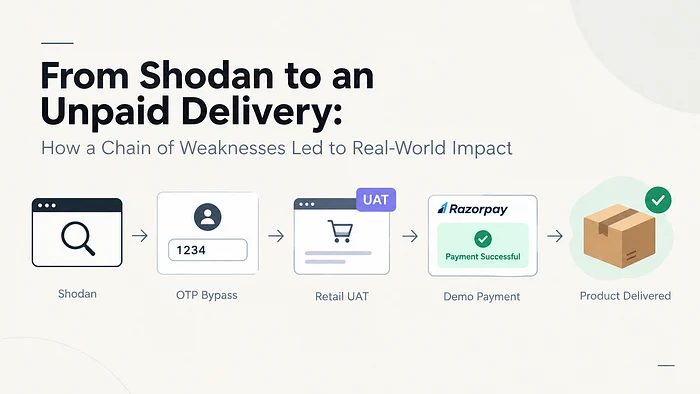
An internet-facing application accepted a fixed, predictable one-time password, and the same weakness existed in a linked retail test environment. In that store, a demo payment page let the tester mark a transaction as successful, and the store then treated the order as paid, so a real product was delivered without genuine payment.
 Published on medium.com
Bug Bounty
The full write-up lives on its author's site
It belongs to its author, so we link to it rather than copy it. The other two tabs are our own rewrites, checked against it.
Context
This write-up describes a chain of weaknesses that started with an IP address found through Shodan and ended with a real physical product being delivered without genuine payment being collected. The target is not named in the report; what is described is an externally reachable application associated with a target's domain, plus a retail UAT (user acceptance testing) environment that the application linked to.
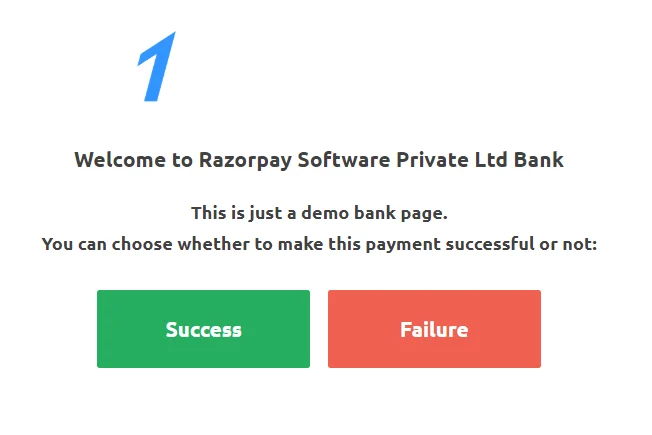
The application on the IP address presented OTP-based authentication and contained several sections, one of which was an e-commerce section. That section redirected to a separate retail UAT environment, which offered an ordering and payment workflow with several payment options, including one tied to the company's own payment mechanism. Selecting that option opened a page branded as a Razorpay Private Limited bank interface, which described itself as a demo bank and let the transaction be marked successful or unsuccessful.
Setup
The report does not describe any accounts, roles, tool versions or other preconditions beyond the following: the researcher was enumerating the external attack surface of a target and used Shodan to find an IP address associated with its domain. No credentials were needed, because the authentication on both the IP-hosted application and the retail UAT environment accepted a predictable OTP. The investigation was split between two people: the author found the entry point and the authentication weakness, then handed the work to his teammate Vijay Sawant, who explored the retail application's ordering and payment workflow.
Finding it
While enumerating the external attack surface, the author found an IP address associated with the target's domain. Opening it directly in a browser revealed a fully functional application that appeared identical to the website reachable through the target's domain. That alone is exposure, not necessarily a vulnerability, but it invited a look at whether the directly reachable copy enforced the same controls.
The application relied on OTP-based authentication, and a predictable value was accepted:
1234
With that value the author gained access. Exploring the application hosted on the IP address revealed several sections, including an e-commerce section that redirected to a separate retail UAT environment. The same authentication mechanism was in place there, and the same predictable OTP worked again. A weakness that looked local to one application had led into a second environment.
Exploitation
Step 1: Reach the application directly by IP
The starting point was the IP address associated with the target's domain, opened directly in a browser. It served a fully functional application that looked identical to the domain-hosted website. No request or response is reproduced in the report.
Step 2: Pass OTP authentication with a predictable value
The application's OTP-based authentication accepted 1234, which allowed access. The report does not show the request that carried the OTP or the response that followed.
Step 3: Follow the e-commerce section into the retail UAT environment
Among the sections of the IP-hosted application was an e-commerce section that redirected to a separate retail UAT environment. There the same authentication mechanism was present, and 1234 worked again, giving access to the retail application.
Step 4: Examine the ordering and payment workflow
Vijay Sawant took over at this point and examined how orders and payments were handled. The store offered several payment options, including one associated with the company's own payment mechanism.
Step 5: Mark the transaction successful on the demo bank page
Selecting that payment option opened a page branded as a Razorpay Private Limited bank interface. The page explicitly described itself as a demo bank and allowed the transaction to be marked successful or unsuccessful. Vijay Sawant marked the transaction successful and watched what the store did with that result.
Step 6: Observe that the store treats the order as paid
After the transaction was marked successful, the store itself displayed the order as paid. The report does not reproduce the request or response behind this state change. The author's point is that a payment page showing a success message does not prove money moved: the merchant's backend has to verify the transaction independently before treating an order as paid, and here it did not.
Step 7: Track the order and receive the product
The order could then be tracked through the store and through Delhivery. Eventually a real physical product was delivered despite no genuine payment being collected. The investigation had moved from an authentication weakness to a tangible business impact.
Root cause
The report identifies several contributing weaknesses rather than a single defect:
- Predictable OTP. Both the IP-hosted application and the retail UAT environment accepted
1234as the one-time password, which undermines the verification step entirely and exposes the functionality behind it. - Exposed non-production environment. The retail UAT environment was reachable and behaved like a live store; the report's lesson is that UAT needs appropriate access restrictions and isolation from real business operations. The report's lesson is that UAT does not mean risk-free and needs appropriate access restrictions.
- No server-side payment verification. The store accepted a client-side outcome from a page that openly described itself as a demo bank. The store marked the order paid after the client reported success, without the report showing any independent confirmation. The report frames this as the core payment flaw: a simulated success message or a client-controlled status must never substitute for independent verification.
Why the existing defences did not stop the chain is only implied: the OTP check existed but accepted a trivial value, the UAT environment existed but was not restricted, and a payment step existed but trusted the result the client reported.
Impact
Under the conditions described, an attacker who could reach the exposed IP address could authenticate with the predictable OTP, move into the retail UAT environment through the e-commerce section, place an order, mark the payment successful on the demo bank page, and have the store treat the order as paid. The order could be tracked through the store and Delhivery, and a real physical product was delivered without genuine payment being collected. The impact therefore extended beyond technical access to a real product delivered without genuine payment being collected.
Fix
Its lessons point to what should be: restrict and isolate non-production environments such as the retail UAT environment from real business operations, implement OTP verification properly so predictable values are not accepted, and verify payments server-side so that a simulated success message or client-controlled status is never treated as proof of payment.
Variants to test
- Direct IP access to domain-hosted applications. Enumerate IPs associated with a target's domain and open them directly. A positive result is a fully functional application that looks identical to the domain-hosted site, which is then worth testing for weaker or missing controls.
- Predictable OTP values. On any OTP-based login, try trivial values such as
1234. A positive result is access granted without a genuine one-time code. - Pivots from one environment to another. Follow links and redirects from an exposed application into other environments, including UAT and staging. A positive result is a second environment reachable with the same weak authentication.
- Client-controlled payment outcomes. In a checkout flow, look for payment pages that let the client choose success or failure, especially pages labelled as demo or sandbox. A positive result is the store marking the order paid after the client reports success, without independent server-side verification.
- Fulfilment after a simulated payment. After a client-reported success, check whether the order is tracked and shipped. A positive result is a real product delivered with no genuine payment collected, which turns a technical finding into demonstrable business impact.
What happened, in plain words
A security researcher was looking at what a company exposes to the internet. Using a search engine for internet-connected devices called Shodan, he found an IP address linked to the company's domain. When he opened that address directly in a browser, he saw a working copy of the company's website. That copy let him log in with a one-time password (OTP), a short code normally sent to you to prove it is really you. The code it accepted was 1234, which anyone could guess.
Behind that login was an online shop. The shop linked to a separate test version of the retail system, called a UAT environment. UAT stands for user acceptance testing: a copy of the real system used to check that new features work before they go live. The same weak code, 1234, worked there too.
The researcher then handed the work to his teammate, Vijay Sawant, who looked at how the shop took orders and payments. One payment option opened a page that called itself a demo bank. On that page you could simply choose whether the payment succeeded or failed. When the payment was marked successful, the shop treated the order as paid. The order could then be tracked, and a real physical product was delivered even though no real money had been paid.
So a chain of small weaknesses, a guessable login code, an exposed test system and a shop that trusted a fake payment result, added up to a real-world loss: goods shipped for free.
Background ideas you need first
Before walking through the steps, here are the few ideas the story depends on. Each one is explained from scratch.
- IP address. Every computer or server on the internet has a numeric address, like a street address for machines. A domain name such as
example.comis a human-friendly label that points to one or more of these numeric addresses. Normally you reach a website by its name, but you can also type the numeric address straight into a browser. - Shodan. A search engine that indexes devices and services connected to the internet. Instead of searching web pages, it lets you search for servers, their addresses and the software they run. Security researchers use it to map what an organisation exposes, which is called its external attack surface: everything an outsider can reach.
- OTP (one-time password). A short code, usually sent by SMS or email, that you enter to prove who you are. It is meant to be different every time and hard to guess. If a system accepts a fixed, obvious value, the whole point of the check is lost.
- UAT environment. A non-production copy of a system used for testing. It is supposed to be separate from the live service, but if it is reachable from the internet and connected to real operations, it can cause real damage.
- Payment verification. When you pay online, the shop's server (the computer behind the website) should ask the payment provider directly whether the money really arrived. It should not simply believe a message that arrives from your browser, because your browser is under your control.
- Demo or sandbox page. A test page that simulates a payment provider so developers can try the checkout without moving real money. It is fine for testing, but dangerous if a live shop treats its results as real.
Step 1: Finding the address
The researcher was mapping the target's external attack surface, meaning he was listing everything the company had reachable from the internet. During this enumeration he found an IP address associated with the target's domain.
Why do this? Because organisations often forget about servers that are reachable directly by address, bypassing the normal website name. Those forgotten copies may have weaker protections.
Step 2: Opening the address directly
He opened the IP address directly in a browser. Instead of an error page or a placeholder, he saw a fully functional application that looked identical to the website reachable through the target's domain.
This is exposure, not automatically a vulnerability. But it raises an important question: does this directly reachable copy enforce the same security checks as the official site? That question is why the next step mattered.
Step 3: Logging in with a guessable code
The application used OTP-based authentication. The value it accepted was:
1234
In plain words: the login asked for a one-time password, and the code 1234 was enough to get in. A real OTP should be random and expire quickly. A fixed, obvious value like this means anyone who reaches the login page can get past it. The report does not show the request that carried the code or the response that followed; what matters is that access was granted.
Step 4: Finding the shop and the test environment
Once inside, the researcher explored the application. It had several sections, and one of them was an e-commerce section, meaning an online shop. That section redirected to a separate retail UAT environment.
A redirect is simply the application sending your browser to a different address. Here it sent him from the IP-hosted application into a test copy of the retail system. This is significant because a weakness that looked limited to one application had now led into a second environment.
Step 5: The same weak code works again
In the retail UAT environment, the same authentication mechanism was in place. The same predictable OTP, 1234, worked again.
Why try it? Because systems built from the same code or by the same team often share the same flaws. If one login accepts a trivial code, the next one may too. Here it did, and the researcher now had access to the retail application.
Step 6: Handing over to a teammate
At this point the author handed the investigation to his teammate, Vijay Sawant. Vijay continued exploring the retail application's functionality beyond the initial discovery and authentication bypass.
Why hand over? Because different people bring different perspectives. One person may find the way in, while another looks at what the system does once you are inside. The report stresses this collaboration as a key part of the investigation.
Step 7: Looking at orders and payments
Vijay examined the ordering and payment workflow, meaning the sequence of steps a customer goes through to buy something. The store offered several payment options, including one associated with the company's own payment mechanism.
Why focus here? Because the payment step is where money and goods change hands. If the shop can be tricked into thinking it has been paid, the consequences go beyond a login screen and into real business loss.
Step 8: A page that calls itself a demo bank
Selecting that payment option opened a page branded as a Razorpay Private Limited bank interface. The page explicitly described itself as a demo bank and allowed the transaction to be marked successful or unsuccessful.
In plain words: the checkout sent the buyer to a page that looked like a bank, but the page openly said it was a demonstration. It gave the person using it a choice: mark the payment as succeeded or as failed. That choice was made in the browser, by the client, not by a real bank.
The important question was what the store would do with that result. A payment page displaying a success message does not prove that money has actually been transferred. The merchant's backend, the server behind the shop, must independently verify the transaction before treating an order as paid.
Step 9: The shop believes the fake success
After the transaction was marked successful, the store itself displayed the order as paid.
This is the core flaw. The shop accepted a result that came from the browser, from a page that described itself as a demo, and treated it as proof of payment. The report does not reproduce the request or response behind this state change. The point is simple: a simulated success message, or a status the client controls, must never substitute for independent verification by the server.
Step 10: Tracking the order and receiving the product
The order could then be tracked through the store and through Delhivery, a delivery company. Eventually a real physical product was delivered despite no genuine payment being collected.
The investigation had moved from an authentication weakness to a tangible business impact. In other words, the chain did not stop at a login screen: it ended with a real product delivered without genuine payment being collected.
Why the chain worked
The report identifies several contributing weaknesses rather than a single defect:
- Predictable OTP. Both the IP-hosted application and the retail UAT environment accepted
1234as the one-time password. This undermines the verification step entirely and exposes everything behind it. - Exposed non-production environment. The retail UAT environment was reachable and behaved like a live store; UAT does not mean risk-free and needs appropriate access restrictions. UAT does not mean risk-free; it needs appropriate access restrictions.
- No server-side payment verification. The store accepted a client-side outcome from a page that openly described itself as a demo bank. The store marked the order paid after the client reported success, without the report showing any independent confirmation.
Why the existing defences did not stop the chain is only implied: the OTP check existed but accepted a trivial value, the UAT environment existed but was not restricted, and a payment step existed but trusted the result the client reported.
What an attacker could do
Under the conditions described, someone who could reach the exposed IP address could authenticate with the predictable OTP, move into the retail UAT environment through the e-commerce section, place an order, mark the payment successful on the demo bank page, and have the store treat the order as paid. The order could be tracked through the store and Delhivery, and a real physical product was delivered without genuine payment being collected.
The impact therefore extended beyond technical access to a real product delivered without genuine payment being collected. The report does not state how many orders could be placed this way or what other data the authenticated sections exposed.
What should be fixed
Its lessons point to what should be:
- Restrict and isolate non-production environments such as the retail UAT environment from real business operations.
- Implement OTP verification properly so predictable values are not accepted.
- Verify payments server-side so that a simulated success message or client-controlled status is never treated as proof of payment.
Things worth testing elsewhere
These are the same ideas, written so a beginner can try them on systems they are authorised to test:
- Direct IP access to domain-hosted applications. Find IP addresses associated with a target's domain and open them directly. A positive result is a fully functional application that looks identical to the domain-hosted site, which is then worth testing for weaker or missing controls.
- Predictable OTP values. On any OTP-based login, try trivial values such as
1234. A positive result is access granted without a genuine one-time code. - Pivots from one environment to another. Follow links and redirects from an exposed application into other environments, including UAT and staging. A positive result is a second environment reachable with the same weak authentication.
- Client-controlled payment outcomes. In a checkout flow, look for payment pages that let the client choose success or failure, especially pages labelled as demo or sandbox. A positive result is the store marking the order paid after the client reports success, without independent server-side verification.
- Fulfilment after a simulated payment. After a client-reported success, check whether the order is tracked and shipped. A positive result is a real product delivered with no genuine payment collected, which turns a technical finding into demonstrable business impact.
Glossary
- IP address: a numeric address that identifies a computer or server on the internet.
- Domain: a human-friendly name such as
example.comthat points to one or more IP addresses. - Shodan: a search engine that indexes internet-connected devices and services, used to map what an organisation exposes.
- External attack surface: everything an organisation has reachable from the internet.
- Enumeration: systematically listing things, such as servers or addresses, to understand what exists.
- OTP (one-time password): a short code meant to be used once and to be hard to guess, used to prove identity.
- Authentication: the process of proving who you are, usually with a password or code.
- Authentication bypass: getting past a login check without knowing the real credentials.
- E-commerce: buying and selling goods or services online.
- UAT (user acceptance testing) environment: a non-production copy of a system used to test that features work before release.
- Redirect: the application sending your browser to a different address.
- Workflow: the sequence of steps a user goes through to complete a task, such as ordering and paying.
- Backend / server: the computer and software behind a website that process requests and store data.
- Client: the browser or app on the user's side, which the user controls.
- Client-side / server-side: happening in the browser (client) versus happening on the shop's server (server).
- Payment verification: checking with the payment provider that money really moved before treating an order as paid.
- Demo bank / sandbox: a test page that simulates a payment provider without moving real money.
- Razorpay Private Limited: the payment company whose name appeared on the demo bank page in this report.
- Delhivery: the delivery company named in the report, used to track the order.
- Fulfilment: the process of picking, shipping and delivering an order.
- Business impact: the real-world consequence of a weakness, such as financial loss or goods shipped for free.
- Vulnerability: a weakness in a system that can be used to cause harm or gain unauthorised access.
- Proof of concept (PoC): a demonstration that a weakness is real, often with steps or code.
- Non-production environment: any copy of a system not used for live business, such as UAT or staging.