Getting XXE in Web Browsers using ChatGPT
The author found that XML and SVG files using XSL stylesheets could read local files via XML External Entity (XXE) attacks in browsers and other applications. An attacker could craft a malicious file that, when opened, reads arbitrary files from the victim's device, limited by sandbox restrictions.
 Published on swarm.ptsecurity.com
I knew that SVG, which is based on XML, and XML itself could be complex and allow file access. Is the Same Origin Policy (SOP) correctly implemented for all possible XML and SVG syntaxes?
The full write-up lives on its author's site
It belongs to its author, so we link to it rather than copy it. The other two tabs are our own rewrites, checked against it.
Context
This is a research write-up about XML External Entity (XXE) behaviour in web browsers and other applications that embed the LibXSLT library. The starting question was simple: what can a malicious page do when JavaScript is disabled? SVG is XML-based, and XML itself can be complex, so the author wanted to know whether the Same Origin Policy (SOP) is correctly implemented for all possible XML and SVG syntaxes, and whether access through the file:// protocol is properly handled.
The technology chosen for testing is XSL (eXtensible Stylesheet Language), a specialised XML-based language that can be used within or outside of XML to modify it or retrieve data. In Chrome, XSL is supported and the library used is LibXSLT. The author notes that LibXSLT, first released on 23 September 1999, is a default component in Chrome, Safari, PHP, PostgreSQL, Oracle Database, Python and numerous other applications.
Because the author was, in his words, too lazy to read the documentation, he started generating examples using ChatGPT. The examples below were obtained from it.
Setup
The setup is deliberately minimal: XML and XSL files uploaded to a local web server and opened in a browser. No accounts or special roles are involved. The tools are a browser (Chrome, Safari, and later Electron-like apps, offline HTML to PDF tools, a Smart TV and mobile devices), a local web server, and ChatGPT to generate candidate XSL code.
A first step is confirming which XSL engine the browser uses. This can be verified with the system-property('xsl:vendor') function.
system-properties.xml
<?xml version="1.0" encoding="UTF-8"?>
<?xml-stylesheet href="system-properties.xsl" type="text/xsl"?>
<root/>
system-properties.xsl
<?xml version="1.0" encoding="UTF-8"?>
<xsl:stylesheet version="1.0" xmlns:xsl="http://www.w3.org/1999/XSL/Transform">
<xsl:template match="/">
<p>
Version: <xsl:value-of select="system-property('xsl:version')" /> <br />
Vendor: <xsl:value-of select="system-property('xsl:vendor')" /> <br />
Vendor URL: <xsl:value-of select="system-property('xsl:vendor-url')" />
</p>
</xsl:template>
</xsl:stylesheet>
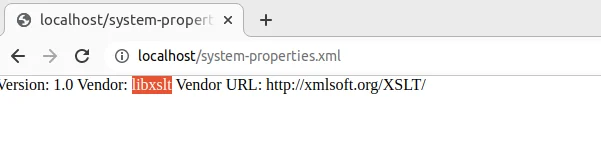
The XML file references the stylesheet through an xml-stylesheet processing instruction, and the stylesheet prints the version, vendor and vendor URL of the engine. Here is the output of the system-properties.xml file, uploaded to the local web server and opened in Chrome:
Finding it
The first interesting XSL output from ChatGPT was code with functionality that retrieves the location of the current document. The author notes that this is not a vulnerability, but it could be useful in some scenarios.
get-location.xml
<?xml-stylesheet href="get-location.xsl" type="text/xsl"?>
<!DOCTYPE test [
    <!ENTITY ent SYSTEM "?" NDATA aaa>
]>
<test>
<getLocation test="ent"/>
</test>
get-location.xsl
<xsl:stylesheet version="1.0"  xmlns:xsl="http://www.w3.org/1999/XSL/Transform"
>
  <xsl:output method="html"/>
  <xsl:template match="getLocation">
          <input type="text" value="{unparsed-entity-uri(@test)}" />
  </xsl:template>
</xsl:stylesheet>
Here is what you should see after uploading this code to your web server:
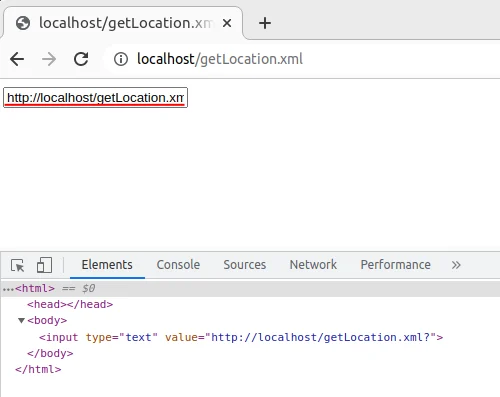
All the magic happens within the unparsed-entity-uri() function. This function returns the full path of the ent entity, which is constructed using the relative path ?.
Next, the author asked ChatGPT many times about XSL's content loading features. Almost all XML-based languages have functionality that can be used for loading or displaying remote files, similar to the functionality of the <iframe> tag in HTML. The examples below are what ChatGPT suggested, and the code was fully obtained from it.
XML External Entities
Since XSL is XML-based, usage of XML External Entities should be the first option.
<?xml version="1.0"?>
<!DOCTYPE foo [
<!ENTITY xxe SYSTEM "file:///etc/passwd">
]>
<test>&xxe;</test>
XInclude
XInclude is an XML add-on described in a W3C Recommendation from 15 November 2006.
<?xml version="1.0"?>
<test xmlns:xi="http://www.w3.org/2001/XInclude">
  <xi:include href="file:///etc/passwd"/>
</test>
XSL's <xsl:import> and <xsl:include> tags
These tags can be used to load files as XSL stylesheets, according to ChatGPT.
<?xml version="1.0" ?>
<xsl:stylesheet version="1.0" xmlns:xsl="http://www.w3.org/1999/XSL/Transform">
  <xsl:include href="file:///etc/passwd"/>
  <xsl:import href="file:///etc/passwd"/>
</xsl:stylesheet>
XSL's document() function
XSL's document() function can be used for loading files as XML documents.
<?xml version="1.0" encoding="UTF-8"?>
<xsl:stylesheet  version="1.0" xmlns:xsl="http://www.w3.org/1999/XSL/Transform">
  <xsl:template match="/">
    <xsl:copy-of select="document('file:///etc/passwd')"/>
  </xsl:template>
</xsl:stylesheet>
Exploitation
Step 1: combine document() with XXE through the data protocol
Using an edited ChatGPT output, the author crafted an XSL file that combined the document() function with XML External Entities in the argument's file, utilising the data protocol. He then inserted the content of the XSL file into an XML file, also using the data protocol.
When he opened his XML file via an HTTP URL from his mobile phone, he was shocked to see his iOS /etc/hosts file. Later, his friend Yaroslav Babin (a.k.a. @yarbabin) confirmed the same result on Android.
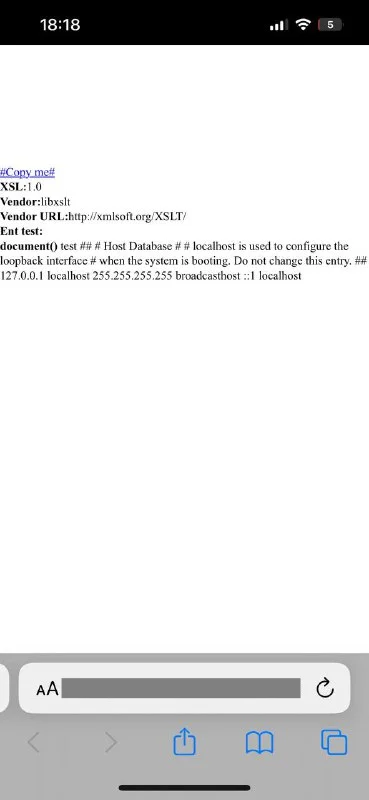
iOS + Safari
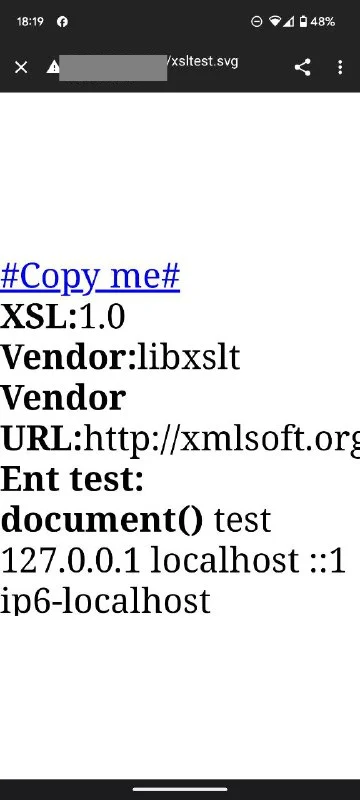
Android + Chrome
Step 2: test other applications
Next, the author started testing offline HTML to PDF tools, and it turned out that file reading works there as well, despite their built-in restrictions. He also tested a Smart TV, where file reading works as well:
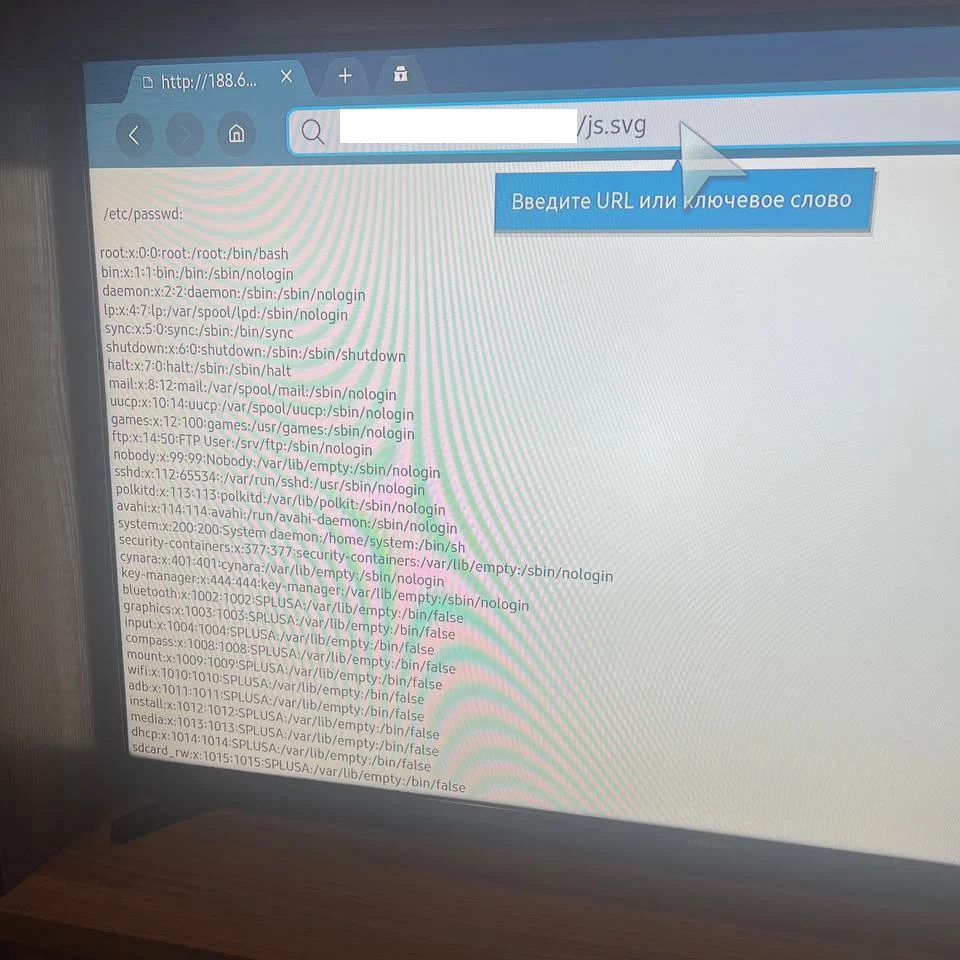
He compiled a table summarising all his tests. The likely root cause of the discrepancy between environments is the differences between sandboxes. Running Chrome on Windows or Linux with the --no-sandbox attribute allows reading arbitrary files as the current user.
Step 3: test applications that use LibXSLT without sandboxes
The author tested some applications that use LibXSLT and do not have sandboxes. The default PHP configuration disables parsing of external entities in XML and XSL documents. However, this does not affect XML documents loaded by the document() function, and PHP allows the reading of arbitrary files using LibXSLT.
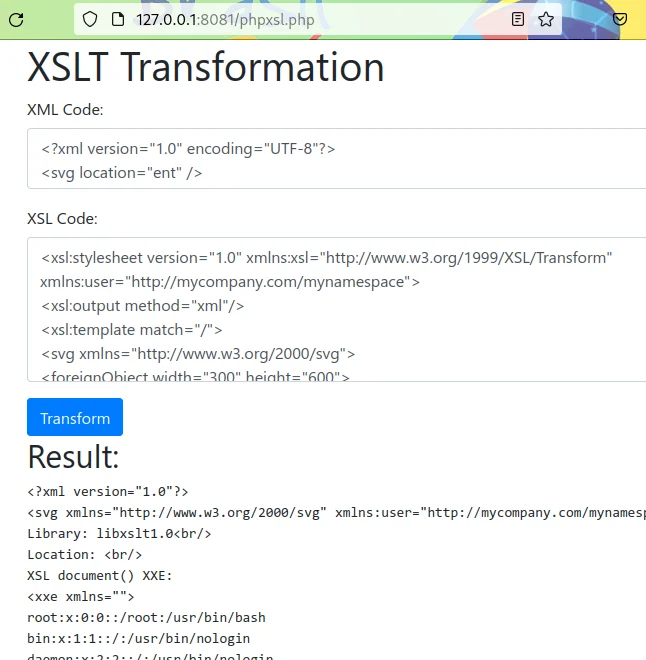
According to his tests, calling libxml_set_external_entity_loader(function ($a) {}); is sufficient to prevent the attack.
Step 4: build a test page for all chains
First, the author created a simple HTML page with multiple <iframe> elements to test all possible file read functionalities and all possible ways to chain them:
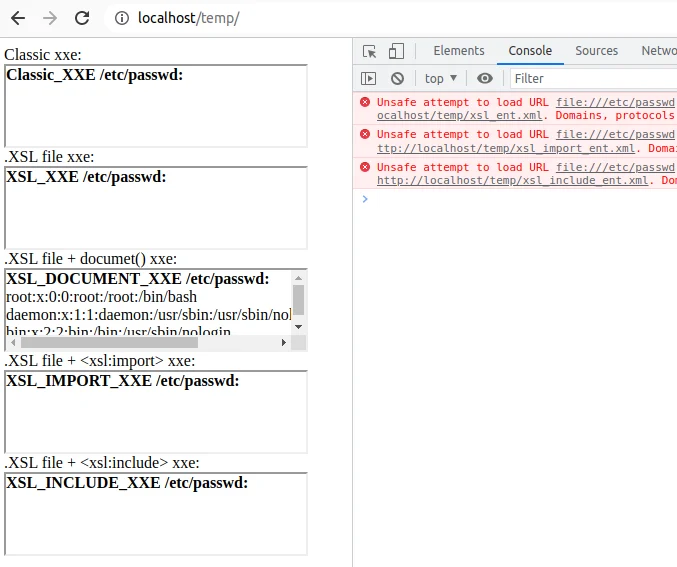
The result of opening the xxe_all_tests/test.html page in an outdated Chrome
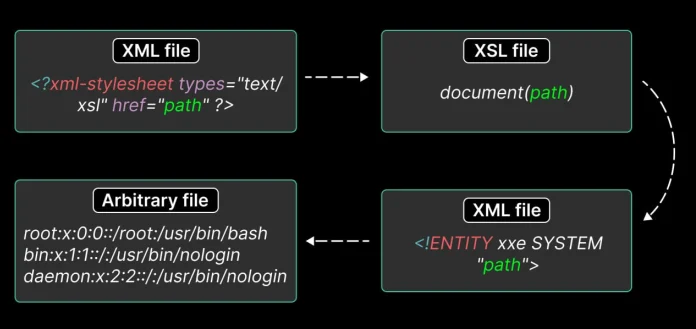
Opening this page in Chrome, Safari or Electron-like apps may read system files with default sandbox settings; without the sandbox, it may read arbitrary files with the current user's rights. As the author puts it, only one of the call chains leads to an XXE in Chrome, and they were very fortunate to find it. Here is his schematic of the chain for better understanding:
Step 5: minified POCs
Next, the author created minified XML, SVG and HTML POCs that can be copied directly from the article.
poc.svg
<?xml version="1.0" encoding="UTF-8"?>
<?xml-stylesheet type="text/xsl" href="data:text/xml;base64,[redacted]+[redacted]+PGJyIC8+[redacted]+[redacted]+CjwvZm9yZWlnbk9iamVjdD4KPC9zdmc+[redacted]=="?>
<!DOCTYPE svg [
    <!ENTITY ent SYSTEM "?" NDATA aaa>
]>
<svg location="ent" />
poc.xml
<?xml version="1.0" encoding="UTF-8"?>
<?xml-stylesheet type="text/xsl" href="data:text/xml;base64,[redacted]+[redacted]+[redacted]
Both POCs use an xml-stylesheet processing instruction whose href is a data:text/xml;base64, URL holding the XSL stylesheet, so the stylesheet travels inside the document itself.
Root cause
The chain combines the document() function with XML External Entities in the argument's file, delivered through the data: protocol. The document() function in particular loads files as XML documents, and the author's chain combines it with XML External Entities in the argument's file. The likely root cause of the differences between environments is the differences between sandboxes: running Chrome on Windows or Linux with the --no-sandbox attribute allows reading arbitrary files as the current user.
Existing defences did not stop the attack in several cases. The default PHP configuration disables parsing of external entities in XML and XSL documents, but this does not affect XML documents loaded by the document() function, and PHP allows the reading of arbitrary files using LibXSLT. Offline HTML to PDF tools had built-in restrictions that file reading worked around.
Impact
A malicious page with disabled JavaScript can read local files. On mobile, the author saw his iOS /etc/hosts file in Safari, and the same result was confirmed on Android. File reading also worked in offline HTML to PDF tools despite their built-in restrictions, and on a Smart TV. In Chrome, Safari and Electron-like apps, the page may read system files with default sandbox settings; without the sandbox, it may read arbitrary files with the current user's rights. In PHP applications using LibXSLT, arbitrary files can be read even with the default configuration that disables external entity parsing.
Fix
According to the author's tests, calling libxml_set_external_entity_loader(function ($a) {}); is sufficient to prevent the attack in PHP. The author notes that running Chrome on Windows or Linux with the --no-sandbox attribute allows reading arbitrary files as the current user.
Variants to test
document()with adata:URL containing an XXE entity. Load an XML or SVG document whose stylesheet callsdocument()on adata:URL that declares an external entity pointing at a local file. A positive result is the file's contents appearing in the rendered output.unparsed-entity-uri()for path disclosure. Declare an unparsed entity with a relative path such as?and read it withunparsed-entity-uri(). A positive result is the full path of the current document being displayed.- XInclude. Use
<xi:include href="file:///etc/passwd"/>inside an XML document. A positive result is the file's contents being included. <xsl:include>and<xsl:import>. Point these tags at a local file. A positive result is the file being loaded as a stylesheet.- PHP with LibXSLT. Test an application that uses LibXSLT with the default configuration. A positive result is arbitrary file reading through
document()despite external entity parsing being disabled. - Offline HTML to PDF tools. Feed the POCs to such tools. A positive result is file reading despite their built-in restrictions.
- Sandbox comparison. Run the same POCs with and without
--no-sandbox. A positive result is that the unsandboxed run reads arbitrary files as the current user.
What happened, in plain words
A security researcher asked a simple question: what can a malicious web page do if JavaScript is turned off? Most people assume that without JavaScript a page is harmless. This research shows that is not true. By using a family of file formats built on XML (a way of writing structured text with tags), a page can make your browser read files from your own computer and show their contents on the page.
The trick relies on a feature called XSL, which lets one XML file describe how another XML file should be displayed. Browsers support XSL through a library called LibXSLT. That library can be told to load other files, including files on your local disk, and in some configurations it does so without asking permission.
The researcher found that this worked in Safari on iOS, in Chrome on Android, in offline tools that turn HTML into PDF, and even on a Smart TV. He also found that a PHP application using the same library could be made to read arbitrary files even with its default safety settings on.
This article walks through the whole story from zero. You only need to know how to use a browser and a computer. Every technical term is explained the first time it appears, and every piece of code from the research is shown exactly as it was written, followed by a plain-language explanation of each line.
Background: XML, XSL and why anyone should care
What XML is
XML stands for eXtensible Markup Language. It is a way of writing data using tags, much like HTML, but instead of describing how a page looks, it describes what the data is. A tag is a label in angle brackets, such as <name>, and it usually comes in pairs: an opening tag <name> and a closing tag </name>, with content in between.
A simple everyday comparison: HTML is like a printed menu with pictures and layout, while XML is like a shopping list. Both use the same kind of pen, but the shopping list is about the items, not the presentation.
XML has a feature called an entity. An entity is a named placeholder that gets replaced by something else when the file is read. You have probably seen & in HTML, which is an entity that turns into the & character. XML lets you define your own entities, and some of them can point at files.
What XSL is
XSL stands for eXtensible Stylesheet Language. It is a specialised XML-based language that can be used within or outside of XML for modifying it or retrieving data. In plain terms, an XSL file is a set of instructions that says: take this XML data and turn it into something else, such as a web page.
A useful comparison is a recipe. The XML file is the list of ingredients, and the XSL file is the recipe that says what to do with them. The browser reads both and produces the final dish, which is the page you see.
What LibXSLT is
LibXSLT is a piece of software that implements XSL. It was first released on 23 September 1999 and is a default component in Chrome, Safari, PHP, PostgreSQL, Oracle Database, Python and numerous other applications. Because so many programs use it, a behaviour in LibXSLT affects a very large number of users.
What the Same Origin Policy is
The Same Origin Policy (SOP) is a rule that browsers follow to keep websites separate. An origin is a combination of protocol (such as https), host (such as example.com) and port. The SOP says that a page from one origin should not be able to read data from another origin. Think of it as a rule in an office building: you can walk freely on your own floor, but you cannot open the filing cabinets on another floor.
The researcher wanted to know whether the SOP is correctly implemented for all possible XML and SVG syntaxes. SVG is a format for drawing pictures using XML, so it is part of the same family.
What the file:// protocol is
When you type an address into a browser, the part before :// is the protocol. https:// means a secure web connection. file:// means a file on your own computer. Browsers are supposed to be very careful about letting web pages touch file:// addresses, because those are your personal files.
What XXE means
XXE stands for XML External Entity. It is a class of vulnerability where an XML file defines an entity that points at an external resource, such as a local file, and the program reading the XML fetches that resource and includes its contents. If the contents end up somewhere the attacker can see, the attacker has read a file they should not have.
A comparison: imagine a form that asks for your name, and you write "see the note in the drawer". If the clerk actually opens the drawer and reads the note aloud, you have made them fetch something you were not supposed to access. XXE is that, but with files on a computer.
What ChatGPT has to do with it
ChatGPT is a chatbot that can generate text, including code. The researcher says he was too lazy to read the documentation, so he started generating examples using ChatGPT. The examples below were obtained from it. This is worth noting because it shows that a researcher can use a general-purpose tool to produce candidate code quickly, and then test it.
Setting up the test
The setup is deliberately minimal: XML and XSL files uploaded to a local web server and opened in a browser. No accounts or special roles are involved. The tools are a browser (Chrome, Safari, and later Electron-like apps, offline HTML to PDF tools, a Smart TV and mobile devices), a local web server, and ChatGPT to generate candidate XSL code.
A local web server is simply a program on your own computer that serves files over http://localhost or a similar address. It lets you open your test files in a browser exactly as if they were on the internet, without publishing them.
Step 1: find out which XSL engine the browser uses
The first step is confirming which XSL engine the browser uses. This matters because different engines behave differently, and the whole research depends on how LibXSLT behaves. The check uses the system-property('xsl:vendor') function, which asks the engine to report its own name.
system-properties.xml
<?xml version="1.0" encoding="UTF-8"?>
<?xml-stylesheet href="system-properties.xsl" type="text/xsl"?>
<root/>
Line by line:
<?xml version="1.0" encoding="UTF-8"?>declares that this is an XML file, version 1.0, using the UTF-8 character encoding. It is a standard opening line.<?xml-stylesheet href="system-properties.xsl" type="text/xsl"?>is a processing instruction. It tells the browser: when you display this file, use the stylesheet atsystem-properties.xsl, and treat it as XSL. A processing instruction is a note to the software, not data for the reader.<root/>is the actual content: a single empty element calledroot. It has no data; it exists only so the file has something to transform.
system-properties.xsl
<?xml version="1.0" encoding="UTF-8"?>
<xsl:stylesheet version="1.0" xmlns:xsl="http://www.w3.org/1999/XSL/Transform">
<xsl:template match="/">
<p>
Version: <xsl:value-of select="system-property('xsl:version')" /> <br />
Vendor: <xsl:value-of select="system-property('xsl:vendor')" /> <br />
Vendor URL: <xsl:value-of select="system-property('xsl:vendor-url')" />
</p>
</xsl:template>
</xsl:stylesheet>
Line by line:
- The first line again declares XML 1.0 with UTF-8.
<xsl:stylesheet ...>opens the stylesheet. Thexmlns:xslpart defines a namespace, which is a way of saying "thexsl:prefix in this file refers to the official XSL language". The URL is just an identifier; it is not downloaded.<xsl:template match="/">defines a template that matches the whole document. A template is a rule that says what to output when a certain part of the input is found. The/means the root of the document.<p>starts a paragraph in the output.Version: <xsl:value-of select="system-property('xsl:version')" /> <br />prints the wordVersion:, then asks the engine for its version usingsystem-property('xsl:version'), then inserts a line break with<br />.- The next two lines do the same for the vendor name and the vendor URL.
</p>closes the paragraph,</xsl:template>closes the template, and</xsl:stylesheet>closes the stylesheet.
Here is the output of the system-properties.xml file, uploaded to the local web server and opened in Chrome:
The author uses this to verify that Chrome uses LibXSLT.
Finding the first useful behaviour
The first interesting XSL output from ChatGPT was code with functionality that retrieves the location of the current document. The researcher notes that this is not a vulnerability, but it could be useful in some scenarios. Knowing where a document lives can help an attacker understand the environment, for example whether the file is on a local disk or on a server.
get-location.xml
<?xml-stylesheet href="get-location.xsl" type="text/xsl"?>
<!DOCTYPE test [
    <!ENTITY ent SYSTEM "?" NDATA aaa>
]>
<test>
<getLocation test="ent"/>
</test>
Line by line:
<?xml-stylesheet href="get-location.xsl" type="text/xsl"?>tells the browser to useget-location.xslas the stylesheet.<!DOCTYPE test [starts a document type declaration. This is a section where you can define entities. The nametestis the name of the document type.<!ENTITY ent SYSTEM "?" NDATA aaa>defines an entity calledent. TheSYSTEMkeyword means the entity's value comes from an external resource, here the relative path?.NDATA aaameans the entity is unparsed, that is, it is not XML content but some other kind of data, andaaais a label for that data type. An unparsed entity is not inserted into the document; instead, its address can be looked up.]>closes the document type declaration.<test>opens the root element.<getLocation test="ent"/>is an empty element with an attribute calledtestwhose value is the name of the entity,ent. An attribute is a name-value pair attached to an element.</test>closes the root element.
get-location.xsl
<xsl:stylesheet version="1.0"  xmlns:xsl="http://www.w3.org/1999/XSL/Transform"
>
  <xsl:output method="html"/>
  <xsl:template match="getLocation">
          <input type="text" value="{unparsed-entity-uri(@test)}" />
  </xsl:template>
</xsl:stylesheet>
Line by line:
<xsl:stylesheet ...>opens the stylesheet, with the same namespace declaration as before.<xsl:output method="html"/>says the output should be HTML, so the browser will render it as a web page.<xsl:template match="getLocation">defines a rule that applies when the input contains agetLocationelement.<input type="text" value="{unparsed-entity-uri(@test)}" />creates a text input box. The{...}syntax means "evaluate the expression inside and put the result here".@testrefers to thetestattribute of the current element, andunparsed-entity-uri()returns the full path of the entity whose name is given. So the box displays the full path of theententity.- The closing tags end the template and the stylesheet.
Here is what you should see after uploading this code to your web server:
All the magic happens within the unparsed-entity-uri() function. This function returns the full path of the ent entity, which is constructed using the relative path ?. In other words, the entity points at "the current location", and the function turns that into an absolute path.
Loading remote content with XSL
Next, the researcher asked ChatGPT many times about XSL's content loading features. Almost all XML-based languages have functionality that can be used for loading or displaying remote files, similar to the functionality of the <iframe> tag in HTML. An <iframe> is a way to embed one web page inside another; here the idea is the same, but for XML and XSL.
The examples below are what ChatGPT suggested, and the code was fully obtained from it. They are candidate techniques, each of which might let a document pull in a file.
XML External Entities
Since XSL is XML-based, usage of XML External Entities should be the first option.
<?xml version="1.0"?>
<!DOCTYPE foo [
<!ENTITY xxe SYSTEM "file:///etc/passwd">
]>
<test>&xxe;</test>
Line by line:
<?xml version="1.0"?>declares an XML 1.0 document.<!DOCTYPE foo [starts a document type declaration namedfoo.<!ENTITY xxe SYSTEM "file:///etc/passwd">defines an entity calledxxewhose value comes from the file/etc/passwd. On Linux and similar systems,/etc/passwdis a file that lists user accounts. It is a classic target because it is readable by everyone and proves that file access works.]>closes the declaration.<test>&xxe;</test>uses the entity inside an element. The&xxe;is replaced by the contents of the file when the document is parsed.
XInclude
XInclude is an XML add-on described in a W3C Recommendation from 15 November 2006. A W3C Recommendation is a standard published by the World Wide Web Consortium, the organisation that defines web standards. XInclude lets one XML document include another.
<?xml version="1.0"?>
<test xmlns:xi="http://www.w3.org/2001/XInclude">
  <xi:include href="file:///etc/passwd"/>
</test>
Line by line:
- The first line declares XML 1.0.
<test xmlns:xi="http://www.w3.org/2001/XInclude">opens the root element and declares the XInclude namespace with the prefixxi.<xi:include href="file:///etc/passwd"/>is an XInclude instruction that says: include the file at this address here.</test>closes the root element.
XSL's <xsl:import> and <xsl:include> tags
These tags can be used to load files as XSL stylesheets, according to ChatGPT. The difference between them is about precedence: import has lower priority than the importing stylesheet, while include behaves as if the included text were written in place.
<?xml version="1.0" ?>
<xsl:stylesheet version="1.0" xmlns:xsl="http://www.w3.org/1999/XSL/Transform">
  <xsl:include href="file:///etc/passwd"/>
  <xsl:import href="file:///etc/passwd"/>
</xsl:stylesheet>
Line by line:
- The first line declares XML 1.0.
<xsl:stylesheet ...>opens the stylesheet with the usual namespace.<xsl:include href="file:///etc/passwd"/>tells the engine to include the file at that address as part of the stylesheet.<xsl:import href="file:///etc/passwd"/>tells the engine to import the file at that address as a stylesheet with lower priority.</xsl:stylesheet>closes the stylesheet.
XSL's document() function
XSL's document() function can be used for loading files as XML documents. This is important because it treats the target as XML, not as a stylesheet, which opens different possibilities.
<?xml version="1.0" encoding="UTF-8"?>
<xsl:stylesheet  version="1.0" xmlns:xsl="http://www.w3.org/1999/XSL/Transform">
  <xsl:template match="/">
    <xsl:copy-of select="document('file:///etc/passwd')"/>
  </xsl:template>
</xsl:stylesheet>
Line by line:
- The first line declares XML 1.0 with UTF-8.
<xsl:stylesheet ...>opens the stylesheet.<xsl:template match="/">defines a template for the whole document.<xsl:copy-of select="document('file:///etc/passwd')"/>loads the file at that address as an XML document and copies the result into the output.copy-ofmeans "copy the whole thing", not just its text.
Exploitation
Step 1: combine document() with XXE through the data protocol
Using an edited ChatGPT output, the researcher crafted an XSL file that combined the document() function with XML External Entities in the argument's file, utilising the data protocol. He then inserted the content of the XSL file into an XML file, also using the data protocol.
The data protocol is a way of putting the content of a file directly into a URL, instead of pointing at a server. A URL starting with data: carries the data itself. A comparison: instead of giving someone an address to pick up a parcel, you hand them the parcel. This matters because it means the stylesheet can travel inside the document, with no second file needed.
When he opened his XML file via an HTTP URL from his mobile phone, he was shocked to see his iOS /etc/hosts file. The /etc/hosts file is a small local file that maps host names to addresses; it is not secret, but it is local, and a web page should not be able to read it. Later, his friend Yaroslav Babin (a.k.a. @yarbabin) confirmed the same result on Android.
iOS + Safari
Android + Chrome
This is the moment the researcher realised the behaviour was not limited to one device or one browser.
Step 2: test other applications
Next, the researcher started testing offline HTML to PDF tools, and it turned out that file reading works there as well, despite their built-in restrictions. These are programs that take an HTML page and produce a PDF, often used to generate reports or invoices. They usually try to block access to local files, but the restrictions were not enough.
He also tested a Smart TV, where file reading works as well:
The point is that the same underlying library appears in many kinds of software, not just desktop browsers.
He compiled a table summarising all his tests. The likely root cause of the discrepancy between environments is the differences between sandboxes. A sandbox is a security mechanism that restricts what a program can do, a bit like putting a child in a playpen: they can move around, but only inside the fence. Running Chrome on Windows or Linux with the --no-sandbox attribute allows reading arbitrary files as the current user. The --no-sandbox attribute is a command-line switch that turns the playpen off.
Step 3: test applications that use LibXSLT without sandboxes
The researcher tested some applications that use LibXSLT and do not have sandboxes. The default PHP configuration disables parsing of external entities in XML and XSL documents. PHP is a programming language often used for websites, and its default configuration is meant to be safe. However, this does not affect XML documents loaded by the document() function, and PHP allows the reading of arbitrary files using LibXSLT.
The lesson is that a defence aimed at one path (external entities in the main document) can miss another path (documents loaded by document()).
According to his tests, calling libxml_set_external_entity_loader(function ($a) {}); is sufficient to prevent the attack. In plain words, this line replaces the function that loads external resources with an empty function, so any attempt to fetch an external file does nothing.
Step 4: build a test page for all chains
First, the researcher created a simple HTML page with multiple <iframe> elements to test all possible file read functionalities and all possible ways to chain them. Chaining means using one technique to trigger another, like a series of dominoes.
The result of opening the xxe_all_tests/test.html page in an outdated Chrome
Opening this page in Chrome, Safari or Electron-like apps may read system files with default sandbox settings; without the sandbox, it may read arbitrary files with the current user's rights. Electron-like apps are desktop applications built with web technology, so they embed a browser engine.
As the researcher puts it, only one of the call chains leads to an XXE in Chrome, and they were very fortunate to find it. Here is his schematic of the chain for better understanding:
Step 5: minified POCs
Next, the researcher created minified XML, SVG and HTML POCs that can be copied directly from the article. A POC, or proof of concept, is a small example that demonstrates a vulnerability. Minified means the code has been compressed, with unnecessary spaces and line breaks removed, so it is shorter and easier to paste.
poc.svg
<?xml version="1.0" encoding="UTF-8"?>
<?xml-stylesheet type="text/xsl" href="data:text/xml;base64,[redacted]+[redacted]+PGJyIC8+[redacted]+[redacted]+CjwvZm9yZWlnbk9iamVjdD4KPC9zdmc+[redacted]=="?>
<!DOCTYPE svg [
    <!ENTITY ent SYSTEM "?" NDATA aaa>
]>
<svg location="ent" />
Line by line:
<?xml version="1.0" encoding="UTF-8"?>declares XML 1.0 with UTF-8.<?xml-stylesheet type="text/xsl" href="data:text/xml;base64,..."?>tells the browser to use a stylesheet. Thehrefis adata:URL, so the stylesheet is carried inside the document. Thebase64part is an encoding that turns binary data into plain text characters, which is safe to put in a URL. The long string is the stylesheet, encoded.<!DOCTYPE svg [starts a document type declaration for an SVG document.<!ENTITY ent SYSTEM "?" NDATA aaa>defines an unparsed entity calledentpointing at the relative path?, just as in the earlier location example.]>closes the declaration.<svg location="ent" />is the root SVG element with an attributelocationset to the entity name. The stylesheet reads this attribute withunparsed-entity-uri().
poc.xml
<?xml version="1.0" encoding="UTF-8"?>
<?xml-stylesheet type="text/xsl" href="data:text/xml;base64,[redacted]+[redacted]+[redacted]
Line by line:
<?xml-stylesheet type="text/xsl" href="data:text/xml;base64,..."?>again carries the stylesheet inside the document as adata:URL.- The base64 string is the encoded stylesheet. In this variant the stylesheet uses the HTML output method, as the earlier
xsl:outputexamples did.
Root cause
The chain combines the document() function with XML External Entities in the argument's file, delivered through the data: protocol. The document() function in particular loads files as XML documents, and the researcher's chain combines it with XML External Entities in the argument's file.
The likely root cause of the differences between environments is the differences between sandboxes: running Chrome on Windows or Linux with the --no-sandbox attribute allows reading arbitrary files as the current user.
Existing defences did not stop the attack in several cases. The default PHP configuration disables parsing of external entities in XML and XSL documents, but this does not affect XML documents loaded by the document() function, and PHP allows the reading of arbitrary files using LibXSLT. Offline HTML to PDF tools had built-in restrictions that file reading worked around.
Impact
A malicious page with disabled JavaScript can read local files. On mobile, the researcher saw his iOS /etc/hosts file in Safari, and the same result was confirmed on Android. File reading also worked in offline HTML to PDF tools despite their built-in restrictions, and on a Smart TV. In Chrome, Safari and Electron-like apps, the page may read system files with default sandbox settings; without the sandbox, it may read arbitrary files with the current user's rights. In PHP applications using LibXSLT, arbitrary files can be read even with the default configuration that disables external entity parsing.
The practical consequence is that turning JavaScript off does not make a browser safe against a malicious page. If the page can supply XML or SVG content, and the browser or application processes it with LibXSLT, local files may end up on the page.
Fix
According to the researcher's tests, calling libxml_set_external_entity_loader(function ($a) {}); is sufficient to prevent the attack in PHP. The author notes that running Chrome on Windows or Linux with the --no-sandbox attribute allows reading arbitrary files as the current user.
Variants to test
document()with adata:URL containing an XXE entity. Load an XML or SVG document whose stylesheet callsdocument()on adata:URL that declares an external entity pointing at a local file. A positive result is the file's contents appearing in the rendered output.unparsed-entity-uri()for path disclosure. Declare an unparsed entity with a relative path such as?and read it withunparsed-entity-uri(). A positive result is the full path of the current document being displayed.- XInclude. Use
<xi:include href="file:///etc/passwd"/>inside an XML document. A positive result is the file's contents being included. <xsl:include>and<xsl:import>. Point these tags at a local file. A positive result is the file being loaded as a stylesheet.- PHP with LibXSLT. Test an application that uses LibXSLT with the default configuration. A positive result is arbitrary file reading through
document()despite external entity parsing being disabled. - Offline HTML to PDF tools. Feed the POCs to such tools. A positive result is file reading despite their built-in restrictions.
- Sandbox comparison. Run the same POCs with and without
--no-sandbox. A positive result is that the unsandboxed run reads arbitrary files as the current user.
Glossary
- Attribute: a name-value pair attached to an element in XML or HTML, such as
location="ent". - Base64: an encoding that turns binary data into plain text characters, often used to put data inside a URL.
- Chaining: using one technique to trigger another, like a series of dominoes.
- Data protocol: a way of putting the content of a file directly into a URL, starting with
data:, instead of pointing at a server. - Document type declaration: the
<!DOCTYPE ...>section of an XML file where entities can be defined. - Electron-like apps: desktop applications built with web technology, so they embed a browser engine.
- Entity: a named placeholder in XML that gets replaced by something else when the file is read.
- file:// protocol: a URL scheme that refers to a file on your own computer.
- iframe: an HTML element that embeds one web page inside another.
- LibXSLT: a software library that implements XSL, used by Chrome, Safari, PHP and many other programs.
- Minified: code with unnecessary spaces and line breaks removed, so it is shorter.
- Namespace: a way of saying which language a prefix in an XML file refers to, such as
xsl:. - Origin: a combination of protocol, host and port, used by browsers to separate websites.
- PHP: a programming language often used for websites.
- POC (proof of concept): a small example that demonstrates a vulnerability.
- Processing instruction: a note to the software in an XML file, not data for the reader, such as
<?xml-stylesheet ...?>. - Sandbox: a security mechanism that restricts what a program can do, like a playpen.
- Same Origin Policy (SOP): a browser rule that a page from one origin should not be able to read data from another origin.
- SVG: a format for drawing pictures using XML.
- Tag: a label in angle brackets in XML or HTML, usually in pairs.
- Template: in XSL, a rule that says what to output when a certain part of the input is found.
- Unparsed entity: an entity that is not XML content but some other kind of data, whose address can be looked up.
- W3C Recommendation: a standard published by the World Wide Web Consortium.
- XInclude: an XML add-on that lets one XML document include another.
- XML: eXtensible Markup Language, a way of writing structured data using tags.
- XML External Entity (XXE): a vulnerability where an XML file defines an entity pointing at an external resource, and the program reading the XML fetches it and includes its contents.
- XSL: eXtensible Stylesheet Language, a specialised XML-based language for modifying XML or retrieving data.
- XSLT: the transformation part of XSL, which turns one XML document into another format.




