GraphQL IDOR: How a Missing Org Check Let Me Edit Another Tenant’s Permissions
A GraphQL mutation for granting or revoking permission scopes did not verify that the target user belonged to the caller's organization. An attacker with any free account could add or remove scopes on users in other organizations, bypassing tenant isolation.
 Published on medium.com
Bug Bounty
The full write-up lives on its author's site
It belongs to its author, so we link to it rather than copy it. The other two tabs are our own rewrites, checked against it.
Context
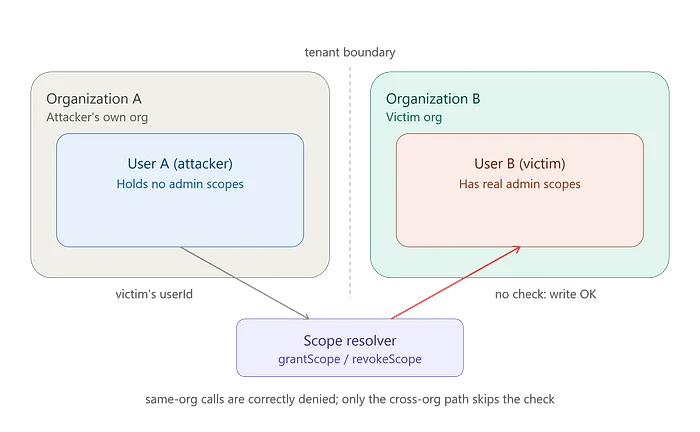
The target is a multi-tenant application in which each organization has its own users. Organization admins grant or revoke permission scopes on those users through a GraphQL mutation. The mutation used for this is revokeScope, and it returns the affected User object with its id and scopes fields:
mutation SC($input: ScopeChangeInput!) { revokeScope(input: $input) { … on User { id scopes } } }
The input carries a userId and a scopeName. The request itself never states which organization the target user belongs to; the server is expected to derive that from the caller's identity and enforce tenant boundaries on its own.
Setup
No special access was needed. The researcher used a free-tier account (referred to as A) and created a second, throwaway free account in a completely different organization (referred to as B). The only value taken from B was its userId. Requests were sent to the GraphQL endpoint with the caller's identity token in the Authorization header.
Finding it
The mutation takes a caller-supplied userId and a scopeName, and nothing in the request ties the target to the caller's organization. That made the ownership check the obvious thing to probe: if the server resolves the target user without confirming it belongs to the caller's org, the mutation becomes a cross-tenant write.
Exploitation
Step 1: test against your own account
The first test pointed the mutation at the researcher's own account with a scope that account did not hold:
revokeScope(userId: <my own id>, scopeName: "organization:automation:ui:write") → {"errors":[{"message":"not authorized"}]}
The call was rejected with a not authorized error, which confirmed that some authorization check exists on this path.
Step 2: point the same mutation at another tenant
With the throwaway account B created in a different organization, the researcher took B's userId and sent the identical mutation, changing only the target:
revokeScope(userId: <other org's user id>, scopeName: "organization:users:read") → HTTP 200, returns the live record with the scope removed
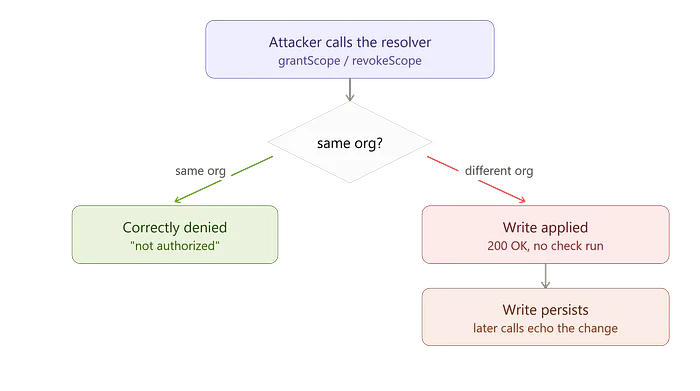
The call returned HTTP 200 and the live user record with the scope removed. The check that blocked the first attempt only runs when the target sits in the caller's own organization; for a cross-org target it does not run at all.
Step 3: reproduce across both mutations and several scopes
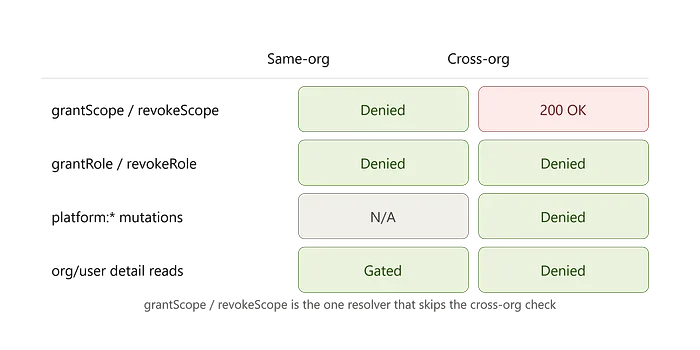
The researcher then looped both revokeScope and grantScope over three scopes against a victim ID. Every call returned HTTP 200 and either mutated or echoed B's scope array:
JWT_A="<A's idToken>" / VICTIM="507f1f77bcf86cd799439011" / for OP in revokeScope grantScope; do for SCOPE in organization:users:read organization:users:write organization:reports:read; do curl -s https://api.target.example/graphql -H "content-type: application/json" -H "Authorization: $JWT_A" -d "{...}"; sleep 2; done; done
The script sets the caller's token in JWT_A and the victim's identifier in VICTIM, then iterates over the two operations and the three scope names, posting each combination to the GraphQL endpoint with a JSON content type and the caller's Authorization header. The request body is abbreviated as {...} in the write-up. A two-second pause separates the calls.
Step 4: confirm the write persists
A follow-up call against the same victim echoed the scope that had just been revoked, and a second scope removed on a later request stacked on top of the first. The change is therefore a real, persisted write to another tenant's permissions, not a reflected no-op.
Step 5: compare with sibling mutations
The researcher tried the sibling grantRole/revokeRole mutations in the same way. Both were correctly denied in both directions. They belong to the same resolver family in the same application, so the grantScope/revokeScope pair is the one missing the check that its siblings enforce.
Root cause
The authorization check on the scope mutations is conditional on the target user being in the caller's own organization. When the target belongs to a different organization, the check is skipped rather than failing closed, so the resolver proceeds with the caller-supplied userId and applies the change. For a cross-org target the check does not run at all, so the cross-tenant case is never evaluated. The sibling role mutations do enforce the check in both directions, which shows the intended control exists elsewhere in the same resolver family.
Impact
- Integrity: an attacker can silently strip scopes that a victim organization's users genuinely hold, removing their access. The write leaves no audit trail on the victim's side.
- Confidentiality (minor): each response echoes the victim's current scope list.
- No victim interaction is needed. The attacker only needs the victim's
userId, which the application hands back in places such as analytics cookies.
The report rates severity as HIGH and records a reward of $$$. No target, client or program identifiers are included; hostnames, user IDs and tokens in the write-up are placeholders.
Fix
The report does not describe a fix being applied. The control that should be enforced is the one the sibling mutations already apply: resolve the target user's organization server-side and reject the mutation unless it matches the caller's organization, for both grantScope and revokeScope, so the cross-tenant case fails closed instead of skipping the check.
Variants to test
- Same mutation, foreign tenant. Take a
userIdfrom an account in a different organization and send the mutation with your own token. A positive result is HTTP 200 with the target's record returned and the scope actually changed on a follow-up read. - Both directions of a grant/revoke pair. Run the loop over
grantScopeandrevokeScopewith several scope names. A positive result is every combination returning 200 and mutating or echoing the victim's scope array. - Sibling mutations as a control. Send the same requests to
grantRole/revokeRole. A denial in both directions confirms the intended control exists and narrows the gap to the one pair that lacks it. - Persistence check. After a successful write, re-read the victim's scopes and remove a second scope. A positive result is the first change still present and the second stacking on top, which rules out a reflected no-op.
- Diff before and after state. For any write-IDOR that echoes the mutated object, compare the scope list before and after rather than trusting the status code; a 200 alone does not prove the write landed.
What happened, in plain words
A website that many companies use at the same time had a hole in one of its features. The feature lets an administrator of one company give or take away permissions from that company's own users. The hole meant that anyone with a free account could use the same feature to change the permissions of a user who belonged to a completely different company. No special access, no trickery, no victim clicking anything: just a request aimed at the wrong person.
To follow the rest of this article you only need to know what a browser does. Everything else is explained as it comes up.
The product and the feature
The application is multi-tenant. Think of an office building where each company rents its own floor: the building is shared, but each company's files, users and settings are meant to stay on its own floor. In software, a tenant is one such company (often called an organization or org). A multi-tenant application is one program serving many companies at once, keeping their data apart.
Each organization has its own users. Some of those users are admins, and admins decide what the other users are allowed to do. They do this by granting or revoking permission scopes.
A permission scope is a short label that says what a user may do, for example "read the user list" or "write reports". The application checks these labels before letting someone perform an action. Granting a scope adds a label to a user; revoking a scope removes it.
The admins do this through a GraphQL mutation. Two terms to unpack:
- An API (application programming interface) is the set of doors a program offers to other programs. A website's own pages use it behind the scenes, and so can anyone who knows the address.
- GraphQL is a particular style of API. Instead of many separate addresses for many separate actions, there is usually one address (an endpoint) and the caller sends a written request describing exactly which action to run and which fields to get back. That written request is called a mutation when it changes something, and a query when it only reads.
The mutation used here is called revokeScope, and it returns the affected user record with its id and scopes fields:
mutation SC($input: ScopeChangeInput!) { revokeScope(input: $input) { … on User { id scopes } } }
Line by line, in plain words:
mutation SC($input: ScopeChangeInput!)says "I want to change something; I am calling this requestSC, and I am handing over one input value whose shape is calledScopeChangeInput." The exclamation mark means the input is required.revokeScope(input: $input)names the action to run (revoke a scope) and passes the input to it.{ … on User { id scopes } }says what to send back: if the result is a user, return that user'sidand its list ofscopes.
The input carries a userId (which user to change) and a scopeName (which permission label to add or remove). The request itself never says which organization the target user belongs to. The server is expected to work that out from who is calling, and to refuse anything that crosses a company boundary.
Setting up the test
No special access was needed. The researcher used a free-tier account, called A, and created a second, throwaway free account in a completely different organization, called B. The only thing taken from B was its userId, the unique identifier the application uses for that user.
Requests were sent to the GraphQL endpoint with the caller's identity token in the Authorization header. Two more terms:
- A token (here an idToken, a JWT) is a long string the server gives you after you log in. It is like a cloakroom ticket: whoever holds it is treated as you. Sending it with a request proves who you are.
- A header is a small labelled line attached to a request, carrying extra information such as "here is my token" or "the body is JSON".
Authorizationis the conventional header name for credentials.
Finding it
The mutation takes a userId chosen by the caller and a scopeName, and nothing in the request ties the target to the caller's organization. That made the ownership check the obvious thing to probe. An ownership check (or authorization check) is the server asking "is this person allowed to touch this particular thing?". If the server looks up the target user without confirming it belongs to the caller's org, the mutation becomes a cross-tenant write: one company's account changing another company's data.
This kind of flaw has a name: IDOR, short for Insecure Direct Object Reference. It means the program accepts an identifier supplied by the caller (here a userId) and acts on it without checking that the caller is entitled to it. A simple comparison: a hotel reception that hands out room keys to anyone who reads a room number off a door, without checking the guest is staying in that room.
Exploitation
Step 1: test against your own account
The first test pointed the mutation at the researcher's own account, with a scope that account did not hold:
revokeScope(userId: <my own id>, scopeName: "organization:automation:ui:write") → {"errors":[{"message":"not authorized"}]}
What this line means:
revokeScope(...)is the action being requested.userId: <my own id>targets the researcher's own account, so nothing crosses a company boundary.scopeName: "organization:automation:ui:write"names a permission the account does not have.- The arrow shows the reply: a JSON error object saying
not authorized.
JSON is just a text format for structured data, built from names and values in curly braces. The reply was a rejection, which confirmed that some authorization check exists on this path. Why do this first? Because it establishes a baseline: the server does say no in at least one situation, so the question becomes when it says no.
Step 2: point the same mutation at another tenant
With the throwaway account B in a different organization, the researcher took B's userId and sent the identical mutation, changing only the target:
revokeScope(userId: <other org's user id>, scopeName: "organization:users:read") → HTTP 200, returns the live record with the scope removed
What this line means:
- The action is the same
revokeScope. userId: <other org's user id>now points at a user in a different company.scopeName: "organization:users:read"is the permission being removed.- The reply was HTTP 200, the standard status code for "the request succeeded", and it contained the live user record with the scope removed.
HTTP status codes are three-digit numbers a server sends back to summarise what happened: 200 means success, 401 or 403 mean "not allowed", 404 means "not found".
The conclusion: the check that blocked the first attempt only runs when the target sits in the caller's own organization. For a cross-org target it does not run at all. The server does not refuse the request; it simply never asks the question.
Step 3: reproduce across both mutations and several scopes
Next the researcher looped both revokeScope and grantScope over three scopes against a victim ID. Every call returned HTTP 200 and either changed or echoed B's scope array:
JWT_A="<A's idToken>" / VICTIM="507f1f77bcf86cd799439011" / for OP in revokeScope grantScope; do for SCOPE in organization:users:read organization:users:write organization:reports:read; do curl -s https://api.target.example/graphql -H "content-type: application/json" -H "Authorization: $JWT_A" -d "{...}"; sleep 2; done; done
Line by line, in plain words:
JWT_A="<A's idToken>"stores the caller's token in a variable namedJWT_A. A variable is a named box holding a value so it can be reused.VICTIM="507f1f77bcf86cd799439011"stores the victim's identifier in a variable namedVICTIM. The value shown is a placeholder.for OP in revokeScope grantScope; dostarts a loop that runs once for each of the two operations, first revoking, then granting.for SCOPE in organization:users:read organization:users:write organization:reports:read; dostarts an inner loop over three permission names, so each operation is tried with each scope.curl -s https://api.target.example/graphqlruns curl, a command-line tool for sending web requests, quietly (-s), against the GraphQL endpoint.-H "content-type: application/json"adds a header saying the body is JSON.-H "Authorization: $JWT_A"adds the header carrying the caller's token, taken from the variable.-d "{...}"is the request body. In the write-up it is abbreviated as{...}.sleep 2pauses for two seconds between calls.- The two
donewords close the inner and outer loops.
Why loop? Because one successful call could be a fluke. Trying both directions (grant and revoke) across several scopes shows whether the flaw is systematic. It was: every combination returned 200.
Step 4: confirm the write persists
A follow-up call against the same victim echoed the scope that had just been revoked, and a second scope removed on a later request stacked on top of the first. The change is therefore a real, persisted write to another tenant's permissions, not a reflected no-op.
Two ideas there:
- A persisted write means the change is stored and stays. A reflected no-op would mean the server merely repeats back what you sent without changing anything, like a mirror rather than a pen.
- Stacking means the second change did not undo the first; both were present afterwards. That is strong evidence the data really changed.
Step 5: compare with sibling mutations
The researcher tried the sibling grantRole/revokeRole mutations in the same way. Both were correctly denied in both directions. They belong to the same resolver family in the same application, so the grantScope/revokeScope pair is the one missing the check that its siblings enforce.
A sibling mutation is another action built the same way, by the same part of the code, for a similar purpose. A resolver is the piece of server code that actually carries out a GraphQL action. Comparing siblings is a cheap way to find the odd one out: if three of four behave one way, the fourth deserves a close look.
Root cause
The authorization check on the scope mutations is conditional on the target user being in the caller's own organization. When the target belongs to a different organization, the check is skipped rather than failing closed, so the resolver proceeds with the caller-supplied userId and applies the change. For a cross-org target the check does not run at all, so the cross-tenant case is never evaluated. The sibling role mutations do enforce the check in both directions, which shows the intended control exists elsewhere in the same resolver family.
Failing closed means that when a check cannot be completed, the safe answer is "no". The opposite, failing open, lets the request through. Here the cross-tenant case was not even evaluated, which is worse than either: the door was simply not locked.
Impact
- Integrity: an attacker can silently strip scopes that a victim organization's users genuinely hold, removing their access. The write leaves no audit trail on the victim's side. Integrity here means the data is correct and unaltered; audit trail means a record of who did what.
- Confidentiality (minor): each response echoes the victim's current scope list. Confidentiality means data stays visible only to those entitled to see it.
- No victim interaction is needed. The attacker only needs the victim's
userId, which the application hands back in places such as analytics cookies. A cookie is a small piece of data a website stores in your browser and sends back with each request; analytics cookies often carry identifiers.
The report rates severity as HIGH and records a reward of $$$. No target, client or program identifiers are included; hostnames, user IDs and tokens in the write-up are placeholders.
Fix
The report does not describe a fix being applied. The control that should be enforced is the one the sibling mutations already apply: resolve the target user's organization server-side and reject the mutation unless it matches the caller's organization, for both grantScope and revokeScope, so the cross-tenant case fails closed instead of skipping the check.
Variants to test
- Same mutation, foreign tenant. Take a
userIdfrom an account in a different organization and send the mutation with your own token. A positive result is HTTP 200 with the target's record returned and the scope actually changed on a follow-up read. - Both directions of a grant/revoke pair. Run the loop over
grantScopeandrevokeScopewith several scope names. A positive result is every combination returning 200 and changing or echoing the victim's scope array. - Sibling mutations as a control. Send the same requests to
grantRole/revokeRole. A denial in both directions confirms the intended control exists and narrows the gap to the one pair that lacks it. - Persistence check. After a successful write, re-read the victim's scopes and remove a second scope. A positive result is the first change still present and the second stacking on top, which rules out a reflected no-op.
- Diff before and after state. For any write-IDOR that echoes the mutated object, compare the scope list before and after rather than trusting the status code; a 200 alone does not prove the write landed.
Glossary
- API: the set of doors a program offers to other programs, so they can ask it to do things.
- Audit trail: a record of who changed what and when.
- Authorization check: the server asking whether this caller is allowed to touch this particular thing.
- Confidentiality: keeping data visible only to those entitled to see it.
- Cookie: a small piece of data a website stores in your browser and sends back with each request.
- Cross-tenant write: one company's account changing data that belongs to another company.
- curl: a command-line tool for sending web requests.
- Endpoint: the address a program sends requests to.
- Failing closed: when a check cannot be completed, the safe answer is "no".
- GraphQL: a style of API where one endpoint accepts written requests naming the action and the fields to return.
- Header: a small labelled line attached to a request carrying extra information, such as a token.
- HTTP status code: a three-digit number summarising the result of a request, such as 200 for success.
- IDOR (Insecure Direct Object Reference): a flaw where the program acts on an identifier supplied by the caller without checking the caller is entitled to it.
- idToken / JWT: a long string issued at login that proves who you are when sent with a request.
- Integrity: the property that data is correct and unaltered.
- JSON: a text format for structured data, built from names and values in curly braces.
- Multi-tenant: one application serving many companies at once while keeping their data apart.
- Mutation: a GraphQL request that changes something.
- Permission scope: a short label saying what a user may do, checked before an action is allowed.
- Persisted write: a change that is stored and stays, as opposed to being merely echoed back.
- Query: a GraphQL request that only reads.
- Reflected no-op: a reply that repeats back what you sent without changing anything.
- Resolver: the piece of server code that carries out a GraphQL action.
- Sibling mutation: another action built the same way, by the same part of the code, for a similar purpose.
- Tenant: one company (organization) using a shared application.
- Token: a string proving identity, like a cloakroom ticket.
- Variable: a named box holding a value so it can be reused.


