How A Single Click Exceeded a Store’s Entire Stock
The e-commerce application allowed two users to each order the full stock of the same item simultaneously because the backend did not serialise concurrent checkout requests. An attacker could place multiple orders for stock that did not exist, leading to overselling and operational problems.

medium.com
Published on medium.com
Cybersecurity
The full write-up lives on its author's site
It belongs to its author, so we link to it rather than copy it. The other two tabs are our own rewrites, checked against it.
Context
The target was a normal e-commerce application running a private bug bounty programme. The researcher describes it as having few functions, so the reconnaissance was mostly a matter of creating an account and clicking every button to understand what each one did. One request stood out: the cart quantity request, which is where the application decides how many units of an item a user may add.
Normally that request should cap the quantity at the available stock and refuse anything above it. The interesting part was how the application behaved when the requested number exceeded the stock.
Setup
- Two separate accounts on the same e-commerce application.
- A browser with developer tools, used to edit the page's disabled attribute.
- Burp Suite, used to group the two checkout requests and send them in parallel.
- The item under test had a limited inventory, and the application offered an in-store collection option for orders.
No versions, endpoints or parameter names are given in the write-up.
Finding it
The first attempt was the usual pair of tricks on the cart quantity request: a negative quantity and a huge quantity. Neither is described as succeeding. What mattered was the response to a number larger than the stock: the application validated the requested quantity and then automatically added the full stock to the user's cart instead of rejecting the request.
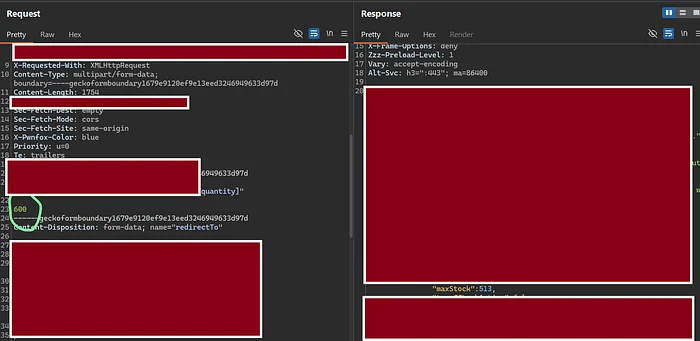
The screenshot shows the inventory for the item: only 513 units were available. That behaviour raised the question that drives the rest of the report: can two users order the maximum stock for the same item?
Exploitation
Step 1: Two accounts, maximum quantity in each cart
The researcher created a second account, added the maximum number of units to the cart in both accounts, and proceeded to checkout in both.
Step 2: The second checkout is blocked in the UI
At checkout the second user hit a wall. The interface reported that the item was unavailable and disabled the purchase control. The researcher treated this as a possible client-side restriction and tested that hypothesis by removing the disabled attribute with the browser's developer tools.
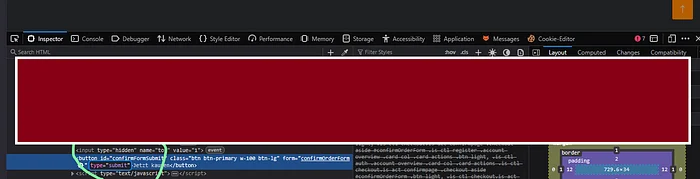
The screenshot shows the button after it was edited in DevTools. With the attribute removed, the buy button could be clicked and the restriction was bypassed, which confirmed that the block was enforced only in the page and not by the backend at that point. Both users' requests could now be captured.
Step 3: Send both checkouts at the same moment
In Burp Suite the two checkout requests were added to a group and sent with the Send in Parallel option, so that both reached the server at the same time.
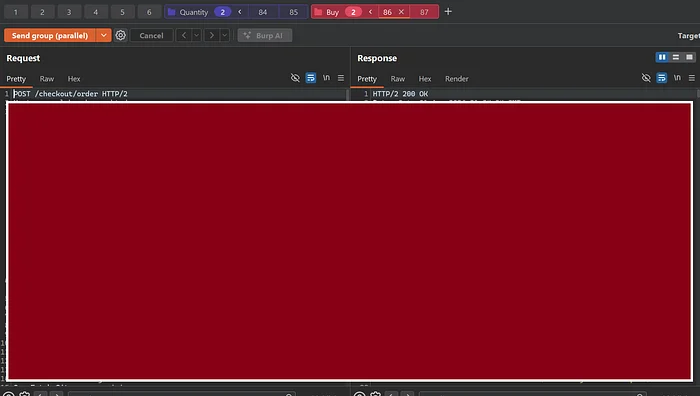
The screenshot shows both checkout requests for the two orders sitting in the buy group.
Step 4: Two confirmed orders for stock that did not exist
After sending, the researcher opened both accounts. Two separate, fully paid orders had been created for stock that did not exist, and both had a confirmation email sent.
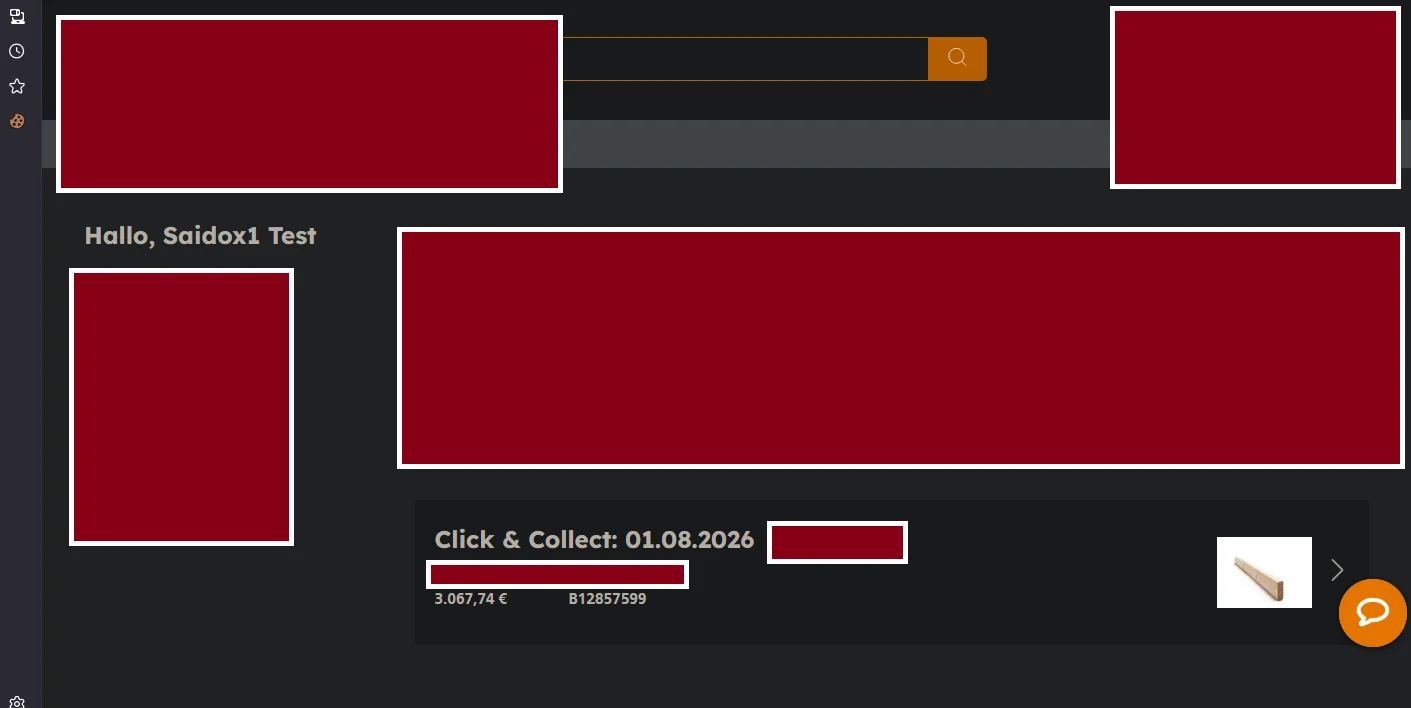
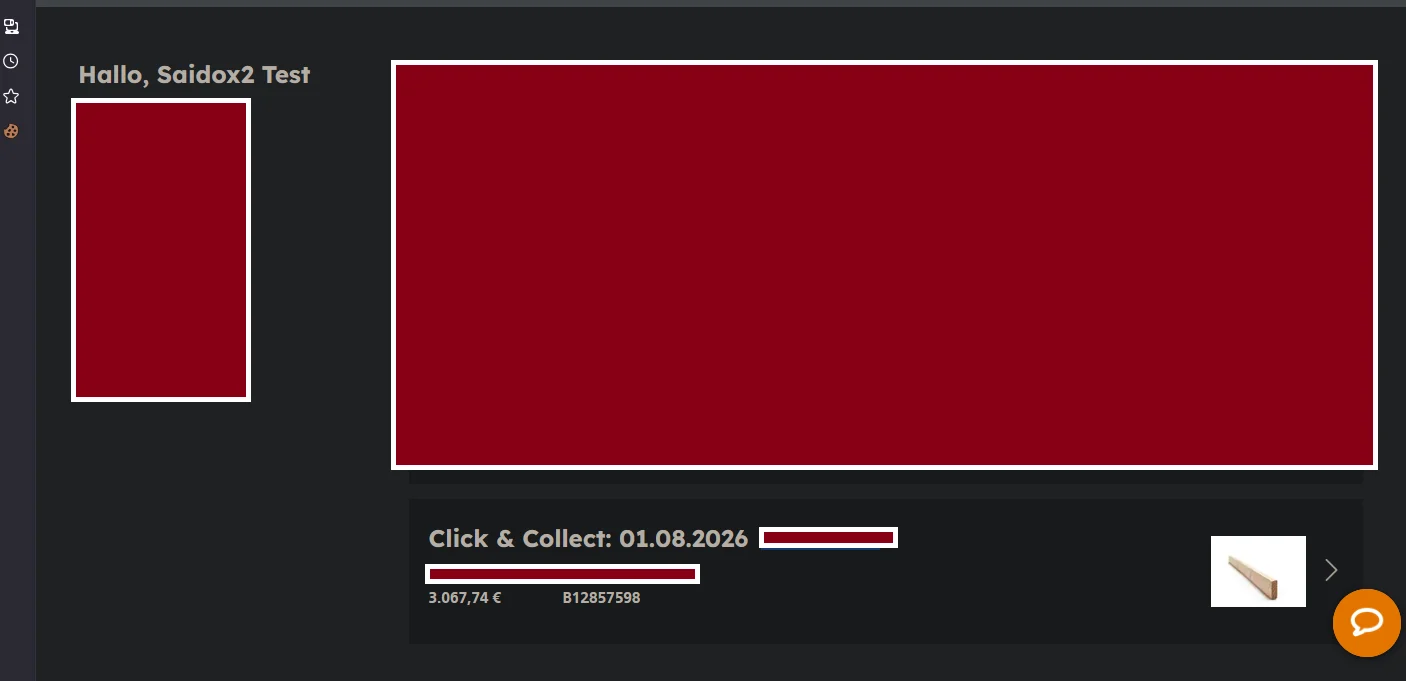
The screenshots show the two orders, each made with the full stock of the item.
The backend never made one order wait for the other. It treated both buy clicks as if they had happened at completely different times, rather than recognising that they were happening at the exact same moment for the exact same limited stock.
Because the application also offered in-store collection, both users would have gone to the store on the same day to pick up the same limited stock.
Root cause
The backend never made one order wait for the other: both requests were processed as if they had happened at different times, so each was allowed to complete against the same limited stock. This is a classic race condition: the check and the state change are not atomic with respect to each other.
The client-side disabled button was not a defence at all. It only stopped the second user in the browser, and removing the attribute let the request through. The backend did not make one order wait for the other, so the second concurrent request was not rejected.
Impact
Two customers could each buy the full stock of a limited item at the same time, and both orders were confirmed and paid. With in-store collection, both customers would arrive on the same day for the same physical unit, which means an in-store incident, an unhappy customer and a support ticket for the business. The write-up frames this as a real-life business impact rather than a theoretical edge case.
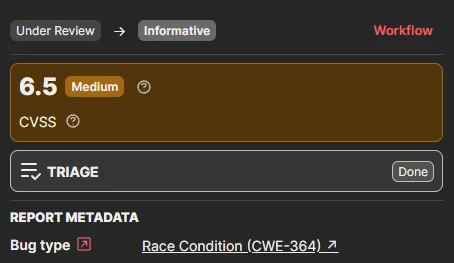
The programme closed the report as "Informative" without explaining why. The researcher still believes it deserved a Low or Medium severity.
Fix
The write-up does not describe any fix being applied.
Variants to test
- Concurrent checkout of the last unit. Put one unit in stock, prepare two accounts with that unit in the cart, and send both checkout requests in parallel. A positive result is two confirmed orders for one unit.
- Concurrent coupon or gift-card redemption. Send the same single-use code from two sessions at once. A positive result is the discount applied twice or the balance spent twice.
- Concurrent withdrawal or transfer of a balance. Fire two requests that each move the full balance. A positive result is a negative balance or a doubled payout.
- Concurrent account registration with the same identifier. Send two sign-ups for the same email or username in parallel. A positive result is two accounts created for one identifier.
- Client-side only restrictions elsewhere. Remove disabled attributes, hidden fields or read-only flags on any purchase, refund or approval control and replay the request. A positive result is the server accepting an action the UI would not have allowed.
- Quantity above stock. Submit a quantity larger than the inventory and observe whether the server clamps it to the full stock, rejects it, or accepts it. A positive result is an order for more units than exist.
What happened, in plain words
An online shop let a researcher buy more of a limited item than the shop actually had. He did it with two ordinary customer accounts and a single click in each. The shop's website tried to stop the second purchase by greying out the buy button, but that greyed-out button only existed in the browser page. Once the button was switched back on, both purchases could be sent to the shop's server at the same instant. The server did not make one order wait for the other, and both orders were confirmed. Two customers ended up owning the same limited stock, and both got confirmation emails.
The researcher reported it to the shop's bug bounty programme, which is a scheme where companies pay people for finding security problems. The programme closed the report as "Informative", meaning it was noted but not treated as a security bug worth a reward. The researcher disagreed and still thinks it deserved a Low or Medium severity rating.
This article walks through the whole story from the beginning, explaining every technical idea as it comes up. You only need to know how to use a browser.
The target
The target was a normal e-commerce application, meaning a website where people buy things. It ran a private bug bounty programme, so the researcher had permission to test it and report what he found.
The write-up says the application did not have many functions. So the first phase, called reconnaissance (looking around to understand what a system does), was simple: create an account, then click every button and work out what each one did. Think of it like walking around a shop you have never visited, opening every door and reading every sign before you try anything clever.
One request caught his attention: the cart quantity request. A request is a message your browser sends to a website's server asking it to do something or give it something. When you change how many of an item you want, your browser sends a request saying "set the quantity to this number". The server is the computer, usually far away, that stores the shop's data and decides what is allowed.
Normally that request should cap the quantity at the available stock and refuse anything above it. The interesting part was how the application behaved when the requested number was larger than the stock.
Setting up
Before the interesting part, here is what the researcher used:
- Two separate accounts on the same e-commerce application.
- A browser with developer tools, used to edit the page's disabled attribute.
- Burp Suite, used to group the two checkout requests and send them in parallel.
- An item with limited inventory, and an in-store collection option for orders.
Two of those need explaining.
Developer tools are built into every modern browser. You open them with a keyboard shortcut or a menu, and they let you look at and change the page you are viewing, including its HTML. HTML is the language that describes what appears on a page: text, images, buttons, and properties such as whether a button is clickable. Changing HTML in developer tools only changes what your own browser shows. It does not change anything on the server.
Burp Suite is a tool used by security testers. It sits between your browser and the website, so you can see every request your browser sends and every response it gets back. It can also hold requests and send several of them at exactly the same moment, which is the key trick in this story.
The write-up does not give any software versions, endpoint names or parameter names.
Finding it
The cart quantity limit
The first attempt was the usual pair of tricks on the cart quantity request: a negative quantity and a huge quantity. A negative quantity means asking for minus five items, for example, which sometimes confuses a shop into adding stock or giving a refund. A huge quantity means asking for a million of something that only has a few hundred in stock. The write-up does not say either of these worked.
What mattered was the response to a number larger than the stock. The application checked the requested quantity and then automatically added the full stock to the user's cart instead of rejecting the request. In other words, if you asked for more than existed, it quietly gave you everything that existed.
The screenshot shows the inventory for the item: only 513 units were available. That behaviour raised the question that drives the rest of the report: can two users order the maximum stock for the same item?
This is worth pausing on. The shop was not broken in an obvious way. It was doing something reasonable-looking: capping your order at what it had. The problem is that nothing made one order wait for the other when both were sent at the same moment.
Exploitation
Step 1: Two accounts, maximum quantity in each cart
The researcher created a second account, added the maximum number of units to the cart in both accounts, and went to checkout in both. Checkout is the final step where you confirm the order and pay.
Why two accounts? Because the question was whether two different customers could each buy the whole stock. One account cannot demonstrate that, since a single customer buying everything is just a normal, if greedy, purchase.
Step 2: The second checkout is blocked in the UI
At checkout the second user hit a wall. The interface reported that the item was unavailable and disabled the purchase control. The interface, or UI (user interface), is everything you see and click on the page. Disabling a button means making it unclickable, usually shown greyed out.
The researcher treated this as a possible client-side restriction. Client-side means it happens in your browser, on your computer. Server-side means it happens on the shop's computer. A restriction that only exists client-side is like a sign on a door saying "do not enter" with no lock: anyone who ignores the sign can walk in. He tested that hypothesis by removing the disabled attribute with the browser's developer tools.
An attribute is a property written into the HTML of an element. A button can have an attribute that says it is disabled. Delete that attribute in developer tools and the button becomes clickable again in your browser.
The screenshot shows the button after it was edited in DevTools. With the attribute removed, the buy button could be clicked and the restriction was bypassed. That confirmed the block was enforced only in the page and not by the server at that point. Both users' requests could now be captured.
Capturing a request means recording it in Burp Suite so you can look at it, change it, and send it again yourself. Once both checkout requests were captured, the researcher controlled exactly when each one reached the shop.
Step 3: Send both checkouts at the same moment
In Burp Suite the two checkout requests were added to a group and sent with the Send in Parallel option, so that both reached the server at the same time.
The screenshot shows both checkout requests for the two orders sitting in the buy group.
Why does timing matter so much? Imagine a shop with one ticket left for a concert. Two people ask the ticket seller at the same moment. If the seller answers one, updates the count to zero, then answers the other, the second person is told no. That is safe. But if the seller takes both questions at once, looks at the count of one for each, and says yes to both before writing anything down, two tickets are sold for one seat. That is the whole idea here, applied to a website.
Sending requests in parallel means firing them off together rather than one after the other. The server receives them so close together that it may start handling both before either has finished.
Step 4: Two confirmed orders for stock that did not exist
After sending, the researcher opened both accounts. Two separate, fully paid orders had been created for stock that did not exist, and both had a confirmation email sent.
The screenshots show the two orders, each made with the full stock of the item.
The server never made one order wait for the other. It treated both buy clicks as if they had happened at completely different times, rather than recognising that they were happening at the exact same moment for the exact same limited stock.
Because the application also offered in-store collection, both users would have gone to the store on the same day to pick up the same limited stock. That turns a database problem into a real-world one: two people standing at a counter, one physical item, and a member of staff who has to explain it.
Why it worked
This kind of bug is called a race condition. The name comes from the idea of two things racing to finish first. In software, a race condition happens when the result depends on the exact order in which two operations run, and the program was not written to cope with them running at the same time.
Here is the sequence in slow motion. A normal checkout does two things: it checks whether there is enough stock, then it reduces the stock by the amount ordered. If those two steps are done for one request, then the next request, everything is fine. The second request sees the reduced stock and is refused.
But when both requests arrive together, the server does not make one wait for the other, so both orders are allowed to complete against the same limited stock.
The technical way to say this is that the check and the state change are not atomic with respect to each other. Atomic means "all at once, indivisible", like a single step that cannot be interrupted. If checking and reducing were one atomic step, only one request could pass through at a time, and the second would see the truth.
The disabled button was not a defence at all. It only stopped the second user in the browser, and removing the attribute let the request through. The server did not make the second concurrent request wait, so it was not rejected. A rule that lives only in the page is a suggestion, not a security control, because the page belongs to the user and the user can change it.
Impact
Two customers could each buy the full stock of a limited item at the same time, and both orders were confirmed and paid. With in-store collection, both customers would arrive on the same day for the same physical unit. That means an in-store incident, an unhappy customer and a support ticket for the business.
The write-up frames this as a real-life business impact rather than a theoretical edge case. A theoretical edge case is a problem that could happen in theory but probably never will. The researcher argues it had a real-life impact on the business.
The programme closed the report as "Informative" without explaining why. The researcher still believes it deserved a Low or Medium severity rating. Severity is how serious a bug is judged to be, and it usually decides whether a reward is paid and how large it is.
How to fix it
One is to perform the check and the update inside a single transaction with row-level locking. A transaction is a group of database operations that either all succeed or all fail together, like a bank transfer that must take money from one account and put it in another. Row-level locking means that while one request is working on a particular row of data, other requests must wait their turn for that row. The second checkout would then wait, see the reduced stock, and be refused.
The other is a conditional update that only succeeds while sufficient stock remains, with the order rejected when that update affects no rows. In plain words: "reduce the stock by this amount, but only if there is still enough left". If the stock has already gone, the update changes nothing, and the shop knows to refuse the order.
Availability should also be re-checked on the server at order creation, rather than relying on a disabled button in the page.
Other places to look for the same pattern
Once you know what a race condition looks like, you can look for it anywhere a limited resource is checked and then used. These are variants of the same pattern worth testing.
- Concurrent checkout of the last unit. Put one unit in stock, prepare two accounts with that unit in the cart, and send both checkout requests in parallel. A positive result is two confirmed orders for one unit.
- Concurrent coupon or gift-card redemption. Send the same single-use code from two sessions at once. A positive result is the discount applied twice or the balance spent twice.
- Concurrent withdrawal or transfer of a balance. Fire two requests that each move the full balance. A positive result is a negative balance or a doubled payout.
- Concurrent account registration with the same identifier. Send two sign-ups for the same email or username in parallel. A positive result is two accounts created for one identifier.
- Client-side only restrictions elsewhere. Remove disabled attributes, hidden fields or read-only flags on any purchase, refund or approval control and replay the request. A positive result is the server accepting an action the UI would not have allowed.
- Quantity above stock. Submit a quantity larger than the inventory and observe whether the server clamps it to the full stock, rejects it, or accepts it. A positive result is an order for more units than exist.
What to take away
A greyed-out button is not a security control. Anything the browser enforces can be undone by the person using the browser. The real question is always what the server does when the request arrives, and whether it does it safely when two requests arrive together.
Glossary
- API: a way for one piece of software to ask another to do something, usually by sending a request and receiving a response.
- Atomic: done as a single indivisible step that cannot be interrupted halfway through.
- Attribute: a property written into the HTML of a page element, such as whether a button is disabled.
- Bug bounty programme: a scheme where a company authorises and rewards people for finding and reporting security problems in its systems.
- Burp Suite: a tool that sits between your browser and a website so you can inspect, change, group and resend requests.
- Cart quantity request: the message your browser sends to the shop when you change how many units of an item you want.
- Checkout: the final step of an online purchase where the order is confirmed and paid for.
- Client-side: happening in your browser, on your own computer, and therefore under your control.
- Conditional update: a database change that only takes effect if a stated condition is still true at that moment.
- Concurrent: happening at the same time as something else.
- Developer tools: the inspection and editing features built into a browser, which let you view and change the page you are looking at.
- Disabled attribute: the HTML property that makes a button unclickable in the page.
- E-commerce application: a website where people buy and sell things.
- Endpoint: the specific address on a server that a request is sent to.
- HTML: the language that describes the content and structure of a web page.
- Informative: a bug report status meaning the report was noted but not accepted as a security issue worth acting on.
- In-store collection: an option where a customer picks up an online order at a physical shop.
- Inventory: the amount of stock a shop actually has.
- Parameter: a named value sent along with a request, such as a quantity.
- Private bug bounty programme: a bounty programme open only to invited researchers rather than the public.
- Race condition: a bug where the result depends on the exact timing and order of two operations running at once.
- Reconnaissance: the early phase of exploring a system to understand what it does before testing it.
- Request: a message your browser sends to a server asking it to do something or return something.
- Response: the message a server sends back after receiving a request.
- Row-level locking: a database feature that makes other operations wait while one operation is working on a particular row of data.
- Send in Parallel: a Burp Suite option that sends several captured requests at the same moment.
- Server: the remote computer that stores a website's data and decides what is allowed.
- Server-side: happening on the server, where the user cannot change it.
- Severity: a rating of how serious a security bug is, often deciding whether and how much a reward is paid.
- Stock: the number of units of an item a shop has available to sell.
- Transaction: a group of database operations that all succeed or all fail together.
- UI (user interface): everything you see and click on a page.
- Vulnerability: a weakness in software that someone could abuse to make it behave in a way it should not.



