How a Sneaker Order Led Me to an IDOR Vulnerability (and $50)
An online store's order API returned any order's details to anyone who knew the order's UUID, without checking ownership or requiring login. An attacker with an order ID could read another customer's personal order information.

medium.com
Published on medium.com
Cybersecurity
The full write-up lives on its author's site
It belongs to its author, so we link to it rather than copy it. The other two tabs are our own rewrites, checked against it.
Context
The target was a new online store that runs frequent discounts on clothing. The feature in question is the customer's own order view: after signing up and placing an order, a logged-in user can open their order in their account and the site displays it with the expected details. Behind that page, the front end fetches the order from a JSON API using the order's UUID as the identifier.
The author does not name the store. The vulnerability was fixed after the report, and the write-up keeps the domain out of the screenshots and text.
Setup
- A normal customer account on the store, created by the author, with one real order placed (a pair of sneakers bought during a sale).
- A second registered account belonging to a friend, referred to as Brian, who had also placed an order and who explicitly agreed to share his order number for testing.
- Firefox Dev Tools, specifically the Network panel, to observe the site's requests to its backend.
- PowerShell with
curl.exefor a request made outside the browser.
The precondition for the decisive test was simply a second, consenting user with an existing order.
Finding it
While the order was in transit, the author opened Dev Tools and watched how the site talked to its backend. Opening his own order in his account produced a normal page, and the Network panel showed the underlying request:
GET https://[site]/api/orders/{order_uuid}

The screenshot shows the Network panel with the GET request for the author's own order; the domain is redacted to avoid identifying the store.
The response for that request was JSON containing the order, the normal output expected when viewing your own order.
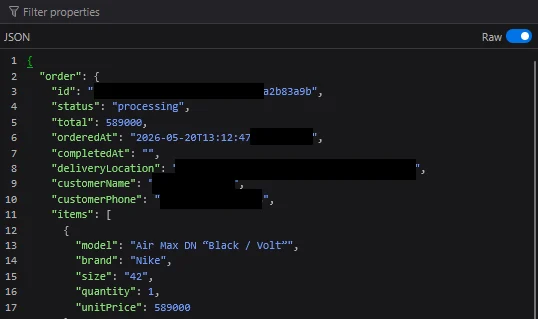
The second screenshot shows that JSON response for the same request.
The order identifier was a UUID. To see how the server handled an identifier that was not his, the author replaced the UUID in the request with a random one. The server returned 404 Not Found.
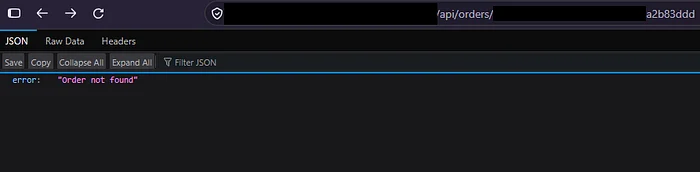
The screenshot shows the request with the modified order_uuid and the 404 response.
That result was ambiguous. A 404 could mean the server recognised that the order was not the caller's and deliberately hid its existence, or it could simply mean no order with that ID existed and the server performed no ownership check at all. A 404 on a random UUID proves nothing on its own, so the next step had to be an existing order belonging to someone else.
Exploitation
Step 1: obtain a second, existing order identifier
Brian, who had recommended the store, was also registered and had his own order. With his explicit permission, he shared his order number. The author stresses that no brute-forcing or guessing of other users' data took place.
Step 2: request another user's order with your own session
Using his own authenticated session, the author swapped Brian's UUID into the same request. The server returned the full details of Brian's order:
- sneaker brand and model
- size and quantity
- order date and time
- delivery city and pickup point
- order total
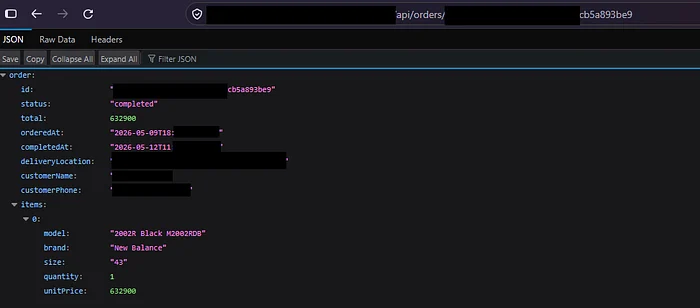
The screenshot shows the JSON API response containing Brian's order data, with the field structure visible so readers can see what kind of data was exposed.
This confirmed the hypothesis: the server checked only whether the order existed, not whether it belonged to the requesting user.
Step 3: repeat the request with no session at all
To test whether authentication was required, the author cleared every cookie on the site and repeated the request without a session. The response was identical: the order data was returned to a completely unauthenticated user. That changes the finding from "a logged-in user can see other users' orders" to "anyone with an order ID can see anyone's order, with no login required".
Step 4: confirm outside the browser
To rule out anything browser-specific, the author sent a plain request from PowerShell straight to the endpoint, with no cookies and no auth headers:
curl.exe -i https://[site]/api/orders/{order_uuid}
The server responded with 200 OK and returned the full order data, exactly as it had in the browser: no session, no login, no token, just the raw UUID.
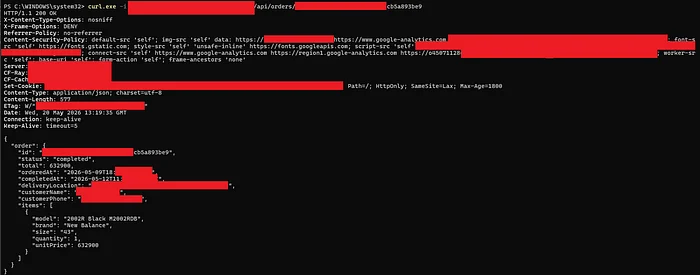
The screenshot shows the curl output with the 200 response and the returned order data; the domain, UUID and personal fields are redacted.
Root cause
The endpoint looked up an order by its identifier and returned it without verifying that the order belonged to the caller. The only check was existence: a valid UUID produced the order, an invalid one produced 404. Because the lookup was not tied to the authenticated user, and because the endpoint did not require authentication at all, possession of the identifier was effectively the only access control.
UUIDs are not an authorisation mechanism. They make mass enumeration impractical, but they do not stop access when an identifier leaks, for example through an email, a screenshot, server logs or browser history. The report does not describe the server-side code, so the exact implementation is not shown; the behaviour is consistent with an object lookup keyed solely on the identifier.
Impact
This is an IDOR (Insecure Direct Object Reference), also known as BOLA (Broken Object Level Authorization), which sits at the top of the OWASP API Security Top 10 (API1).
Two factors shape the risk:
- Order IDs are UUIDs rather than sequential numbers, so large-scale enumeration is essentially impractical. That lowers the odds of exploitation but does not remove the vulnerability.
- The exposed data is personal information (delivery address, order contents), and reading it requires no authentication whatsoever.
The author rated severity as medium, noting that depending on the scoring model it could reasonably land higher. Large-scale exploitation is not realistic, but the privacy impact is real.
Fix
The report recommends, for developers facing the same pattern:
- Always verify object ownership server-side on every request (
order.user_id == current_user.id). - Require authentication on every endpoint that returns personal data.
- Do not rely on unpredictable identifiers such as UUIDs as a substitute for real authorisation checks.
- Return a consistent response (
403or404) for both unauthorised and nonexistent objects, so no extra information leaks either way.
The write-up does not describe the specific change that was made.
Responsible disclosure
Immediately after confirming the issue, the author emailed the store's support team. The report contained:
- a short summary of the vulnerability
- the affected endpoint and reproduction steps
- what data was exposed
- recommended fixes
- a note that testing was minimal and limited to Brian's order, which he had consented to share
Nothing was published and the finding was not taken any further until the team had a chance to respond. Support thanked the author, classified the vulnerability as non-critical, and offered a $50 reward, which covered roughly half the cost of the sneakers.
Variants to test
- Swap an object identifier in any account-scoped API call. Take a request that returns your own resource (order, invoice, address, ticket, message) and substitute an identifier belonging to a second consenting account. A positive result is a 200 with the other account's data while using your own session.
- Repeat the same request with all cookies cleared. A positive result is the same data returned to an unauthenticated client, which escalates the finding from horizontal to unauthenticated access.
- Repeat outside the browser with a bare client. Send the request with no cookies and no auth headers, for example with
curl.exe -i, and check for a 200 and a populated body. This rules out browser-side behaviour and shows the endpoint stands alone. - Compare responses for a random identifier and a real one belonging to another user. If a random identifier gives 404 but a real foreign identifier gives 200, the server is checking existence but not ownership. If both give 404, ownership may be enforced, and the test is inconclusive without a known-valid foreign identifier.
- Check whether identifiers leak. Look for UUIDs in emails, exported PDFs, screenshots, referrer headers, logs or browser history. A positive result is a valid identifier for an object you do not own, which is enough to read it where ownership is not checked.
What happened, in plain words
A security researcher bought a pair of sneakers from a brand new online clothing store. While the parcel was on its way, he opened his browser's developer tools and watched how the website fetched his order from the store's servers. He noticed that the page asked the server for an order using a long random-looking code, and he wondered what would happen if he asked for a different order instead. With a friend's permission, he swapped in the friend's order code and the server handed over the friend's order details. He then repeated the request with every cookie cleared, and finally from a command line outside the browser, and the server still returned the data. Anyone who had an order code could read that order, with no login at all. He reported it to the store and received a $50 reward.
This article walks through the same story step by step, explaining every term along the way. You only need to know how to use a browser and a computer.
Some words you will meet
Before the story, a few ideas that come up constantly.
- Server: the computer somewhere else that runs the website. Your browser asks it for pages and data, and it answers.
- Front end: the part of the website that runs in your browser, the pages and buttons you see.
- Backend: the part on the server that stores data and decides what to send back.
- API: a way for one piece of software to ask another for data, without a human-friendly page in between. Think of it as a serving hatch: your browser passes a request through the hatch and gets back a neat package of data, not a decorated web page. The package is usually in a format called JSON, which is just text arranged as labelled fields and values, a bit like a very structured shopping list.
- Request: one message your browser sends to the server, for example "give me order 123".
- Response: the server's answer to a request, for example the order data, or an error.
- HTTP status code: a three-digit number at the start of every response that says how it went.
200 OKmeans it worked.404 Not Foundmeans the thing asked for does not exist (or the server is pretending it does not).403 Forbiddenmeans it exists but you are not allowed to see it. - Cookie: a small piece of text your browser stores for a website and sends back with every request to that site. It is how a site remembers that you are logged in. Think of it as the wristband you get at an event: the staff check the wristband instead of asking for your name every time.
- Token: a similar idea, a string of characters that proves who you are, often sent in a request header instead of a cookie.
- Header: extra information attached to a request or response, separate from the main content. Cookies and tokens usually travel in headers.
- Session: the period during which the server recognises you as a logged-in user, based on your cookie or token.
- UUID: a Universally Unique Identifier, a long random-looking string such as a mixture of letters, digits and hyphens. It is used as an identifier for a thing, in this case an order. Because it is random, you cannot simply count upwards through them the way you could with order numbers 1, 2, 3.
- Endpoint: a specific address on the server that accepts requests, for example the address that returns one order.
- IDOR: Insecure Direct Object Reference. It means the server lets you refer directly to a thing (an order, a file, a message) by its identifier, and does not check that the thing is yours. It is like a hotel where the room number on your key is the only thing the door checks: change the number and you open someone else's room.
- BOLA: Broken Object Level Authorization, the same problem under a different name, common in API security.
- Authentication: proving who you are, usually by logging in.
- Authorisation: what you are allowed to do once you are known. Authentication is the wristband; authorisation is whether the wristband lets you into the backstage area.
- Dev Tools: the built-in toolkit in browsers such as Firefox. One of its panels, Network, lists every request the page makes and lets you inspect the request and the response.
- curl: a command-line program for sending requests to a server without a browser.
curl.exeis the Windows version. - PowerShell: the command-line tool built into Windows.
- Brute force: trying many guesses automatically until one works. The researcher did not do this.
- Enumeration: systematically walking through possible identifiers to find valid ones.
- Responsible disclosure: telling the owner of a system about a security problem privately, giving them time to fix it, instead of publishing it or misusing it.
How it started
The researcher had been talking with a friend about a pair of sneakers he wanted. The friend, whom the article calls Brian to protect his privacy, recommended a new online store that runs frequent discounts on clothing, and the exact pair happened to be on sale. The researcher signed up, entered his details and placed the order.
While the parcel was in transit, he started thinking: the store was brand new, so there was a decent chance it had security gaps. He opened Dev Tools in Firefox and began watching how the site talked to its backend.
He deliberately does not name the store. The vulnerability was fixed after he reported it, but he feels it is more responsible not to call the store out.

The finding
When he opened his own order in his account, the site displayed it normally, with all the expected details. Behind that page, the front end fetched the order from the server through an API request. The Network panel showed it:
GET https://[site]/api/orders/{order_uuid}
Line by line:
GETis the type of request. It means "give me this thing", as opposed to sending or changing something.https://[site]is the address of the store's server. The domain is replaced with[site]so the store is not identified./api/orders/is the path, the part of the address that points at the order feature of the API.{order_uuid}is a placeholder for the actual order identifier, the UUID. In the real request it was a long random string.
The screenshot shows the Network panel with the GET request for his own order. The domain is redacted to avoid identifying the store.
The response to that request was JSON containing the order, the normal output you would expect when viewing your own order.
The second screenshot shows that JSON response for the same request.
The order identifier was a UUID. He wanted to see how the server would handle someone else's identifier, or one that did not exist, so he swapped the UUID in the request for a random one. The server returned 404 Not Found.
The screenshot shows the request with the modified order_uuid and the 404 response.
That result was ambiguous, and it is worth understanding why. A 404 could mean two very different things:
- The server recognised that the order was not his and deliberately hid its existence, which is good protection.
- No order with that random ID existed, and the server never checks ownership at all. It simply looked up the ID, found nothing, and said so.
A 404 on a random UUID proves nothing on its own. To tell the two cases apart, he needed to test against an existing order that belonged to someone else. If that returned data, the server was checking existence but not ownership.
Testing the hypothesis
Step 1: get a second, existing order identifier
Brian, the friend who had recommended the store, was also registered there and had his own order. With his explicit permission, he shared his order number. The researcher stresses that this was done with consent: he did not brute-force or guess anyone else's data. This matters both ethically and legally. Testing someone else's account without permission is not acceptable, even for research.
Step 2: request another user's order with your own session
Using his own logged-in session, the researcher swapped Brian's UUID into the same request. The server returned the full details of Brian's order:
- sneaker brand and model
- size and quantity
- order date and time
- delivery city and pickup point
- order total
The screenshot shows the JSON API response containing Brian's order data, with the field structure visible so readers can see what kind of data was exposed.
This confirmed the hypothesis: the server checked only whether the order existed, not whether it belonged to the person asking. His own cookie, his own login, was enough to read someone else's order simply by changing the identifier in the address.
Step 3: repeat the request with no session at all
Next he checked whether authentication was required at all. He cleared every cookie on the site and repeated the request without a session. The response was identical: the order data was returned to a completely unauthenticated user.
That changes the finding from "a logged-in user can see other users' orders" to "anyone with an order ID can see anyone's order, with no login required". The first is bad; the second is worse, because it removes even the small barrier of needing an account.
Step 4: confirm outside the browser
To rule out anything browser-specific, he opened PowerShell and sent a plain request straight to the endpoint, with no cookies and no auth headers:
curl.exe -i https://[site]/api/orders/{order_uuid}
Line by line:
curl.exeis the command-line program that sends requests without a browser.-itells curl to print the response headers along with the body, so you can see the status code and other details, not just the data.https://[site]/api/orders/{order_uuid}is the same address as before, with the domain and the identifier replaced by placeholders.
The server responded with 200 OK and returned the full order data, exactly as it had in the browser: no session, no login, no token, just the raw UUID.
The screenshot shows the curl output with the 200 response and the returned order data; the domain, UUID and personal fields are redacted.
Why it worked
The endpoint looked up an order by its identifier and returned it without checking that the order belonged to the caller. The only check was existence: a valid UUID produced the order, an invalid one produced 404. Because the lookup was not tied to the logged-in user, and because the endpoint did not require authentication at all, knowing the identifier was effectively the only access control.
UUIDs are not an authorisation mechanism. They make mass enumeration impractical, because there are far too many possible values to guess through, but they do not stop access when an identifier leaks, for example through an email, a screenshot, server logs or browser history. The report does not describe the server-side code, so the exact implementation is not shown; the behaviour is consistent with an object lookup keyed solely on the identifier.
Classification and risk assessment
This is an IDOR (Insecure Direct Object Reference), also known as BOLA (Broken Object Level Authorization), which sits at the top of the OWASP API Security Top 10 (API1). OWASP is a well-known community project that publishes lists of common security risks; API1 means this class of problem is ranked first for APIs.
Two factors shape the risk:
- Order IDs are UUIDs rather than sequential numbers, so large-scale enumeration is essentially impractical. That lowers the odds of exploitation but does not remove the vulnerability.
- The exposed data is personal information (delivery address, order contents), and reading it requires no authentication whatsoever.
The researcher rated severity as medium, noting that depending on the scoring model it could reasonably land higher. Large-scale exploitation is not realistic, but the privacy impact is real.
Responsible disclosure
Immediately after confirming the issue, he emailed the store's support team. His report contained:
- a short summary of the vulnerability
- the affected endpoint and reproduction steps
- what data was exposed
- recommended fixes
- a note that his testing was minimal and limited to Brian's order, which Brian had consented to share
Nothing was published and the finding was not taken any further until the team had a chance to respond. This is the standard approach: give the owner time to fix the problem before saying anything publicly.
The outcome
Support thanked him for the report. They classified the vulnerability as non-critical, but offered a $50 reward as a thank-you. He accepted, and it covered roughly half the cost of the sneakers he had ordered in the first place. The write-up does not describe the specific change that was made.
How to fix this
For developers who might be dealing with something similar:
- Always verify object ownership server-side on every request (
order.user_id == current_user.id). In plain words: before returning an order, check that the order's owner matches the person making the request. The snippet is a comparison between the order's user and the current user. - Require authentication on every endpoint that returns personal data. If nobody is logged in, the answer should be no.
- Don't rely on unpredictable identifiers (like UUIDs) as a substitute for real authorisation checks. A hard-to-guess name is not the same as a lock.
- Return a consistent response (
403or404) for both unauthorised and nonexistent objects, so you don't leak extra information either way. If one case says "forbidden" and the other says "not found", an attacker learns which identifiers are real.
Variants to test
If you ever find yourself in a similar situation, with permission to test, these are the same checks generalised:
- Swap an object identifier in any account-scoped API call. Take a request that returns your own resource (order, invoice, address, ticket, message) and substitute an identifier belonging to a second consenting account. A positive result is a 200 with the other account's data while using your own session.
- Repeat the same request with all cookies cleared. A positive result is the same data returned to an unauthenticated client, which escalates the finding from horizontal to unauthenticated access.
- Repeat outside the browser with a bare client. Send the request with no cookies and no auth headers, for example with
curl.exe -i, and check for a 200 and a populated body. This rules out browser-side behaviour and shows the endpoint stands alone. - Compare responses for a random identifier and a real one belonging to another user. If a random identifier gives 404 but a real foreign identifier gives 200, the server is checking existence but not ownership. If both give 404, ownership may be enforced, and the test is inconclusive without a known-valid foreign identifier.
- Check whether identifiers leak. Look for UUIDs in emails, exported PDFs, screenshots, referrer headers, logs or browser history. A positive result is a valid identifier for an object you do not own, which is enough to read it where ownership is not checked.
What I took away from this
- Even a simple online store is worth checking for basic security hygiene.
- Dev Tools and a bit of curiosity are often enough to surface serious issues.
Glossary
- API: a way for software to ask another piece of software for data, usually returning structured text such as JSON rather than a web page.
- Authentication: proving who you are, typically by logging in.
- Backend: the server-side part of a website that stores data and decides what to return.
- BOLA: Broken Object Level Authorization, another name for IDOR, common in API security.
- Cookie: a small piece of text stored by your browser for a site and sent back with each request, often used to keep you logged in.
- curl: a command-line program for sending requests to a server without a browser;
curl.exeis the Windows version. - Dev Tools: the built-in toolkit in browsers such as Firefox, including the Network panel that lists requests and responses.
- Endpoint: a specific address on a server that accepts requests.
- Front end: the part of a website that runs in your browser.
- GET: the type of request that asks for something without changing it.
- HTTP status code: a three-digit number in a response saying how it went, such as 200 OK, 403 Forbidden or 404 Not Found.
- IDOR: Insecure Direct Object Reference, where a server lets you refer to a thing by its identifier without checking that it is yours.
- JSON: a text format for structured data, made of labelled fields and values.
- OWASP: a community project that publishes lists of common security risks, including the API Security Top 10.
- Request: one message sent from a browser or program to a server.
- Response: the server's answer to a request.
- Responsible disclosure: telling the owner of a system about a security problem privately and giving them time to fix it before publishing anything.
- Server: the remote computer that runs a website and answers requests.
- Session: the period during which a server recognises you as logged in, based on your cookie or token.
- Token: a string of characters that proves who you are, often sent in a request header.
- UUID: a Universally Unique Identifier, a long random-looking string used to identify a thing such as an order.



