How an GraphQL IDOR leaked AI conversation History and Got me $500 bounty

IDOR common web security vulnerability that happens when an application exposes an internal object — such as a user ID, order number, or file path — directly in a URL or request parameter without checking if the logged-in user is actually authorized to view or edit it
The full write-up lives on its author's site
It belongs to its author, so we link to it rather than copy it. The other two tabs are our own rewrites, checked against it.
Context
The target was an AI chat assistant built to help users plan vacations around the world. Its main job was to fetch information about available flights, the best hotels and resorts, and to plan a vacation within the user's budget.
While interacting with the bot and watching the requests and responses, the researcher noticed that the application used a GraphQL endpoint on the backend to fetch data. That observation is what set the rest of the investigation in motion.
Setup
The report does not describe any accounts, roles, tool versions or other preconditions beyond the following: the researcher was interacting with the AI chat assistant as a normal user, and used Burp Suite to intercept the GraphQL POST request. No special access was needed for the final result, because the request that returned another user's data did not require authentication.
Finding it
Looking at the traffic between the web app and the backend, the researcher identified the GraphQL endpoint used to fetch data:
https://api.example.com/umbrella/v2/graphql?featureName=PapayaItinerariesQuery
The report notes that the feature name PapayaItenerariesQuery is used for fetching data through a GraphQL query. The schema also contains a field called papayaConversationHistory, which returns the user's conversation with the AI assistant.
To fetch the conversation history of any user, one thing is needed: the conversationID of a particular session. In the target's web app, when a user starts a conversation with the AI assistant, the app generates a URL containing a UUID for that session:
https://www.example.com/en/search/results?conversation=594b89bb-2c6d-4ac3-a67e-35b61fd0a5a6
The UUID sits in the conversation URL parameter. Seeing that identifier exposed in the URL is what suggested the idea of substituting another user's value into the GraphQL query.
Exploitation
Step 1: Intercept the GraphQL request
The researcher intercepted the POST request to the GraphQL API in Burp Suite. The request carries the query that the front end sends when it wants conversation data.
Step 2: Inject a query with another user's conversationID
The intercepted request was modified to send a query that asks for papayaConversationHistory for a different user's conversation identifier:
query { papayaConversationHistory( conversationID: "<victim's-ID>" ) { __typename ... on PapayaConversation { conversationID conversation { prompt promptID __typename } } ... on AppError { code message __typename } }}
The important parts of this query:
papayaConversationHistory(conversationID: "<victim's-ID>")is the field that returns a conversation, keyed only by the identifier supplied by the caller.- The inline fragment
... on PapayaConversationselects theconversationIDand, insideconversation, thepromptandpromptIDof each entry, which is the actual conversation content. - The inline fragment
... on AppErrorselectscodeandmessage.
Step 3: Read the victim's conversation
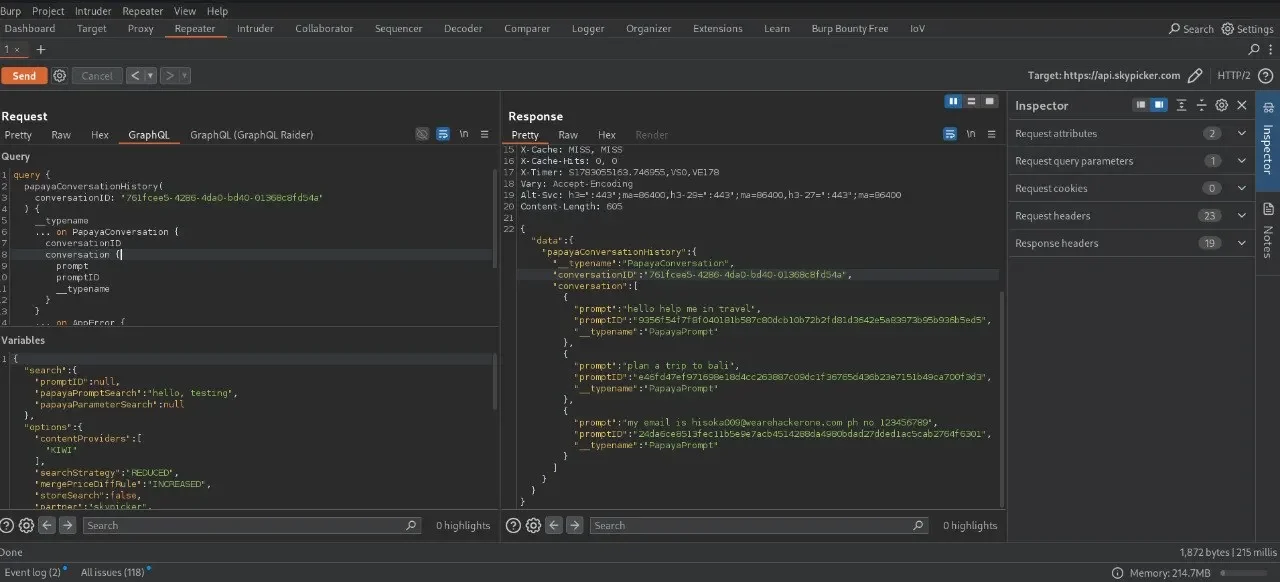
Putting the victim's conversationID into the <victim's-ID> field returned all of the conversation that the other user had with the AI assistant.
Step 4: Repeat without authentication
The same request also worked without being authenticated as a user: an attacker can view anyone's conversation history.
Root cause
The papayaConversationHistory GraphQL field accepts a conversationID supplied by the client and returns the corresponding conversation. The report shows the query returned another user's conversation, and that the same request worked without authentication. The identifier supplied by the client was enough to read the conversation, which matches the IDOR pattern.
The identifier is a UUID, and the report does not describe how one would be discovered beyond its appearance in the conversation URL parameter.
Impact
An unauthenticated attacker can view anyone's conversation history, given a valid conversationID. The report frames this as the ability to view anyone's conversation history, without further qualification about what those conversations might contain.
Fix
Based on the behaviour described, the fix would be to require authentication on the GraphQL request and to authorise the caller against the requested conversationID, returning the conversation only when it belongs to the authenticated user.
Variants to test
- Other fields keyed by a client-supplied identifier. Look for sibling fields on the same GraphQL schema that take an ID argument (conversation, order, booking, itinerary) and try another user's value. A positive result is a response containing that user's data rather than an authorisation error.
- The same query without credentials. Replay the intercepted request with cookies and authorization headers removed. A positive result is the same data coming back unauthenticated.
- Identifier leakage in URLs and referrers. Check whether session identifiers such as the
conversationparameter appear in shareable links, logs or referrer headers, since the attack needs a valid identifier to start with. - Error-shape probing. Use the
AppErrorfragment shown above to distinguish a missing object from a forbidden one; if a forbidden object returns data instead of an error, the ownership check is absent.
What happened, in plain words
A security researcher was testing a website that hosts an AI chat assistant. The assistant helps people plan holidays: you tell it where you want to go and what your budget is, and it looks up flights, hotels and resorts for you.
While chatting with the bot, the researcher watched the messages travelling back and forth between the browser and the website's servers. That is a normal thing to do when testing a site: you open your browser's developer tools, or a tool that sits between your browser and the server, and you read the requests and responses. A request is what your browser sends to a server ("give me this page", "save this data"); a response is what the server sends back.
By reading those messages, the researcher noticed something: the chat assistant was not fetching its data through ordinary web pages. It was using a GraphQL endpoint. GraphQL is a way for a website's front end (the part you see in the browser) to ask a back end (the server that holds the data) for exactly the pieces of information it needs, in a single request. Instead of the server deciding what to send, the client sends a query describing the shape of the data it wants, and the server answers with data in that shape.
That observation gave the researcher an idea: whether GraphQL query injection was possible. That is the thread this article follows.
What is IDOR?
IDOR stands for Insecure Direct Object Reference. It is a common web security weakness. It happens when an application exposes an internal object, such as a user ID, an order number or a file path, directly in a URL or in a request parameter, and does not check whether the logged-in user is actually allowed to view or edit that object.
An everyday comparison: imagine a hotel where every room key is just a number written on a card, and the reception desk hands you key number 12 for your room. If the door lock only checks that the number on the card is a real room number, and never checks that room 12 is your room, then writing 13 on a card gets you into room 13. The lock is working; it is just checking the wrong thing. In a web application, the "room number" is an identifier such as a user ID or a conversation ID, and the missing check is the server asking "does this identifier belong to the person making the request?".
IDOR is not about breaking encryption or guessing passwords. It is about the application trusting an identifier that the client supplies, and treating possession of the identifier as proof of permission.
How a malicious GraphQL query can lead to IDOR
While hunting on a target, the researcher came across an AI chat assistant designed to help users plan vacations all over the world. Its main job was to fetch information about available flights, the best hotels and resorts, and to plan a nice vacation within the user's budget.
While playing with the AI bot and looking at the requests and responses, the researcher learned that the application was using a GraphQL endpoint on the back end for fetching data. That gave the researcher an idea.
Can GraphQL query injection be possible?
To find out, the researcher looked at the endpoint:
https://api.example.com/umbrella/v2/graphql?featureName=PapayaItinerariesQuery
Let us take this address apart, piece by piece, because every part matters later.
https://is the secure version of the protocol browsers use to talk to websites. Thesmeans the traffic is encrypted in transit.api.example.comis the host name. Theapipart is a strong hint: this is not the page you look at, it is the machine-to-machine interface behind it. An API (Application Programming Interface) is a defined way for one piece of software to ask another for data or actions. Think of it as the service counter at a shop: you do not walk into the stockroom yourself, you go to the counter, say what you want in the agreed format, and the staff bring it./umbrella/v2/graphqlis the path.graphqltells you this is the GraphQL service.v2suggests a second version of the interface.?featureName=PapayaItinerariesQueryis the query string, the part after the question mark. It is a list of name=value pairs sent along with the request. Here the parameter is calledfeatureNameand its value isPapayaItinerariesQuery.
The researcher observed that the feature name PapayaItenerariesQuery is used for fetching data through a GraphQL query. The front end says "run the Papaya itineraries query" and the server does so.
The schema also contains a field called papayaConversationHistory, which obviously shows the user's conversation with the AI assistant. A field in GraphQL is a named piece of data you can ask for, a bit like a column in a spreadsheet or a question on a form. If a field called papayaConversationHistory exists, then somewhere the server knows how to return chat history, and the question becomes: who is allowed to ask for it, and about which conversation?
Spotting the IDOR
To fetch the conversation history of any user, one important thing is needed: the conversationID of a particular session. A session is one continuous period of use: you open the chat, talk to the bot, close the tab. The application gives each such period its own identifier so it can keep the messages together.
In the target's web app, whenever a user starts a conversation with the AI assistant, the app generates a URL containing a UUID for that session:
https://www.example.com/en/search/results?conversation=594b89bb-2c6d-4ac3-a67e-35b61fd0a5a6
A UUID (Universally Unique Identifier) is a long string of letters, digits and hyphens, designed to be effectively unique, so that two sessions will not accidentally get the same one. The one above, 594b89bb-2c6d-4ac3-a67e-35b61fd0a5a6, is the value in this example.
Reading the URL the same way as before: the site is www.example.com, the path is /en/search/results, and the query string has one parameter, conversation, whose value is that UUID. So the identifier of the chat session is sitting right there in the address bar, visible to anyone who can see the URL.
Seeing that identifier exposed in the URL is what gave the researcher the idea: if the browser sends this identifier to the server to say "show me this conversation", what happens if we send a different identifier, one belonging to somebody else?
Exploitation
Step 1: Intercept the GraphQL request
The researcher intercepted the POST request to the GraphQL API in Burp Suite. Burp Suite is a tool that sits between your browser and the internet, like a postbox that lets you open every letter before it is delivered. You configure your browser to send its traffic through Burp, and Burp shows you each request and response, and lets you edit a request before forwarding it.
A POST request is one of the standard ways a browser talks to a server. GET is typically used to ask for a page; POST is typically used to send data to the server, such as a form submission or, here, a GraphQL query. The request carries the query that the front end sends when it wants conversation data.
Why intercept at all? Because the query the browser sends is generated by the website's own code. To change it, you need to catch it in flight, edit it, and let it continue. That is exactly what an intercepting proxy is for.
Step 2: Inject a query with another user's conversationID
The intercepted request was modified to send a query that asks for papayaConversationHistory for a different user's conversation identifier:
query { papayaConversationHistory( conversationID: "<victim's-ID>" ) { __typename ... on PapayaConversation { conversationID conversation { prompt promptID __typename } } ... on AppError { code message __typename } }}
This is a GraphQL query. It is written in a compact, nested style, so let us walk through it in plain words.
query { ... }says: this is a query, and everything inside the braces is what I want back. In GraphQL, braces group fields together, and nesting shows which fields belong to which.papayaConversationHistory( conversationID: "<victim's-ID>" )is the field being requested. The part in brackets is an argument: extra information passed to the field. Here the argument is namedconversationIDand its value is"<victim's-ID>", a placeholder standing for the identifier of the other person's conversation. The researcher replaced the placeholder with the victim's realconversationID. The field returns a conversation for the identifier supplied.- The braces after the field list what to return from that conversation. GraphQL lets you choose the shape of the answer, so you have to say which pieces you want.
__typenameis a special GraphQL field that returns the name of the type of the object. Asking for it at each level makes the response shape explicit: you can see what kind of thing came back, not just its contents.... on PapayaConversation { ... }is an inline fragment. A fragment is a way of saying "if the thing you are returning is of this type, then include these fields". Here it says: if the result is aPapayaConversation, return itsconversationIDand, insideconversation, thepromptandpromptIDof each entry. A prompt is the message the user typed to the AI assistant, andpromptIDis the identifier of that message. This is the actual conversation content, the part that matters.... on AppError { ... }is a second inline fragment: if the result is anAppErrorinstead, return itscodeandmessage. An error code is a short label for what went wrong, and a message is the human-readable explanation. Asking for these returns the error's code and message.- The final
}}closes the outer query and the field selection.
Why write the query by hand instead of using the one the site sends? Because the site's own query asks for your conversation. By writing the query yourself, you control the conversationID argument, and you can put somebody else's value in it.
Step 3: Read the victim's conversation
Putting the victim's conversationID into the <victim's-ID> field returned all of the conversation that the other user had with the AI assistant.
The screenshot shows the response returning the other user's conversation.
Step 4: Repeat without authentication
The same request also worked without being authenticated as a user: an attacker can view anyone's conversation history.
Authentication is how a site knows who you are. Usually you log in, the server gives your browser a cookie (a small piece of data stored by the browser and sent back with every request to that site) or a token (a string that proves you have logged in, sent with requests, often in an Authorization header). When the researcher says the request worked without being authenticated, it means the request was sent without those credentials, and the server still returned the data. The request was sent without credentials and the server still returned the data.
Root cause
The papayaConversationHistory GraphQL field accepts a conversationID supplied by the client and returns the corresponding conversation. The report shows the query returned another user's conversation, and that the same request worked without authentication. The identifier supplied by the client was enough to read the conversation, which matches the IDOR pattern.
The identifier is a UUID, and the report does not describe how one would be discovered beyond its appearance in the conversation URL parameter. The report does not describe how such an identifier would be discovered in practice beyond the fact that it appears in the conversation URL parameter of the app.
Impact
An unauthenticated attacker can view anyone's conversation history, given a valid conversationID. The report frames this as the ability to view anyone's conversation history, without further qualification about what those conversations might contain.
Fix
Based on the behaviour described, the fix would be to require authentication on the GraphQL request and to authorise the caller against the requested conversationID, returning the conversation only when it belongs to the authenticated user. Authorise here means checking permission: not just "is this person logged in?" but "is this person allowed to see this particular conversation?".
Variants to test
- Other fields keyed by a client-supplied identifier. Look for sibling fields on the same GraphQL schema that take an ID argument (conversation, order, booking, itinerary) and try another user's value. A positive result is a response containing that user's data rather than an authorisation error.
- The same query without credentials. Replay the intercepted request with cookies and authorization headers removed. A positive result is the same data coming back unauthenticated.
- Identifier leakage in URLs and referrers. Check whether session identifiers such as the
conversationparameter appear in shareable links, logs or referrer headers, since the attack needs a valid identifier to start with. A referrer header is information the browser sends to the next site you visit, saying which page you came from; if a URL containing an identifier is sent that way, the identifier can leak to third parties. - Error-shape probing. Use the
AppErrorfragment shown above to distinguish a missing object from a forbidden one; if a forbidden object returns data instead of an error, the ownership check is absent.
Conclusion
Sometimes diving deep into the target gets you bugs that automated scanners and other hunters miss. So stay sharp, stay curious.
Glossary
- API: a defined way for one piece of software to ask another for data or actions, like a service counter rather than walking into the stockroom.
- Argument: extra information passed to a GraphQL field, written in brackets after the field name, such as
conversationID: "...". - Authentication: how a site knows who you are, usually through a login that results in a cookie or token being sent with later requests.
- Authorisation: whether a known user is allowed to do or see a particular thing.
- Burp Suite: a tool that sits between your browser and the internet, letting you view and edit requests and responses.
- Cookie: a small piece of data stored by your browser and sent back with requests to the same site, often used to carry a login session.
- Endpoint: a specific address on a server that accepts requests, such as the GraphQL URL in this report.
- Error code: a short label identifying what went wrong in a failed request.
- Field: a named piece of data you can ask for in GraphQL, like a column in a spreadsheet.
- Fragment (inline fragment): a GraphQL construct that says "if the returned object is of this type, include these fields".
- GraphQL: a way for a client to ask a server for exactly the pieces of data it wants, by sending a query that describes the shape of the answer.
- Header: extra information sent alongside a request or response, such as an
Authorizationheader carrying a token. - IDOR (Insecure Direct Object Reference): a weakness where an application exposes an internal identifier and does not check that the requester is allowed to access the object it points to.
- POST request: a request type typically used to send data to a server, such as a GraphQL query.
- Prompt: a message typed by a user to an AI assistant.
- Query string: the part of a URL after the question mark, made of name=value pairs such as
?conversation=.... - Referrer header: information the browser sends to the next site you visit, saying which page you came from.
- Request: what a browser or client sends to a server.
- Response: what a server sends back.
- Session: one continuous period of use of an application, often identified by a unique value.
- Token: a string that proves you have logged in, sent with requests, often in an
Authorizationheader. - UUID (Universally Unique Identifier): a long string of letters, digits and hyphens designed to be effectively unique, used here as a conversation identifier.



