How an IDOR + OSINT Investigation Exposed a Company
An unauthenticated API endpoint allowed looking up driver records by arbitrary email address, returning a company invite code for some accounts. An attacker could use OSINT to find employee emails, retrieve a valid invite code, and use it during registration to unlock bespoke vehicle pricing.

medium.com
Published on medium.com
Idor
The full write-up lives on its author's site
It belongs to its author, so we link to it rather than copy it. The other two tabs are our own rewrites, checked against it.
Context
redacted.com runs a vehicle sales and customisation platform. Access to certain pricing is tied to a company's employee benefit scheme, and the key to that flow is the company Invite Code.
The platform states that the Invite Code should be provided directly by the user's HR team. Users without a code can still browse vehicles, but they cannot access bespoke pricing. That makes the code part of the application's business trust model: holding it is what separates a regular visitor from someone who is supposed to see company-specific pricing.
The finding described here broke that assumption. A value meant to stay within the relationship between the company, its HR team and eligible employees could be obtained by someone outside that flow and then reused during registration, bypassing the eligibility model for bespoke vehicle pricing.
Setup
The work was done against redacted.com without logging in. The vulnerable endpoint accepted arbitrary email addresses, so no account of the researcher's own was needed to start querying it. To find addresses worth querying, the researcher used OSINT to collect publicly available employee email addresses belonging to companies that use the platform.
Finding it
The endpoint under investigation behaved like this:
POST /api/get-driver-by-email HTTP/2Host: redacted.comContent-Type: application/json
{ "email": "[redacted]"}
Changing the email address was enough to retrieve information associated with other users. For a regular user, the response contained data similar to:
{ "getDriverByEmail": { "driver": { "company": { "inviteCode": null, "quoteJourney": "standard" } }, "message": null, "statusCode": 200 }}
At this stage the impact still looked limited. The interesting detail was that inviteCode was always present in the response, even though it was null for every normal account tested.
The next clue came from the registration process. At one point the application asked the user for a company Invite Code and explained that the code should be provided by the user's HR team. Users without a code could continue with limited access, but bespoke vehicle pricing was not available to them. This meant inviteCode was not just another piece of account metadata: it was connected to a business rule.
The question then became simple: if regular users always have inviteCode: null, who actually has a real value there?
Exploitation
Step 1: Query the endpoint with employee addresses
Because the endpoint accepted arbitrary email addresses, the researcher used OSINT to identify publicly available employee email addresses belonging to companies using the platform, and tested several of them. Most responses were exactly the same as before:
"inviteCode": null
Then one account returned something different:
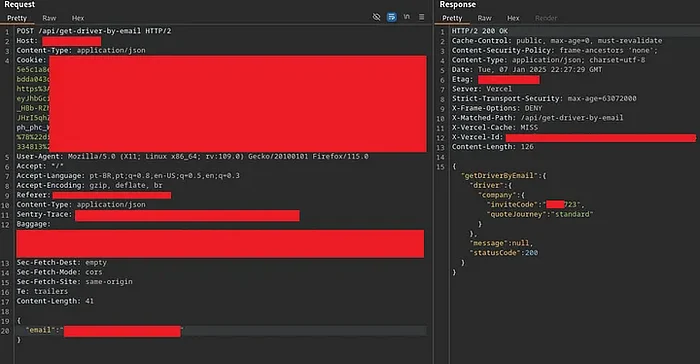
That changed the meaning of the bug completely. The code was not obtained from an email, an HR platform or an internal company system. It came directly from the vulnerable API, and the only thing needed was the employee's email address.
Step 2: Reuse the leaked code in registration
The leaked value could then be entered into the application's registration flow:
This was the same place where the application told users that the Invite Code should be obtained from HR. Without a valid code, a user could browse the available cars but would not have access to bespoke pricing. With the leaked code, that restriction could be bypassed.
At that point the issue was no longer just about reading another user's data. The IDOR was exposing a value that the application itself treated as proof that the user had legitimately received access through their company.
Root cause
The endpoint POST /api/get-driver-by-email looked up a driver by the email address supplied in the request body and returned the associated company object, including inviteCode, without checking that the caller was entitled to that record. The lookup key was fully attacker-controlled and the response was not scoped to the caller's own account, which is the classic shape of an IDOR.
On top of that, the Invite Code was treated as a bearer credential for eligibility: possession alone unlocked bespoke pricing. The application therefore relied on the secrecy of a value that it also handed out through an unrelated lookup endpoint.
Impact
The practical impact came from chaining a few simple observations together:
- The endpoint allowed arbitrary email lookups.
- Public sources made employee email addresses discoverable.
- Some of those accounts contained a real Invite Code.
- That Invite Code controlled access to functionality that normal users could not use.
An attacker could therefore identify employee email addresses, query them through the vulnerable API, find an account with a non-null Invite Code, and reuse that code during registration. This exposed a trust boundary: the platform expected the code to come from the company's HR team, but the same value could be recovered from another user's account through the IDOR. Because possession of the code was enough to unlock bespoke vehicle pricing, the vulnerability crossed from a data exposure issue into a business-logic bypass.
The impact depends on the attacker first finding a valid employee address for a company on the platform, and on that employee's account actually holding a non-null code. In the researcher's testing, most accounts returned null.
Fix
The report does not describe the fix that was applied.
Timeline
- Discovered and reported: vulnerability identified and submitted through HackerOne.
- Triage: confirmed and validated by the security team.
- Resolved: October 7, 2025, 11:37 UTC.
- Reward: $500 USD.
Variants to test
- Other lookup endpoints keyed by email or username. Try registration, password reset and profile endpoints that accept an identifier in the body. A positive result is a response containing fields belonging to another user, especially fields the UI never shows to the account owner.
- Fields that are always present but usually null. Look for response keys such as codes, tokens, flags or plan names that appear for every account. A positive result is one account where the value is populated, which tells you the field carries business meaning.
- Invite or referral codes as bearer credentials. Register with a code taken from another account and check whether eligibility, pricing or role changes. A positive result is access to functionality that the registration flow says requires HR or company approval.
- Chaining OSINT with IDOR. Collect public employee addresses for the target's customers and query them in bulk. A positive result is any account whose response differs from the baseline, which is where the business impact usually sits.
What happened, in plain words
A company runs a website where people can look at vehicles and buy them, with the option of customising them. Some of the prices on that site are special prices that only employees of certain companies can see, because those companies have a deal with the vehicle seller. To get those special prices, an employee needs a short secret word from their company's HR team. The site calls this word an Invite Code.
The site had a hidden doorway, a piece of software that answers requests from other software, and that doorway would tell anyone who asked what a given person's account contained, as long as the asker knew that person's email address. It did not check whether the asker was allowed to know. For most people the answer included an empty Invite Code, but for at least one employee it included the real code. Anyone who found that out could take the code, type it into the normal sign-up page, and get the special prices without ever talking to HR.
That is the whole story. The rest of this article walks through it slowly, explains every term, and shows the exact requests that were sent.
The product and the feature
redacted.com is a vehicle sales and customisation platform. You can think of it as a car showroom on the web: you browse models, pick options, and see a price. Most visitors see the ordinary price list.
Some companies have an arrangement with the platform: their staff get special, bespoke pricing. The platform needs a way to tell a random visitor apart from a genuine employee of a partner company. It does that with the Invite Code, a short secret string that the company's HR team hands to each eligible employee.
The platform itself says the code should come directly from your HR team. If you do not have one, you can still browse the cars, but the bespoke prices stay locked. So the code is not decoration: it is the thing that decides whether you are treated as eligible. Security people call a value like this a bearer credential, meaning that whoever holds it is treated as entitled, no questions asked, much like a paper ticket at a concert: the door staff check the ticket, not your name.
That design only works if the code stays secret. The finding described here broke that assumption: a value meant to stay between the company, its HR team and eligible employees could be obtained by an outsider and then reused during registration.
Some words you will need
Before the technical part, here are the ideas it relies on, explained from zero.
- API: an API (Application Programming Interface) is the part of a website that software talks to, rather than people. When you click a button in a browser, the page often sends a small message behind the scenes to the site's server and gets an answer back. That message-and-answer channel is the API. A useful comparison is a restaurant: the menu and the dining room are the website you see, and the kitchen is the server. The API is the waiter who carries your order to the kitchen and brings back the dish. You never walk into the kitchen yourself.
- Endpoint: one specific address inside that API, for one specific job. If the API is the waiter, an endpoint is one item on the menu, such as "look up a driver by email".
- Request and response: a request is the message your browser (or a tool) sends to an endpoint. A response is what comes back. Requests have a method (a verb saying what kind of action it is), a path (which endpoint), sometimes headers (extra labels with details about the message) and sometimes a body (the actual content, such as the email address you are asking about).
- POST: one of the HTTP methods. It means "here is some data, please do something with it". It is the method used when you submit a form. GET means "please give me something".
- HTTP/2: the version of the language that browsers and servers use to exchange these messages. You do not need to know the details; it is just the protocol version noted in the request.
- JSON: a simple text format for structured data, made of names and values in curly braces. It looks like
{"name": "value"}. APIs use it because both humans and programs can read it easily. Think of it as a labelled form: each label (called a key) has something written next to it. null: in JSON, the special word for "nothing here". It is not zero and not an empty text; it means the value is absent. An empty Invite Code shows up asnull.- IDOR: short for Insecure Direct Object Reference. It means the site lets you ask for a specific record (a user, an order, a document) by naming it, and does not check that the record belongs to you. A comparison: a hotel where room numbers are the only key, and the reception never checks whether the room you ask for is yours. If you change the number and the door opens, that is an IDOR. The "object reference" here is the email address: it names the record you want.
- OSINT: Open Source Intelligence, meaning information gathered from public sources: company websites, press pages, conference listings, social media, and so on. Nothing secret is broken into; the point is that a lot of useful information is already public.
- Authenticated session: a logged-in state. When you log in, the site gives your browser a small piece of data (often called a cookie or a token) that it checks on every later request, so it knows who you are without asking for your password again. A request made without one is called unauthenticated. The work described here was done without logging in at all.
- Enumeration: trying many values one after another (many email addresses, many numbers) to see which ones give a different answer. It is the digital equivalent of trying every door in a corridor.
- Business logic: the rules a company decides for its own product, as opposed to technical rules. "Only employees of partner companies get bespoke prices" is business logic. A business-logic bypass is when someone gets around such a rule without breaking any technical lock.
- Trust boundary: the line between parties who are supposed to trust each other and parties who are not. The platform trusted that anyone holding an Invite Code got it from HR. The bug moved the code across that line.
Setup: what was needed to start
The work was done against redacted.com without logging in. In plain terms: the researcher did not create an account and did not log in. They simply sent requests to the API and read the answers.
That was possible because the endpoint accepted arbitrary email addresses. It did not require the email of the person making the request; it accepted any email at all. So no account of the researcher's own was needed to start querying it.
To have something worth querying, the researcher used OSINT to collect publicly available employee email addresses belonging to companies that use the platform. Why this step? Because the endpoint answers questions about a person identified by email, and the interesting people here are employees of partner companies, since those are the ones who might hold a real Invite Code. Public sources were enough to find real employee email addresses.
Finding it: the vulnerable endpoint
The endpoint under investigation behaved like this:
POST /api/get-driver-by-email HTTP/2Host: redacted.comContent-Type: application/json
Line by line:
POST /api/get-driver-by-emailis the request line.POSTis the method ("here is data, act on it"), and/api/get-driver-by-emailis the path, the name of the endpoint. The name is a strong hint about what it does: get a driver by email.HTTP/2is the protocol version used for the message.Host: redacted.comis a header that says which website the request is addressed to. One server can host many sites, so the request names the one it wants.Content-Type: application/jsonis a header that tells the server what format the body is in: JSON, the labelled form format described above.
The body of the request was:
{ "email": "[redacted]"}
This is a JSON object with a single key, email, whose value is an email address. In words: "look up the driver whose email is this one". The address shown is a placeholder for whichever address the researcher wanted to ask about.
Changing the email address was enough to retrieve information associated with other users. That is the IDOR: the email is the object reference, and the server did not check that the asker had any right to that person's record.
For a regular user, the response contained data similar to:
{ "getDriverByEmail": { "driver": { "company": { "inviteCode": null, "quoteJourney": "standard" } }, "message": null, "statusCode": 200 }}
Line by line:
- The whole answer is one JSON object. Its single key,
getDriverByEmail, holds the result of the lookup. The key is named after the operation, which is common in APIs. - Inside it,
driverholds the record of the person found. - Inside the driver,
companyholds details about the company that person is linked to. inviteCodeis the field that matters. Here it isnull, meaning this person has no code stored on their account.quoteJourneyis"standard", which reads like a label for the kind of pricing journey this account follows: the ordinary one.messageisnull, so there is no extra message, andstatusCodeis200, the standard code for "everything went fine".
At this stage the impact still looked limited. The researcher was reading other people's records, which is already a problem, but the records contained nothing dramatic. The interesting detail was that inviteCode was always present in the response, even though it was null for every normal account tested. Why does that matter? Because a field that is always there but usually empty is a strong hint that it is sometimes not empty. The API was built to carry this value; it just happened to be empty for the accounts tried so far.
Looking at the registration flow
The next clue came from the registration process, the ordinary sign-up that any visitor goes through. At one point the application asked the user for a company Invite Code and explained that the code should be provided by the user's HR team. Users without a code could continue with limited access, but bespoke vehicle pricing was not available to them.
This meant inviteCode was not just another piece of account metadata, meaning a harmless detail stored alongside a profile. It was connected to a business rule: the rule that decides who gets special prices. The field in the API response and the box on the sign-up page were two ends of the same mechanism.
The question then became simple: if regular users always have inviteCode: null, who actually has a real value there? That question is the heart of the whole finding. Instead of stopping at "I can read other users' data", the researcher asked what the data means and who might have a different answer.
Exploitation
Step 1: Query the endpoint with employee addresses
Because the endpoint accepted arbitrary email addresses, the researcher used OSINT to identify publicly available employee email addresses belonging to companies using the platform, and tested several of them. The reasoning: if the code lives on employee accounts, then employee addresses are exactly the ones worth asking about. Each test was the same request as before, with a different address in the body.
Most responses were exactly the same as before:
"inviteCode": null
This single line is the relevant part of the response: the field exists, and it is empty. Most employees, it turned out, did not have a code stored on their account either.
Then one account returned something different:
That changed the meaning of the bug completely. The code was not obtained from an email, an HR platform or an internal company system. It came directly from the vulnerable API, and the only thing needed was the employee's email address.
Put differently: the secret that the site used to prove someone was eligible had just been handed out by the site itself, to anyone who knew an employee's address. The trust boundary described earlier had been crossed.
Step 2: Reuse the leaked code in registration
The leaked value could then be entered into the application's registration flow:
This is a URL: the address of the place in the application where the Invite Code is submitted during sign-up. It is the same place where the application told users that the Invite Code should be obtained from HR. In other words, the researcher did not find some hidden back door; they used the normal front door, with a code that should never have reached them.
Without a valid code, a user could browse the available cars but would not have access to bespoke pricing. With the leaked code, that restriction could be bypassed.
At that point the issue was no longer just about reading another user's data. The IDOR was exposing a value that the application itself treated as proof that the user had legitimately received access through their company. Reading data is one kind of problem; unlocking a paid feature with someone else's credential is another, and a more serious one.
Root cause: why it worked
The endpoint POST /api/get-driver-by-email looked up a driver by the email address supplied in the request body and returned the associated company object, including inviteCode, without checking that the caller was entitled to that record. The lookup key was fully attacker-controlled, meaning the person sending the request chooses the email freely, and the response was not scoped to the caller's own account, meaning the server did not limit answers to "your own record". That combination is the classic shape of an IDOR.
On top of that, the Invite Code was treated as a bearer credential for eligibility: possession alone unlocked bespoke pricing. The application therefore relied on the secrecy of a value that it also handed out through an unrelated lookup endpoint.
A comparison may help. Imagine a members' club where the doorman accepts any membership card without checking the name on it. That is fine as long as cards never leave members' pockets. But if the club also runs a public noticeboard that lists each member's card number on request, the doorman's rule collapses. Neither piece is catastrophic alone; together they are.
Impact: what an attacker could actually do
The practical impact came from chaining a few simple observations together:
- The endpoint allowed arbitrary email lookups.
- Public sources made employee email addresses discoverable.
- Some of those accounts contained a real Invite Code.
- That Invite Code controlled access to functionality that normal users could not use.
An attacker could therefore identify employee email addresses, query them through the vulnerable API, find an account with a non-null Invite Code, and reuse that code during registration. No password, no insider, no malware: just a public email address and a request anyone can send.
This exposed a trust boundary. The platform expected the code to come from the company's HR team, but the same value could be recovered from another user's account through the IDOR. Because possession of the code was enough to unlock bespoke vehicle pricing, the vulnerability crossed from a data exposure issue into a business-logic bypass. The company's rule about who gets special prices was, in effect, no longer enforced.
The impact depends on two conditions: the attacker first finding a valid employee address for a company on the platform, and that employee's account actually holding a non-null code. In the researcher's testing, most accounts returned null, so this is not a case where every employee address works. It is a case where the right address is enough.
Why this was interesting
What made this finding interesting was that the impact was not obvious from the first request. If testing had stopped after checking only regular accounts, the issue would have looked much less important. Every response showed the same thing:
"inviteCode": null
The difference came from asking what that field represented, who might have a different value, and what the application did with it elsewhere. That small change in perspective turned a basic IDOR into a much more meaningful business-impact issue.
For someone learning security, this is the most transferable lesson in the report. Finding that an endpoint answers questions it should not is step one. Step two is understanding what the answers mean to the business, and step three is following the value to where it is used. The same request, sent to a different kind of account, told a completely different story.
Fix: what would stop it
The report does not describe the fix that was applied. In plain terms: the endpoint should answer only about you, and should not include secrets in its answers.
Binding means the code is tied to a specific company and a specific person, so a code that leaks is useless to anyone else. Rate-limiting means refusing to answer if one caller asks too many questions too quickly, which makes trying many email addresses impractical.
Timeline
- Discovered and reported: vulnerability identified and submitted through HackerOne.
- Triage: confirmed and validated by the security team.
- Resolved: October 7, 2025, 11:37 UTC.
- Reward: $500 USD.
HackerOne is a platform where security researchers report bugs to companies; triage is the stage where the company's security team checks the report and confirms it is real. The reward is the payment the researcher received for the report.
Variants to test
If you want to look for similar issues in software you are allowed to test, these are the directions the report points to.
- Other lookup endpoints keyed by email or username. Try registration, password reset and profile endpoints that accept an identifier in the body. A positive result is a response containing fields belonging to another user, especially fields the UI never shows to the account owner.
- Fields that are always present but usually null. Look for response keys such as codes, tokens, flags or plan names that appear for every account. A positive result is one account where the value is populated, which tells you the field carries business meaning.
- Invite or referral codes as bearer credentials. Register with a code taken from another account and check whether eligibility, pricing or role changes. A positive result is access to functionality that the registration flow says requires HR or company approval.
- Chaining OSINT with IDOR. Collect public employee addresses for the target's customers and query them in bulk. A positive result is any account whose response differs from the baseline, which is where the business impact usually sits.
Glossary
- API: the part of a website that software talks to, rather than people; it receives requests and sends back answers.
- Authenticated session: a logged-in state, usually kept alive by a cookie or token the browser sends with each request.
- Bearer credential: a value that grants access to whoever holds it, with no further check of identity, like a concert ticket.
- Business logic: the rules a company sets for its own product, such as who qualifies for special pricing.
- Business-logic bypass: getting around such a rule without breaking any technical lock.
- Content-Type: a request header that says what format the body is in, for example JSON.
- Cookie: a small piece of data a site stores in your browser and reads back on later requests, often used to remember that you are logged in.
- Endpoint: one specific address inside an API, dedicated to one job.
- Enumeration: trying many values one after another to see which ones give a different answer.
- GET: an HTTP method meaning "please give me something".
- Header: extra labelled information attached to a request or response, such as the host name or the content type.
- Host: a header naming which website the request is addressed to.
- HTTP/2: the version of the protocol browsers and servers use to exchange requests and responses.
- IDOR: Insecure Direct Object Reference; when a site lets you name a record and does not check that the record belongs to you.
- Invite Code: in this report, a short secret from a company's HR team that unlocks bespoke vehicle pricing.
- JSON: a text format for structured data made of keys and values in curly braces.
- Method: the verb of an HTTP request, such as GET or POST, saying what kind of action is wanted.
null: in JSON, the value meaning "nothing here".- OSINT: Open Source Intelligence; information gathered from public sources such as company websites and social media.
- Path: the part of a request that names the endpoint, such as
/api/get-driver-by-email. - POST: an HTTP method meaning "here is some data, please act on it".
- Rate-limiting: refusing to answer a caller who sends too many requests too quickly.
- Request: the message sent to an endpoint.
- Response: the message that comes back.
- Status code: a number in the response saying how it went, such as 200 for success.
- Token: a piece of data, similar to a cookie, used to prove who you are or to grant access.
- Triage: the stage where a company's security team checks a reported bug and confirms it.
- Unauthenticated: done without logging in.
- URL: the address of a resource on the web, such as
https://redacted.com/api/invite-code.



