How an Unauthenticated API Endpoint Exposed 19,990 User Records
An API endpoint that returned developer profile details did not enforce authentication or authorization when accessed directly, and it used sequential integer identifiers. An attacker could enumerate the identifier to retrieve personally identifiable information from many user profiles without logging in.

medium.com
Published on medium.com
Hacking
The full write-up lives on its author's site
It belongs to its author, so we link to it rather than copy it. The other two tabs are our own rewrites, checked against it.
Context
In June 2026 I spent some time on an AI-focused freelance marketplace: a platform that helps companies find and hire AI specialists for automation projects, chatbots and AI development. The feature I was looking at is the ordinary profile page. A logged-in user opens their profile, the frontend fetches the profile data from an API, and the page renders it.

That is all the feature is meant to do: show you your own profile, behind a login. What I found was that the API serving that profile did not check who was asking, and that the profile identifier was a sequential integer. The result was that profile records could be read directly, without an account, by changing a number in a URL.
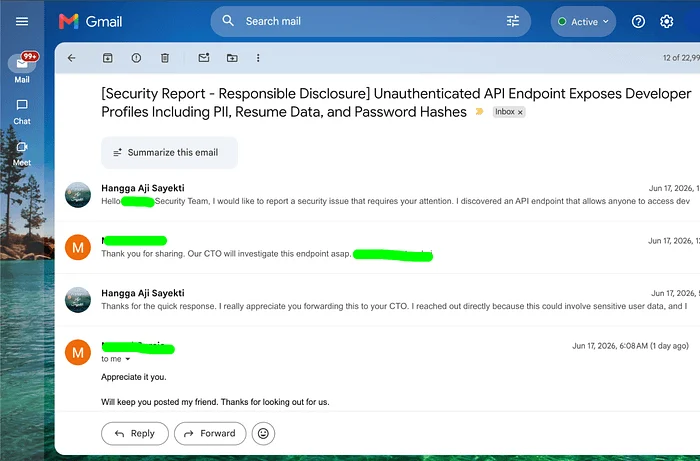
This was one of three vulnerabilities I reported to the platform during the same review. This article covers only this one; the email verification bypass has its own write-up. The reports were acknowledged quickly, investigated, and the exposed data described here was no longer accessible shortly afterwards. At the time of writing I was still waiting for the final response. Identifying details have been redacted.
Setup
The setup was deliberately minimal. I created an account with a temporary email address and explored the application as a regular user. The only tool involved was the browser: devTools to watch network traffic, and a second browser to repeat requests outside my logged-in session. No proxies, scanners or scripts were used at any point.
Finding it
I opened devTools and watched the network requests the profile page made.
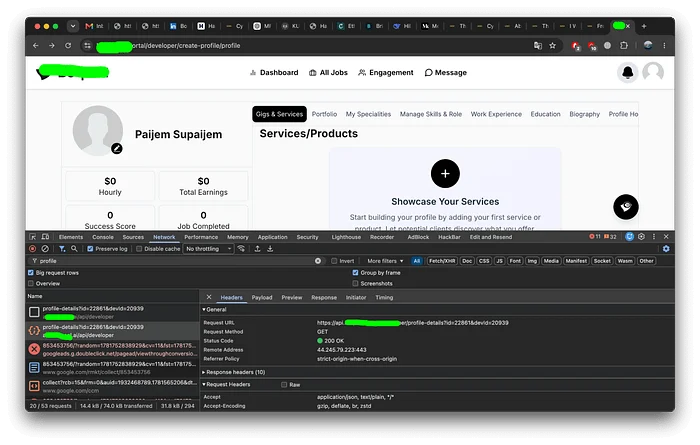
Among dozens of API calls, one endpoint stood out:
The response contained my own profile information, which on its own is unremarkable. The interesting part was the shape of the request: a profile-details endpoint, with the profile selected by an id parameter and a second parameter, devId, alongside it. Both values were plain integers in the URL.
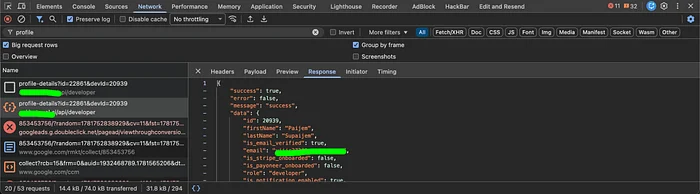
That raised the obvious question: what happens if I open this endpoint directly, outside the application?
Exploitation
Step 1: Replaying the request without a session
I copied the URL, opened a different browser, pasted it and pressed Enter.
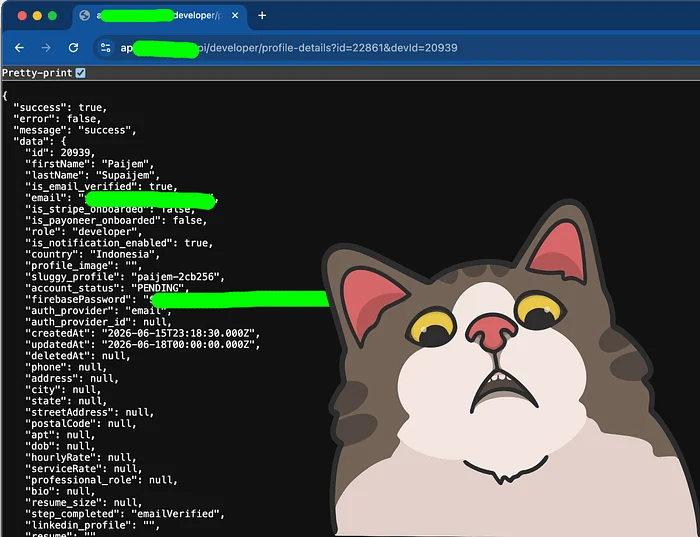
The profile loaded successfully without requiring authentication. That was unexpected, because reaching this functionality through the application normally requires the user to be logged in. I first suspected a caching issue or some frontend quirk, so I repeated the test in a clean browser session. The result was the same.
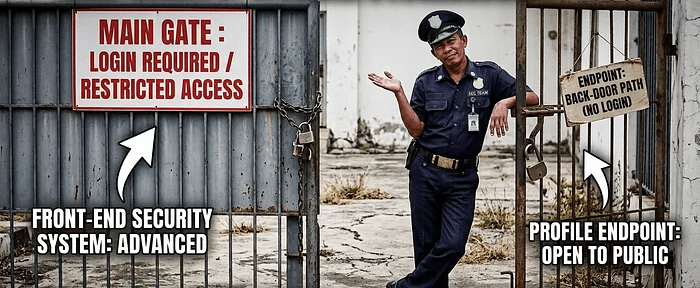
The authentication requirement existed at the application or navigation layer, but not at the endpoint responsible for serving the profile. The functionality was hidden behind an authenticated flow rather than protected by authentication at the server-side endpoint.
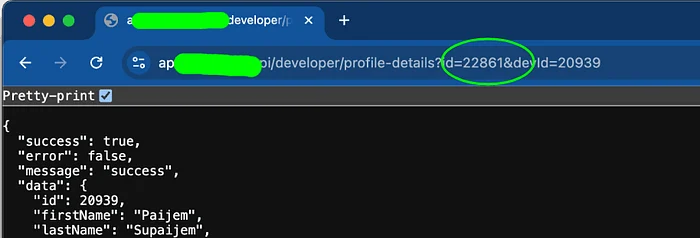
Looking more closely at the URL, I noticed that the profile identifier was a sequential integer.
Step 2: Walking the ID space
With a sequential identifier and no authentication check, the next step is to see which values return records. I started at the bottom:
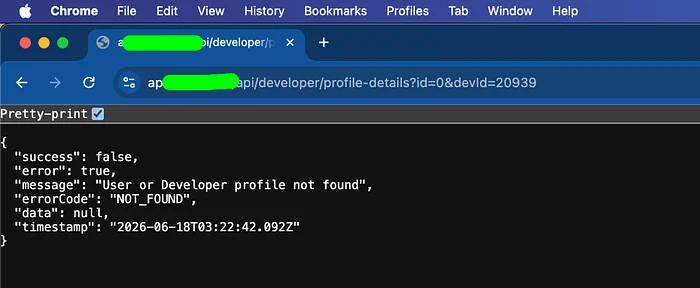
?id=0
Nothing.
Then I tried a few more low values:
?id=1  -> Nothing.
?id=2  -> Nothing.
?id=5  -> Still nothing.
?id=10 -> Valid record.
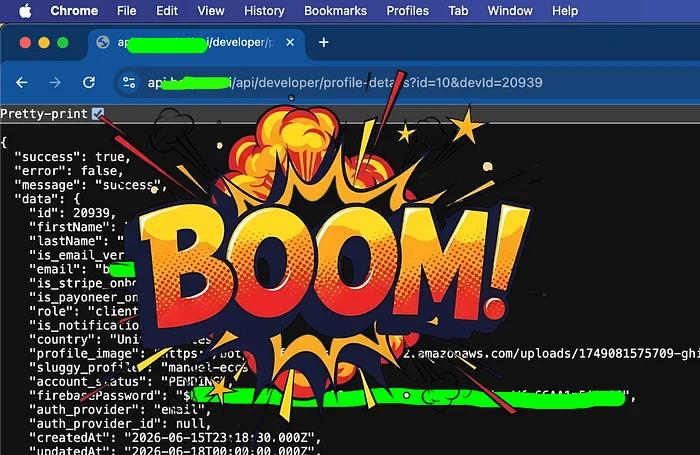
So the low end of the range was empty, and by id=10 real records were being returned.
Step 3: Establishing the scale
I tested a larger value:
?id=10000 -> Valid record.
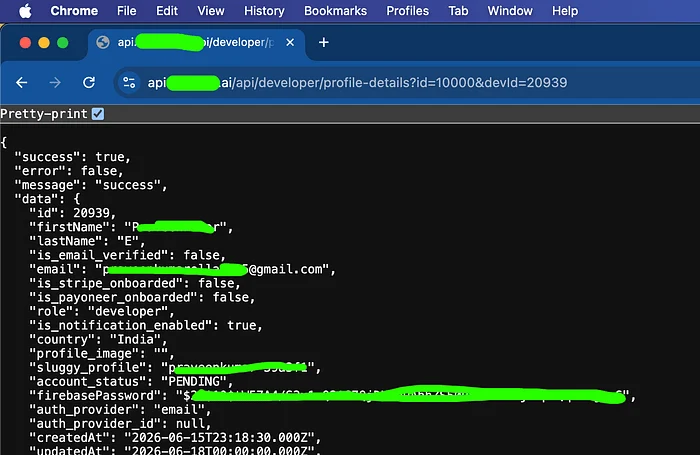
Rather than checking every value, I jumped through the ID space to gauge how far the data went:
?id=11000 -> valid.
?id=15000 -> valid.
?id=19000 -> valid.
?id=19999 -> still valid.
At that point it was clear this was not an isolated exposure. The question became how many records were actually exposed.
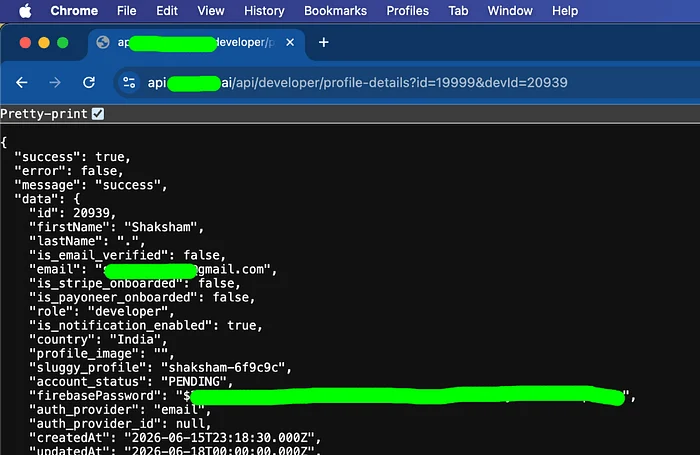

Everything up to this point had been done from a browser by editing a few URL parameters. No advanced tooling was required, just a browser and elementary-school arithmetic.

Step 4: Testing the second parameter
The endpoint also carried another parameter:
devId=20939
I initially assumed it was some kind of authorization control, so I changed it:
devId=10001
Nothing happened: the same records remained accessible. Then I found that certain values actually expanded the amount of information returned. The parameter was not restricting access at all; it was exposing more details.
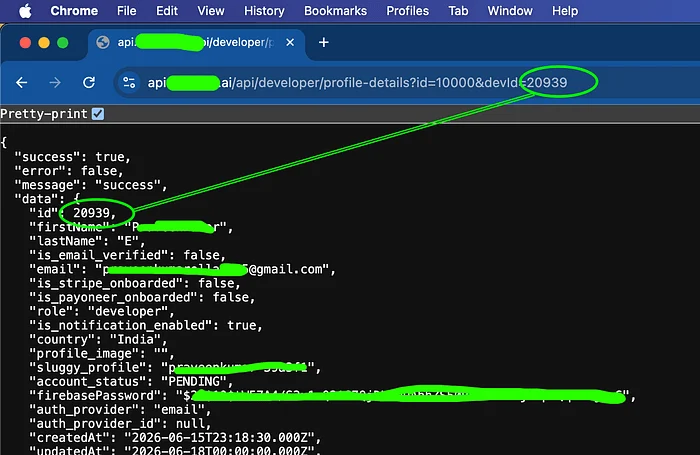
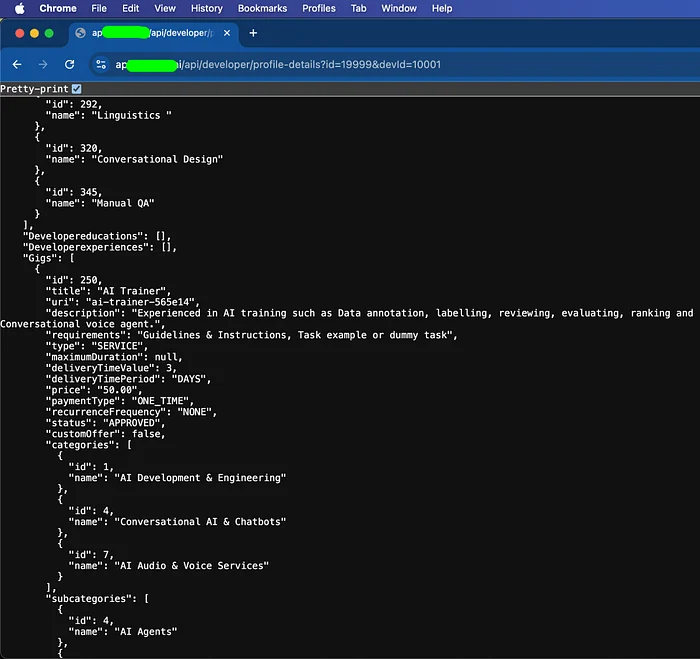
Root cause
There was no cryptography, no race condition and no authentication bypass trick. The backend returned sensitive user data without verifying whether the requester was authorized to access it: a missing authorization check. Combined with predictable integer IDs, that produced a classic enumeration vulnerability.
Sensitive Endpoint + No Authorization Check + Sequential IDs = Mass Data Exposure
The authentication requirement existed at the application or navigation layer, not at the endpoint, so anyone talking to the API directly skipped it entirely. Anyone talking to the API directly skipped it entirely. The devId parameter looked like a control but behaved as a way to widen the response, so it offered no protection either.
Impact
The exposed records contained personally identifiable information and other sensitive profile-related data. I have intentionally omitted the exact fields. Issues of this kind can enable:
- Large-scale user enumeration
- Targeted phishing campaigns
- Identity correlation
- Social engineering attacks
- Privacy violations
The key issue was not just unauthorized access; it was unauthorized access at scale, across nearly twenty thousand accessible records.
Fix
The platform acknowledged the report, investigated it, and the exposed data was no longer accessible shortly afterwards. The lesson is server-side: the endpoint must verify that the requester is authenticated and authorized to read the requested profile before returning any data, rather than relying on the frontend to gate access. Ownership and permissions should be checked on every sensitive request.
Lessons learned
- Never trust the frontend. Attackers do not use your UI; they interact directly with your APIs. Authorization must always be enforced server-side.
- Authentication is not authorization. Being logged in does not mean a user may access every resource. Ownership and permissions must be verified for every sensitive request.
- Sequential IDs make enumeration easy. Predictable identifiers are not inherently vulnerable, but combined with missing authorization checks they dramatically increase impact.
- Small mistakes become big incidents. One missing authorization check can expose a single record; enumeration turns that into thousands.
- Browser developer tools are enough. Many impactful findings do not require advanced tooling. Sometimes F12 is all you need.

One of the biggest myths in security is that major data exposures require sophisticated attackers. Sometimes everything starts with a simple question: what happens if I open this URL somewhere else? In this case that question led to nearly twenty thousand accessible records, which is exactly why security controls must live on the backend.
Variants to test
What happened, in plain words
In June 2026 I was looking at an AI freelancer marketplace: a website where companies go to find and hire AI specialists for automation projects, chatbots and AI development. The feature I was interested in was the ordinary profile page. You log in, you open your profile, and the page shows your details.
That is all the feature is supposed to do: show you your own profile, and only after you log in. What I found was that the part of the site that actually hands over the profile data never checked who was asking. On top of that, the number used to identify each profile was a simple counting number: 1, 2, 3 and so on. So anyone could read other people's profile records by changing a number in a web address, without having an account at all.
This was one of three problems I reported to the platform during the same review. This article covers only this one; the email verification bypass has its own write-up. The reports were acknowledged quickly, investigated, and the exposed data described here was no longer accessible shortly afterwards. At the time of writing I was still waiting for the final response. Identifying details have been redacted.
Before going further, a few words for readers who have never done this kind of testing. A website is really two things talking to each other: the pages you see in your browser (the frontend), and a program on the company's server that stores and returns data (the backend). They talk through an API, which is best imagined as a waiter in a restaurant. You do not walk into the kitchen and take food yourself; you tell the waiter what you want, the waiter goes to the kitchen, and the kitchen sends back a plate. An API is that waiter: your browser asks for something in a specific format, and the server answers with data. The address you ask is called an endpoint, and the extra pieces of information you attach to the address, such as id=22861, are called parameters.
When you log in, the server usually gives your browser a small piece of proof of who you are, called a session cookie or a token. Your browser sends it automatically with every request, like a wristband at an event: the door staff check it once, and after that you can move around inside. The important detail for this story is that the wristband is only useful if someone actually looks at it at the door.
Setup
The setup was deliberately minimal. I created an account with a temporary email address and explored the application as a regular user. The only tool involved was the browser: devTools to watch network traffic, and a second browser to repeat requests outside my logged-in session. No proxies, scanners or scripts were used at any point.
Two terms there. DevTools (developer tools) are built into every modern browser; you open them with F12 or a right-click and "Inspect". One of their tabs, usually called Network, lists every request the page makes behind the scenes, which is useful because the visible page hides most of that traffic. A proxy, by contrast, is a separate program that sits between your browser and the server and lets you intercept and edit traffic; a scanner is a program that automatically probes a site for weaknesses. I used neither. Everything below was done by hand in a browser.
Finding it
I opened devTools and watched the network requests the profile page made.
Among dozens of API calls, one endpoint stood out:
Line by line, in plain words:
https://is the normal, encrypted way a browser talks to a website. The padlock in the address bar relates to this.[redacted]is the site's name, removed here so the platform is not identified./api/developer/profile-detailsis the path: the specific endpoint, meaning the specific request the server understands. Reading it literally, it is the "give me the details of a developer profile" request.?marks the start of the parameters, the extra instructions attached to the request.id=22861says which profile is wanted. In my case this was my own profile's number.&separates one parameter from the next.devId=20939is a second parameter. At this point I did not know what it did.
The response contained my own profile information, which on its own is unremarkable. The interesting part was the shape of the request: a profile-details endpoint, with the profile selected by an id parameter and a second parameter, devId, alongside it. Both values were plain integers in the URL.
The word "integer" just means a whole number with no decimal part. So the whole request was saying, in effect: "give me profile number 22861, and here is 20939 for whatever that is for."
That raised the obvious question: what happens if I open this endpoint directly, outside the application?
Why ask that? Because when a page shows you data, there are two separate things that could be protecting it: the page itself (for example, it refuses to display anything unless you are logged in) and the endpoint behind it (it refuses to hand over data unless you are logged in). If only the first one is doing the work, then skipping the page and talking to the endpoint directly gets you the data. That is the whole idea I was testing.
Exploitation
Step 1: Replaying the request without a session
I copied the URL, opened a different browser, pasted it and pressed Enter.
A different browser matters because of the wristband analogy. My normal browser was still holding the session cookie from my login, so any request from it would carry proof of who I was and could succeed for that reason alone. A fresh browser has no cookie, so it is effectively a stranger with no account. If the stranger still gets the data, the endpoint is not checking anything.
The profile loaded successfully without requiring authentication. That was unexpected, because reaching this functionality through the application normally requires the user to be logged in. I first suspected a caching issue or some frontend quirk, so I repeated the test in a clean browser session. The result was the same.
A cache is a stored copy of something, kept so it can be served faster next time; a caching issue would mean I was seeing an old saved copy rather than live data. A frontend quirk would be a bug in the page's own code. Repeating the test in a clean session ruled both out: the server itself was answering.
The authentication requirement existed at the application or navigation layer, but not at the endpoint responsible for serving the profile. The functionality was hidden behind an authenticated flow rather than protected by authentication at the server-side endpoint.
In everyday terms: the profile page was behind a locked door in the lobby, but the actual records room had no lock at all. Walking through the lobby required a key; walking straight to the records room did not. "Server-side" means the check happens on the company's own machine, where a visitor cannot tamper with it, as opposed to "client-side", which means the check happens in your browser, where anyone can simply skip it.
Looking more closely at the URL, I noticed that the profile identifier was a sequential integer.
Sequential means the numbers follow one another in order: 1, 2, 3, 4 and so on, with no gaps and no randomness. This matters because it makes guessing trivial. If profile numbers were long random strings, finding someone else's record would be practically impossible; if they are 1, 2, 3, you can simply count upwards.
Step 2: Walking the ID space
With a sequential identifier and no authentication check, the next step is to see which values return records. I started at the bottom:
?id=0
This is the same request as before with only the number changed: give me profile number 0. I started at zero because it is the smallest sensible value and tells you where the numbering begins. If the answer is an error or an empty page, the range does not start there.
Nothing.
Then I tried a few more low values:
?id=1  -> Nothing.
?id=2  -> Nothing.
?id=5  -> Still nothing.
?id=10 -> Valid record.
Each line is the same request with a different number, and the arrow shows what came back. "Nothing" means no usable record: an error, an empty answer, or a refusal. "Valid record" means a real profile came back. The point of trying several small numbers is to find the lowest number that actually exists, which tells you roughly where the data starts. Here the low numbers were empty and by 10 real records were being returned.
So the low end of the range was empty, and by id=10 real records were being returned.
Step 3: Establishing the scale
I tested a larger value:
?id=10000 -> Valid record.
A single record proves the door is open. A record at number 10,000 proves the room behind it is large. That is why the next question is not "can I read one?" but "how many are there?".
Rather than checking every value, I jumped through the ID space to gauge how far the data went:
?id=11000 -> valid.
?id=15000 -> valid.
?id=19000 -> valid.
?id=19999 -> still valid.
Each line again changes only the number. Jumping in big steps rather than counting one by one is simply a matter of time: if 11,000, 15,000, 19,000 and 19,999 all return records, the data clearly extends at least that far, and you learn that in four requests instead of twenty thousand. The highest number that still works gives you an idea of the total size.
At that point it was clear this was not an isolated exposure. The question became how many records were actually exposed.
Everything up to this point had been done from a browser by editing a few URL parameters. No advanced tooling was required, just a browser and elementary-school arithmetic.
Step 4: Testing the second parameter
The endpoint also carried another parameter:
devId=20939
This is the second value from the original URL, the one whose purpose I did not know. In a request, it sits alongside id and is separated from it by &.
I initially assumed it was some kind of authorization control, so I changed it:
devId=10001
Authorization control means a check on whether you are allowed to see this particular thing, as opposed to authentication, which is only about whether you are logged in at all. My reasoning was: perhaps the server compares devId with the logged-in user and only returns the record if they match. If so, changing it should make the request fail.
Nothing happened: the same records remained accessible. Then I found that certain values actually expanded the amount of information returned. The parameter was not restricting access at all; it was exposing more details.
So the parameter that looked like a lock was not a lock. Changing it did not close the door; some values opened it wider, returning more fields in the response. A field here means one piece of data inside a record, such as a name or a phone number. This is worth pausing on: a parameter that looks like a security measure can be doing something completely different, and the only way to know is to change it and watch what happens.
Root cause
There was no cryptography, no race condition and no authentication bypass trick. The backend returned sensitive user data without verifying whether the requester was authorized to access it: a missing authorization check. Combined with predictable integer IDs, that produced a classic enumeration vulnerability.
A few of those words deserve a plain explanation. Cryptography is the mathematics of scrambling data so others cannot read it; none of that was involved here, because nothing was scrambled. A race condition is a bug where two things happening at almost the same moment interfere with each other; also not involved. An authentication bypass trick would be some clever way of fooling a login check; there was no check to fool. Enumeration means simply going through items one by one, or in jumps, to collect them: exactly what counting through profile numbers does.
Sensitive Endpoint + No Authorization Check + Sequential IDs = Mass Data Exposure
Read as a sentence: take an endpoint that returns sensitive data, add the absence of any check on who may read it, add identifiers that are easy to guess in order, and the result is sensitive data exposed in bulk. Each ingredient is ordinary on its own; together they are the problem.
The authentication requirement existed at the application or navigation layer, not at the endpoint, so anyone talking to the API directly skipped it entirely. Anyone talking to the API directly skipped it entirely. The devId parameter looked like a control but behaved as a way to widen the response, so it offered no protection either.
Impact
The exposed records contained personally identifiable information and other sensitive profile-related data. I have intentionally omitted the exact fields. Personally identifiable information, usually shortened to PII, means any data that can be tied to a specific real person: a name, an email address, a phone number and so on. Issues of this kind can enable:
- Large-scale user enumeration: building a list of who uses the platform, at scale.
- Targeted phishing campaigns: messages crafted to look convincing because the sender knows real details about the recipient.
- Identity correlation: joining pieces from one place with pieces from another to build a fuller picture of a person.
- Social engineering attacks: manipulating people into doing something, using real information to sound trustworthy.
- Privacy violations: people's details being seen by those they never gave them to.
The key issue was not just unauthorized access; it was unauthorized access at scale, across nearly twenty thousand accessible records.
Fix
The platform acknowledged the report, investigated it, and the exposed data was no longer accessible shortly afterwards. The lesson is server-side: the endpoint must verify that the requester is authenticated and authorized to read the requested profile before returning any data, rather than relying on the frontend to gate access. Ownership and permissions should be checked on every sensitive request.
In plain terms: the records room needs its own lock, checked by the server on every single request, not a locked lobby that anyone can walk around. Ownership means confirming that the record being asked for actually belongs to the person asking.
Lessons learned
- Never trust the frontend. Attackers do not use your UI; they interact directly with your APIs. Authorization must always be enforced server-side. The UI is the shop front; the API is the back door, and the back door is what gets tried.
- Authentication is not authorization. Being logged in does not mean a user may access every resource. Ownership and permissions must be verified for every sensitive request. Having a wristband gets you into the event; it does not entitle you to every room inside.
- Sequential IDs make enumeration easy. Predictable identifiers are not inherently vulnerable, but combined with missing authorization checks they dramatically increase impact.
- Small mistakes become big incidents. One missing authorization check can expose a single record; enumeration turns that into thousands.
- Browser developer tools are enough. Many impactful findings do not require advanced tooling. Sometimes F12 is all you need.
One of the biggest myths in security is that major data exposures require sophisticated attackers. Sometimes everything starts with a simple question: what happens if I open this URL somewhere else? In this case that question led to nearly twenty thousand accessible records, which is exactly why security controls must live on the backend.
Variants to test
A query string is the part of a URL after the ?; a private window is a browser window that starts without your saved cookies; 401 and 403 are standard server replies meaning "you are not logged in" and "you are not allowed".
The path is the part of the URL before the ?; the body is the content sent with a request that is not a simple read.
A batch or list endpoint is one that returns many records at once rather than a single one.
Glossary
- API: the agreed way for one program to ask another for data or actions; think of a waiter taking your order to the kitchen.
- Endpoint: the specific address and request a server understands, such as
/api/developer/profile-details. - Parameter: an extra piece of information attached to a request, such as
id=22861. - Query string: the part of a URL after the
?, holding the parameters. - GET: the request type used to read something from a server.
- Frontend: the part of a site that runs in your browser and that you see and click.
- Backend: the program on the company's server that stores data and answers requests.
- Server-side: happening on the company's server, where a visitor cannot alter it.
- Client-side: happening in your browser, where a visitor can skip or change it.
- Session cookie / token: a small piece of proof of who you are, given at login and sent with later requests; like a wristband at an event.
- Authentication: checking who you are, usually by logging in.
- Authorization: checking whether you are allowed to do or see this particular thing.
- Missing authorization check: the server hands over data without verifying that the requester is entitled to it.
- PII (personally identifiable information): data that can be tied to a specific real person, such as a name or email address.
- Integer: a whole number with no decimal part.
- Sequential: following in order, 1, 2, 3, with no gaps or randomness.
- Enumeration: going through items one by one, or in jumps, to collect them.
- DevTools: the developer tools built into a browser, opened with F12, including a Network tab that lists requests.
- Cache: a stored copy of something, kept to serve it faster next time.
- Proxy: a separate program placed between your browser and a server to intercept and edit traffic.
- Scanner: a program that automatically probes a site for weaknesses.
- Cryptography: the mathematics of scrambling data so others cannot read it.
- Race condition: a bug where two things happening at almost the same moment interfere with each other.
- Authentication bypass: a way of getting past a login check without valid credentials.
- Field: one piece of data inside a record, such as a name or a phone number.
- 401 / 403: standard server replies meaning "you are not logged in" and "you are not allowed".
- Private window: a browser window that starts without your saved cookies.
- Path: the part of a URL before the
?. - Body: the content sent along with a request that is not a simple read.
- Batch / list endpoint: an endpoint that returns many records at once rather than a single one.



