How I Could Have Shut Down Every Restaurant in Europe With One Click
An API for managing restaurant delivery areas did not check that the authenticated partner account owned the restaurant whose ID was supplied, so one restaurant could read another's delivery zones and disable or enable them. An attacker with a partner account could therefore remove delivery coverage for other restaurants, potentially at scale.
 Published on medium.com
Infosec
The full write-up lives on its author's site
It belongs to its author, so we link to it rather than copy it. The other two tabs are our own rewrites, checked against it.
Context
The write-up refers to the Partner Hub frontend, which calls a delivery-area API. One of the features it exposes is delivery-area management: an API that returns the delivery zones configured for a restaurant, and endpoints that enable or disable an individual delivery area. A delivery area determines where a restaurant can deliver, so the data is both commercially sensitive and operationally important.
The researcher was testing within an authorised bug bounty program. The frontend normally sends the authenticated restaurant's own identifier when it calls the delivery-area API, and the question that started the work was simply what happens when that identifier is replaced with somebody else's.
Setup
The write-up does not describe the tooling, the account provisioning process or any software versions. The precondition that matters is stated plainly: the attacker only needs an authenticated partner account. No access to the victim restaurant's dashboard, no login as the victim and no victim credentials are required. All identifiers in the article have been replaced with fictional values.
Finding it
The delivery-area listing endpoint looked normal at first glance. The frontend calls an API similar to:
GET /v2/deliveryarea/lists/shorts/{restaurantId}
and in normal use it sends the authenticated restaurant's own ID, for example:
GET /v2/deliveryarea/lists/shorts/12345678
The researcher replaced that ID with the ID of a different, unrelated restaurant:
GET /v2/deliveryarea/lists/shorts/87654321
The response was:
HTTP/1.1 200 OK
with delivery-area information containing objects similar to:
{ "id": 1876543210, "available": 1, "boundary": "POLYGON((24.3512 42.6901,23.3524 52.6917,24.3541 52.6912,...))"}
The account had no relationship to that restaurant, yet the API returned its delivery areas. The application was effectively trusting the restaurantId taken from the URL instead of enforcing the chain authenticated_user → authorized_restaurants → requested_restaurant. The backend was not checking that relationship.
Exploitation
Step 1: cross-tenant read
The first finding was a cross-tenant read of another restaurant's delivery configuration. The important part was not that an object came back, but that the object was another tenant's delivery setup, including the geographic boundary as polygon coordinates.
Step 2: find the write endpoints in the JavaScript bundle
Reading another restaurant's delivery areas was already interesting, but the researcher then looked at the frontend JavaScript bundle, which contained the mappings for the delivery-area API. Conceptually they looked like this:
deliveryAreas: restaurantId => smartGateway + "/v1/delivery-area/list/short/" + restaurantId
deliveryAreaEnable: areaId => smartGateway + "/v1/delivery-area/" + areaId + "/enable"deliveryAreaDisable: areaId => smartGateway + "/v1/delivery-area/" + areaId + "/disable"
That raised the next question: if another restaurant's area ID can be obtained, can it be modified too?
Step 3: take an area ID from the unauthorised read
The researcher used one of the area IDs returned by the unauthorised read. Before the test, the area's state was:
available = 1
Step 4: disable the area
PUT /v2/deliveryarea/1876543210/disable
The response was:
HTTP/1.1 204 No Content
A 204 on its own does not prove much, so the researcher queried the delivery area again. Before the request the value was available = 1; after it, the value was:
available = 0
The backend had actually changed the state. It was not a UI trick, not a cached response and not a fake success message: it was a real backend-side state transition.
Step 5: restore the state
The researcher then restored the area:
PUT /v2/deliveryarea/1876543210/enable
and verified that available = 1 again. The complete transition was:
1 → 0 → 1
Everything was restored immediately after testing.
Step 6: assess the chain
At this point the issue was no longer just "I can read another restaurant's data"; it was "I can modify another restaurant's delivery configuration". If an unauthorised user can disable a delivery area, the restaurant could potentially stop accepting deliveries from an entire geographic zone. The attacker does not need the restaurant's dashboard, does not need to log in as the victim and does not need the victim's credentials; an authenticated partner account is enough.
The delivery-area identifiers were numeric and appeared to be discoverable through the unauthorised read functionality, which produces a chain:
Restaurant ID ↓Unauthorized delivery-area lookup ↓Area ID ↓Unauthorized enable/disable
The attacker does not necessarily have to guess the area ID, because the vulnerable read endpoint provides it, which makes the write primitive considerably easier to automate.
Step 7: keep the proof of concept safe
The researcher did not perform mass exploitation. There was no reason to start randomly disabling real restaurants to produce a screenshot. The state transition was verified on a test operation and immediately restored, no attempt was made to disrupt multiple restaurants, and the security team was given reproduction steps so they could independently validate the behaviour. Once the unauthorised write has been demonstrated and the backend state change verified, continuing to cause damage adds very little security value.
Root cause
The core issue appeared to be that the gateway resolved the requested resource primarily from the identifier supplied in the request. The application had contextual information such as the authenticated account and restaurant identity, but the authorisation layer was not properly enforcing the question "does this user actually control restaurant X?". The effective logic looked much closer to a check that the caller is authenticated, while the secure model should be:
Authenticated user | vAuthorized restaurants | vRequested restaurant | + | +
That authorisation boundary was missing. The frontend was doing the right thing from a normal user-flow perspective by sending the logged-in restaurant's ID, but security cannot depend on the frontend not sending something else: an attacker does not have to behave like the frontend. If the browser sends GET /deliveryarea/lists/shorts/12345678, an attacker can send GET /deliveryarea/lists/shorts/87654321, and the backend has to decide whether the request is authorised, not the JavaScript, the UI or the user.
The write-up also notes that headers such as X-Stands-As should never be treated as a security boundary by themselves. They can be useful for application context, but authorisation must ultimately be derived from trusted server-side identity and access-control rules.
Impact
The final issue combined several problems:
- Cross-tenant authorisation bypass. An authenticated partner account could access delivery areas belonging to another restaurant.
- Sensitive geographic information disclosure. The response exposed delivery-area boundaries, including polygon/multipolygon coordinates.
- Unauthorised modification. The attacker could disable and enable delivery areas belonging to another restaurant.
- Business impact. Disabling delivery areas can affect where a restaurant is able to accept deliveries, so customers inside a disabled zone could potentially lose delivery coverage.
- Potential scalability. Because restaurant and area identifiers could be obtained and processed programmatically, the write primitive could potentially be automated across multiple targets.
Conceptually, an attacker could build a script that performs, for each restaurant, a retrieval of delivery areas, extraction of area IDs and disabling of selected areas:
for each restaurant:
retrieve delivery areas extract area IDs disable selected areas
The attack is therefore not necessarily limited to one restaurant and could potentially be scaled to affect a large number of them. The researcher stresses that this is a hypothetical worst case: no mass exploitation was performed, and the impact demonstration was deliberately kept controlled.
Fix
The obvious remediation is to enforce object-level authorisation before performing the lookup or modification:
Authenticated user ↓Resolve user's authorized restaurants ↓Check requested restaurant ↓Allow / deny
For write operations, the server should additionally verify that the requested areaId belongs to a restaurant the authenticated user is authorised to manage, something equivalent to:
areaId ↓Find owning restaurant ↓Is caller authorized for this restaurant? ↓YES → modifyNO → 403
The write-up does not say which of these changes the vendor actually made.
Variants to test
The general lesson is not to assume an ID in a URL is protected just because the UI only exposes your own ID. On other targets, the same pattern is worth probing:
- Swap the tenant identifier on read endpoints. Take any endpoint that takes a restaurant, organisation or account ID and substitute a second account's ID. A positive result is a
200containing the other tenant's objects. - Mine the JavaScript bundle for write routes. Look for mappings that build URLs from an object ID, as the enable and disable routes did here. A positive result is a write endpoint whose only apparent authorisation input is the ID in the path.
- Chain the read into the write. Use an ID obtained from an unauthorised read as the input to a modification endpoint. A positive result is a successful state change on an object you do not own, confirmed by re-reading the object rather than by the status code alone.
- Verify state changes out of band. After any
204or200, query the object again and compare the field values before and after. A positive result is a real backend transition, not a cached or cosmetic response. - Test whether identifiers are enumerable. If IDs are numeric, check whether the read endpoint can be used to collect them. A positive result is a reliable way to harvest area IDs for automation.
- Check context headers. If the application accepts headers that carry tenant or acting-as context, try changing them alongside the object ID. The write-up notes such headers must never be treated as a security boundary by themselves.
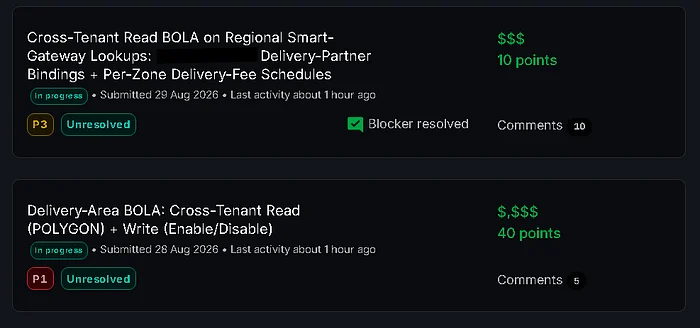
When testing, ask what object was reached, whether it is cross-tenant, what information it exposes, whether it can be modified, whether the modification has a real business effect, whether the read can be chained into the write, whether the attack can be automated and how many objects could theoretically be affected. That is where a simple IDOR can turn into a serious BOLA.
What happened, in plain words
A security researcher was testing a website that restaurants use to manage their own settings. This kind of site is often called a partner portal or partner hub: a private area where a business logs in and controls things about itself. One of the settings it manages is the restaurant's delivery area, meaning the map zone where the restaurant is willing to send food. If you switch a delivery area off, the restaurant may stop accepting orders from that whole zone.
The researcher noticed that the website asked the server for a restaurant's delivery areas by putting a restaurant number in the web address. In normal use the site always puts in your own restaurant number. The researcher tried putting in a different restaurant's number instead, and the server answered as if nothing was wrong, handing back that other restaurant's delivery zones.
That alone is a privacy problem. But then the researcher looked at the code the website sends to your browser and found two more addresses: one that switches a delivery area off and one that switches it back on. Using an area number taken from the first, unauthorised answer, the researcher switched another restaurant's delivery area off, checked that it really was off, then switched it back on. Everything was restored straight away, and no real restaurants were harmed.
The lesson is about authorisation: the server must check not only that you are logged in, but that the thing you are asking about actually belongs to you. This article walks through the whole story slowly, explaining each idea as it appears.
The setting: what a delivery area is
A restaurant that delivers food does not usually deliver everywhere. It draws a shape on a map, and only customers inside that shape can order for delivery. That shape is stored by the platform as a list of coordinates, a polygon: a closed outline made of points joined by straight lines. The platform calls each such shape a delivery area.
Each delivery area has a few pieces of information attached to it:
- an ID, a number that identifies that particular area;
- an available flag, which is
1when the area is switched on and0when it is switched off; - a boundary, the polygon coordinates describing the shape on the map.
Switching the area off is a real business action. Customers inside that shape may no longer be able to order delivery from that restaurant. So the ability to switch somebody else's area off is not a cosmetic trick; it can affect a real business.
The starting point: an API and a partner account
When you use a website, your browser and the company's server talk to each other. The part of the server that answers these conversations is often called an API (application programming interface). You can think of it as a waiter in a restaurant: you tell the waiter what you want, the waiter goes to the kitchen, and the waiter brings back the result. You never walk into the kitchen yourself, and the kitchen only reacts to what the waiter asks for.
A typical API request has three parts:
- a method, a verb saying what you want to do.
GETmeans "give me something".PUTmeans "change something". - a path, the address of the thing you want, for example
/v2/deliveryarea/lists/shorts/12345678. - sometimes a body, extra information sent along with the request.
The server answers with a status code, a three-digit number summarising what happened. 200 OK means "here is what you asked for". 204 No Content means "done, and there is nothing to send back". 403 Forbidden means "you are not allowed to do that".
To know who you are, the site gives your browser a session: after you log in, the browser stores a small piece of data (often a cookie or a token) and sends it with every request. The server looks at it and says "ah, this is restaurant 12345678". Without it, the server would treat you as a stranger.
The researcher was testing inside an authorised bug bounty program. That is an arrangement where a company invites outside people to try to break its systems, within agreed rules, and report what they find. Testing without such permission is not allowed.
The only thing the researcher needed was an ordinary, logged-in partner account. No access to the victim restaurant's dashboard, no logging in as the victim, no stolen password. That detail matters later.
Finding it: changing the number in the address
The delivery-area listing endpoint looked completely normal at first. The website calls an API similar to this:
GET /v2/deliveryarea/lists/shorts/{restaurantId}
Line by line:
GETis the method: "give me something"./v2/deliveryarea/lists/shorts/is the path.v2is just a version label.deliveryareasays which feature.lists/shortssuggests a short list of delivery areas.{restaurantId}is a placeholder. In a real request it is replaced by an actual restaurant number. The curly brackets are not sent; they just show where a value goes.
In normal use the site sends the logged-in restaurant's own number, for example:
GET /v2/deliveryarea/lists/shorts/12345678
Here 12345678 is the restaurant's own ID. The browser is asking: "give me the short list of delivery areas for restaurant 12345678".
The researcher's question was simple: what happens if that number is replaced with a different restaurant's number? So the request was changed to:
GET /v2/deliveryarea/lists/shorts/87654321
This is the same request with only the last number changed. 87654321 belongs to a different, unrelated restaurant. The researcher's account has no connection to it at all.
The server answered:
HTTP/1.1 200 OK
Line by line:
HTTP/1.1is the version of the web protocol being used.200is the status code meaning success.OKis the human-readable label for200.
So the server did not refuse. It said "here you go". The answer contained delivery-area information with objects similar to this:
{ "id": 1876543210, "available": 1, "boundary": "POLYGON((24.3512 42.6901,23.3524 52.6917,24.3541 52.6912,...))"}
Line by line:
- The outer curly brackets
{ ... }mark one object, a bundle of named values. The format is JSON, a common way for servers to send structured data. "id": 1876543210is the delivery area's own number. This is the number that will be needed later to switch the area on or off."available": 1means the area is currently switched on.1means on,0means off."boundary": "POLYGON((...))"is the shape of the delivery zone on the map, written as a list of coordinate pairs. The...shows the list continues; the article does not print the whole thing.
The researcher's account had no relationship to restaurant 87654321, yet the server returned its delivery areas. The server was trusting the number in the address instead of checking the chain "who is logged in, which restaurants do they control, is the requested restaurant one of them?". That check was missing.
The first finding: reading another restaurant's data
The first finding is called a cross-tenant read. A tenant is one customer of a shared platform: here, each restaurant is a tenant. "Cross-tenant" means reaching data that belongs to a different tenant than the one you are logged in as.
The important part is not simply that some object came back. It is that the object was another restaurant's delivery setup, including the geographic boundary as polygon coordinates. That is sensitive geographic information: it shows the shape of another restaurant's delivery zone.
Looking at the website's own code
Reading another restaurant's delivery areas was already interesting. But the researcher then looked at the JavaScript bundle. When you open a website, your browser downloads files containing code, and that code runs in your browser to make the page work. This is called the frontend, the part you can see and interact with. The bundle is simply those files bundled together.
Inside that code were the mappings for the delivery-area API: the recipes the website uses to build the addresses it calls. Conceptually they looked like this:
deliveryAreas: restaurantId => smartGateway + "/v1/delivery-area/list/short/" + restaurantId
Line by line:
deliveryAreas:is the name of this recipe.restaurantId =>means "given a restaurant number, produce the following".smartGateway +is a base address, a common starting point for API calls. The article does not say what it actually is."/v1/delivery-area/list/short/" +is a fixed piece of the address, glued on with+.restaurantIdis the number glued on at the end.
So this recipe builds an address by taking a fixed prefix and adding a restaurant number. The next two recipes are the interesting ones:
deliveryAreaEnable: areaId => smartGateway + "/v1/delivery-area/" + areaId + "/enable"deliveryAreaDisable: areaId => smartGateway + "/v1/delivery-area/" + areaId + "/disable"
Line by line:
deliveryAreaEnable:is the recipe for switching an area on.areaId =>means "given an area number, produce the following".smartGateway +is the same base address as before."/v1/delivery-area/" +is a fixed prefix.areaId +is the area number glued in the middle."/enable"is the fixed ending. The result is an address that switches that area on.deliveryAreaDisable:is the same idea for switching an area off, ending in"/disable".
These two recipes raised the next question: if another restaurant's area number can be obtained, can that area be modified too? The read gave the area number; these recipes showed where to send it.
Taking an area number from the unauthorised read
The researcher used one of the area numbers returned by the unauthorised read. Before the test, the area's state was:
available = 1
Line by line:
availableis the flag saying whether the area is switched on.= 1means it is currently on.
This is the "before" snapshot. It is recorded first so that any change afterwards can be proven.
Switching the area off
The researcher sent:
PUT /v2/deliveryarea/1876543210/disable
Line by line:
PUTis the method meaning "change something". It is not a read; it is an instruction to modify./v2/deliveryarea/is the path prefix.1876543210is the area number, taken from the unauthorised read./disableis the action: switch this area off.
The server answered:
HTTP/1.1 204 No Content
Line by line:
HTTP/1.1is the protocol version.204is the status code meaning "done, nothing to send back".No Contentis the label for204.
A 204 on its own does not prove much. A server can say "done" without actually doing anything, or the page could be showing a fake success message. So the researcher queried the delivery area again. Before the request the value was available = 1; after it, the value was:
available = 0
Line by line:
availableis the same flag as before.= 0means it is now switched off.
The backend, the part of the system that stores and changes the real data, had actually changed the state. It was not a UI trick, not a cached response and not a fake success message: it was a real backend-side state transition. The researcher's account had just switched off a delivery area belonging to a restaurant it had nothing to do with.
Putting it back
The researcher then restored the area:
PUT /v2/deliveryarea/1876543210/enable
Line by line:
PUTagain means "change something"./v2/deliveryarea/is the path prefix.1876543210is the same area number./enableis the opposite action: switch this area back on.
and verified that available = 1 again. The complete transition was:
1 → 0 → 1
Line by line:
1is the state before any test: switched on.→ 0is the unauthorised change: switched off.→ 1is the restoration: switched back on.
Everything was restored immediately after testing. This is how a careful researcher behaves: prove the change is real, then undo it.
What the chain means
At this point the issue was no longer just "I can read another restaurant's data". It was "I can modify another restaurant's delivery configuration". If an unauthorised user can switch a delivery area off, the restaurant could potentially stop accepting deliveries from an entire geographic zone. Customers inside that zone could lose delivery coverage.
The attacker does not need the restaurant's dashboard, does not need to log in as the victim and does not need the victim's credentials. An ordinary logged-in partner account is enough.
The delivery-area numbers were numeric and appeared to be discoverable through the unauthorised read functionality. That produces a chain:
Restaurant ID ↓Unauthorized delivery-area lookup ↓Area ID ↓Unauthorized enable/disable
Line by line:
Restaurant IDis the starting point: a restaurant number.↓ Unauthorized delivery-area lookupmeans using the read endpoint without permission to fetch that restaurant's delivery areas.↓ Area IDmeans taking an area number out of the answer.↓ Unauthorized enable/disablemeans using that area number on the switch endpoints without permission.
The attacker does not necessarily have to guess the area number, because the vulnerable read endpoint provides it. That makes the write step considerably easier to automate.
Keeping the proof safe
The researcher did not perform mass exploitation. There was no reason to start randomly switching off real restaurants just to produce a screenshot. The state transition was verified on a test operation and immediately restored, no attempt was made to disrupt multiple restaurants, and the security team was given reproduction steps so they could independently validate the behaviour.
Once the unauthorised write has been demonstrated and the backend state change verified, continuing to cause damage adds very little security value. A useful comparison: you do not need to burn down the house to prove that the petrol is flammable. A small, controlled flame and a clear explanation are enough.
Why it happened
The core issue appeared to be that the gateway resolved the requested resource primarily from the identifier supplied in the request. A gateway is a piece of software that sits in front of the actual services and forwards requests to them. It was taking the number from the address and fetching whatever that number pointed at.
The application did have contextual information: it knew which account was logged in and which restaurant that account belonged to. But the authorisation layer, the part responsible for deciding who may do what, was not properly enforcing the question "does this user actually control restaurant X?". The effective logic looked much closer to a check that the caller is logged in at all, while the secure model should be:
Authenticated user | vAuthorized restaurants | vRequested restaurant | + | +
Line by line:
Authenticated useris the account making the request, proven by its session.| v Authorized restaurantsmeans: look up which restaurants that account is allowed to manage.| v Requested restaurantmeans: compare that list with the restaurant named in the request.| + | +represents the decision point: allow only if the requested restaurant is in the authorised list.
That authorisation boundary was missing. The frontend was doing the right thing from a normal user-flow perspective by sending the logged-in restaurant's number, but security cannot depend on the frontend not sending something else. An attacker does not have to behave like the frontend. If the browser sends GET /deliveryarea/lists/shorts/12345678, an attacker can send GET /deliveryarea/lists/shorts/87654321, and the backend has to decide whether the request is authorised, not the JavaScript, the UI or the user.
The write-up also notes that headers such as X-Stands-As should never be treated as a security boundary by themselves. A header is a small labelled value sent alongside a request, like a note attached to the envelope. X-Stands-As looks like a note saying "act as this other party". Such notes can be useful for application context, but authorisation must ultimately be derived from trusted server-side identity and access-control rules, not from something the caller can write on the envelope.
How serious it was
The final issue combined several problems:
- Cross-tenant authorisation bypass. An authenticated partner account could access delivery areas belonging to another restaurant. "Bypass" means getting past a check that should have stopped you.
- Sensitive geographic information disclosure. The response exposed delivery-area boundaries, including polygon and multipolygon coordinates. A multipolygon is simply several polygons grouped together, for a zone made of separate pieces.
- Unauthorised modification. The attacker could switch delivery areas belonging to another restaurant off and on.
- Business impact. Switching delivery areas off can affect where a restaurant is able to accept deliveries, so customers inside a disabled zone could potentially lose delivery coverage.
- Potential scalability. Because restaurant and area numbers could be obtained and processed programmatically, the write step could potentially be automated across multiple targets.
Conceptually, an attacker could build a script that performs, for each restaurant, a retrieval of delivery areas, extraction of area numbers and switching off of selected areas:
for each restaurant:
Line by line:
for each restaurant:means repeat the following steps once for every restaurant in a list.
retrieve delivery areas extract area IDs disable selected areas
Line by line:
retrieve delivery areasmeans call the read endpoint for that restaurant.extract area IDsmeans pull the area numbers out of the answer.disable selected areasmeans call the switch-off endpoint for the chosen area numbers.
The attack is therefore not necessarily limited to one restaurant and could potentially be scaled to affect a large number of them. The researcher stresses that this is a hypothetical worst case: no mass exploitation was performed, and the impact demonstration was deliberately kept controlled.
How to fix it
The obvious remediation is to enforce object-level authorisation before performing the lookup or modification. Object-level authorisation means checking, for the specific thing being asked about, whether this user is allowed to touch it:
Authenticated user ↓Resolve user's authorized restaurants ↓Check requested restaurant ↓Allow / deny
Line by line:
Authenticated useris the account making the request.↓ Resolve user's authorized restaurantsmeans look up the list of restaurants this account may manage.↓ Check requested restaurantmeans compare the restaurant named in the request against that list.↓ Allow / denymeans proceed only if it matches, and refuse otherwise.
For write operations, the server should additionally verify that the requested areaId belongs to a restaurant the authenticated user is authorised to manage, something equivalent to:
areaId ↓Find owning restaurant ↓Is caller authorized for this restaurant? ↓YES → modifyNO → 403
Line by line:
areaIdis the delivery area number from the request.↓ Find owning restaurantmeans look up which restaurant that area belongs to.↓ Is caller authorized for this restaurant?means check whether the logged-in account may manage that restaurant.↓ YES → modifymeans if the check passes, carry out the change.NO → 403means if it fails, refuse with status code403 Forbidden.
The write-up does not say which of these changes the vendor actually made.
Other places to look for the same pattern
The general lesson is not to assume a number in a web address is protected just because the interface only shows you your own number. On other targets, the same pattern is worth probing:
- Swap the tenant identifier on read endpoints. Take any endpoint that takes a restaurant, organisation or account number and substitute a second account's number. A positive result is a
200containing the other tenant's objects. - Mine the JavaScript bundle for write routes. Look for recipes that build addresses from an object number, as the enable and disable routes did here. A positive result is a write endpoint whose only apparent authorisation input is the number in the path.
- Chain the read into the write. Use a number obtained from an unauthorised read as the input to a modification endpoint. A positive result is a successful state change on an object you do not own, confirmed by re-reading the object rather than by the status code alone.
- Verify state changes out of band. After any
204or200, query the object again and compare the field values before and after. A positive result is a real backend transition, not a cached or cosmetic response. - Test whether identifiers are enumerable. If numbers are numeric, check whether the read endpoint can be used to collect them. A positive result is a reliable way to harvest area numbers for automation.
- Check context headers. If the application accepts headers that carry tenant or acting-as context, try changing them alongside the object number. The write-up notes such headers must never be treated as a security boundary by themselves.
When testing, ask what object was reached, whether it is cross-tenant, what information it exposes, whether it can be modified, whether the modification has a real business effect, whether the read can be chained into the write, whether the attack can be automated and how many objects could theoretically be affected. That is where a simple IDOR can turn into a serious BOLA.
Glossary
- API: the part of a server that answers requests from software, like a waiter taking orders to a kitchen.
- Authorisation: deciding whether a logged-in user is allowed to do a particular thing, as opposed to merely being logged in.
- Authorised bug bounty program: an arrangement where a company invites outside researchers to test its systems within agreed rules and report findings.
- Backend: the part of a system that stores and changes the real data, as opposed to what you see in the browser.
- BOLA: broken object level authorisation, a vulnerability where the server does not check that the specific object requested belongs to the caller.
- Boundary: the polygon coordinates describing the shape of a delivery zone on a map.
- Bug bounty: a program that rewards people for reporting security problems they find, within agreed rules.
- Cache: a stored copy of an earlier answer, served again to save time; a cached answer can look like a change when nothing changed.
- Cookie: a small piece of data a site stores in your browser and sends back with each request, often used to remember who you are.
- Cross-tenant: reaching data that belongs to a different customer of the same shared platform.
- Delivery area: the map zone where a restaurant is willing to deliver food.
- Endpoint: one specific address on an API that performs one specific job.
- Enumerable: able to be listed or walked through one by one, for example sequential numbers.
- Frontend: the part of a website that runs in your browser and that you see and interact with.
- Gateway: software that sits in front of the actual services and forwards requests to them.
- GET: the request method meaning "give me something".
- Header: a small labelled value sent alongside a request, like a note on an envelope.
- HTTP: the protocol browsers and servers use to exchange requests and responses.
- ID: a number or string that identifies one particular thing, such as a restaurant or a delivery area.
- IDOR: insecure direct object reference, a vulnerability where changing an identifier in a request gives access to somebody else's object.
- JavaScript bundle: the file or files of browser code a website downloads to make its pages work.
- JSON: a common text format for structured data, built from named values inside curly brackets.
- Method: the verb of a request, such as
GETto read orPUTto change. - Multipolygon: several polygons grouped together, for a zone made of separate pieces.
- Object: one item of data, such as one delivery area, with its own fields.
- Object-level authorisation: checking, for the specific object being requested, whether this user is allowed to touch it.
- Partner account: an ordinary login for a business that uses the platform, here a restaurant.
- Partner Hub: the private area where restaurants log in to manage their own settings.
- Path: the address part of a request saying which thing you want.
- Polygon: a closed shape on a map made of points joined by straight lines.
- Proof of concept (PoC): a small, controlled demonstration that a vulnerability is real.
- PUT: the request method meaning "change something".
- Remediation: the fix that removes the vulnerability.
- Reproduction steps: the exact sequence someone else can follow to see the same behaviour.
- Request: a message your browser or tool sends to a server asking it to do something.
- Response: the message the server sends back.
- Session: the server's memory of who you are after you log in, kept alive by a cookie or token sent with each request.
- State transition: a real change from one stored value to another, such as
availablegoing from1to0. - Status code: the three-digit number in a response summarising what happened, such as
200,204or403. - Tenant: one customer of a shared platform; here, each restaurant.
- Token: a piece of data proving who you are, sent with requests in place of or alongside a cookie.
- UI: the user interface, the visible part of a site you click and type into.
- Write primitive: the basic ability to change data on the server, which can then be repeated or automated.
- X-Stands-As: a header that appears to carry acting-as context; the write-up notes it must never be treated as a security boundary by itself.
- 204 No Content: status code meaning the request succeeded and there is nothing to send back.
- 200 OK: status code meaning the request succeeded and the answer follows.
- 403 Forbidden: status code meaning you are not allowed to do that.



