How I Discovered an API Authorization Flaw Exposing 100+ User Phone Numbers and Sensitive Campaign…
An API endpoint that returned campaign details also disclosed referral records belonging to many other users, including over a hundred phone numbers and campaign budget figures. An attacker with a normal account could read other users' personal data and internal financial information by requesting the campaign endpoint.

Bug Bounty
The full write-up lives on its author's site
It belongs to its author, so we link to it rather than copy it. The other two tabs are our own rewrites, checked against it.
Context
The target was a subdomain of MTN Group, a program on HackerOne. The author deliberately withholds the actual domain, asset and vulnerable endpoints, so the only description of the asset is that the application appeared to be related to campaigns and promotional activities. The hint is left deliberately vague for OSINT and recon purposes.
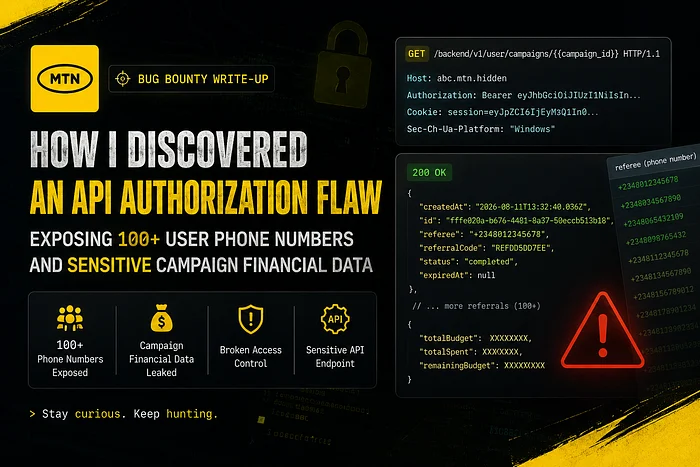
The feature at the centre of the finding is Campaigns. A user can enrol in an available campaign, and the functionality allows users to generate referrals and earn rewards. To generate a referral, the user enters the phone number of the person they want to refer. The application then exposes, through its backend API, referral records and campaign financial data.
Setup
- The author picked the program by looking through HackerOne programs, choosing MTN Group because it had a good number of reports.
- Recon started with Google dorking around the MTN domain, using the pattern
site:mtn.hidden "login", which led to a subdomain. - Visiting the subdomain redirected to the application's login page.
- An account was created through the signup functionality and then logged in.
- Burp Suite was running in the background for the whole session, capturing requests while the application was used normally.
The author's stated criteria for choosing a program are worth recording because they frame the approach:
- Huge total number of reports: an active history with researchers.
- Program activity: whether other hackers are actively hunting on the same program.
- Response efficiency: how long the program usually takes to respond to reports.
- Scope: how large the scope is, since a bigger and wider scope means a bigger attack surface.
No versions, headers beyond those shown below, or specific tool versions are given.
Finding it
After logging in, the author clicked through everything to understand what each piece of functionality does. The Campaigns feature was enrolled in, and its functionality was tested while Burp Suite recorded traffic. After some normal testing, the requests generated by the application were reviewed in Burp Suite, and one request stood out.
What made it stand out was the amount of information returned. The response was disclosing referral information belonging to multiple users, including 100+ phone numbers, along with other referral-related information. It also disclosed sensitive campaign information.
Exploitation
Step 1: Capture the campaign request
While reviewing the recorded traffic, the author noticed this request:
GET /backend/v1/user/campaigns/{{campaign_id}} HTTP/1.1Host: [REDACTED]Cookie: [COOKIE]Sec-Ch-Ua-Platform: "Windows"Authorization: [TOKEN]
The request is a GET against a versioned backend path, /backend/v1/user/campaigns/{{campaign_id}}, with the campaign identifier in the path. It carries the session cookie and an Authorization token, so it is an authenticated request made as the logged-in user. The Sec-Ch-Ua-Platform header shows the request came from a Windows browser.
Step 2: Inspect the response
The response contained data similar to:
{ "createdAt": "2026-08-11T13:32:40.036Z", "updatedAt": "2026-08-11T13:34:00.000Z", "id": "[CAMPAIGN_ID]", "referee": "[PHONE_NUMBER]", "referralCode": "REFDD5DD7EE", "status": "completed", "expiredAt": null}
The object describes a single referral: when it was created and updated, the campaign id, the referee field holding a phone number, a referralCode, a status of completed, and a null expiredAt. The referee field is the phone number of the person who was referred, which is exactly the personal data a user supplies when generating a referral.
Step 3: Note the financial fields
There was much more information in the response, including campaign-related financial information such as:
{ "totalBudget": "XXXXXXX", "totalSpent": "XXXXXX", "remainingBudget": "XXXXXXX"}
These three fields expose the total campaign budget, the amount already spent, and the remaining campaign budget. The values are redacted in the write-up, but the field names and their meaning are clear.
Step 4: Recognise the scale
The problem became obvious when looking at the amount of information being returned. The API response was disclosing referral information belonging to multiple users, including 100+ phone numbers, along with other referral-related information. On top of the personal information exposure, the response also disclosed sensitive campaign information:
- Total campaign budget
- Amount already spent
- Remaining campaign budget
- Referral information
The author does not show how the campaign identifier was obtained or whether it was changed between requests, and does not describe any attempt to enumerate other campaigns. The write-up explains the methodology and the vulnerability at a high level only.
Root cause
The report does not describe the server-side code, so the exact mistake is not stated. What the behaviour shows is that an authenticated request for a campaign resource returns referral records for multiple users, including their phone numbers, rather than only the records belonging to the requesting user. The path contains user, yet the response returned referral information belonging to multiple users.
The request is authenticated with a cookie and an Authorization token, so authentication was in place; the failure is in authorisation and in data minimisation at the object level. The report does not say whether any role or permission check existed on the endpoint.
Impact
An authenticated user who can reach the campaign endpoint could obtain referral information belonging to multiple users, including 100+ phone numbers. The same response disclosed the campaign's total budget, amount already spent and remaining budget. The author frames this as personal information exposure combined with disclosure of sensitive campaign financial data.
The domain, asset and endpoints are withheld, and the program is identified only as MTN Group on HackerOne.
Fix
Based on the behaviour described, the response should be scoped to the requesting user's own referrals, and the campaign budget fields should not be returned to ordinary users at all unless the caller is authorised to see them.
Variants to test
- Object-level authorisation on user-scoped paths. Take any endpoint shaped like
/user/<resource>/<id>and compare what comes back with what the account owns. A positive result is a response containing records, identifiers or personal data belonging to other accounts. - Referral and invite features. Any feature where a user enters another person's phone number or email address is a candidate: check whether the listing or detail response returns other users' entries. A positive result is a response with entries you did not create.
- Financial fields in shared objects. Look for budget, spend or balance fields in responses to non-privileged users. A positive result is a response where an ordinary account receives campaign or account financial totals it has no role to see.
- Identifier substitution. Where a campaign or object id appears in a path, request the same endpoint with ids you did not obtain from your own session, if the program's scope and rules allow it. A positive result is a successful response for an object you do not own.
- Response size as a signal. Watch for responses noticeably larger than the UI needs; the extra fields are often the finding, as happened here with the referral list and budget values.
What happened, in plain words
A security researcher was looking for a bug bounty program to work on. Bug bounty programs are run by companies that invite independent researchers to test their systems and report problems, often paying a reward for valid findings. The researcher chose a program belonging to MTN Group, hosted on a platform called HackerOne. He found a subdomain (a smaller section of the company's website, like a branch office of a large building) that seemed to be about campaigns and promotional activities. He signed up for an account, joined a campaign, and used a tool called Burp Suite to record the traffic between his browser and the server. While reviewing that traffic, he noticed that one request was returning referral information belonging to multiple users, including more than 100 phone numbers, plus the campaign's budget figures. That is the bug: the server was handing out data it should have kept private. This article walks through the same story step by step, explaining every technical term along the way.
Background: what the researcher was doing
The researcher had not published a write-up in a while and wanted to get back into hunting seriously. He browsed programs on HackerOne and picked MTN Group because, as he remembers it, the program had a good number of reports. A program with many reports is one where researchers have been active, which usually means the company takes reports seriously and responds to them.
He lists four criteria he uses when choosing a program:
- Huge total number of reports: this tells him the program has an active history with researchers.
- Program activity: are other hackers actively hunting on the same program?
- Response efficiency: how long does the program usually take to respond to reports?
- Scope: how large is the scope?
Scope is the list of systems a program allows you to test. A bigger and wider scope means a bigger attack surface, which simply means there are more doors and windows to try. Testing outside the scope is not allowed, so the scope also defines the boundaries of what is fair game.
He then started with Google dorking. Google dorking means using special search operators in Google to find pages that ordinary searches would not surface, for example pages that mention a particular word. He used this pattern:
site:mtn.hidden "login"
Here is what each part means:
site:tells Google to only return results from a particular website or domain. The domain in the pattern is written asmtn.hidden, which is a placeholder: the researcher is not revealing the real domain."login"in quotes asks Google for pages containing that exact word.
So the search was asking Google: show me pages on this domain that contain the word login. This led him to a subdomain. A subdomain is a prefix added to a domain name, for example shop.example.com is a subdomain of example.com. Companies often have many subdomains for different services, and older or less-known ones are sometimes forgotten.
The subdomain itself was not rich in functionality, but he did not ignore it. From what he could see, the application appeared to be related to campaigns and promotional activities. He deliberately keeps the exact type of asset vague, saying that anyone good at OSINT and recon could probably identify it. OSINT stands for open-source intelligence: gathering information from publicly available sources. Recon, short for reconnaissance, is the phase of exploring a target before attacking it, like studying the layout of a building before trying the doors.
When he visited the subdomain, he was redirected to the application's login page. A redirect is when a server answers a request by telling the browser to go to a different address instead.
Setting up an account and recording traffic
He created an account through the signup functionality and logged in. This matters because most of what follows only works from inside an account: the server needs to know who is asking before it answers.
At this point he started clicking through everything to understand what each piece of functionality does. This is a normal first step: before you can tell what is wrong, you need to know what is right.
While going through the application, he came across a feature called Campaigns. He enrolled in one of the available campaigns and started testing its functionality. The functionality basically allows users to generate referrals and earn rewards. A referral is when you recommend someone, for example by giving a company a friend's phone number so that the friend can be contacted or signed up. To generate a referral, the user enters the phone number of the person they want to refer. The company then rewards the user for the successful recommendation.
Throughout all of this, Burp Suite was running in the background. Burp Suite is a tool that sits between your browser and the server, like a recording device on a phone line. It captures every request your browser sends and every response the server sends back, so you can read them afterwards. Without such a tool, this traffic is invisible: your browser sends it and you never see it.
Finding the request
After some normal testing, he went back to Burp Suite and started reviewing the requests the application had generated. That is when he noticed an interesting request:
GET /backend/v1/user/campaigns/{{campaign_id}} HTTP/1.1Host: [REDACTED]Cookie: [COOKIE]Sec-Ch-Ua-Platform: "Windows"Authorization: [TOKEN]
This block is written in HTTP, the language browsers and servers use to talk to each other. Here is what each line means:
GET /backend/v1/user/campaigns/{{campaign_id}} HTTP/1.1is the request line.GETis the method: it means "give me something", as opposed to sending data. The path/backend/v1/user/campaigns/{{campaign_id}}is the address of the thing being asked for.backendsuggests this is the server side of the application rather than a web page.v1is a version number in the address, so the company can change the API later without breaking older clients.usersuggests the endpoint is meant to be about the logged-in user.campaigns/{{campaign_id}}points at one specific campaign, identified by an id. The{{campaign_id}}is a placeholder: the real value is not shown.HTTP/1.1is the version of the protocol.Host: [REDACTED]names the server being contacted. The real hostname is hidden.Cookie: [COOKIE]carries the session cookie. A cookie is a small piece of data the server gives your browser after you log in, and your browser sends it back with every request so the server can recognise you. Think of it as a wristband you get at an event: it proves you already checked in. The actual value is hidden because anyone holding it could act as the logged-in user.Sec-Ch-Ua-Platform: "Windows"is a header in which the browser tells the server what operating system it runs on. Here it says Windows. A header is a labelled line of extra information attached to a request or response.Authorization: [TOKEN]carries a token, another credential that proves who is making the request. A token is like a temporary key card: the server issues it after login and checks it on each request. The value is hidden.
So this is an authenticated request: it carries credentials, and it is made as the logged-in user. The path says user, which suggests the server intends to return data belonging to that user.
Reading the response
The response contained data similar to:
{ "createdAt": "2026-08-11T13:32:40.036Z", "updatedAt": "2026-08-11T13:34:00.000Z", "id": "[CAMPAIGN_ID]", "referee": "[PHONE_NUMBER]", "referralCode": "REFDD5DD7EE", "status": "completed", "expiredAt": null}
This is JSON, a text format for structured data. It is just labelled values inside curly braces, and it is the usual way an API answers. An API, short for application programming interface, is the part of a website that serves data to the application rather than drawing pages for humans. When you click a button and the page updates without reloading, your browser is usually talking to an API behind the scenes. Think of the website as a waiter and the API as the kitchen: you order through the waiter, but the food comes from the kitchen, and the kitchen has its own rules about what it will hand out.
Line by line:
createdAtis when the record was created, in a standard date and time format ending inZ, which means UTC, a common world time reference.updatedAtis when the record was last changed.idis the identifier of the campaign. The real value is replaced with[CAMPAIGN_ID].refereeis the person who was referred. Its value is a phone number, hidden here as[PHONE_NUMBER]. This is the key field: it is exactly the personal data a user supplies when generating a referral.referralCodeis a code associated with the referral, shown asREFDD5DD7EE.statusiscompleted, meaning the referral reached its final state.expiredAtisnull, meaning no expiry date is set.
On its own, one record like this would be normal: it describes a referral. The problem is what else came back and how much of it.
The financial fields
There was much more information in the response, including campaign-related financial information such as:
{ "totalBudget": "XXXXXXX", "totalSpent": "XXXXXX", "remainingBudget": "XXXXXXX"}
These three fields are:
totalBudget: the total budget of the campaign. The value is redacted asXXXXXXX.totalSpent: how much has already been spent. The value is redacted asXXXXXX.remainingBudget: how much budget is left. The value is redacted asXXXXXXX.
The numbers are hidden, but the field names make their meaning clear. Budget figures are business information: a company does not normally publish how much it is spending on a promotion, and an ordinary user of a referral feature has no reason to see it.
Why this is a vulnerability
The problem became obvious when he looked at the amount of information being returned. The API response was disclosing referral information belonging to multiple users, including 100+ phone numbers, along with other referral-related information. On top of the personal information exposure, the response also disclosed sensitive campaign information:
- Total campaign budget
- Amount already spent
- Remaining campaign budget
- Referral information
This is an authorisation flaw. Authentication and authorisation are two different things, and beginners often mix them up. Authentication answers the question "who are you?": logging in with a username and password is authentication. Authorisation answers the question "what are you allowed to do and see?": even a logged-in user should only reach their own data. Here, authentication was working: the request carried a cookie and a token, and the server knew who was asking. The failure was in authorisation: the server returned records belonging to other people anyway.
The path of the request even says user, which suggests the endpoint was designed to return the requesting user's own data. Yet the response was not limited to that user's referrals. The report does not show the server code, so the exact mistake is not stated. The same response also carries the campaign's budget fields.
There is a second idea here: data minimisation. This means sending only the data the caller actually needs. Even if a user is allowed to see their own referral, they do not need the phone numbers of a hundred other people, and they certainly do not need the campaign's budget.
What the report does not say
The write-up explains the methodology and the vulnerability at a high level only. It does not show how the campaign identifier was obtained, whether it was changed between requests, or any attempt to enumerate other campaigns. The domain, asset and endpoints are withheld, and the program is identified only as MTN Group on HackerOne.
How this could be fixed
Based on the behaviour described, the response should be limited to the requesting user's own referrals, and the campaign budget fields should not be returned to ordinary users at all unless the caller is authorised to see them.
Similar things to look for
These are patterns worth checking on any application you are allowed to test:
- Object-level authorisation on user-scoped paths. Take any endpoint shaped like
/user/<resource>/<id>and compare what comes back with what the account owns. A positive result is a response containing records, identifiers or personal data belonging to other accounts. - Referral and invite features. Any feature where a user enters another person's phone number or email address is a candidate: check whether the listing or detail response returns other users' entries. A positive result is a response with entries you did not create.
- Financial fields in shared objects. Look for budget, spend or balance fields in responses to non-privileged users. A positive result is a response where an ordinary account receives campaign or account financial totals it has no role to see.
- Identifier substitution. Where a campaign or object id appears in a path, request the same endpoint with ids you did not obtain from your own session, if the program's scope and rules allow it. A positive result is a successful response for an object you do not own.
- Response size as a signal. Watch for responses noticeably larger than the UI needs; the extra fields are often the finding, as happened here with the referral list and budget values.
Glossary
- API: the part of a website that serves data to the application rather than drawing pages for humans; the kitchen behind the waiter.
- Attack surface: the total set of things an attacker could try to reach; more features and more subdomains mean a bigger attack surface.
- Authentication: proving who you are, for example by logging in.
- Authorisation: what a logged-in user is allowed to do and see.
- Burp Suite: a tool that sits between the browser and the server and records requests and responses so you can inspect them.
- Cookie: a small piece of data the server gives your browser after login, sent back with each request so the server recognises you; like a wristband at an event.
- Data minimisation: sending only the data the caller actually needs, nothing more.
- Endpoint: a specific address on a server that accepts requests, such as a particular path in an API.
- GET: the HTTP method that asks the server to return something.
- Google dorking: using special search operators in Google to find pages ordinary searches would not surface.
- Header: a labelled line of extra information attached to a request or response.
- HTTP: the language browsers and servers use to talk to each other.
- JSON: a text format for structured data, made of labelled values inside curly braces, commonly used by APIs.
- OSINT: open-source intelligence, gathering information from publicly available sources.
- Recon: reconnaissance, exploring a target before attacking it.
- Redirect: when a server answers a request by telling the browser to go to a different address.
- Referral: recommending someone, for example by giving a company a friend's phone number, usually in exchange for a reward.
- Scope: the list of systems a bug bounty program allows you to test.
- Subdomain: a prefix added to a domain name, such as
shop.example.comunderexample.com. - Token: a credential issued after login and checked on each request; like a temporary key card.
- Triage: the process a program uses to review and assess a submitted report.
- UTC: a common world time reference used in timestamps, marked by a trailing
Z. - Vulnerability: a weakness in a system that lets someone do something they should not be able to do.



