How I found an IDOR that led to sensitive information leak?
A hostel website used a student ID parameter to fetch user data without checking that the requested record belonged to the logged-in user. By changing the ID, an attacker could read private details of over 3500 students.

medium.com
Published on medium.com
Information Security
The full write-up lives on its author's site
It belongs to its author, so we link to it rather than copy it. The other two tabs are our own rewrites, checked against it.
Context
This is an account of a first major bug found while learning web application security. The target was a hostel's website, referred to in the write-up as hostel.com. The feature involved is the part of the application that returns the details of the logged-in student: the request carries an identifier called Student ID, and the server uses it to look up and return that student's record.
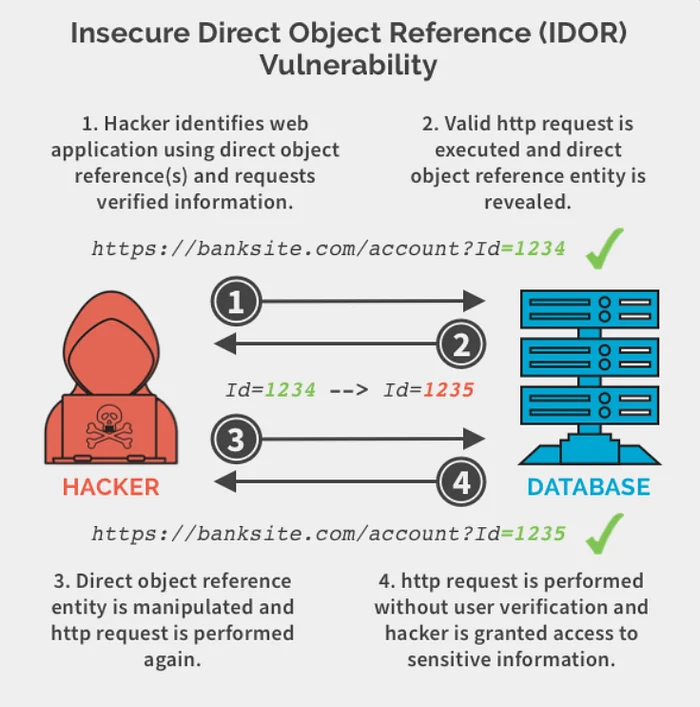
Before describing the finding, the author sets out what an IDOR is. Insecure direct object references occur when a web application developer uses an identifier for direct access to an internal implementation object but provides no additional access control and/or authorisation checks. It is a type of access control vulnerability that arises when an application uses user-supplied input to access objects directly without validating or checking it.

The vulnerability happens when a web server receives user-supplied input to retrieve objects (files, data, documents), too much trust has been placed on the input data, and it is not validated on the server side to confirm the requested object belongs to the user requesting it.
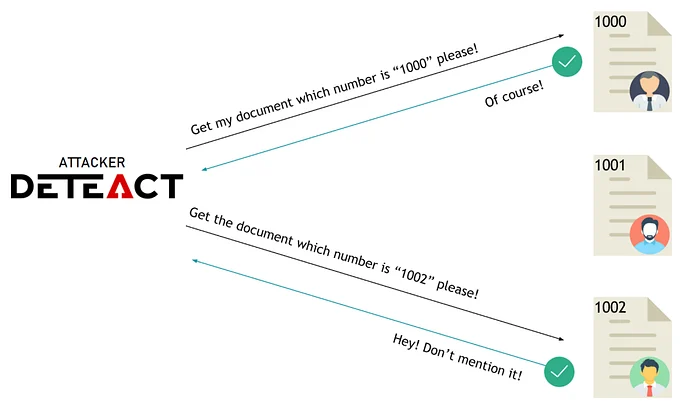
The author's illustrative example is a web application that displays transaction details using this URL:
https://www.example.com/transaction.php?id=8000
A malicious hacker could substitute the id parameter value 8000 with another similar value:
https://www.example.com/transaction.php?id=8001
The 8001 transaction could be a valid transaction belonging to another user, which the hacker should not be allowed to see. If the developer made an error, the attacker would see this transaction, and that is an IDOR vulnerability.
Setup
The author was learning web application security and had already found a few P4 bugs, and wanted to hunt for more severe ones. The only tool mentioned is Burp Suite, used to capture and intercept requests. No accounts, roles, versions or other preconditions are described beyond browsing the site.
Finding it
While searching for websites to hunt on, the author came across the hostel website. Manual exploration was aimed at finding parameters for XSS. Very few were found, and none could be exploited. While capturing a specific request in Burp Suite, an id parameter was found, named Student ID. Having failed at XSS, the first thing the author thought to test was IDOR.
That Student ID was used for retrieving the data of the logged-in user, but the parameter could be manipulated by intercepting the request through Burp Suite. That is what made it worth testing: a client-supplied identifier that selects which user's record the server returns.
Exploitation
Step 1: Intercept the request carrying the Student ID
The request that retrieves the logged-in user's data was captured in Burp Suite. The report does not reproduce the raw request, so the exact endpoint, method, headers and parameter format are not shown.
Step 2: Change the identifier and forward
The original number in the Student ID parameter was replaced with another random number, and the request was forwarded.
Step 3: Read the response
The response was a blank page containing some HTML and JavaScript code. Going through that code, it held all the private details of the student that the ID belonged to: name, mobile number, hostel room number, course details, email, permanent address, parent's name, and occupation.
Step 4: Confirm it was not a one-off
More random numbers were tried, to make sure the behaviour was valid for all records and not only for a few. The author could access the data of 3500+ students living at the hostel.
Root cause
The author states the main reason plainly: the application was using user-supplied input to retrieve data without validating it at the server side for authorisation. The identifier was trusted as-is, and the server did not confirm that the requested object belonged to the user making the request. The report does not describe any code, so the exact implementation is not shown.
Impact
The IDOR led to sensitive information disclosure for all the students at the hostel: 3500+ records, each exposing name, mobile number, hostel room number, course details, email, permanent address, parent's name, and occupation. The response was a blank page containing HTML and JavaScript code, and that code held the private details of the student the ID belonged to.
The site was not listed on any bug bounty platform, so no bounty was paid.
Fix
The report does not say what was changed. The fix implied by the stated root cause is server-side authorisation: before returning a record, the server should confirm that the requested object belongs to the user making the request, rather than trusting the client-supplied Student ID.
Variants to test
- Numeric identifiers on profile, order, invoice or document endpoints. Change the value to a neighbouring number and look for another user's data in the response. A positive result is a response containing records that belong to a different account.
- Identifiers hidden in JSON or JavaScript rather than rendered in the page. Read the full response body, as here, where the private details sat inside HTML and JavaScript on an otherwise blank page.
- Sequential enumeration across a range of identifiers. A positive result is consistent access across many values, not just one, which is how the author confirmed the issue affected 3500+ records.
- Parameters found only by intercepting requests in a proxy. A positive result is an identifier that the server accepts from the client and uses to select the object returned.
What happened, in plain words
A student was learning how to test websites for security problems. He had already found a few small bugs and wanted to find something more serious. He picked a website belonging to his hostel and started poking around. While watching the traffic between his browser and the hostel's website, he noticed that the site asked for a number called a Student ID whenever it wanted to show a student's details. He changed that number to a different one, sent the request again, and the website handed back the private details of a completely different student: name, mobile number, room number, course, email, permanent address, parent's name and occupation. He tried more numbers and found he could read the records of more than 3500 students. This kind of bug is called an IDOR, short for Insecure Direct Object Reference. The site was not part of any bug bounty programme, so he was not paid, but it was his first major find.
What an IDOR is
Before the story, the author explains the bug class. An IDOR happens when a website lets you ask for something by naming it directly, for example by giving a number, and the website does not check whether you are allowed to have that thing. The author's own definition: insecure direct object references occur when a web application developer uses an identifier for direct access to an internal implementation object but provides no additional access control and/or authorisation checks. It is a type of access control vulnerability that arises when an application uses user-supplied input to access objects directly without validating or checking it.
A few words in that definition need unpacking for a newcomer.
- An identifier is simply a name or number that points at one specific thing. Your student number, your order number, your account number: each one picks out exactly one record in the website's database.
- An object here means a stored thing: a file, a database row, a document, a transaction. It is not a physical object.
- Access control is the part of a website that decides who may see or do what. When you log in and the site only shows you your own profile, access control is working.
- Authorisation is the specific check that answers "is this particular user allowed to see this particular thing?" It is different from logging in. Logging in proves who you are; authorisation decides what you may reach once you are in.
- User-supplied input is anything the browser sends to the server: a number in a URL, a field in a form, a value hidden in the page. The server should treat all of it as untrusted, because anyone can change it before it is sent.
An everyday comparison: imagine a hotel where the receptionist hands out room keys to anyone who says a room number, without checking that the person is the guest in that room. Saying "room 214" is the identifier. The missing check is the authorisation. The guest in room 214 is the only person who should get that key, but the receptionist trusts the number alone.
How the bug happens
The author then explains the mechanism. This type of vulnerability can occur when a web server receives user-supplied input to retrieve objects (files, data, documents), too much trust has been placed on the input data, and it is not validated on the server side to confirm the requested object belongs to the user requesting it.
The key phrase is "on the server side". A website has two halves. The part you see and click, running in your browser, is the client. The part that stores data and answers requests, running on a machine you never see, is the server. Anything the client sends can be changed by the person using the browser, so the server must do the checking. If the server simply believes the number it is given, the check is missing where it matters.
A simple example
The author gives an example of a web application that displays transaction details using this URL:
https://www.example.com/transaction.php?id=8000
Line by line, in plain words:
https://is the secure version of the protocol browsers use to talk to websites. Thesmeans the traffic is encrypted.www.example.comis the name of the website.example.comis a placeholder domain reserved for examples, not a real company./transaction.phpis the path to a particular page or script on that website. The.phpending tells you the server runs a program written in the PHP language to produce the page.?id=8000is the query string. The?marks where it starts,idis the name of a parameter, and8000is its value. A parameter is just a labelled piece of information sent along with the request. Here it says: show me the transaction numbered 8000.
A malicious hacker could substitute the id parameter value 8000 with another similar value:
https://www.example.com/transaction.php?id=8001
- Everything is the same except the last digit:
id=8001instead ofid=8000. - The browser does not stop you typing this. You can edit the address bar by hand, or change the request before it leaves your machine.
- The server receives a perfectly well-formed request for transaction 8001. The only question is whether it checks that transaction 8001 belongs to you.
The 8001 transaction could be a valid transaction belonging to another user, which the hacker should not be allowed to see. If the developer made an error, the attacker would see this transaction, and that is an IDOR vulnerability.
Notice how small the change is. The attacker does not need special software or a password. They need one editable number and a server that trusts it.
Getting ready to hunt
The author was learning web application security and had already found a few P4 bugs, and wanted to hunt for more severe ones. Bug bounty platforms often rank findings by severity, and P4 is a low-severity label, so the aim was to move up to something with more impact. The only tool mentioned is Burp Suite, used to capture and intercept requests. No accounts, roles, versions or other preconditions are described beyond browsing the site.
Two ideas need explaining here.
- A proxy is a program that sits between your browser and the website. Instead of your browser talking straight to the server, it talks to the proxy, and the proxy passes the message on. Because everything passes through it, the proxy can show you each request and let you pause, edit and resend it. Burp Suite is a well-known proxy of this kind.
- Intercepting means telling the proxy to hold a request before it reaches the server, so you can look at it and change it. Without a proxy you only see the address bar; with one you see the full request, including parts the page never displays.
Finding it
While searching for websites to hunt on, the author came across the hostel website, called hostel.com in the write-up. Manual exploration was aimed at finding parameters for XSS. Very few were found, and none could be exploited.
XSS stands for cross-site scripting. It is a different bug class where an attacker gets their own code to run inside another person's browser on a website. Testing for it means looking for places where the site takes something you typed and puts it back into the page. The author was hunting for those places first, found almost none, and could not make any of them misbehave.
While capturing a specific request in Burp Suite, an id parameter was found, named Student ID. Having failed at XSS, the first thing the author thought to test was IDOR.
That Student ID was used for retrieving the data of the logged-in user, but the parameter could be manipulated by intercepting the request through Burp Suite. That is what made it worth testing: a client-supplied identifier that selects which user's record the server returns.
The reasoning is worth spelling out, because it is the heart of the method. The page you see after logging in shows your own details. That does not mean the server checked that they are yours. It may simply have taken the Student ID from your request and looked it up. If the number comes from the client, the client can change it. So the test is: change it and see whose data comes back.
Exploitation
Step 1: Intercept the request carrying the Student ID
The request that retrieves the logged-in user's data was captured in Burp Suite. The report does not reproduce the raw request, so the exact endpoint, method, headers and parameter format are not shown.
Why this step: you cannot change what you cannot see. The proxy pauses the request so the Student ID becomes visible and editable. In Burp Suite this is done by turning interception on and loading the page or triggering the action that fetches the student's details.
Step 2: Change the identifier and forward
The original number in the Student ID parameter was replaced with another random number, and the request was forwarded.
Why this step: this is the actual test. If the server only returns your own record, the number is being checked against your login and the request will fail or return nothing. If it returns someone else's record, the number is being trusted on its own. "Forward" means letting the paused request continue to the server with your edit applied.
Step 3: Read the response
The response was a blank page containing some HTML and JavaScript code. Going through that code, it held all the private details of the student that the ID belonged to: name, mobile number, hostel room number, course details, email, permanent address, parent's name, and occupation.
Two terms here:
- HTML is the language that describes the structure of a web page: headings, paragraphs, forms, and so on. Your browser reads it and draws the page.
- JavaScript is a programming language that runs inside the browser and makes pages interactive. Websites often embed data inside JavaScript so the page can fill itself in after it loads.
The response was a blank page containing HTML and JavaScript code, and that code held the private details of the student the ID belonged to. Anyone who views the source of the response, rather than the rendered page, can read it. This is a useful lesson for a beginner: a blank page is not an empty response. Always look at the body of the response, not just what is drawn.
Step 4: Confirm it was not a one-off
More random numbers were tried, to make sure the behaviour was valid for all records and not only for a few. The author could access the data of 3500+ students living at the hostel.
Why this step: trying more numbers shows whether the behaviour holds for all records and not only for a few. Trying several numbers shows a pattern. Trying many shows the scale.
Root cause
The author states the main reason plainly: the application was using user-supplied input to retrieve data without validating it at the server side for authorisation. The identifier was trusted as-is, and the server did not confirm that the requested object belonged to the user making the request. The report does not describe any code, so the exact implementation is not shown.
In everyday terms: the server asked "which record do you want?" and the client answered "number 1234", and the server fetched number 1234 without asking "and are you the student who owns 1234?" The missing question is the whole bug.
Impact
The IDOR led to sensitive information disclosure for all the students at the hostel: 3500+ records, each exposing name, mobile number, hostel room number, course details, email, permanent address, parent's name, and occupation.
The site was not listed on any bug bounty platform, so no bounty was paid. A bug bounty platform is a service where companies invite researchers to test their systems and pay for valid findings under agreed rules. Without such a programme, there is no agreed reward.
Fix
The report does not say what was changed. The fix implied by the stated root cause is server-side authorisation: before returning a record, the server should confirm that the requested object belongs to the user making the request, rather than trusting the client-supplied Student ID.
Put simply, the server should take the identity from the logged-in session, not from a number in the request. A session is the server's memory of who you are after you log in, usually kept with a cookie, which is a small piece of data your browser stores and sends back with each request. The server can compare the requested Student ID with the one tied to that session and refuse if they differ.
Variants to test
If you want to look for the same class of bug yourself, these are the patterns the author's approach suggests. Only test systems you own or that explicitly invite testing.
- Numeric identifiers on profile, order, invoice or document endpoints. Change the value to a neighbouring number and look for another user's data in the response. A positive result is a response containing records that belong to a different account.
- Identifiers hidden in JSON or JavaScript rather than rendered in the page. Read the full response body, as here, where the private details sat inside HTML and JavaScript on an otherwise blank page. JSON is a text format for structured data, made of names and values in curly braces, commonly used when a page fetches data in the background.
- Sequential enumeration across a range of identifiers. A positive result is consistent access across many values, not just one, which is how the author confirmed the issue affected 3500+ records. Enumeration just means trying values one after another in a pattern.
- Parameters found only by intercepting requests in a proxy. A positive result is an identifier that the server accepts from the client and uses to select the object returned.
Glossary
- Access control: the part of a website that decides who may see or do what.
- Authorisation: the check that a particular logged-in user is allowed to reach a particular thing.
- Bug bounty platform: a service where companies invite researchers to test their systems and pay for valid findings under agreed rules.
- Burp Suite: a proxy tool used to capture, pause, edit and resend requests between a browser and a website.
- Client: the part of a website that runs in your browser, which you can see and change.
- Cookie: a small piece of data a website stores in your browser and receives back with later requests, often used to remember that you are logged in.
- Enumeration: trying a series of values one after another, for example consecutive numbers, to see which ones work.
- HTML: the language that describes the structure of a web page.
- Identifier: a name or number that points at one specific stored thing, such as a student number or order number.
- IDOR (Insecure Direct Object Reference): a bug where a website lets you ask for a stored thing by naming it directly and does not check that you are allowed to have it.
- Intercepting: pausing a request in a proxy before it reaches the server so it can be inspected and edited.
- JavaScript: a programming language that runs in the browser and makes pages interactive; websites often embed data inside it.
- JSON: a text format for structured data made of names and values, commonly used when a page fetches data in the background.
- Object: in this context, a stored thing such as a file, database row, document or transaction.
- Parameter: a labelled piece of information sent with a request, such as
id=8000in a URL. - P4: a low-severity ranking used on bug bounty platforms.
- Proxy: a program that sits between your browser and a website, passing messages through so you can see and change them.
- Query string: the part of a URL after the
?, carrying parameters and their values. - Server: the machine and software that store data and answer requests, which you never see directly.
- Session: the server's memory of who you are after you log in, usually kept with a cookie.
- User-supplied input: anything the browser sends to the server, which can always be changed before it is sent.
- XSS (cross-site scripting): a bug class where an attacker gets their own code to run inside another person's browser on a website.



