How I Found an Unauthenticated IDOR That Exposed Every User’s PII and Access Roles
A Django REST Framework view for user permissions was declared without any permission classes, and the project had no default permission setting, so the endpoint allowed unauthenticated access. An attacker could walk sequential user IDs to read every user's name, email, username, group membership and permission codenames.

cybersecuritywriteups.com
Published on cybersecuritywriteups.com
Cybersecurity
The full write-up lives on its author's site
It belongs to its author, so we link to it rather than copy it. The other two tabs are our own rewrites, checked against it.
Context
The target is a program that listed an API repository as in-scope source, even though the repository is now archived on GitHub. The researcher refers to the target as example.com. The feature involved is the user permission view of a Django REST Framework API: a view that returns a user's profile together with the groups and permissions attached to that user. In a correctly configured deployment, such a view should only return data to an authenticated user, and normally only for that user's own record or for staff.
The researcher's starting point was the archived repository itself. The argument for reading it is that an archived repo has no live environment to babysit, no WAF and no rate limits, so the code can be read at leisure.
Setup
The researcher worked from the source code in the archived repository, starting with the permission views. The relevant file was api/permission/views/user.py. Testing was done against a local instance, since the request shown uses Host: localhost:8000. No accounts, tokens or special roles were needed for the test itself: the whole point is that the request carried no authentication at all.
Finding it
Reading through the permission views, the researcher landed on api/permission/views/user.py and noticed that the view class never sets permission_classes.
Why that matters: in Django REST Framework, if a view skips permission_classes and the project's settings.py has no DEFAULT_PERMISSION_CLASSES set, DRF defaults to AllowAny. The researcher checked settings.py and found no default was set either, so the view was open by accident.
The retrieve method takes a raw pk from the URL and returns that user's full profile. There is no authentication check and no ownership check.
Exploitation
Step 1: request a user record without credentials
The researcher tested the view straight away:
GET /api/v1/permission/user/1/ HTTP/1.1Host: localhost:8000
No token, no cookie, no login. The response was:
{ "user": { "username": "user.one", "email": "[redacted]", "first_name": "user", "last_name": "one" }, "groups": [], "permissions": []}
The pk in the path selects the user record, and the response returns that user's profile fields along with the groups and permissions attached to the account. In this first case the account has no groups and no permissions.
Step 2: change the pk
The researcher bumped the pk to 2 out of curiosity, and the result was more revealing:
{ "user": { "username": "user.two", "email": "[redacted]", "first_name": "user", "last_name": "two" }, "groups": ["bureau_ao"], "permissions": [ "bidding.add_bid", "bidding.change_bid", "bidding.view_bid", "position.add_position", "position.change_position" ]}
So the response does not just leak PII: it also tells you which pk belongs to a privileged role and what that role can do. There is no need to guess who the good targets are, because the API states it.
Step 3: enumerate
The researcher wrote a quick script to loop through pk values and confirmed that it enumerates cleanly, with no rate limiting and no anomaly. The researcher walked through 15 accounts without a single hiccup.
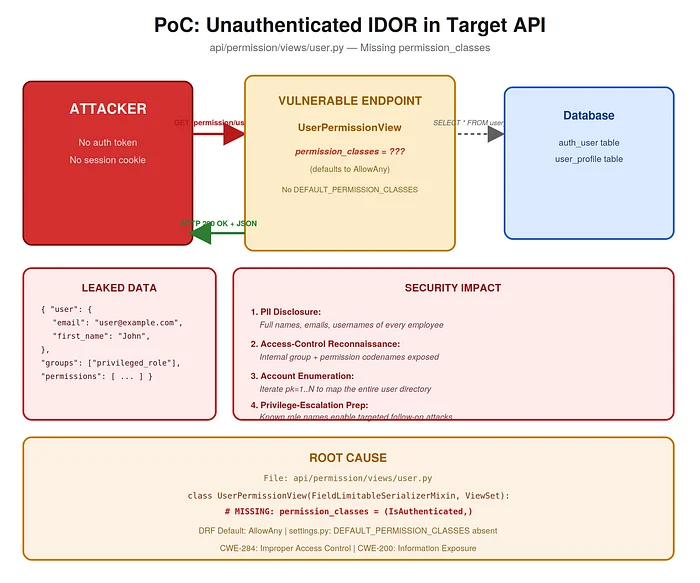
The researcher's diagram of the flow from start to finish.
Root cause
The view class never declares permission_classes, and the project's settings.py does not set DEFAULT_PERMISSION_CLASSES. Under DRF's defaults, that combination means AllowAny, so the view is reachable without authentication. The retrieve method then takes the raw pk from the URL and returns the corresponding user's full profile without checking that the requester is that user or a staff member. The missing permission class and the missing ownership check are two separate gaps.
Impact
The researcher lists what the exposure amounts to:
- full names, work emails and usernames for every employee, obtained just by walking an integer
- group names and permission codenames leaked in the same response, which amounts to a free RBAC map
- a clean list of verified work emails, which is material for phishing and credential stuffing
- for a government agency handling personnel data, a compliance problem as well as a PII leak
The enumeration was confirmed across 15 accounts with no rate limiting encountered. The researcher notes that for a government agency handling personnel data, this would be a compliance problem as well as a PII leak.
Fix
The researcher's fix is small: add the permission class and an ownership check.
from rest_framework.permissions import IsAuthenticatedfrom django.core.exceptions import PermissionDenied
class UserPermissionView(FieldLimitableSerializerMixin, ViewSet): permission_classes = (IsAuthenticated,) def retrieve(self, request, pk=None, format=None): profile = get_object_or_404(UserProfile, id=pk) if request.user != profile.user and not request.user.is_staff: raise PermissionDenied return Response( self.construct_return_object(profile.user), status=status.HTTP_200_OK, )
The permission_classes tuple requires authentication, and the retrieve method raises PermissionDenied unless the requester is the profile's own user or a staff member. The researcher's closing advice is not to rely on a global DEFAULT_PERMISSION_CLASSES to save views that never declare their own, because one missing line makes the whole thing fall back to AllowAny.
Disclosure outcome
The researcher reported it through the program on HackerOne with source code references, terminal output, an enumeration script and the diagram above. A couple of days later it was closed as a duplicate of a report from about six months earlier.
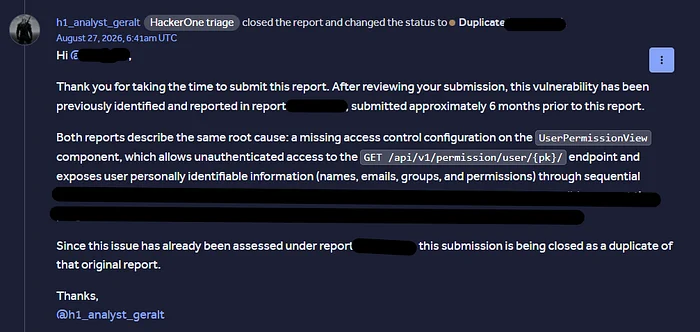
The researcher's conclusion is that the bug is real and someone found it first. Not every finding turns into a recognition or a bounty, but the bug does not stop being a bug because it was closed as a duplicate.
Variants to test
- Views without
permission_classesin DRF projects. Grep the codebase for view classes and check each one for an explicitpermission_classes. Then checksettings.pyforDEFAULT_PERMISSION_CLASSES. A positive result is a view that has neither, which falls back toAllowAny. retrievemethods that take a rawpk. Look for detail routes that fetch an object by primary key and return it without comparing the object's owner torequest.useror checkingis_staff. A positive result is a response containing another user's data when requested with a different or absent session.- Integer enumeration on detail endpoints. Walk sequential ids on any endpoint that accepts a numeric identifier. A positive result is a steady stream of distinct records with no rate limiting or anomaly detection interrupting the loop.
- Responses that bundle authorisation metadata. Check whether profile or user endpoints return group names or permission codenames alongside personal data. A positive result is a response that maps ids to privileged roles, which turns enumeration into target selection.
- Archived and source-only scopes. Where a program lists an archived repository as in-scope source, read the permission and serialiser layers rather than only the live application. A positive result is a configuration gap that the live deployment may still carry.
What happened, in plain words
A security researcher was looking at a bug bounty program, which is a scheme where companies invite people to find flaws in their software and report them. This particular program listed a piece of source code as fair game: the code of an API, hosted on GitHub, a website where programmers keep and share code. The repository was archived, meaning it is frozen and no longer being worked on. The researcher decided to read it anyway, and found a flaw that let anyone, without logging in, ask the API for any user's personal details and see which users had special powers.
This article walks through that discovery from the beginning, explaining each idea as it comes up. You only need to be comfortable using a browser and a computer to follow along.
The setting: an API and its source code
An API (Application Programming Interface) is the part of a website or service that other software talks to, rather than a person clicking buttons. Think of a restaurant: the dining room is the website you see, and the kitchen is the database where information is kept. The API is the waiter who carries your order to the kitchen and brings back the food. When your browser loads a page, it is often the API that supplies the data behind it.
The program the researcher was working on listed the API's source code as in scope. Source code is the human-written instructions that make up a program, before the computer turns them into something it can run. In scope means the program's rules say it is acceptable to look at and test this. The code was on GitHub and archived, so nobody was actively changing it.
The researcher refers to the target as example.com, a placeholder name used so the real company is not named.
The feature involved is a user permission view. A view is a piece of code that handles one kind of request and produces a response. This particular view returns a user's profile, together with the groups and permissions attached to that user. Groups are collections of users, and permissions are the individual actions a user is allowed to perform, such as adding or changing a record. Together, groups and permissions decide who is allowed to do what, a system often called RBAC, role-based access control. In a correctly configured deployment, such a view should only return data to a logged-in user, and normally only that user's own record, or to staff.
Why start from the archived code rather than the live website? The researcher's reasoning: an archived repository has no live environment to babysit, no WAF (web application firewall, a filter that inspects incoming requests and blocks suspicious ones) and no rate limits (rules that stop someone making too many requests too quickly). So the code can be read at leisure, with nothing in the way.
Setup
The researcher worked from the source code in the archived repository, starting with the permission views. The relevant file was api/permission/views/user.py. The path is just the location of the file inside the project, like a folder path on your own computer.
Testing was done against a local instance, meaning a copy of the application running on the researcher's own machine rather than on the internet. You can tell because the request shown uses Host: localhost:8000. localhost is the name a computer uses for itself, and 8000 is a port number, a numbered doorway on the machine where a program listens. No accounts, tokens or special roles were needed for the test itself, because the whole point is that the request carried no authentication at all. Authentication is simply proving who you are, usually by logging in.
Finding it
Reading through the permission views, the researcher landed on api/permission/views/user.py and noticed that the view class never sets permission_classes. A class here is a block of code that describes one part of the application, and permission_classes is a setting inside it that says who is allowed to use it.
Why that matters: the application is built with Django REST Framework, usually shortened to DRF, a toolkit for building APIs in the Python programming language. In DRF, if a view skips permission_classes and the project's settings.py (the main configuration file) has no DEFAULT_PERMISSION_CLASSES set, DRF falls back to a default called AllowAny. AllowAny means exactly what it sounds like: anyone may call this view, logged in or not. The researcher checked settings.py and found no default was set either, so the view was open by accident.
The retrieve method takes a raw pk from the URL and returns that user's full profile. A method is a named block of code that does one job. retrieve is the job of fetching a single record. pk stands for primary key, a unique number that identifies one record in a database, much like a row number in a spreadsheet. Raw means the value is used as it arrives, without being checked first. There is no authentication check and no ownership check: nothing confirms you are logged in, and nothing confirms the record belongs to you.
Exploitation
Step 1: request a user record without credentials
Credentials are the proof of identity you send with a request, such as a login. The researcher tested the view straight away:
GET /api/v1/permission/user/1/ HTTP/1.1Host: localhost:8000
Line by line:
GETis the type of request. It means "give me something", as opposed to sending or changing data./api/v1/permission/user/1/is the address being asked for.api/v1is the version of the API,permission/userpoints at the user permission view, and the final1is the pk, the number of the user record being requested.HTTP/1.1states the version of the language that browsers and servers use to talk to each other.Host: localhost:8000says which machine and port the request is aimed at, here the researcher's own machine on port 8000.
No token, no cookie, no login. A cookie is a small piece of data a website stores in your browser so it can recognise you on later requests, which is how a site remembers you are logged in. A token is a similar piece of proof, usually a long string sent with each request instead of a cookie. Sending neither means the request arrives as a complete stranger. The response was:
{ "user": { "username": "user.one", "email": "[redacted]", "first_name": "user", "last_name": "one" }, "groups": [], "permissions": []}
This is JSON, a common text format for data, built from labels and values in curly braces. Line by line:
"user"holds the person's details:username,email,first_nameandlast_name. These are the personal details, often called PII, personally identifiable information, meaning data that can identify a real person."groups": []is an empty list, so this account belongs to no groups."permissions": []is also empty, so this account has no special permissions.
The pk in the path selects the user record, and the response returns that user's profile fields along with the groups and permissions attached to the account. In this first case the account has no groups and no permissions. The important part is that the server answered a stranger with someone's personal data.
Step 2: change the pk
The researcher bumped the pk to 2 out of curiosity, meaning the last number in the address was changed from 1 to 2. The result was more revealing:
{ "user": { "username": "user.two", "email": "[redacted]", "first_name": "user", "last_name": "two" }, "groups": ["bureau_ao"], "permissions": [ "bidding.add_bid", "bidding.change_bid", "bidding.view_bid", "position.add_position", "position.change_position" ]}
Line by line:
"user"again holds the personal details, this time for a different account."groups": ["bureau_ao"]is no longer empty. This account belongs to a group calledbureau_ao."permissions"lists five actions this account is allowed to perform. Each name has two parts separated by a dot: the area, such asbiddingorposition, and the action, such asadd_bid,change_bid,view_bid,add_positionorchange_position. In plain words: this user can add, change and view bids, and add and change positions.
So the response does not just leak PII: it also tells you which pk belongs to a privileged role and what that role can do. There is no need to guess who the good targets are, because the API states it. This kind of flaw, where changing an identifier in a request lets you reach someone else's data, is called an IDOR, Insecure Direct Object Reference. The name sounds technical, but the idea is simple: the application hands you a record based on a number you supply, and never checks that the record is yours to see.
Step 3: enumerate
The researcher wrote a quick script to loop through pk values and confirmed that it enumerates cleanly, with no rate limiting and no anomaly. To enumerate means to go through values one after another, here 1, 2, 3 and so on, collecting a record each time. Rate limiting would be the server noticing too many requests and slowing or blocking them. Anomaly detection would be the server noticing unusual behaviour and raising an alarm. Neither happened. The researcher walked through 15 accounts without a single hiccup.
The image shows the flow from start to finish, as the researcher presents it.
Root cause
The view class never declares permission_classes, and the project's settings.py does not set DEFAULT_PERMISSION_CLASSES. Under DRF's defaults, that combination means AllowAny, so the view is reachable without authentication. The retrieve method then takes the raw pk from the URL and returns the corresponding user's full profile without checking that the requester is that user or a staff member. The missing permission class and the missing ownership check are two separate gaps.
Impact
The researcher lists what the exposure amounts to:
- full names, work emails and usernames for every employee, obtained just by walking an integer, meaning counting upwards through the pk numbers
- group names and permission codenames leaked in the same response, which amounts to a free RBAC map, a ready-made chart of who holds which powers
- a clean list of verified work emails, which is material for phishing (tricking people into handing over information or clicking something harmful) and credential stuffing (trying stolen username and password pairs on other services, on the bet that people reuse them)
- for a government agency handling personnel data, a compliance problem as well as a PII leak. Compliance here means the legal and regulatory duties that come with holding personal data.
The enumeration was confirmed across 15 accounts with no rate limiting encountered. The researcher notes that for a government agency handling personnel data, this would be a compliance problem as well as a PII leak.
Fix
The researcher's fix is small: add the permission class and an ownership check.
from rest_framework.permissions import IsAuthenticatedfrom django.core.exceptions import PermissionDenied
Line by line:
from rest_framework.permissions import IsAuthenticatedbrings in a ready-made rule calledIsAuthenticated, which means only logged-in users may proceed.from django.core.exceptions import PermissionDeniedbrings in an error calledPermissionDenied, which is raised to refuse a request.
class UserPermissionView(FieldLimitableSerializerMixin, ViewSet): permission_classes = (IsAuthenticated,) def retrieve(self, request, pk=None, format=None): profile = get_object_or_404(UserProfile, id=pk) if request.user != profile.user and not request.user.is_staff: raise PermissionDenied return Response( self.construct_return_object(profile.user), status=status.HTTP_200_OK, )
Line by line:
class UserPermissionView(...)declares the view, the same one that was open before.permission_classes = (IsAuthenticated,)is the missing line. It says only logged-in users may call this view.def retrieve(self, request, pk=None, format=None):defines the method that fetches one record, taking the request and the pk from the address.profile = get_object_or_404(UserProfile, id=pk)looks up the profile with that pk. If no such record exists, it returns a "not found" response instead of an error.if request.user != profile.user and not request.user.is_staff:is the ownership check. It asks: is the requester someone other than the profile's owner, and is the requester not a staff member?raise PermissionDeniedrefuses the request when that is true.return Response(...)sends back the profile data, withstatus.HTTP_200_OKmeaning the request succeeded.
The permission_classes tuple requires authentication, and the retrieve method raises PermissionDenied unless the requester is the profile's own user or a staff member. The researcher's closing advice is not to rely on a global DEFAULT_PERMISSION_CLASSES to save views that never declare their own, because one missing line makes the whole thing fall back to AllowAny.
Disclosure outcome
Disclosure is the process of telling the organisation about a flaw and agreeing what happens next. The researcher reported it through the program on HackerOne, a well-known bug bounty platform, with source code references, terminal output, an enumeration script and the diagram above. A couple of days later it was closed as a duplicate of a report from about six months earlier. A duplicate, or dupe, means someone else had already reported the same flaw.
The researcher's conclusion is that the bug is real and someone found it first. Not every finding turns into a recognition or a bounty (a cash reward for a valid report), but the bug does not stop being a bug because it was closed as a duplicate.
Variants to test
If you want to look for similar flaws yourself, these are the patterns worth checking. Each one describes what to look for and what a positive result looks like.
- Views without
permission_classesin DRF projects. Search the codebase for view classes and check each one for an explicitpermission_classes. Then checksettings.pyforDEFAULT_PERMISSION_CLASSES. A positive result is a view that has neither, which falls back toAllowAny. retrievemethods that take a rawpk. Look for detail routes that fetch an object by primary key and return it without comparing the object's owner torequest.useror checkingis_staff. A positive result is a response containing another user's data when requested with a different or absent session.- Integer enumeration on detail endpoints. Walk sequential ids on any endpoint that accepts a numeric identifier. A positive result is a steady stream of distinct records with no rate limiting or anomaly detection interrupting the loop.
- Responses that bundle authorisation metadata. Check whether profile or user endpoints return group names or permission codenames alongside personal data. A positive result is a response that maps ids to privileged roles, which turns enumeration into target selection.
- Archived and source-only scopes. Where a program lists an archived repository as in-scope source, read the permission and serialiser layers rather than only the live application. A positive result is a configuration gap that the live deployment may still carry.
Glossary
- API: the part of a service that other software talks to, carrying requests to the data and answers back.
- AllowAny: a DRF default meaning any caller may use a view, logged in or not.
- Anomaly detection: a server noticing unusual behaviour and raising an alarm.
- Archived repository: a code repository that is frozen and no longer being worked on.
- Authentication: proving who you are, usually by logging in.
- Bounty: a cash reward paid for a valid security report.
- Class: a block of code that describes one part of an application.
- Compliance: the legal and regulatory duties that come with holding personal data.
- Cookie: a small piece of data a site stores in your browser so it can recognise you later.
- Credentials: the proof of identity sent with a request, such as a login.
- Credential stuffing: trying stolen username and password pairs on other services, betting that people reuse them.
- DEFAULT_PERMISSION_CLASSES: a project-wide DRF setting that supplies a default permission rule to views that do not declare their own.
- Disclosure: the process of telling an organisation about a flaw and agreeing what happens next.
- Django REST Framework (DRF): a toolkit for building APIs in the Python programming language.
- Duplicate (dupe): a report of a flaw that someone else already reported.
- Enumerate: to go through values one after another, such as 1, 2, 3, collecting a record each time.
- GET: the request type that asks for something, as opposed to sending or changing data.
- Groups: collections of users used to grant powers in bulk.
- HackerOne: a well-known bug bounty platform where reports are submitted and handled.
- Host: the part of a request that says which machine and port it is aimed at.
- HTTP/1.1: the version of the language browsers and servers use to talk to each other.
- IDOR (Insecure Direct Object Reference): a flaw where changing an identifier in a request lets you reach someone else's data.
- In scope: covered by the program's rules as acceptable to look at and test.
- JSON: a common text format for data, built from labels and values in curly braces.
- localhost: the name a computer uses for itself.
- Method: a named block of code that does one job.
- Ownership check: a check that the record being requested belongs to the person requesting it.
- Permission: an individual action a user is allowed to perform.
- permission_classes: a setting inside a view that says who is allowed to use it.
- Phishing: tricking people into handing over information or clicking something harmful.
- PII (personally identifiable information): data that can identify a real person.
- pk (primary key): a unique number that identifies one record in a database.
- Port: a numbered doorway on a machine where a program listens.
- Python: a popular programming language.
- Rate limiting: rules that stop someone making too many requests too quickly.
- Raw: used as it arrives, without being checked first.
- RBAC (role-based access control): deciding who may do what based on groups and permissions.
- retrieve: the method that fetches a single record.
- settings.py: the main configuration file of a Django project.
- Source code: the human-written instructions that make up a program.
- Token: a piece of proof, usually a long string, sent with each request instead of a cookie.
- View: a piece of code that handles one kind of request and produces a response.
- WAF (web application firewall): a filter that inspects incoming requests and blocks suspicious ones.



