How I found read/write access to the personal data of 3 million users of an E-commerce website?
The checkout address endpoint accepted requests without the session and CSRF token cookies, and only checked that a user identifier cookie was present, not that it matched the session. An attacker could change that identifier to another user's value to read their personal data, and by also using the CSRF token leaked in that response, update their address.
 Published on medium.com
This is Prashant Singh, a cybersecurity researcher. This is my first bug bounty write-up.
The full write-up lives on its author's site
It belongs to its author, so we link to it rather than copy it. The other two tabs are our own rewrites, checked against it.
Context
This is a write-up of an IDOR found in an unnamed e-commerce bug bounty program. The program cannot be named, so the target is referred to throughout as redacted.com. The site uses cookie-based authentication and authorisation to validate legitimate requests on the server side.
The feature in question is the address book that almost every e-commerce site offers: users can add, remove and update their address. The same address data is rendered on two endpoints:
- The user profile section, at
https://www.redacted.com/profile/address. - The final step for completing an order while clearing cart items, at
https://www.redacted.com/checkout/adv/address/view, which the author describes as a hidden JSON endpoint.
The author's observation is that developers tend to harden the endpoints a user can easily reach, and to pay less attention to the ones that are less visible. That asymmetry is what this report is built on.
Setup
The report does not describe any special tooling, accounts or versions. The author inspected the cookies issued to a logged-in user and found a user identity parameter inside them: The author inspected the cookies issued to a logged-in user and found a user identity parameter inside them:
c=1234567
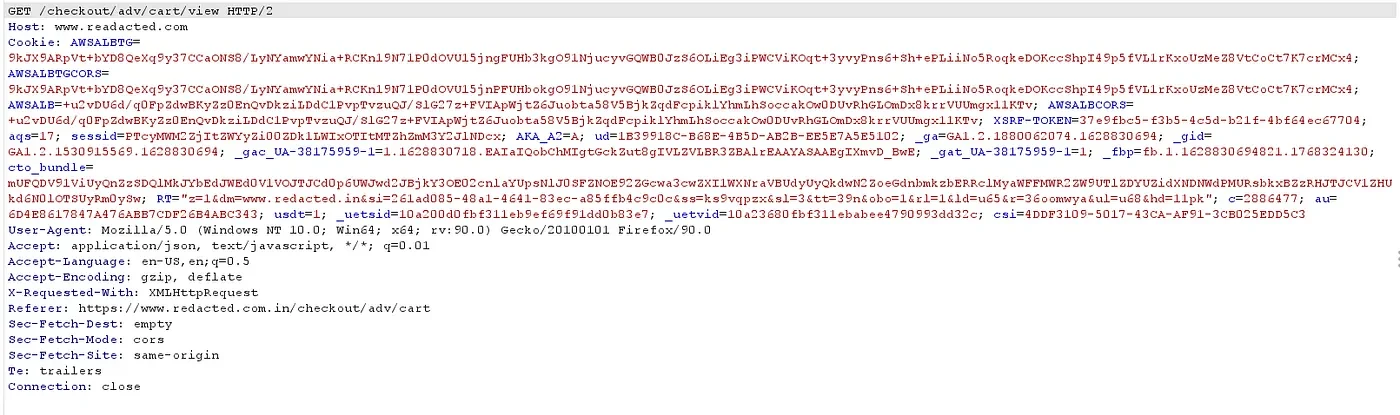
The whole issue revolves around that parameter. The session is validated server-side with the following cookie parameters, as the author's investigation found:
ud= XXXXXXX;c= CUSTOMER_ID;XSSRF-TOKEN= XXXXXXXX;sessid= XXXXXXXXXX;
Finding it
The first endpoint, /profile/address, was safe and secure, so the author moved on to the second one. On /checkout/adv/address/view the author tried changing the customer_id, which did not work, and also tried parameter pollution, which did not work either.

The next step was to work out on what basis the web server validates a session request. The author's investigation showed that on the following endpoint the validation is loose: if the sessid and XSSRF-Token parameters are removed and any request is then sent to the server, the server treats it as a valid request and fetches the content the request asks for. In other words, the server verifies the presence of the ud parameter but does not verify its contents.
That combination is the bug. If the attacker's customer ID parameter in the request is replaced with the victim's customer ID, the web server fetches the contents of the victim's personal account details.
Exploitation
Step 1: read another user's address data
The final request sent to the server looks like this:
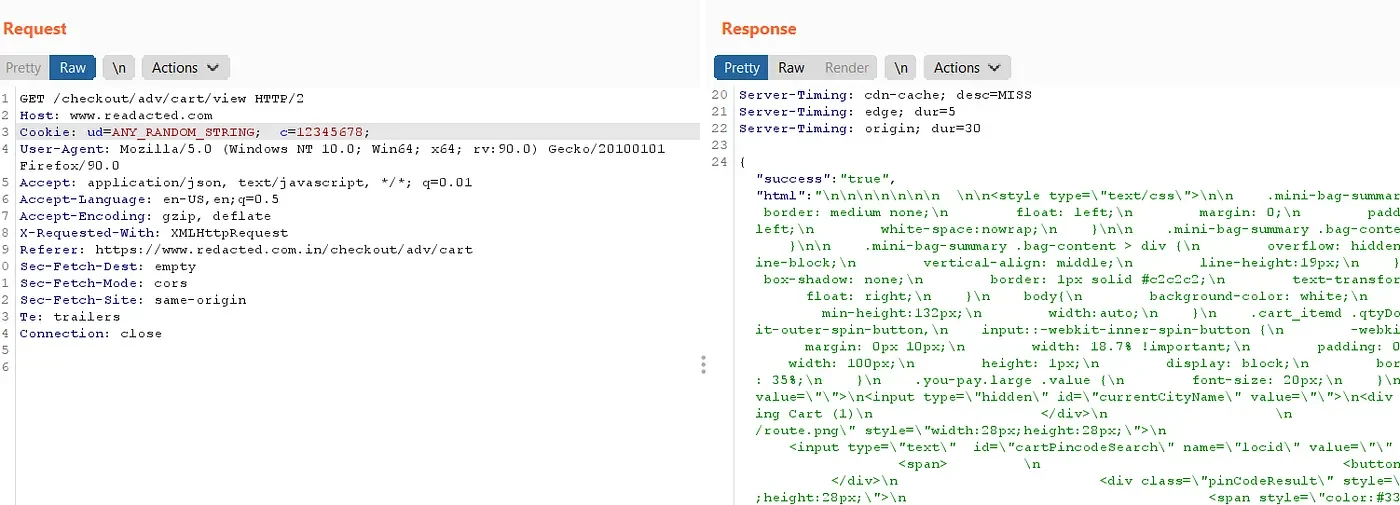
Final response
The response is JSON, but it is jumbled with very long HTML elements, so the PII is not clearly visible in the raw response. The author extracted a clean form of the personal data from it:
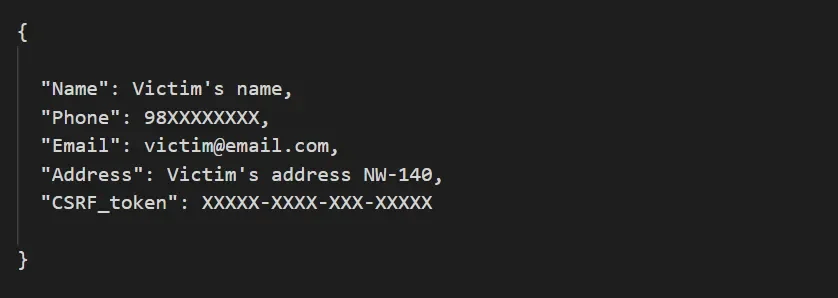
PII data extracted from the response
At this point the author could read another user's private data. The extracted data also contained a CSRF_token, which is what makes the next step possible.
Step 2: try to write with the cookie
The address section offers a functionality to edit or update the address. The POST request sent to the server carried the same cookies as before, so the author manipulated the cookie with the victim's customer_ID.
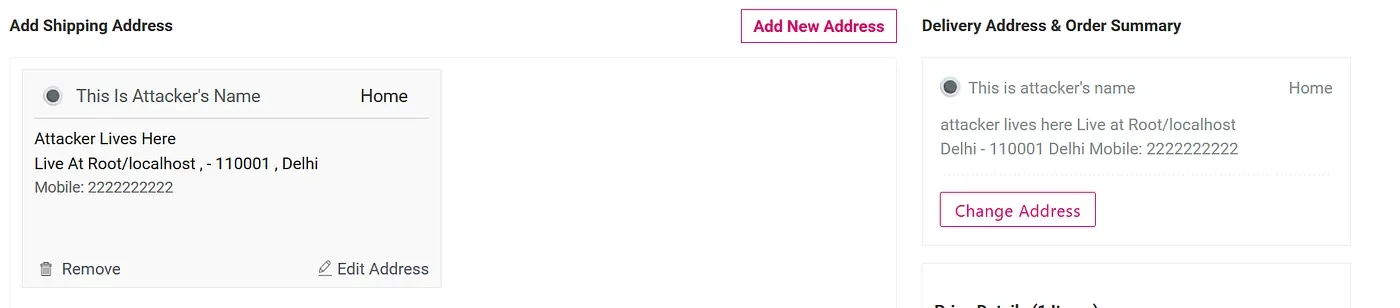
Address section
It did not work.

Step 3: write with the victim's CSRF token
The author realised that for the update the authorisation was not based on the cookie. It was based on the value of the CSRF token passed in the POST request while updating the address. Since the read in step 1 had already returned the victim's CSRF token, the author substituted that token, and the victim's details were updated.
With that, the author was able to read and write the personal data of almost 3 million users remotely.
Root cause
The design flaw is that the server verifies the presence of the ud parameter but not its contents, and does not reject requests missing sessid and XSSRF-Token. Removing sessid and XSSRF-Token does not cause the request to be rejected, and the ud parameter is only checked for presence, not for content. The identity check therefore collapses into "whatever customer ID the client sends".
The write path has a second, separate weakness: the update is authorised by the CSRF token carried in the POST body rather than by the session cookie. A CSRF token is meant to prove that a request came from the user's own browser session, not to serve as the authorisation decision for which record may be modified. Because the read endpoint disclosed the victim's token, the token stopped being a barrier at all.
Impact
An attacker with an authenticated account could read the personal data of any other customer by changing the customer ID in the request, and could then modify that customer's address details by supplying the CSRF token obtained from the read. The author states this affected almost 3 million users. The report does not describe what specific fields were returned, nor whether the write could reach anything other than the address record.
Fix
Based on the root cause, the fixes would be: derive the customer identity on the server from the authenticated session and ignore the client-supplied c value, reject requests that lack sessid and XSSRF-Token instead of treating them as valid, validate the contents of ud rather than only its presence, and authorise address updates against the session identity rather than against a CSRF token that can be read from another endpoint.
Variants to test
- Cookie identity parameters. Look for a numeric or otherwise guessable user identifier in cookies (
c,uid,customer_idand similar) and swap it for another account's value on every endpoint that returns account data. A positive result is a response containing another user's records. - Optional session cookies. Remove individual session cookies (
sessid, CSRF or anti-forgery cookies) one at a time and resend the request. A positive result is a normal response instead of a rejection or redirect to login. - Presence-only checks. Send a parameter the server expects (here
ud) with an empty or arbitrary value. A positive result is that the request is processed as if the value were valid. - Hidden JSON endpoints behind checkout or order flows. Enumerate endpoints used late in a purchase flow, such as address or payment-step views, and test them with another user's identifier. A positive result is JSON containing PII that the UI never shows for that account.
- CSRF token as authorisation. Where an update is accepted with a token taken from a read response, try replaying a victim's token against the update endpoint. A positive result is a successful modification of the victim's record.
- Parameter pollution on identity fields. Supply the identity parameter twice with different values and observe which one the server honours. A positive result is that the server uses the attacker-supplied value while the session belongs to someone else.
What happened, in plain words
A security researcher found a way to read and change the personal details of other shoppers on a large online shop. The shop could not be named publicly, so it is called redacted.com throughout. The researcher could look at any customer's saved address and then change it, just by editing a value that the website stored in their own browser. The researcher says this affected almost 3 million users.
To follow this, you only need to know a few everyday ideas. When you log in to a website, the site gives your browser a small piece of text called a cookie. Your browser sends that cookie back with every request, like a wristband at an event that proves you already paid to get in. A request is simply your browser asking the server for something, for example "show me my address". The server is the computer that holds the website's data and answers those requests. An endpoint is one specific address on the server that answers one specific kind of request, like one particular counter in a large office. JSON is a common text format for data, something like a neatly labelled list, and it is what many endpoints send back when they return information rather than a web page.
The bug class here is called IDOR, short for Insecure Direct Object Reference. The name sounds complicated, but the idea is simple: the website asks the server for a record by its number, and the server hands over whatever number you ask for without checking that the record belongs to you. Think of a cloakroom that gives you any coat when you read out any ticket number, instead of checking that the ticket is yours. The researcher's own title calls it read/write access to personal data, and the weakness is an IDOR.
First things first
The researcher could not name the bug bounty program, so the target is called redacted.com. A bug bounty program is an arrangement where a company invites outside researchers to look for security problems and report them, sometimes for a reward. The site uses cookie-based authentication and authorisation to validate legitimate requests on the server side. Authentication means proving who you are, like showing your passport. Authorisation means deciding what you are allowed to do once you are known, like a passport not letting you into every room of a building.
The image shows the cookies the site gave to a logged-in user. Among them is a parameter that identifies the user:
c=1234567
This is a single line from the cookie. c is the name of the parameter, and 1234567 is its value, a number that stands for one particular customer. The researcher's point is that the whole problem revolves around this one value. If the server trusts this number to decide whose data to show, then anyone who can change the number can ask for someone else's data.
The researcher's investigation found that the session is validated on the server with the following cookie parameters:
ud= XXXXXXX;c= CUSTOMER_ID;XSSRF-TOKEN= XXXXXXXX;sessid= XXXXXXXXXX;
Each line is one cookie the browser sends. ud is a parameter whose exact meaning the report does not explain. c is the customer identity, the number seen above. XSSRF-TOKEN is a token, a long random-looking value that a site uses to check that a request really came from its own pages. sessid is the session identifier, the value that ties the request to a logged-in session, like the number on your wristband. The X characters stand in for the real values, which are not shown.
What did I do?
Almost every e-commerce website has a section where users can add, remove and update their address. On redacted.com the same address data appeared on two endpoints:
- The user profile section, at
https://www.redacted.com/profile/address. - The final step for completing an order while clearing cart items, at
https://www.redacted.com/checkout/adv/address/view, which the researcher describes as a hidden JSON endpoint.
The first is the ordinary page you reach from your account settings. The second is used late in the checkout flow, when the shop needs your address to finish the order. The researcher calls it hidden because users do not normally see it as a page; it is an endpoint that returns data in JSON form, and it is easy to overlook when securing a site.
The researcher's observation is that developers tend to harden the endpoints a user can easily reach, and to pay less attention to the ones that are less visible. That difference is what this report is built on. The first endpoint, /profile/address, was safe and secure, so the researcher moved on to the second one.
The image shows the second endpoint, the hidden JSON endpoint used during checkout.
On /checkout/adv/address/view the researcher tried changing the customer_id, which did not work, and also tried parameter pollution, which did not work either. Parameter pollution means sending the same parameter twice with different values, to see which one the server believes. Neither attempt succeeded, so the researcher changed approach.
The next step was to work out on what basis the web server validates a session request. In other words: which of those cookies does the server actually check before it answers? The researcher's investigation showed that on this endpoint the validation is loose. If the sessid and XSSRF-Token parameters are removed and any request is then sent to the server, the server treats it as a valid request and fetches the content the request asks for. In other words, the server verifies the presence of the ud parameter but does not verify its contents. It checks that the box is not empty, not what is written on the form.
That combination is the bug. If the attacker's customer ID parameter in the request is replaced with the victim's customer ID, the web server fetches the contents of the victim's personal account details. The server never asks whether the session making the request is allowed to see that customer's record.
Exploitation
Step 1: read another user's address data
The final request sent to the server looks like this:
Final response
The image shows the final response that came back. The response is JSON, but it is jumbled with very long HTML elements, so the PII is not clearly visible in the raw response. PII stands for personally identifiable information, the details that identify a real person, such as a name, address or phone number. HTML is the code that describes how a web page looks, and here it is mixed into the response, which makes the useful data hard to spot by eye.
The researcher extracted a clean form of the personal data from it:
PII data extracted from the response
The image shows the PII data extracted from the response. At this point the researcher could read another user's private data. The extracted data also contained a CSRF_token, which is what makes the next step possible. A CSRF token is a value a site puts into its pages and forms so that it can tell a genuine request from a forged one. CSRF stands for Cross-Site Request Forgery, an attack where another site tricks your browser into sending a request you did not intend. The token is meant to be a secret that only your own browser session knows.
Step 2: try to write with the cookie
The address section offers a functionality to edit or update the address. The POST request sent to the server carried the same cookies as before, so the researcher manipulated the cookie with the victim's customer_ID. A POST request is a request that sends data to the server to change something, as opposed to a GET request, which only asks to see something. Think of GET as reading a noticeboard and POST as writing on it.
Address section
The image shows the address section. It did not work.
Step 3: write with the victim's CSRF token
The researcher realised that for the update the authorisation was not based on the cookie. It was based on the value of the CSRF token passed in the POST request while updating the address. Since the read in step 1 had already returned the victim's CSRF token, the researcher substituted that token, and the victim's details were updated. The server was checking the token, not the session, so a token obtained from the read was enough to make the write succeed.
With that, the researcher was able to read and write the personal data of almost 3 million users remotely. Remotely here simply means over the internet, from the researcher's own computer, without any access to the company's internal systems.
Root cause
The design flaw is that the server verifies the presence of the ud parameter but not its contents, and does not reject requests missing sessid and XSSRF-Token. Removing sessid and XSSRF-Token does not cause the request to be rejected, and the ud parameter is only checked for presence, not for content. The identity check therefore collapses into "whatever customer ID the client sends". The server is effectively asking the visitor which record they would like, and believing the answer.
The write path has a second, separate weakness: the update is authorised by the CSRF token carried in the POST body rather than by the session cookie. A CSRF token is meant to prove that a request came from the user's own browser session, not to serve as the authorisation decision for which record may be modified. Because the read endpoint disclosed the victim's token, the token stopped being a barrier at all.
Impact
An attacker with an authenticated account could read the personal data of any other customer by changing the customer ID in the request, and could then modify that customer's address details by supplying the CSRF token obtained from the read. The researcher states this affected almost 3 million users. The report does not describe what specific fields were returned, nor whether the write could reach anything other than the address record.
Fix
Based on the root cause, the fixes would be: derive the customer identity on the server from the authenticated session and ignore the client-supplied c value, reject requests that lack sessid and XSSRF-Token instead of treating them as valid, validate the contents of ud rather than only its presence, and authorise address updates against the session identity rather than against a CSRF token that can be read from another endpoint.
Variants to test
These are the general lessons a beginner can carry to other sites, phrased as things to try:
- Cookie identity parameters. Look for a numeric or otherwise guessable user identifier in cookies (
c,uid,customer_idand similar) and swap it for another account's value on every endpoint that returns account data. A positive result is a response containing another user's records. - Optional session cookies. Remove individual session cookies (
sessid, CSRF or anti-forgery cookies) one at a time and resend the request. A positive result is a normal response instead of a rejection or redirect to login. - Presence-only checks. Send a parameter the server expects (here
ud) with an empty or arbitrary value. A positive result is that the request is processed as if the value were valid. - Hidden JSON endpoints behind checkout or order flows. Enumerate endpoints used late in a purchase flow, such as address or payment-step views, and test them with another user's identifier. A positive result is JSON containing PII that the UI never shows for that account.
- CSRF token as authorisation. Where an update is accepted with a token taken from a read response, try replaying a victim's token against the update endpoint. A positive result is a successful modification of the victim's record.
- Parameter pollution on identity fields. Supply the identity parameter twice with different values and observe which one the server honours. A positive result is that the server uses the attacker-supplied value while the session belongs to someone else.
Glossary
- Authentication: proving who you are to a system, like showing a passport.
- Authorisation: deciding what a known user is allowed to do, like which rooms a passport opens.
- Bug bounty program: an arrangement where a company invites outside researchers to find and report security problems.
- Cookie: a small piece of text a site stores in your browser and your browser sends back with each request, used to remember who you are.
- CSRF (Cross-Site Request Forgery): an attack where another site tricks your browser into sending a request you did not intend.
- CSRF token: a secret value placed in pages and forms so the server can tell a genuine request from a forged one.
- Endpoint: one specific address on a server that answers one specific kind of request.
- GET request: a request that only asks to see something.
- HTML: the code that describes how a web page looks.
- IDOR (Insecure Direct Object Reference): a bug where a site hands over a record based on a number or identifier supplied by the user, without checking that the record belongs to that user.
- JSON: a common text format for structured data, like a labelled list.
- Parameter: a named value sent with a request or stored in a cookie, such as
c=1234567. - Parameter pollution: sending the same parameter twice with different values to see which one the server uses.
- PII (personally identifiable information): details that identify a real person, such as a name, address or phone number.
- POST request: a request that sends data to the server to change something.
- Remotely: over the internet, from your own computer, without access to the company's internal systems.
- Request: your browser asking the server for something.
- Server: the computer that holds a website's data and answers requests.
- Session: the period during which a site remembers that you are logged in, usually tracked by a session identifier.
- Session identifier (
sessid): the value that ties a request to a logged-in session. - Token: a long random-looking value used to prove or check something, such as a CSRF token.



