How I Get $1350 From IDOR Just Less 1 hours
An IDOR vulnerability in a GraphQL delete mutation allowed an attacker to change the alert definition ID to a victim's ID and delete their data. The attacker could also use Burp Intruder to mass-delete many users' alerts by brute-forcing IDs.

psfauzi.medium.com
Published on psfauzi.medium.com
Idor
The full write-up lives on its author's site
It belongs to its author, so we link to it rather than copy it. The other two tabs are our own rewrites, checked against it.
Context
The target is a web application the author refers to as redacted.com, with a per-website alerts configuration feature. The relevant page is the alerts configuration screen for a website, reached at a path of the form /websites/<site-id>/alerts/configuration, and the feature lets a user delete alert definitions belonging to that website. The delete action is performed over GraphQL, and the request carries the identifiers of the alert definitions to remove in a field called alertDefinitionIds.
The author classifies the issue as an Insecure Direct Object Reference (IDOR): an access control vulnerability that arises when an application uses user-supplied input to access objects directly. IDOR is most commonly associated with horizontal privilege escalation, but it can also arise in relation to vertical privilege escalation. The author notes that the term was popularised by its appearance in the OWASP 2007 Top Ten, and that it is one example of many access control implementation mistakes that let access controls be circumvented.
Setup
Two accounts were registered on the target:
- Account A, the attacker.
- Account B, the victim.
The only tool used is Burp Suite Community Edition, acting as an intercepting proxy, plus its Intruder module for the mass-delete step. No special role, plan or permission is described for either account beyond being a normal registered user with a website and alert configuration of their own.
Finding it
The reasoning is visible in the delete request: the alert definition identifier is sent by the client in the GraphQL body, and the attacker's own identifier (4478250) is a plain number that the client controls. Because the identifier is user-supplied input used to select the object to delete, changing it to another account's identifier is the natural test, and the server answered that test with 200 OK.
Exploitation
Step 1: reach the alerts configuration page
The attacker visits the alerts configuration page of their own website:
This is the normal entry point for managing alert definitions on a website the attacker owns.
Step 2: enable the proxy
Before deleting anything from the victim, the attacker turns on Burp Suite Community Edition as an intercepting proxy, so the delete request can be captured and modified.
Step 3: trigger the delete action
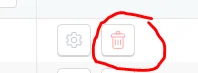
With the proxy running, the attacker clicks Delete Data on the configuration page. The screenshot shows the data belonging to the attacker's own account at this stage.
Step 4: capture the delete request
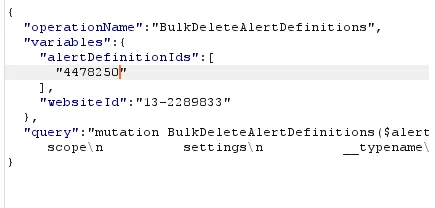
The attacker moves to Burp Suite and inspects the request generated by the click. It is a GraphQL request that carries the alert definition identifiers to delete.
Step 5: swap the identifier
In the JSON body, the field alertDefinitionIds holds the attacker's own identifier, 4478250. The attacker replaces it with the victim's identifier. In this case the victim's identifier is 4478118, which the attacker obtained from the victim's configuration edit URL:
So the identifier in the request body is changed from the attacker's 4478250 to the victim's 4478118, while the rest of the request stays as it was.
Step 6: send and observe the result
The server responds with 200 OK to the request carrying the victim's identifier.
Increasing impact: mass deletion with Intruder
A single identifier per request is slow, so the author escalates to deleting many definitions at once using Burp Intruder.
- Take the original delete request captured above and send it to Intruder.
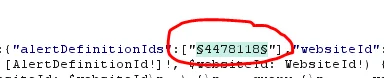
- Mark the identifier inside
alertDefinitionIdsas the payload position, adding the section markers around it:
alertDefinitionIds":["§4478118§"]
- In the Payloads tab of Intruder, configure the payload set. The screenshot shows the payload configuration used for the attack.
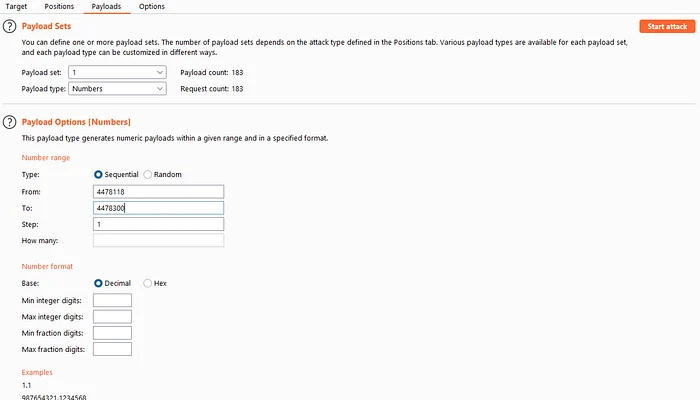
In that configuration the author brute-forces 183 identifiers.
- Click Start Attack.
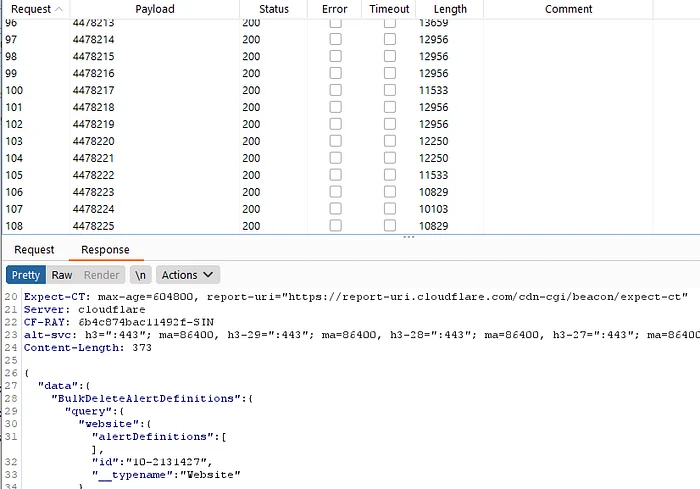
The final screenshot shows the responses from the attack.
Root cause
The delete operation trusts the alertDefinitionIds value supplied by the client and acts on it without checking that the referenced alert definitions belong to the account making the request. The identifier is a plain number supplied by the client, so an attacker can substitute another account's identifier. The author does not show any server-side ownership check, and the 200 OK response to a foreign identifier indicates that none blocked the request. Whether the check was missing entirely or only applied to the website in the URL rather than to the identifiers in the body is not stated; likely the authorisation was tied to the website context and not to each object identifier.
Impact
An authenticated attacker can delete alert definitions belonging to other users, one at a time or in bulk. The author demonstrates a run over 183 identifiers. The request targets the victim's alert definition from a different account. The author does not describe any read access to the victim's data, only deletion, and does not state which alert types or how many victims were affected beyond the identifiers used in the demonstration.
Fix
The report does not describe the fix that was applied. The change that addresses the root cause is a server-side ownership check on every identifier in alertDefinitionIds: the server should verify that each referenced alert definition belongs to the authenticated account (or to a website that account is authorised for) before deleting it, and reject the whole request otherwise. Relying on unguessable identifiers alone would reduce enumeration but would not fix the missing authorisation check.
Variants to test
- Other GraphQL mutations with identifier lists. Look for mutations that take arrays of IDs (delete, update, share, export) and swap one element for another account's ID. A positive result is a success response where the object is changed or removed for the other account.
- Nested objects in the same request. Send a request that mixes your own identifier with a foreign one in the same array. A positive result is that the foreign object is affected while the request still succeeds.
- Identifiers taken from URLs. Collect identifiers from edit, view and configuration URLs of other accounts, as the author did with the victim's edit URL, and replay them in body parameters. A positive result is a
200response and a visible change on the victim side. - Sequential enumeration. Where identifiers are numeric and close together, run an Intruder-style sweep over a range and compare response lengths and status codes. A positive result is a cluster of successful responses for identifiers that do not belong to you.
- Website-scoped versus object-scoped checks. Keep the website identifier in the URL pointing at your own site while changing the object identifier in the body. A positive result shows the authorisation is checked only at the website level.
Timeline
| Date | Event |
|---|---|
| 27 November 2021 | Reported |
| 30 November 2021 | Triaged |
| 3 December 2021 | Fixed and bounty of $1350 awarded |
What happened, in plain words
A security researcher found a way to delete other people's alert settings on a website, using nothing more than a normal account and a tool that lets you pause and edit web traffic. The site had a feature where each user could configure alerts for their own website. When you clicked delete, your browser sent a request to the server saying, in effect, "delete alert number 4478250". The server did what it was told without checking whether that alert actually belonged to you. By changing the number to someone else's, the researcher sent a delete request for their alerts. He then automated it so he could try many numbers in a row, and reported the issue. The timeline records the issue as fixed and a bounty of $1350 awarded.
The bug class is called IDOR, short for Insecure Direct Object Reference. The name sounds complicated, but the idea is simple. Imagine a hotel where the receptionist hands you a key with the room number on it, and any key opens any door as long as the number is written on it. The hotel trusts the number on the key instead of checking who you are. In web applications, the "number on the key" is an identifier sent by your browser, and an IDOR happens when the server uses that identifier to pick an object (a record, a file, an alert) without checking that the object belongs to you.
The author explains that IDOR is a type of access control vulnerability: a flaw in how a system decides who is allowed to do what. The term became well known after it appeared in the OWASP 2007 Top Ten, a list of common web security risks. IDOR is usually linked to horizontal privilege escalation, where you reach sideways into another user's data at the same level as you (another normal user), but it can also appear in vertical privilege escalation, where you reach upwards into something only an administrator should touch. This report is the horizontal kind: one normal user reaching into another normal user's settings.
The pieces you need to understand first
Before walking through the steps, here are the concepts the report relies on, explained from zero.
- Web application: a program that runs on a server and that you use through your browser. When you click a button, your browser sends a message to the server and shows you the reply.
- Request and response: the message your browser sends is a request; the server's answer is a response. A response carries a status code, a three-digit number.
200 OKmeans "done, no problem". - API: the part of a web application that accepts these messages directly, usually in a structured format rather than a web page. Think of a restaurant: the menu is the website you see, and the waiter taking your order is the API. You tell the waiter what you want, and the kitchen acts on it.
- GraphQL: a style of API where the request body is a structured text describing exactly which operation to run and with which values. It is a common way for modern sites to send actions like "delete these items".
- JSON: a simple text format for structured data, made of names and values in curly braces, like
{"name": "value"}. GraphQL requests often carry JSON. - Identifier (ID): a number or string that names a specific object in the database, such as one alert definition. If IDs are sequential (1, 2, 3...), they are easy to guess.
- Proxy: a tool that sits between your browser and the server. Instead of your browser talking straight to the server, it talks to the proxy, and the proxy forwards the message. This lets you read and edit every request before it leaves. Burp Suite Community Edition is a free proxy of this kind.
- Intercepting: telling the proxy to pause each request so you can look at it and change it before it is sent on.
- Burp Intruder: a part of Burp that takes one request and sends it many times, each time with a different value in a marked position. It is used for automated repetition, such as trying many IDs.
- Payload: in Intruder, the list of values that get inserted into the marked position, one per request.
- Authenticated user: someone logged in with an account. Both accounts in this report are ordinary logged-in users.
- Alert definition: a saved rule on the site that says "notify me when something happens". Deleting it removes that rule for the owner.
Setting up
The researcher registered two ordinary accounts on the target site, which he calls redacted.com:
- Account A, the attacker.
- Account B, the victim.
Each account had its own website and its own alert configuration. Nothing special was needed: no administrator role, no paid plan, just two normal sign-ups. The only tool used was Burp Suite Community Edition, both as the proxy and, later, through its Intruder module.
Finding it
The clue is in the delete request itself. When the attacker clicked delete, the browser sent the alert's identifier in the request body, and that identifier was the attacker's own number, 4478250. Because the number comes from the client (your browser), the natural question is: what happens if I send a different number? The server answered that question with 200 OK, meaning it accepted the change.
Step by step: deleting one victim's alert
Step 1: open your own alerts configuration page
The attacker first visits the alerts configuration page of his own website:
This is the normal page where a website owner manages alerts. The long number in the path (10-21xxxxx) identifies the website. The point of starting here is to use the feature exactly as a normal user would, so the request that follows is a genuine one.
Step 2: turn on the proxy
Before touching anything belonging to the victim, the attacker starts Burp Suite Community Edition and configures his browser to send traffic through it. From now on, every request can be paused and inspected. This step matters because the delete request is generated by a button click, and you cannot edit it after the browser has sent it. You need to catch it in flight.
Step 3: click Delete Data
With the proxy running, the attacker clicks Delete Data on his own configuration page. The screenshot shows the data belonging to the attacker's own account at this stage, before anything is changed.
At this point nothing unusual has happened. The attacker is simply using the feature on his own data, which is allowed.
Step 4: capture the delete request
The attacker switches to Burp Suite and looks at the request that the click produced. It is a GraphQL request carrying the identifiers of the alert definitions to delete.
This is the key moment: the request is now visible as text, and text can be edited. The screenshot shows the request as captured, with the attacker's own identifier inside it.
Step 5: swap the identifier
In the JSON body, the field alertDefinitionIds holds the attacker's own identifier, 4478250. The attacker replaces it with the victim's identifier. In this case the victim's identifier is 4478118, which the attacker obtained from the victim's configuration edit URL:
Line by line, in plain words:
https://redacted.comis the site./websites/13-2292xxxis the victim's website, a different number from the attacker's own site./alerts/configuration/edit/4478118is the edit page for one specific alert definition, and4478118is that alert's identifier.?group=page_alerts&type=page_type_changeis extra information after the question mark that tells the page which kind of alert is being edited.
So the identifier in the request body is changed from the attacker's 4478250 to the victim's 4478118, while the rest of the request stays exactly as it was. The reason for changing only the number is to test one thing at a time: if the server accepts the request, the only difference is whose alert it is.
Step 6: send it and watch the response
The server responds with 200 OK to the request carrying the victim's identifier. That is the whole vulnerability: the server acted on the number it was given without checking who owned that number.
Doing it at scale: mass deletion with Intruder
Deleting one alert per request is slow. To show how bad the problem could be, the author used Burp Intruder to delete many alerts in a row.
- Take the original delete request captured above and send it to Intruder. Intruder is the part of Burp that repeats a request many times with different values.
- Mark the identifier inside
alertDefinitionIdsas the payload position, adding the section markers around it:
alertDefinitionIds":["§4478118§"]
In plain words: the two § symbols are Intruder's way of saying "this is the spot to change". Everything outside the markers stays the same in every request; only the text between them is replaced, once per payload value. The surrounding text alertDefinitionIds":[" and "] is just the JSON field name and brackets that must remain intact so the request is still valid.
- In the Payloads tab of Intruder, configure the payload set. The screenshot shows the payload configuration used for the attack.
In that configuration the author brute-forces 183 identifiers. "Brute-forcing" here means trying a long list of numbers one after another, rather than guessing cleverly. The payload list is the set of numbers that will be inserted into the marked position.
- Click Start Attack.
The final screenshot shows the responses from the attack. Each row in the results corresponds to one request with one identifier, and the responses show which ones succeeded.
Why it worked
The delete operation trusts the alertDefinitionIds value supplied by the client and acts on it without checking that the referenced alert definitions belong to the account making the request. The identifier is a plain number supplied by the client, so an attacker can substitute another account's identifier. The author does not show any server-side ownership check, and the 200 OK response to a foreign identifier indicates that none blocked the request. Whether the check was missing entirely or only applied to the website in the URL rather than to the identifiers in the body is not stated; likely the authorisation was tied to the website context and not to each object identifier.
In everyday terms: the server checked that you were logged in, and perhaps that you had some connection to the website in the address, but it never asked "does this specific alert belong to you?". The number was treated as proof of ownership, which it is not.
What an attacker could do with it
An authenticated attacker can delete alert definitions belonging to other users, one at a time or in bulk. The author demonstrates a run over 183 identifiers. The request targets the victim's alert definition from a different account. The author does not describe any read access to the victim's data, only deletion, and does not state which alert types or how many victims were affected beyond the identifiers used in the demonstration.
How it should be fixed
The report does not describe the fix that was applied. The change that addresses the root cause is a server-side ownership check on every identifier in alertDefinitionIds: the server should verify that each referenced alert definition belongs to the authenticated account (or to a website that account is authorised for) before deleting it, and reject the whole request otherwise. Relying on unguessable identifiers alone would reduce enumeration but would not fix the missing authorisation check.
Other places to look for the same mistake
- Other GraphQL operations that take lists of IDs. Look for operations that take arrays of IDs (delete, update, share, export) and swap one element for another account's ID. A positive result is a success response where the object is changed or removed for the other account.
- Mixing your own ID with a foreign one in the same request. Send a request that contains both your identifier and someone else's in the same array. A positive result is that the foreign object is affected while the request still succeeds.
- IDs taken from URLs. Collect identifiers from edit, view and configuration URLs of other accounts, as the author did with the victim's edit URL, and replay them in body parameters. A positive result is a
200response and a visible change on the victim side. - Sequential enumeration. Where identifiers are numeric and close together, run an Intruder-style sweep over a range and compare response lengths and status codes. A positive result is a cluster of successful responses for identifiers that do not belong to you.
- Website-level versus object-level checks. Keep the website identifier in the URL pointing at your own site while changing the object identifier in the body. A positive result shows the authorisation is checked only at the website level.
Timeline
| Date | Event |
|---|---|
| 27 November 2021 | Reported |
| 30 November 2021 | Triaged |
| 3 December 2021 | Fixed and bounty of $1350 awarded |
"Triaged" means the security team confirmed the report was valid and started handling it. The timeline runs from report on 27 November to fixed and bounty awarded on 3 December.
Glossary
- Access control: the rules a system uses to decide who may do what. A flaw here means someone can do something they should not be allowed to do.
- Alert definition: a saved rule on the site that triggers a notification when a certain event happens. It belongs to the account that created it.
- API: the part of a web application that accepts structured messages from programs and browsers, separate from the pages you see.
- Authenticated user: someone who has logged in and is recognised by the server.
- Brute-force: trying many values in sequence, usually numbers or short strings, until something works.
- Burp Suite Community Edition: a free tool that sits between your browser and a server so you can read, pause and edit requests.
- Enumeration: walking through a range of identifiers one by one to discover which ones exist or are accessible.
- GraphQL: a style of API where the request body describes the operation and its values in a structured format.
- Horizontal privilege escalation: reaching sideways into another user's data at the same permission level as yourself.
- Identifier (ID): a number or string that names a specific object in a system, such as one alert definition.
- IDOR (Insecure Direct Object Reference): a vulnerability where the server uses an identifier supplied by the client to pick an object without checking that the client is allowed to access that object.
- Intercepting proxy: a proxy that pauses each request so you can inspect and modify it before it is forwarded.
- Intruder: the part of Burp Suite that repeats one request many times, substituting a different value in a marked position each time.
- JSON: a text format for structured data, made of names and values in curly braces.
- OWASP Top Ten: a widely referenced list of common web application security risks, first published in 2007.
- Payload: in Intruder, the list of values inserted into the marked position, one per request.
- Proxy: a tool or server that sits between your browser and the target server and forwards messages between them.
- Request: the message your browser sends to a server when you do something, such as clicking a button.
- Response: the server's reply to a request, including a status code such as
200 OK. - Status code: a three-digit number in a response.
200 OKmeans the request succeeded. - Triaged: the state of a security report after the receiving team has confirmed it is valid and begun handling it.
- Vertical privilege escalation: reaching upwards into functionality or data that only a higher-privileged user, such as an administrator, should access.



