How I got my first $13500 bounty through Parameter Polluting (HPP)
The registration logic determined host status by checking whether a HostId parameter was supplied, but only validated it when IsHost=1, allowing creation of invalid host accounts. This unlocked features with a public three-character form ID that allowed viewing other users' forms and files, and a self-XSS in the name field became reflected through the IDOR.
 Published on infosecwriteups.com
This write-up is about 2 IDORs and an XSS I found on a housing website. However what led me into these bugs is the point of this article.
The full write-up lives on its author's site
It belongs to its author, so we link to it rather than copy it. The other two tabs are our own rewrites, checked against it.
Context
This write-up covers two IDORs and one XSS found on a housing website. The bugs themselves are not the interesting part: what led to them is. The target was a service built around two sites. The main website is where you create your account, and it has different privilege levels depending on what you want to do. A second website, a subdomain of the main website, hosts a sub-service that gets help from the main website.
On the main website you could be a host or a customer. In the sub-service, the functionalities available to you depended on whether your main account was a host or a customer. The registration form for the sub-service asked you to choose whether your main account is a host, and then to enter your ID. The website then prompted a check to see whether the ID was valid and to retrieve information.

Setup
No special tooling is described. The precondition that mattered was the broken host registration path: the hosting section completely malfunctioned, so no matter how valid your hosting ID was, the service told you it was invalid or that it could not retrieve information.
That malfunction is what made the researcher suspect that no hunter had successfully created a host account, and that whatever lay behind the host role was still unexplored.
Finding it
The registration form looked like the screenshot below. You chose whether your main account is a host, then entered your ID, which required the website to prompt a check to see whether the ID is valid and retrieve information.
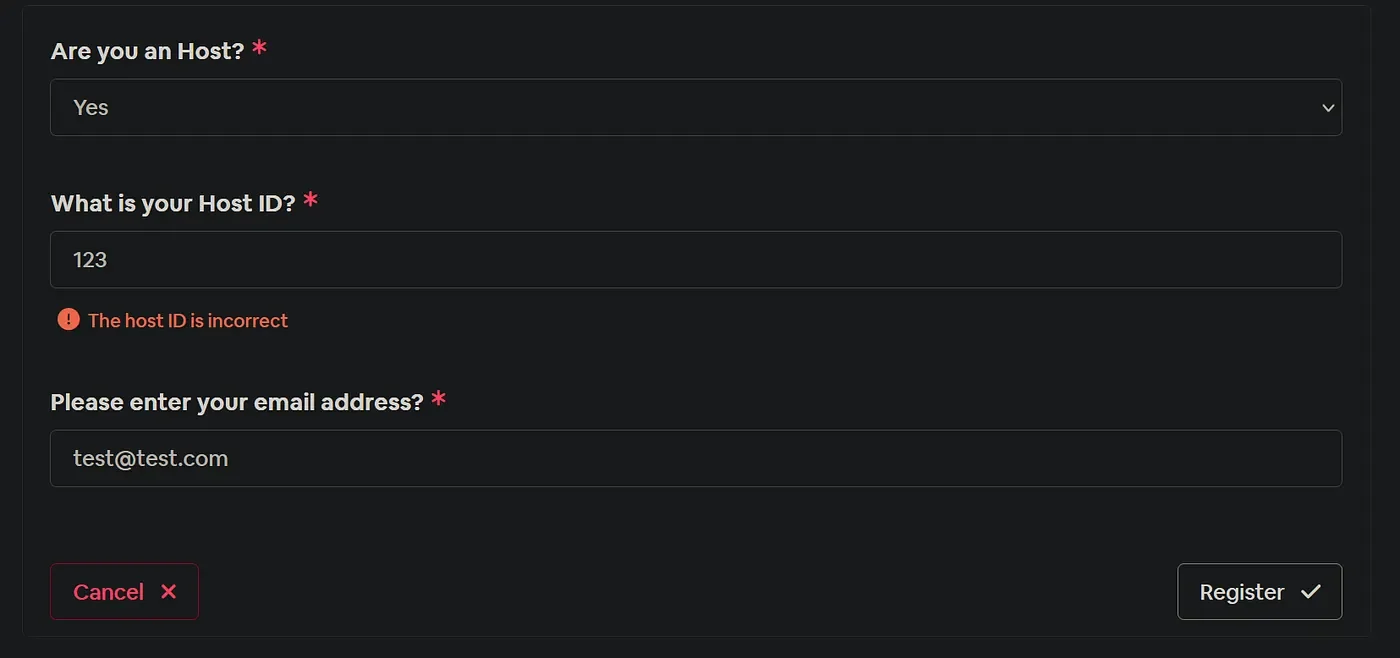
When you selected that you are a host, the registration body looked something like this:
IsHost=1&HostId=123&Email=test%40test.com
When you selected that you are a customer, it looked like this:
IsHost=0&Email=test%40test.com
A HostId was not supplied if you selected that you are a non-host. The way the service functioned was, in the researcher's words, funny:
- If
HostIdexists andIsHost=1, it searches forhostIDand fails. - If
HostIddoes not exist andIsHost=0, the user is a customer and it proceeds. - If
HostIdexists andIsHost=0, the user is a host but it does not search forhostID.
In other words, the service determined whether or not you are a host by checking whether you supplied any HostID, but it processed the check only if you selected IsHost=1. That mismatch is the flaw: it lets you create invalid host accounts.
With that, the researcher unlocked four features and immediately assumed they had bugs.
Exploitation
Step 1: Register as a host through the parameter mismatch
The registration request carries IsHost and, optionally, HostId. The legitimate host path (IsHost=1 with a HostId) always failed at the lookup step. The customer path (IsHost=0 without a HostId) succeeded but gave a customer account.
Step 2: Use the host-only features
Creating the invalid host account unlocked four features. One of them was a form submission. The form contained confidential user data, both input directly by the user and retrieved from the main website, which is what makes the information critical.
Step 3: Enumerate form IDs
When you submitted a form, you were granted a three-character unique ID in the URL that opened your form. The ID was public and had no protection. That is a public IDOR, which means two things:
- You can see other people's stuff.
- You can achieve reflected XSS if you find an XSS on the form and pass the URL to a victim.
The inputs on the form itself were all properly sanitised, so none of them were vulnerable.
Step 4: Chain a self-XSS into a reflected XSS
A previously found issue made the field name vulnerable to XSS, but the name was entirely private and only the owner could see it, so on its own it was a self-XSS. The IDOR changed that: the name gets reflected in the form and outputted in the three-character page, . The self-XSS became a reflected XSS through the IDOR.
Step 5: Abuse the file upload IDOR
The form also contained a file upload. The upload gave you another link to the file, separate from the main form, and that link was vulnerable by itself: you could see other files through it.
Root cause
The registration logic decided host status from the presence of a HostId parameter but only ran the validation lookup when IsHost=1. The two checks were not tied together, so a request could claim to be a non-host while still carrying a HostId, and the account was treated as a host without the lookup that would have rejected it. The form ID was a three-character value with no authorisation check, so knowing or guessing it was enough to read someone else's form. The file link was likewise separate from the form and unprotected.
Impact
, so reading other users' forms leaked confidential data. The file IDOR exposed other users' uploaded files. The bounty split was $12000 for the main IDOR, $1000 for the file IDOR and $500 for the XSS, $13500 in total.
Fix
The report does not describe any remediation. The registration logic should derive host status from a single validated source: run the HostId lookup whenever a HostId is supplied, regardless of IsHost, and reject the request if the lookup fails. Form and file identifiers should be checked against the authenticated user's ownership before any data is returned, and the field name should be output-encoded wherever it is reflected.
Variants to test
- Send a privileged identifier parameter alongside a flag that declares an unprivileged role, as with
HostIdandIsHost=0, and see whether the privileged feature set is unlocked. A positive result is access to host-only functionality without a valid lookup. - Look for short, sequential or low-entropy object identifiers in URLs, such as the three-character form ID, and request neighbouring values with another account's session. A positive result is another user's form contents.
- Find secondary links generated by an upload or export feature that are separate from the main object URL, and request them without ownership checks. A positive result is another user's file.
- Find stored values that are only visible to their owner, such as a profile name, then locate a page where that value is reflected to other users through an IDOR. A positive result is script execution in a victim's session when they open the crafted URL.
What happened, in plain words
A security researcher found three bugs on a housing website: two IDORs (Insecure Direct Object Reference) and one XSS (Cross-Site Scripting). The interesting part is not the bugs themselves but how they were reached. The target was a service built around two websites. The main website is where you create your account, and it has different privilege levels depending on what you want to do. A second website, a subdomain of the main website, hosts a sub-service that gets help from the main website.
On the main website you could be a host or a customer. In the sub-service, the features available to you depended on whether your main account was a host or a customer. The registration form for the sub-service asked you to choose whether your main account is a host, and then to enter your ID. The website then checked whether the ID was valid and retrieved information.
No special tooling is described. The precondition that mattered was the broken host registration path: the hosting section completely malfunctioned, so no matter how valid your hosting ID was, the service told you it was invalid or that it could not retrieve information.
That malfunction made the researcher suspect that no hunter had successfully created a host account, and that whatever lay behind the host role was still unexplored.
Finding it
The registration form looked like the screenshot below. You chose whether your main account is a host, then entered your ID, which required the website to check whether the ID is valid and retrieve information.
When you selected that you are a host, the registration body looked something like this:
IsHost=1&HostId=123&Email=test%40test.com
This is the data your browser sends to the server when you submit the form. It is a series of name=value pairs joined by &. IsHost=1 means you ticked the box saying you are a host. HostId=123 is the ID you typed. Email=test%40test.com is your email address; %40 is how the @ sign is encoded in a URL. The server reads these values to decide what kind of account to create.
When you selected that you are a customer, it looked like this:
IsHost=0&Email=test%40test.com
Here IsHost=0 means you did not tick the host box, and there is no HostId at all. The server sees only the email and the flag saying you are a customer.
A HostId was not supplied if you selected that you are a non-host. The way the service functioned was, in the researcher's words, funny:
- If
HostIdexists andIsHost=1, it searches forhostIDand fails. - If
HostIddoes not exist andIsHost=0, the user is a customer and it proceeds. - If
HostIdexists andIsHost=0, the user is a host but it does not search forhostID.
In other words, the service determined whether or not you are a host by checking whether you supplied any HostId, but it processed the check only if you selected IsHost=1. That mismatch is the flaw: it lets you create invalid host accounts.
With that, the researcher unlocked four features and immediately assumed they had bugs.
Exploitation
Step 1: Register as a host through the parameter mismatch
The registration request carries IsHost and, optionally, HostId. The legitimate host path (IsHost=1 with a HostId) always failed at the lookup step. The customer path (IsHost=0 without a HostId) succeeded but gave a customer account.
Step 2: Use the host-only features
Creating the invalid host account unlocked four features. One of them was a form submission. The form contained confidential user data, both input directly by the user and retrieved from the main website, which is what makes the information critical.
Step 3: Enumerate form IDs
When you submitted a form, you were granted a three-character unique ID in the URL that opened your form. The ID was public and had no protection. That is a public IDOR, which means two things:
- You can see other people's stuff.
- You can achieve reflected XSS if you find an XSS on the form and pass the URL to a victim.
The inputs on the form itself were all properly sanitised, so none of them were vulnerable.
Step 4: Chain a self-XSS into a reflected XSS
A previously found issue made the field name vulnerable to XSS, but the name was entirely private and only the owner could see it, so on its own it was a self-XSS. The IDOR changed that: the name gets reflected in the form and outputted in the three-character page, . The self-XSS became a reflected XSS through the IDOR.
Step 5: Abuse the file upload IDOR
The form also contained a file upload. The upload gave you another link to the file, separate from the main form, and that link was vulnerable by itself: you could see other files through it.
Root cause
The registration logic decided host status from the presence of a HostId parameter but only ran the validation lookup when IsHost=1. The two checks were not tied together, so a request could claim to be a non-host while still carrying a HostId, and the account was treated as a host without the lookup that would have rejected it. The form ID was a three-character value with no authorisation check, so knowing or guessing it was enough to read someone else's form. The file link was likewise separate from the form and unprotected.
Impact
, so reading other users' forms leaked confidential data. The file IDOR exposed other users' uploaded files. The bounty split was $12000 for the main IDOR, $1000 for the file IDOR and $500 for the XSS, $13500 in total.
Fix
The report does not describe any remediation. The registration logic should derive host status from a single validated source: run the HostId lookup whenever a HostId is supplied, regardless of IsHost, and reject the request if the lookup fails. Form and file identifiers should be checked against the authenticated user's ownership before any data is returned, and the field name should be output-encoded wherever it is reflected.
Variants to test
- Send a privileged identifier parameter alongside a flag that declares an unprivileged role, as with
HostIdandIsHost=0, and see whether the privileged feature set is unlocked. A positive result is access to host-only functionality without a valid lookup. - Look for short, sequential or low-entropy object identifiers in URLs, such as the three-character form ID, and request neighbouring values with another account's session. A positive result is another user's form contents.
- Find secondary links generated by an upload or export feature that are separate from the main object URL, and request them without ownership checks. A positive result is another user's file.
- Find stored values that are only visible to their owner, such as a profile name, then locate a page where that value is reflected to other users through an IDOR. A positive result is script execution in a victim's session when they open the crafted URL.
Glossary
- IDOR (Insecure Direct Object Reference): a bug where a program uses a user-supplied value (like an ID in a URL) to pick which record to show, without checking that the user is allowed to see that record. Anyone who changes the value can see someone else's data.
- XSS (Cross-Site Scripting): a bug where an attacker can make a website show their own code (usually JavaScript) to another user. The code runs in the victim's browser as if it came from the site.
- Reflected XSS: an XSS where the malicious code is part of the request (for example, in a URL parameter) and is immediately echoed back in the response. It only affects users who click a crafted link.
- Self-XSS: an XSS that only affects the person who enters the malicious code, because the vulnerable value is only shown back to them. It is usually considered low risk on its own.
- Subdomain: a prefix added to a domain name to create a separate site, like
blog.example.comunderexample.com. - Privilege level: the set of actions an account is allowed to perform. A host and a customer have different privileges.
- Parameter: a named value sent to a server, often in a URL or in form data, like
IsHost=1. - Request body: the part of an HTTP request that carries data, such as form fields, when you submit a form.
- Sanitised: cleaned up so that dangerous characters are removed or neutralised, preventing them from being interpreted as code.
- Output encoding: converting characters in data so that they are displayed as text rather than executed as code when shown on a page.
- Enumerate: to go through a list of possible values (like IDs) one by one to find valid ones.
- Authorisation check: a check that the logged-in user is permitted to access a particular resource.
- Bounty: a reward paid by a company to a researcher who reports a security bug.
- Critical / Medium: severity ratings that indicate how serious a bug is, based on impact and ease of exploitation.


