How I Hacked A Telecom Company
A telecom account portal accepted a tampered login response, letting the author log in with a wrong one-time code, and a profile request keyed on the phone number returned other subscribers' personal data when the number was changed. An attacker could take over accounts and read identity, contact and PIN/PUK details of any subscriber.

medium.com
Published on medium.com
Bug Bounty
The full write-up lives on its author's site
It belongs to its author, so we link to it rather than copy it. The other two tabs are our own rewrites, checked against it.
Context
This is a story about a penetration test against a telecom company's customer account portal, the website a subscriber uses to log in and manage their line. The researcher was invited to conduct the test for a private company. The account area handles the usual telecom self-service functions: logging in with a password or a one-time code sent by SMS, reading SMS messages that arrived on the number, and viewing the profile tied to the phone number, which holds contract data, personal details and SIM-related codes.
The write-up is framed by a text message the researcher received, which they first took for a scam and ignored until they were actually billed for it. That prompted them to look at the website behind it.
Setup
The only tool named is Burp Suite, which the researcher kept running while browsing the site like a normal user. No versions, accounts, roles or other preconditions are given. The testing was done against the live customer account portal, and the researcher describes doing these pentests mostly for free.
Finding it
The researcher's summary of the underlying problem is blunt: the application had no server-side validation. Two separate weaknesses follow from that. The login flow trusted values in the response rather than deciding on the server whether authentication succeeded, and the profile lookup trusted the phone number supplied in the request rather than checking that it belonged to the logged-in user.
Before the technical part, the write-up describes how the findings were handled. The researcher called the company to report the IDOR, showed screenshots and gave a live demonstration. They were then put in front of three other people to explain what they had done, and mentioned that they could bypass the login too, which they had not tried yet. One of the people said that was impossible. The researcher asked for five minutes, nearly gave up, kept trying, and the bypass worked. The company fixed the issues, but within 30 minutes the researcher managed to bypass the fix again. The fix added an authcode header, and deleting the value of that header made it behave as if nothing had been fixed. After that the researcher was ignored.
Exploitation
Step 1: Observe a legitimate login response
The researcher first made a normal, legitimate login to see what the response looks like.
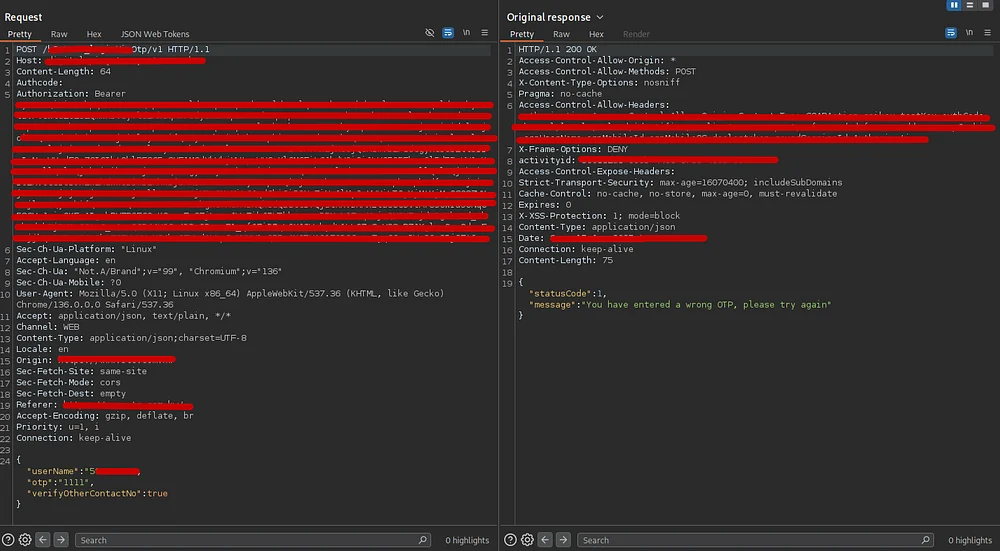
Step 2: Log in with a random OTP
The same login was repeated with a random OTP instead of the real one. It was rejected, as expected.
Step 3: Tamper with the rejected response
The researcher repeated the random-OTP login but changed the response to look like the legitimate login response from step 1.
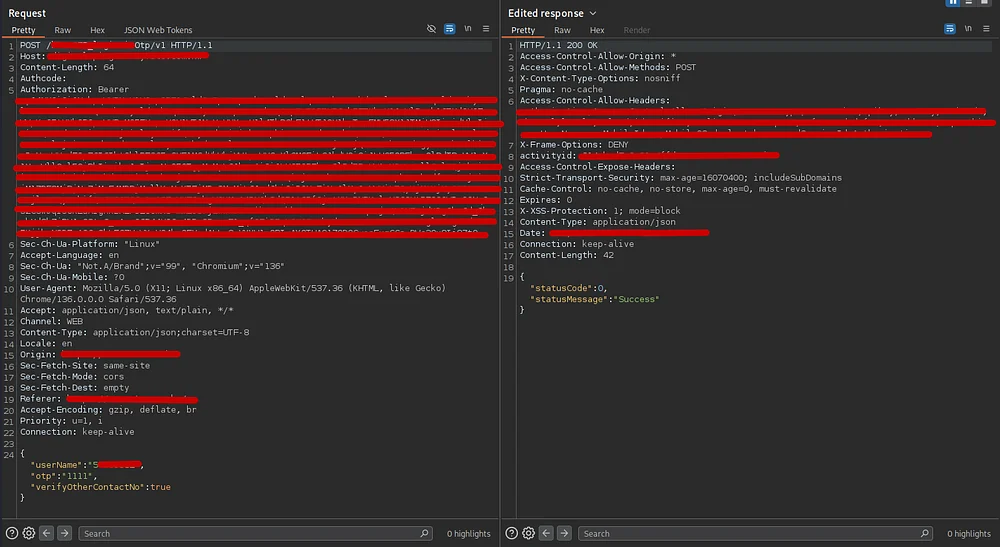
With the response values changed, the application logged them in. The password or OTP steps stayed the same; only the response was altered. The same technique also let them read SMS messages for any number.
Step 4: View a profile with a different phone number
Next the researcher viewed their own profile using their phone number. The number sits at the top left of the request.
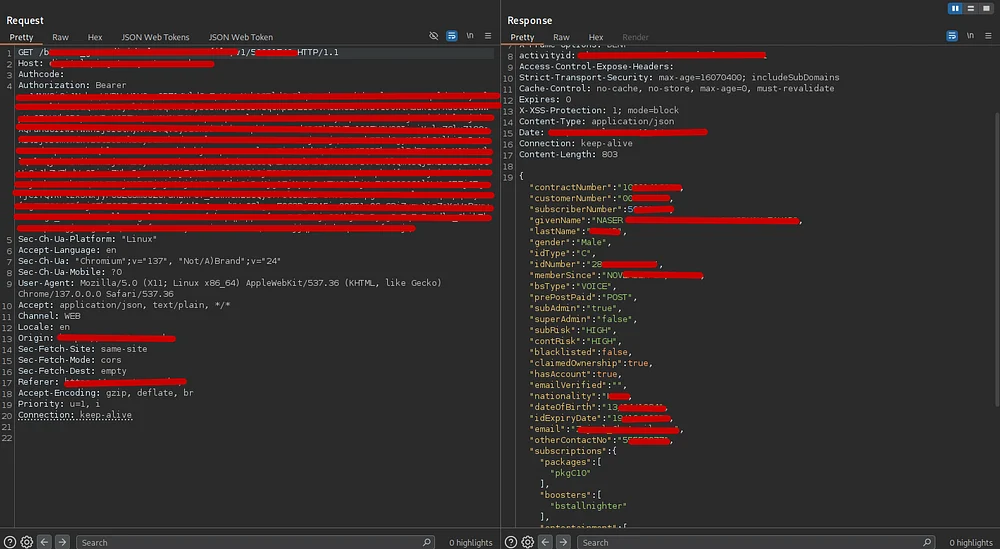
They changed it to a different number. The expectation was a 403 or a 401. Instead the response returned another subscriber's data.
Step 5: Read the exposed data
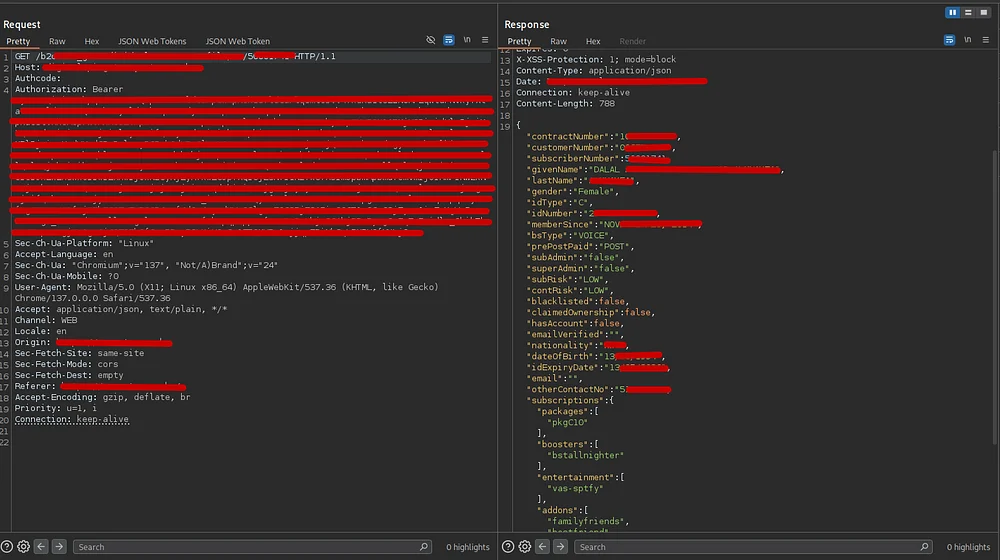
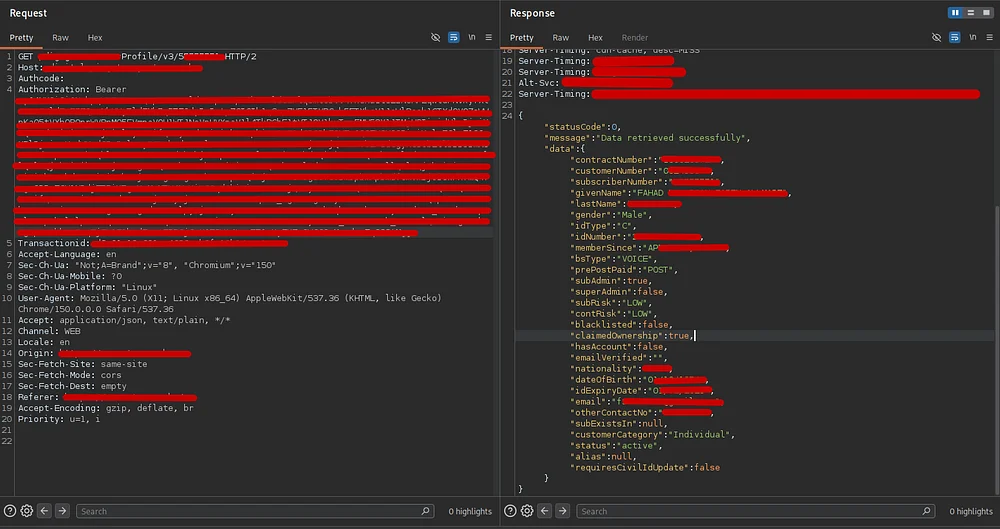
The profile response contained personally identifiable information: ID number, phone numbers tied to the original phone number, access to the account, contract numbers, full names and emails, PIN codes and PUK codes.
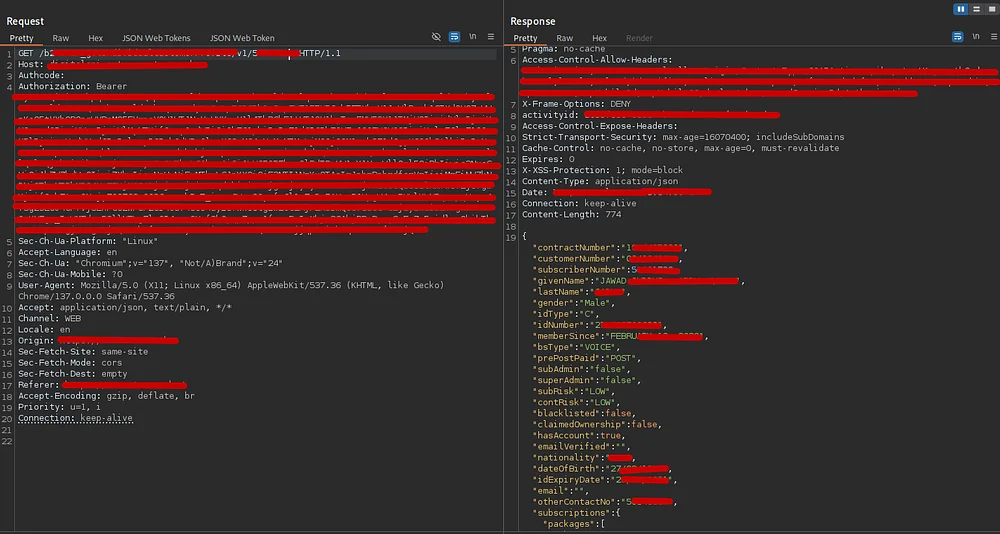
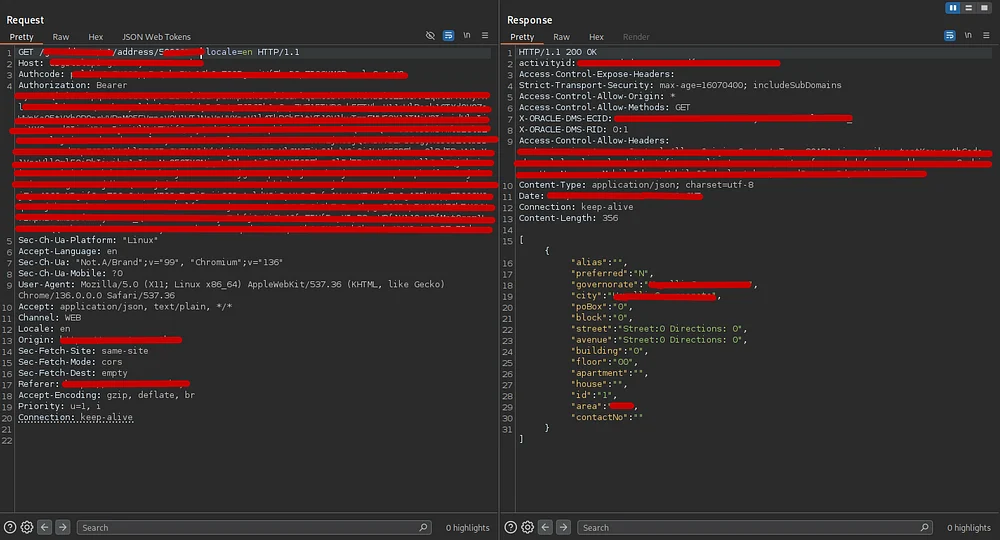
It also returned the subscriber's home address.
The researcher notes that with this, an attacker could get the entire subscribers and their personal information.
Root cause
The application made its security decisions on the client side of the trust boundary. In the login flow, the outcome of authentication was carried in the response, and the client accepted a modified response as proof of a successful login, so the server never independently confirmed that the OTP was correct. In the profile flow, the phone number in the request was used directly to select the record, with no check that it matched the authenticated user, which is a classic IDOR. Both stem from the same missing server-side validation.
The first fix added an authcode header, but deleting the header's value restored the original behaviour, so the check was not enforced when the header was absent. The report does not describe the header's contents or how it was validated.
Impact
The researcher lists the impact as full account takeover, impersonation and SIM swapping, and notes that with the profile access an attacker could obtain the entire subscriber base and their personal information. The data exposed per subscriber includes ID number, linked phone numbers, contract numbers, full names, emails, PIN and PUK codes and home address. PUK and PIN codes are what an attacker would need to take control of a SIM, which is why SIM swapping appears in the list. These are the researcher's stated consequences; the report does not quantify how many subscribers were affected.

Fix
The company fixed the issues, and within 30 minutes the researcher managed to do it again. The fix added an authcode header, and deleting its value made it behave as if nothing had been fixed. The report does not describe any further remediation. The lesson the researcher draws is simply that reporting what you see is wrong matters, whether or not it is paid.

Variants to test
- Response tampering on authentication endpoints. Intercept the login response for a failed OTP or password and change the success flag or session values to match a known good login. A positive result is being logged in with an invalid credential.
- Identifier swaps on profile and account endpoints. Replace the phone number, account ID or contract number in a request with another value. A positive result is a 200 response containing another subscriber's data instead of a 401 or 403.
- Header-based fixes. When a new header appears after a fix, try removing it, emptying its value and replaying an old request. A positive result is the original behaviour returning, as happened here with the authcode header.
- SMS and message retrieval endpoints. Apply the same identifier swap to endpoints that list or read messages for a number. A positive result is messages belonging to another number.
- Sensitive codes in profile responses. Check whether PIN, PUK or similar recovery codes are returned in profile responses at all. A positive result is any such code appearing in a response body.
What happened, in plain words
A security researcher was invited to test the customer account website of a telecom company. That website is the place where a phone subscriber logs in to manage their line: paying bills, reading text messages that arrived on the number, and looking at the personal details the company holds about them.
The story starts with a text message the researcher received. They thought it was a scam and ignored it, until they were actually billed for it. That made them take a look at the website behind the message.
While browsing the site like a normal customer, with a tool called Burp Suite running in the background, the researcher found that the site made important security decisions in the wrong place. Instead of the server deciding whether a login succeeded, or whether the person asking for a profile was allowed to see it, the site trusted information that came back and forth in the browser. That let the researcher log in without a valid one-time code, and separately read the personal data of other subscribers, including their home address and the codes used to control a SIM card.
Before the technical part, the write-up describes how the findings were handled. The researcher called the company to report the IDOR (explained below), showed screenshots and gave a live demonstration. They were then put in front of three other people to explain what they had done, and mentioned that they could bypass the login too, which they had not tried yet. One of the people said that was impossible. The researcher asked for five minutes, nearly gave up, kept trying, and the bypass worked. The company fixed the issues, but within 30 minutes the researcher managed to bypass the fix again. The fix added an authcode header, and deleting the value of that header made it behave as if nothing had been fixed. After that the researcher was ignored.
The pieces you need to know first
Before the steps make sense, here are the basic ideas, explained from zero.
A website and a server. When you open a page, your browser (the client) sends a request over the internet to a computer somewhere else (the server). The server sends back a response. The page you see is built from that response.
An API. Many websites are not just pages; behind the scenes the page talks to the server through an API. Think of an API as a waiter in a restaurant: you tell the waiter what you want, the waiter goes to the kitchen, and brings back a plate. You never walk into the kitchen yourself. In the same way, the page asks the API for your profile, and the API answers with your data.
A request and a response. A request is the message your browser sends: it says what it wants and includes details such as your phone number or a code you typed. A response is the message that comes back: it says whether it worked and carries the data. Both are just text, and both can be read and changed with the right tool.
Headers. Headers are small labelled lines attached to a request or a response, a bit like the address and handling notes on an envelope. They carry things such as what kind of data is inside, or a value the server wants to see on later requests.
A cookie or a token. After you log in, the server usually gives your browser a small piece of text called a cookie or a token. Your browser sends it back with every later request so the server knows who you are. Think of it as a wristband you get at an event: show it at the door and you are let in without explaining who you are again.
An OTP. A one-time password is a short code, often sent by SMS, that you type in addition to (or instead of) your normal password. It is meant to prove that you hold the phone tied to the account.
Burp Suite. This is a tool that sits between your browser and the server, like a postbox you can open. It lets you read every request and response, and change them before they are delivered. The researcher kept it running while browsing the site like a normal user.
Server-side validation. This means the server checks things for itself. If the server validates on its side, it does not care what your browser claims; it looks up the truth in its own records. If it does not, it trusts whatever the browser sends, and that is the root of everything below.
IDOR. Insecure Direct Object Reference. It means the site lets you ask for a record by its identifier (here, a phone number) without checking that the record belongs to you. A simple comparison: a cloakroom that hands out any coat to anyone who reads the ticket number aloud, instead of checking that the ticket is yours.
401 and 403. These are HTTP status codes, the numbers a server uses to say what happened. 401 means "you are not logged in / not authenticated". 403 means "you are logged in, but you are not allowed to do this". Seeing either one when you ask for someone else's data is the correct, safe behaviour.
PII. Personally Identifiable Information: data that identifies a real person, such as a full name, an ID number, an email address or a home address.
PIN and PUK. A SIM card has a PIN (a short code you may need to unlock it) and a PUK (a longer code used to unblock a SIM after too many wrong PINs). Whoever holds these codes can take control of the SIM, which is why they matter so much.
SIM swapping. Moving a victim's phone number onto a SIM card the attacker controls. Once that is done, calls and SMS meant for the victim, including login codes, go to the attacker.
Setup
The only tool named is Burp Suite, which the researcher kept running while browsing the site like a normal user. No versions, accounts, roles or other preconditions are given. The testing was done against the live customer account portal, and the researcher describes doing these pentests mostly for free.
Finding it
The researcher's summary of the underlying problem is blunt: the application had no server-side validation. Two separate weaknesses follow from that. The login flow trusted values in the response rather than deciding on the server whether authentication succeeded, and the profile lookup trusted the phone number supplied in the request rather than checking that it belonged to the logged-in user.
Exploitation
Step 1: Observe a legitimate login response
The researcher first made a normal, legitimate login to see what the response looks like. The reason is simple: before you can spot something wrong, you need to know what right looks like. This response becomes the reference copy.
The image shows the login request and the response that came back from a normal, successful login. It is the baseline the next steps are compared against.
Step 2: Log in with a random OTP
The same login was repeated with a random OTP instead of the real one. It was rejected, as expected. This step confirms that the server does at least notice a wrong code when nothing else is changed.
Step 3: Tamper with the rejected response
The researcher repeated the random-OTP login but changed the response to look like the legitimate login response from step 1.
With the response values changed, the application logged them in. The password or OTP steps stayed the same; only the response was altered. The same technique also let them read SMS messages for any number.
Why this works: the browser (or the page) accepted the modified response as proof that the login had succeeded. The server never independently confirmed that the OTP was correct. It is like a bouncer who asks to see your ticket, then believes whatever the ticket says because you wrote it yourself.
Step 4: View a profile with a different phone number
Next the researcher viewed their own profile using their phone number. The number sits at the top left of the request.
They changed it to a different number. The expectation was a 403 or a 401. Instead the response returned another subscriber's data.
Why this works: the server used the phone number in the request directly to pick which record to return, without checking that the number belonged to the logged-in user. That is the IDOR. The correct behaviour would have been to refuse, with a 401 or 403, because the record is not theirs.
Step 5: Read the exposed data
The profile response contained personally identifiable information: ID number, phone numbers tied to the original phone number, access to the account, contract numbers, full names and emails, PIN codes and PUK codes.
It also returned the subscriber's home address.
The researcher notes that with this, an attacker could get the entire subscribers and their personal information. "Iterating" here means simply trying the next number, then the next, over and over, the way you might dial numbers one after another. Each successful response hands back another person's details.
Root cause
The application made its security decisions on the client side of the trust boundary. In the login flow, the outcome of authentication was carried in the response, and the client accepted a modified response as proof of a successful login, so the server never independently confirmed that the OTP was correct. In the profile flow, the phone number in the request was used directly to select the record, with no check that it matched the authenticated user, which is a classic IDOR. Both stem from the same missing server-side validation.
The first fix added an authcode header, but deleting the header's value restored the original behaviour, so the check was not enforced when the header was absent. The report does not describe the header's contents or how it was validated.
Impact
The researcher lists the impact as full account takeover, impersonation and SIM swapping, and notes that with the profile access an attacker could obtain the entire subscriber base and their personal information. The data exposed per subscriber includes ID number, linked phone numbers, contract numbers, full names, emails, PIN and PUK codes and home address. PUK and PIN codes are what an attacker would need to take control of a SIM, which is why SIM swapping appears in the list. These are the researcher's stated consequences; the report does not quantify how many subscribers were affected.
Fix
The company fixed the issues, and within 30 minutes the researcher managed to do it again. The fix added an authcode header, and deleting its value made it behave as if nothing had been fixed. The report does not describe any further remediation. The lesson the researcher draws is simply that reporting what you see is wrong matters, whether or not it is paid.
Variants to test
- Response tampering on authentication endpoints. Intercept the login response for a failed OTP or password and change the success flag or session values to match a known good login. A positive result is being logged in with an invalid credential.
- Identifier swaps on profile and account endpoints. Replace the phone number, account ID or contract number in a request with another value. A positive result is a 200 response containing another subscriber's data instead of a 401 or 403.
- Header-based fixes. When a new header appears after a fix, try removing it, emptying its value and replaying an old request. A positive result is the original behaviour returning, as happened here with the authcode header.
- SMS and message retrieval endpoints. Apply the same identifier swap to endpoints that list or read messages for a number. A positive result is messages belonging to another number.
- Sensitive codes in profile responses. Check whether PIN, PUK or similar recovery codes are returned in profile responses at all. A positive result is any such code appearing in a response body.
Glossary
- API: the set of requests a website's pages use to talk to its server, like a waiter carrying orders to the kitchen and plates back.
- Burp Suite: a tool that sits between your browser and the server so you can read and change requests and responses.
- Client: the browser or app on your side that sends requests.
- Cookie: a small piece of text the server gives your browser after login, sent back on later requests to identify you.
- Header: a labelled line attached to a request or response, like handling notes on an envelope.
- IDOR (Insecure Direct Object Reference): asking for a record by its identifier without the server checking that the record belongs to you.
- Impersonation: acting as another person, here by taking over their account.
- OTP (one-time password): a short code, often sent by SMS, used to prove you hold the phone tied to the account.
- PII (Personally Identifiable Information): data that identifies a real person, such as a name, ID number, email or address.
- PIN: a short code used to unlock a SIM card.
- PUK: a longer code used to unblock a SIM after too many wrong PINs.
- Request: the message your browser sends to the server asking for something.
- Response: the message the server sends back, saying what happened and carrying the data.
- Server: the computer somewhere else that holds the data and answers requests.
- Server-side validation: the server checking things for itself instead of trusting what the browser sends.
- SIM swapping: moving a victim's phone number onto a SIM the attacker controls, so calls and SMS go to the attacker.
- Token: a piece of text, similar to a cookie, that proves who you are on later requests.
- 401: HTTP status meaning you are not logged in / not authenticated.
- 403: HTTP status meaning you are logged in but not allowed to do this.
- 200: HTTP status meaning the request succeeded and data is being returned.



