How I hacked into a government e-learning website
The e-learning website had an IDOR vulnerability in its password reset functionality, allowing an attacker to change any user's password by supplying a valid user ID without knowing the old password. The attacker also found IDORs that exposed other teachers' and students' personal information.

My name is Ganesh Kumar AKA iamgk808, a cybersecurity enthusiast and bug hunter. Handles — Twitter, Linkedin
The full write-up lives on its author's site
It belongs to its author, so we link to it rather than copy it. The other two tabs are our own rewrites, checked against it.
Context
A government e-learning website required teachers to complete certain tasks within two days. Accounts are tied to a school through a UDISE Code, a code given to schools to register an account. The site offers login, password reset by mobile number, and registration by UDISE Code. The author's goal was to log into an account that had been created for his father's friend by someone else, with wrong information, so that the teacher could finish the required tasks.
Setup
The details the friend supplied were, as quoted in the report:
father’s friend given details :
email id - ######@gmail.com
password - ###### (wrong)
mobile no- ######## (wrong)
UDISE Code- #########
The email address, password, mobile number and UDISE Code are redacted in the report. The only tool mentioned is Burp Suite, used to inspect the responses behind the UI messages. No versions are given. The author also had his father's own valid account, which he used later to look for a password change request.
Finding it
The starting point was a login failure. The UI said the credentials were wrong, but the response body told a different story: the account did not exist at all. The response showed "user not found", so both the email id and the password were treated as incorrect and the attempt failed.
Exploitation
Attempt 1: login
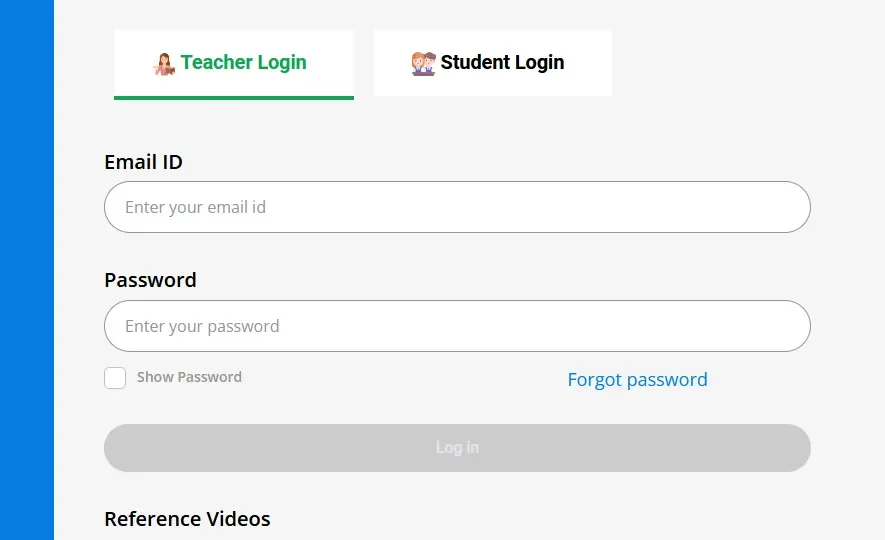
With the given email id and password the author tried to log in, and the UI showed “enter the correct credential”.
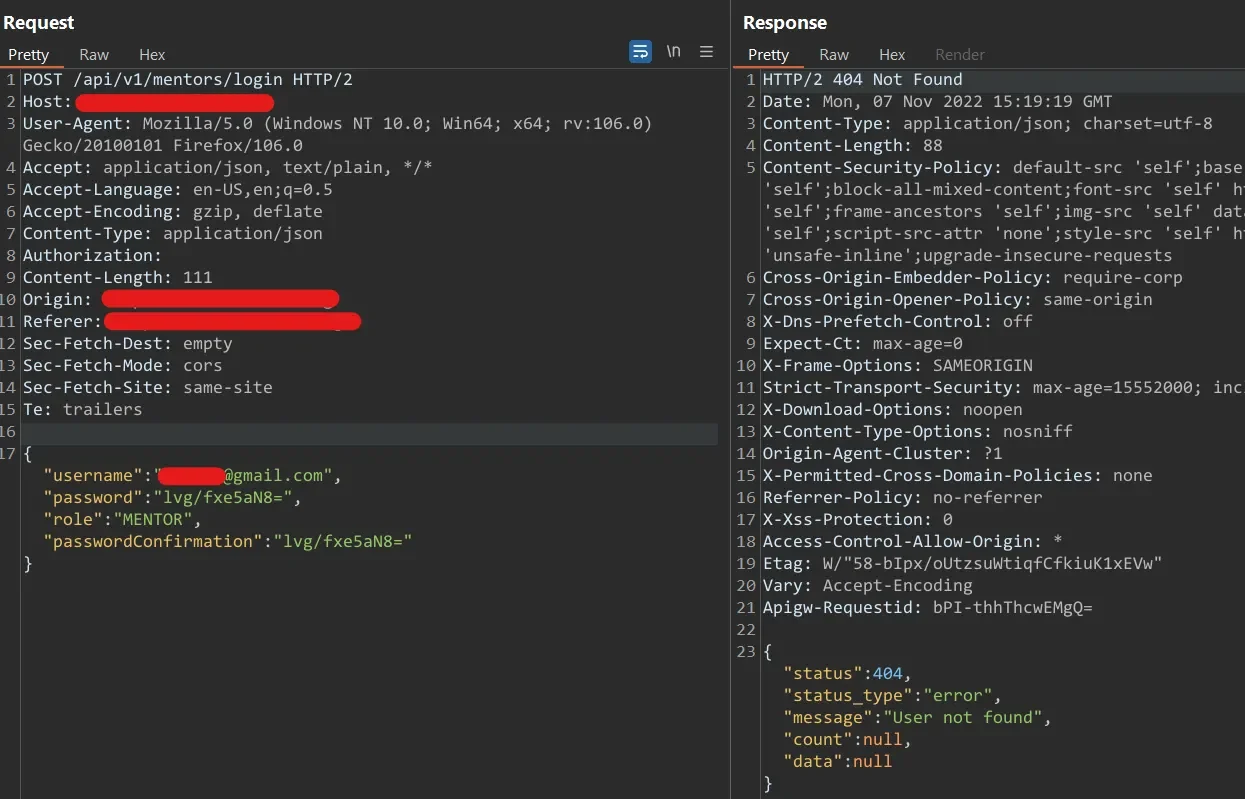
The Burp Suite response showed “user not found”. Both the email id and the password were therefore treated as incorrect, and the attempt failed.
Attempt 2: password reset
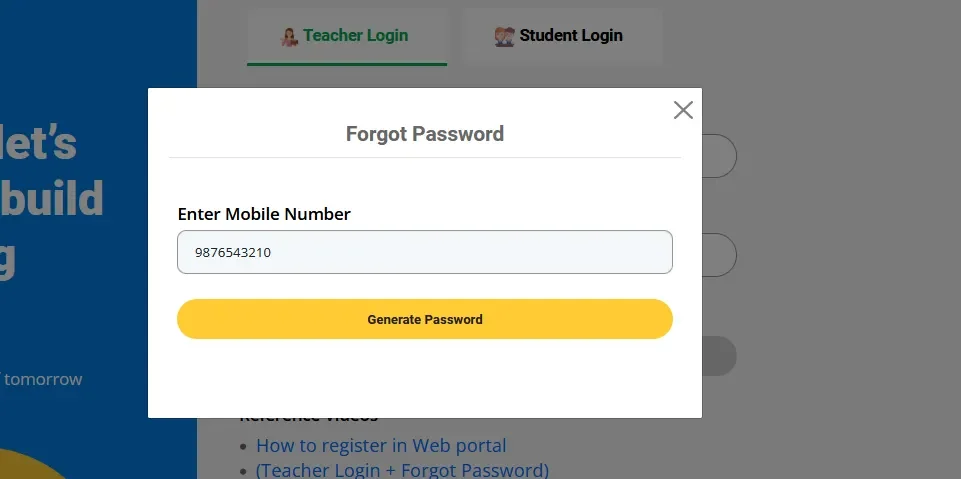
The password reset asks for a mobile number, not an email id. The author entered the given mobile number and the UI showed “oops something went wrong”.
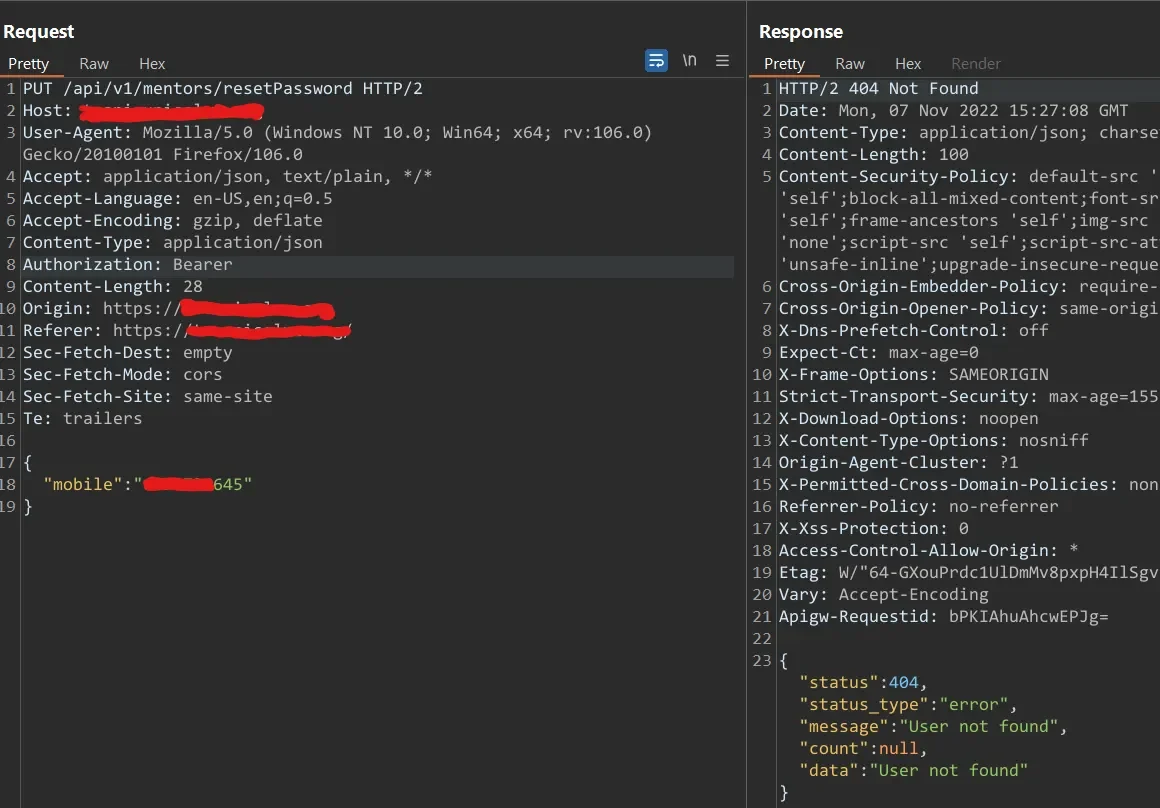
The Burp Suite response again showed “user not found”, so the mobile number was also incorrect and this attempt failed.
Attempt 3: registration by UDISE Code
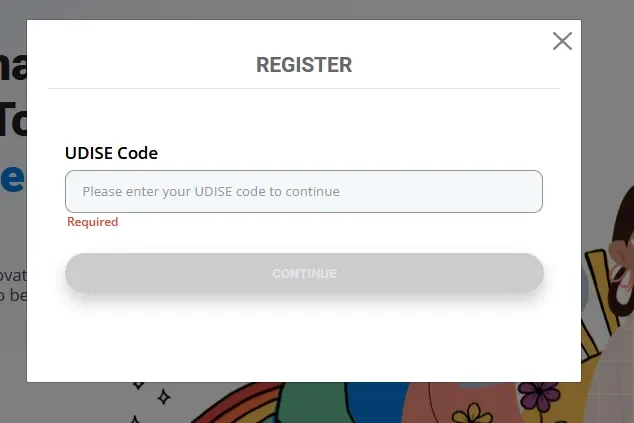
Registration asks for a UDISE Code. Entering the given code produced the UI message “Another Teacher is already registered in the given School”.
The code turned out to be correct. The Burp Suite response to the registration request contained full details such as email, user id and mobile number.
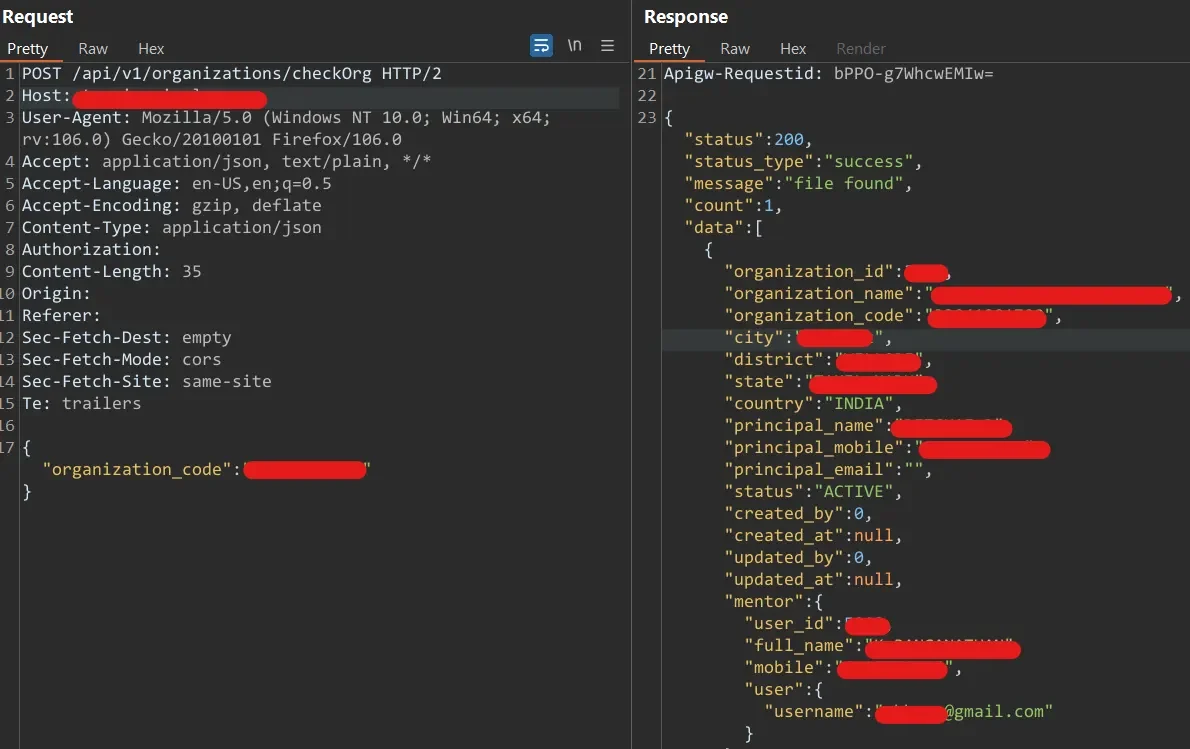
This attempt yielded the email, mobile number and user id. With that mobile number the author repeated the password reset, and the OTP was sent successfully. The friend, however, said he had not received the OTP: the number belonged to someone else, not to him. Calling the unknown number to ask for the OTP was not practically possible, so the reset route was closed.
Attempt 4: password change with only a user id
The author logged in with his father's valid credentials and looked for any functionality or request that changes a password. He found a password reset request that only requires a valid user id and does not check the old password. The user id obtained in Attempt 3 was enough to change the password successfully.
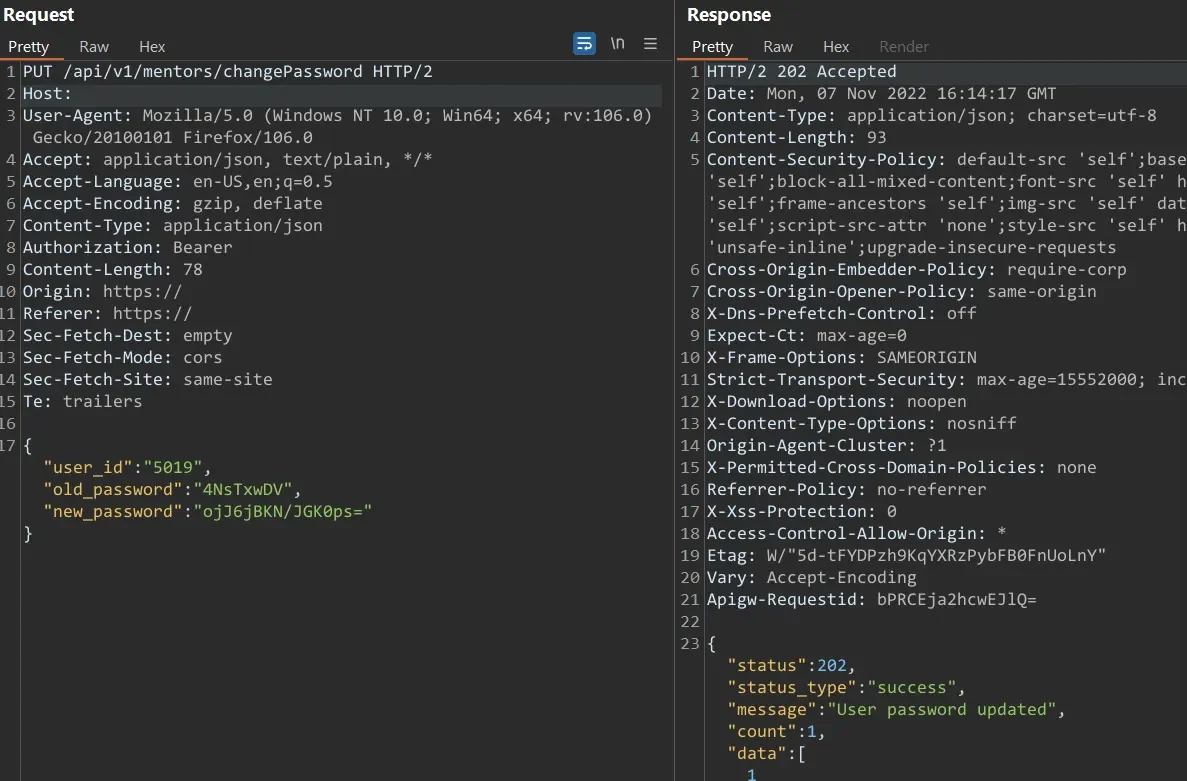
The report notes that the password appeared to be encoded in some way and asks readers whether they know which encryption is used; the encoding scheme is not identified.
Goal reached
With the password changed, the author logged into the account and finished the task.
Root cause
The password reset request only required a valid user id and did not check the old password. That is a classic IDOR: the object reference (the user id) is the only thing separating one account from another. The registration response returned full details such as email, user id and mobile number for a school that was already registered. The report does not describe any server-side ownership check, token binding or rate limiting that would have stopped the change; the absence of an old-password check is stated directly.
Impact
In this case, a valid user id was enough to change that user's password and log in. The author lists three issues found during the process:
- IDOR: able to change anyone's password (Critical)
- IDOR: able to see other teachers' P1 information by simply changing the id value (Critical)
- IDOR: able to see other students' P1 information by simply changing the id value (Critical)
The report does not detail the requests behind items 2 and 3, nor what “P1 information” contains beyond the general description. The practical precondition for the takeover is knowledge of a target user id, which the registration response supplied in this case.
Fix
The change that addresses the root cause is to require proof of ownership on the password change request, such as the old password or a valid reset token bound to the account and session, and to authorise the request against the authenticated user rather than a client-supplied id. Registration responses should not return other users' email, mobile number or user id when a school is already registered, and the teacher and student information endpoints should check that the requested record belongs to the caller.
Variants to test
- Password change endpoints that accept a user id: send a request with another account's id while authenticated as yourself. A positive result is a success response and the other account's password changing.
- Registration by a shared code (school, organisation, invite): submit a code already in use and inspect the response body. A positive result is another member's email, mobile number or internal id coming back.
- Object references in profile or record endpoints: increment or substitute the id value. A positive result is another teacher's or student's information returned.
- Password reset flows: check whether the reset step can be completed with an identifier alone, without an OTP or token tied to the account. A positive result is a successful reset without possession of the registered mobile number or email.
- Error message differences: compare UI text with raw responses for login and reset. A positive result is the response distinguishing “user not found” from a wrong credential, which enables account enumeration.
What happened, in plain words
A government e-learning website needed teachers to finish some tasks within two days. The author's father asked him to log in, and he completed the tasks using his father's account. Then his father's friend also needed the tasks done, but the account had been created for him by someone else with wrong details: the email, password and mobile number were all incorrect. The author had to find a way into that account anyway.
The site had three doors: a login form, a password reset that asked for a mobile number, and a registration form that asked for a UDISE Code (a code given to schools to register an account). The author tried each door in turn. The login failed, the reset failed, but the registration form, when given the school's UDISE Code, returned a response that contained the teacher's email, user id and mobile number. That user id was the key. Using his father's valid account, the author found a password change request that only needed a user id and did not ask for the old password. He changed the password and logged in.
Along the way he found three IDOR issues: one allowed changing anyone's password, and two allowed viewing other teachers' and students' P1 information by changing an id value. This article explains every step for someone who has never done security testing before.
Who is behind this
The author is Ganesh Kumar, known online as iamgk808, a cybersecurity enthusiast and bug hunter. He shares his work on Twitter and LinkedIn. This write-up describes what he did on 7 November 2022.
The setup
The friend gave these details, exactly as written in the report:
father’s friend given details :
email id - ######@gmail.com
password - ###### (wrong)
mobile no- ######## (wrong)
UDISE Code- #########
What this means: the email address, password, mobile number and UDISE Code are hidden (redacted) in the report. The note says the password and mobile number are wrong. The UDISE Code is a code given to schools to register an account; it identifies the school, not the individual teacher.
The only tool mentioned is Burp Suite. Burp Suite is a program that sits between your browser and the website and lets you see the exact requests your browser sends and the exact responses the server sends back. Normally you only see what the website chooses to display; Burp shows the raw conversation. No version numbers are given.
The author also had his father's own valid account, which he used later to look for a password change request.
Finding it
The starting point was a login failure. The website's visible message said the credentials were wrong, but the raw response from the server said the account did not exist at all. The raw response said "user not found", so both the email id and the password were treated as incorrect and the attempt failed.
Exploitation
Attempt 1: login
With the given email id and password the author tried to log in, and the UI showed “enter the correct credential”.
The image shows the login screen with that error message after the attempt.
The Burp Suite response showed “user not found”. Both the email id and the password were therefore treated as incorrect, and the attempt failed.
The image shows the raw response in Burp Suite with the text “user not found”.
Why this step: logging in is the normal way in, so it is the first thing to try. The visible error is generic, but the raw response is more specific. “User not found” means the server could not find any account with that email address. That is different from “wrong password”, which would mean the account exists but the password does not match. The response said "user not found", so the author treated both the email id and the password as incorrect.
Attempt 2: password reset
The password reset asks for a mobile number, not an email id. The author entered the given mobile number and the UI showed “oops something went wrong”.
The image shows the password reset form asking for a mobile number and the error message.
The Burp Suite response again showed “user not found”, so the mobile number was also incorrect and this attempt failed.
The image shows the raw response with “user not found” after the reset attempt.
Why this step: if you cannot log in, the next usual route is to reset the password. The site only accepts a mobile number for reset, so the author used the one he was given. The raw response said “user not found” again, meaning no account is associated with that mobile number. So the reset route was closed with the details provided.
Attempt 3: registration by UDISE Code
Registration asks for a UDISE Code. Entering the given code produced the UI message “Another Teacher is already registered in the given School”.
The image shows the registration form with the UDISE Code field and that message.
The code turned out to be correct. The Burp Suite response to the registration request contained full details such as email, user id and mobile number.
The image shows the raw response containing those details.
Why this step: the UDISE Code is the one piece of information that was said to be correct. The registration form is a place where the site looks up a school by that code. Even though registration itself was blocked because a teacher was already registered for that school, the response still carried information about the existing registration. That is a leak: the server told the author details about an account that was not his.
This attempt yielded the email, mobile number and user id. With that mobile number the author repeated the password reset, and the OTP was sent successfully. The friend, however, said he had not received the OTP: the number belonged to someone else, not to him. Calling the unknown number to ask for the OTP was not practically possible, so the reset route was closed.
What is an OTP? A one-time password: a short code sent by SMS to the registered mobile number, used to prove you possess that number. If the number belongs to someone else, you cannot receive the code, so the reset cannot be completed.
Attempt 4: password change with only a user id
The author logged in with his father's valid credentials and looked for any functionality or request that changes a password. He found a password reset request that only requires a valid user id and does not check the old password. The user id obtained in Attempt 3 was enough to change the password successfully.
Why this step: the author now had a valid user id from the registration response. He used his own account to find the request the site uses to change a password, then replaced the user id with the target's. Because the request did not ask for the old password or any other proof that the caller owned that account, the server accepted it. This is the core flaw: the only thing identifying which account to change was a number supplied by the client.
The report notes that the password appeared to be encoded in some way and asks readers whether they know which encryption is used; the encoding scheme is not identified.
Goal reached
With the password changed, the author logged into the account and finished the task.
Root cause
The password reset request only required a valid user id and did not check the old password. That is a classic IDOR: the object reference (the user id) is the only thing separating one account from another. The registration response returned full details such as email, user id and mobile number for a school that was already registered. The report does not describe any server-side ownership check, token binding or rate limiting that would have stopped the change; the absence of an old-password check is stated directly.
What is an IDOR? Insecure Direct Object Reference. It means the website uses a direct reference to an object, such as a user id or a record number, in a request, and does not check that the person making the request is allowed to access that object. If you can guess or obtain another person's reference, you can act on their data. A simple comparison: a coat check where the attendant hands you a coat based only on the number you say, without checking your ticket. If you say someone else's number, you get their coat.
Impact
In this case, a valid user id was enough to change that user's password and log in. The author lists three issues found during the process:
- IDOR: able to change anyone's password (Critical)
- IDOR: able to see other teachers' P1 information by simply changing the id value (Critical)
- IDOR: able to see other students' P1 information by simply changing the id value (Critical)
The report does not detail the requests behind items 2 and 3, nor what “P1 information” contains beyond the general description. The practical precondition for the takeover is knowledge of a target user id, which the registration response supplied in this case.
Fix
The change that addresses the root cause is to require proof of ownership on the password change request, such as the old password or a valid reset token bound to the account and session, and to authorise the request against the authenticated user rather than a client-supplied id. Registration responses should not return other users' email, mobile number or user id when a school is already registered, and the teacher and student information endpoints should check that the requested record belongs to the caller.
Variants to test
- Password change endpoints that accept a user id: send a request with another account's id while authenticated as yourself. A positive result is a success response and the other account's password changing.
- Registration by a shared code (school, organisation, invite): submit a code already in use and inspect the response body. A positive result is another member's email, mobile number or internal id coming back.
- Object references in profile or record endpoints: increment or substitute the id value. A positive result is another teacher's or student's information returned.
- Password reset flows: check whether the reset step can be completed with an identifier alone, without an OTP or token tied to the account. A positive result is a successful reset without possession of the registered mobile number or email.
- Error message differences: compare UI text with raw responses for login and reset. A positive result is the response distinguishing “user not found” from a wrong credential, which enables account enumeration.
Glossary
- API: Application Programming Interface; a set of rules that lets one piece of software talk to another. In a website, the browser sends requests to the server's API and gets responses back.
- Burp Suite: A tool that intercepts and shows the HTTP requests and responses between your browser and a website, so you can see what is really being sent and received.
- Cookie: A small piece of data a website stores in your browser to remember who you are between requests, such as after you log in.
- Endpoint: A specific URL or address on a server that performs a particular function, like login or password reset.
- IDOR: Insecure Direct Object Reference; a vulnerability where a request uses a direct reference to an object (like a user id) and the server does not check that the requester is allowed to access it.
- OTP: One-Time Password; a short code sent to a phone or email to prove you possess that phone or email, used during login or password reset.
- P1 information: A term used in the report for personal information; the report does not define exactly what it contains.
- Password reset: A feature that lets you set a new password when you have forgotten the old one, usually after proving you control the registered email or mobile number.
- Request: A message your browser sends to a server asking for something, such as a page or an action.
- Response: The message a server sends back to your browser after a request.
- Token: A piece of data, often a long random string, that a server issues to a client after login and that the client sends back with later requests to prove it is authenticated.
- UDISE Code: A code given to schools to register an account on the e-learning website; it identifies the school.
- UI: User Interface; the part of the website you see and interact with, including messages shown on screen.
- User id: A number or string that uniquely identifies a user account in the system.
- Account takeover: Gaining control of someone else's account, for example by changing their password.
- Account enumeration: Finding out which accounts exist on a system by observing differences in responses, such as “user not found” versus “wrong password”.
- Rate limiting: A control that restricts how many requests you can make in a given time, to prevent abuse.
- Token binding: Tying a token to a specific account and session so it cannot be used for another account.
- Authorise: To check whether the person making a request is allowed to perform that action.
- Encoding: Converting data into a different format, such as turning a password into a string of characters; not the same as encryption, and the report does not identify the scheme used.



