How I managed to make a DDoS attack by exploiting a company’s service — Bug Bounty
The website monitoring service allowed multiple accounts to monitor the same target without restriction, and the monitoring hosts made rapid requests. An attacker could create many accounts to monitor a single target, potentially overwhelming it with traffic and causing a denial of service.

Hello Hackers, I’m MrEmpy, I’m 17 years old and welcome. Today I’m going to tell you about an event that happened to me while I was exploring a service from a company.
The full write-up lives on its author's site
It belongs to its author, so we link to it rather than copy it. The other two tabs are our own rewrites, checked against it.
Context
MrEmpy, a 17 year old bug hunter, was exploring a company's website monitoring service. The product lets a customer register a website and have it checked continuously from the outside. The feature that matters here is the monitoring engine itself: when you add a target, the company's infrastructure fetches it on your behalf, repeatedly, from more than one machine.
The researcher's original goal was server-side request forgery (SSRF). He had the client side of the application in front of him and wanted to see whether the monitoring backend could be steered towards internal or otherwise unintended destinations. That attempt did not succeed, but the traffic the backend generated towards his own server became the interesting part.

Setup
- He enumerated subdomains of the target and validated which ones were still active.
- He settled on one of the main subdomains, the one hosting the client part of the monitoring application.
- He set up a listener he controlled, first with ngrok port forwarding, later with interactsh, so that the monitoring service had something to fetch.
- He set up a listener he controlled, first with ngrok port forwarding, later with interactsh, and registered it as the website to be monitored.
No versions, endpoints or parameters are given in the report; the walkthrough is at the level of behaviour rather than individual HTTP messages.
Finding it
While watching the requests that arrived at his web server, he saw that it was not a single host checking his site. Several hosts from different countries were doing it. He scanned the ports of each of those hosts looking for something interesting to pivot into, but found no useful ports, which is why the SSRF angle went nowhere.
What he did notice was volume and speed: his server was full of requests made very fast. He was surprised at the rate the service used to monitor his web server, and that is where the idea of a distributed denial of service came from.
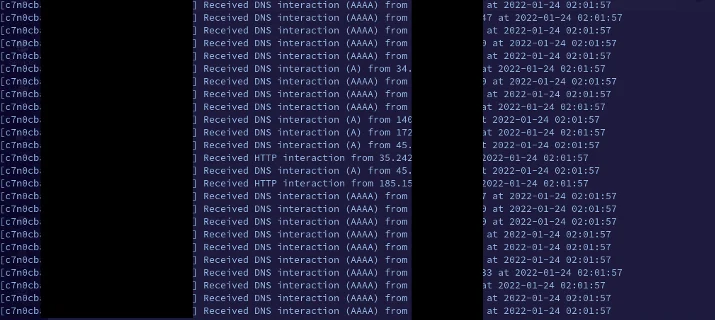
A second observation made the idea practical. A single host could be monitored through several different accounts. There was no block preventing a host that was already being monitored from being added again by another account. That absence of a limit is what allowed him to make the backend servers issue more requests, faster than normal, against the same destination.
Exploitation
Step 1: report the behaviour with screenshots
He sent the company a report built from a few screenshots and a detailed walkthrough of what he had observed. The response was that the report would only be accepted if he could show that it was possible to take down a service. He says he started to get sad at that point, imagining he would not be able to demonstrate the impact.
Step 2: build a target he was allowed to knock over
He created a VPS on a hosting website, set up a web server on it and put a home HTML page there. He then created multiple accounts on the monitoring service, all pointed at the same target, to speed up the request process.
Against a simple HTML page there was no observable slowness, so the plain multi-account amplification was not enough to produce a visible effect.
Step 3: serve a large file instead of a small page
He recalled an article about denial of service which argued that if a request is made for a file with many bytes on a web server, the data transfer on the network becomes intense enough to slow the server down: a lot of data is sent to several different computers, creating several threads and making the processor work harder.
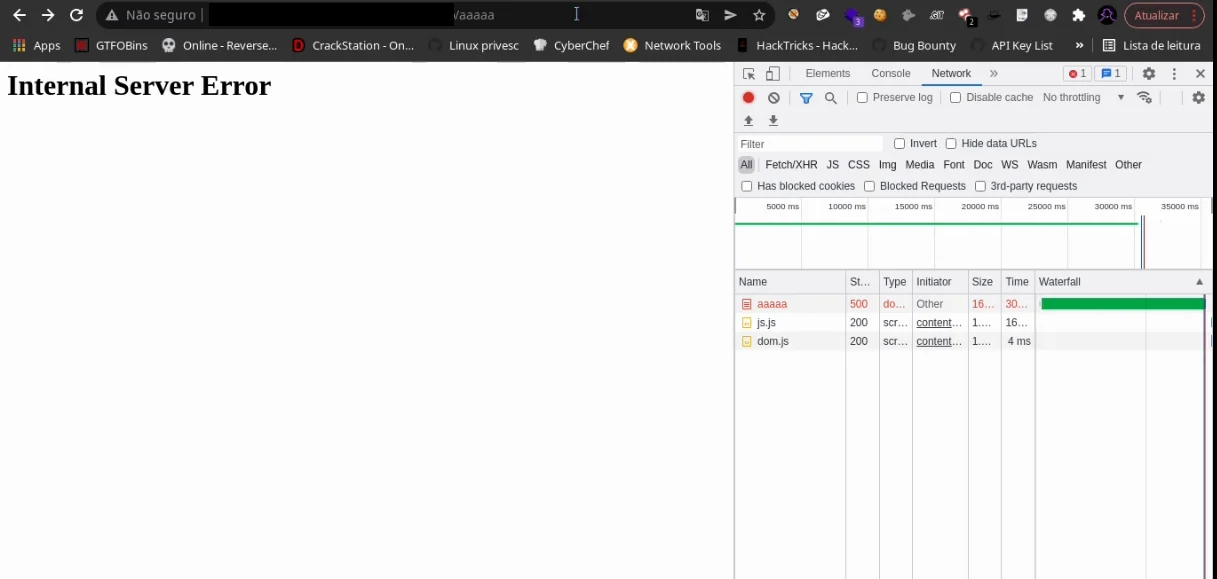
He put that into practice. He created a file and filled it with bytes, treating it as a file to be passed to another computer, like a ZIP file, and served it from the VPS. With the large file served from the VPS and the same target monitored from multiple accounts, he managed to take down his own web server.
He recorded the attack from the beginning so that he could attach the recording to a new message on the report.
Step 4: submit the proof
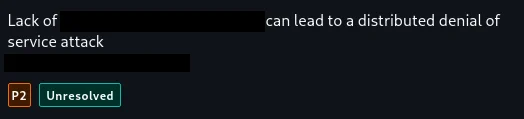
He took down his own web server and recorded it. The video has no sound, which he jokes saved him from embarrassment. He replied to the company's message with the video attached, and after a few days the report was marked and accepted.
Root cause
The design flaw is the missing per-target limit. The monitoring service accepted an unlimited number of monitoring jobs for the same host, across different accounts, and each job was executed by the company's distributed infrastructure. The service therefore acted as a traffic amplifier: one destination chosen by the user, many source hosts owned by the provider, and no cap on how many of them could be aimed at that destination at once.
Two properties of the backend made the effect worse. Monitoring was performed from several hosts in different countries, so the load arrived distributed rather than from one address, and the checks ran at a high frequency. The size of the fetched object then made each check more expensive.
Existing defences did not stop it. There was no block on monitoring a host that was already being monitored, and There was no block on monitoring a host that was already being monitored.. The report does not describe any rate limiting, per-target quota or egress control on the monitoring side.
Impact
Under the conditions shown, an attacker with several accounts on the service could direct the provider's monitoring infrastructure at a host of their choosing and degrade or take it down. The researcher demonstrated this against a VPS he controlled, using a large file to make each check expensive.
The report does not state which real service, if any, was affected beyond his own server, nor how many accounts or hosts were needed for the effect.
Fix
Based on the mechanism, the fixes that address it are a limit on how many accounts or monitoring jobs may target the same host, deduplication of monitoring for a host that is already being monitored, and a cap on the size of the object the monitoring backend will fetch, so that a single check cannot be made arbitrarily expensive.
Variants to test
- Multi-account monitoring on other uptime services. Register the same host from several accounts and watch the request rate at your listener. A positive result is request volume that scales with the number of accounts rather than staying flat.
- Large response bodies. Serve a multi-megabyte file and see whether the monitoring backend downloads it in full on every check. A positive result is repeated full downloads from many source addresses.
- Slow responses. Hold the connection open instead of returning quickly, and observe whether monitoring workers pile up. A positive result is a growing number of concurrent connections from the provider.
- Redirect chains. Point the monitored URL at a redirect that leads to a large resource and check whether the backend follows it. A positive result is the backend fetching the final large object.
- Source host enumeration. Collect the addresses that arrive at your listener and scan them, as the researcher did, for exposed services. A positive result is any reachable port on the monitoring hosts.
What happened, in plain words
A young bug hunter was testing a company's website monitoring service. That kind of service works like a watchdog: you tell it a website address, and the company's computers keep visiting that address to check whether the site is up. The hunter wanted to find a different kind of flaw, but while watching the traffic arriving at his own test server he noticed something else. The company's computers were visiting his server very often, from many different machines in many different countries, and nothing stopped him from adding the same website over and over again using several accounts. By pointing all of that monitoring at one small server he controlled, and by making that server hand out a large file instead of a tiny page, he managed to knock his own server offline. The company accepted the report after he sent a video of the crash.
The service and the first idea
The researcher, who goes by MrEmpy, started by picking a company and looking for weaknesses. He first collected the company's subdomains. A subdomain is a smaller address under a main domain: if the main site is example.com, then shop.example.com or app.example.com are subdomains. Companies often run many of them, and some are forgotten or less protected, so listing them is a common first step. He checked which of those subdomains were still alive, then focused on one of the main ones, the one that hosted the part of the application a customer uses in the browser.
The product was a website monitoring service. You give it a website address, and its own machines visit that address regularly to confirm the site is reachable. The interesting part for a security tester is that the company's servers are the ones making the request, not you. Whenever a system fetches something on your behalf, there is a chance it can be tricked into fetching something it should not.
That was his first idea: server-side request forgery, usually shortened to SSRF. In an SSRF attack, you make a server send a request to a destination of your choosing, typically an internal address that you could never reach from the outside. A simple comparison: imagine a receptionist who will phone any number you write on a form. If the receptionist can also dial internal extensions, you can use them to reach rooms you are not allowed into. To test this, he set up a listener, meaning a small web server of his own that records every request it receives. He first exposed it to the internet with ngrok, a tool that creates a public address for a server running on your own machine, and later switched to interactsh, a similar service built for this kind of testing. Then he registered his own address as the website to be monitored, so that the company's machines would come to him.
What the traffic showed
Watching the requests arrive, he saw that it was not one machine checking his site. Several hosts from different countries were doing it. A host here means a computer on the network, identified by its address. He scanned the ports of each of those hosts, looking for something interesting to break into. A port is a numbered door on a computer: web traffic usually goes to port 80 or 443, and other services listen on other numbers. He found no useful ports, so the SSRF path led nowhere.
What he did find was volume. His server was full of requests arriving very fast, and the speed surprised him. That is when the idea of a distributed denial of service came up. A denial of service, or DoS, is an attack that makes a service unavailable to its normal users, usually by overwhelming it with more work than it can handle. When the traffic comes from many machines at once, it is called distributed, or DDoS. The key point is that the attacker does not need to own those machines: here they belonged to the monitoring company.
A second observation made the idea practical. The same website could be monitored through several different accounts, and nothing blocked a site that was already being monitored from being added again by another account. Think of a gym where the same person can be signed up for ten personal training sessions by ten different friends: the trainers still show up ten times. Because there was no limit, he could make the company's backend servers send more requests, faster than normal, to the same destination.
Step 1: the first report
He wrote up what he had seen, with a few screenshots and a detailed walkthrough, and sent it to the company. The answer was that the report would only be accepted if he could show it was possible to take a service down. He admits he started to feel sad, thinking he would not be able to prove the impact. This is a common moment in bug bounty work: a report describing suspicious behaviour is weaker than a report showing a real consequence.
Step 2: a target he was allowed to knock over
He rented a VPS, a virtual private server: a computer in a data centre that you control remotely, usually paid by the month. He set up a web server on it and put a simple home page there. Then he created multiple accounts on the monitoring service, all pointed at that same target, to speed up the request process.
Against a simple HTML page there was no visible slowness. A small page is cheap to serve: the server reads a short file and sends it, and even many requests for it did not produce an effect he could demonstrate. The plain multi-account trick was not enough on its own.
Step 3: serve a large file instead of a small page
He remembered an article about denial of service which argued that if a request asks for a file with many bytes, the data transfer on the network becomes intense enough to slow the server down. The reasoning in that article: a lot of data is sent to several different computers, which creates several threads, and the processor has to work harder. A thread is one unit of work a program is running at a given moment; more concurrent transfers mean more threads and more CPU time.
He put that into practice. He created a file and filled it with bytes, treating it as a file to be passed to another computer, like a ZIP file, and served it from the VPS. With the large file served from the VPS and the same target monitored from multiple accounts, he managed to take down his own web server. He recorded the attack from the beginning so he could attach the recording to a new message on the report.
Step 4: submit the proof
He took down his own web server and recorded it. The video has no sound, which he jokes saved him from embarrassment. He replied to the company's message with the video attached, and after a few days the report was marked and accepted.
Why it worked
The design flaw is the missing limit per target. The monitoring service accepted an unlimited number of monitoring jobs for the same host, across different accounts, and each job was run by the company's distributed infrastructure. The service therefore acted as a traffic amplifier: one destination chosen by the user, many source hosts owned by the provider, and no cap on how many of them could be aimed at that destination at once.
Two properties of the backend made it worse. Monitoring ran from several hosts in different countries, so the load arrived distributed rather than from one address, and the checks ran at a high frequency. The size of the fetched object then multiplied the cost of each check, because every monitoring host pulled the whole file.
Existing defences did not stop it. There was no block on monitoring a host that was already being monitored, and There was no block on monitoring a host that was already being monitored.. The report does not describe any rate limiting, per-target quota or egress control on the monitoring side. Rate limiting means refusing requests once a client exceeds a set pace; a quota is a hard cap on how much a client may use; egress control means restricting where a server is allowed to send traffic.
Impact
Under the conditions shown, someone with several accounts on the service could direct the provider's monitoring infrastructure at a host of their choosing and degrade or take it down. The researcher demonstrated this against a VPS he controlled, using a large file to make each check expensive.
The report does not state which real service, if any, was affected beyond his own server, nor how many accounts or hosts were needed for the effect.
Fix
Based on the mechanism, the fixes that address it are a limit on how many accounts or monitoring jobs may target the same host, deduplication of monitoring for a host that is already being monitored, and a cap on the size of the object the monitoring backend will fetch, so that a single check cannot be made arbitrarily expensive.
Variants to test
- Multi-account monitoring on other uptime services. Register the same host from several accounts and watch the request rate at your listener. A positive result is request volume that scales with the number of accounts rather than staying flat.
- Large response bodies. Serve a multi-megabyte file and see whether the monitoring backend downloads it in full on every check. A positive result is repeated full downloads from many source addresses.
- Slow responses. Hold the connection open instead of returning quickly, and observe whether monitoring workers pile up. A positive result is a growing number of concurrent connections from the provider.
- Redirect chains. Point the monitored URL at a redirect that leads to a large resource and check whether the backend follows it. A positive result is the backend fetching the final large object.
- Source host enumeration. Collect the addresses that arrive at your listener and scan them, as the researcher did, for exposed services. A positive result is any reachable port on the monitoring hosts.
Glossary
- Bug bounty: a programme where a company pays or credits people who report security flaws in its systems.
- Subdomain: a smaller address under a main domain, such as
app.example.comunderexample.com. - Port: a numbered door on a computer through which a particular service receives traffic.
- Host: a computer on a network, identified by an address.
- Listener: a small server you control that records every request it receives.
- ngrok: a tool that gives a public internet address to a server running on your own machine.
- interactsh: a service for receiving and recording requests sent by a target during security testing.
- SSRF (server-side request forgery): a flaw where an attacker makes a server send a request to a destination of the attacker's choosing.
- DoS (denial of service): an attack that makes a service unavailable to its normal users, usually by overwhelming it.
- DDoS (distributed denial of service): a DoS attack where the traffic comes from many machines at once.
- VPS (virtual private server): a computer in a data centre that you control remotely.
- HTML page: a simple web page made of text and markup that a browser displays.
- Thread: one unit of work a program is running at a given moment.
- Rate limiting: refusing requests once a client exceeds a set pace.
- Quota: a hard cap on how much a client may use.
- Egress control: restricting where a server is allowed to send traffic.
- Deduplication: recognising that a job is already registered and not creating a second copy of it.
- Redirect: an instruction from a web server telling the client to fetch a different address instead.
- Enumeration: systematically listing items, such as subdomains or open ports, to find what exists.


