How I Unveiled a Critical Vulnerability: Exposing All Buyers’ Invoices PII with a Single Trick
An invoice download endpoint lacked authentication and exposed an API token, allowing anyone to download invoices. By changing the invoice number, an attacker could access all buyers' invoices and their personally identifiable information.

In the realm of Cybersecurity, the process of uncovering vulnerabilities requires a combination of curiosity, persistence, and technical prowess.
The full write-up lives on its author's site
It belongs to its author, so we link to it rather than copy it. The other two tabs are our own rewrites, checked against it.
Context
The target was a subdomain, https://cloud.z.xxxxxxx.com, which the author also refers to as https://cloud.z.target.com. The feature of interest is invoice download: a buyer's invoice could be retrieved from a URL on that host. The author describes the outcome as a flaw that allowed access to all buyers' invoices, potentially exposing their personally identifiable information (PII).
The write-up does not describe the wider product, the organisation behind it, or how invoices are normally generated. It only states that the invoice-download URL existed on the subdomain and that the invoice downloaded without any authentication requirement.
Setup
No accounts, roles or credentials are described. The author did not register or log in anywhere before the discovery; the whole point of the finding is that the invoice downloaded without authentication. The tools mentioned are:
- Content discovery: directory fuzzing, parameter fuzzing and archived URLs.
- The Wayback Machine, to find historical URLs.
- A browser with developer tools, in particular the Network tab and the ability to read the JavaScript of a response.
wget, to replay the request with a custom header.
No versions are given for any of these.
Finding it
During reconnaissance the author came across the subdomain https://cloud.z.target.com and decided to explore it. Content discovery (directory fuzzing, parameter fuzzing and archived URLs) led to a specific URL in the Wayback Machine:
https://cloud.z.target.com/invoice-download
The URL looked promising, so the author opened it in a browser. To his surprise, the invoice downloaded without any authentication requirement, which he labels BAC (broken access control). That alone was the first sign that something was wrong: a document containing buyer data was reachable by an unauthenticated visitor.
Exploitation
Step 1: Observe the download and its redirects
The download took longer than expected. To understand why, the author examined the Network tab in the developer tools, which revealed several background redirects. The report does not list the redirect targets or the status codes.
Step 2: Read the JavaScript of the initial response
The author then examined the JavaScript code of the initial response from https://cloud.x.target.com/invoice-download. Note that this host differs from the one used earlier in the report; the report does not explain the relationship between the two. In that JavaScript he found a variable called AuthToken and an "APIGEE" API endpoint together with its associated variables.
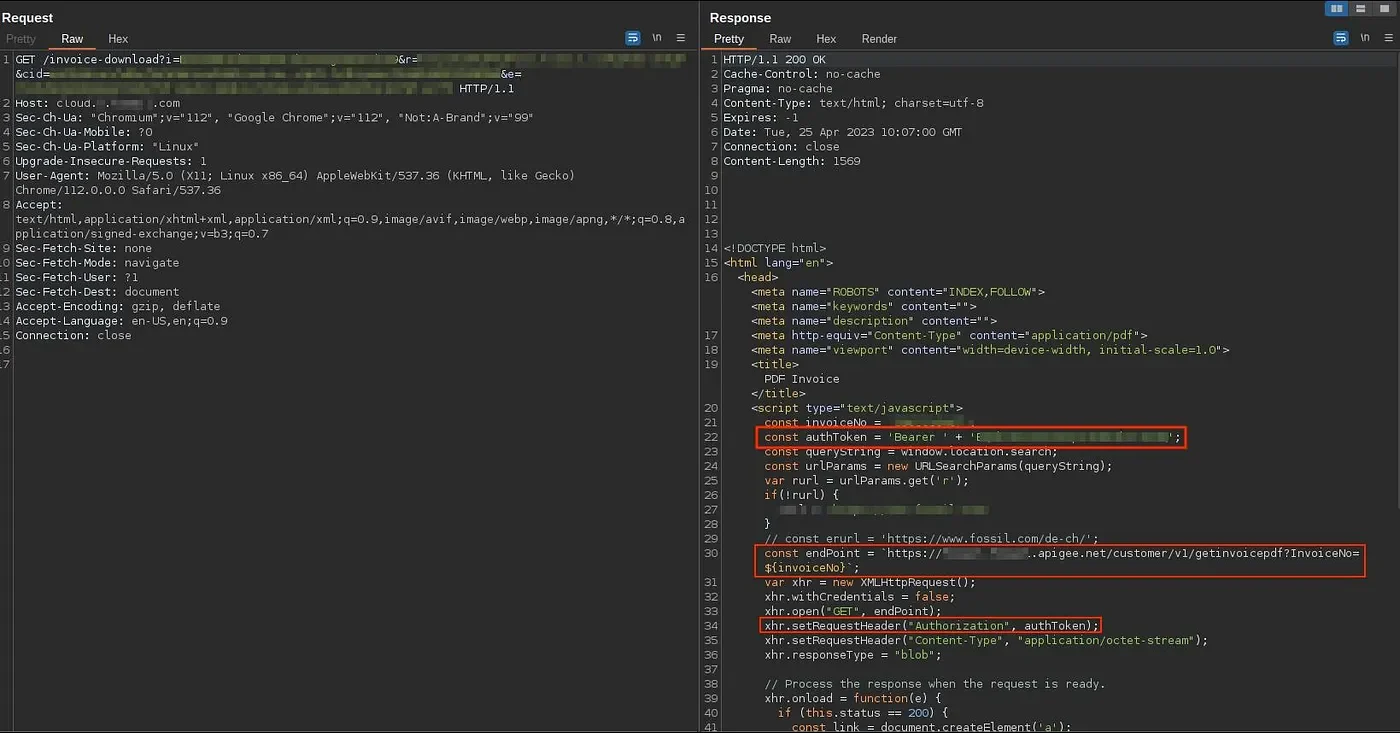
The screenshot shows the JavaScript containing the AuthToken variable and the APIGEE endpoint with its variables, as described around it.
Step 3: Replay the API call with wget
Using the token and endpoint taken from the JavaScript, the author built the following command:
~$ wget --header "Authorization: Bearer xxxxxxxxxxxxxxxxxxxx" "https://xxxxxxxxxxxx.apigee.net/customer/v1/getinvoicepdf?InvoiceNo=000000000" -O invoice.pdf
The important parts:
--header "Authorization: Bearer ..."sends the token that was embedded in the client-side JavaScript as a bearer credential.- The URL points at an APIGEE-hosted API path,
/customer/v1/getinvoicepdf, which takes the invoice identifier in theInvoiceNoquery parameter. -O invoice.pdfwrites the response to a local file.
The command successfully downloaded the invoice.
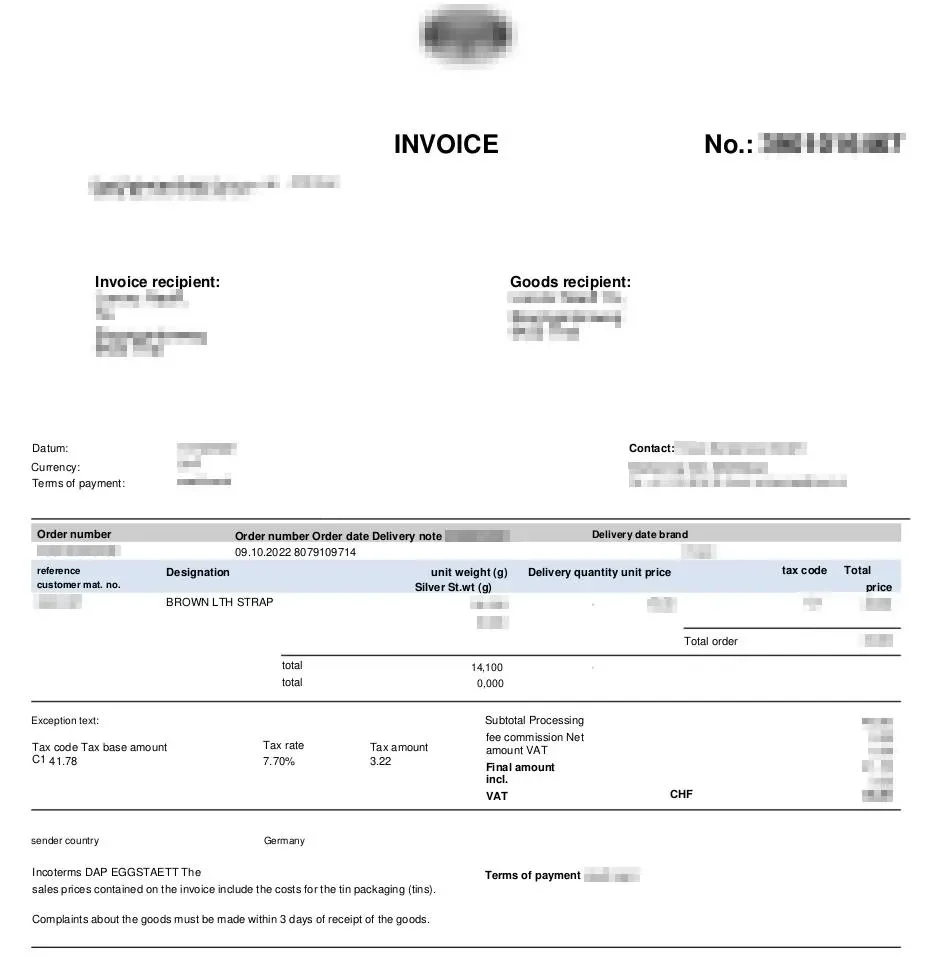
The screenshot shows the wget command and the resulting invoice download.
Step 4: Change InvoiceNo
The author then altered the value of InvoiceNo. According to the report, doing so grants access to all the invoices on the platform, potentially exposing the PII of all buyers. The report presents this as the escalation from a single invoice to every invoice, and states that two screenshots were attached as evidence of the severity; only the images referenced above appear in the text.
Root cause
The report does not include a code review, so the following is what the described behaviour implies rather than something the author states.
The invoice-download endpoint on the APIGEE API authorises requests using a bearer token that is shipped inside the JavaScript served to the browser. Anyone who can load that JavaScript can read the token, so the token does not distinguish one buyer from another. The only thing that selects which invoice is returned is the client-supplied InvoiceNo parameter, and the API appears to return whatever invoice is named without checking that the caller is entitled to it. In other words, the object reference is direct and the authorisation decision is effectively absent: possession of the shared token is treated as sufficient for any invoice.
The front-end URL https://cloud.z.target.com/invoice-download also served the document without authentication, which is the broken access control the author notes first.
Impact
An unauthenticated attacker who finds the URL can download an invoice. By changing InvoiceNo, the same attacker can reach invoices belonging to other buyers across the platform, which the author says puts the PII of all buyers at risk. The report does not enumerate which fields an invoice contains, so the exact data exposed is not stated.
Fix
Based on the described behaviour, the changes that would address it are: stop embedding a usable API credential in client-side JavaScript, authenticate the caller and bind each invoice to the authenticated buyer on the server side, and enforce that check on the APIGEE endpoint rather than relying on the caller to supply only their own InvoiceNo. The front-end /invoice-download route should also require authentication. These are recommendations, not changes the report confirms were made.
Variants to test
- Look for invoice, receipt and statement download endpoints in archived URLs and in JavaScript bundles, then request them without credentials. A positive result is a document returned to an unauthenticated client.
- Search client-side JavaScript for token-like variables and API gateway hostnames (the report found
AuthTokenand an APIGEE endpoint). A positive result is a bearer token or API key that the server accepts when replayed outside the browser. - Take an identifier parameter such as
InvoiceNofrom a request you are entitled to make and substitute another value. A positive result is a document belonging to a different buyer. - Try sequential or low-entropy identifier values around a known one. A positive result is any invoice that is not yours being returned.
- Replay the API call directly against the gateway host, bypassing the front end, with the extracted token. A positive result is the same document returned without the front-end flow.
What happened, in plain words
A security researcher was exploring a company's website and found a subdomain called cloud.z.target.com. While looking around, he discovered a link that let anyone download invoices without logging in. Invoices can contain personal information, so this was a serious problem. He then found a way to download not just one invoice, but any invoice on the platform, simply by changing a number in the request. This meant that the personal data of every buyer could be exposed. In this article, I will explain how he did it, step by step, in simple terms.

Photo by Claudio Schwarz on Unsplash
Reconnaissance and Initial Discovery
Reconnaissance is the first phase of any security test: you look around to see what parts of a system are visible and how they behave. The researcher started by finding a subdomain: https://cloud.z.target.com. A subdomain is a part of a larger website, like a separate section or building within a company's online presence. He decided to explore it further.
To find hidden pages, he used three techniques:
- Directory fuzzing: trying many common folder and file names (like
/admin,/backup,/invoice) to see if any exist and are accessible. - Parameter fuzzing: adding different parameters to URLs (like
?id=1,?user=test) to see how the site responds. - Exploring archived URLs: using services like the Wayback Machine, which stores old versions of websites, to find pages that might have been removed or forgotten.
These methods help uncover parts of a site that are not linked from the main pages but are still reachable.
The Promising URL
While looking through the Wayback Machine, he found a specific URL:
https://cloud.z.target.com/invoice-download
This URL looked interesting because it seemed to directly offer an invoice download. He opened it in his browser, and to his surprise, the invoice downloaded immediately, without asking for any username or password. This is a classic case of broken access control (BAC): a situation where a resource that should be protected is accessible to anyone. In simple terms, it's like a bank vault with no lock.
Unveiling the Trick
The download took longer than expected. To understand why, he opened the Network tab in his browser's developer tools. This tab shows all the requests the browser makes and receives. He saw that there were several background redirects: the browser was being sent from one URL to another before finally getting the file. Redirects are common, but they can also hide the real source of data.
Uncovering the JavaScript Code
Next, he looked at the JavaScript code that was part of the initial response from https://cloud.x.target.com/invoice-download. JavaScript is the programming language that runs in your browser and makes web pages interactive. By reading it, you can sometimes find sensitive information that the developers accidentally left in.
In that code, he found two important things:
- A variable called
AuthToken. A variable is like a labelled box that holds a value. Here, it held a token, which is a piece of text used to prove identity, similar to a temporary password or a wristband at an event. - An "APIGEE" API endpoint with its associated variables. An API (Application Programming Interface) is a way for two software programs to talk to each other. An endpoint is a specific URL where the API can be reached. APIGEE is a service that helps manage APIs.
The screenshot shows the JavaScript containing the AuthToken variable and the APIGEE endpoint with its variables, as described around it.
Replaying the API Call with wget
With the token and endpoint in hand, he used a command-line tool called wget to make the same request that the browser would make, but outside the browser. This is called replaying a request. The command he used was:
~$ wget --header "Authorization: Bearer xxxxxxxxxxxxxxxxxxxx" "https://xxxxxxxxxxxx.apigee.net/customer/v1/getinvoicepdf?InvoiceNo=000000000" -O invoice.pdf
Let's break this down:
~$is the command prompt, indicating you type the command in a terminal.wgetis the program that downloads files from the internet.--header "Authorization: Bearer xxxxxxxxxxxxxxxxxxxx"adds a custom header to the request. A header is extra information sent along with the request, like an envelope with a letter. Here, it sends an authorization token. The word "Bearer" means the token itself grants access, like a bearer bond: whoever holds it can use it. Thexxxxxxxxxxxxxxxxxxxxis a placeholder for the actual token he found."https://xxxxxxxxxxxx.apigee.net/customer/v1/getinvoicepdf?InvoiceNo=000000000"is the URL of the API endpoint. The part after the question mark is a query parameter:InvoiceNo=000000000tells the API which invoice to fetch. The000000000is an example invoice number.-O invoice.pdftells wget to save the downloaded file asinvoice.pdfon his computer.
This command successfully downloaded the invoice, proving that the token worked and that the API would return an invoice when given a valid invoice number.
The screenshot shows the wget command and the resulting invoice download.
Escalation: Changing InvoiceNo
The researcher then tried changing the value of InvoiceNo in the URL. By altering the value of InvoiceNo, he could access all the invoices on the platform. This is a classic example of an Insecure Direct Object Reference (IDOR) vulnerability: the system uses a direct reference to an object (like an invoice number) without checking if the person making the request is allowed to access that object. It's like a hotel giving you a key to your room, but the key also opens every other room because the lock doesn't check which room you're supposed to have.
By manipulating InvoiceNo, he could access all invoices on the platform, potentially exposing the personally identifiable information (PII) of every buyer. PII is any data that can be used to identify a specific person, such as name, address, email, or phone number.
The Alarming Implications
This vulnerability meant that anyone who found the URL and knew or guessed invoice numbers could download invoices belonging to other people. The report does not specify how invoice numbers are formatted or whether they are easy to guess, but the example 000000000 suggests they might be sequential. The impact is severe: a malicious actor could harvest personal data on a large scale.
Root Cause
The report does not include a code review, so the following is an analysis of what the described behaviour implies.
The invoice-download endpoint on the APIGEE API uses a bearer token that is embedded in the JavaScript served to the browser. Anyone who loads that JavaScript can read the token, so the token does not distinguish one buyer from another; it is a shared secret that grants access to anyone. The only thing that determines which invoice is returned is the InvoiceNo parameter supplied by the client, and the API appears to return whatever invoice is requested without checking if the caller is authorised to access it. In other words, the authorisation decision is effectively absent: possession of the shared token is treated as sufficient for any invoice.
The front-end URL https://cloud.z.target.com/invoice-download also served the document without authentication, which is the broken access control noted first. The report does not say whether the front end and the APIGEE API share the same token or how the front end obtained the invoice number.
Impact
An unauthenticated attacker who finds the URL can download an invoice. By changing InvoiceNo, the same attacker can reach invoices belonging to other buyers across the platform, which puts the PII of all buyers at risk. The report does not enumerate which fields an invoice contains, so the exact data exposed is not stated.
Fix
Based on the described behaviour, the changes that would address it are: stop embedding a usable API credential in client-side JavaScript, authenticate the caller and bind each invoice to the authenticated buyer on the server side, and enforce that check on the APIGEE endpoint rather than relying on the caller to supply only their own InvoiceNo. The front-end /invoice-download route should also require authentication. These are recommendations, not changes the report confirms were made.
Variants to test
- Look for invoice, receipt and statement download endpoints in archived URLs and in JavaScript bundles, then request them without credentials. A positive result is a document returned to an unauthenticated client.
- Search client-side JavaScript for token-like variables and API gateway hostnames (the report found
AuthTokenand an APIGEE endpoint). A positive result is a bearer token or API key that the server accepts when replayed outside the browser. - Take an identifier parameter such as
InvoiceNofrom a request you are entitled to make and substitute another value. A positive result is a document belonging to a different buyer. - Try sequential or low-entropy identifier values around a known one. A positive result is any invoice that is not yours being returned.
- Replay the API call directly against the gateway host, bypassing the front end, with the extracted token. A positive result is the same document returned without the front-end flow.
Glossary
- API (Application Programming Interface): a set of rules that allows different software programs to communicate with each other.
- API endpoint: a specific URL where an API can be accessed.
- APIGEE: a platform for managing APIs, often used as a gateway.
- Authentication: the process of verifying who someone is, like checking an ID card.
- Authorisation: the process of checking if an authenticated user has permission to access a resource.
- AuthToken: a piece of data used to prove identity or grant access, often a string of characters.
- Bearer token: a type of token that grants access to whoever holds it, like a ticket.
- Broken access control (BAC): a vulnerability where access restrictions are not properly enforced.
- Directory fuzzing: trying many common directory names to discover hidden paths on a web server.
- Header: additional information sent with an HTTP request or response.
- IDOR (Insecure Direct Object Reference): a vulnerability where an application exposes a direct reference to an internal object, such as a database key or file, without proper access checks.
- Invoice: a document listing goods or services provided and the amount owed.
- JavaScript: a programming language used to create interactive web pages.
- Network tab: a tool in browser developer tools that shows all network requests made by the page.
- Parameter fuzzing: trying many different parameter names and values to see how the application responds.
- PII (Personally Identifiable Information): data that can be used to identify a specific individual.
- Query parameter: the part of a URL after the question mark, used to pass data to the server.
- Reconnaissance: the initial phase of a security assessment, gathering information about the target.
- Redirect: an HTTP response that tells the browser to go to a different URL.
- Subdomain: a domain that is part of a larger domain, like
blog.example.com. - Token: a piece of data used for authentication or authorisation.
- Variable: a named storage location in programming that holds a value.
- Wayback Machine: an archive of the World Wide Web that stores old versions of websites.
- wget: a command-line tool for downloading files from the internet.



