How I was able to Download Any file from Web server!
The attachment download endpoint used a sequential integer identifier in the URL, and the server did not check whether the requesting user belonged to the team that owned the file. By changing the identifier, an attacker could download files uploaded by other teams.
 Published on blog.securitybreached.org
Hello to all Masters and Learners, I hope you all are doing well and spending most of your time in hunting and learning. Where most of us spend time to exploit the mechanism or to find out the weak endpoints. :D This is my first Write-up, I know that I am weak in English but I’m going to try my best to explain.
The full write-up lives on its author's site
It belongs to its author, so we link to it rather than copy it. The other two tabs are our own rewrites, checked against it.
Context
The target was a private software management site, described by the researcher as "totally private" and not included in any bug bounty program. Companies used it to let their teams accomplish their tasks. The relevant feature is file upload: users can upload files, and those files are only shown to members of the same team. Uploaded files are not rendered on the web server; they are only downloadable.
Setup
The researcher was testing the site without a formal programme behind it. No tooling, versions or specific roles are described beyond the fact that uploaded files are scoped to team members. The researcher notes that at the time they knew nothing about the RECON phase.
Finding it
The work started as XSS testing. The researcher tried some XSS payloads and successfully popped an alert.

A video proof of concept was made and reported, and after some conversation with the team the researcher received a $150 reward.
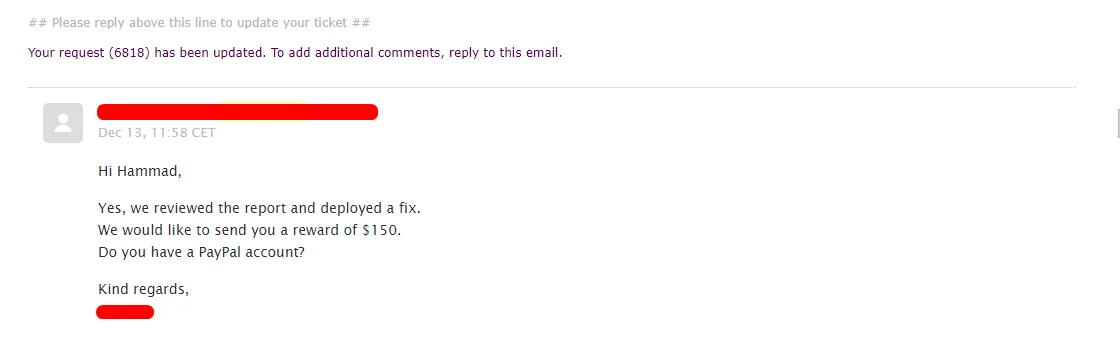
The reward encouraged further testing. More XSS payloads were tried at different endpoints and executed successfully; the researcher deliberately does not disclose how many.

Because the site manages software tasks, it has a file upload option. Since the researcher was testing for XSS, the next idea was to upload a file containing an XSS payload. The report notes that WordPress did not allow posting the payload even in Base64 encoding, so a picture was pasted instead. The payloads mostly used are shown below.

Some of the time a different payload was used.

Which one was used depended on the events.
Exploitation
Step 1: try to get the uploaded file to execute
Opening the uploaded file revealed that it is only downloadable: it cannot be opened on the web server. Renaming the file with the payload was the next attempt, and it was again unsuccessful. The researcher notes that you will not always achieve what you want.
Step 2: inspect the download path
The file was opened in a new tab to check its path and to try executing the payload, but the web server only showed the following URL, and the file was ready for download:
https://www.site.com/attachments/123456/download.png?id=12345
The URL contains an id parameter with an integer value. Changing that value allowed the researcher to download files belonging to other teams:
https://www.site.com/attachments/integer_value/download.png?id=integer_value
In simple words, the researcher was able to download any file uploaded on the web server. A second video proof of concept was made and reported, and this time the reward was $300.
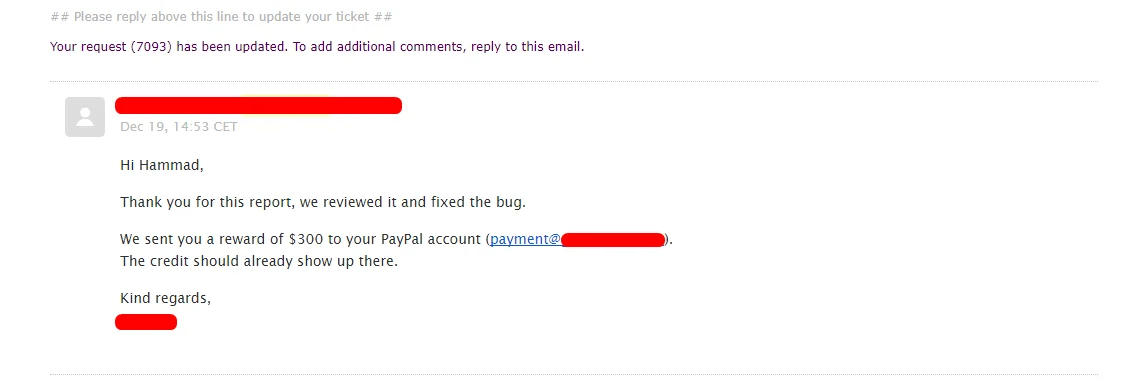
The researcher notes that the reward is low but that it was the site's highest reward.

Root cause
The report does not describe the server-side code. What it shows is that the download endpoint identifies a file by an integer id (and a path segment that also carries an integer value), and that changing the value returns another team's file. The likely cause is that the download handler looks up the attachment by identifier alone and does not check that the requesting user belongs to the team that owns the file, an insecure direct object reference. The upload feature's team scoping was described for viewing files, but the download endpoint returned another team's file.
Impact
An authenticated user could download files uploaded by other teams, and in the researcher's words, any file uploaded on the web server. The report does not state what kinds of files were exposed or how many. The researcher's own framing is that the reward was low, and the site was private and outside any bug bounty programme.
Fix
The fix that follows from the finding is to authorise every download request against the requesting user's team membership for the specific attachment, rather than trusting the identifier in the URL, and to avoid exposing sequential integer identifiers where possible.
Variants to test
- On any site with team-scoped attachments, capture a download URL and increment or decrement the integer
idand the path segment. A positive result is a file that belongs to another team. - Try the same identifier manipulation with a second account in a different team, to confirm the boundary is missing rather than the file being public.
- Check whether the same identifier is accepted in other endpoints that reference attachments, such as preview or metadata routes. A positive result is any response that discloses another team's file or its details.
- Test whether the identifier can be supplied as a non-integer or with extra parameters to bypass any filtering. A positive result is a file returned for an identifier the application should reject.
What happened, in plain words
A security researcher found a private website used by companies to manage their software tasks, where teams could upload files that only their own team members were supposed to see. While testing the site, the researcher first found cross-site scripting (XSS) bugs, where a malicious script can be made to run in another user's browser. After reporting those and receiving a reward, the researcher turned to the file upload feature. The uploaded files could not be opened in the browser, only downloaded, so the researcher looked at the download link. The link contained a number (an id) identifying the file. By changing that number, the researcher could download files belonging to other teams. This kind of bug is called an insecure direct object reference (IDOR): the server looks up an object by an identifier supplied by the user and does not check whether that user is allowed to see it. The researcher reported it with a video proof of concept and received $300.
The target
The site was, in the researcher's words, "totally private" and was not part of any bug bounty programme. A bug bounty programme is a formal arrangement where a company invites people to test its systems and pays for valid findings. Here there was no such arrangement; the researcher simply tested the site.
The site was a software management tool: companies used it so that their teams could accomplish their tasks. Think of it like a shared online noticeboard for a workplace, where each team has its own section. The feature that mattered was file upload. Users could upload files, and those files were only shown to members of the same team. The uploaded files were not displayed inside the web page; they could only be downloaded. That detail matters later, because it means the browser never runs anything inside the uploaded file.
The researcher notes that at the time they knew nothing about the RECON phase. Reconnaissance is the information-gathering stage of a test: looking at what a site is built from, what pages exist, and how it behaves, before trying to break anything. Skipping it is not fatal, but it means findings come from trying things rather than from a plan.
Finding the first bugs
The work started as XSS testing. XSS, or cross-site scripting, is a bug where an attacker manages to get their own JavaScript code to run inside another user's browser session on a website. A simple way to prove it is to make the browser show a pop-up box with an alert. The researcher tried some XSS payloads and successfully popped an alert. A payload here just means the piece of text or code that is sent to the site to trigger the bug.
A video proof of concept was made and reported. A proof of concept (PoC) is a demonstration that the bug is real, usually a recording or a set of steps that someone else can follow. After some conversation with the team, the researcher received a $150 reward.
The reward encouraged further testing. More XSS payloads were tried at different endpoints and executed successfully. An endpoint is a specific address on a server that does something, for example a page that saves a comment or a route that returns a file. The researcher deliberately does not disclose how many XSS bugs were found.
Trying XSS through file upload
Because the site manages software tasks, it has a file upload option. Since the researcher was testing for XSS, the next idea was to upload a file containing an XSS payload. The reasoning is simple: if the site ever displays the contents of an uploaded file in a browser, the script inside it might run. The report notes that WordPress did not allow posting the payload even in Base64 encoding, so a picture was pasted instead. Base64 is a way of turning binary data into plain text characters so it can be pasted into places that only accept text. The payloads mostly used are shown below.
Some of the time a different payload was used.
Which one was used depended on the events. In other words, the choice of payload depended on what the page was doing at that point, for example whether it reflected text back or stored it.
Trying to make the uploaded file run
Step 1: open the file
Opening the uploaded file revealed that it is only downloadable: it cannot be opened on the web server. This is an important observation. If the server only sends the file as a download, the browser saves it to disk instead of rendering it, so any script inside it never runs in the site's context. Renaming the file with the payload was the next attempt, and it was again unsuccessful. The researcher notes that you will not always achieve what you want.
Step 2: look at the download link
The file was opened in a new tab to check its path and to try executing the payload, but the web server only showed the following URL, and the file was ready for download:
https://www.site.com/attachments/123456/download.png?id=12345
Line by line, this URL says:
https://is the protocol, the set of rules the browser uses to talk to the server securely.www.site.comis the domain, the name of the server./attachments/123456/is a path on the server. The123456part is a number that appears to identify a folder or a record.download.pngis the name of the file being requested.?id=12345is the query string. Everything after the?is extra information sent to the server. Here it is a parameter calledidwith the value12345.
The URL contains an id parameter with an integer value. An integer is a whole number. The researcher changed that value and was able to download files belonging to other teams:
https://www.site.com/attachments/integer_value/download.png?id=integer_value
In this second URL, integer_value is a placeholder for whatever number the researcher typed. The point is that the id parameter is a number chosen by the client, and the server accepted a different number and returned a different file. In simple words, the researcher was able to download any file uploaded on the web server. A second video proof of concept was made and reported, and this time the reward was $300.
The researcher notes that the reward is low but that it was the site's highest reward.
Why the bug existed
The report does not describe the server-side code. What it shows is that the download endpoint identifies a file by an integer id, and a path segment that also carries an integer value, and that changing the value returns another team's file. The likely cause is that the download handler looks up the attachment by identifier alone and does not check that the requesting user belongs to the team that owns the file. That is an insecure direct object reference. The upload feature's team scoping was described for viewing files, but the download endpoint returned another team's file. In everyday terms: the receptionist checks your name before letting you into the building, but once you are inside, every door opens with the same key.
What an attacker could do
An authenticated user could download files uploaded by other teams, and in the researcher's words, any file uploaded on the web server. The report does not state what kinds of files were exposed or how many. The researcher's own framing is that the reward was low, and the site was private and outside any bug bounty programme.
How to fix it
The fix that follows from the finding is to authorise every download request against the requesting user's team membership for the specific attachment, rather than trusting the identifier in the URL, and to avoid exposing sequential integer identifiers where possible. Sequential means the numbers run in order, 1, 2, 3, so guessing the next one is trivial.
Things to try on other sites
- On any site with team-scoped attachments, capture a download URL and increment or decrement the integer
idand the path segment. A positive result is a file that belongs to another team. - Try the same identifier manipulation with a second account in a different team, to confirm the boundary is missing rather than the file being public.
- Check whether the same identifier is accepted in other endpoints that reference attachments, such as preview or metadata routes. A positive result is any response that discloses another team's file or its details.
- Test whether the identifier can be supplied as a non-integer or with extra parameters to bypass any filtering. A positive result is a file returned for an identifier the application should reject.
Glossary
- XSS (cross-site scripting): a bug where an attacker's JavaScript runs inside another user's browser session on a website.
- Payload: the piece of text or code sent to a site to trigger a bug.
- Alert: a browser pop-up box, often used as a harmless proof that script ran.
- Proof of concept (PoC): a demonstration that a bug is real, such as a video or a set of steps.
- Endpoint: a specific address on a server that performs an action or returns data.
- Base64: a way of encoding binary data as plain text characters.
- URL: the address of a resource on the web.
- Query string: the part of a URL after the
?, carrying extra parameters. - Parameter: a named value sent to a server, such as
id=12345. - Integer: a whole number.
- IDOR (insecure direct object reference): a bug where a server looks up an object by an identifier supplied by the user without checking that the user is allowed to access it.
- Reconnaissance (recon): the information-gathering stage of a security test.
- Bug bounty programme: a formal arrangement where a company invites testing and pays for valid findings.
- Authenticated user: someone logged in with an account.
- Authorise: to check that a user is allowed to perform an action.
- Sequential identifier: a number that runs in order, making it easy to guess the next value.



