How spending our Saturday hacking earned us 20k
The application used a random token (E value) mapped to a cleartext value to prevent IDOR, but the token was not bound to a specific endpoint. An attacker could obtain a valid token for any value by changing their username, then use that token on other endpoints to access other users' invoices and archives.
 Published on web.archive.org
Note: I have personally archived this amazing article due to the fact that the original is no longer available.
The full write-up lives on its author's site
It belongs to its author, so we link to it rather than copy it. The other two tabs are our own rewrites, checked against it.
Context
This is an account of a live hacking event organised by Intigriti, in which Matti Bijnens, Arne Swinnen and Jeroen Beckers together earned €20,000 in bounties by bypassing one of the target's main IDOR defences. The target itself is deliberately anonymised: the author states that, because of the nature of the target, all endpoints have different names in the article. The examples below therefore use placeholder names such as /getInvoice, /getArchive and /changeUsername, and the values shown are illustrative.
The application was well hardened and had several layers of defence. Besides the usual IDOR protection, it used what the team believed to be "encrypted parameters": requests carried an E value alongside a plaintext V value, and the server appeared to act on the E value rather than the V value. The feature at the centre of the finding is the archive endpoint, which returns all bills and earnings a user has ever received.
Setup
The work was done during a live hacking event, so several hunters were testing the same target at the same time and reports were triaged immediately. The author used Burp and Firefox. No specific versions, accounts or roles beyond ordinary user accounts are described. The only precondition that matters is an authenticated account whose username can be changed, because the username field turned out to be the signing oracle.
Finding it
At the start of the event the author looked at a request containing the E and V pair and immediately listed the ways the layer might be bypassed:
- Maybe the
Evalue is ignored, so theVvalue can simply be changed and tested for IDORs. - Maybe the
Evalue is generated in the front end, so the algorithm could be reverse engineered and values signed by the attacker. - What if the type is changed, or the
Evalue deleted? Will the system fall back on the unencrypted values?
Testing the first idea by editing only the V value gave misleading results: requests appeared to return no errors. In the end the V value was almost always ignored and only the E value was used. For some endpoints the opposite was true: the system looked at the V value and ignored the E value. In those cases the next layer of IDOR defence produced the message:
This doesn't seem to be working, try again or contact us.
The second idea, that the E value was generated in the front end, was dropped quickly: the values were always present in the response to the previous request. A little time went into guessing the encryption method, without success. One observation stood out: the same V value can come back with different E values, but the server only accepts the last generated E value. That led the team to believe some kind of timestamp was included in the E value.
Changing the T (type) value to something else, such as none, hidden or number, produced the same error as changing the E value:
This doesn't seem to be working, try again or contact us.
Running out of ideas, the author took a suggestion from Arne: find a signing oracle. A signing oracle would return the encrypted E for a supplied plaintext V. For example, an endpoint /encryptValue that accepts a parameter V and replies with a value E: give it id=6548116 and it replies with E=bm90YWN0dWFsbHliYXNlNjQ. There is no need to know how the E value is generated, whether it is a hash with appended or prepended data or an encryption; the backend will accept the value and decrypt it, and that is all that matters.
Searching for oracle signing endpoints, the author noticed that a username also has an E value: changing your username returns the E value for that username.
Exploitation
Step 1: confirm the oracle with an invoice endpoint
With half a day already spent in the application, the author knew of a /getInvoice endpoint that accepts an invoice ID, for example 12340.
To test whether the oracle worked, the username was changed to the invoice ID plus one (12341). The E value from the username was copied into the E value of the request and the request was sent. The response was not the invoice, but it was also not the usual failure. Instead of the generic message, the server returned:
Entity does not belong to client
That error was the breakthrough: the server had accepted the forged E value, and a later IDOR check had stopped the request. One layer of the company's IDOR defence had been bypassed.
Step 2: look for endpoints with a missing second check
Because this was a live event, the finding was shared with Arne and Jeroen. The team went through all the sensitive endpoints they could think of that used a guessable or incremental ID. The target was hardened enough that finding an endpoint without the second authorisation check was difficult.
Step 3: the archive endpoint and its hidden field
One endpoint the author examined was /getArchive, which returns all bills and earnings a user has ever received. It behaved differently from the others: most endpoints sent the user ID in a field of type text, while this one expected a field of type hidden. Because the field was hidden, there was no value in the request, so there was no way to know what the E value was. The author suspected it was the user ID.
The username was set to the user ID and the resulting E value was supplied to the archive endpoint. The first attempt failed with:
Could not find client with this ID.
On other endpoints the author had noticed that sometimes only the last part of the user ID is sent. The first part of the user ID was cut off and the request retried. This worked and returned the author's own archive, confirming that the hidden field was the user ID.
Step 4: another user's archive
The user ID of Jeroen was requested and the same process was repeated with his account. The request went through and returned a full archive of Jeroen's bills and earnings.
Step 5: the report and the presentation
A report was submitted quickly, perhaps too quickly, with a CVSS score of 7.7 (High severity). Because of the live event the development team looked at it immediately, but important steps were missing from the explanation and the team did not fully understand it. They asked the author to present the finding.

In the meeting room the author set up in front of about 20 people. The laptop's HDMI did not work with the projector, so Stijn, the CEO of Intigriti, lent his MacBook for the demo. The steps explained to the room were:
- Change your username to someone else's ID.
- Use the
Evalue of your username in this request. - The hidden value is just your user ID.
The demo was given with Jeroen's account. One of the attendees then asked for the process to be repeated with his own ID, and the author went through it again and obtained access to that person's full archive. The impact was immediately clear to everyone in the room.
By the time the author sat back down, an Intigriti member came over to say the company had changed the criticality from high to exceptional, which equals a bounty of €10,000.

Step 6: further findings with the same oracle
Hunting continued with the oracle bug. Arne found a way to obtain the total earnings of someone by supplying only their real name, and his bug was also rated exceptional. Arne insisted on sharing 50% of his bounty because it would not have been possible without the oracle bug. Jeroen found a vulnerability that gave access to other users' profile pictures, which on this target were not supposed to be public, and he too earned a bounty.
Root cause
After the presentation the development team explained the design. There is no real encryption: the E value is a randomly generated string that is mapped to a cleartext value, so that IDs cannot be guessed and IDORs are impossible. The mapping was supposed to be per transaction only, meaning an E value should be valid for one endpoint at a time. That restriction would have prevented the E value from /changeUsername from working against /getArchive.
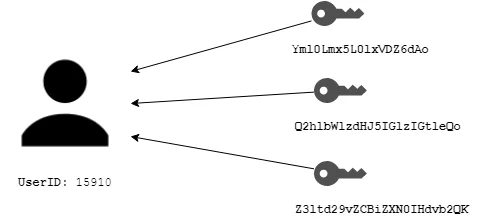
The mapping was supposed to be per transaction only, so an E value should have been valid for one endpoint at a time; that restriction would have prevented the username E value from working against the archive endpoint.
Impact
An authenticated attacker could read another user's full archive of bills and earnings by changing their own username to the victim's user ID, taking the resulting E value and sending it to the archive endpoint. The same oracle allowed Arne to obtain total earnings from a real name, and Jeroen to access non-public profile pictures. During the presentation the author repeated the process with an attendee's ID and obtained access to his full archive. The author's report was rated high initially and then exceptional, with a €10,000 bounty; the three hunters together earned €20,000.
Fix
The report does not describe a specific code change. The development team explained that the mapping was supposed to be per transaction only, so an E value should have been valid for one endpoint at a time.
Variants to test
- Look for any field whose value is echoed back as an opaque token, such as a username, display name or email change, and check whether that token is accepted by other endpoints. A positive result is a different error from the generic invalid-token message, for example an authorisation error naming the entity.
- Test whether the opaque value is scoped per endpoint by taking a token from one feature and replaying it against another. A positive result is any response other than the generic failure message.
- Try changing the type of a parameter (
text,hidden,number,none) and deleting the opaque value, to see whether the server falls back to the plaintext value. A positive result is a response that reflects the plaintext ID. - For hidden fields with no value in the request, guess that the hidden value is the user ID and try both the full ID and a truncated suffix. A positive result is a successful response or an error that reveals the expected format.
- Compare responses for the same plaintext value over time: if the opaque value changes but only the latest is accepted, a timestamp or nonce is likely involved, which is useful context even when the value cannot be forged.
Some things to remember
- No target is completely secure; everyone makes mistakes.
- Do not give up because you see an advanced layer of defence.
- Brainstorm with other hackers when possible.
- Always write clear and detailed reports, unless you like presenting in front of 20 people.
What happened, in plain words
A group of three security researchers took part in a hacking event organised by Intigriti. Companies at these events invite researchers to try to break into their systems, and pay a reward (a "bounty") for each real problem found. The three researchers, Matti Bijnens, Arne Swinnen and Jeroen Beckers, together earned €20,000.
One of the target's endpoints, the archive endpoint, returns all bills and earnings a user has ever received. The website had a clever protection against a common bug called IDOR, which I will explain below. The researchers found a way around that protection, and then used it to read other people's private financial records.
This article walks through the same story for someone who has never done security testing before. Every technical word is explained the first time it appears, and there is a glossary at the end.
The words you need first
Before the story makes sense, a few everyday ideas.
A website is two programs talking. Your browser (Firefox, Chrome) is one program. A computer somewhere else, the server, is the other. When you click something, your browser sends a short message to the server and the server sends one back. That message exchange is what people call a request and a response.
An API is the menu of requests a website accepts. Think of a restaurant. The kitchen (the server) can make many dishes, but the menu lists exactly which ones you can order and what you have to say to order them. On a website, each item on that menu is called an endpoint: a specific address, like /getInvoice, that does one specific job. When you send a request to an endpoint, you include parameters: the extra details, like which invoice you want. A parameter is just a named value, for example id=12340.
A cookie or token is a wristband. When you log in, the server gives your browser a small piece of text. Your browser shows it on every later request, the way a wristband shows you paid to get into a festival. The server uses it to know who you are. Without it, the server treats you as a stranger.
An ID is a number that identifies a thing. Your user account has an ID, an invoice has an ID, a bill has an ID. These are often simple counting numbers: 12340, 12341, 12342. That is convenient for the website, and also convenient for an attacker, because numbers are easy to guess.
IDOR is "changing the number". IDOR stands for Insecure Direct Object Reference. Imagine a hotel where your room key is literally the room number written on a card. If the hotel only checks that you have a card, and not that the card is yours, you can write "214" on a blank card and walk into someone else's room. In web terms: the website takes an ID from your request and hands back the matching record without checking that the record belongs to you. If you can change id=12340 to id=12341 and see someone else's invoice, that is an IDOR.
A defence is a lock; a bypass is a way around the lock. The target had several locks in a row. The researchers' job was to find one lock that could be opened, and then check whether the next lock was actually fitted.
The target and its defences
The application was well hardened and had several layers of defence. Besides the usual IDOR protection, it used what the team believed to be "encrypted parameters". In practice, requests carried an E value alongside a plaintext V value, and the server appeared to act on the E value rather than the V value.
In plain words: instead of sending id=12340 and having the server trust it, the page sent two things. V was the readable value (the number). E was a long jumble of characters that the server treated as the real instruction. The idea was that you cannot guess the jumble for someone else's ID, so you cannot swap IDs. The E value works like a cloakroom ticket: you hand in a coat (the V value) and get a ticket (E); later you hand in the ticket and get the coat back. If tickets cannot be forged, nobody can collect a coat that is not theirs.
The feature at the centre of the finding is the archive endpoint, which returns all bills and earnings a user has ever received. Think of it as a personal filing cabinet with every payslip you have ever had.
The author notes that, because of the nature of the target, all endpoints have different names in the article. The examples therefore use placeholder names such as /getInvoice, /getArchive and /changeUsername, and the values shown are illustrative.
Setting the scene
The work was done during a live hacking event, so several hunters were testing the same target at the same time and reports were triaged immediately. The author used Burp and Firefox.
Burp (Burp Suite) is a tool that sits between your browser and the website and lets you read and edit every request before it is sent. Think of it as a transparent envelope you can open, change the letter inside, and seal again. Firefox is just the browser used to drive the site.
No specific versions, accounts or roles beyond ordinary user accounts are described. The only precondition that matters is an authenticated account whose username can be changed, because the username field turned out to be the signing oracle. "Authenticated" simply means logged in. "Signing oracle" is explained below, but the short version is: a part of the website that will happily stamp a ticket for any value you give it.
Finding it
At the start of the event the author looked at a request containing the E and V pair and immediately listed the ways the layer might be bypassed:
- Maybe the
Evalue is ignored, so theVvalue can simply be changed and tested for IDORs. - Maybe the
Evalue is generated in the front end, so the algorithm could be reverse engineered and values signed by the attacker. - What if the type is changed, or the
Evalue deleted? Will the system fall back on the unencrypted values?
Each idea is worth spelling out, because this is how a tester thinks.
- Ignore the ticket. If the server secretly only looks at the readable
Vvalue and treatsEas decoration, then changingVis enough. This is the simplest possible bypass and always worth a try. - Make your own ticket. "Front end" means the part of the website that runs in your browser (the page itself), as opposed to the "back end" on the server. If the page's own code produces the
Evalue, you can read that code, understand the recipe, and produce valid tickets for any ID you like. "Reverse engineering" means reading something to work out how it was made. - Break the ticket and see what happens. If you change the type of a field, or remove the
Evalue entirely, a badly written server might fall back to trusting the plainVvalue. "Fallback" means the automatic second choice when the first one fails.
Testing the first idea by editing only the V value gave misleading results: requests appeared to return no errors. In the end the V value was almost always ignored and only the E value was used. For some endpoints the opposite was true: the system looked at the V value and ignored the E value. In those cases the next layer of IDOR defence produced the message:
This doesn't seem to be working, try again or contact us.
What this block shows: a plain error message returned by the server. It is deliberately vague, so it does not tell an attacker which check failed. For the researchers, that vagueness was itself information: it meant a check existed and had rejected the request, but not which one.
The second idea, that the E value was generated in the front end, was dropped quickly: the values were always present in the response to the previous request. In other words, the ticket was printed by the server, not by the page, so there was no recipe in the browser to copy. A little time went into guessing the encryption method, without success. One observation stood out: the same V value can come back with different E values, but the server only accepts the last generated E value. That led the team to believe some kind of timestamp was included in the E value.
A timestamp is the current date and time, down to the second or finer. If the ticket contains the moment it was printed, then printing a new ticket for the same coat produces a different ticket, and only the newest one is valid. That is a sensible design, and it also told the researchers they would not be able to forge tickets by hand.
Changing the T (type) value to something else, such as none, hidden or number, produced the same error as changing the E value:
This doesn't seem to be working, try again or contact us.
What this block shows: the same generic message again. The T value describes what kind of form field is being sent. text is a normal box you can type in; hidden is a field the page keeps but the user never sees; number accepts digits; none means no field at all. Changing the type did not open a door, so that idea was set aside.
Running out of ideas, the author took a suggestion from Arne: find a signing oracle. A signing oracle would return the encrypted E for a supplied plaintext V. For example, an endpoint /encryptValue that accepts a parameter V and replies with a value E: give it id=6548116 and it replies with E=bm90YWN0dWFsbHliYXNlNjQ. There is no need to know how the E value is generated, whether it is a hash with appended or prepended data or an encryption; the backend will accept the value and decrypt it, and that is all that matters.
This is the key idea of the whole article, so here it is slowly. A hash is a one-way fingerprint of some data: easy to compute, practically impossible to reverse. Encryption is a two-way scramble: with the right key you can unscramble it. The researchers did not know which one was in use, and it did not matter. What mattered was finding a place on the website that would take a value from them and hand back a valid E for it. That place is the oracle. The word comes from ancient temples where people believed a god spoke through a priest; in security it means any system that answers a question you are not supposed to be able to ask. Here the question is "what is the valid ticket for this ID?" and the answer is the E value.
Searching for oracle signing endpoints, the author noticed that a username also has an E value: changing your username returns the E value for that username. That is the oracle. The username field is something every logged-in user is allowed to change, and the site helpfully returns a fresh ticket for whatever you typed. So if you type someone else's ID as your username, the site hands you a valid ticket for that ID.
Exploitation
Step 1: confirm the oracle with an invoice endpoint
With half a day already spent in the application, the author knew of a /getInvoice endpoint that accepts an invoice ID, for example 12340.
To test whether the oracle worked, the username was changed to the invoice ID plus one (12341). The E value from the username was copied into the E value of the request and the request was sent. The response was not the invoice, but it was also not the usual failure. Instead of the generic message, the server returned:
Entity does not belong to client
What this block shows: a different error. "Entity" here means the record being requested (the invoice). "Client" means the logged-in account. The message says, in effect, "this invoice exists, but it is not yours". That is a completely different situation from "your ticket is invalid". It proves the forged ticket was accepted, and that a second, separate check then stopped the request.
That error was the breakthrough: the server had accepted the forged E value, and a later IDOR check had stopped the request. One layer of the company's IDOR defence had been bypassed. The researchers now had a working way to produce valid tickets for any ID. What they still needed was an endpoint where the second check was missing.
Step 2: look for endpoints with a missing second check
Because this was a live event, the finding was shared with Arne and Jeroen. The team went through all the sensitive endpoints they could think of that used a guessable or incremental ID. The target was hardened enough that finding an endpoint without the second authorisation check was difficult.
"Authorisation" is the check that the thing you are asking for belongs to you. "Authentication" is proving who you are; "authorisation" is what you are allowed to do once you are known. The invoice endpoint had both. The team was hunting for one that had the first but not the second.
Step 3: the archive endpoint and its hidden field
One endpoint the author examined was /getArchive, which returns all bills and earnings a user has ever received. It behaved differently from the others: most endpoints sent the user ID in a field of type text, while this one expected a field of type hidden. Because the field was hidden, there was no value in the request, so there was no way to know what the E value was. The author suspected it was the user ID.
A hidden field is a value the page stores and sends but never displays. You cannot see it in the normal page, but Burp shows it in the request. The absence of a visible value is exactly why the author had to guess: the ticket was there, but the coat it belonged to was not written anywhere obvious.
The username was set to the user ID and the resulting E value was supplied to the archive endpoint. The first attempt failed with:
Could not find client with this ID.
What this block shows: another distinct error. This one says the ID itself was not recognised, which is different from "not yours". It told the author the guess was close but the format was wrong.
On other endpoints the author had noticed that sometimes only the last part of the user ID is sent. The first part of the user ID was cut off and the request retried. This worked and returned the author's own archive, confirming that the hidden field was the user ID.
Why cut the ID? Trying the full ID failed; trying the shortened form succeeded. That confirmed the hidden field was the user ID, and that the oracle could produce a valid ticket for it.
Step 4: another user's archive
The user ID of Jeroen was requested and the same process was repeated with his account. The request went through and returned a full archive of Jeroen's bills and earnings.
In plain words: the author asked a colleague for his user ID, typed it into his own username field to get a valid ticket, then sent that ticket to the archive endpoint. The server returned Jeroen's private financial records. The bug was real and it worked against a real person.
Step 5: the report and the presentation
A report was submitted quickly, perhaps too quickly, with a CVSS score of 7.7 (High severity). Because of the live event the development team looked at it immediately, but important steps were missing from the explanation and the team did not fully understand it. They asked the author to present the finding.
CVSS is a scoring system for the severity of a security bug. It produces a number, and the number maps to a label such as Low, Medium, High or Critical. 7.7 is in the High band. The score is a shared language between researchers and companies: it says how bad the bug is, so everyone can prioritise.
In the meeting room the author set up in front of about 20 people. The laptop's HDMI did not work with the projector, so Stijn, the CEO of Intigriti, lent his MacBook for the demo. The steps explained to the room were:
- Change your username to someone else's ID.
- Use the
Evalue of your username in this request. - The hidden value is just your user ID.
The demo was given with Jeroen's account. One of the attendees then asked for the process to be repeated with his own ID, and the author went through it again and obtained access to that person's full archive. The impact was immediately clear to everyone in the room.
By the time the author sat back down, an Intigriti member came over to say the company had changed the criticality from high to exceptional, which equals a bounty of €10,000.
"Criticality" is the company's own severity label. "Exceptional" was this company's top band, above high. The bounty is the money paid for the finding.
Step 6: further findings with the same oracle
Hunting continued with the oracle bug. Arne found a way to obtain the total earnings of someone by supplying only their real name, and his bug was also rated exceptional. Arne insisted on sharing 50% of his bounty because it would not have been possible without the oracle bug. Jeroen found a vulnerability that gave access to other users' profile pictures, which on this target were not supposed to be public, and he too earned a bounty.
This is worth pausing on. The oracle was not a single bug; it was a key that opened several doors. Once the team knew that any value typed into the username field came back with a valid ticket, each of them could look for a different endpoint that trusted that ticket. That is why sharing the finding during a live event paid off for all three.
Root cause
After the presentation the development team explained the design. There is no real encryption: the E value is a randomly generated string that is mapped to a cleartext value, so that IDs cannot be guessed and IDORs are impossible. The mapping was supposed to be per transaction only, meaning an E value should be valid for one endpoint at a time. That restriction would have prevented the E value from /changeUsername from working against /getArchive.
"Mapped" means a lookup table: the server keeps a list where each random string points to one real value. "Cleartext" means the readable value, the number itself. "Per transaction" means the ticket should only be good for the one counter where it was issued. A cloakroom ticket from the theatre should not work at the restaurant next door.
The mapping was supposed to be per transaction only, so an E value should have been valid for one endpoint at a time; that restriction would have prevented the username E value from working against the archive endpoint. "Scoped" means limited to a particular place. "Replayed" means sending the same value again somewhere else.
Impact
An authenticated attacker could read another user's full archive of bills and earnings by changing their own username to the victim's user ID, taking the resulting E value and sending it to the archive endpoint. The same oracle allowed Arne to obtain total earnings from a real name, and Jeroen to access non-public profile pictures. During the presentation the author repeated the process with an attendee's ID and obtained access to his full archive. The author's report was rated high initially and then exceptional, with a €10,000 bounty; the three hunters together earned €20,000.
"Impact" is the answer to "what could a bad person actually do with this?". Here the answer is: read another user's full archive of bills and earnings, knowing their user ID, while logged in with an ordinary account.
Fix
The report does not describe a specific code change. The development team explained that the mapping was supposed to be per transaction only, so an E value should have been valid for one endpoint at a time.
In everyday terms: make the cloakroom ticket valid only at the counter that issued it, and put a second guard on every door who checks that the coat is really yours.
Variants to test
These are the same ideas, written as things a beginner can try on a site they are allowed to test.
- Look for any field whose value is echoed back as an opaque token, such as a username, display name or email change, and check whether that token is accepted by other endpoints. A positive result is a different error from the generic invalid-token message, for example an authorisation error naming the entity. "Opaque" means you cannot read what is inside it; it is just a jumble.
- Test whether the opaque value is scoped per endpoint by taking a token from one feature and replaying it against another. A positive result is any response other than the generic failure message.
- Try changing the type of a parameter (
text,hidden,number,none) and deleting the opaque value, to see whether the server falls back to the plaintext value. A positive result is a response that reflects the plaintext ID. - For hidden fields with no value in the request, guess that the hidden value is the user ID and try both the full ID and a truncated suffix. A positive result is a successful response or an error that reveals the expected format.
- Compare responses for the same plaintext value over time: if the opaque value changes but only the latest is accepted, a timestamp or nonce is likely involved, which is useful context even when the value cannot be forged. A "nonce" is a number used once, a value that is only valid for a single use.
Some things to remember
- No target is completely secure; everyone makes mistakes.
- Do not give up because you see an advanced layer of defence.
- Brainstorm with other hackers when possible.
- Always write clear and detailed reports, unless you like presenting in front of 20 people.
Glossary
- API: the set of requests a website accepts, like a menu of what you can order from the server.
- Authentication: proving who you are, usually by logging in.
- Authorisation: the check that you are allowed to see or do the thing you asked for.
- Back end: the part of a website that runs on the server, out of sight of the browser.
- Bounty: money paid by a company for a valid security finding.
- Burp (Burp Suite): a tool that sits between browser and website so you can read and edit requests.
- Bypass: a way around a security check without breaking it.
- Cleartext: a value in readable form, not scrambled.
- Cookie: a small piece of text your browser stores and sends back so the server recognises you.
- Criticality: a company's own label for how severe a bug is.
- CVSS: a scoring system that turns a bug's severity into a number and a label such as High.
- Endpoint: one specific address on a website that performs one job, such as
/getInvoice. - Encryption: a two-way scramble of data that can be undone with the right key.
- Fallback: the automatic second choice a system makes when the first one fails.
- Front end: the part of a website that runs in your browser.
- Hash: a one-way fingerprint of data; easy to compute, practically impossible to reverse.
- Hidden field: a form value the page stores and sends but never displays to the user.
- ID: a number or string that identifies a record, such as a user or an invoice.
- IDOR: Insecure Direct Object Reference; handing back a record based on an ID from the request without checking it belongs to you.
- Impact: what an attacker could actually do with a bug.
- Mapping: a lookup table linking one value to another, here a random string to a real value.
- Nonce: a value meant to be used only once.
- Opaque: a value you cannot read or interpret, just a jumble of characters.
- Oracle (signing oracle): a part of a system that will produce a valid token for any value you give it.
- Parameter: a named value sent with a request, such as
id=12340. - Per transaction / scoped: limited to one place or one use, not valid everywhere.
- Replay: sending a value again somewhere it was not originally issued for.
- Request: the message your browser sends to the server.
- Response: the message the server sends back.
- Reverse engineering: reading something to work out how it was built.
- Server: the computer that runs the website and answers requests.
- Timestamp: the date and time something happened, often included in a token.
- Token: a piece of text that stands in for something else, such as your identity or a record's ID.
- Triaged: reviewed and sorted by severity, usually by the company running the programme.




