How to Secure AWS ServerLess Lambda from ReDoS(Regular Expression Denial-of-Service) & Resultant Financial Impact
The sign-in endpoint used a regular expression that was vulnerable to ReDoS, so a crafted username caused the Lambda function to stall and return a 503 error. An attacker could send many concurrent requests to exhaust concurrency limits and inflate AWS costs.

The serverless paradigm makes it very easy for product development teams to develop and deploy in AWS cloud. Most of the operational responsibilities like configuring machine images (AMIs), patching the OS, installation of daemons to collect log distribution and gathering metrics for your application, are managed by…
The full write-up lives on its author's site
It belongs to its author, so we link to it rather than copy it. The other two tabs are our own rewrites, checked against it.
Context
Serverless applications run in stateless compute containers that are event-driven, ephemeral (functions as a service) and fully managed by the cloud provider. They scale seamlessly and do not require any server operations. The developer writes application code as functions; once a function is deployed, it needs a way to be invoked in the form of an event.
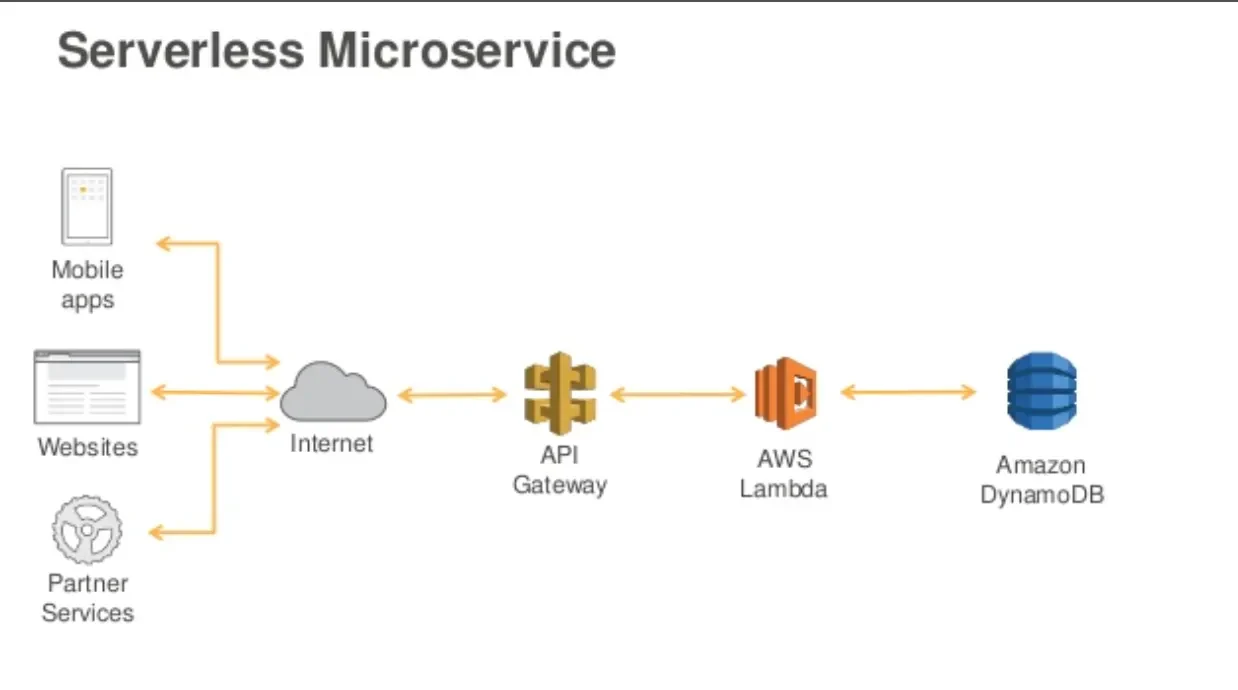
Fig-1: Sample Serverless Design
The event can come from an API gateway (an HTTP request), from a client application, from another serverless function, or from another cloud service such as Amazon S3 after something is uploaded. The cloud provider executes the function code on the developer's behalf and takes care of provisioning and managing the servers that run the code upon invocation.
The target in this write-up is an eCommerce company's sign-in endpoint, https://XXX.com/api/signin, running over AWS as a microservice/Lambda service with automated scalability and high availability. The researcher found it during a bug bounty exercise. The operational responsibilities such as configuring machine images (AMIs), patching the OS, installing daemons to collect log distribution and gathering metrics are managed by AWS, but the cloud provider does not protect against cyber threats resulting from vulnerable code. That split of responsibility is the theme of the finding.
Setup
The only tool named in the report is Burp Suite, used for basic recon. No versions, accounts or roles are described. The precondition for the finding is simply that the sign-in endpoint is reachable and that its username parameter is processed by a regular expression.
Finding it
The first question was where the site was hosted. During basic recon through Burp Suite, the researcher added a regular expression in the username field and reached a 503 error. The subsequent response revealed that the site was hosted on S3/AWS.
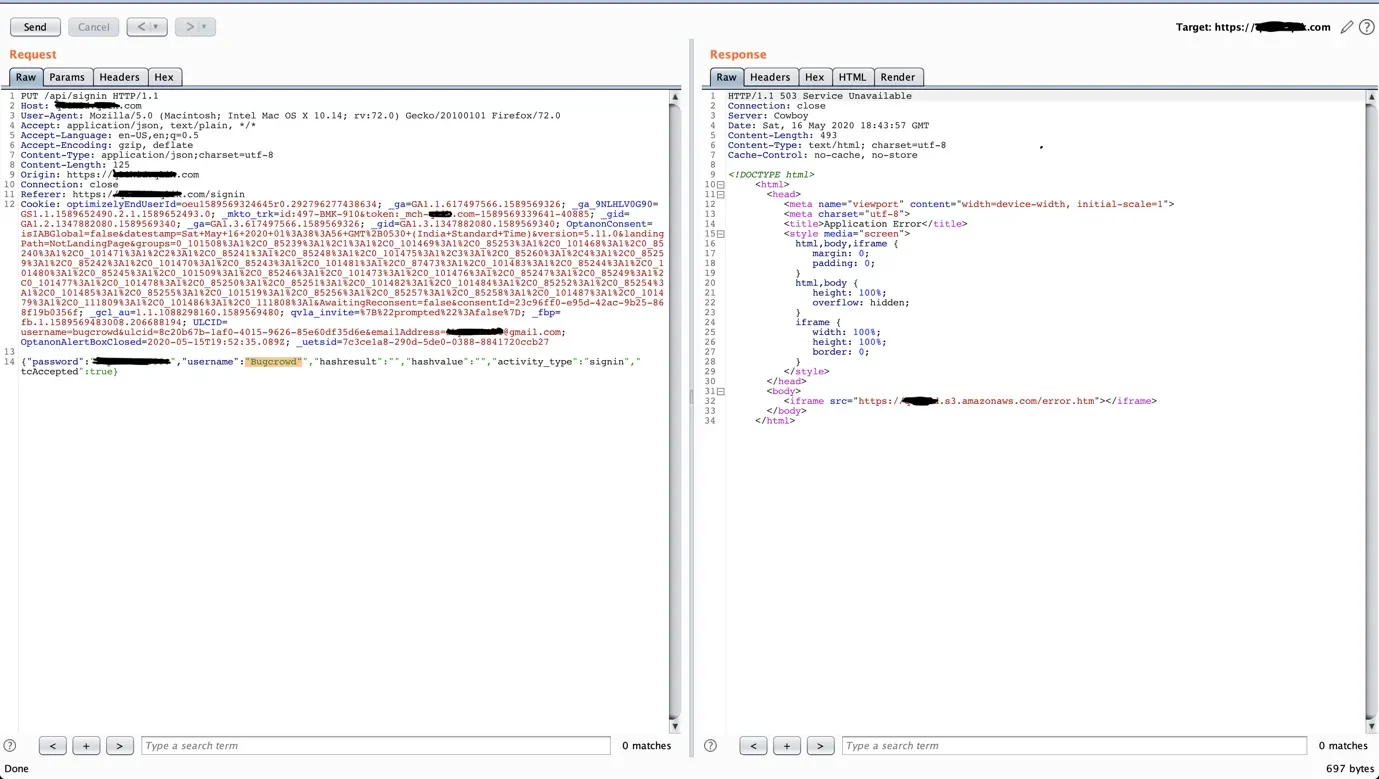
Fig-2 Basic Recon Using Burp Suite
After checking the response, the researcher went to the S3 bucket and looked for open S3 bucket issues, and found none.
The next step was the usual application security pass: OWASP Top 10 vulnerabilities and business logic issues. None were found. Because the application was based on AWS Lambda functions, the researcher then looked into the OWASP Serverless Top 10 and found that the AWS Lambda event function was set as a service for auto scaling.
AWS charges per request per second. The interesting part, as the author puts it, was that an application DoS had already been performed without the researcher being aware of the vulnerability. After reading a few articles, the researcher understood AWS Lambda functions and the issues related to them. One of those issues is application-level DoS, which can cause additional charges to an organisation based on AWS Lambda pricing.
Adding the regular expression to the username had the unintended consequence of a DoS: the payload made the service go down, hence the 503 error. That led to the conclusion that if the exploit were automated in a Python script with a number of requests, it would result in a ReDoS attack, and that attack would end up as a big invoice for AWS S3/Lambda services for the eCommerce company.
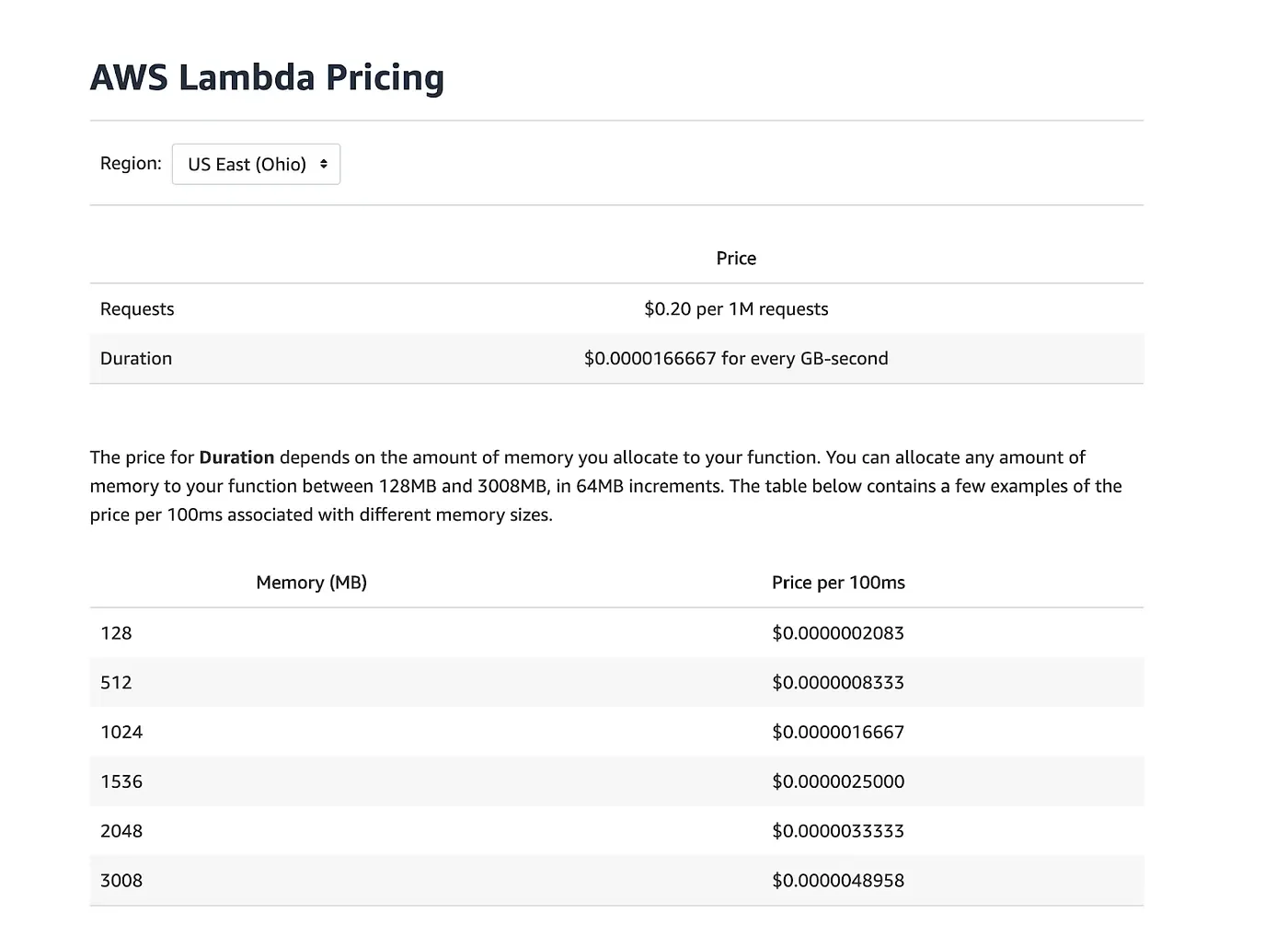
Fig-3: AWS Lambda pricing
Exploitation
Step 1: Identify the endpoint and its hosting model
The endpoint https://XXX.com/api/signin runs over AWS as a microservice/Lambda service, with automated scalability and high availability, and imposes some limitations and issues which require attention.
Step 2: Confirm the ReDoS vector
The endpoint https://XXX.com/api/signin was found to be vulnerable to a ReDoS (Regular-Expression Denial of Service) attack vector. The vulnerability enables a malicious user to cause each AWS microservice/Lambda function which uses it to stall until it times out.
Step 3: Send the payload
The request parameter used is "username":"ANYNAME", and adding an extra double quote makes the regular expression extremely inefficient, as per the attack nature. This string (the extra double quote), with a simple request body as the one provided in the report, causes 100% CPU utilisation for a very long period of time and returns a response such as "Service Unavailable along with 503 HTTP".
The report describes the request body in prose rather than reproducing it verbatim.
Step 4: Scale the requests
An attacker may send numerous concurrent malicious requests to the AWS Lambda function, that is the https://XXX.com/api/signin endpoint, until the concurrent executions limit is reached, and in turn deny other users access to the application.
Step 5: Inflate the bill
An attacker may also push the Lambda or microservice function to over-execute for long periods of time, essentially inflating the monthly bill and inflicting a financial loss for the target organisation.
Fig-4: Redos in Serverless AWS Lambda function
Depending on the type of limit and activity, poorly designed or configured applications may be abused in such a way that will eventually cause latency to become unacceptable or even render it unusable for other users.
Root cause
The mistake is in the application code, not in the cloud provider: the username value is fed into a regular expression that is extremely inefficient when it encounters the extra double quote, so a single request drives the function to 100% CPU for a long period and it stalls until it times out. The Lambda event function was set as a service for auto scaling, and AWS charges per request per second. The report notes that no open S3 bucket issues and no OWASP Top 10 or business logic issues were found. The report does not describe the regular expression itself, so the exact pattern that backtracks is not shown.
Impact
Two effects are described, both conditional on the attacker being able to send many concurrent requests:
- Availability. Concurrent malicious requests to
https://XXX.com/api/signincan be sent until the concurrent executions limit is reached, denying other users access to the application. Latency can become unacceptable or the application can be rendered unusable for other users, depending on the type of limit and activity. - Cost. Pushing the Lambda or microservice function to over-execute for long periods inflates the monthly bill and inflicts a financial loss on the target organisation. The report frames this as a big invoice for AWS S3/Lambda services for the eCommerce company.
The report does not state a severity rating, a CVSS score or a bounty amount.
Fix
The report lists mitigation steps and best practices for dealing with Denial of Service and Denial of Wallet attacks against serverless architectures.
- Set alerts for AWS services thresholds through the AWS Cost Optimization tool.
- Write efficient serverless functions which perform discrete targeted tasks.
- Set appropriate timeout limits for serverless function execution.
- Set appropriate disk usage limits for serverless functions.
- Apply request throttling on API calls.
- Enforce proper access controls to serverless functions.
- Use APIs, modules and libraries which are not vulnerable to the application.
- Ensure that your VPC Lambda subnet has enough IP addresses to scale.
- Use short timeouts on API endpoints as a thumb rule in microservices.
- Use cached or default responses when downstream cannot respond in a timely fashion.
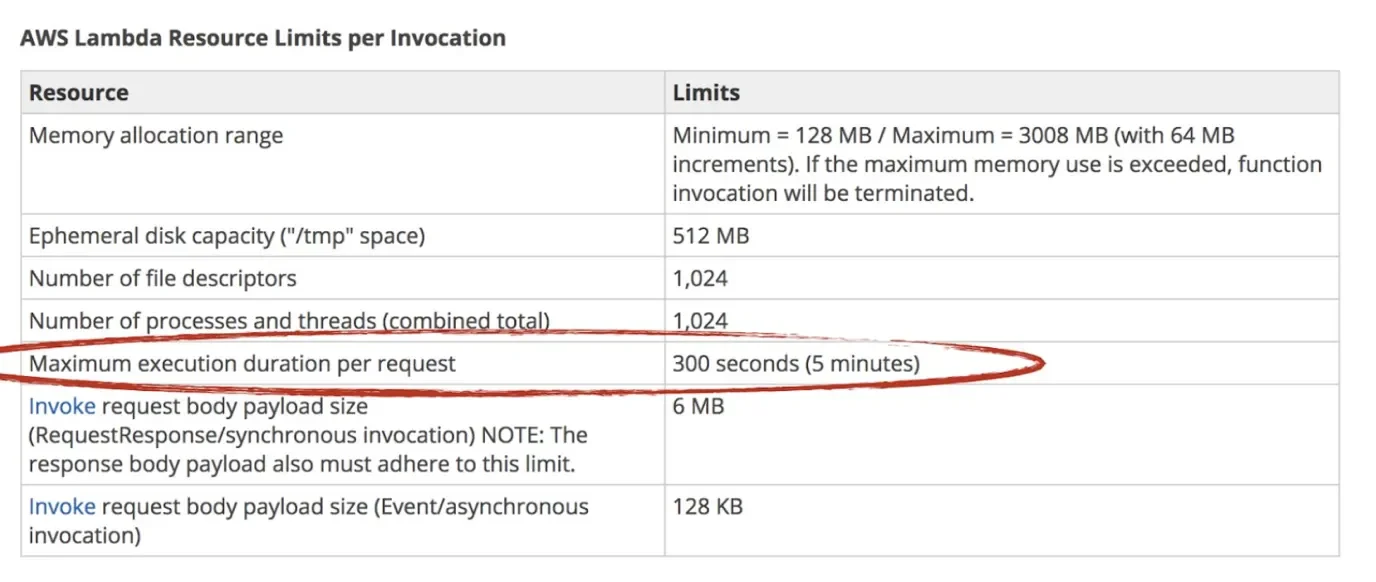
Fig-5: Rate limit for AWS Lambda
Variants to test
- Other input fields validated by regex. Try the same extra double quote, and other metacharacters, in every parameter that is likely validated by a regular expression (email, phone, search, coupon codes).
- Other serverless endpoints behind an API gateway. Repeat the recon on other
apipaths of the same host. - Concurrency limit probing. Send concurrent requests to a confirmed slow endpoint and watch for the point where other users are denied.
- Cost amplification. Automate the slow request in a script and monitor execution duration.
- Auto-scaling configuration. Check whether the Lambda event function is set as a service for auto scaling, as it was here.
What happened, in plain words
A security researcher was testing a shopping website (an eCommerce company) as part of a bug bounty exercise. A bug bounty is a scheme where companies invite outside researchers to look for security problems and pay them for reporting what they find. While testing the sign-in page, the researcher added a regular expression in the username field and reached a 503 error. That error page also revealed where the site was hosted: on Amazon Web Services (AWS), specifically on a service called S3 and a service called Lambda.
That accidental breakage turned out to be the whole finding. The sign-in page was built as a serverless application on AWS Lambda. Serverless means the company does not run its own servers; AWS runs the code on demand, and the company pays for each request and each second of computing time. Because the username value was processed by a regular expression (a pattern-matching rule), a crafted request could make the code work very hard for a long time. Send many of those requests at once and two things happen: real customers cannot sign in, and the company's AWS bill grows. The report calls this a ReDoS attack, short for Regular Expression Denial of Service.
The rest of this article walks through the same steps the researcher took, explains every concept from scratch, and ends with the fixes the report recommends.
Background: what serverless actually is
Before the exploit, the report reviews the basics. Serverless applications run in stateless compute containers that are event-driven, ephemeral (functions as a service) and fully managed by the cloud provider. That sentence is dense, so let us unpack it piece by piece.
- Stateless means the running code does not remember anything between calls. Each time it runs, it starts fresh, like a shop assistant who forgets every customer the moment they leave.
- Event-driven means the code only runs when something happens: a click, a form submission, a file upload. Nothing runs in the background waiting.
- Ephemeral means the running copy is temporary. It starts, does its job, and is thrown away.
- Functions as a service means the company writes small pieces of code (functions) and the cloud provider runs them on demand.
- Fully managed means AWS handles the servers, the operating system and the scaling. The company only supplies the code.
A useful everyday comparison: a traditional server is like owning a restaurant that is open all day whether or not anyone comes in. Serverless is like hiring a chef only when an order arrives, paying per dish, and letting the agency handle the kitchen.
The developer writes application code as functions. Once a function is deployed, it needs a way to be invoked in the form of an event. An event is simply a message that says "run this function now, here is the input".
Fig-1: Sample Serverless Design
The diagram shows the typical layout: a user or another system sends an event, and the cloud provider routes it to the function, which runs and returns a result.
The event can come from several places:
- An API gateway, which is the front door that turns an HTTP request (a normal web request from a browser) into an event.
- A client application, such as a mobile app calling the function directly.
- Another serverless function, where one function calls another.
- Another cloud service, such as Amazon S3 after something is uploaded. S3 is Amazon's file storage service; think of it as a giant online folder.
The cloud provider executes the function code on the developer's behalf and takes care of provisioning and managing the servers that run the code upon invocation. Provisioning means setting up the machines; managing means keeping them running, patched and scaled. The company never sees a server.
The target in this write-up is an eCommerce company's sign-in endpoint, https://XXX.com/api/signin, running over AWS as a microservice/Lambda service with automated scalability and high availability. A few terms here:
- Endpoint is a specific web address that accepts requests, like a particular counter in a bank.
https://XXX.com/api/signinis the counter where you sign in. - API stands for Application Programming Interface. In web terms it is the set of addresses a website's own front end uses to talk to its back end. When you type your username and password into a login form, your browser sends them to an API endpoint like this one.
- Microservice means the application is split into small independent pieces, each doing one job (sign-in, search, checkout), rather than one giant program.
- Automated scalability means AWS adds more copies of the function automatically when more requests arrive.
- High availability means the service is designed to keep working even if parts fail.
The researcher found this during a bug bounty exercise. The operational responsibilities such as configuring machine images (AMIs), patching the OS, installing daemons to collect log distribution and gathering metrics are managed by AWS. In plain words: AWS handles the plumbing. But the cloud provider does not protect against cyber threats resulting from vulnerable code. That split of responsibility is the theme of the finding: AWS keeps the lights on, but if the company writes a slow or unsafe function, AWS will happily run it, and bill for it.
Setting up
The only tool named in the report is Burp Suite, used for basic recon. Burp Suite is a program that sits between your browser and a website and lets you see and edit every request before it is sent. Think of it as a transparent envelope you can open, read and rewrite before the postman delivers it. No versions, accounts or roles are described in the report.
The precondition for the finding is simply that the sign-in endpoint is reachable and that its username parameter is processed by a regular expression. A parameter is one named piece of data in a request, like the username field on a form. A regular expression (often shortened to regex) is a pattern used by programmers to check or search text, for example to confirm that an email address looks like an email address. Regexes are powerful but can be written badly, and that is the heart of this bug.
Finding it
The first question was where the site was hosted. Knowing the hosting provider matters because it tells you what kind of defences and what kind of billing model are in play. During basic recon through Burp Suite, the researcher added a regular expression in the username field and reached a 503 error. A 503 is the HTTP status code for "Service Unavailable": the server is telling you it cannot handle the request right now. The subsequent response revealed that the site was hosted on S3/AWS.
Fig-2 Basic Recon Using Burp Suite
Why did this step matter? Because a 503 from a single odd input is a strong hint that the input is being processed in a way that can be pushed over the edge. Most well-built forms simply reject bad input with a polite error; they do not fall over.
After checking the response, the researcher went to the S3 bucket and looked for open S3 bucket issues, and found none. An open S3 bucket is a common misconfiguration where a company's file storage is left publicly readable, exposing documents or backups. That was not the problem here, so the researcher moved on.
The next step was the usual application security pass: OWASP Top 10 vulnerabilities and business logic issues. OWASP is a well-known non-profit that publishes lists of common security mistakes. The OWASP Top 10 is its list of the ten most common web application weaknesses, such as injection flaws and broken access control. Business logic issues are flaws in how the application is supposed to work, for example letting a user apply the same discount code twice. None were found.
Because the application was based on AWS Lambda functions, the researcher then looked into the OWASP Serverless Top 10. This is a similar list, but aimed specifically at serverless applications. There the researcher found that the AWS Lambda event function was set as a service for auto scaling. In other words, the function was configured to spawn more copies automatically as requests arrived.
AWS charges per request per second. That is the billing model: every time the function runs, you pay for the request, and you pay for the time it spends running. The interesting part, as the author puts it, was that an application DoS had already been performed without the researcher being aware of the vulnerability. A DoS, or Denial of Service, is any situation where a service is made unavailable to its real users. The researcher had caused one by accident, simply by sending a strange username.
After reading a few articles, the researcher understood AWS Lambda functions and the issues related to them. One of those issues is application-level DoS, which can cause additional charges to an organisation based on AWS Lambda pricing. Application-level means the problem is in the application's own code, not in the network or the servers.
Adding the regular expression to the username had the unintended consequence of a DoS: the payload made the service go down, hence the 503 error. A payload is simply the malicious or crafted part of a request, the data you send to trigger the behaviour. That led to the conclusion that if the exploit were automated in a Python script with a number of requests, it would result in a ReDoS attack. Automating means writing a small program to send the same request over and over, instead of doing it by hand. Python is a popular programming language often used for such scripts. And that attack would end up as a big invoice for AWS S3/Lambda services for the eCommerce company.
Fig-3: AWS Lambda pricing
The pricing page shows how AWS charges for Lambda: per request and per unit of computing time. The more requests and the longer each one runs, the higher the bill.
Exploitation
Step 1: Identify the endpoint and its hosting model
The endpoint https://XXX.com/api/signin runs over AWS as a microservice/Lambda service, with automated scalability and high availability, and imposes some limitations and issues which require attention. Why this step first? Because the whole attack depends on the hosting model. On a fixed server, a flood of requests might just be absorbed or blocked by a firewall. On an auto-scaling serverless function, every extra request can spawn extra paid execution, so the same flood has a direct cost.
Step 2: Confirm the ReDoS vector
The endpoint https://XXX.com/api/signin was found to be vulnerable to a ReDoS (Regular-Expression Denial of Service) attack vector. The vulnerability enables a malicious user to cause each AWS microservice/Lambda function which uses it to stall until it times out. A timeout is a built-in limit: if a function runs longer than allowed, the platform stops it. Stalling until timeout means the function spends its entire allowed time doing useless work, and you pay for all of it.
Step 3: Send the payload
The request parameter used is "username":"ANYNAME", and adding an extra double quote makes the regular expression extremely inefficient, as per the attack nature. This string (the extra double quote), with a simple request body as the one provided in the report, causes 100% CPU utilisation for a very long period of time and returns a response such as "Service Unavailable along with 503 HTTP".
CPU utilisation is how busy the processor is. 100% means it is working flat out and has no spare capacity for anything else.
The report describes the request body in prose rather than reproducing it verbatim. JSON is a simple text format for structured data, the kind of thing you see inside curly braces with names and values. The shape looks like this:
{"username":"ANYNAME""}
Line by line:
- The outer
{and}mark the start and end of a JSON object, a bundle of named values. "username"is the name of the field, the same field the login form uses.:separates the name from its value."ANYNAME"is the value, a placeholder for whatever name you type.- The final
"is the extra double quote that the report says makes the regular expression extremely inefficient. It is the whole trick: one stray character that the pattern was not written to handle gracefully.
Why does one character cause so much trouble? Because some regular expressions, when they meet unexpected input, try an enormous number of possible ways to match it before giving up. It is like a librarian asked to find a book with a title that almost matches a rule, who then checks every shelf, every row and every book in every possible order. The work grows explosively with the length of the input, and the function sits there until the timeout stops it.
Step 4: Scale the requests
An attacker may send numerous concurrent malicious requests to the AWS Lambda function, that is the https://XXX.com/api/signin endpoint, until the concurrent executions limit is reached, and in turn deny other users access to the application. Concurrent means at the same time. The concurrent executions limit is the maximum number of function copies AWS will run simultaneously. Once that ceiling is reached, new requests, including those from real customers, have to wait or are refused. This is the availability half of the impact.
Step 5: Inflate the bill
An attacker may also push the Lambda or microservice function to over-execute for long periods of time, essentially inflating the monthly bill and inflicting a financial loss for the target organisation. Over-execute means the function keeps running, and being billed, far longer than a normal request would need. This is the cost half of the impact, and it is why the report also calls this a Denial of Wallet attack.
Fig-4: Redos in Serverless AWS Lambda function
The figure illustrates the ReDoS behaviour inside the Lambda function: the crafted input drives the function into a long, expensive execution.
Depending on the type of limit and activity, poorly designed or configured applications may be abused in such a way that will eventually cause latency to become unacceptable or even render it unusable for other users. Latency is the delay before a response arrives. Unacceptable latency means customers wait so long that the site is effectively broken for them.
Root cause
The mistake is in the application code, not in the cloud provider: the username value is fed into a regular expression that is extremely inefficient when it encounters the extra double quote, so a single request drives the function to 100% CPU for a long period and it stalls until it times out. Because the Lambda event function is set as a service for auto scaling, each concurrent request spawns further execution, and AWS bills per request per second. The existing defences did not stop it: the report notes that no open S3 bucket issues and no OWASP Top 10 or business logic issues were found, and the auto-scaling configuration is what turns a single slow request into both an availability problem and a cost problem. The report does not describe the regular expression itself, so the exact pattern that backtracks is not shown. Backtracking is the regex engine's habit of trying one possibility, failing, and going back to try another; with a badly written pattern it can try an astronomical number of combinations.
Impact
Two effects are described, both conditional on the attacker being able to send many concurrent requests:
- Availability. Concurrent malicious requests to
https://XXX.com/api/signincan be sent until the concurrent executions limit is reached, denying other users access to the application. Latency can become unacceptable or the application can be rendered unusable for other users, depending on the type of limit and activity. - Cost. Pushing the Lambda or microservice function to over-execute for long periods inflates the monthly bill and inflicts a financial loss on the target organisation. The report frames this as a big invoice for AWS S3/Lambda services for the eCommerce company.
The report does not state a severity rating, a CVSS score or a bounty amount. A CVSS score is a standard number from 0 to 10 used to express how serious a vulnerability is.
Fix
The report lists mitigation steps and best practices for dealing with Denial of Service and Denial of Wallet attacks against serverless architectures.
- Set alerts for AWS services thresholds through the AWS Cost Optimization tool. An alert is an automatic notification when spending or usage crosses a line you set, so a surprise bill is caught early.
- Write efficient serverless functions which perform discrete targeted tasks. Keep each function small and focused, so it does one job quickly.
- Set appropriate timeout limits for serverless function execution. A timeout caps how long a function may run, which caps the damage a slow request can do.
- Set appropriate disk usage limits for serverless functions.
- Apply request throttling on API calls. Throttling means deliberately slowing or limiting how many requests a client may send in a period, like a turnstile at a stadium.
- Enforce proper access controls to serverless functions. Access controls decide who is allowed to call what.
- Use APIs, modules and libraries which are not vulnerable to the application. A library is reusable code written by someone else; if it has a known flaw, you inherit it.
- Ensure that your VPC Lambda subnet has enough IP addresses to scale. A VPC is a private network inside the cloud, and a subnet is a slice of it; if it runs out of addresses, the function cannot scale.
- Use short timeouts on API endpoints as a thumb rule in microservices. A thumb rule is a simple rule of thumb you apply by default.
- Use cached or default responses when downstream cannot respond in a timely fashion. A cache is a stored copy of an earlier answer; serving it is better than making the user wait.
Fig-5: Rate limit for AWS Lambda
Variants to test
Each one describes what to try and what a positive result looks like.
- Other input fields validated by regex. Try the same extra double quote, and other metacharacters, in every parameter that is likely validated by a regular expression (email, phone, search, coupon codes). A metacharacter is a character with special meaning in a pattern, such as a bracket or a dot.
- Other serverless endpoints behind an API gateway. Repeat the recon on other
apipaths of the same host. - Concurrency limit probing. Send concurrent requests to a confirmed slow endpoint and watch for the point where other users are denied.
- Cost amplification. Automate the slow request in a script and monitor execution duration.
- Auto-scaling configuration. Check whether the Lambda event function is set as a service for auto scaling, as it was here.
Glossary
- 503: HTTP status code meaning Service Unavailable; the server cannot handle the request right now.
- Access control: the rules that decide who is allowed to use which part of a system.
- Alert: an automatic notification when a threshold is crossed, for example a spending limit.
- API: Application Programming Interface; the set of addresses and rules a program uses to talk to another program, such as a website's back end.
- API gateway: the front door that receives web requests and passes them to the right function.
- Application-level DoS: a denial of service caused by the application's own code rather than by network flooding.
- Auto scaling: automatically adding more copies of a service as demand rises.
- AWS: Amazon Web Services, Amazon's cloud computing platform.
- Backtracking: a regex engine's process of trying one match possibility, failing, and going back to try another.
- Bug bounty: a programme where companies pay outside researchers for reporting security problems.
- Burp Suite: a tool that sits between your browser and a website so you can inspect and edit requests.
- Business logic issue: a flaw in how an application is meant to work, rather than in its technical defences.
- Cache: a stored copy of an earlier response, served to avoid repeating work.
- Concurrent: happening at the same time.
- Concurrent executions limit: the maximum number of function copies AWS will run simultaneously.
- CPU utilisation: how busy a processor is; 100% means fully occupied.
- CVSS: a standard 0 to 10 score expressing the severity of a vulnerability.
- Denial of Service (DoS): making a service unavailable to its real users.
- Denial of Wallet: an attack whose main damage is financial, by forcing the victim to pay for extra cloud usage.
- Endpoint: a specific web address that accepts requests.
- Ephemeral: temporary; created, used and discarded.
- Event: a message that triggers a function to run.
- Event-driven: running code only in response to an event.
- Function as a service: a cloud model where you supply small pieces of code and the provider runs them on demand.
- High availability: a design that keeps a service working even when parts fail.
- HTTP request: a message a browser or program sends to a web server asking for something.
- JSON: a simple text format for structured data, using names and values in curly braces.
- Lambda: AWS's serverless function service.
- Latency: the delay before a response arrives.
- Library: reusable code written by someone else that your program includes.
- Metacharacter: a character with special meaning inside a regular expression.
- Microservice: a small, independent piece of an application that does one job.
- OWASP: a non-profit that publishes widely used lists of common security weaknesses.
- OWASP Serverless Top 10: OWASP's list of common weaknesses specific to serverless applications.
- OWASP Top 10: OWASP's list of the ten most common web application weaknesses.
- Parameter: one named piece of data in a request, such as a username field.
- Payload: the crafted part of a request that triggers the behaviour.
- Provisioning: setting up the machines and resources a service needs.
- ReDoS: Regular Expression Denial of Service; a DoS caused by a badly written regular expression taking enormous time on crafted input.
- Regular expression (regex): a pattern used to check or search text.
- S3: Amazon's file storage service.
- Serverless: a cloud model where the provider runs your code on demand and you do not manage servers.
- Stateless: not remembering anything between runs.
- Subnet: a slice of a private network.
- Throttling: deliberately limiting how many requests a client may send in a period.
- Timeout: a built-in limit after which a running function is stopped.
- VPC: a private network inside a cloud provider.


