I Changed One Number in a URL and Read Another Customer’s PAN, Aadhaar and Card PIN
The profile endpoint accepted a user-supplied user_id parameter without checking that it belonged to the logged-in user, so any authenticated customer could change the number and read another customer's profile. Because IDs were sequential, an attacker could enumerate every customer's email, account number, PAN, Aadhaar, card PIN and balance.

Cybersecurity
The full write-up lives on its author's site
It belongs to its author, so we link to it rather than copy it. The other two tabs are our own rewrites, checked against it.
Context
SwarnaVault is a fictional demo application built to look like a real gold-loan finance product: customer profiles, accounts, balances and KYC fields. It is a Flask application developed with AI assistance and run only in a local lab. The author performed the testing, analysis and fix himself, and all data shown is fictitious. Session tokens are redacted in the screenshots.
The feature under test is the customer profile page. A logged-in customer views their own profile, which the application loads from a URL that carries the record identifier as a query parameter. The question the author set out to answer is whether the server checks that the identifier in that parameter belongs to the session user.
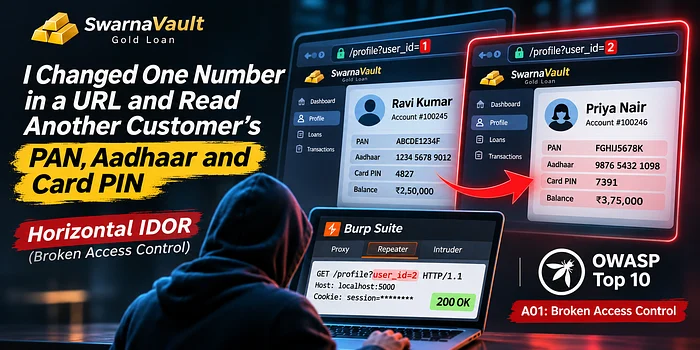
The author chose a demo app deliberately. Lab platforms tell you where the bug is; an AI-generated application that looks like a real finance product can be tested with no hints, using only Burp Suite and a methodology. AI-generated code usually works, but it often skips authorization checks, which makes it a realistic thing to test.
Setup
- Target: SwarnaVault, a Flask demo application, local lab only.
- Accounts used: ravi.kumar (Account #100245, role: User) as the attacker-controlled session, and other customers whose records were reached through the parameter.
- Tools: Burp Suite (Proxy and Repeater).
- Precondition: a valid authenticated session as a standard, non-privileged customer.
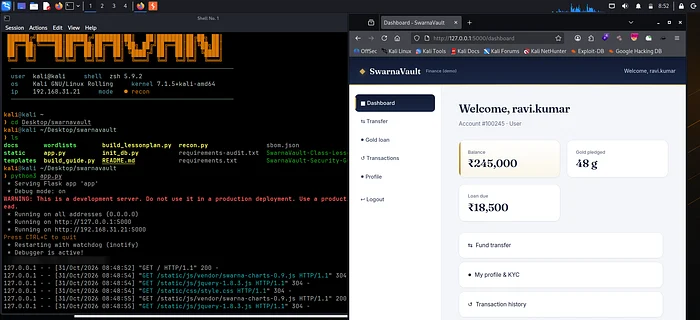
The author logged in as a standard customer, ravi.kumar (Account #100245, role: User).
Finding it
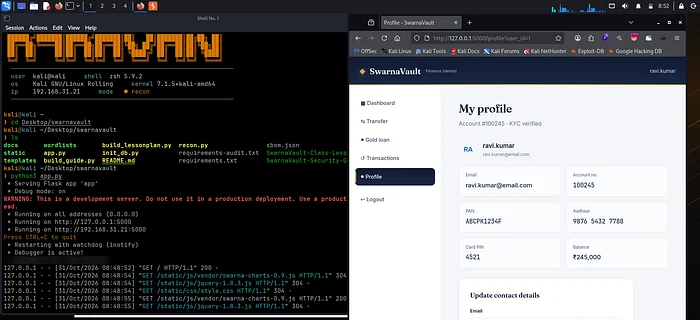
The profile page loaded from GET /profile?user_id=1. The reasoning is the standard one for any object reference: whenever an object ID appears in a URL, body or cookie, the first question is whether the server checks that this ID belongs to the current user. Here the ID was in a query parameter, the value was a small sequential integer, and the page rendered the record it was given.
Exploitation
Step 1: capture the original request
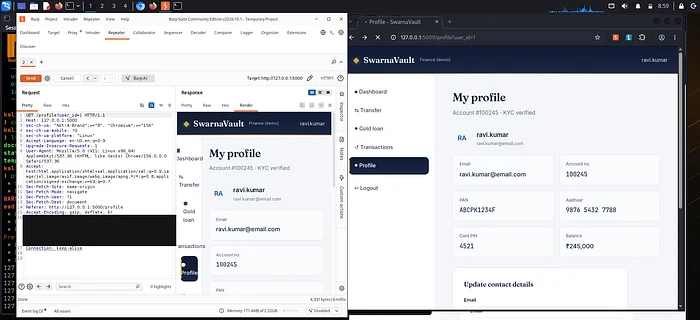
The request was captured and sent to Burp Repeater. It carries the author's own session, with user_id=1.
The captured request carries the author's own session, with user_id=1.
Step 2: change the identifier
With the same session kept in place, user_id was changed from 1 to 2.
The same session was kept in place. This is the whole test: if the server authorises on the session, the response should be a denial; if it authorises on the parameter, the response is someone else's record.
Step 3: read another customer's profile
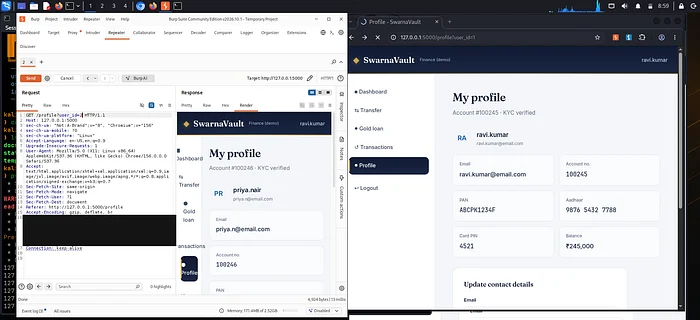
The server returned 200 OK with another customer's profile (priya.nair, Account #100246), while the page header still showed the logged-in user as ravi.kumar. The page header still showed the logged-in user as ravi.kumar while another customer's profile was returned.
Step 4: confirm enumeration
user_id=3 returned a third customer (suresh.menon, Account #100247). Because IDs are sequential, the whole customer base can be enumerated.
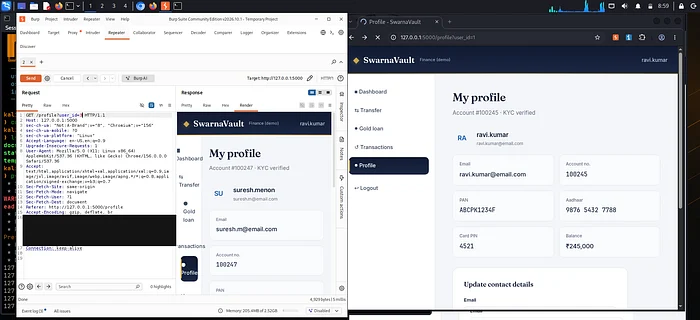
Data exposed per customer: email, account number, PAN, Aadhaar, card PIN and balance.
Root cause
The application trusted a client-controlled parameter and performed no server-side check to confirm that the requested record belonged to the logged-in user. The vulnerable handler:
@app.route("/profile")def profile():    user = current_user()    if not user:        return redirect(url_for("login"))        user_id = request.args.get("user_id")    db = get_db()    if user_id is None:        return redirect(url_for("profile", user_id=user["id"]))    target = db.execute(        "SELECT * FROM users WHERE id = ?",        (user_id,)
    ).fetchone()    if not target:        target = user    return render_template(        "profile.html",        user=user,        target=target    )
Authentication is enforced: without a session the handler redirects to login. What is missing is authorization. The handler reads user_id from the query string, looks the record up directly, and renders it. The session user is passed to the template as user, but the record shown is target, taken from the parameter. The only fallback is when the lookup returns nothing, in which case the handler quietly falls back to the session user's own record rather than denying the request.
Impact
- Any authenticated user can read every other customer's KYC and financial data.
- Sequential IDs let an attacker enumerate all customers with a simple loop, for example Burp Intruder with a numeric payload.
- In a real product this means identity theft, targeted phishing and fraud, plus regulatory exposure for leaked KYC data.
The author rated the issue High. With full KYC data, a card PIN and trivial enumeration, many programs would rate it Critical; the rating depends on data sensitivity and exploitability. For reference, the CVSS 3.1 base score is 6.5 (AV:N/AC:L/PR:L/UI:N/S:U/C:H/I:N/A:N). CVSS alone undersells the bug, because it does not weigh how sensitive the leaked data is or how easily every record can be pulled.
Fix
The fix derives the user's identity from the server-side session, not from request parameters. user_id is still accepted only so that admins can view other profiles; for everyone else it must match the session user. Object-level authorization is enforced on every request and denied by default with 403 Forbidden.
@app.route("/profile")def profile():    user = current_user()    if not user:        return redirect(url_for("login"))    user_id = request.args.get("user_id")        if user_id is None:        user_id = user["id"]        if str(user_id) != str(user["id"]):        if user["role"] != "admin":            abort(403)    db = get_db()    target = db.execute(        "SELECT * FROM users WHERE id = ?",        (user_id,)
    ).fetchone()    if not target:        abort(404)    return render_template(        "profile.html",        user=user,
        target=target    )
Two further measures are recommended as defence in depth, not as replacements for the check: use non-sequential identifiers such as UUIDs, and log and alert when one account requests many different object IDs.
Other issues noticed in the same application:
- Card PIN is displayed in plain text. A PIN should never be stored or shown.
- PAN and Aadhaar are shown in full. Mask them in the UI (for example XXXX XXXX 7788) so one bug exposes less.
- Flask debug mode was on. The Werkzeug debugger is a serious risk if it is ever reachable outside a local lab.
Variants to test
- Numeric IDs in query parameters. Swap your own ID for another account's ID using two test accounts. Swap your own ID for another account's ID (use two test accounts).
- IDs in POST bodies, JSON, cookies and headers. The same swap applies wherever an object identifier is supplied by the client. Look for IDs in URL parameters, POST bodies, JSON, cookies and headers.
- Other HTTP methods on the same endpoint. Try the same identifier swap with methods other than GET. Try other HTTP methods on the same endpoint.
- UUIDs and encoded IDs. Test non-numeric and encoded identifiers as well. Test numeric IDs, UUIDs and encoded IDs.
- Automation. Use Burp Intruder with a numeric payload, or the Autorize extension, to sweep a range of IDs. Automate with Burp Intruder or the Autorize extension.
The general lesson the author draws is that a single missing server-side authorization check can expose sensitive customer information even when authentication is properly implemented, and that AI-generated applications should never be assumed secure just because they work as expected. Manual testing with tools like Burp Suite is what surfaces issues such as IDOR.
What happened, in plain words
A developer built a small practice website that looks like a gold-loan finance company. It has customer profiles, account numbers, balances and identity documents. He then attacked his own website, the way a stranger might, and found that by changing a single digit in the address bar he could read other customers' private records: their email, account number, PAN, Aadhaar, card PIN and balance.
The website is called SwarnaVault. It is not a real company. It is a demo app the author built with AI assistance and ran only on his own computer, in a local lab. Every piece of data in it is fake, and the session tokens in the screenshots are redacted. He did the testing, the analysis and the fix himself.
The bug has a name: IDOR, which stands for Insecure Direct Object Reference. In everyday terms, imagine a hotel where the receptionist hands you the key to room 101. You notice the key is just a number, so you ask for the key to room 102 instead, and the receptionist hands it over without checking whether you are staying in that room. The hotel checked that you are a guest (you have a booking), but it never checked that room 102 is yours. That is exactly what happened here, except the rooms are customer profiles and the keys are numbers in a web address.
Why use a practice website at all
There are websites built specifically for practising security, called lab platforms. They are useful, but they usually tell you where the bug is, a bit like a treasure map with an X already drawn on it. The author wanted a target with no hints, so he used AI to generate an application that looks like a real finance product, then tested it the way he would test a real company's website: with a tool called Burp Suite and a repeatable method.
His reasoning is worth remembering. AI-generated code usually works: the pages load, the buttons do things, the login works. But it often skips the checks that decide who is allowed to see what. That makes it a realistic thing to test, because the same mistake happens in code written by people.
Background: two ideas you need first
Before the attack makes sense, you need two ideas.
Broken Access Control is ranked number one in the OWASP Top 10. OWASP is a well-known community project that publishes lists of the most common web security mistakes, and the Top 10 is its best-known list. Broken Access Control means the application fails to enforce what a logged-in user is allowed to access. The site knows who you are, but not what you may see.
IDOR is a common form of Broken Access Control. The application fetches a record using an identifier that the user supplies, without checking that this user is allowed to see that record. The identifier might be a number, a name, a code, anything that points at a specific record.
There are two directions this can go:
- Horizontal privilege escalation: you reach another user's data at the same level as you. Customer to customer. That is what this post covers.
- Vertical privilege escalation: a low-privilege user reaches administrator functionality. That is promised for the next post.
The finding at a glance
- Vulnerability: Horizontal IDOR (Broken Access Control)
- Endpoint: GET /profile?user_id=<id>
- Severity: High (arguably Critical, see the severity section below)
- Tools: Burp Suite (Proxy, Repeater)
An endpoint is simply a specific address on a website that does a specific job. Think of a large office building: the street address gets you into the building, but each department has its own room number. /profile is the room where profile pages are produced. GET is the type of request that means "give me this page", as opposed to a request that submits a form.
Discovery: logging in and looking at the address bar
The author logged in as a standard customer, ravi.kumar (Account #100245, role: User). "Standard customer" matters: this is an ordinary user with no special powers, not an administrator.
When you log in to a website, the server usually gives your browser a small piece of data called a session cookie. Your browser sends it back with every request, and that is how the server recognises you on the next page. It works like a wristband at an event: you show it at the door and you are let in without showing your ticket again. If someone else gets your wristband, they can walk around as you, which is why session tokens are sensitive and are redacted in the screenshots here.
The profile page loaded from GET /profile?user_id=1. Everything after the question mark in a web address is called the query string, and it carries small named values called parameters. Here the parameter is named user_id and its value is 1. In plain words, the browser is saying: "give me the profile page for the record numbered 1".
The author's rule of thumb is the important part: whenever an object ID appears in a URL, body or cookie, the first question is whether the server checks that this ID belongs to me. An object ID is any value that points at one specific record, like a row number in a spreadsheet. If the server takes that number on trust, anyone can point it at any row.
Exploitation: four steps
Step 1: capture the original request
The author captured the request and sent it to Burp Repeater. Burp Suite is a tool that sits between your browser and the website, so you can see and edit what is sent. Its Proxy records the traffic, and Repeater lets you take one captured request, change it, and send it again as many times as you like. It is like being able to reopen an envelope, swap the letter inside, and post it again.
The captured request carries the author's own session, with user_id=1:
Line by line: GET is the request type, asking the server to return something. /profile is the path, the room in the building. ?user_id=1 is the query string, saying which record is wanted. HTTP/1.1 is the version of the language the browser and server use to talk to each other.
That baseline matters: before you try to break something, you check that it works normally, so you know what a normal answer looks like.
Step 2: change the identifier
With the same session kept in place, user_id was changed from 1 to 2:
The same session was kept in place. This is the whole test, and it is worth spelling out why. The server has two possible ways to decide what to show. It can look at the session cookie, work out that the person asking is ravi.kumar, and show ravi.kumar's record. Or it can look at the user_id parameter and show whatever record that number points to. If it authorises on the session, the response should be a denial. If it authorises on the parameter, the response is someone else's record. Changing only the number, and leaving the cookie alone, separates those two possibilities cleanly.
Step 3: read another customer's profile
The server returned 200 OK with another customer's profile (priya.nair, Account #100246), while the page header still showed the logged-in user as ravi.kumar.
200 OK is the standard code a web server sends to mean "here is the page you asked for". A refusal would normally come back as a different code, such as 403 Forbidden, which means "I know who you are, and you may not have this".
The page header still showed the logged-in user as ravi.kumar while another customer's profile was returned. The page was still saying "you are logged in as ravi.kumar" at the top, while the body of the page showed priya.nair's details. The site knew who was asking, and served someone else's record anyway.
Step 4: confirm enumeration
user_id=3 returned a third customer (suresh.menon, Account #100247). Because IDs are sequential, the whole customer base can be enumerated.
Enumeration means walking through a list of possible values one by one. Sequential means the numbers run 1, 2, 3, 4 and so on, with no gaps and nothing random. If the IDs were long random strings, guessing the next one would be impractical. Because they are small consecutive numbers, a script can simply count upwards and collect every customer's record.
Data exposed per customer: email, account number, PAN, Aadhaar, card PIN and balance. PAN is the Indian permanent account number used for tax, Aadhaar is the Indian national identity number, and a card PIN is the secret number used at a cash machine or card terminal.
Root cause: why the code allowed it
The application trusted a client-controlled parameter and performed no server-side check to confirm that the requested record belonged to the logged-in user. "Client-controlled" means the value comes from the browser, and the browser is under the visitor's control, so anything it sends can be edited. "Server-side check" means the decision is made on the server, where the visitor cannot reach in and change it.
Here is the vulnerable handler:
@app.route("/profile")def profile():    user = current_user()    if not user:        return redirect(url_for("login"))        user_id = request.args.get("user_id")    db = get_db()    if user_id is None:        return redirect(url_for("profile", user_id=user["id"]))    target = db.execute(        "SELECT * FROM users WHERE id = ?",        (user_id,)
    ).fetchone()    if not target:        target = user    return render_template(        "profile.html",        user=user,
        target=target    )
Line by line, in plain words:
@app.route("/profile")says: when someone asks for the address/profile, run the function below it. The@line is a label that attaches the address to the function.def profile():starts the function that builds the profile page.user = current_user()asks the framework who is logged in, based on the session cookie. This is the authentication step, and it is done correctly.if not user:checks whether nobody is logged in.return redirect(url_for("login"))sends a visitor with no session to the login page. So the door is locked for strangers.user_id = request.args.get("user_id")reads theuser_idvalue out of the query string. This is the client-controlled value.db = get_db()gets a handle to the database, the store where all the customer records live.if user_id is None:checks whether the parameter was left out entirely.return redirect(url_for("profile", user_id=user["id"]))sends the browser back to the same page with the logged-in user's own ID filled in. A convenience redirect.target = db.execute(starts a database query."SELECT * FROM users WHERE id = ?",is the query: fetch every column from the users table where the id matches. The?is a placeholder, and the value is supplied separately on the next line. This is called a parameterised query, and it is the correct way to build a query, because it stops an attacker from injecting their own database commands (a different bug called SQL injection).(user_id,)is the value that fills the?placeholder: the number from the URL.).fetchone()runs the query and takes the first matching row.if not target:checks whether the lookup found nothing.target = userquietly falls back to the logged-in user's own record instead of refusing the request. This is a small but telling detail: the code's instinct is to show something rather than to deny.return render_template(builds the page from a template file."profile.html",names the template to use.user=user,passes the logged-in user to the template, which is why the header can still say ravi.kumar.target=targetpasses the record that was looked up, which is the record from the URL.)closes the call.
The key point: authentication is enforced, because without a session the handler redirects to login. What is missing is authorization, the separate question of whether this particular user may see this particular record. The handler reads user_id from the query string, looks the record up directly, and renders it. The session user is passed to the template as user, but the record shown is target, taken from the parameter.
Impact: what this would mean in a real product
- Any authenticated user can read every other customer's KYC and financial data. KYC means "know your customer", the identity checks finance companies are required to perform, so it includes exactly the documents that identify a person.
- Sequential IDs let an attacker enumerate all customers with a simple loop, for example Burp Intruder with a numeric payload. Burp Intruder is the part of Burp Suite that sends the same request many times with one value changed each time, which turns "I can read one record" into "I can read all of them".
- In a real product this means identity theft, targeted phishing and fraud, plus regulatory exposure for leaked KYC data. Phishing is a message that pretends to come from a trusted company to trick someone into handing over details or money, and it works far better when the sender already knows the target's real account number and identity details.
The author rated the issue High. With full KYC data, a card PIN and trivial enumeration, many programs would rate it Critical; the rating depends on data sensitivity and exploitability. For reference, the CVSS 3.1 base score is 6.5 (AV:N/AC:L/PR:L/UI:N/S:U/C:H/I:N/A:N).
CVSS is a standard scoring system for the severity of a security flaw, and a base score is a number from 0 to 10. The letters in brackets are its components: attack vector network, attack complexity low, privileges required low, user interaction none, scope unchanged, confidentiality high, integrity none, availability none. In plain words, the score says the attacker needs a normal account and nothing else, and can read a lot of sensitive data, but cannot change or break anything. CVSS alone undersells this bug, because it does not weigh how sensitive the leaked data is or how easily every record can be pulled. A score is a summary, and summaries lose detail.
Fix: how the code should decide
The fix derives the user's identity from the server-side session, not from request parameters. user_id is still accepted only so that admins can view other profiles; for everyone else it must match the session user. Object-level authorization is enforced on every request and denied by default with 403 Forbidden. "Denied by default" means the starting position is no, and access has to be granted explicitly, rather than the other way round.
@app.route("/profile")def profile():    user = current_user()    if not user:        return redirect(url_for("login"))    user_id = request.args.get("user_id")        if user_id is None:        user_id = user["id"]        if str(user_id) != str(user["id"]):        if user["role"] != "admin":            abort(403)    db = get_db()    target = db.execute(        "SELECT * FROM users WHERE id = ?",        (user_id,)
    ).fetchone()    if not target:        abort(404)    return render_template(        "profile.html",        user=user,
        target=target    )
Line by line, focusing on what changed:
- The route, the function, the login check and the reading of
user_idare the same as before. The site still knows who is asking, and still reads the requested number. if user_id is None:anduser_id = user["id"]handle the case where no number was supplied, by using the logged-in user's own ID. This replaces the old redirect with a direct assignment.if str(user_id) != str(user["id"]):is the new check. It compares the requested number with the logged-in user's number.str()converts both to text first, so that a number and a piece of text containing the same digits compare as equal. If they match, the request is for your own record and it carries on.if user["role"] != "admin":runs only when the numbers differ, meaning someone is asking for another person's record. It checks whether the logged-in user is an administrator.abort(403)refuses the request with 403 Forbidden. So a normal customer asking for someone else's record is stopped here, before any data is fetched.- The database lookup is unchanged, but it now only runs for your own record or for an admin.
if not target:andabort(404)replace the old quiet fallback. If the record does not exist, the server says 404 Not Found instead of silently showing your own profile. 404 is the standard code for "there is nothing at this address".- The template call is unchanged.
Two further measures are recommended as defence in depth, not as replacements for the check. Defence in depth means adding more than one barrier, so that one mistake does not open everything. The first is to use non-sequential identifiers such as UUIDs. A UUID is a long random-looking identifier, so guessing the next one is impractical. The second is to log and alert when one account requests many different object IDs, because that pattern looks like enumeration rather than normal use.
Other issues noticed in the same application:
- Card PIN is displayed in plain text. A PIN should never be stored or shown. A PIN should never be stored or shown.
- PAN and Aadhaar are shown in full. Mask them in the UI (for example XXXX XXXX 7788) so one bug exposes less. Masking does not fix the bug, but it limits the damage when a bug exists.
- Flask debug mode was on. Flask is the Python framework the app is built with, and its debug mode includes an interactive debugger called the Werkzeug debugger. That debugger is a serious risk if it is ever reachable outside a local lab.
Variants to test
Once you understand the pattern, you can look for it in other places. These are the variations the author lists, each with what a positive result looks like:
- Numeric IDs in query parameters. Swap your own ID for another account's ID using two test accounts. Swap your own ID for another account's ID (use two test accounts).
- IDs in POST bodies, JSON, cookies and headers. The same swap applies wherever an object identifier is supplied by the client. A POST body is the data a form sends when you submit it, JSON is a common text format for that data, and headers are the extra lines of information sent alongside every request. Look for IDs in URL parameters, POST bodies, JSON, cookies and headers.
- Other HTTP methods on the same endpoint. Try the same identifier swap with methods other than GET. Try other HTTP methods on the same endpoint.
- UUIDs and encoded IDs. Test non-numeric and encoded identifiers as well. Test numeric IDs, UUIDs and encoded IDs. Encoded means the value has been transformed, for example into a different character set, so it does not look like a plain number.
- Automation. Use Burp Intruder with a numeric payload, or the Autorize extension, to sweep a range of IDs. Automate with Burp Intruder or the Autorize extension. Autorize is a Burp extension named in the report for automating this test.
The general lesson the author draws is that a single missing server-side authorization check can expose sensitive customer information even when authentication is properly implemented, and that AI-generated applications should never be assumed secure just because they work as expected. Manual testing with tools like Burp Suite is what surfaces issues such as IDOR.
Glossary
- Access control: the rules that decide which user may see or do which thing.
- Aadhaar: the Indian national identity number.
- Admin: a user with special powers, such as viewing other people's records.
- Authentication: proving who you are, usually by logging in.
- Authorization: deciding what a known user is allowed to access. Separate from authentication.
- Autorize: a Burp Suite extension that repeats requests without your session to check whether access is really controlled.
- Broken Access Control: a class of bug where the application fails to enforce what a logged-in user may access. Ranked first in the OWASP Top 10.
- Burp Intruder: the part of Burp Suite that sends one request many times with a value changed each time.
- Burp Proxy: the part of Burp Suite that sits between browser and server and records the traffic.
- Burp Repeater: the part of Burp Suite that lets you edit and resend a single captured request.
- Burp Suite: a tool for inspecting and modifying web traffic between a browser and a server.
- Client-controlled: a value that comes from the browser and can therefore be edited by the visitor.
- Cookie: a small piece of data a site stores in your browser and your browser sends back with each request.
- CVSS: a standard scoring system for the severity of a security flaw, with a base score from 0 to 10.
- Defence in depth: adding more than one barrier so a single mistake does not open everything.
- Denied by default: the starting position is no, and access must be granted explicitly.
- Endpoint: a specific address on a website that performs a specific job.
- Enumeration: walking through a list of possible values one by one to collect records.
- Flask: a Python web framework, the toolkit the demo app is built with.
- GET: the request type that asks the server to return a page or resource.
- Handler: the piece of code that runs when a particular address is requested.
- Header: an extra line of information sent alongside a request or response.
- Horizontal privilege escalation: reaching another user's data at the same privilege level as you.
- HTTP: the language browsers and servers use to talk to each other.
- IDOR (Insecure Direct Object Reference): a bug where the application fetches a record using an identifier supplied by the user, without checking that the user may see that record.
- JSON: a common text format for structured data, often used in request bodies.
- KYC (Know Your Customer): the identity checks finance companies are required to perform on customers.
- Local lab: an environment running only on the tester's own machine, not reachable from the internet.
- Object ID: a value that points at one specific record, such as a row number.
- OWASP Top 10: a well-known community list of the most common web security mistakes.
- PAN: the Indian permanent account number used for tax.
- Parameter: a named value in a query string, such as
user_id=1. - Parameterised query: a database query where values are supplied separately from the query text, which prevents SQL injection.
- Phishing: a message pretending to come from a trusted company to trick someone into giving up details or money.
- PIN: the secret number used with a bank card.
- POST: the request type used to submit data, for example from a form.
- Query string: the part of a web address after the question mark, carrying parameters.
- Role: the label that says what kind of user an account is, such as User or admin.
- Sequential ID: an identifier that runs 1, 2, 3 and so on, with no gaps and nothing random.
- Session: the server's memory of your logged-in state, usually tied to a cookie.
- Session cookie / session token: the value your browser sends to prove it is still you. Sensitive, because anyone holding it can act as you.
- Severity: how serious a flaw is, often expressed as a rating such as High or Critical.
- SQL injection: a bug where an attacker inserts database commands through user-supplied input.
- Template: a file that describes the shape of a page, which the server fills with data before sending it.
- UUID: a long random-looking identifier, impractical to guess.
- Vertical privilege escalation: a low-privilege user reaching administrator functionality.
- Werkzeug debugger: the interactive debugger included with Flask's debug mode, risky if reachable outside a local lab.
- 200 OK: the standard response code meaning the requested page is being returned.
- 403 Forbidden: the standard response code meaning the server knows who you are but you may not have this.
- 404 Not Found: the standard response code meaning there is nothing at this address.



