I Wasn’t Looking for PII. I Just Cancelled an Invite. (IDOR → PII)
An endpoint meant to cancel workspace invitations accepted a user identifier instead of an invitation identifier and returned that user's profile data without checking authorisation. An authenticated attacker could therefore read other users' names, email addresses, profile pictures and account statuses.
 Published on medium.com
Cybersecurity
The full write-up lives on its author's site
It belongs to its author, so we link to it rather than copy it. The other two tabs are our own rewrites, checked against it.
Context
The target was a collaboration feature that lets users invite other people into a workspace. The feature has an obvious, ordinary action: cancelling an invitation you have created. The researcher, Mahmoud Adel (El7xoot), was testing that action when the bug appeared, not a suspicious endpoint or a hidden parameter.
The application uses prefixed object identifiers, and the prefix tells you what kind of object the identifier refers to:
invXXXXXXXXusrXXXXXXXX
An inv prefix marks an invitation, a usr prefix marks a user. The captured request carried one of these identifiers in its body.
Setup
The report does not describe the accounts, roles or tooling used beyond an authenticated session and an intercepting proxy. The only precondition shown is that the tester could create a workspace invitation and capture the request that removes it. The host in the captured request is staging.example.com.
Finding it
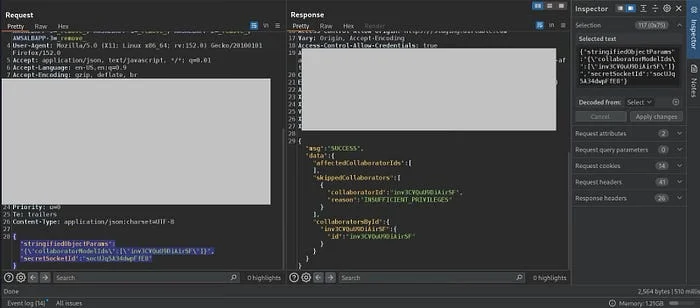
The researcher created an invitation and intercepted the request responsible for removing it. The API looked roughly like this:
POST /v0.3/workspace/{workspaceId}/bulkUnshareHost: staging.example.com{ "stringifiedObjectParams": { "collaboratorModelIds": ["inv3CVQuU9DiAirSF"] }, "requestId": "reqruksi57yLNs5Mu", "secretSocketId": "socUJq5A34dwpFfE8"}
The request carries the workspace identifier in the path and a body with a stringifiedObjectParams object. Inside it, collaboratorModelIds is an array holding the identifier of the invitation to remove, here inv3CVQuU9DiAirSF. The body also includes a requestId and a secretSocketId.
Nothing about the request looked unusual. What caught the researcher's attention was the identifier scheme itself: different prefixes represent different object types. That raised a question about the endpoint's assumptions:
What happens if the endpoint receives a user identifier instead of an invitation identifier?
Exploitation
Step 1: Change only the object reference
The researcher changed only the object reference, swapping the invitation identifier for a user identifier. No other part of the request was altered.
Step 2: Observe the response
A correct implementation would have rejected the request with an error such as:
403 Forbidden
or:
400 Bad Request
Instead, the server returned information associated with the referenced user. A simplified response looked like:
{ "name": "Victim User", "email": "[redacted]", "profilePicture": "...", "status": "active"}
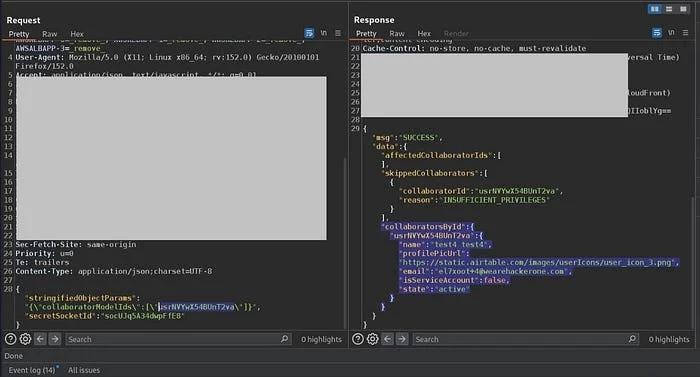
At that point the problem was no longer about cancelling an invitation: the endpoint was accepting an object of a different type and returning data without checking whether the authenticated user was authorised to access it.
Root cause
The application knew who the caller was, but it did not properly verify whether the caller was allowed to access the object supplied. The vulnerable logic behaved effectively like this:
Authenticated user ↓Receive object ID ↓Find object ↓Return data
It should have enforced something closer to:
Authenticated user ↓Receive object ID ↓Validate object type ↓Verify ownership / workspace relationship ↓Authorize access ↓Return data
The endpoint returned data for the supplied identifier without an authorisation error. The response showed a user identifier was resolved and its data returned, with no type or authorisation error. The report does not show the server-side code, so the exact implementation is not stated; the behaviour above is what the responses demonstrate.
The lesson the researcher draws is direct: an object ID is an identifier, not an authorization mechanism.
Impact
By abusing the endpoint's object handling, an authenticated attacker could access user information outside the expected authorization boundary. The exposed information included:
- Full name
- Email address
- Profile picture
- Account status
The vulnerability crossed an important boundary: a workspace-level action became an unintended user-data access primitive.
Fix
Based on the root cause, the endpoint should validate that the supplied identifier is of the expected object type (an invitation, not a user) and verify the caller's ownership of, or workspace relationship to, that object before returning any data, rejecting mismatches with an error such as 400 Bad Request or 403 Forbidden.
Variants to test
- Type confusion in bulk operations. On endpoints that accept arrays of object identifiers, submit an identifier of a different type in the same array. A positive result is a response containing data for the substituted object instead of a type or authorisation error.
- Prefix swap on other object types. Where identifiers carry type prefixes, replace the prefix with another known type (for example a user identifier where an invitation, file or membership identifier is expected). A positive result is data or an action belonging to the other object type.
- Cross-workspace identifiers. Supply a valid invitation identifier that belongs to a workspace the caller is not a member of. A positive result is a successful removal or a response revealing that invitation's details.
- Removal endpoints as read primitives. For any delete or unshare action, check whether the response body echoes the resolved object. A positive result is object data returned on a request that should only have removed something.
- Identifier enumeration. If identifiers are short or sequential within their prefix, request neighbouring values. A positive result is data for objects the caller never created or joined.
What happened, in plain words
A security researcher was testing an ordinary feature of a website: the button that cancels an invitation you have sent to someone to join a shared workspace. While watching the network traffic that the button sends, he noticed that the website labels every object with a short code, and the first three letters of the code tell you what kind of object it is. Invitations start with inv, users start with usr. He wondered what would happen if he sent a user code to the endpoint that expects an invitation code. The server did not complain. It answered with the user's name, email address, profile picture and account status. That is a data leak: a request that should only have cancelled an invitation ended up revealing personal information about a user.
This kind of bug is called an IDOR, short for Insecure Direct Object Reference. The name sounds complicated, but the idea is simple. A website often refers to things by an identifier, a short code such as inv3CVQuU9DiAirSF. If the server trusts that code and fetches whatever it points to without checking whether you are allowed to see it, you can swap the code for someone else's and read their data. The code is doing the job of a name tag, but the server is treating it like a key.
Below is the whole story, step by step, with every request and response explained in plain words.
The feature being tested
The target was a collaboration feature. Think of a workspace as a shared online folder or a shared document where several people can work together. To let someone in, you send them an invitation. If you change your mind, you can cancel that invitation. Cancelling is a normal, ordinary action.
The researcher, Mahmoud Adel (El7xoot), was testing exactly that action. He was not poking at a strange hidden page or guessing at secret parameters. He pressed a normal button and watched what the browser sent to the server.
What an API is
When you click a button on a website, your browser does not magically change the page. It sends a message to the server, and the server sends a message back. That conversation is what people call an API, short for Application Programming Interface. You can think of it as a waiter in a restaurant: you tell the waiter what you want, the waiter goes to the kitchen, and the waiter brings back a plate. You never walk into the kitchen yourself. The API is the waiter between your browser and the server's database.
Most of these messages are HTTP requests. Each one has a method (what kind of action you want, such as POST for "send this data"), a path (which part of the site you are talking to), and often a body (the data you are sending). The server replies with a status code, a number that says how it went. 200 means success, 400 means your request was malformed, 403 means you are not allowed, and so on.
What an identifier is
Every object in a database needs a way to be referred to. That is an identifier, often shortened to ID. On many sites an ID is a long random string, so nobody can guess someone else's. On this site the IDs have a pattern: the first three characters say what type of object it is.
invXXXXXXXXusrXXXXXXXX
This is not a single ID. It is a diagram showing two example IDs side by side. The first starts with inv, which stands for invitation. The second starts with usr, which stands for user. The XXXXXXXX part is a placeholder for the random characters that follow. So an invitation ID might look like inv3CVQuU9DiAirSF, and a user ID would start with usr instead.
This prefix scheme is convenient for developers, because you can tell at a glance what an ID refers to. It is also a gift to a curious tester, because it tells you exactly what to try changing.
Setting up
The report does not describe which accounts, roles or tools were used beyond two things: the tester was logged in, and he had a way to intercept the requests his browser sent. An intercepting proxy is a tool that sits between your browser and the server and lets you pause, read and edit each message before it goes out. Imagine a postal worker who lets you open every letter before it is delivered and reseal it with different contents. That is what the proxy does for web traffic.
The only precondition shown in the report is that the tester could create a workspace invitation and capture the request that removes it. The host in the captured request is staging.example.com. A staging server is a test copy of a website, usually used before changes go live to real users.
Finding it
The researcher created an invitation and intercepted the request responsible for removing it. The API looked roughly like this:
POST /v0.3/workspace/{workspaceId}/bulkUnshareHost: staging.example.com{ "stringifiedObjectParams": { "collaboratorModelIds": ["inv3CVQuU9DiAirSF"] }, "requestId": "reqruksi57yLNs5Mu", "secretSocketId": "socUJq5A34dwpFfE8"}
This block is a captured HTTP request, written in a slightly compressed form. Here is what each part means.
POSTis the method. It tells the server "I am sending you some data and I want you to act on it." Removing an invitation is an action, soPOSTfits./v0.3/workspace/{workspaceId}/bulkUnshareHostis the path. It says which part of the API is being called.v0.3is a version number.workspaceis the workspace section.{workspaceId}is a placeholder for the ID of the workspace the invitation belongs to.bulkUnshareHostis the name of the action, which in plain words means "remove sharing for these objects in bulk."staging.example.comis the host, the server being talked to.- The curly braces after that are the body, the data being sent. It is JSON, a common text format for structured data, where
"key": valuepairs are grouped inside{ }and lists are written inside[ ]. "stringifiedObjectParams"is a wrapper object. The name suggests the parameters inside it are passed as a stringified (text-encoded) blob, a common pattern in some frameworks."collaboratorModelIds"is an array, a list, holding the IDs of the collaborators to remove. Here it holds one value:"inv3CVQuU9DiAirSF", the invitation ID."requestId"is a value the client generates to help the server and client match a request to its response, useful for debugging."secretSocketId"is another value sent along with the request. The report does not explain what it is used for.
The request carries the workspace identifier in the path and a body with a stringifiedObjectParams object. Inside it, collaboratorModelIds is an array holding the identifier of the invitation to remove, here inv3CVQuU9DiAirSF. The body also includes a requestId and a secretSocketId.
Nothing about the request looked unusual. What caught the researcher's attention was the identifier scheme itself: different prefixes represent different object types. That raised a question about the endpoint's assumptions:
What happens if the endpoint receives a user identifier instead of an invitation identifier?
Exploitation
Step 1: Change only the object reference
The researcher changed only the object reference, swapping the invitation identifier for a user identifier. No other part of the request was altered.
Why this step? Because the whole question was whether the server checks what kind of object it is being handed. If you change one thing at a time, you know exactly what caused any change in the response. Changing the workspace ID, the request ID or the socket ID at the same time would muddy the result.
Step 2: Observe the response
A correct implementation would have rejected the request with an error such as:
403 Forbidden
or:
400 Bad Request
These are HTTP status codes. 403 Forbidden means "I know who you are, but you are not allowed to do this." 400 Bad Request means "what you sent does not make sense for this endpoint." Either one would have been the right answer to a user ID arriving at an endpoint that expects an invitation ID.
Instead, the server returned information associated with the referenced user. A simplified response looked like:
{ "name": "Victim User", "email": "[redacted]", "profilePicture": "...", "status": "active"}
This is the server's reply, in JSON. Line by line:
"name": "Victim User"is the user's full name. The value is a placeholder in the report, not a real person's name."email": "[redacted]"is the user's email address, again a placeholder."profilePicture": "..."is a reference to the user's profile picture. The report shortens it to...."status": "active"is the account status, meaning whether the account is active.
At that point the problem was no longer about cancelling an invitation: the endpoint was accepting an object of a different type and returning data without checking whether the authenticated user was authorised to access it.
Root cause
The application knew who the caller was, but it did not properly verify whether the caller was allowed to access the object supplied. The vulnerable logic behaved effectively like this:
Authenticated user ↓Receive object ID ↓Find object ↓Return data
This diagram is a flow, read from top to bottom. The arrows mean "then." An authenticated user (someone who has logged in) sends an object ID. The server receives it. The server looks up the object. The server returns the data. Notice what is missing: there is no step that asks "is this the right type of object?" and no step that asks "is this person allowed to see this object?" The server simply trusts the ID.
It should have enforced something closer to:
Authenticated user ↓Receive object ID ↓Validate object type ↓Verify ownership / workspace relationship ↓Authorize access ↓Return data
Here the flow has two extra checks. After receiving the ID, the server validates the object type, meaning it confirms the ID is an invitation and not a user. Then it verifies ownership or workspace relationship, meaning it confirms the caller created this invitation or belongs to the workspace it belongs to. Only then does it authorise access and return data. If either check fails, the server should return an error instead of data.
The endpoint returned data for the supplied identifier without an authorisation error. The response showed a user identifier was resolved and its data returned, with no type or authorisation error.
The lesson the researcher draws is direct: an object ID is an identifier, not an authorization mechanism. In everyday terms, knowing someone's house number does not mean you are allowed to walk in. The number identifies the house; it does not grant permission to enter.
Impact
By abusing the endpoint's object handling, an authenticated attacker could access user information outside the expected authorization boundary. The exposed information included:
- Full name
- Email address
- Profile picture
- Account status
The vulnerability crossed an important boundary: a workspace-level action became an unintended user-data access primitive. In plain words, a button that was only supposed to remove an invitation turned into a way to look up personal details about users.
Fix
Based on the root cause, the endpoint should validate that the supplied identifier is of the expected object type (an invitation, not a user) and verify the caller's ownership of, or workspace relationship to, that object before returning any data, rejecting mismatches with an error such as 400 Bad Request or 403 Forbidden.
Variants to test
These are other places where the same idea could show up. They are listed as things to try, not as confirmed findings.
- Type confusion in bulk operations. On endpoints that accept arrays of object identifiers, submit an identifier of a different type in the same array. A positive result is a response containing data for the substituted object instead of a type or authorisation error.
- Prefix swap on other object types. Where identifiers carry type prefixes, replace the prefix with another known type (for example a user identifier where an invitation, file or membership identifier is expected). A positive result is data or an action belonging to the other object type.
- Cross-workspace identifiers. Supply a valid invitation identifier that belongs to a workspace the caller is not a member of. A positive result is a successful removal or a response revealing that invitation's details.
- Removal endpoints as read primitives. For any delete or unshare action, check whether the response body echoes the resolved object. A positive result is object data returned on a request that should only have removed something.
- Identifier enumeration. If identifiers are short or sequential within their prefix, request neighbouring values. A positive result is data for objects the caller never created or joined.
Glossary
- API: the set of messages a website's front end and back end use to talk to each other, like a waiter carrying orders between you and the kitchen.
- Authentication: proving who you are, usually by logging in. An authenticated user is someone the server recognises.
- Authorisation: deciding what a recognised user is allowed to do or see. Authentication is "who are you"; authorisation is "what may you do."
- Body: the part of an HTTP request or response that carries the actual data, as opposed to the method and path.
- Collaborator: a person who has been invited to or joined a shared workspace.
- Endpoint: a specific address on a server that accepts a particular kind of request, such as the one that removes invitations.
- Enumeration: trying a series of related values (such as neighbouring IDs) to discover which ones exist.
- Host: the server name in a request, such as
staging.example.com. - HTTP: the protocol browsers and servers use to exchange requests and responses.
- IDOR (Insecure Direct Object Reference): a bug where a server accepts an object identifier from the user and returns or changes the object without checking whether the user is allowed to access it.
- Identifier (ID): a short code that refers to a specific object in a database, such as an invitation or a user.
- Intercepting proxy: a tool that sits between your browser and the server, letting you pause, read and edit requests and responses.
- JSON: a text format for structured data, using
{ }for objects and[ ]for lists. - Method: the verb of an HTTP request, such as
POST(send data and act on it) orGET(fetch something). - Path: the part of a URL that says which part of the site or API you are talking to.
- PII (Personally Identifiable Information): data that can identify a specific person, such as a full name or email address.
- Prefix: the first few characters of an identifier that indicate what type of object it refers to, such as
invfor invitation orusrfor user. - Primitive: a basic building block or capability. A "user-data access primitive" means a way to read user data, however small.
- Request: a message from the browser to the server asking it to do something.
- Response: the server's reply to a request.
- Root cause: the underlying reason a bug exists, as opposed to its visible symptom.
- Staging server: a test copy of a website, usually used before changes go live to real users.
- Status code: a number in an HTTP response saying how it went, such as
200(success),400(bad request) or403(forbidden). - Stringified: converted into a text string, often so it can be passed through a layer that expects text rather than structured data.
- Type confusion: a bug where a server accepts an object of one type where it expected another, such as a user ID where an invitation ID was expected.
- Workspace: a shared online space where several people can collaborate, such as a shared folder or document.



