IDOR allows cross account workspace metadata disclosure
An endpoint that returns workspace metadata for a given account did not check that the account belonged to the requesting user. By changing the account identifier, an attacker could view another user's workspace metadata.

medium.com
Published on medium.com
Bug Bounty
The full write-up lives on its author's site
It belongs to its author, so we link to it rather than copy it. The other two tabs are our own rewrites, checked against it.
Context
The target was an external bug bounty program. The report does not name the product or the company behind it, and the only asset detail given is the platform field medium.com, which is where the write-up was published rather than the tested application. What the report does describe is a marketplace feature: a set of endpoints under /marketplace/users/... that serve per-user resources such as workspaces, payment customer records and, in the vulnerable case, the list of workspaces belonging to an account.
The researcher's stated focus for this program was Broken Access Control rather than injection or other bug classes, so the whole session was aimed at finding endpoints that return data keyed by an identifier the client controls.
Setup
The report does not list tools or versions. It does say the researcher worked from HTTP history. Two accounts are needed to demonstrate the issue: the report calls them Account A (the attacker's own, used to log in and to learn the identifier format) and user B (the victim, whose account UUID is substituted in the final step). The only precondition is an authenticated session on Account A.
Finding it
The first step was reconnaissance on the site. The researcher's usual approach is to collect JavaScript files and search them for secrets, endpoints and anything else useful for mapping the target, but here the goal was narrower: enumerate endpoints and test them for IDOR.
Most of the endpoints collected this way did not misbehave. One did stand out because it had never appeared in the HTTP history and had not been triggered by any function exercised in the application:
GET /marketplace/users/{user_id}/accounts/{account_id}/workspaces
The path takes two identifiers, a user ID and an account ID. The presence of both identifiers in the path is what makes it interesting: if the server checks only one of them against the session, the other becomes a way in.
Exploitation
Step 1: obtain a valid account UUID
To call the endpoint, the researcher needed a real account_id. Rather than guessing, the approach was to click anywhere in the application, then look in HTTP history for any request whose path began with marketplace/users/{user_id}. One such request was found:
GET /marketplace/users/{user_id}/workspaces/{workspace_id}/payments/customer
The technique was then to strip the rest of the path and keep only the prefix needed to reach the accounts collection:
/marketplace/users/{user_id}/accounts/
Requesting that truncated path returned the account UUID belonging to the logged-in user.
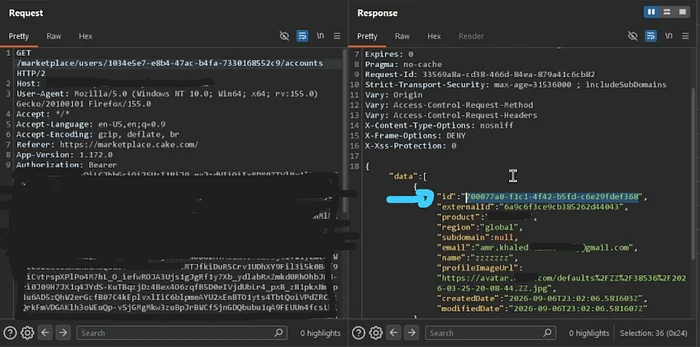
Step 2: complete the endpoint
With the UUID in hand, the researcher rebuilt the full path from the finding phase and sent it with their own identifiers to confirm the endpoint responds normally for the legitimate owner.
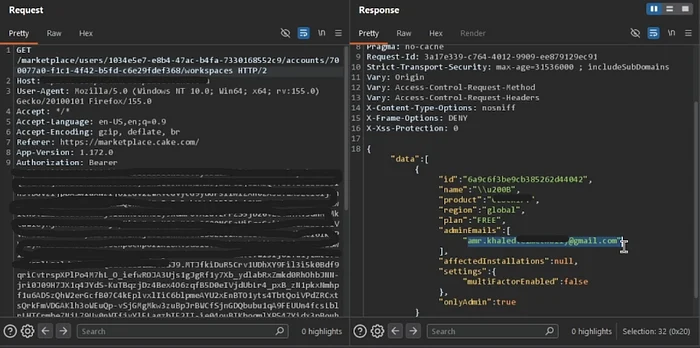
Step 3: swap the identifiers
The first attempt was to change the user_id to another user's value. That request came back with 403. The researcher then left the user ID alone and changed only the account_id, and the response contained another user's metadata.
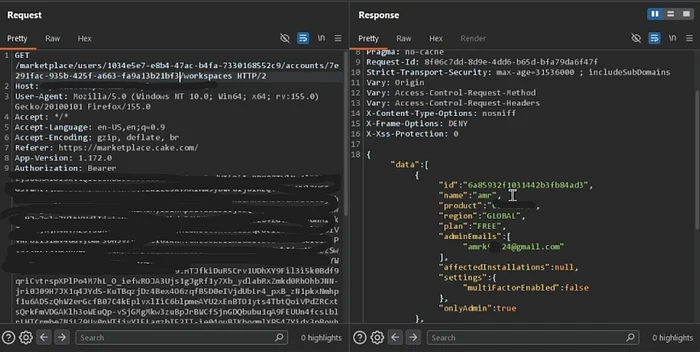
The report's own reproduction steps summarise the same sequence:
- Log in using Account A.
- Make some noise in the application and notice this endpoint in HTTP history:
/marketplace/users/{user_id}/workspaces/{workspace_id}/payments/customer
- Change it to this to get your account UUID:
/marketplace/users/{user_id}/accounts/
- Complete the endpoint to this one:
/marketplace/users/{user_id}/accounts/{account_id}/workspaces
- Finally change the
account_idto user B's ID. - Notice that you got user B's metadata.
The asymmetry is the whole bug: the user_id segment is enforced, the account_id segment is not. The report does not show the response body, so the exact fields returned as "metadata" are not described here.
Root cause
The report states it plainly: the endpoint lacks proper authorization checks to verify whether the requested account UUID actually belongs to the currently authenticated user's session. The endpoint lacks proper authorisation checks to verify whether the requested account UUID belongs to the authenticated user's session. Any authenticated user who learns another account's UUID can read that account's workspace metadata.
Impact
An authenticated attacker can disclose workspace metadata belonging to other accounts by substituting the account UUID, provided they know or can obtain that UUID. The disclosure is read-only in the described flow; the report does not claim any write, edit or delete capability through this endpoint.
Fix
The report recommends implementing strict server-side authorization checks across all endpoints, verifying that the authenticated user is explicitly authorized to access the requested resource ID before returning, editing or deleting any data. In this specific case that means checking that the account_id in the path belongs to the authenticated user.
Variants to test
- Two-identifier paths. Wherever a route carries both a user identifier and a tenant or account identifier, swap each one independently. A
403on one segment and a200on the other is the signal seen here. - Truncated collection paths. Take any endpoint of the form
/users/{user_id}/...from history and cut it back to the collection level, as with/marketplace/users/{user_id}/accounts/. A positive result is a listing of identifiers you can then feed into other endpoints. - Nested resources under a checked parent. If
/users/{user_id}/workspaces/{workspace_id}/payments/customeris protected, try sibling resources under the same parent, including ones that never appear in normal application traffic. - Endpoints absent from history. The vulnerable route here was never triggered by the UI. Compare JavaScript-derived route lists against captured traffic and test the difference.
- UUID versus sequential IDs. The report uses UUIDs, which are hard to guess but not secret. Any place a UUID is returned to a client, check whether it is accepted as an object reference elsewhere.
The reward
The report was marked as a duplicate. The researcher notes being happy with the experience gained from testing a real-world application.
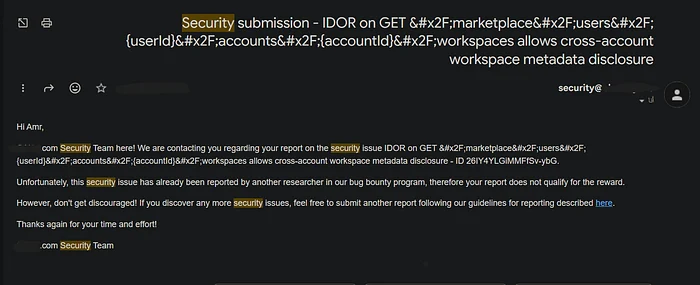
keep hacking

What happened, in plain words
A security researcher was taking part in a bug bounty programme. A bug bounty programme is a scheme run by a company that invites outside people to look for security problems in its systems and report them, sometimes for a reward. The researcher spent a session looking for one specific kind of mistake: a page or request that hands back data belonging to somebody else simply because the person asking supplied that somebody else's identifier.
That kind of mistake is called an IDOR, short for Insecure Direct Object Reference. A simple comparison: imagine a hotel where every guest is given a key card, and the door of room 214 opens if you swipe any valid card, not just the card of the person staying in 214. The room number is the "direct object reference". The hotel checked that you are a guest, but not that you are the guest of that room. In web applications the "room number" is usually an ID in a web address, and the "key card" is your login session.
The researcher found exactly this in a marketplace feature of the target site. A marketplace here means a part of the application where users have accounts, workspaces and payment records. By taking a request that was meant to list your own workspaces and changing one identifier in it, the researcher could read metadata belonging to another account. Metadata means descriptive information about something: here, information about an account's workspaces rather than the workspaces' contents. The report does not list which fields were returned.
The report was submitted and marked as a duplicate, meaning somebody else had already reported the same problem. The researcher still wrote it up as a learning exercise.
Background ideas you need first
Before walking through the steps, here are the few concepts the rest of the article relies on.
A request and a response. Your browser is constantly sending requests to servers and receiving responses. A request says what you want ("give me this page", "save this change"); a response is the server's answer, usually a page or a lump of data.
An API endpoint. Many web applications are built so that the browser fetches data from addresses that are not meant to be looked at by a human in a browser tab. These addresses are called endpoints, and the collection of them is sometimes called an API (Application Programming Interface). An endpoint is just a URL plus a method. The method is a verb: GET means "read something", and it is the only method that appears in this report.
Path parameters. Look at an address like /marketplace/users/123/accounts/456/workspaces. The parts in curly braces in this article, such as {user_id} and {account_id}, are placeholders. In a real request they are replaced by actual values, for example 123 and 456. Those values are called identifiers, or IDs. The server reads them and decides what to return.
Authentication versus authorisation. Authentication is proving who you are, like showing your passport at the airport. Authorisation is deciding what you are allowed to do once you are inside, like a boarding pass that only lets you into one gate. Most IDOR bugs are authorisation failures: the server knows perfectly well who you are, it just never checks whether the thing you asked for belongs to you.
A session. When you log in, the server needs a way to recognise you on the next request, because each request arrives separately. It usually gives your browser a small piece of data, stored in a cookie or sent as a token, which your browser attaches to every following request. That is your session. The server uses it to know which account is asking.
HTTP history. Browsers have a developer tools panel, and security testers usually route their traffic through a special program called an intercepting proxy. The proxy records every request and response in a list called HTTP history. This list is gold for a tester: it shows endpoints the application actually uses, including ones you would never find by clicking around.
JavaScript files. The code that runs in your browser is written in JavaScript and delivered as files. Those files often contain the addresses of endpoints the application can call. Reading them is a standard reconnaissance step.
Reconnaissance. Reconnaissance, or recon, is the information-gathering phase before testing: mapping out what the application is made of, which addresses exist, and which parts are worth poking.
Broken Access Control. This is the umbrella name for bugs where the application fails to enforce who may access what. IDOR is one member of that family. The researcher says the focus for this programme was Broken Access Control rather than injection (bugs where crafted input is interpreted as code or commands by the server) or other categories.
UUID. A UUID is a long random-looking identifier, something like a very long string of letters, digits and hyphens. It is hard to guess, but it is not a secret: it is often shown to users or included in responses. The report uses UUIDs for accounts.
The target and the setup
The target was an external bug bounty programme. The report does not name the product or the company, and the only asset detail available is the platform field medium.com, which is where the write-up was published, not the application that was tested. What the report does describe is a marketplace feature: a set of endpoints under /marketplace/users/... that serve per-user resources such as workspaces, payment customer records and, in the vulnerable case, the list of workspaces belonging to an account.
Two accounts are needed to demonstrate the issue. The report calls them Account A, the attacker's own account, used to log in and to learn what the identifiers look like, and user B, the victim, whose account UUID is substituted in the final step. The only precondition is that you are logged in to Account A.
The report does not list tools or versions. It does say the researcher worked from HTTP history.
Finding it
The first step was reconnaissance on the site. The researcher's usual approach is to collect JavaScript files and search them for secrets, endpoints and anything else useful for mapping the target. Here the goal was narrower: collect endpoints and test them for IDOR.
Most of the endpoints collected this way behaved correctly. One stood out because it had never appeared in the HTTP history and had not been triggered by any function exercised in the application:
GET /marketplace/users/{user_id}/accounts/{account_id}/workspaces
Line by line:
GETis the method: this request only reads data, it does not change anything./marketplace/is the part of the site that deals with the marketplace feature./users/{user_id}/says which user the request is about. The{user_id}placeholder is where a real user identifier goes./accounts/{account_id}/says which account, inside that user, the request is about. This is a second identifier./workspacesis the final segment of the path.
Why this is interesting: the address contains two identifiers. If the server checks only one of them against your session and trusts the other, the trusted one becomes a way in. That is the whole shape of the bug that follows.
Exploitation
Step 1: obtain a valid account UUID
To call the endpoint, the researcher needed a real account_id. Guessing was not the plan. Instead the approach was to click anywhere in the application, then look in HTTP history for any request whose path began with marketplace/users/{user_id}. One such request was found:
GET /marketplace/users/{user_id}/workspaces/{workspace_id}/payments/customer
Line by line:
GETagain means read-only./marketplace/users/{user_id}/is the same prefix as the interesting endpoint: it identifies the user./workspaces/{workspace_id}/narrows down to one workspace./payments/customeris the final part of the path.
This request is useful not because of what it returns, but because of its shape: it proves the application itself calls addresses that start with the same prefix. The technique was then to strip the rest of the path and keep only the prefix needed to reach the accounts collection:
/marketplace/users/{user_id}/accounts/
Line by line:
/marketplace/users/{user_id}/is kept exactly as before./accounts/replaces everything after the user ID. The trailing slash matters: it asks for the collection of accounts rather than one specific account.
Requesting that shortened path returned the account UUID belonging to the logged-in user. In other words, the application happily tells you your own account identifier when you ask for the list of accounts under your own user. That is not a bug by itself; it is the key you need for the next step.
The image shows the shortened endpoint being used to retrieve the researcher's own account UUID.
Step 2: complete the endpoint
With the UUID in hand, the researcher rebuilt the full path from the finding phase and sent it with their own identifiers, to confirm the endpoint responds normally for the legitimate owner. This is a sanity check: before you try to break something, you make sure it works the way it is supposed to when used correctly. If it failed even for your own account, you would be looking at a different problem.
The image shows the completed endpoint being called with the researcher's own identifiers.
Step 3: swap the identifiers
The first attempt was to change the user_id to another user's value. That request came back with 403. A 403 is the HTTP status code for "forbidden": the server understood the request and refused it. That request came back with 403.
The researcher then left the user ID alone and changed only the account_id. The response contained another user's metadata.
The image shows the request with the account identifier swapped and the response containing another user's metadata.
The report's own reproduction steps summarise the same sequence:
- Log in using Account A.
- Make some noise in the application and notice this endpoint in HTTP history:
/marketplace/users/{user_id}/workspaces/{workspace_id}/payments/customer
- Change it to this to get your account UUID:
/marketplace/users/{user_id}/accounts/
- Complete the endpoint to this one:
/marketplace/users/{user_id}/accounts/{account_id}/workspaces
- Finally change the
account_idto user B's ID. - Notice that you got user B's metadata.
"Make some noise" means using the application normally: clicking around, opening pages, triggering features. Every action produces requests, and those requests land in HTTP history, giving you material to work with.
The asymmetry is the whole bug: the user_id segment is enforced, the account_id segment is not. The report does not show the response body, so the exact fields returned as metadata are not described here.
The issue
The report states it plainly: the endpoint lacks proper authorisation checks to verify whether the requested account UUID actually belongs to the currently authenticated user's session. The endpoint lacks proper authorisation checks to verify whether the requested account UUID belongs to the authenticated user's session. Any authenticated user who learns another account's UUID can read that account's workspace metadata.
Going back to the hotel comparison: the front desk checks that your key card is genuine, and it even checks that you are walking towards your own floor, but the door of the room itself opens for any valid card.
Impact
An authenticated attacker can disclose workspace metadata belonging to other accounts by substituting the account UUID, provided they know or can obtain that UUID. The disclosure is read-only in the described flow; the report does not claim any write, edit or delete capability through this endpoint.
The fix
The report recommends implementing strict server-side authorisation checks across all endpoints, verifying that the authenticated user is explicitly authorised to access the requested resource ID before returning, editing or deleting any data. In this specific case that means checking that the account_id in the path belongs to the authenticated user.
"Server-side" is the important phrase. Checks done in the browser can be bypassed, because the browser belongs to the attacker. The decision about who may see what has to be made on the server, every time, for every identifier the client sends.
Variants to test
Once you understand the shape of this bug, you can look for it elsewhere.
- Two-identifier paths. Wherever a route carries both a user identifier and a tenant or account identifier, swap each one independently. A
403on one segment and a200on the other is the signal seen here. A200is the status code for "OK, here is your data". - Truncated collection paths. Take any endpoint of the form
/users/{user_id}/...from history and cut it back to the collection level, as with/marketplace/users/{user_id}/accounts/. A positive result is a listing of identifiers you can then feed into other endpoints. - Nested resources under a checked parent. If
/users/{user_id}/workspaces/{workspace_id}/payments/customeris protected, try sibling resources under the same parent, including ones that never appear in normal application traffic. - Endpoints absent from history. The vulnerable route here was never triggered by the user interface. Compare route lists taken from JavaScript files against captured traffic and test the difference.
- UUID versus sequential IDs. The report uses UUIDs, which are hard to guess but not secret. Any place a UUID is returned to a client, check whether it is accepted as an object reference elsewhere.
The reward
The report was marked as a duplicate. The researcher notes being happy with the experience gained from testing a real-world application.
The image accompanies the note about the duplicate result.
keep hacking
Glossary
- API: a set of addresses (endpoints) that an application uses to read and write data, usually returning data rather than web pages.
- Authentication: proving who you are, for example by logging in.
- Authorisation: deciding what an authenticated person is allowed to access or change.
- Broken Access Control: the family of bugs where an application fails to enforce who may access what.
- Cookie: a small piece of data a website stores in your browser, often used to recognise your session.
- Endpoint: a specific address plus method (such as
GET /marketplace/...) that an application responds to. - GET: the HTTP method used to read data without changing it.
- HTTP history: the recorded list of requests and responses kept by an intercepting proxy or browser developer tools.
- IDOR (Insecure Direct Object Reference): a bug where an application returns or changes an object based on an identifier supplied by the client, without checking that the client is allowed to access that object.
- Identifier (ID): a value that names a specific thing, such as a user, account or workspace.
- Injection: a bug class where crafted input is interpreted as code or commands by the server.
- Intercepting proxy: a tool that sits between your browser and the server, recording and allowing you to modify requests and responses.
- JavaScript: the programming language that runs in web browsers; its files often reveal endpoint addresses.
- Metadata: descriptive information about something, as opposed to its contents.
- Method: the verb of an HTTP request, such as
GET. - Path parameter: a placeholder inside a URL path, such as
{user_id}, replaced by a real value in each request. - Reconnaissance (recon): the information-gathering phase of a security test.
- Request / response: what your browser sends to a server, and what the server sends back.
- Session: the server's way of recognising you across separate requests, usually via a cookie or token.
- Status code: a number in the response saying what happened, such as
200(OK) or403(forbidden). - Token: a piece of data used to prove your identity or session to the server.
- UUID: a long, random-looking identifier that is hard to guess but not secret.
- Workspace: in this marketplace, a container belonging to an account that groups related resources such as payment records.



