IDOR and Business Logic Flaw in a Payment Extension API: Unauthorized Modification of Billing Arrangements
An authenticated payment extension API accepted a client-supplied billing account identifier without verifying that the account belonged to the requesting user or met payment eligibility rules. An attacker could potentially create or modify billing arrangements for another customer's account, including one with no outstanding balance.
 Published on medium.com
Bug Bounty
The full write-up lives on its author's site
It belongs to its author, so we link to it rather than copy it. The other two tabs are our own rewrites, checked against it.
Context
During an authorised security assessment of a customer billing platform, I identified a potential authorization and business logic weakness in its payment extension functionality. The application provided a feature that allowed eligible customers to request payment extensions for outstanding balances.
Under normal circumstances, the workflow should:
- Authenticate the customer.
- Identify billing accounts belonging to that customer.
- Check whether the selected account has an eligible outstanding balance.
- Validate the requested payment arrangement.
- Create the extension only after successful server-side checks.
The account identifier should identify a resource, not independently authorise modification of that resource. That distinction is the whole point of the finding below.
Setup
Testing was performed in the context of an authenticated session. I intercepted an authenticated payment extension request using Burp Suite. The assessment involved comparing payment extension behaviour across authorised test accounts with different payment eligibility conditions.
The research focused on whether the application enforced two independent security requirements:
- Account ownership validation. A customer must not be able to create or modify billing arrangements belonging to an unrelated account.
- Payment eligibility validation. A customer must not be able to establish an extension for an account that fails the application's payment-plan eligibility rules.
Finding it
While analysing the underlying API workflow, I observed that the request included a client-controlled account identifier used to select the billing account associated with the extension. The API accepted a JSON request body containing two notable fields:
billAccountNumberidentifies the billing account.selectedPlanTypeindicates the requested payment arrangement.
The presence of a client-controlled account identifier presented a potential opportunity for an object-level authorization failure if the backend failed to verify that the authenticated user was permitted to modify the specified account. The key security question was whether the server independently enforced account ownership and payment-plan eligibility rather than relying on account information supplied by the client.
Exploitation
Step 1: Capture the authenticated request
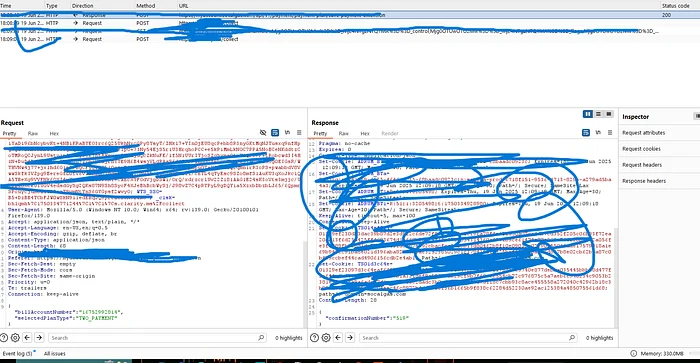
I intercepted the payment extension request in Burp Suite. The following is a redacted representation of the observed request structure. It excludes the original account number, session cookies and other sensitive authentication data.
POST /api/v1/payment/payment-plan/save-payment-extension HTTP/1.1Host: [REDACTED]Content-Type: application/jsonAccept: application/json{ "billAccountNumber": "[REDACTED_ACCOUNT]", "selectedPlanType": "TWO_PAYMENT"}
The endpoint is /api/v1/payment/payment-plan/save-payment-extension. The body carries the account to be modified in billAccountNumber and the arrangement in selectedPlanType, here TWO_PAYMENT. Both values are supplied by the client.
Step 2: Modify the account identifier
In the reported test, modifying the account identifier in an authenticated payment extension request appeared to allow an extension request to be accepted for another account, including an account without outstanding dues. The targeted account reportedly had no outstanding balance.
Step 3: Observe the response
The accompanying Burp Suite screenshot shows a successful HTTP response with a confirmation number.
HTTP/1.1 200 OKContent-Type: application/json{ "confirmationNumber": "[REDACTED]"}
The response indicates that the API returned a successful confirmation. Independent verification of the resulting account state is necessary to demonstrate that the payment arrangement was actually persisted. The reported observation was that an extension request using an alternative account identifier returned a successful confirmation, despite the targeted account reportedly having no outstanding balance. This behaviour suggested insufficient enforcement of one or both requirements.
Root cause
The suspected root cause was inadequate server-side validation of client-supplied billing account references. A secure implementation should resolve the account in the context of the authenticated user's permissions. The backend should also validate the account's current payment status and available payment arrangements before saving any changes.
The observed response raises concerns about authorization enforcement, but without backend visibility and confirmation of persisted changes, the precise implementation flaw remains unverified. If the resulting extension was persisted, this behaviour would demonstrate a failure to enforce account-level authorization and business rules on a financial workflow.
Impact
If cross-account modification is possible, an authenticated user could potentially alter another customer's payment arrangements without their permission. The impact is conditional on the extension actually being persisted for the targeted account, which the report does not confirm.
Fix
The report recommends the following remediation:
-
Enforce object-level authorization. Validate that the billing account referenced by the request is owned by, or explicitly accessible to, the authenticated customer.
-
Validate payment eligibility. Perform all payment extension eligibility checks on the server using authoritative account and billing records.
-
Avoid trusting client-supplied account identifiers. Never treat the presence of a valid account number as proof of authorization.
-
Enforce workflow integrity. Ensure payment extension creation is permitted only when all required eligibility and authorization conditions have been satisfied.
-
Maintain reliable audit logs. Record the authenticated actor, affected account, requested arrangement, authorization outcome and resulting state change.
-
Add security regression tests. Include tests covering unauthorised account references, ineligible accounts, stale billing states and duplicate extension attempts.
-
Swap the account identifier on any billing or payment endpoint. Replace
billAccountNumberwith an account belonging to a second test user. A positive result is a200with a confirmation number for the other account. -
Target an ineligible account. Point the request at an account with no outstanding balance or otherwise failing the eligibility rules. A positive result is an accepted extension where the workflow should have rejected it.
-
Change the plan type. Alter
selectedPlanTypeto an arrangement the account should not qualify for. A positive result is acceptance of the ineligible arrangement. -
Replay the request. Resend the same extension request to check for duplicate extension creation. A positive result is a second confirmation for the same account.
-
Verify persistence independently. After any accepted response, check the account state through a separate view. A positive result is the arrangement actually saved, which turns a suspicious response into a confirmed finding.
What happened, in plain words
A security researcher was given permission to test a website that customers use to manage their bills. This kind of website is called a customer billing platform: you log in, you see what you owe, and you can do things like pay or arrange to pay later.
One of its features let customers ask for more time to pay. If you owe money and you qualify, you can request a payment extension, which means the company agrees to let you pay in a different way or on a different schedule. In this app, the customer picked a plan type, and the request was sent to the server behind the scenes.
The researcher found that the request sent to the server included the customer's account number, and that number was chosen by the browser, not by the server. In other words, the customer's own computer told the server which account to change. The researcher changed that number to a different account and the request appeared to be accepted, with a success message and a confirmation number, even though the other account reportedly had no money owed on it.
That is two problems in one. First, a customer might be able to change billing arrangements on an account that is not theirs. Second, the app might be skipping its own rule that says only accounts with an outstanding balance can get an extension. The researcher could not look inside the server, so it is not proven that the change was actually saved. But the success reply is a serious warning sign.
This kind of mistake has a name: IDOR, which stands for Insecure Direct Object Reference. It means the app lets you name an object (here, a billing account) directly in a request, and does not check that the object belongs to you. The other half is a business logic flaw: the app's own rules (only eligible accounts get extensions) were not enforced where it counts.
Background: the words you need first
Before the steps, a few everyday ideas.
- Server and browser. Your browser is the program on your computer that shows web pages. The server is the computer far away that stores the data and does the real work. Your browser asks, the server answers.
- API. An API is a way for two programs to talk to each other, like a waiter taking your order to the kitchen. Your browser does not fetch the whole page every time; it sends small messages to the server's API and gets small answers back. Those messages are called requests, and the answers are responses.
- Endpoint. An endpoint is one specific address in the API, like one counter in a large office. Here the endpoint is a path that ends in
save-payment-extension, which tells you it is the counter that saves a payment extension. - HTTP request. The text your browser sends to the server. It has a method (like
POST, meaning "please create or change something"), a path (which counter), headers (extra labels) and often a body (the actual data). - JSON. A simple text format for data, made of names and values in curly braces, like
{"name": "value"}. APIs commonly use it. - Session and cookie. When you log in, the server gives your browser a small piece of text called a session cookie. Your browser sends it back with every request so the server knows who you are. It works like a wristband at an event: show it and you get in without showing your ID again.
- Authenticated. Means "logged in and identified". An authenticated request is one that carries a valid session, so the server knows which customer sent it.
- Authorisation. Authentication is who you are. Authorisation is what you are allowed to do. You can be logged in and still not be allowed to touch someone else's account.
- Burp Suite. A tool used by security testers. It sits between your browser and the server and lets you pause, read and edit requests before they are sent. Think of it as a mail intercept service: you can open the envelope, change the letter, and send it on.
- Redacted. Sensitive values (real account numbers, cookies) are replaced with placeholders like
[REDACTED]so the write-up can be published safely.
The feature and how it should work
The app let customers with an eligible outstanding balance request payment extensions. "Outstanding balance" means money still owed. "Eligible" means the account meets the company's rules for being allowed an extension.
Under normal circumstances, the workflow should:
- Authenticate the customer.
- Identify billing accounts belonging to that customer.
- Check whether the selected account has an eligible outstanding balance.
- Validate the requested payment arrangement.
- Create the extension only after successful server-side checks.
Step 1 is the wristband check. Step 2 is the important one for this story: the server should work out which accounts belong to you, rather than believing a number you typed. Steps 3 and 4 are the company's business rules. Step 5 says: only save the change after all the checks pass, and do the checks on the server, where the customer cannot edit them.
The key sentence from the report is this: the account identifier should identify a resource, not independently authorise modification of that resource. In plain words, knowing an account number should let you point at an account, not give you permission to change it. Compare it to a hotel: your room number is written on your key card, but the door lock checks the card, not the number you say out loud.
Setup: how the test was done
Testing was performed in the context of an authenticated session. That means the researcher was logged in as a normal test customer, with a real session cookie, exactly as any customer would be.
The researcher intercepted an authenticated payment extension request using Burp Suite. "Intercepted" means the request was paused on its way out so it could be read and edited.
The assessment involved comparing payment extension behaviour across authorised test accounts with different payment eligibility conditions. In other words, the researcher compared accounts with different payment eligibility conditions. Comparing two situations is how you tell a real rule from a coincidence.
The research focused on whether the application enforced two independent security requirements:
- Account ownership validation. A customer must not be able to create or modify billing arrangements belonging to an unrelated account.
- Payment eligibility validation. A customer must not be able to establish an extension for an account that fails the application's payment-plan eligibility rules.
These are independent because an app could get one right and the other wrong. It might correctly refuse to touch someone else's account but still allow an extension on an account with nothing owed. Or the reverse. Each needs its own check.
Finding it: what the request looked like
While analysing the underlying API workflow, the researcher observed that the request included a client-controlled account identifier used to select the billing account associated with the extension. "Client-controlled" means the value comes from the browser side, so the customer can change it before it is sent. The server should never treat such a value as trustworthy on its own.
The API accepted a JSON request body containing two notable fields:
billAccountNumberidentifies the billing account.selectedPlanTypeindicates the requested payment arrangement.
The presence of a client-controlled account identifier presented a potential opportunity for an object-level authorization failure if the backend failed to verify that the authenticated user was permitted to modify the specified account. "Object-level authorization" is the check that says: this particular record (this account) may be changed by this particular user. "Backend" means the server-side code the customer never sees.
The key security question was whether the server independently enforced account ownership and payment-plan eligibility rather than relying on account information supplied by the client. That is the heart of the whole report: does the server check for itself, or does it take the browser's word for it?
Step 1: Capture the authenticated request
The researcher intercepted the payment extension request in Burp Suite. The following is a redacted representation of the observed request structure. It excludes the original account number, session cookies and other sensitive authentication data.
POST /api/v1/payment/payment-plan/save-payment-extension HTTP/1.1Host: [REDACTED]Content-Type: application/jsonAccept: application/json{ "billAccountNumber": "[REDACTED_ACCOUNT]", "selectedPlanType": "TWO_PAYMENT"}
Line by line, in plain words:
POST /api/v1/payment/payment-plan/save-payment-extension HTTP/1.1is the first line of the request.POSTmeans "create or change something". The path after it is the endpoint, the specific counter in the API that saves a payment extension.HTTP/1.1is the version of the language being spoken. The endpoint is/api/v1/payment/payment-plan/save-payment-extension.Host: [REDACTED]names the website the request is going to. The real name has been hidden.Content-Type: application/jsontells the server that the body is in JSON format, so it knows how to read it.Accept: application/jsontells the server that the browser would like a JSON answer back.{ "billAccountNumber": "[REDACTED_ACCOUNT]", "selectedPlanType": "TWO_PAYMENT" }is the body, the actual data.billAccountNumberis the account to be modified, and its real value is hidden.selectedPlanTypeis the arrangement being requested, hereTWO_PAYMENT, which suggests a plan paid in two parts.
Both values are supplied by the client. That is the whole issue in one sentence: the browser says which account to change and how, and the question is whether the server double-checks.
Step 2: Modify the account identifier
In the reported test, modifying the account identifier in an authenticated payment extension request appeared to allow an extension request to be accepted for another account, including an account without outstanding dues. The targeted account reportedly had no outstanding balance.
Why do this? Because the account number is the one value that decides whose account is touched. If the server trusts it, changing it is the simplest possible test of whether ownership is checked.
"Without outstanding dues" matters because of the business rule. An account with nothing owed should not qualify for a payment extension at all. So a success here would mean the eligibility rule was skipped too.
Step 3: Observe the response
The accompanying Burp Suite screenshot shows a successful HTTP response with a confirmation number.
HTTP/1.1 200 OKContent-Type: application/json{ "confirmationNumber": "[REDACTED]"}
Line by line:
HTTP/1.1 200 OKis the status line.200is the standard code for "it worked".OKis the short label for that code.Content-Type: application/jsonsays the answer body is JSON.{ "confirmationNumber": "[REDACTED]" }is the body. A confirmation number is what the app gives you when it has accepted a request, like a receipt number. The real value is hidden.
The response indicates that the API returned a successful confirmation. But a receipt is not proof that the goods arrived. Independent verification of the resulting account state is necessary to demonstrate that the payment arrangement was actually persisted. "Persisted" means actually saved in the database, not just acknowledged in a reply.
The reported observation was that an extension request using an alternative account identifier returned a successful confirmation, despite the targeted account reportedly having no outstanding balance. This behaviour suggested insufficient enforcement of one or both requirements: ownership, eligibility, or both.
Root cause: why it probably happened
The suspected root cause was inadequate server-side validation of client-supplied billing account references. In plain words, the server probably took the account number from the request and acted on it without first asking "does this account belong to the logged-in customer?" and "does this account qualify?"
A secure implementation should resolve the account in the context of the authenticated user's permissions. That means: start from the session (who is logged in), look up which accounts that customer may touch, and only then use the number from the request to pick one of those. The number selects from an allowed list; it does not create the list.
The backend should also validate the account's current payment status and available payment arrangements before saving any changes. Status and arrangements should be read from the company's own records, not from the request.
The observed response raises concerns about authorization enforcement, but without backend visibility and confirmation of persisted changes, the precise implementation flaw remains unverified. The researcher could see the reply but not the database, so the exact line of code at fault is unknown. If the resulting extension was persisted, this behaviour would demonstrate a failure to enforce account-level authorization and business rules on a financial workflow.
Impact: what could go wrong
If cross-account modification is possible, an authenticated user could potentially alter another customer's payment arrangements without their permission. "Cross-account" means from one account to another. A customer could, in principle, change when or how someone else pays, which is a financial matter and could cause real harm to the other person.
The impact is conditional on the extension actually being persisted for the targeted account, which the report does not confirm. So the honest summary is: a serious warning sign, not a proven break-in.
Fix: what the report recommends
The report recommends the following remediation:
- Enforce object-level authorization. Validate that the billing account referenced by the request is owned by, or explicitly accessible to, the authenticated customer.
- Validate payment eligibility. Perform all payment extension eligibility checks on the server using authoritative account and billing records.
- Avoid trusting client-supplied account identifiers. Never treat the presence of a valid account number as proof of authorization.
- Enforce workflow integrity. Ensure payment extension creation is permitted only when all required eligibility and authorization conditions have been satisfied.
- Maintain reliable audit logs. Record the authenticated actor, affected account, requested arrangement, authorization outcome and resulting state change.
- Add security regression tests. Include tests covering unauthorised account references, ineligible accounts, stale billing states and duplicate extension attempts.
In everyday terms: check the wristband against the room list, check the rules against your own records, do not accept a number as a password, only save when every check passes, write down who did what, and keep tests that would catch the mistake if it came back.
These are the follow-up tests the report lists, each with what a positive result looks like.
- Swap the account identifier on any billing or payment endpoint. Replace
billAccountNumberwith an account belonging to a second test user. A positive result is a200with a confirmation number for the other account. - Target an ineligible account. Point the request at an account with no outstanding balance or otherwise failing the eligibility rules. A positive result is an accepted extension where the workflow should have rejected it.
- Change the plan type. Alter
selectedPlanTypeto an arrangement the account should not qualify for. A positive result is acceptance of the ineligible arrangement. - Replay the request. Resend the same extension request to check for duplicate extension creation. A positive result is a second confirmation for the same account.
- Verify persistence independently. After any accepted response, check the account state through a separate view. A positive result is the arrangement actually saved, which turns a suspicious response into a confirmed finding.
Glossary
- API: a way for two programs to talk to each other, like a waiter carrying orders between you and the kitchen.
- Authentication: proving who you are, usually by logging in.
- Authorisation: what a logged-in user is allowed to do.
- Backend: the server-side code and data that customers never see.
- Burp Suite: a tool that sits between browser and server so a tester can pause, read and edit requests.
- Business logic flaw: a mistake in the app's own rules, such as letting an ineligible account get an extension.
- Client: the browser side, the part the customer controls.
- Client-controlled: a value that comes from the browser and can be changed by the customer.
- Confirmation number: a receipt-like value the app returns when it accepts a request.
- Cookie: a small piece of text the browser stores and sends back so the server recognises your session.
- Cross-account: from one customer's account to another's.
- Eligibility: whether an account meets the company's rules for a feature.
- Endpoint: one specific address in an API, like one counter in an office.
- Extension (payment extension): an arrangement giving a customer more time or a different schedule to pay.
- Header: an extra label in an HTTP request or response, such as the content type.
- HTTP: the language browsers and servers use to exchange requests and responses.
- IDOR (Insecure Direct Object Reference): when an app lets you name a record directly in a request and does not check that it belongs to you.
- Intercept: to pause a request in transit so it can be read or edited.
- JSON: a simple text format for data, made of names and values in curly braces.
- Object-level authorization: the check that a specific record may be changed by a specific user.
- Outstanding balance (dues): money still owed on an account.
- Persistence: whether a change was actually saved in the database.
- POST: an HTTP method meaning create or change something.
- Redacted: sensitive values replaced with placeholders before publishing.
- Regression test: an automated test that catches a bug if it comes back later.
- Remediation: the fix.
- Replay: sending the same request again.
- Request: the message the browser sends to the server.
- Response: the message the server sends back.
- Session: the state of being logged in, kept alive by a cookie.
- Status code: a number in the response saying what happened, such as
200for success. - Workflow: the sequence of steps a feature goes through, from request to saved change.



