IDOR in the medical report viewer
The medical report viewer used a base64-encoded JSON token containing only a user ID and report ID, with no signature or session binding. An attacker could rebuild the token with another account's identifiers and retrieve that user's private medical report and personal data.

Idor
The full write-up lives on its author's site
It belongs to its author, so we link to it rather than copy it. The other two tabs are our own rewrites, checked against it.
Context
The target was a medical report viewer: a feature that lets a patient open their own laboratory report through a "View report" link. The link carried a long token, which gave the impression that access to each report was protected by something unguessable. The write-up is about what that token actually contained and what the server did with it.
Setup
The researcher needed two accounts to demonstrate the issue:
- A first account, used to obtain a legitimate report token and to make the cross-account request while logged in.
- A second test account, created to supply a different user ID and report ID.
The second account's email address appears in the write-up as [redacted]; it is a test address created for the exercise. No specific tools or versions are named beyond decoding the token and re-encoding a modified copy.
Finding it
The "View report" link contained a long token, so it looked secure. It was not: it was base64-encoded JSON. Decoding the researcher's own token produced:
{"user_id": 1485, "report_id": 9416}
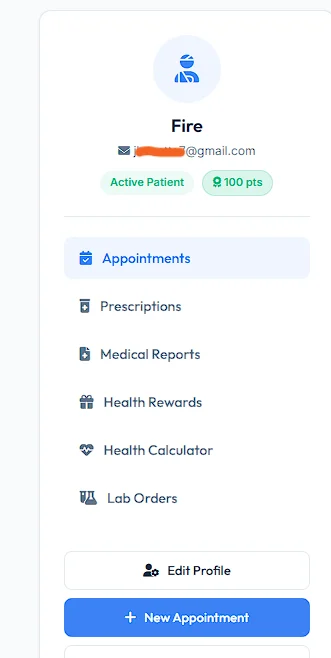
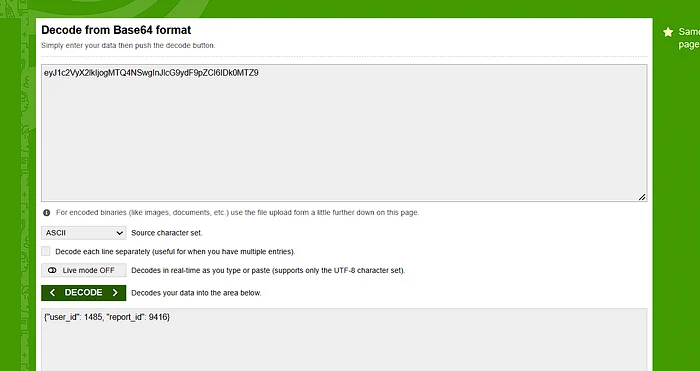
Decoding my own report token revealed plain user_id and report_id values.
There was no signature and no session binding, just two numbers. That is the point where the design looked wrong: the token was being treated as an authorisation artefact, but it was only a client-readable container for the two identifiers the server needed. Anyone holding a token could read the identifiers, and anyone who could write a token could choose them.
Exploitation
Step 1: decode the legitimate token
The researcher decoded the token from their own "View report" link and recovered the JSON shown above: user_id 1485 and report_id 9416. This established the format and confirmed that no signature or other integrity protection was present.
Step 2: obtain a second account's identifiers
A second test account was created, and its user ID and report ID were taken. The write-up records the second account's token contents as:
{"user_id": 1997, "report_id": 9411}
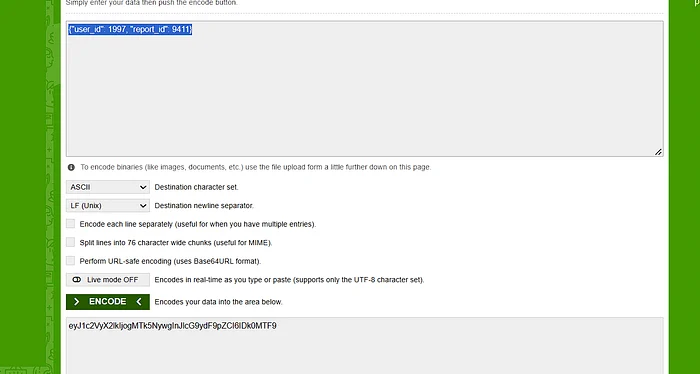
Rebuilding the token with another account's identifiers
Step 3: rebuild the token and request the report
The second account's identifiers were encoded the same way as the original token, and the resulting token was used to request the report while still logged in as the first account. The request therefore carried the session of user 1485 together with a token naming user 1997 and report 9411.
Step 4: read the response
The server returned the second account's private medical report: name, email, phone, laboratory, status, and result.
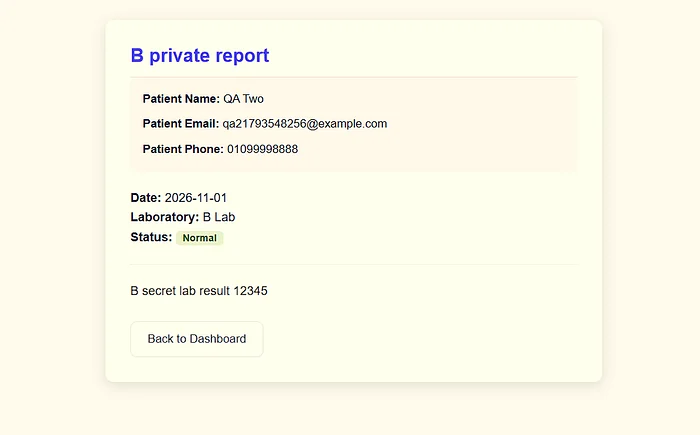
The server returned the other account's private report and PII.
The server returned the second account's report even though the request came from the first account's session. Supplying a validly formatted token for another account was enough.
Root cause
The authorisation decision was delegated to a value the client controls. The token was base64-encoded JSON holding user_id and report_id, with no signature and no session binding, so the server had no way to tell a token it had issued from one the client had assembled. Because the server trusted the identifiers inside the token rather than deriving the user from the authenticated session, changing the numbers changed whose report was returned. Existing defences did not stop it: the length of the token gave a false sense of security, but length is not integrity, and base64 is an encoding, not a protection.
Impact
An attacker with an account on the service could read other patients' private medical reports, including name, email, phone, laboratory, status, and result. The write-up demonstrates this with a second account created by the researcher and does not describe how an attacker would learn another user's user_id and report_id values. Where they can, the exposure is personal data and medical results belonging to other users.
Fix
The write-up lists four recommendations:
- Do not put object IDs in a client-readable authorisation token.
- Use an opaque, signed, short-lived token, or no token at all.
- Always check that the report belongs to the session user.
- Use random public IDs and log access.

The report does not say which of these were implemented.
Variants to test
- Decode every token in a link. Take any token used in a report, download, invoice or share link and base64-decode it. A positive result is readable JSON or delimited text containing object identifiers, user identifiers or role names.
- Re-encode with another account's identifiers. With two accounts, swap the identifiers in the decoded token, re-encode, and request the resource while authenticated as the first account. A positive result is the second account's data in the response.
- Drop the session. Repeat the request with no session cookie at all. A positive result is that the token alone still returns data, which shows the token is the only access control.
- Tamper with the identifiers directly. Change
user_idorreport_idby one and observe whether the response changes owner or returns a different record. A positive result is a record belonging to a different user. - Check for signature verification. Modify a single character of the token and resend. A positive result for the tester is a clean rejection; acceptance of a modified token, or an error that reveals the decoded contents, indicates the value is not integrity-protected.
- Look for sequential identifiers. If
report_idvalues appear close together, try neighbouring values with a valid token. A positive result is reports belonging to other users being returned.
What happened, in plain words
A website let patients open their own laboratory reports by clicking a "View report" link. The link contained a long string of characters, which made it look as though the site had protected each report with something impossible to guess. It had not. The long string was simply a small piece of data, written in a common text format called base64, that contained two numbers: which user the report belonged to, and which report it was. Anyone who could read that string could read the numbers, and anyone who could write a new string with different numbers could ask for someone else's report. The server accepted the new string and handed back another patient's private medical report, including their name, email address, phone number, laboratory, status and result.
This kind of mistake is called an IDOR, short for Insecure Direct Object Reference. The name sounds complicated, but the idea is simple. Imagine a hotel where, instead of a key card that only opens your own room, the receptionist gives you a slip of paper with your room number written on it, and the door opens for anyone who shows a slip with that number. If you can write "room 214" on a slip yourself, you can walk into room 214. The report viewer worked the same way: the "slip of paper" was the token in the link, and the room number was the pair of numbers inside it.
The pieces you need to know
Before walking through the steps, here are the basic ideas, explained from zero.
A web page and a server. When you use a website, your browser (the program on your computer, such as Chrome or Firefox) sends requests over the internet to a server (a computer somewhere else that stores the data and does the work). The server sends back pages, images and data. You see the result; the conversation happens behind the scenes.
An API. An API is the part of a website that answers requests with raw data rather than with a finished page. Think of a restaurant: the dining room is the web page you see, and the kitchen is the API. You do not walk into the kitchen yourself; you place an order through the waiter, and the kitchen sends back a plate. When a page needs to show your report, it asks the API for the report, and the API sends the data back.
A token. A token is a short piece of text that a website gives you so it can recognise you on later requests. It is like the wristband you get at a festival: you show it at the gate and you are let in without explaining who you are every time. Tokens often travel inside the link itself, which is convenient but also means anyone who sees the link can see the token.
Base64. Base64 is a way of writing data using only ordinary letters, digits and a couple of symbols, so it can travel safely through systems that do not like unusual characters. It is an encoding, not a protection. Think of writing a message in a different alphabet: anyone who knows the alphabet can read it back instantly. Base64 is not encryption and it is not a signature; it hides nothing from anyone who bothers to decode it.
JSON. JSON is a simple way of writing structured data as text, using curly brackets, names and values. A line like {"name": "Anna", "age": 30} means: there is a thing with a name field containing Anna and an age field containing 30. It is the format most APIs use to send data back and forth.
A signature. A signature is a short code that a server computes from a piece of data using a secret key. If anyone changes even one character of the data, the signature no longer matches, and the server can reject it. It is like a wax seal on an envelope: if the seal is broken, you know the letter was opened or replaced. A token without a signature can be edited by anyone.
A session. A session is the server's memory of you being logged in. When you log in, the server gives your browser a session cookie, a small piece of data the browser sends back with every request so the server knows it is still you. The session is the server's own record; the token in the link is something the client carries around.
An IDOR. An IDOR happens when a website lets you reach a specific record by naming it directly (for example, by its number) and does not check that the record belongs to you. The fix is always the same idea: before returning the record, the server must check that the person asking is allowed to see it.
PII. PII stands for personally identifiable information: data that identifies a real person, such as a name, an email address or a phone number. Medical results are especially sensitive, which is why this kind of mistake matters more on a health site than on, say, a site that only stores favourite colours.
Setting up the test
The researcher needed two accounts to show the problem:
- A first account, used to get a genuine report token and to make the cross-account request while logged in as that user.
- A second test account, created to supply a different user ID and report ID.
The second account's email address appears in the write-up as [redacted]; it is a test address created for the exercise. The write-up does not name any specific tools or versions beyond decoding the token and re-encoding a modified copy.
Why two accounts? Because the whole question is whether account A can see account B's data. With only one account, you cannot tell whether the server is checking ownership or simply returning whatever you ask for. The second account gives you a second set of numbers to try.
Finding it
The "View report" link contained a long token, so it looked secure. It was not: it was base64-encoded JSON. Decoding the researcher's own token produced:
{"user_id": 1485, "report_id": 9416}
Decoding my own report token revealed plain user_id and report_id values.
Line by line, this is what the decoded token says:
- The outer curly brackets mark the start and end of one JSON object, a single bundle of named values.
"user_id": 1485means the token names user number 1485. This is the account the report belongs to."report_id": 9416means the token names report number 9416. This is the specific laboratory report being requested.- The comma separates the two fields; both are inside the same object.
There was no signature and no session binding, just two numbers. That is the point where the design looked wrong: the token was being treated as an authorisation artefact, meaning the server used it to decide whether access was allowed, but it was only a client-readable container for the two identifiers the server needed. Anyone holding a token could read the identifiers, and anyone who could write a token could choose them.
Why does this matter? Because the server should decide who you are from your session, which it controls, not from a value you hand it, which you control. If the server trusts the numbers in the token, then changing the numbers changes whose report comes back.
Exploitation
Step 1: decode the legitimate token
The researcher decoded the token from their own "View report" link and recovered the JSON shown above: user_id 1485 and report_id 9416. This established the format and confirmed that no signature or other integrity protection was present.
Why this step? Before trying to break anything, you need to know what you are dealing with. Decoding your own token is harmless: it is your own data. It tells you whether the token is opaque (a meaningless string you cannot interpret) or readable (a container you can open). Here it was readable, and it contained exactly the two numbers the server would need to find a report.
Step 2: obtain a second account's identifiers
A second test account was created, and its user ID and report ID were taken. The write-up records the second account's token contents as:
{"user_id": 1997, "report_id": 9411}
Rebuilding the token with another account's identifiers
Again, line by line:
- The curly brackets wrap a single JSON object, the same shape as the first token.
"user_id": 1997names the second test account, a different user from 1485."report_id": 9411names a report belonging to that second account.- The comma separates the two fields.
Why this step? The researcher needed a second set of real numbers to put into the token. Using a second account they controlled gave a second set of real identifiers to try. The two report IDs, 9416 and 9411, are close together, which is worth noticing.
Step 3: rebuild the token and request the report
The second account's identifiers were encoded the same way as the original token, and the resulting token was used to request the report while still logged in as the first account. The request therefore carried the session of user 1485 together with a token naming user 1997 and report 9411.
Why this step? This is the actual test. The researcher stayed logged in as the first account, so the server knew perfectly well who was asking. But the token in the request pointed at the second account's report. If the server checks ownership properly, it should refuse, because the session belongs to user 1485 and the token names user 1997. If it returns the report anyway, the check is missing.
Step 4: read the response
The server returned the second account's private medical report: name, email, phone, laboratory, status, and result.
The server returned the other account's private report and PII.
The server returned the second account's report even though the request came from the first account's session. Supplying a validly formatted token for another account was enough.
Why is this the proof? Because the response contains data the first account should never see. The server had two pieces of information that disagreed: the session said "this is user 1485", and the token said "give me user 1997's report". A correct server would notice the disagreement and refuse. This one did not.
Root cause
The authorisation decision was delegated to a value the client controls. The token was base64-encoded JSON holding user_id and report_id, with no signature and no session binding, so the server had no way to tell a token it had issued from one the client had assembled. Because the server trusted the identifiers inside the token rather than deriving the user from the authenticated session, changing the numbers changed whose report was returned.
Existing defences did not stop it. The length of the token gave a false sense of security, but length is not integrity: a long string is not automatically a safe one. And base64 is an encoding, not a protection: it changes how data looks, not who can read or change it.
A useful comparison is a form you fill in at a doctor's reception. If the receptionist asks your name and then hands you whatever file you point at, the system relies on you pointing honestly. A correct system checks your identity against the file before handing it over.
Impact
An attacker with an account on the service could read other patients' private medical reports, including name, email, phone, laboratory, status, and result. The write-up demonstrates this with a second account created by the researcher; it does not describe how an attacker would learn another user's user_id and report_id values, so the practical reach depends on whether those identifiers can be obtained or guessed. Where they can, the exposure is personal data and medical results belonging to other users.
In plain terms: the data at risk is exactly the kind people expect a health service to protect. Names, contact details and test results are sensitive, and a leak of them can cause real harm to the people involved.
Fix
The write-up lists four recommendations:
- Do not put object IDs in a client-readable authorisation token.
- Use an opaque, signed, short-lived token, or no token at all.
- Always check that the report belongs to the session user.
- Use random public IDs and log access.
What each recommendation means in everyday terms:
- No object IDs in a readable token. Do not write "report 9411" on a slip the visitor can read and edit. If the visitor can see and change the number, they can ask for someone else's record.
- Opaque, signed, short-lived token, or none. "Opaque" means a meaningless string that reveals nothing; "signed" means the server can tell whether it was tampered with; "short-lived" means it stops working after a short time, so a leaked link is not useful forever. The simplest option is often no token at all: the server already knows who you are from your session.
- Check ownership. Before returning a report, the server must confirm that the report belongs to the logged-in user. This is the single most important check, and it would have stopped the attack on its own.
- Random public IDs and logging. If report numbers are sequential, guessing neighbours is easy. Random identifiers make guessing impractical. Logging access means that if something does go wrong, there is a record of who read what.
Variants to test
If you ever find yourself looking at a similar feature, these are checks worth trying:
- Decode every token in a link. Take any token used in a report, download, invoice or share link and base64-decode it. A positive result is readable JSON or delimited text containing object identifiers, user identifiers or role names.
- Re-encode with another account's identifiers. With two accounts, swap the identifiers in the decoded token, re-encode, and request the resource while authenticated as the first account. A positive result is the second account's data in the response.
- Drop the session. Repeat the request with no session cookie at all. A positive result is that the token alone still returns data, which shows the token is the only access control.
- Tamper with the identifiers directly. Change
user_idorreport_idby one and observe whether the response changes owner or returns a different record. A positive result is a record belonging to a different user. - Check for signature verification. Modify a single character of the token and resend. A positive result for the tester is a clean rejection; acceptance of a modified token, or an error that reveals the decoded contents, indicates the value is not integrity-protected.
- Look for sequential identifiers. If
report_idvalues are close together, as in the two examples here, enumerate neighbouring values with a valid token. A positive result is reports belonging to other users being returned.
Glossary
- API: the part of a website that answers requests with raw data rather than a finished page, like a kitchen that sends plates out to the dining room.
- Authorisation: the decision about whether a particular person is allowed to do or see a particular thing.
- Base64: a way of writing data using ordinary letters, digits and a few symbols so it can travel through systems safely; it is an encoding, not encryption, and anyone can decode it.
- Client: the program on your side, usually your browser, that sends requests to the server.
- Cookie: a small piece of data a website stores in your browser and your browser sends back with later requests, often used to remember that you are logged in.
- Cross-account request: a request made while logged in as one user that asks for another user's data.
- Encoding: changing how data looks (for example, into base64) without protecting it; anyone who knows the format can reverse it.
- IDOR (Insecure Direct Object Reference): a flaw where a website lets you reach a record by naming it directly and does not check that the record belongs to you.
- Integrity protection: a way for the server to tell whether data has been changed since it issued it, usually by a signature.
- JSON: a simple text format for structured data, using curly brackets, field names and values.
- Opaque token: a token that is a meaningless string, so reading it reveals nothing about the data behind it.
- PII (personally identifiable information): data that identifies a real person, such as a name, email address or phone number.
- Session: the server's memory of you being logged in, usually tied to a cookie your browser sends with each request.
- Session binding: tying a token to the specific logged-in session so it cannot be used by anyone else.
- Signature: a short code computed from data with a secret key, so any change to the data makes the code stop matching.
- Token: a short piece of text a website gives you so it can recognise you or a resource on later requests, like a festival wristband.
- user_id: the number that identifies which user an account belongs to.
- report_id: the number that identifies which report is being requested.



