IDOR Leads to Full Account Takeover
An invite acceptance endpoint trusted a client-supplied invite identifier, so a user could change that number and accept invites belonging to other people and companies. This let a low-privileged viewer become super admin on many companies' accounts without being invited.

medium.com
Published on medium.com
The vulnerability was an IDOR that makes you able to claim any invite that was ever sent to anyone (even if it was claimed before) i can still claim it over and over again.
The full write-up lives on its author's site
It belongs to its author, so we link to it rather than copy it. The other two tabs are our own rewrites, checked against it.
Context
This write-up covers a pentest project the researcher received from CESPPA. The target is a platform where companies have accounts and users hold roles inside those accounts. The lowest role described is a viewer, and the highest is super admin. The feature involved is the invitation flow: an existing user with sufficient permissions invites someone by email, the invited person signs up through an invite link, and the platform accepts the invite and grants the role attached to it.
The researcher's summary of the outcome is that a viewer on one company's account could escalate to super admin on any other company's account on the platform. The mechanism was an IDOR in the invite acceptance endpoint that let a user claim any invite that had ever been sent to anyone, including invites that had already been claimed, and claim it repeatedly.
Setup
The researcher already held an account with superadmin permissions on the platform, which was the starting point for testing the invite flow. The tooling was a browser with Burp intercepting traffic, used to read and modify requests during sign-up. The request captured in the report carries a Firefox 62.0 user agent on macOS 10.14, which reflects the browser used rather than a target version.
The precondition for the attack as first tested was an existing invite: the researcher needed at least one invite ID to work with. As the exploitation showed, that precondition later turned out not to be required.
Finding it
The researcher sent an invite to a personal email address and started the sign-up while intercepting requests. The invite acceptance request appeared in the proxy, and the inviteId parameter in the body drew attention. The value was a small integer, and the researcher checked whether an IDOR was present in the parameter.
Exploitation
Step 1: Capture the invite acceptance request
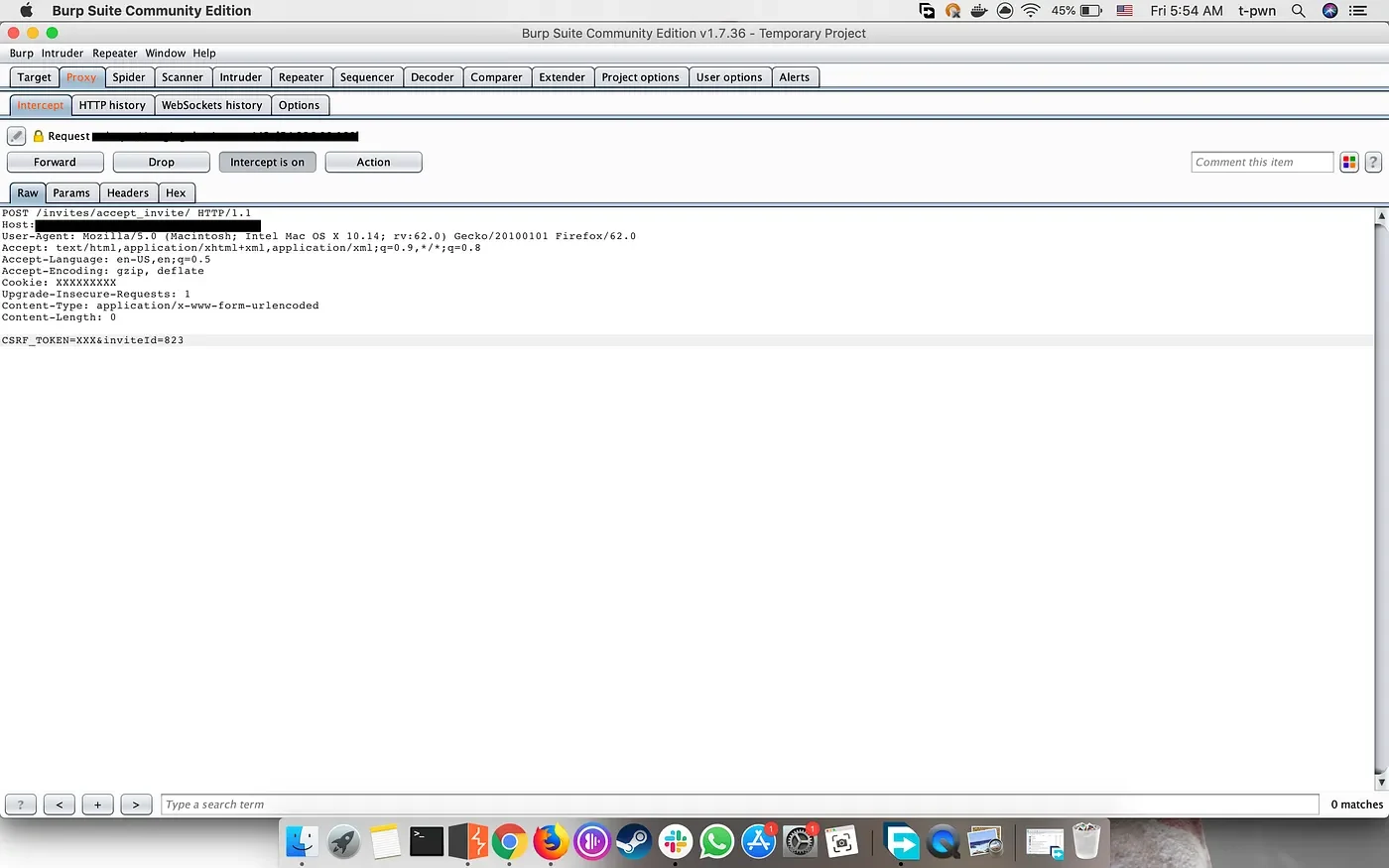
Signing up from the invite produced this request:
POST /invites/accept_invite/ HTTP/1.1
HOST: target.com
User-Agent: Mozilla/5.0 (Macintosh; Intel Mac OS X 10.14; rv:62.0) Gecko/20100101 Firefox/62.0
Cookies: XXXX

CSRF_TOKEN=XXX&inviteId=823
The body carries two parameters: a CSRF token and the numeric inviteId. The cookie header is redacted in the report. The endpoint is a plain form-encoded POST to /invites/accept_invite/.
Step 2: Change the ID to the previous invite
The researcher changed inviteId from 823 to 822, the previous invite, and the result was super admin instead of just admin. That confirmed the IDOR: the server accepted an invite ID that did not correspond to the invite sent to the researcher's address, and it applied the role attached to that other invite.
Step 3: Replay from the browser with arbitrary IDs
The researcher then copied the URL into the browser with Burp intercepting, changed the request method to POST, and added the body data:
CSRF_TOKEN=XXX&inviteId={ID}
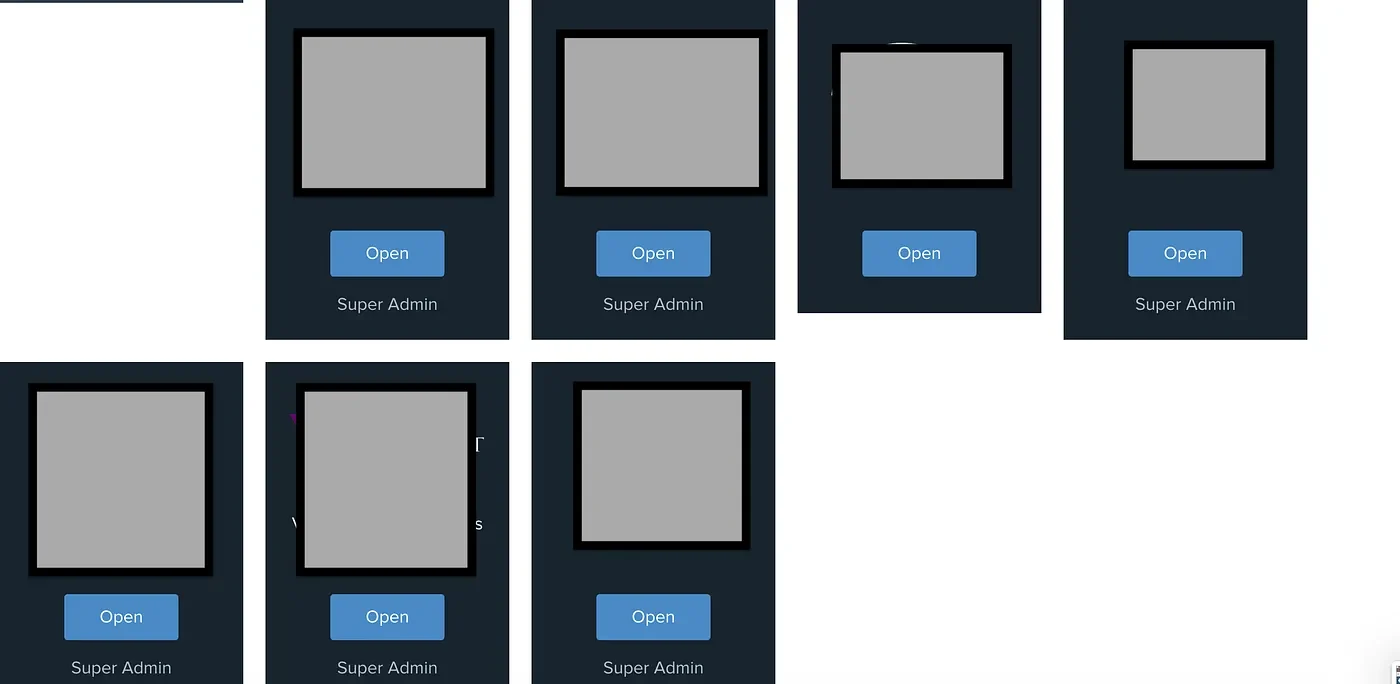
Sending requests with different values for inviteId resulted in super admin access on a large number of companies.
Step 4: Confirm no invitation is needed
Because the endpoint accepted any invite ID, being invited was not required to reproduce the vulnerability. The researcher describes the position as a viewer who only has to send one request to become super admin on any account.

Root cause
The server accepted an inviteId that did not belong to the researcher and granted the role attached to that invite, including for already-claimed invites. The report shows that already-claimed invites could be claimed again, so there is no single-use enforcement either. The CSRF token was present in the request but did nothing against this issue: it protects against cross-site request forgery, not against an authenticated user choosing someone else's object ID. The report does not state where the granted role comes from; changing inviteId from 823 to 822 resulted in super admin.
Impact
An authenticated user with the lowest role, a viewer, could send a single request and become super admin on any company's account on the platform. The researcher demonstrated this across a large number of companies. Because previously claimed invites could be claimed again, the set of usable IDs is not limited to outstanding invitations. The report does not describe what actions were taken with the resulting super admin access, nor how many companies were affected beyond "a huge number".
Fix
The fix implied by the behaviour is server-side: bind invite acceptance to the authenticated user's email or identity, reject invites that are not addressed to that user, and mark an invite as consumed so it cannot be accepted twice.
Variants to test
- Sequential numeric IDs in any accept, join or redeem endpoint. A positive result is a response that grants a role or membership tied to an object you were not given.
- Replaying an already-used invite or token. A positive result is a second successful acceptance with the same value.
- Changing the method or content type on the same endpoint, as done here by moving to a browser POST. A positive result is the same privileged state change through the alternate path.
- Invite IDs in other flows: password reset, email verification, team joins, referral codes. A positive result is any state change on an account that is not yours.
- Role escalation within the same invite: compare the role granted by adjacent IDs. A positive result is a higher role than the one you were invited with.
What happened, in plain words
A security researcher was asked to test a website (a "pentest project" from a company called CESPPA). The website is a platform where many different companies each have their own account, and inside each company account people have different levels of power. The weakest level mentioned is "viewer" (someone who can only look), and the strongest is "super admin" (someone who can do everything).
The researcher found a bug in the part of the site that handles invitations. When a company wants to add a person, it sends them an email invite, and the person clicks a link and signs up. The bug meant that anyone could take an invite that was meant for somebody else, even one that had already been used, and use it to give themselves super admin powers on other companies' accounts. The researcher started as a viewer on one company and ended up as super admin on a huge number of companies.
The type of bug is called IDOR, which stands for Insecure Direct Object Reference. A simple comparison: imagine a hotel where your room key is just the room number written on a card. If you change the number on the card from 101 to 102, the hotel lets you into room 102 because it only checks that the number is valid, not that the room is yours. In a website, the "room number" is often a number in a request, and an IDOR happens when the server trusts that number without checking whether you are allowed to use it.

The setup
The researcher already had an account with super admin permissions on the platform. That was the starting point: with enough power to send invites, they could watch what happens when an invite is accepted.
The tool used was a browser together with Burp, a program that sits between the browser and the website and lets you read and change every request before it is sent. Think of it as standing at the post office and being able to open, read and rewrite every letter before it goes out. The request shown in the report carries a Firefox 62.0 user agent on macOS 10.14, which tells us about the browser the researcher used, not about the website's version.
At first the researcher assumed they needed a real invite to work with. As the testing went on, that turned out not to be necessary.
Finding it
The researcher sent an invite to their own personal email address and began the sign-up process while Burp was intercepting the traffic. The request that accepts the invite appeared in Burp, and one part of it stood out: a parameter called inviteId.
A parameter is simply a named value sent to the website, like a field on a form. Here the value was a small whole number. The value was a small whole number, which is worth testing because guessable identifiers can expose other users' objects. If you can guess the next number, you can try to use somebody else's invite.
Exploitation
Step 1: Capture the invite acceptance request
Signing up from the invite produced this request:
POST /invites/accept_invite/ HTTP/1.1
HOST: target.com
User-Agent: Mozilla/5.0 (Macintosh; Intel Mac OS X 10.14; rv:62.0) Gecko/20100101 Firefox/62.0
Cookies: XXXX

CSRF_TOKEN=XXX&inviteId=823
Line by line:
POST /invites/accept_invite/ HTTP/1.1is the request line.POSTis the method, meaning "I am sending data to the server to create or change something"./invites/accept_invite/is the address on the website that handles accepting an invite.HTTP/1.1is the version of the language the browser and server use to talk.HOST: target.comsays which website the request is for. The report usestarget.comas a stand-in for the real site.User-Agent: ...identifies the browser and operating system that sent the request. Here it is Firefox 62.0 on macOS 10.14.Cookies: XXXXis where the browser would send its cookies. A cookie is a small piece of data the website stored in your browser earlier, usually to remember that you are logged in. It is like the wristband you get at an event: showing it proves who you are. The value is hidden in the report.- The empty line separates the headers (the labels above) from the body (the data being sent).
CSRF_TOKEN=XXX&inviteId=823is the body. It contains two values joined by&.CSRF_TOKENis a security token the site puts in its forms to prove the request came from its own pages and not from a malicious site; this protection is called CSRF protection (Cross-Site Request Forgery).inviteId=823is the number of the invite being accepted. The token value is hidden in the report.
The important part is that the invite is identified only by a number sent by the browser. The server should check that this invite was sent to the logged-in user, but the next step shows it did not.
Step 2: Change the ID to the previous invite
The researcher changed inviteId from 823 to 822, the invite just before it, and the result was super admin instead of just admin. That confirmed the IDOR: the server accepted an invite number that had nothing to do with the invite sent to the researcher's email address, and it gave the role attached to that other invite.
Why was this step taken? Because if the server only checks that the number exists, then any valid number will work, and the role you get will be whatever role that invite carried. Changing one digit is the simplest possible test.
Step 3: Replay from the browser with arbitrary IDs
The researcher then copied the address into the browser with Burp still intercepting, changed the request method to POST, and added this body data:
CSRF_TOKEN=XXX&inviteId={ID}
Line by line:
CSRF_TOKEN=XXXis the same anti-CSRF value as before, hidden in the report.inviteId={ID}is the invite number, with{ID}standing for whatever number the researcher wanted to try.- The
&joins the two values into one body, exactly as a web form would send them.
Sending requests with different values for inviteId gave super admin access on a large number of companies. In other words, the researcher could walk through invite numbers and collect super admin rights on company after company.
Step 4: Confirm no invitation is needed
Because the endpoint accepted any invite number, being invited was not required to reproduce the vulnerability. The researcher describes the position as a viewer who only has to send one request to become super admin on any account.
Why it worked
The server accepted an invite number that did not belong to the researcher and granted the role attached to that invite, even for invites already claimed. The report shows that invites which had already been claimed could be claimed again, so there is no rule that an invite can only be used once either.
The CSRF token in the request did nothing to stop this. CSRF protection stops another website from making your browser send a request you did not intend; it does not stop a logged-in user from choosing somebody else's number. It is like a seal on an envelope that proves the letter came from the right office, but says nothing about whether the recipient is allowed to open it.
The report does not state where the granted role comes from; changing inviteId from 823 to 822 resulted in super admin.
Impact
A logged-in user with the lowest role, a viewer, could send a single request and become super admin on any company's account on the platform. The researcher demonstrated this across a large number of companies. Because already-claimed invites could be claimed again, the usable numbers are not limited to invitations that are still waiting. The report does not describe what was done with the resulting super admin access, nor how many companies were affected beyond "a huge number".
Fix
The fix suggested by the behaviour is on the server side: tie invite acceptance to the logged-in user's email or identity, reject invites that were not addressed to that user, and mark an invite as used so it cannot be accepted twice.
Variants to test
- Sequential numbers in any endpoint that accepts, joins or redeems something. A positive result is a response that grants a role or membership tied to something you were not given.
- Replaying an already-used invite or token. A positive result is a second successful acceptance with the same value.
- Changing the method or content type on the same endpoint, as done here by moving to a browser POST. A positive result is the same privileged change through the alternate path.
- Invite numbers in other flows: password reset, email verification, team joins, referral codes. A positive result is any change to an account that is not yours.
- Role escalation within the same invite: compare the role granted by adjacent numbers. A positive result is a higher role than the one you were invited with.
Glossary
- Pentest: a test in which a security researcher is authorised to attack a system to find its weaknesses before criminals do.
- Platform: the website or service being tested, here one where many companies have accounts.
- Role: a named set of permissions, such as viewer (can only look) or super admin (can do everything).
- Viewer: the lowest role described in the report, someone who can only look at an account.
- Super admin: the highest role described in the report, someone with full control over an account.
- Invitation flow: the feature where an existing user invites someone by email, the person signs up through a link, and the platform grants the role attached to the invite.
- IDOR (Insecure Direct Object Reference): a bug where the server lets you use an identifier for something that does not belong to you, because it does not check ownership.
- Endpoint: a specific address on a website that handles a particular action, such as
/invites/accept_invite/. - Request: the message your browser sends to a website asking it to do something.
- Response: the message the website sends back.
- Parameter: a named value sent to the website, like a field on a form, for example
inviteId. - Body: the part of a request that carries the data being sent, as opposed to the headers.
- Header: a label at the top of a request carrying information such as the browser type or cookies.
- Method: the word at the start of a request saying what kind of action it is, such as GET (fetch something) or POST (send data to change something).
- Cookie: a small piece of data stored in your browser by a website, often used to remember that you are logged in.
- CSRF token: a secret value placed in forms to prove a request came from the site's own pages, used to prevent Cross-Site Request Forgery.
- CSRF (Cross-Site Request Forgery): an attack where another website tricks your browser into sending a request you did not intend.
- Burp: a tool that sits between the browser and the website so you can read and change requests.
- Intercepting: pausing requests in a proxy tool so you can inspect or modify them before they reach the server.
- User-Agent: a header that identifies the browser and operating system that sent the request.
- Proxy: a program that sits between your browser and the website and passes traffic through, optionally letting you read and edit it.
- Replay: sending the same request again, possibly with changed values.
- Root cause: the underlying reason a bug exists, as opposed to its visible symptom.
- Escalation: gaining more permissions than you were given.
- Sequential identifier: a number that goes up by one each time, such as 822, 823, 824, which makes it easy to guess other values.



